SimpleOres Fabric

# Simple Ores Fabric
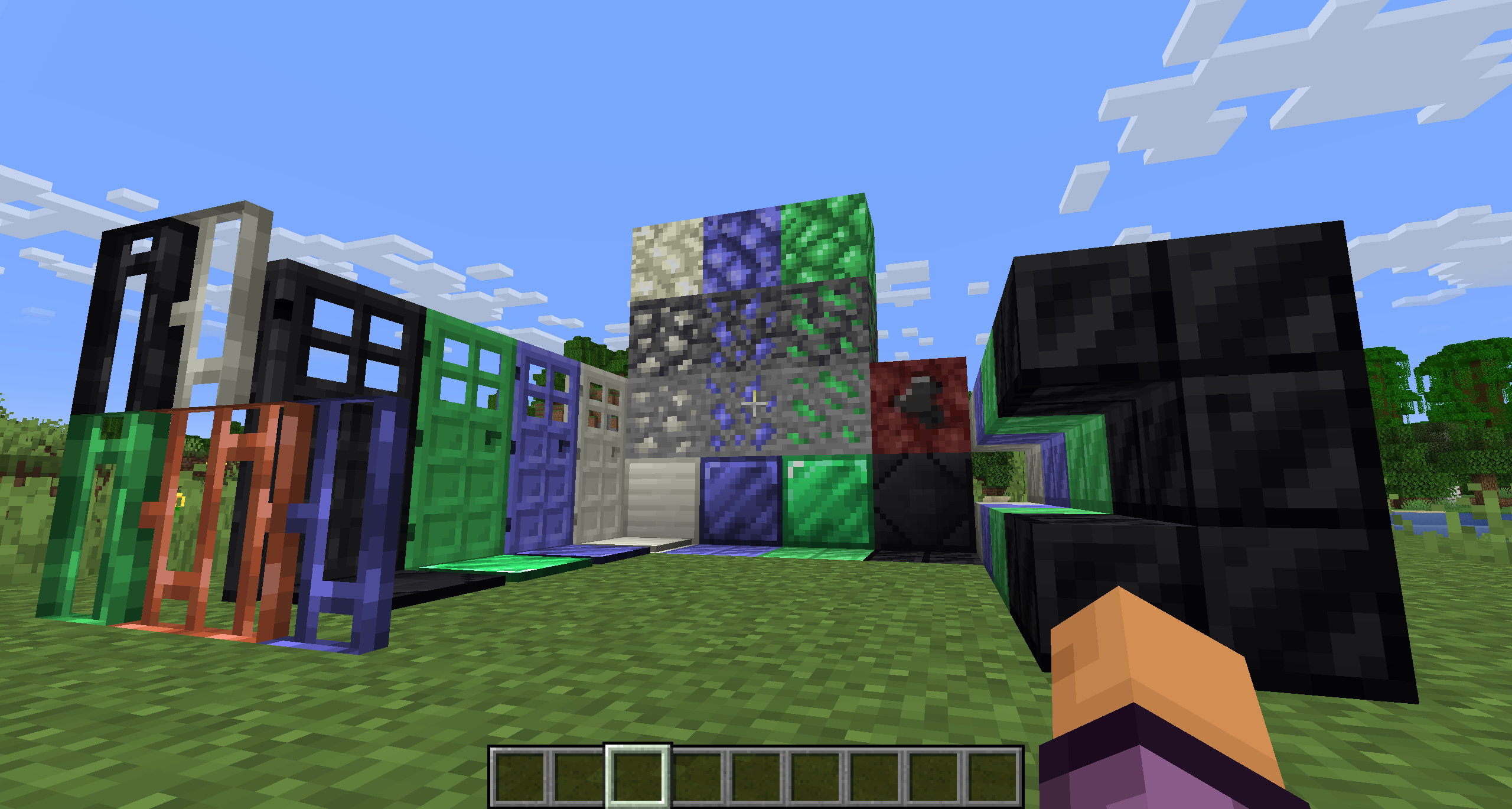
SimpleOres Fabric is an unofficial port of the original Forge mod by skrallexy to Fabric/Quilt that adds 4 new ores to the base game: Tin, Mythril, Adamantium and Onyx. All except Onyx can be found in the overworld, while Onyx can be found only in the Nether.
Each ore has its own unique properties, armor and tool sets, and more.
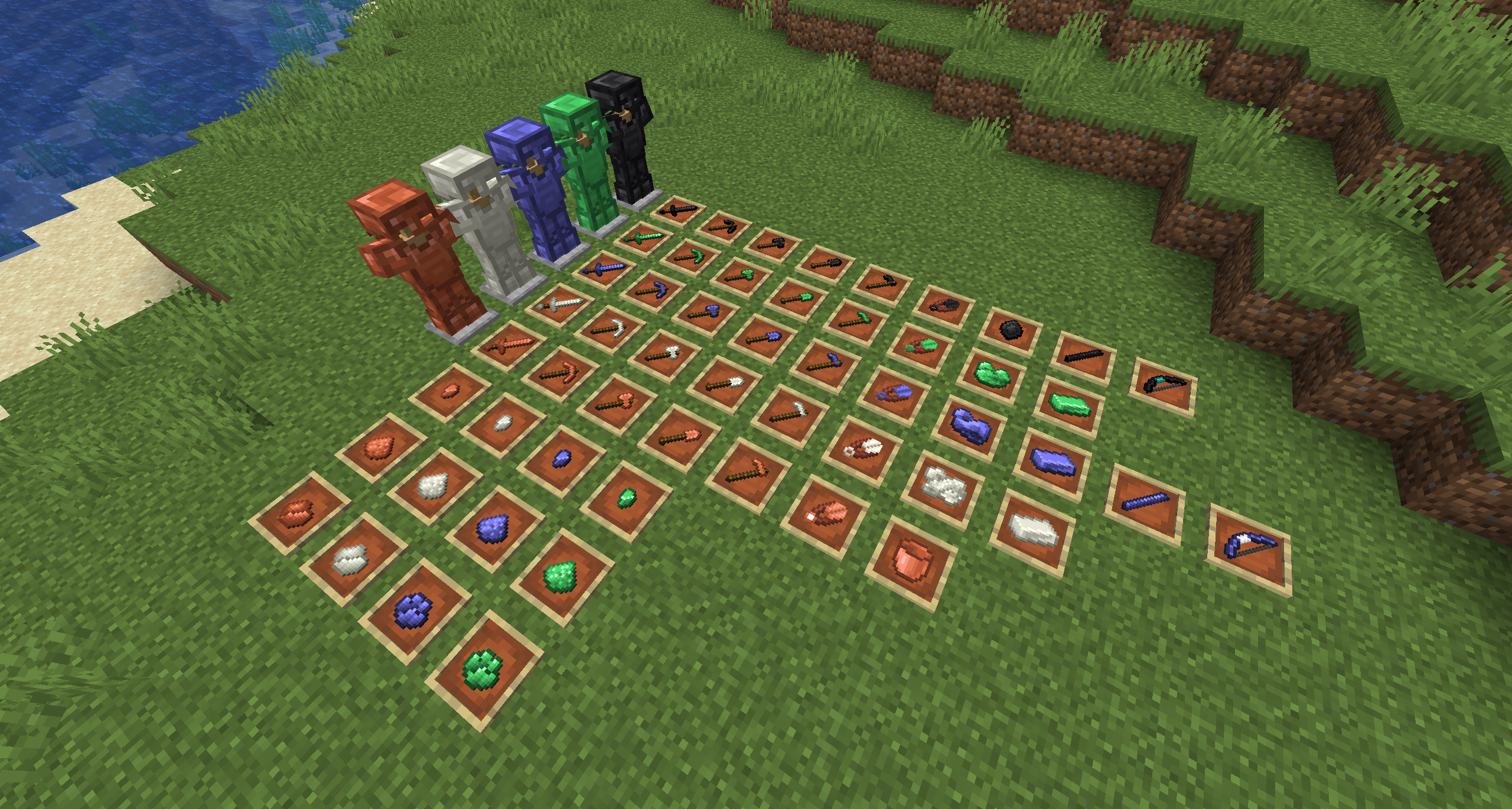

SimpleOres Fabric does not add copper ore or ingots to the game, as vanilla has added them. However, since vanilla did not add copper tools or armor, SimpleOres Fabric still has them (before 1.21.9). SimpleOres Fabric’s ores drop raw metal, like vanilla ores, except for onyx ore, which drops the gem, of course.
Copper doors (before 1.21), mythril, tin, adamantium and onyx bars, doors, bricks, and brick stairs are added too.
SimpleOres Fabric requires [Fabric API](https://modrinth.com/mod/fabric-api)
The textures are those from the [original mod](https://www.curseforge.com/minecraft/mc-mods/simpleores), you should take a look 😉
The original Minecraft Forum thread is [here](https://www.minecraftforum.net/forums/mapping-and-modding-java-edition/minecraft-mods/1279863-alexndrthegr8sts-mods-simplecore-api-simpleores). The original mod was by AleXndrTheGr8st, aka Skrallexy. Sinhika is the current off-and-on maintainer for Forge. The current code of this project is also licensed under LGPL 3.0, so go wild, modpack makers!
## Developers
If you want to add support of SimpleOres Fabric to your mod, crushed and powder versions of ores are available natively, Support of Energized Power has been added in 1.3.1 (and 1.3.2 for 1.20.1+) !
SimpleGUI
[
](https://www.planetminecraft.com/member/nickshoof/) | [](https://www.curseforge.com/members/nickshoof/projects) | [](https://modrinth.com/user/NickShoof) | [](https://discord.com/)
[
](https://ko-fi.com/nickshoof)
You can buy monthy subscription to get faster updates on KO-FI
****
#
**About**
This pack is all about making UI as clean and minimalistic as posible. If you ever played on [Bare Bones](https://modrinth.com/resourcepack/bare-bones) before you probably know what im aiming for (btw those two packs work so well toghether). For now im testing bottom viev point like shading, let me know how you like this. Before instaling you can check gallery for ingame screenshots. I will try making updates ATLEAST once a month. No mods required (for now).
#
**FAQ**
> **How to install resourcepacks?**
– There are a lot of tutorial out there on youtube, that will explain this better than me, but just download something from trusted sites like modrinth or curseforge, then drag this file to folder that will pop out if you click “Open Pack Folder” in Minecraft.
> **Can i use some textures from SimpleGUI in my pack**
– As long as its not distributed, yes you can. If you want to publish it, just ask me before doing it.
> **Will you add compatibility with mods?**
– Yes, im going to do this with popular mods in form of add-on to this pack.
#
**Lists**
Containers
1. Anvil
2. Beacon
3. Blast Furnace
4. Brewing Stand
5. Cartography Table
6. Crafter
7. Crafting Table
8. Dispenser/Dropper
9. Enchanting Table
10. Furnance
11. Gamemode Switcher
12. Chests
13. Grindstone
14. Hopper
15. Horse
16. Donkey
17. LLama
18. Inventory
19. Creative Inv.
20. Loom
21. Nautilus
22. Shulker Box
23. Smithing
24. Smoker
25. Stonecutter
26. Villager
Plans for future
1. Adding something to crafting table, loom, villager texture so it wouldn’t be so plane (V)
2. Listening to your feedback
3. Redoing reciepe book
4. Fixing inconsistencies
### [
](https://www.planetminecraft.com/member/nickshoof/) SimpleGUI
by NickShoof
Simple World Downloader
The saved world will be in the same folder as your singleplayer worlds.
This Mod adds a button to the Escape-Menu which allows you to download a copy of the Server you are on to Singleplayer.
The Mod downloads:
– Blocks
– BlockEntities
– Resourcepacks
– Player Inventory
– Entities
– Enderchest Inventory
– Containers (Chests, Barrels, …)
– Villagers
– Advancements
– Statistics
# Containers
Container inventories (Enderchest, Chests, Barrels, …) can only be saved if you open the inventory at least once while the world download is running. This is also true for Entitiy Inventories (like Villagers, Chestboats, Horses, …).
# Advancements & Statistics
Advancements and Statistics can only be saved if the corresponding UI’s are opened at least once while the download is running.
# Fabric API
The Fabric API is required for this Mod to work. It can be downloaded [here](https://modrinth.com/mod/fabric-api).
# Config
Use “/swd config” to access the config.
### Auto Downloading
Set whether worlds should be downloaded automatically on server joining.
### Save world to
Set the name of the saved world. If a world with this name already exists, the new chunks overwrite parts of that world.
# Flashback
You can download the world from a [Flashback](https://modrinth.com/mod/flashback) recording. Just open the Flashback Replay Viewer in-game and press escape. There will be a download button in the bottom left.
# Replay Mod
You can download the world from a [Replay Mod](https://modrinth.com/mod/replaymod) recording. Just open the Replay Mod Replay Viewer in-game and press escape. There will be a download button in the bottom left.
# Images

# Affiliate
If you are in need of a reliable Minecraft Server, you can support me by using my [affiliate Link for Wisehosting](https://wisehosting.com/aff.php?aff=3092). Thanks!

Simple Voice Chat
[Modrinth](https://modrinth.com/mod/simple-voice-chat)
|
[CurseForge](https://legacy.curseforge.com/minecraft/mc-mods/simple-voice-chat)
|
[Discord](https://discord.gg/4dH2zwTmyX)
|
[Wiki](https://modrepo.de/minecraft/voicechat/wiki)
|
[FAQ](https://modrepo.de/minecraft/voicechat/faq)
|
[Credits](https://modrepo.de/minecraft/voicechat/credits)
|
[API](https://modrepo.de/minecraft/voicechat/api)
# Simple Voice Chat
A proximity voice chat for Minecraft with a variety of [addons](https://modrepo.de/minecraft/voicechat/addons) that offer additional features and functionalities.
⚠️ **NOTE** This mod requires special setup on the server in order to work.
Please read the [wiki](https://modrepo.de/minecraft/voicechat/wiki/setup) for more information.

Please join the Discord if you have questions!
## Downloads
– [Fabric](https://modrinth.com/mod/simple-voice-chat/versions?l=fabric)
– [NeoForge](https://modrinth.com/mod/simple-voice-chat/versions?l=neoforge)
– [Forge](https://modrinth.com/mod/simple-voice-chat/versions?l=forge)
– [Bukkit/Spigot/Paper](https://modrinth.com/plugin/simple-voice-chat/versions?l=bukkit)
– [Quilt](https://modrinth.com/mod/simple-voice-chat/versions?l=quilt)
– [Velocity](https://modrinth.com/mod/simple-voice-chat/versions?l=velocity)
– [BungeeCord/Waterfall](https://modrinth.com/mod/simple-voice-chat/versions?l=bungeecord)
## Features
– Push to talk
– Voice activation
– Proximity voice chat
– Password protected groups
– Automatic voice activity detection
– Automatic microphone gain adjustment
– [Opus codec](https://opus-codec.org/)
– [RNNoise](https://jmvalin.ca/demo/rnnoise/) recurrent neural network noise suppression
– OpenAL audio
– Cross compatibility between Fabric, NeoForge, Forge, Quilt, Bukkit, Spigot and Paper
– Support for Velocity, BungeeCord and Waterfall
– Compatibility with [ModMenu](https://modrinth.com/mod/modmenu) (Use [ClothConfig](https://modrinth.com/mod/cloth-config) for a better configuration UI)
– Configurable push to talk key
– Microphone and speaker test playback
– Configurable voice distance
– Whispering
– Individual player volume adjustment
– Microphone amplification
– 3D sound
– AES encryption
– Audio recording with separate audio tracks
– A powerful [API](https://modrepo.de/minecraft/voicechat/api)
– Many [addons](https://modrepo.de/minecraft/voicechat/addons)
## Icons
| Icon | Description |
|:————————————:|——————————————————-|
|  | You are talking |
|  | You are whispering |
|  | Player is talking |
|  | Player is whispering |
|  | Microphone muted |
|  | Voice chat disabled |
|  | Voice chat not connected
Voice chat not installed |
## The GUI
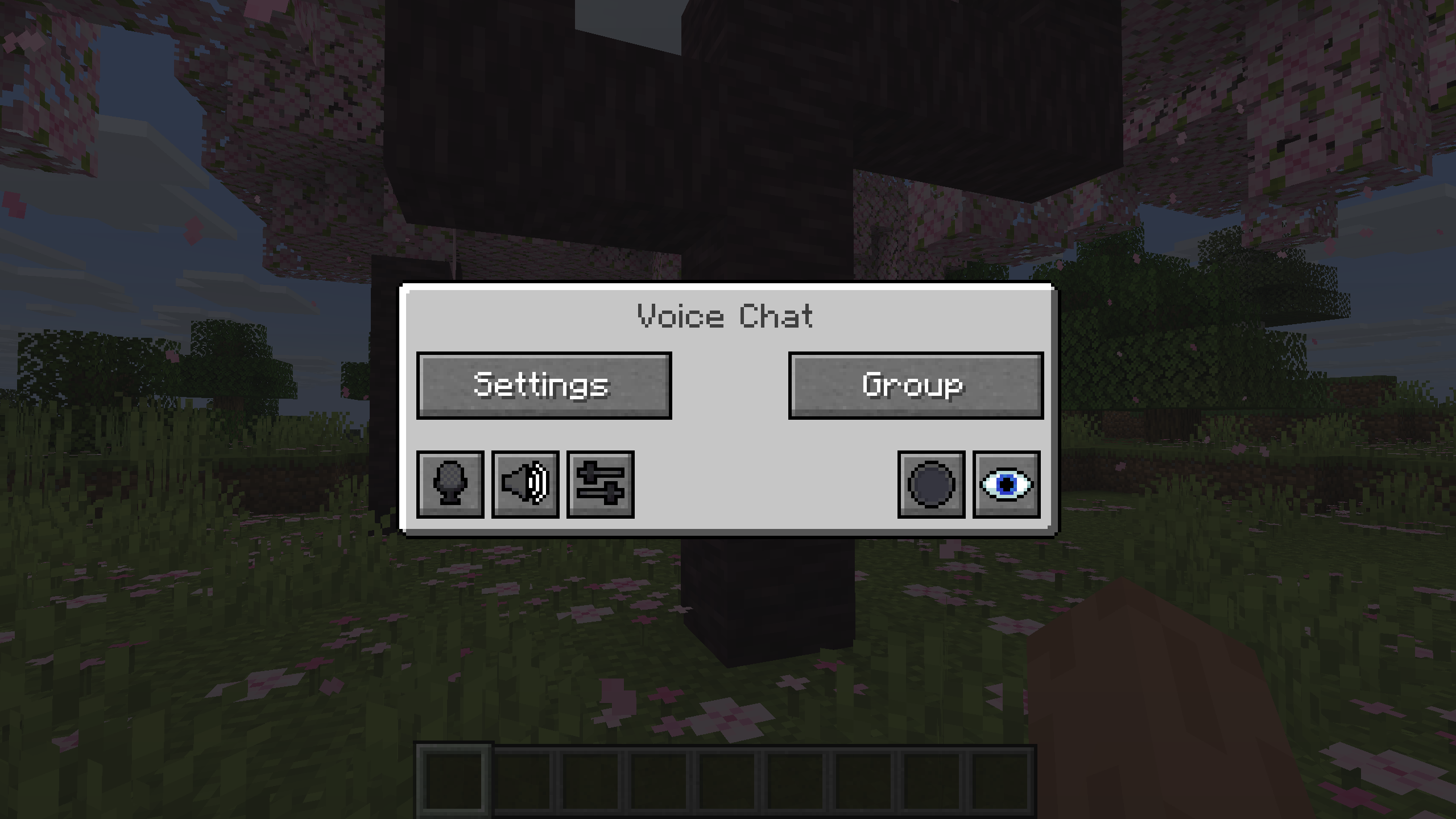
You can open the voice chat GUI by pressing the `V` key.
This allows you to open the settings, group chats, mute yourself, disable the voice chat, start/stop a recording and hide all icons.
### Group Chats
Group chats allow you to talk to players that are not in your vicinity.
To open the group chat interface, either press the group button in the voice chat GUI or just press the group key.
To create a new group, just type a name in the text field and press the button at the bottom.
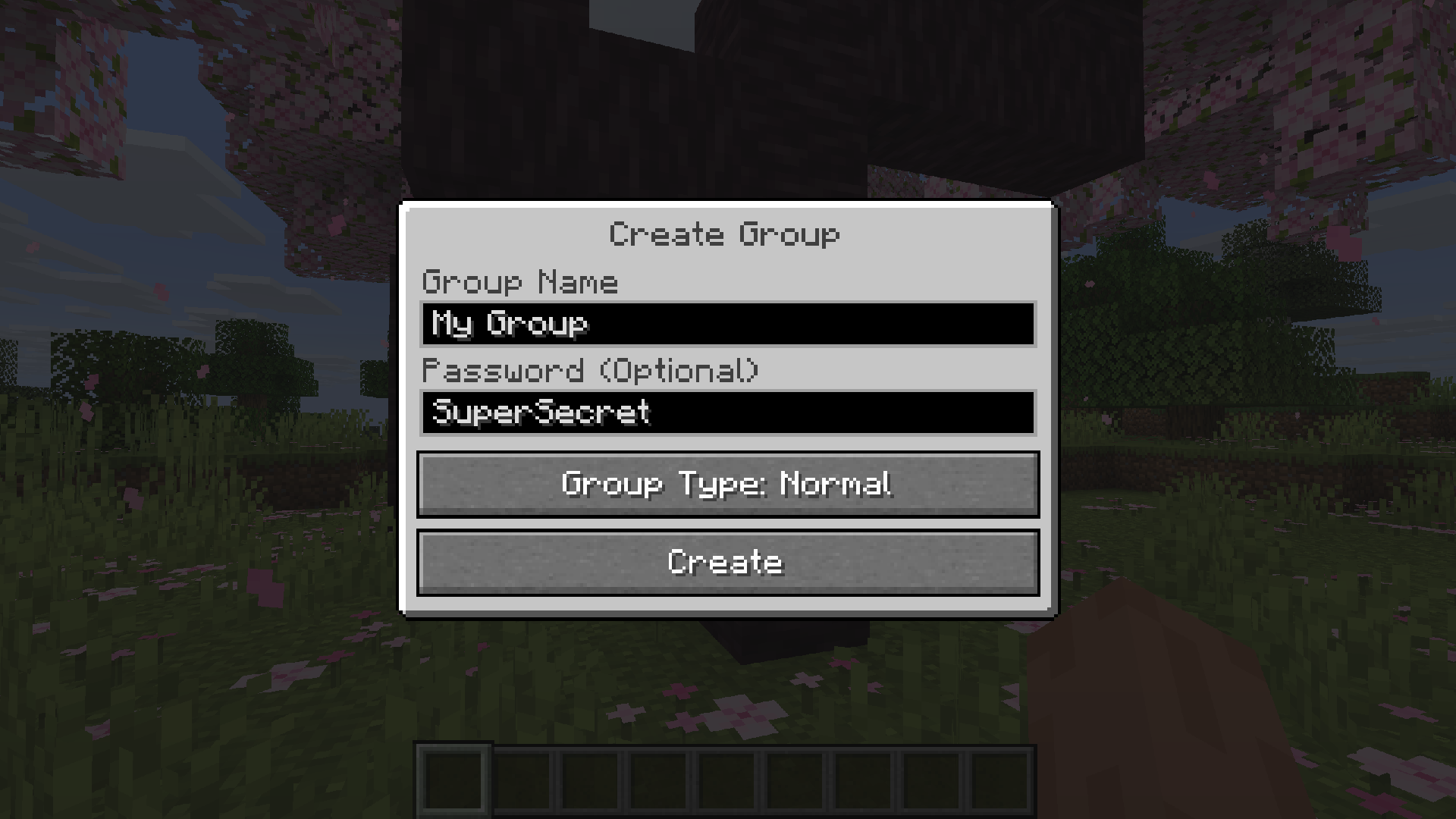
Creating or joining a group will bring you into the group chat interface.
You will also see the heads of the group members in the top left corner of your screen.
Talking players will be outlined.
You can disable these icons by pressing the third button from the left.
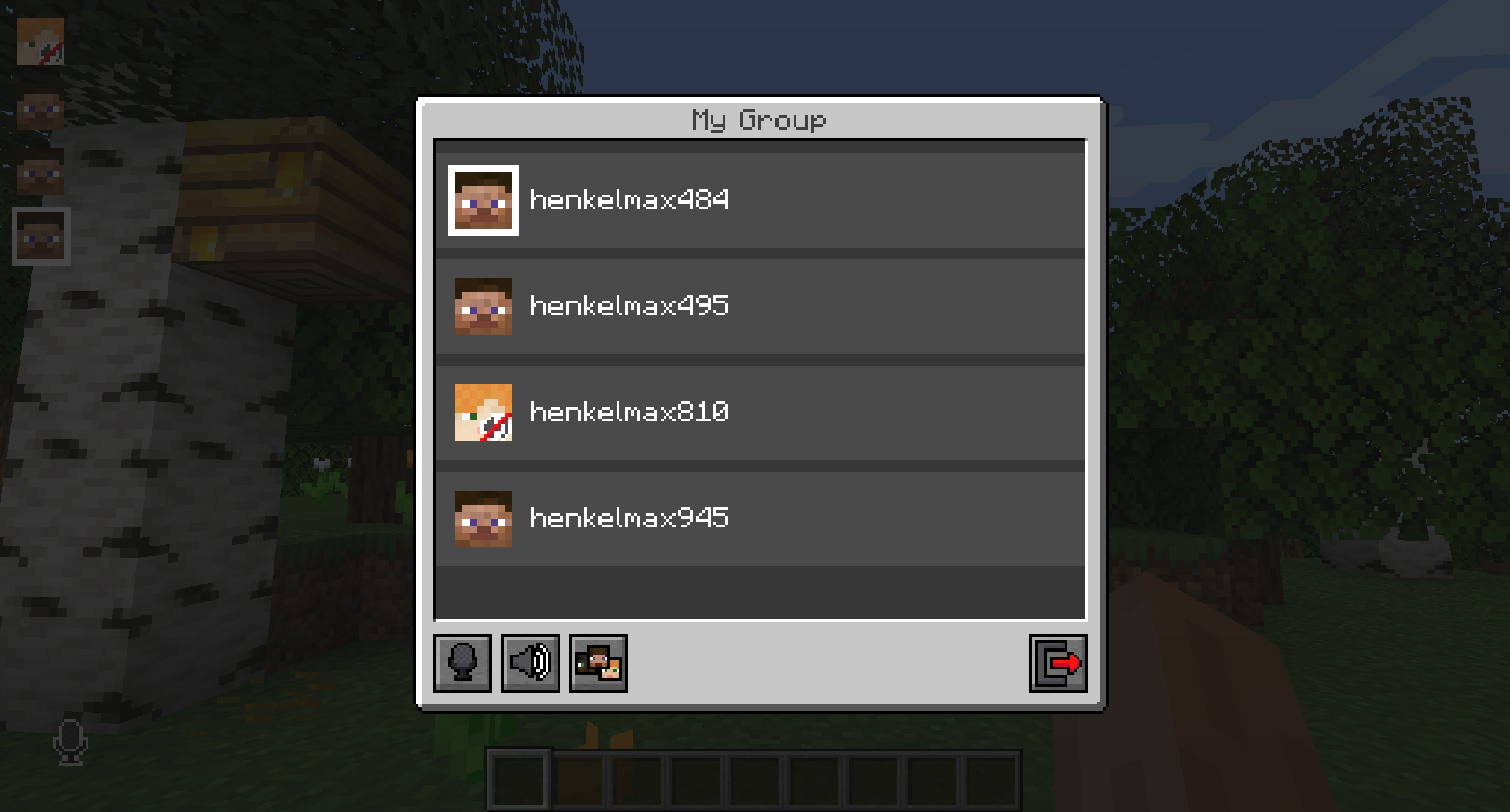
Players that are not in a group will see a group icon next to your head, indicating that you are in a group.
You can invite players to your group chat by entering the command `/voicechat invite ` or from the social interactions screen.
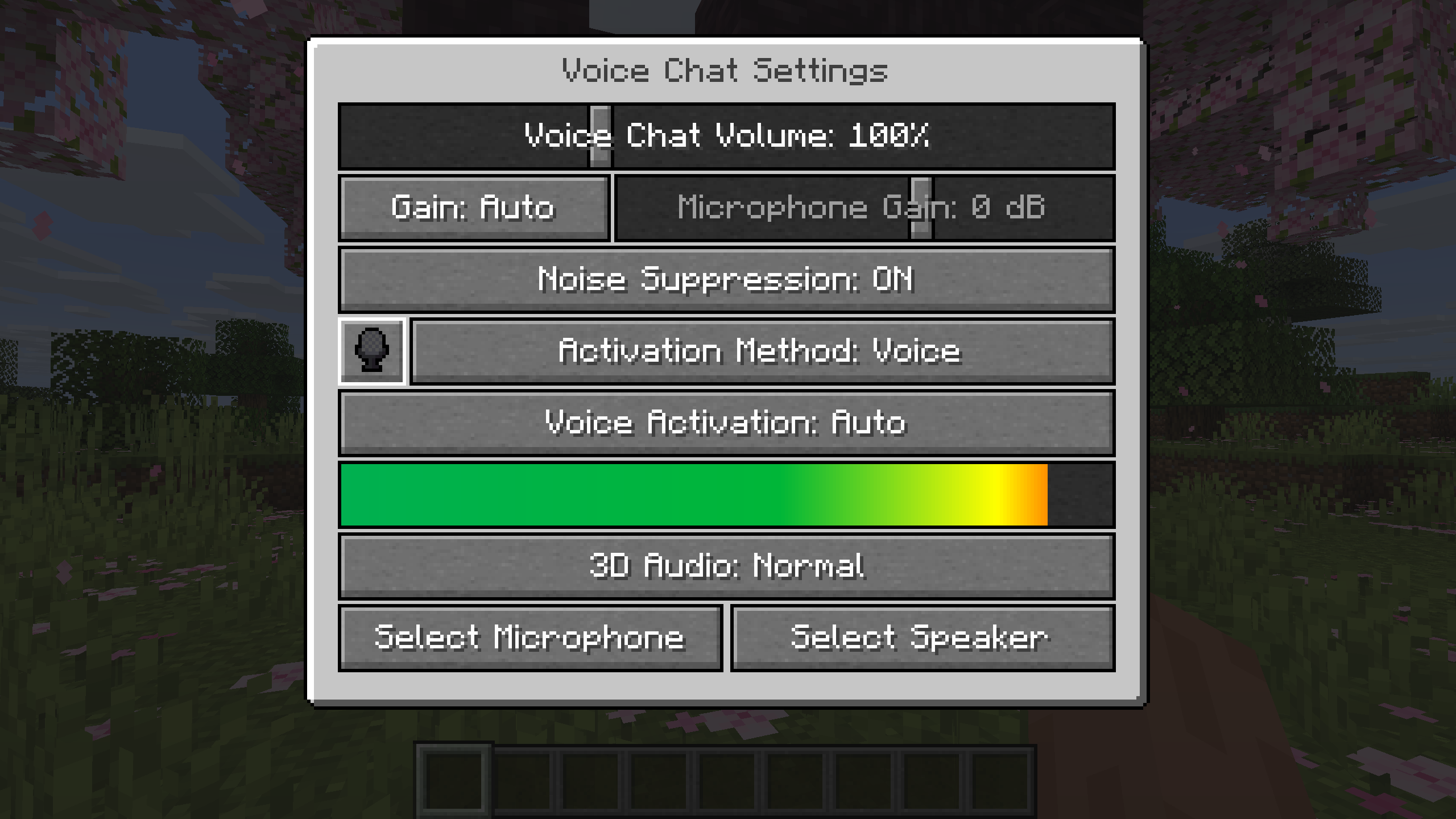
### Settings
You can access the voice chat settings by pressing the `V` key and pressing the settings button.
This menu offers the ability to set up your voice chat audio settings.
By clicking the microphone button, you can test your microphone activation.
## Important Notes
You need to open a port on the server. This is port `24454` `UDP` by default.
Without opening this port, the voice chat will not work.
This port can be changed in the server config.
More information [here](https://modrepo.de/minecraft/voicechat/wiki/setup).
The voice chat is encrypted, but we don’t guarantee the security of it. Use at your own risk!
Simple Structures: Desert
This modification adds **30** structures to the minecraft world for the Desert biome.


_______________________________________________________________________________________________
### [All projects are Simple Structures](https://modrinth.com/collection/vinouI3O)
_______________________________________________________________________________________________
### Compatibility
– Biomes O’ Plenty
– Terralith.
_______________________________________________________________________________________________
**License** – you can use the data pack materials in any of your projects, just specify the authorship.
_______________________________________________________________________________________________
**AI** – only the project icon was generated
Simple Structures: Caves
Adds small decorative structures, shelters, halts, and dungeons to the cave. At the moment, **34** structures have been added
_______________________________________________________________________________________________

_______________________________________________________________________________________________
### [All projects are Simple Structures](https://modrinth.com/collection/vinouI3O)
_______________________________________________________________________________________________
### Roadmap
In the future, I plan to add:
“`
Compatible with other cave mods
New structures and more variations.
more custom mobs and loot tables
“`
_______________________________________________________________________________________________
### **Integration:**
– > Vanilla Biome
– > Terralith
– > Biomes O’ Plenty
_______________________________________________________________________________________________
Simple Structures: Pale Garden
Adds small structures to the Pale Garden biome, making it diverse. At the moment,**20** structures have been added
_______________________________________________________________________________________________


_______________________________________________________________________________________________
### All projects are **Simple Structure**:
[Simple Structure: Desert](https://modrinth.com/datapack/simple-structuretest-by-pv)
[Simple Structure: Mushroom Fields](https://modrinth.com/datapack/simplestructure-mushroom-fields)
[Simple Structure: Bewitchment](https://modrinth.com/datapack/simplestructure-bewitchment)
[Simple Structure: Botania](https://modrinth.com/project/simple-structure-botania)
_______________________________________________________________________________________________
### **License**
you can use the data pack materials in any of your projects, just specify the authorship.
Simple Structures: Nostalgia
This modification adds the classic buildings of the novice players from the first versions.
Strictly speaking, this is part of another project, but I decided to share these materials.
_______________________________________________________________________________________________

### [All projects are Simple Structures](https://modrinth.com/collection/vinouI3O)
_______________________________________________________________________________________________
### **Integration:**
– Terralith
– Biomes O’ Plenty
Simple Spawn Immunity
This super simple datapack emulates the 3-second spawn immunity that was removed in 1.21.4.
Simple Snowy Fix (Forge / Fabric)
This mod is a multiloader port of [Simple Snowy Fix (fabric)](https://github.com/Apollounknowndev/simple-snowy-fix) by [Apollo](https://github.com/Apollounknowndev).
Differences with original mod:
– Added compatibility with many mods.
– Fixed many issues, like snow was generating on manually grown trees from saplings.
– Just fixes bug by default. Original mod was generating snow on leaves under leaves. We have config option for this,
not enabled by default.
– Doesn’t include the snow under trees feature, since it is implemented well
in [Snow Under Trees](https://github.com/bl4ckscor3/SnowUnderTrees) mod,
which has fixed many problems and compatibility issues. There is no reason to duplicate its function.
## Features
In Minecraft 1.12 and later, snow often doesn’t fully cover tree leaves in snowy biomes,
including modded ones, making trees look bad—especially large modded ones.
It’s because of a Vanilla bug, [MC-119599](https://bugs.mojang.com/browse/MC/issues/MC-119599).
When terrain is generated chunk by chunk, snow is placed in a chunk before trees are added in neighboring chunks.
If a tree’s leaves from a chunk generated later extend into a chunk generated earlier,
the snow in the earlier chunk ends up under those leaves because it was already placed before the leaves appeared.
This very simple mod fixes this issue. No dependencies, just drop it in and it works.
If you have any questions, feel free to join my Discord server: https://discord.gg/Qp2PKbtnp6
## Configuration
By default, it just fixes the bug.
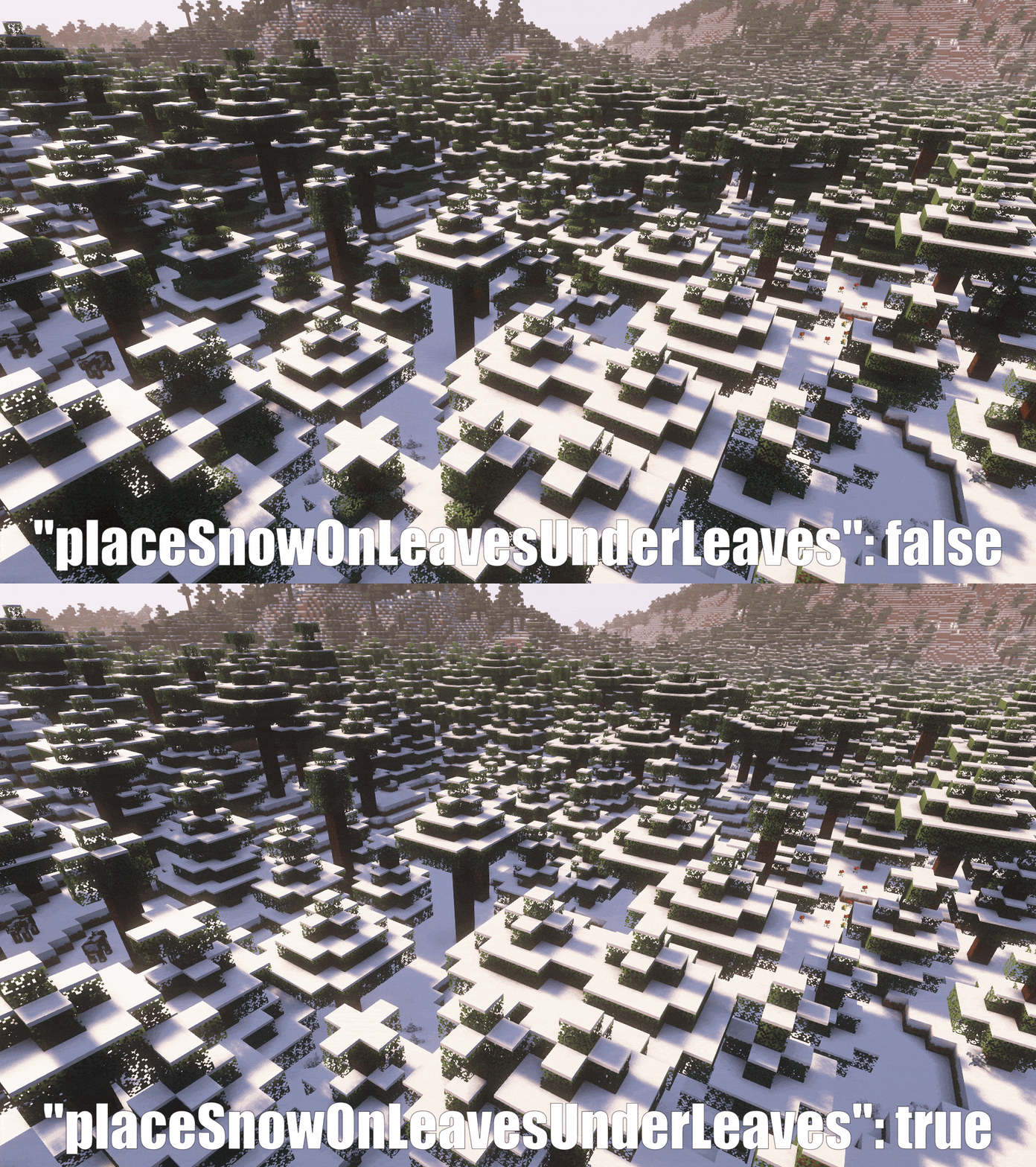
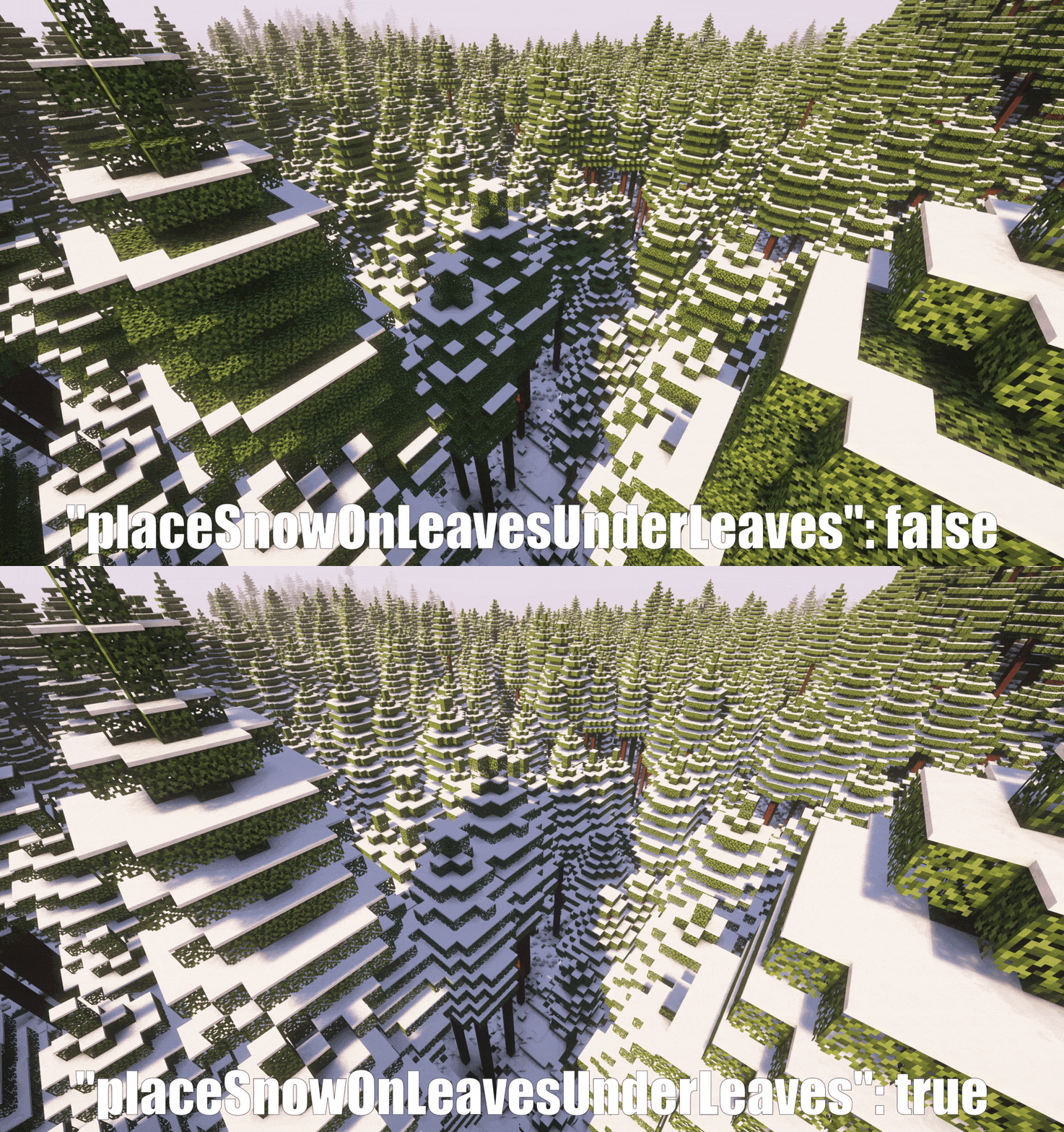
However, if you want snow to also generate on leaves under other leaves,
you can enable this feature in the mod config (If you want snow biomes to look snowier).
Demo:
## Compatibility
It should work out of the box with most worldgen mods that add new snowy biomes.
Tested:
– Biomes O’ Plenty
– Regions Unexplored
– Oh The Biomes We’ve Gone (and all other mods using Oh The Trees You’ll Grow)
If a mod implements trees in some cursed way, it might require a patch. Feel free to open an issue.
It won’t create problems. If there is some compatibility issue, the fix just won’t apply to those biomes.
## Performance
Very well, you will notice no difference. It takes less than an additional 100ms (0.1s) to generate a 32-chunk radius
of snowy biome with a lot of leaves. This was profiled directly from the code, ensuring 100% accuracy.
## Improve your Snow Generation
If you want a more perfect snow experience, I suggest also using these mods:
* [Snow Under Trees](https://github.com/bl4ckscor3/SnowUnderTrees) to let snow generate under trees.
* [Snow! Real Magic! ⛄](https://github.com/Snownee/SnowRealMagic) to let grass, flowers, etc. generate with snow.
## Demo:
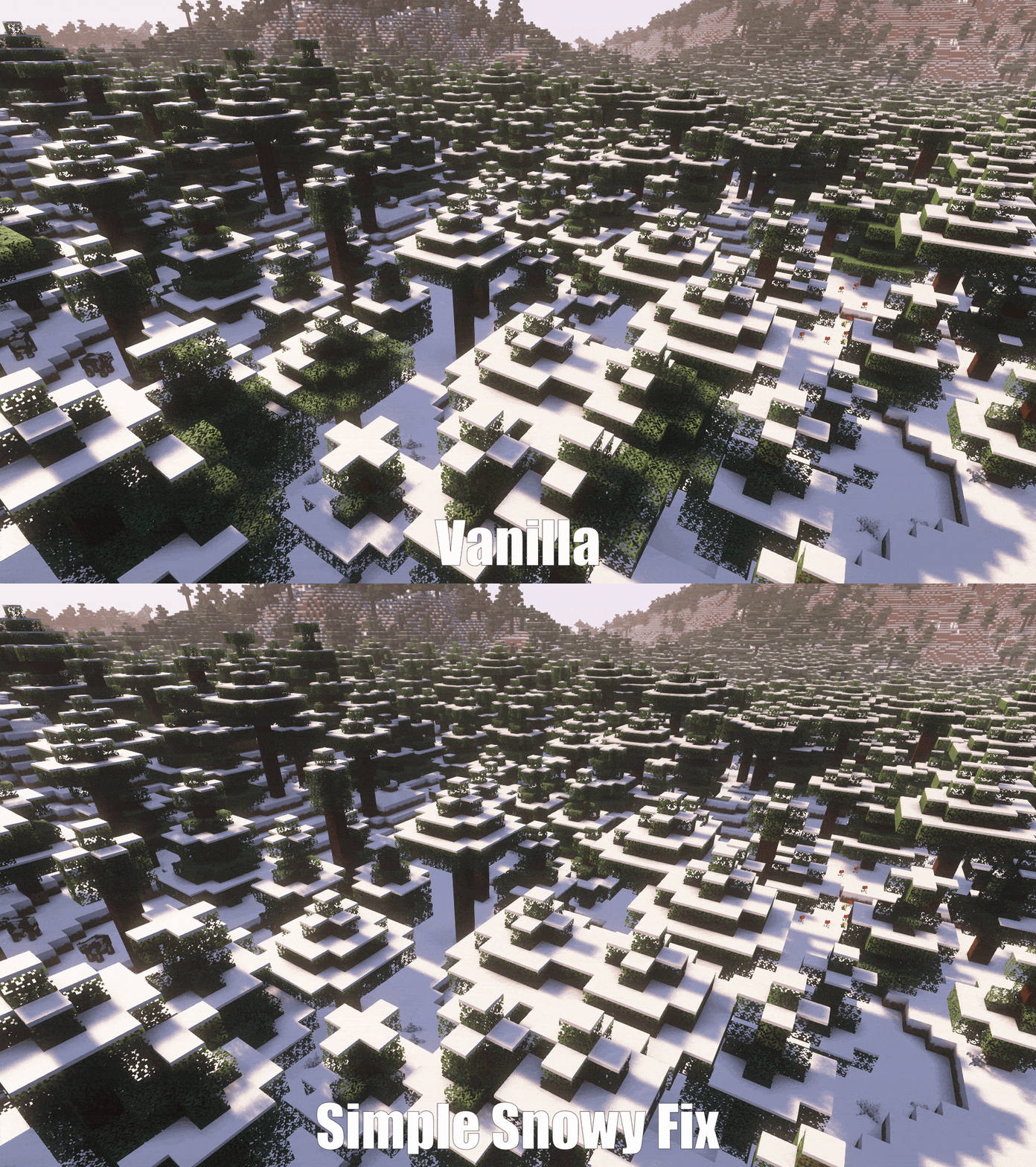
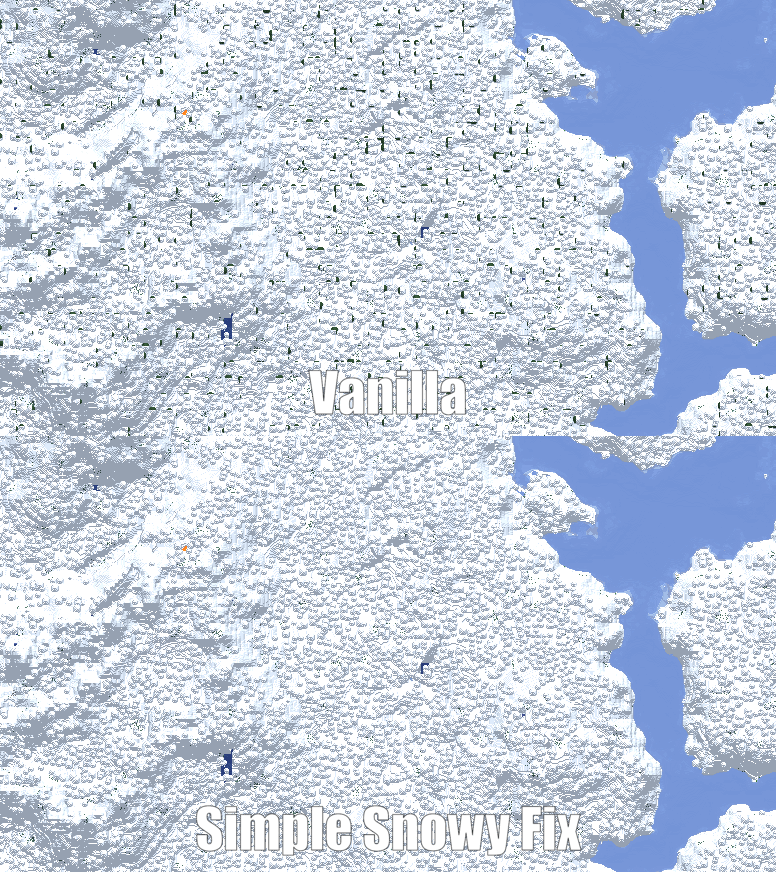
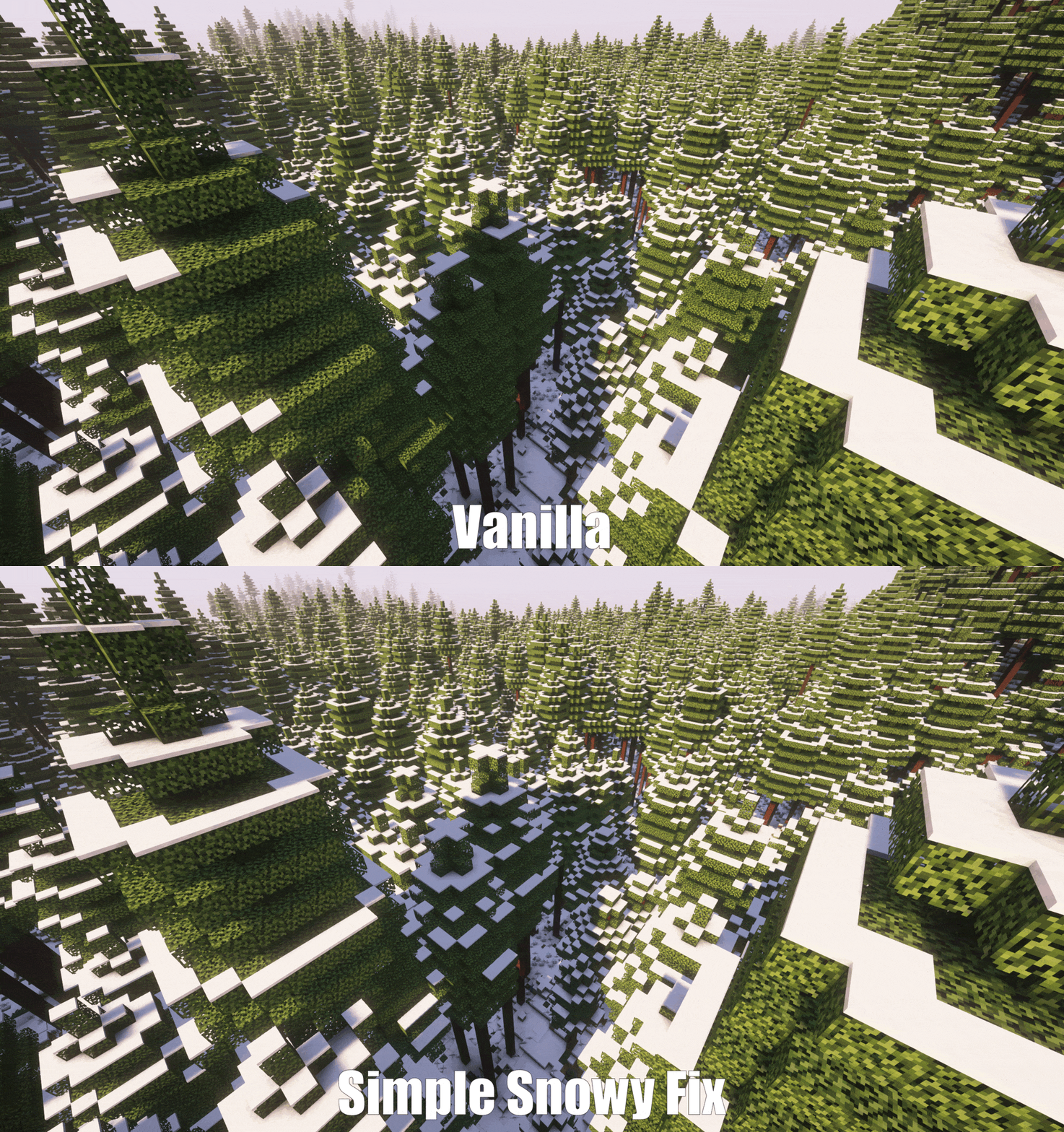
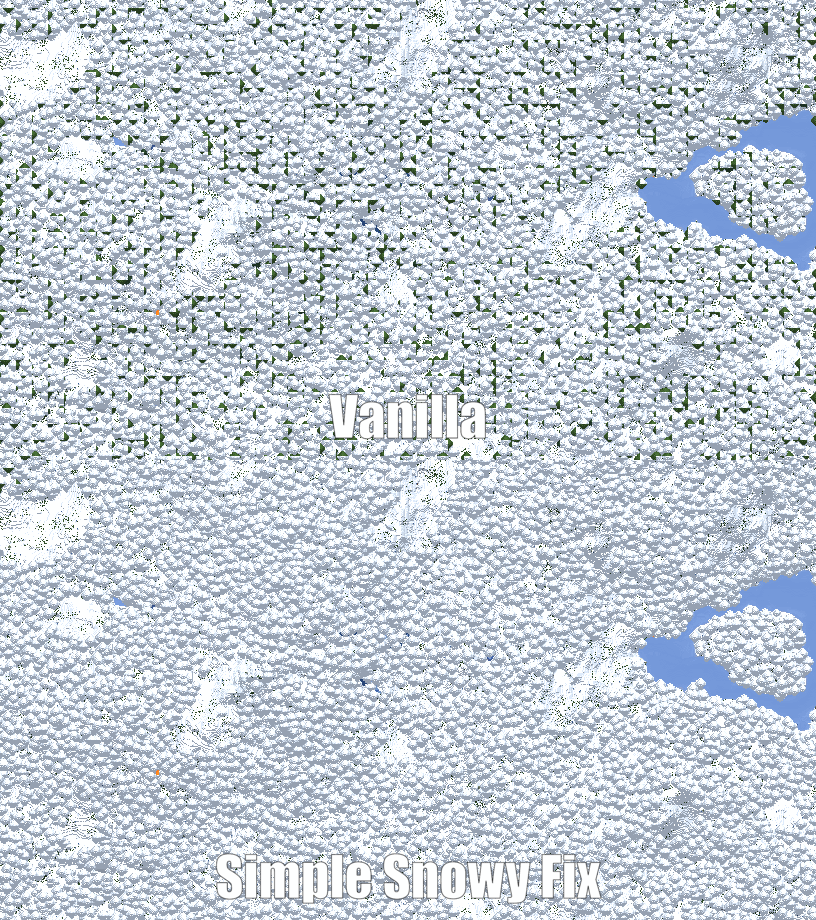
Note: Screenshots were taken with the [Snow Under Trees](https://github.com/bl4ckscor3/SnowUnderTrees) and [Snow! Real Magic! ⛄](https://github.com/Snownee/SnowRealMagic) mods installed.