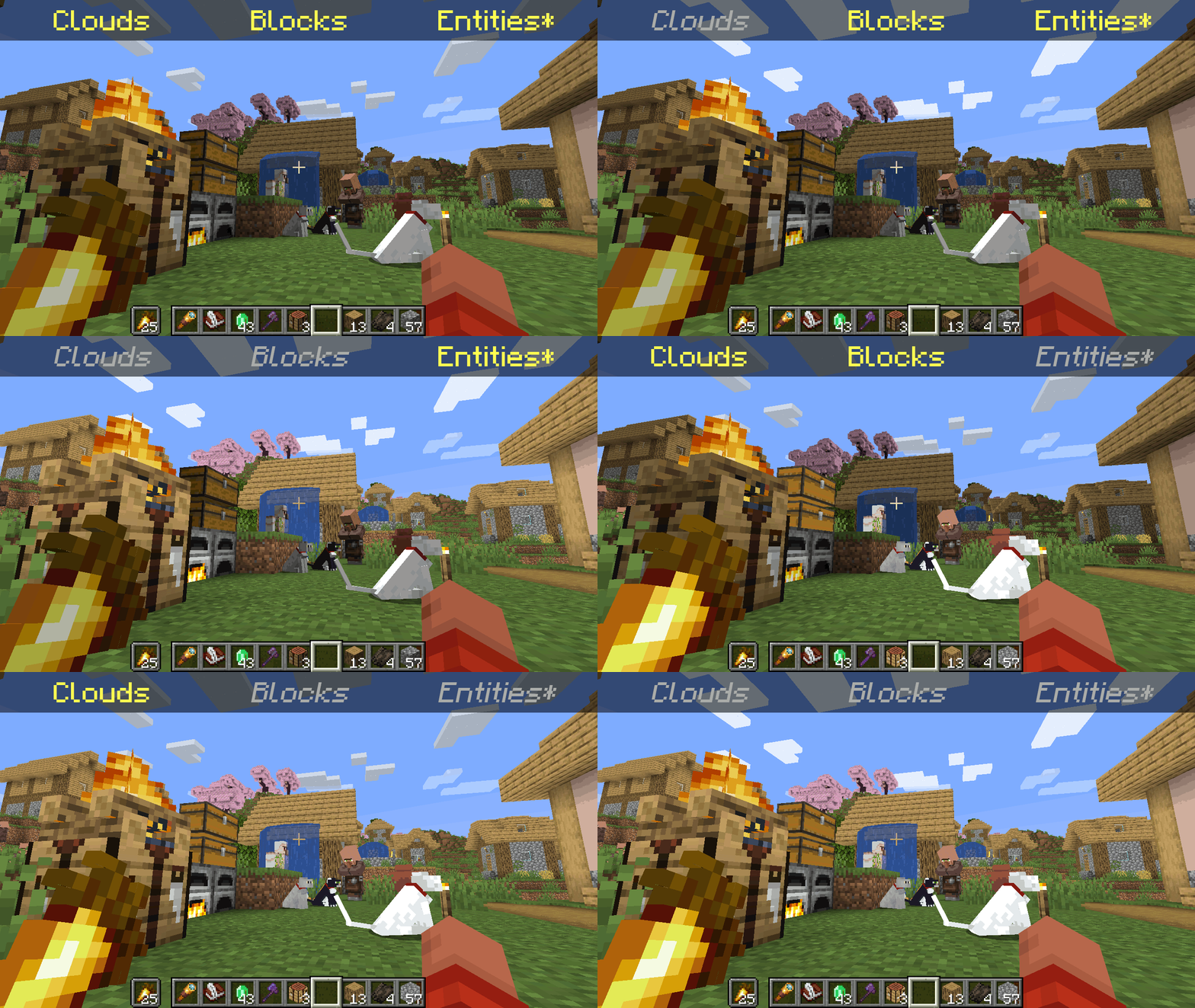
*Clarification that Entity shading is now stable and DOES NOT affect the inventory and in-game screens.
—
Simply No Shading is a [Fabric]-based [modification] (mod) for the [Minecraft] [client]. This mod removes the darkening on sides or faces (also known as [shading]) to in-game objects such as blocks, clouds, and entities as illustrated above.
[Fabric]: https://fabricmc.net
[modification]: https://minecraft.wiki/w/Mods
[Minecraft]: https://minecraft.net
[client]: https://minecraft.wiki/w/Mods#Client-based
[shading]: https://en.m.wikipedia.org/wiki/Shading
## Compatibility
Simply No Shading provides active compatibility for [BedrockIfy] and [Sodium]. Some mods that provide or replace stuff may work such as [Enhanced Block Entities] (EBE), where block entities act like blocks and are affected as such when toggling shading. Some mods that replace rendering are most likely incompatible; exceptions have active support such as Sodium, for example. One example of incompatibility is shaders, usually applied using [Iris], as they may not crash the game but would just render this mod ineffective when they are applied.
[BedrockIfy]: https://modrinth.com/mod/bedrockify
[Sodium]: https://modrinth.com/mod/sodium
[Enhanced Block Entities]: https://modrinth.com/mod/ebe
[Iris]: https://modrinth.com/mod/iris
## Similar Solutions
Simply No Shading is not the only effort to removing shading, there are other solutions such as:
– [Flat Lighting] is a simple Fabric mod that achieves the same results for blocks and supports Sodium.
– [internal-shaders](https://modrinth.com/shader/internal-shaders), though unlisted, is a simple Iris shader that removes shading on blocks and entities.
– [Lightingless] is a simple shader that removes shading on blocks and entities.
– [OptiFine]’s old lighting through the internal shader. Achieved by turning `Options > Video Settings > Shaders… > (internal) > Old Lighting` to `ON`.
– [New Lighting 1.18+ (Internal Shaders without Optifine)]. This resource pack achieves the similar results by setting the `shade` flag on block models to `false` (OFF).
[Flat Lighting]: https://modrinth.com/mod/flat-lighting
[Lightingless]: https://modrinth.com/shader/lightingless
[OptiFine]: https://optifine.net
[New Lighting 1.18+ (Internal Shaders without Optifine)]: https://www.planetminecraft.com/texture-pack/new-lighting-1-16/
## Features
Simply No Shading supports the following categories for toggling shading:
– Blocks — this includes blocks, liquids, and EBE‘s block entities
– Clouds — this includes clouds
– Entities ([`≥7.4.0`]) — this includes normal entities and block entities in the world
– ***Deprecated** Experimental Entities Built-in Resource Pack — this includes block entities, entities, and blocks, block entities, entities, and items in toasts (pop-ups, e.g. completing an [advancement]) and inventories and or Graphical User Interfaces (GUIs)*
[`≥7.4.0`]: https://modrinth.com/mod/simply-no-shading/version/7.4.0+mc1.21
[advancement]: https://minecraft.wiki/w/Advancement
## Configuration
Simply No Shading has a configuration screen and it’s accessible through:
– a key mapping. It’s unbound by default and can be bound at `Options > Controls > Keys > Simply No Shading > Open Config Screen`
– [Mod Menu]. `Mods > Simply No Shading > Configure…`
[Mod Menu]: https://modrinth.com/mod/modmenu
Simply No Shading stores its configuration as a formatted [JSON] file at `/config/simply-no-shading.json`.
[JSON]: https://en.m.wikipedia.org/wiki/JSON
[`1.2.0`]: https://modrinth.com/mod/flat-lighting/version/1.2.0
[core shaders]: https://minecraft.wiki/w/Shaders
[Fabric Loom]: https://github.com/FabricMC/fabric-loom
[MIT License]: https://github.com/simply-no-shading/blob/master/LICENSE
[Modrinth]: https://modrinth.com/mod/simply-no-shading/versions
[resource pack]: https://minecraft.wiki/w/Resource_Packs
## Versions
Simply No Shading follows semantic versioning. This mod aims to maintain the same feature across supported Minecraft versions. Given the version `X.Y.Z` where:
* `X` changes when breaking changes occur, such as with breaking config format changes.
* `Y` changes when features are added or changed (non-breaking).
* `Z` changes for bug and compatibility fixes and may not stay consistent across supported Minecraft versions.
Target versions is currently being reconsidered. Mod version `8.x` will likely only be maintained for the newest versions of the game. `7.x` will still remain maintained for bug-fixing and translations.
Simply No Shading aims to provide support for the latest minor updates to major releases along with some April Fool’s snapshots. All minor releases for the latest major version are supported. The latest snapshot versions also get temporary support before the next major release. Following are all those versions:
| # | Mod Version | Minecraft Version |
|—:|:———–:|:———————-:|
| 1 | `7.6.4` | `1.14.4` |
| 2 | `7.6.4` | `1.15.2` |
| 3 | `7.6.4` | `20w14infinite` |
| 4 | `7.6.4` | `1.16.5` |
| 5 | `7.6.4` | `1.17.1` |
| 6 | `7.6.4` | `1.18.2` |
| 7 | `7.6.4` | `22w13oneblockatatime` |
| 8 | `7.6.4` | `1.19.4` |
| 9 | `7.6.4` | `23w13a_or_b` |
| 10 | `7.6.4` | `1.20.1` |
| 11 | `7.6.4` | `24w14potato` |
| 12 | `7.6.4` | `1.20.6` |
| 13 | `7.6.4` | `1.21` |
| 14 | `7.6.4` | `1.21.1` |
| 15 | `7.6.4` | `1.21.2` |
| 16 | `7.6.4` | `1.21.3` |
| 17 | `7.6.4` | `1.21.4` |
| 18 | `7.6.4` | `25w14craftmine` |
| 19 | `7.6.4` | `1.21.5` |
| 20 | `7.6.4` | `1.21.6` |
| 21 | `7.6.4` | `1.21.7` |
| 22 | `7.6.4` | `1.21.8` |
| 23 | `7.6.6` | `1.21.9` |
| 24 |`8.0.0-alpha.1`| `1.21.10` |
| 25 |`8.0.0-alpha.3`| `1.21.11` |
| 26 |`8.0.0-alpha.3`| `26.1-snapshot-2` |
Simplisticallisticness
Updates are released in ~1-5 days, as I’m busy with personal life constantly.
## What even is Simplisticallisticness?
Simplisticallisticness is a W.I.P. resource pack, trying to be as simplistic as it can with 8x textures. (Some textures are actually 16x, because of the little details, for example: the sides of a blast furnace and the front of it)
### Latest Version: R4 (Release 4), showcase below.

### Latest Preview: R5 P3 (Release 5 Preview 3), showcase below.

## How To Install
– Download Simplisticallisticness R5 P3 OR R4.zip
– Go to C:/Users/(your user)/AppData/Roaming/.minecraft/resourcepacks
– Drop the resource pack there, then load it into Minecraft.
Simple Structures: Mushroom Fields
🌿This modification adds **17** small structures to the mushroom biome.🌿


_______________________________________________________________________________________________
### [All projects are Simple Structures](https://modrinth.com/collection/vinouI3O)
_______________________________________________________________________________________________
**License** – you can use the data pack materials in any of your projects, just specify the authorship.
_______________________________________________________________________________________________
**AI** – only the project icon was generated
SimplesorterR
# SimpleSorter
> A lightweight client-side inventory sorting mod.
—
## Features
### One-Key Smart Sorting
Open an inventory or container and press **R** to sort items.
– **Auto Stack Merging** — Automatically consolidates partial stacks of the same item into full stacks, freeing up valuable slots
– **Creative Tab Native Sorting** — Items are arranged using Minecraft’s Creative Mode tab order and support modded items
– **Custom Sort Order** — Adjust `tabOrder` in the config file to change tab priority
– **Pinned Items** — Configure `pinnedItems` to keep specific items always sorted first
– **Dynamic Container Blacklist** — All storage containers are sortable by default (including modded containers like Reinforced Chests). Functional containers are excluded by exact class names in `blockedContainers`; you can also press **B** while a container is open to toggle it automatically
– **Config Hot-Reload** — Edit `simplesorter.json` directly, changes take effect on the next R-key sort without restarting the game
– **Pure Client-Side** — Sorting is performed by simulated clicks, so the server does not need the mod
—
### Mouse Tweaks
#### Shift + Drag to Quick-Move
Hold **Shift** and **left-click drag** across multiple slots — every slot you pass over will be instantly quick-moved to the opposite inventory.
> Useful when moving many slots at once.
#### Shift + Double-Click to Move All Same Items
While **holding an item** on your cursor, **Shift + Double-Click** on a matching item to instantly quick-move **all identical items** from that inventory to the other side.
> Useful for pulling all matching items out of a chest.
#### Space + Double-Click to Move Everything
Hold **Space** and **Double-Click** any slot in a container to instantly quick-move **every single item** from that inventory to the opposite side.
> Useful for quickly emptying a chest.
—
### Slot Locking
Hold **Alt** and **click** any slot to **lock** it — locked slots display an overlay.
– Locked slots are **never moved** when sorting with R
– Locked hotbar slots are **protected from Q-key drops** (prevents accidental discarding)
– Lock state is **automatically saved** and independent per save file
– **Alt + click** again to unlock
– Hold **Alt + left-click drag** to lock or unlock multiple slots in one sweep. The first slot decides whether the drag locks or unlocks
– Overlay color can be customized with `lockOverlayColor`, supporting both `#RRGGBB` and `#AARRGGBB`
Color values use **Hex color codes**. Both `#RRGGBB` and `#AARRGGBB` are supported. The 8-digit format uses `ARGB` order: `AA` opacity, `RR` red, `GG` green, `BB` blue. It is not `RGBA`.
Common `AA` values: `40` very transparent, `80` half transparent, `C0` mostly opaque, `FF` fully opaque. Examples: `#80FF0000` half-transparent red, `#8000FF00` half-transparent green, `#800000FF` half-transparent blue.
> Useful for keeping tools in fixed slots and reducing accidental drops.
—
### Auto Replacer
– **Tool Break Replacement** — When a held tool breaks, automatically equips a replacement of the same type from your inventory
– **Stackable Item Refill** — When a held stackable item runs out (e.g. placing blocks), automatically refills from your inventory
– Can be **toggled on/off** in the settings screen
> Useful when building or mining with repeated item replacement.
—
### Caps Lock + Double-Click to Batch Drop
Hold **Caps Lock** and **double-click** any slot to **drop all identical items** in that inventory (using the Q-key drop action).
> Useful for clearing large quantities of one item.
—
### In-Game Configuration
Press **Z + I** (default combo) to open a graphical settings panel in-game:
– **Tab Sort Order (tabOrder)** — Customize the priority of Creative Mode tabs
– **Pinned Items (pinnedItems)** — Specify item IDs that always sort to the front
– **Container Blacklist (blockedContainers)** — Add container class names to exclude from sorting, or press **B** while a container is open to write the current class name automatically
– **Lock Overlay Color (lockOverlayColor)** — Customize locked-slot overlay color, for example `#80FF0000`
– **Z-Key Guard Toggle** — Disable the Z-key requirement to open settings with just I
– **Auto Replacer Toggle** — Enable/disable automatic tool and item replacement
– **Localized UI** — Settings interface automatically adapts to your game language (English / Chinese)
Also accessible from **Mod Menu** if installed.
> Advanced settings can be edited directly in `config/simplesorter.json`. Changes take effect on the next R-key sort.
> ⚠️ `blockedContainers` uses **exact class-name matching**, not fuzzy matching. Depending on mappings and Minecraft version, class names may look like `GenericContainerScreenHandler` instead of `ChestMenu`; the safest workflow is opening the target container and pressing **B** so the mod writes the correct name for you.
—
## Requirements
| Dependency | Required? | Notes |
|—|—|—|
| **Fabric Loader** ≥ 0.16.5 | ✅ Required | Mod loader |
| **Fabric API** | ✅ Required | Core API library |
| **Fabric Language Kotlin** | ✅ Required | Kotlin runtime support |
| **Cloth Config API** | ❌ Bundled | Config screen framework (already included in the mod jar) |
| **Mod Menu** | ❌ Optional | Adds a settings entry in the mod list |
—
## Installation
1. Install **Fabric Loader** and **Fabric API**
2. Download **Fabric Language Kotlin** and place it in your `mods` folder
3. Pick the jar matching your Minecraft version and drop it into your `mods` folder
4. Launch the game
—
## Keybind Reference
All keybinds appear under the **SimpleSorter** category in Minecraft’s Controls screen and can be changed there.
| Key | Action | Context |
|:—:|—|—|
| **R** | Sort & organize inventory | While any container is open |
| **Alt + Click** | Lock / Unlock slot | Prevents that slot from being sorted |
| **Alt + Left-Drag** | Batch lock / unlock slots | Drag across multiple slots |
| **B** | Toggle current container blacklist | When the current container should not be sorted |
| **Caps Lock + Double-Click** | Batch drop identical items | Quickly clear large stacks |
| **Shift + Drag** | Quick-move multiple slots | Drag across slots while holding Shift |
| **Shift + Double-Click** | Move all identical items | While holding an item on cursor |
| **Space + Double-Click** | Move all items from container | Empty an entire inventory at once |
| **Z + I** | Open settings screen | Available anytime |
—
## Technical Details
– **Client-Side Only** — No server modifications; sorting is achieved by simulating player click actions
– **Creative Tab Native Sorting** — Reads Minecraft’s Creative Mode tabs directly to build a sort index, perfectly matching the game’s native item order and automatically supporting all modded items
– **Multi-Version Architecture** — Built with a `core` + `shared` + `platform` layered architecture, allowing one codebase to support multiple Minecraft versions
– **Dynamic Config System** — Supports config file hot-reload, no game restart needed after edits
– **Exact Container Matching** — `blockedContainers` matches exact container class names to avoid accidental fuzzy matches
– **Modular Mouse Tweaks** — Each mouse enhancement is an independent `MouseTweakModule`, making it easy to add or modify features
– **License** — All Rights Reserved (See LICENSE file for strict usage terms)
—
SimpleSorter
A simple Minecraft inventory sorting tool.