Simple Datapacks
## 📂 Simple Datapacks
The purpose of this mod is to simplify the ways of adding datapacks to the game. To do this, the mod creates a folder in the root directory of Minecraft called datapacks. In my opinion, the capabilities of datapacks are underestimated by players, mostly because not everyone understands how to install datapacks into the game. This is more difficult to do than to install a mod or resource pack, although many datapacks bring a lot of content to the game.
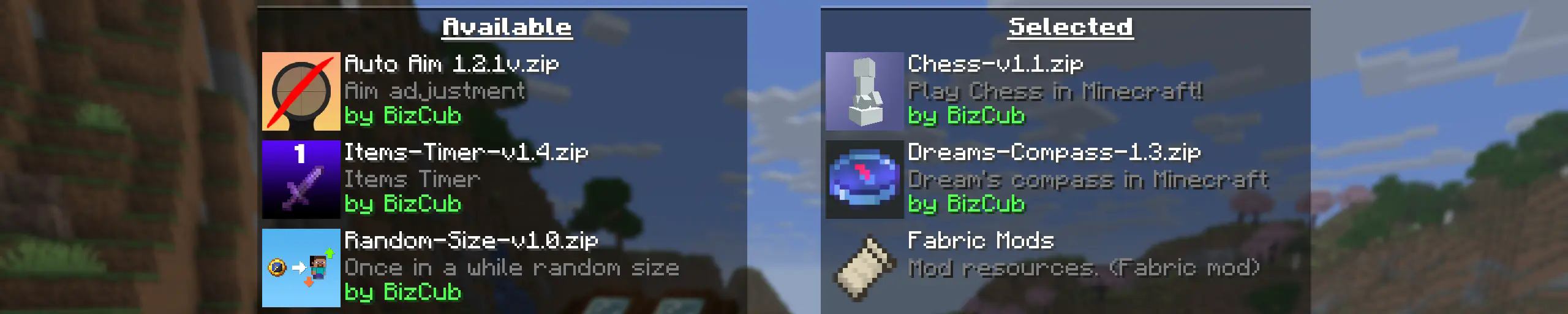
My goal is to make a mod that will help players with installing datapacks into the game so that they can get a new portion of unforgettable impressions.
## 💼 Usage

In order to launch a world with datapacks, you need to download any datapack that is compatible with the selected version of Minecraft, open and place the datapack in the datapacks folder, start creating a world and select the desired datapack from the list. However, when using Cloth Config, the mod settings specify the path to the downloads folder, so to use datapacks, you only need to download them, then simply open the datapack selection menu and enable the desired one.
## ✨ Features
Whenever possible, I added the most basic features for the mod that I could imagine.
Click to open
* Since the main thing for me is that as many players as possible start using datapacks, I made the mod available on 4 different loaders so that it can be launched from almost any modpack.
* The mod has a configuration. The values used by the mod can be changed in the mod menu (Fabric requires ModMenu), and can also be changed in the configuration file, which is available using the Cloth Config API.
* The mod allows players to add and load datapacks from different folders. To change the sources of these packs, you need to configure them in the mod settings. If you want to specify a folder in the game’s root directory, for example, “`my_datapacks“` instead of the full path “`C:Users{USERNAME}AppDataRoaming.minecraftmy_datapacks“`, simply enter the folder name in the field in the mod settings menu.
* By default, datapacks are loaded from the datapacks folder in the root directory and the downloads folder, allowing them to appear in the game immediately after installation (provided Cloth Config API is loaded; otherwise, only the datapacks folder will be used).
* The mod settings have two lists: one for required and one for optional datapacks. The first list specifies the paths to datapacks that are automatically applied when entering a world. The second list contains datapacks that remain inactive but can be enabled at any time using the “`/datapack enable“` command.
* The Simple Datapacks mod runs on the server. Since the mod settings are not accessible on the server, it automatically uses all datapacks from the datapacks folder.
* It’s possible to disable feature packs (experimental datapacks). If you don’t use feature packs, you can disable them to save space on the datapack selection screen. In the mod settings, function packages can be set to required, and then they will be applied when the world starts.
* Unlike similar mods, datapacks will continue to work in the world, even if you disable the mod. In the mod settings, you can enable copying datapacks to the world folder. In this case, the datapack will work without the mod, because the game will read it from the world.
## 🤝 Support

No Spear Charge Attack
# Description
The idea, is simple. so you like the spear, with its cool features, but you hate the charge attack? well then, this is the perfect datapack for you!
## Commands
You can change the settings for the diffrent modes with this command:
“`
/function no_spear_charge_attack:cmd/open_config
“`
## How it works
Basically the spears are made equipable to your feet.
unfortunately the only way i found that didn’t have any draw backs, was un-revertable
Golden Dandelion Suspicious Stew
# Description
This is a lightweight datapack changing what effects is given when a player makes a suspicious stew using the new Golden Dandelion item.
the pack makes it that the stew will give twice the duration of the saturation effect and give absorption I for 35 seconds when eaten
Silly Eatables

Eat things you shouldn’t with this Minecraft data pack and mod that adds some silly food crafting recipes to the game!
## Overview
Silly Eatables, available as a data pack and a Fabric, Quilt, Forge & NeoForge mod, adds new and silly food recipes such as:
* Sugar-coated Obsidian
* Explosive Treats
* Dirt Cakes
* Mud Pies
* Cotton Candy
Visit the Gallery page for a brief look at what Silly Eatables has to offer or check out the Food Recipes page on the wiki for a full list, which also includes additional information such as Nutrition and Saturation values!
## Versions
| Minecraft Version | Data Pack Version | Mod Version
| :–: | :–: | :–: |
| 1.21.9 – 26.1.2 | v4.2.0 | v4.2.1+mod
| 1.21.5 – 1.21.8 | v3.2.2 | v3.2.2+mod |
Older versions and snapshots can be found here on Modrinth or on GitHub.
Make sure you download the correct version that matches your Minecraft version and mod loader if you are using Fabric or Forge. Please note that **Fabric API is required to run the Fabric/Quilt mod version** of Silly Eatables.
## Support & Feedback
Found a bug or have an idea?
* Open a GitHub issue
* Join Discord
Silent Cats
Turns off the sound of cats
Side Eyed Rabbits
### **Side Eyed Rabbits**
Makes the eyes of rabbits on the side instead of the front, making them more realistic
(And cuter in my opinion)
Shulkerwave | End Music Disc
This small Data Pack adds a new music disc that can be found in End Cities that plays a new End-themed song called Shulkerwave!
—
Shulkerwave is a music track originally made in 2024 for an old Data Pack focused on overhauling the End dimension, which was then discontinued. However, I still wanted to release Shulkerwave in some way and finally ended up releasing it in the form of a smaller Data Pack to make it appear as loot in the End Cities!
—
### INSTALLATION
To work properly and play the new track, the Data Pack requires the installation of a Resource Pack. In the Versions page, be sure to go in the specific Release page and download both the Data Pack and the Resource Pack!
—
### COMPATIBILITY
On the technical side, the Data Pack replaces vanilla loot tables by adding an extra entry for the music disc, that way no existing loot is replaced by the Music Disc, however, this makes the Data Pack incompatible with any other packs that change the End City loot table.
Ship With Robber
My social networks

—
## Description👀
**This datapack adds a pirate ship with robbers to your world. The upper chests contain raw cod, fried cod, charcoal, gunpowder, crossbow, fishing rod, ore iron. The middle chests contain tnt, fried cod, raw cod, charcoal, ore iron, gunpowder, fishing rod, trident with a small chance. In the lower chests there is a blacksmith template Shore, gunpowder, tnt, iron ingot, ore iron, charcoal, raw cod, fried cod, with a small chance you can drop a trident and a raid bottle (and there is also a secret barrel with good loot!)**
—
## Useful Сommands🔧
– **Use /locate structure elysianfields:ship_woth_robber for see dungeon coordinates**
– **Use /place structure elysianfields:ship_with_robber for spawn dungeon**
—

shea’s simple Totem x bare bones
# shea’s simple Totem x bare bones
## what does this pack does
### it takes Totems and cleans it up
This pack does not include any bare bones textures
**Bare Bones is required for the intended look**
disclaimer if you use this pack make sure to place this pack above bare Bones in your resource pack list for it to use its own instead of bare bones
i recomend using other shader and resource packs like bliss to improve looks but that is optional
**you can showcase this if you want just dont redistrabute it**
Shadowfangs Texturepack
Shadowfang’s Texture Pack enhances your Minecraft experience with a clean, performance-friendly design focused on visibility and a sleek purple aesthetic. Built for both PvP and survival, it removes visual clutter while keeping the game stylish and smooth.
Features:
– Unobstructive Particles
– Unobstructive Purple Enchant Glint
– Certain Blocks were made more visible
– Low Fire
– Low Shield
– Small Totem Pop
– Transparent Gui
– Purple Button Textures
– Better Longer Mace
– Mace Parry Sounds
– Black Hotbar Selector
– And Much More
Perfect for PvP & Survival:
Optimized for clarity and fast reactions while maintaining a clean look.
Updates:
Updates Only when adding or removing stuff
Credits:


