Black Tooltip (Frame-only Monochrome)
#
Black Tooltip (Frame-only Monochrome)

Replaces the default Minecraft Tooltip with a **Black Tooltip (Frame-only Monochrome)**.
Looking for different colors/flags or styles? Check out the [Pride Tooltips Organization Page](https://modrinth.com/organization/pride-tooltips)!
Looking for packs with the same color(s)/flag but with different styles?
Can’t find a color, flag, or style you are looking for?
Feel free to [open an issue on GitHub](https://github.com/Pridecraft-Studios/pridetooltips/issues) or [join the Pridecraft Discord](https://discord.pridecraft.gay/) and ping `@rotgruengelb`!
Color Palette
The following colors where used to create this pack:
* #000000
Style
Frame-only Monochrome = A simple monochrome style with one color. This style only applies the color to the frame, leaving the background black.
Additional Information
* build_time: `2026-02-26T18:59:00+01:00`
* build_user: `rotgruengelb`
## Installation
Download and place into your `resourcepacks` folder. (Only works in versions **after 1.21.1**)
## About Pride Tooltips
A collection of resource packs that change tooltips to be colorful and/or pride themed.
### Rotgruengelb (Developer & Artist):
[](https://youtube.com/rotgruengelb)
[](https://github.com/rotgruengelb)
### Pridecraft Studios:
If you also want other bits of your UI to be themed with pride:
[](https://modrinth.com/project/pridegui)
You can chat with us and check out the source of our projects here:
[](https://discord.pridecraft.gay)
[](https://github.com/Pridecraft-Studios/pridetooltips?tab=readme-ov-file#pride-tooltips)
### Additional Credit
* Cursor texture, used in the banner, from the [Minecraft Cursor Mod by fishstiz](https://modrinth.com/mod/minecraft-cursor).
* The Pridecraft team for all their support and help.
Bisexual Pride Flag Tooltip (Tricolor)
#
Bisexual Pride Flag Tooltip (Tricolor)

Replaces the default Minecraft Tooltip with a **Bisexual Pride Flag Tooltip (Tricolor)**.
Looking for different colors/flags or styles? Check out the [Pride Tooltips Organization Page](https://modrinth.com/organization/pride-tooltips)!
Looking for packs with the same color(s)/flag but with different styles?
Can’t find a color, flag, or style you are looking for?
Feel free to [open an issue on GitHub](https://github.com/Pridecraft-Studios/pridetooltips/issues) or [join the Pridecraft Discord](https://discord.pridecraft.gay/) and ping `@rotgruengelb`!
Color Palette
The following colors where used to create this pack:
* #d60270
* #9b4f96
* #0038a8
Style
Tricolor = A simple tricolor flag with three colors.
Additional Information
* build_time: `2026-02-26T18:57:29+01:00`
* build_user: `rotgruengelb`
## Installation
Download and place into your `resourcepacks` folder. (Only works in versions **after 1.21.1**)
## About Pride Tooltips
A collection of resource packs that change tooltips to be colorful and/or pride themed.
### Rotgruengelb (Developer & Artist):
[](https://youtube.com/rotgruengelb)
[](https://github.com/rotgruengelb)
### Pridecraft Studios:
If you also want other bits of your UI to be themed with pride:
[](https://modrinth.com/project/pridegui)
You can chat with us and check out the source of our projects here:
[](https://discord.pridecraft.gay)
[](https://github.com/Pridecraft-Studios/pridetooltips?tab=readme-ov-file#pride-tooltips)
### Additional Credit
* Cursor texture, used in the banner, from the [Minecraft Cursor Mod by fishstiz](https://modrinth.com/mod/minecraft-cursor).
* The Pridecraft team for all their support and help.
Baby Pink Tooltip (Frame-only Alt-BG Monochrome)
#
Baby Pink Tooltip (Frame-only Alt-BG Monochrome)

Replaces the default Minecraft Tooltip with a **Baby Pink Tooltip (Frame-only Alt-BG Monochrome)**.
Looking for different colors/flags or styles? Check out the [Pride Tooltips Organization Page](https://modrinth.com/organization/pride-tooltips)!
Looking for packs with the same color(s)/flag but with different styles?
Can’t find a color, flag, or style you are looking for?
Feel free to [open an issue on GitHub](https://github.com/Pridecraft-Studios/pridetooltips/issues) or [join the Pridecraft Discord](https://discord.pridecraft.gay/) and ping `@rotgruengelb`!
Color Palette
The following colors where used to create this pack:
* #ffd7fc
Style
Frame-only Alt-BG Monochrome = A simple monochrome style with one color. This style only applies the color to the frame, leaving the background as the default Minecraft texture.
Additional Information
* build_time: `2026-02-26T18:59:08+01:00`
* build_user: `rotgruengelb`
## Installation
Download and place into your `resourcepacks` folder. (Only works in versions **after 1.21.1**)
## About Pride Tooltips
A collection of resource packs that change tooltips to be colorful and/or pride themed.
### Rotgruengelb (Developer & Artist):
[](https://youtube.com/rotgruengelb)
[](https://github.com/rotgruengelb)
### Pridecraft Studios:
If you also want other bits of your UI to be themed with pride:
[](https://modrinth.com/project/pridegui)
You can chat with us and check out the source of our projects here:
[](https://discord.pridecraft.gay)
[](https://github.com/Pridecraft-Studios/pridetooltips?tab=readme-ov-file#pride-tooltips)
### Additional Credit
* Cursor texture, used in the banner, from the [Minecraft Cursor Mod by fishstiz](https://modrinth.com/mod/minecraft-cursor).
* The Pridecraft team for all their support and help.
Tool Trim TP
# Tool Trim TP
Free and open-source resourcepack for Minecraft 1.21 and higher that works with [Tool Trim](https://modrinth.com/datapack/tool-trim-dp) datapack.
## Features
This resourcepack adds models for tool items.
This resource pack is currently only supported in 16x format.
Tool Trim DP
# More Tool Trim DP
Free and open-source datapack for Minecraft 1.21 and higher that adds tool customisation as with armor trim.
## Features
All types of swords, pickaxes, shovels, axes and hoes can be trimmed.
Bow, crossbow, trident and mace will be supported in a future version.
This datapack requires the installation of the [Tool Trim](https://modrinth.com/datapack/tool-trim-tp) resourcepack.
Tom’s New Painting Textures
# New Textures (Paintings)
This texture pack **replaces** the latent **Minecraft paintings** with new ones **or simply increases the resolution of the existing** paintings. If the modpack is not available in one version, try the next or previous version; perhaps they are compatible.
# Important:
If you want to use the texture pack for your modpacks, feel free to do so, but please write the following in the description below:
**Important: _Contains the resource pack [Tom’s New Painting Textures] by [GuSchu Gaming], licensed under CC BY 4.0._**
Tommy’s Custom music
This is to add my own custom music to minecraft, if you know coding, you can edit the resurce pack too! added music that fits a calm theme, took some music that i have no idea of they are copyrighted, if so, please dm me on my discord server!
Timer for Speedrun
## Description
Datapack or mod adds an automatic timer for speedrunning.
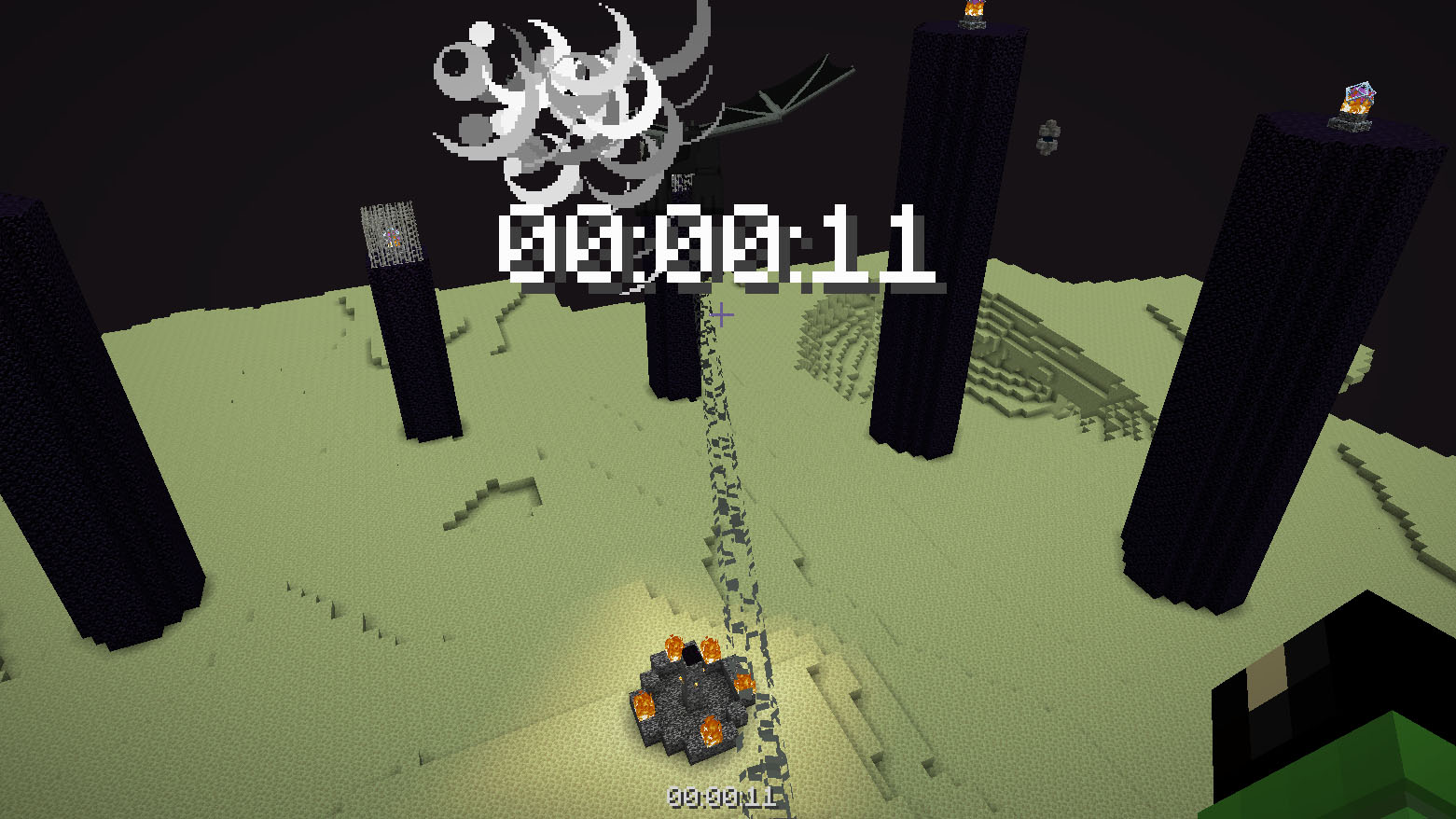
## How to use
The timer is activated automatically when you enter the world. The timer stops when you enter the end portal.
## Dependencies
– Fabric loader requires [Fabric API](https://modrinth.com/mod/fabric-api)
Time Adjustment
Time Adjustment


A simple mod/datapack that allows the player to change how long the Minecraft daylight cycle lasts.
It supports daylight cycle lengths 1 minute and longer.
🕹 Installation
Time Adjustment can be installed multiple ways. The simplest is through Modrinth, while Github can offer experimental versions.
Modrinth
Datapack
- Download the correct version of the datapack
- Follow this guide to complete installation
Mod
- Download the correct version of the mod
- If using the Modrinth app, you’re done. Otherwise, move the mod into your mods folder
Github
Releases
- Navigate to Github Releases
- Find the version of Time Adjustment you want
- In Assets, find and click the zip that has the version of Minecraft you’re playing on
- Follow this guide to complete installation
Continuous Updates
- Install Git
- Open a terminal in your datapacks folder (follow step 4 in Releases if you need help)
- In the terminal, enter
git clone https://github.com/Team-NPM/Time-Adjustment.git
- In the terminal, enter
git checkout $(VERSION), replacing $(VERSION) with the datapack version you want (run git branch -l to see all branches)
- If the datapack ever updates, open a terminal in your datapacks folder and run
git pull to update it quickly!
🎛 Running
When the datapack is installed, a message will appear in chat informing all users of the successful installation.
To begin using it, run /function config:timeadjust or /function timeadjust:.config to open the configuration menu.

- Day Length
- The length of the day shown in hours and minutes
- Daylight Cycle
- Easily enable or disable the daylight cycle (do not use
/gamerule doDaylightCycle or /gamerule advance_time in version below 26.1)
- Presets
- A set of preset daylight cycle lengths
- Manual Adjust
- A set of buttons to quickly adjust the time to the users liking. Clicking on the text in the middle allows the user to enter exact values
- Update Datapack
- A button to quickly run the update functionality for the pack and list update notes
- Uninstall Datapack
- A button that removes all datapack data from the world and gives instructions on how to finish cleanup
🖫 Updating
To update the datapack, simply enter the config and click the update option. It’ll automatically prepare the datapack for updating and will provide a set of instructions on how to finish updating. NOTE: Updating the datapack without running this option may cause problems during large update jumps.
🗑 Uninstalling
To uninstall the datapack, either enter the config and click the uninstall button, run /function uninstall:timeadjust, or run /function timeadjust:uninstall. Doing any of these options will remove all data from the world and give instructions on how to finish uninstallation.
🖇 Compatibility
For Minecraft 1.21.11 and below, most datapacks that rely on the default daylight cycle may not work as this datapack requires it to not run. If there are any problems with running other datapacks alongside this one, please follow the Reporting Issues section below.
🖂 Reporting Issues
Have a problem? Report it! There are 2 ways to report issues.
Github Issues
Head to https://github.com/Team-NPM/Time-Adjustment/issues and create an issue. You can also make suggestions there as well!
Discord
Join the Discord and make a bug report in the correct channel. Once it’s seen, a Github Issue will be created and linked.




Thigh Highs
# Thigh Highs
This is a resource pack that adds thigh-highs in black, blue, pink, red, and yellow instead of armor.
—
