Every Minecraft player knows the pain: you spend hours finding a wolf, tame it, and five minutes later it jumps into lava or walks off a cliff. **Better Dogs** overhauls wolf AI to make them effective partners. Powered by a high-performance **Event-Driven AI Scheduler**, they act efficiently without sacrificing performance.
Part of the **Vanilla Outsider Collection** — mods that refine the vanilla experience with modern standards.
—
## ✨ Features
### 🧠 Personality Intelligence
When tamed, wolves develop one of three permanent personalities, visible via custom particles:
– 💢 **Aggressive**: The Guardian. Proactively attacks hostile mobs and scouts ahead.
– ❤️ **Pacifist**: The Healer. Avoids combat unless you are hurt. High health, low damage.
– ✨ **Normal**: The Classic. Balanced stats and standard vanilla-plus behavior.
### 🤝 Advanced Social AI
– **Social Bonding (Affinity)**: Dogs form relationships within their pack. Socializing builds trust and reduces accidental infighting.
– **Adult Correction**: Aggressive adults discipline misbehaving puppies, preventing death loops.
– **Pack Genetics**: Puppies inherit personality traits and stats from their parents.
### 🛡️ Smart Survival AI
– **Cliff Safety**: Wolves detect fatal drops and airborne targets, stopping dangerous chases.
– **Hazard Awareness**: Improved pathfinding around lava, fire, and drowning hazards.
– **Creeper Awareness**: Wolves flee from hissing Creepers!
### 📡 Behavioral Specialization
– **Scouting**: Aggressive dogs proactively range ahead to clear your path.
– **Silent Alarm**: Pacifist dogs emit a high-pitched whine when they detect nearby monsters.
– **Gift System**: Loyal dogs bring you treasures based on their personality.
– **Debug Tools**: Use `/betterdogs debug territory` to test pack interactions.
### 🏰 Wild Wolf Territoriality
Wild wolf packs are now dynamic, territorial entities led by a dominant leader:
– **Territorial Disputes (The Handshake)**: When rival packs meet, leaders negotiate. If both want war, they engage in a **Territorial War**. If only one wants war, the other may **Yield & Merge** immediately or retreat based on a configurable chance.
– **1v1 Leader Duels**: During a war, rival leaders engage in a cinematic 1v1 duel to settle dominance, while pack members participate in a secondary brawl.
– **Yield & Merge**: Defeated packs are not lost; they yield and **merge** with the winning pack, allowing for the natural formation of massive wolf colonies.
– **Wild Personality AI (New Default)**: Out of the box, wild pack members exhibit unique behaviors (like Aggressive hunting or Pack Retreats) while anchored to their leader.
– **Performance Hardened**: All AI logic is performance-optimized using **DasikLibrary 1.7.0**, ensuring zero console spam and smooth server TPS even with massive packs.
—
## ⚙️ Configuration (Native Game Rules)
No messy config files. Better Dogs uses the **Native Minecraft Game Rules** system. All 40+ mod parameters are grouped into a dedicated **”Better Dogs”** category in the official UI.
—
## ☕ Support
If you enjoy the **Vanilla Outsider** collection, consider fueling the next update!
> [!NOTE]
> **Indonesian Users:** SocioBuzz and Saweria support local payment methods (Gopay, OVO, Dana, etc.) if you want to support me without using PayPal/Ko-fi!
Reverts the HUD Food/Hunger Icons to the default, vanilla ones when put above other Resourcepacks. Useful for overriding the textures when using other resource packs that might make them look worse.
Now with [Appleskin](https://modrinth.com/mod/appleskin/versions) and [Farmer’s Delight](https://modrinth.com/mod/farmers-delight) COMPATS!

I mainly made this to revert these food/hunger textures from [Unique Dark](https://modrinth.com/resourcepack/unique-dark):

|[](https://modrinth.com/resourcepack/old-water)|[](https://modrinth.com/resourcepack/old-bedrock)|[](https://modrinth.com/resourcepack/new-bedrock)|[](https://modrinth.com/resourcepack/mute-pistons)|[](https://modrinth.com/resourcepack/quieter-pistons)|[](https://modrinth.com/resourcepack/mute-dispensers-and-droppers)|[](https://modrinth.com/resourcepack/quieter-dispensers-and-droppers)
|:-:|:-:|:-:|:-:|:-:|:-:|:-:|
|[Old Water](https://modrinth.com/resourcepack/old-water)|[Old Bedrock](https://modrinth.com/resourcepack/old-bedrock)|[New Bedrock](https://modrinth.com/resourcepack/new-bedrock)|[Mute Pistons](https://modrinth.com/resourcepack/mute-pistons)|[Quieter Pistons](https://modrinth.com/resourcepack/quieter-pistons)|[Mute Dispensers and Droppers](https://modrinth.com/resourcepack/mute-dispensers-and-droppers)|[Quieter Dispensers and Droppers](https://modrinth.com/resourcepack/quieter-dispensers-and-droppers)
Vanilla Hearts Health Bar HUD Hotbar
Reverts the HUD Hearts/Health Icons to the default, vanilla ones when put above other Resourcepacks. Useful for overriding the textures when using other resource packs that might make them look worse.


|[](https://modrinth.com/resourcepack/old-water)|[](https://modrinth.com/resourcepack/old-bedrock)|[](https://modrinth.com/resourcepack/new-bedrock)|[](https://modrinth.com/resourcepack/mute-pistons)|[](https://modrinth.com/resourcepack/quieter-pistons)|[](https://modrinth.com/resourcepack/mute-dispensers-and-droppers)|[](https://modrinth.com/resourcepack/quieter-dispensers-and-droppers)
|:-:|:-:|:-:|:-:|:-:|:-:|:-:|
|[Old Water](https://modrinth.com/resourcepack/old-water)|[Old Bedrock](https://modrinth.com/resourcepack/old-bedrock)|[New Bedrock](https://modrinth.com/resourcepack/new-bedrock)|[Mute Pistons](https://modrinth.com/resourcepack/mute-pistons)|[Quieter Pistons](https://modrinth.com/resourcepack/quieter-pistons)|[Mute Dispensers and Droppers](https://modrinth.com/resourcepack/mute-dispensers-and-droppers)|[Quieter Dispensers and Droppers](https://modrinth.com/resourcepack/quieter-dispensers-and-droppers)
V-Paxel’s
## V-Paxels – Craftable & Functional Paxels!
**V-Paxels** uses the new component capabilities, such as the [tool component](https://minecraft.wiki/w/Data_component_format#tool), to add Paxels to the game. These paxels function as a multi-tool. You can use them to break all blocks as if you were using the recommended tool for each block. You can also switch between Tilling, Pathing and Stripping/Srcaping modes by pressing your sprint key and right click at the same time.
## Content:
– **6 Paxel Types:**
> Wood | Stone | Copper | Iron | Diamond | Netherite
– **Tilling, Pathing and Stripping/Srcaping Modes:**
> The ability to switch between **Tilling, Pathing** and **Axing Modes** (hoe, shovel and axe right-click).
– **1 Charm:**
– Charm of Mining Reach I–III
> A Charm that can be found in Trial Chamber Vaults, the Charm increases your Mining Reach when held in your Offhand – 1-2 can be found in normal vaults and 3 only in Ominous Vaults
## Showcase
#### V-Paxels | Crafting and R-Click Modes Showcase
UwUifies your minecraft (makes it cuter)(i hate what i made)!
## What does it do?
– Replaces “l” and “r” with “w”
– Adds random stutters to words
– Replaces some words to a more UwUified version
– Adds emoticons at the end of strings
## How was it made?
I spent a bit of my life to write a python script that does it all automagically.
# How to use
1. Install this resource pack.
2. Enable it.
3. Select “Engwish~ :3 (Furry)” language.
4. Profit.
## ✅ Features
– **Efficiently** converts UUIDs to hex format
– Optimized for speed by relying on a precomputated hexadecimal range (`0000-FFFF`), increasing static data usage
## 📖 Usage
Call the `uuid:_` function as an entity and use its output in `storage uuid:out plain`
Alternatively, assign a 4-integer array to `storage uuid:in UUID`, then call the `uuid:convert` function to format it.
user flags
> **communicating with non-friends in 26.2**
>
> first, open the game at least once to generate the config. then open `config/user-flags.properties` and put `false` next to the line reading `chat_friends_only=`.
>
> this will also allow you to see your own messages. an upcoming update will make this the default option.
# user flags
unblock chat, disable telemetry, and more. configure your safety settings!
by default, this mod simply prevents chat from being disabled by account settings. see below for more configuration information!
this mod works on all versions from 1.18 to 26.1!
## how it works
when starting up the game, minecraft gets [some information about what privileges your account has](https://minecraft.wiki/w/Mojang_API#Query_player_attributes), known internally as user flags. this is what controls various account features such as whether you can see chat. this mod simply changes those values to whatever you want!
## configuration
this mod creates a `config/user-flags.properties` file which can be used to make local changes to your account’s safety settings. simply put true/false next to the values you want to change.
[AVAILABLE ON HANGAR](https://hangar.papermc.io/break08/Useless-Upgrade-Teamplate)
This mod will keep the Netherite Upgrade Template but make it useless, you don’t need it to get Netherite Tools. Instead of, you can replace the template with a gold ingot; therefore, you don’t need to go to the dangerous bastion for the template and upgrading armor =)
### Note (especially 1.20.1 version)
**If the gold ingot can’t go in the template slot in smithing table when you hold Shift and click, try drag and drop in in the template slot**. Like this:
If shift + click don’t put gold ingot in template slot

### Support 26.1 and 26.2-snapshot
**Now support MC 26.1 + 26.2-snapshot (Fabric and Datapack)**

# Support removing **UPGRADE TEMPLATE** for other mods
Enderite Mod Support (1.20.1 and 1.21.11 Fabric)
Support for [Enderite Mod](https://modrinth.com/mod/enderite-mod)
No longer require **Enderite Upgrade TEMPLATE**, replace it with a **diamond** !
> [Enderite Mod](https://modrinth.com/mod/enderite-mod) by Nic4Las
> [Advanced Netherite](https://modrinth.com/mod/advanced-netherite) by Autovw
> [Reinforced Barrels](https://modrinth.com/mod/reinforced-barrels) by Aton-Kish
> [Reinforced Chests](https://modrinth.com/mod/reinforced-chests) by Aton-Kish
> [Reinforced Shulker Boxes](https://modrinth.com/mod/reinforced-shulker-boxes) by Aton-Kish
> [Traveler’s Backpack](https://modrinth.com/mod/travelersbackpack) by Tiviacz1337
Just for Fabric 1.21.11
### More supported mod:
You can suggest me mod which you want to be supported, but not all mod will be accepted. Condition (Even if all these conditions are met, some mods may not be supported):
> Popularity (10 000 downloads or above)
> Mod uses recipe that includes **NETHERITE UPGRADE TEMPLATE** or anything that is similar to **UPGRADE TEMPLATE**
Go to ISSUES tab on GITHUB (Report bugs page), create new “Issues”, choose **Enhancement** label and provide mods’ name and link.
U.P.E. aka Unreal Portal Engine – is a resource engine designed to visually improve the portal(s) in Minecraft Java Edition.
Do you remember the colored portals from the 20w14infinite snapshot and jeb_ the sheep? I created resource packs using CIT (Custom Item Textures), in which I implemented the ability to paint portals using renamed leather armor and dye, and to apply absolutely any image to them.
Resource packs? Why not a resource pack? During development, I encountered difficulties due to the final resource pack size, model limitations in Minecraft, and name length limitations in older versions and in the OS itself. Therefore, I had to split the resource packs into separate components.
Core Engine (for all game versions)
[Add-ons](https://modrinth.com/user/Spazmanazer_Twins) (for Optifine versions from 1.9 to 1.21.4 and for versions starting from 1.21.5 and all future versions, including snapshots)
[Connector](https://modrinth.com/user/Spazmanazer_Twins) (for add-ons for game versions 1.21.5 and all future versions, including snapshots)
The core engine doesn’t do anything on its own. It’s just a collection of models. So, enabling it in-game won’t change anything.
Addons work alongside the engine. With them, you can paint portals or use any PNG image (or GIF after proper conversion). Or you can use any image and color it with a dye. It’s all up to your imagination.
Connector was created due to the priority of resource packs in the list. It’s needed to allow addons to work together on versions 1.21.5+.
Where is a resource pack useful? In singleplayer and on servers.
Since these are resource packs with item renaming, all visual changes will be visible to everyone who has them installed.
You can color-code portals to help you remember which one leads where or which one is connected to which.
You can create a portal gallery.
It’s all up to your imagination.
FAQ
Question 1: what does the engine do?
Answer: adds a set of .json models that, after renaming an item, can do the following:
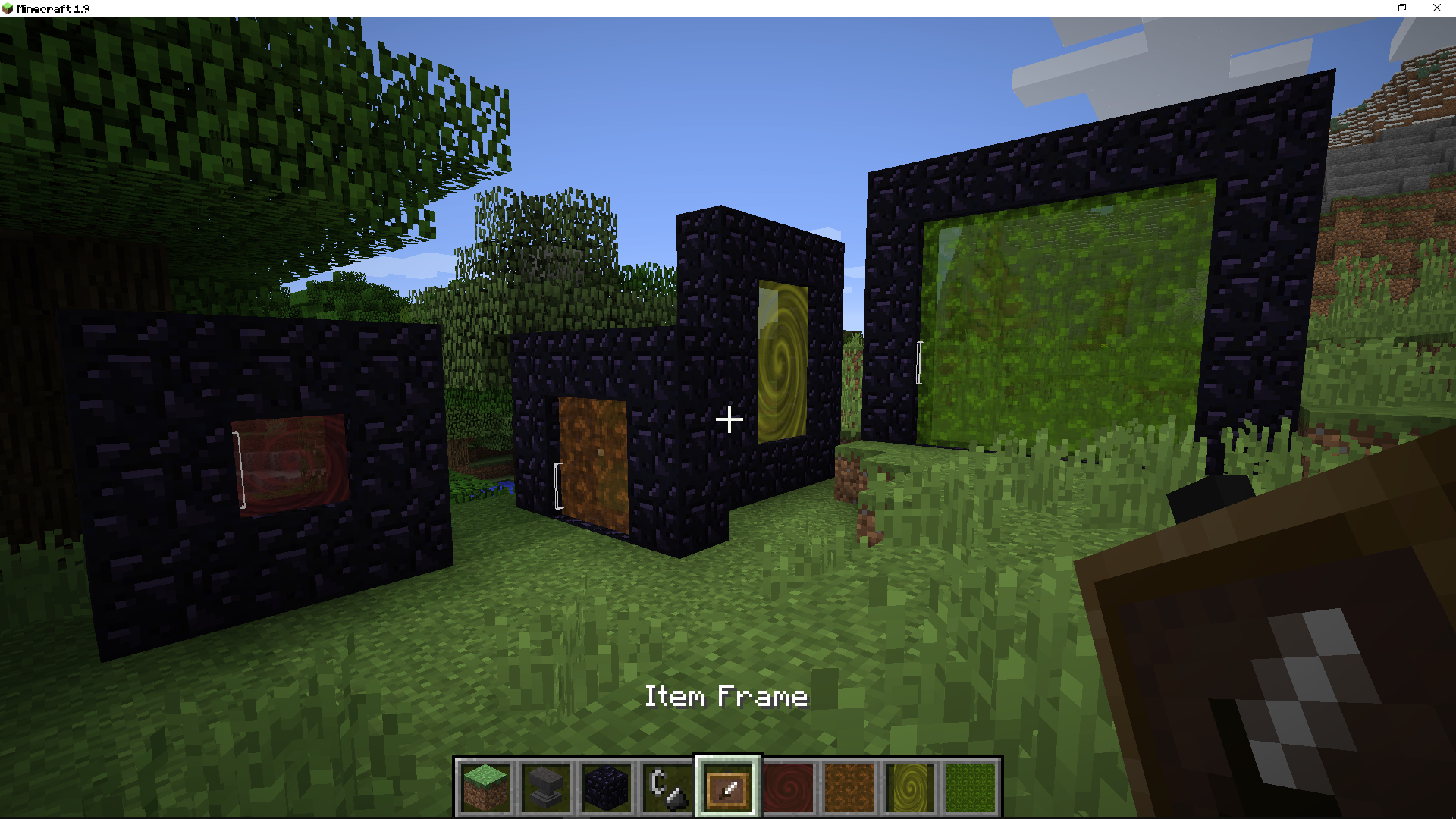
But if you just enable the resource pack, nothing will change in the game, since it is just a set of models.
Question 2: what is needed for the engine to work?
Answer: you need to create an addon for it using CIT (Custom Item Textures) technology, which is available in Optifine, in third-party mods like CIT Resewn, and starting with 1.21.5+, in the vanilla game.
Question 3: will addons work on the server too?
Answer: yes, because CIT (Custom Item Textures) is used exclusively on the game client and not on the server.
Question 4: how to create your own addon?
Answer: you need knowledge of resource packs, scripts for mass file renaming, and Notepad++ for mass character changes.
Question 5: what do you mean by mass renaming?
Answer: portal sizes. This engine supports all portal sizes, from the impossible 1×1 to the maximum 21×21.







