A re-texture of the Creeper using methods similar to the original. My aim was to match the existing art as much as I possibly could (though I’m not much of an artist lol), and also to provide a nice balance between the old and new.
This is based on the modern leaves texture from current Minecraft, for obvious reasons 😛
I looked at the original uncropped texture from an earlier version to match various details. Many people miss that the body actually has some very light detailing, which is included on here. The background color on the original was a white/grey color (I can’t quite tell), but I opted to go for a greenish hue to match the current promotional art.
You might say this doesn’t blend in with the grass as much, which is kind of a byproduct of how the game evolved. Minecraft started with only one biome, grass, which let the Creeper blend in easier. The moment a snow environment was added that point was lost. So I’d say blending in is a non-issue nowadays, for better or for worse.
This also comes with a Spawn Egg.
Yes Steve Model
The Yes Steve Model mod is a Minecraft Forge/Fabric/NeoForge mod that modifies the vanilla player model, using geckolib at its core, using Minecraft Bedrock Edition models and animation files. This allows players to customize player models and animations as they wish.
– **Custom Model Wiki: **
– **Discord: **
– **This github repository is maintained by community player @Elaina and stores many YSM models shared by art authors: [https://github.com/Elaina69/Yes-Steve-Model-Repo](https://github.com/Elaina69/Yes-Steve-Model-Repo)**
# Platform Support
Versions 1.1.5 and earlier were written in pure Java and support the three major mainstream platforms and mobile platforms.
Since the encryption algorithm of the old versions written in Java was quickly cracked, starting from version 1.2.0, the core encryption and rendering parts are all written in C++. This greatly improves the rendering performance and security, but the multi-platform support is poor.
The Yes Steve Model mod takes into account the mod needs of the server community, and adopts many designs suitable for the server environment, including but not limited to:
1. Automatic synchronization of client models: When players enter the server, the server will automatically synchronize the models to the player’s computer.
2. Encrypted model files: All the models sent to the player client are encrypted binary files, effectively avoiding the problem of model theft!
3. Model auth function: Models can be authorized separately, and only after the OP input command is authorized, a specific model can be used.
4. Vanilla player model modification: Added default Steve and Alex models, both of which can automatically call the player skin display.
Simple customization function: The model customization function is extremely simple. You only need to place the model, textures and animation files in a specific folder, and input the reload command in the game to automatically load and synchronize. No need to write any configuration files!
—
For client players, it is also extremely simple to use. After the player enters the server for the first time and waits for more than ten seconds (time-consuming for model synchronization), he can use the shortcut key Alt + Y to open the following GUI:
– ① Model switching button: Click to switch to the corresponding model. If the icon in the upper right corner of the button is red, it means the model is not authorized. The number in the icon represents the number of materials that the model can switch.
– ② Texture switching button: For models with multiple textures, click the left and right buttons to switch the model texture.
– ③ Model category switching button: You can switch between all models, auth models and vanilla models (currently only Steve and Alex models
—
There are many authors who have published works on planetminecraft. You can follow them:
– **NekuroMC**:
– **Omegaff0048**:
– **rWby9**:
– **WelfarexWaifu**:
# Additional Warning:
### Please do not create any models that violate laws and regulations. This production team is also opposed to any form of R18/NSFW content creation! We have never participated in any related content creation!
Although we have used digital signatures to avoid this as much as possible, there may still be false positives from some antivirus software.
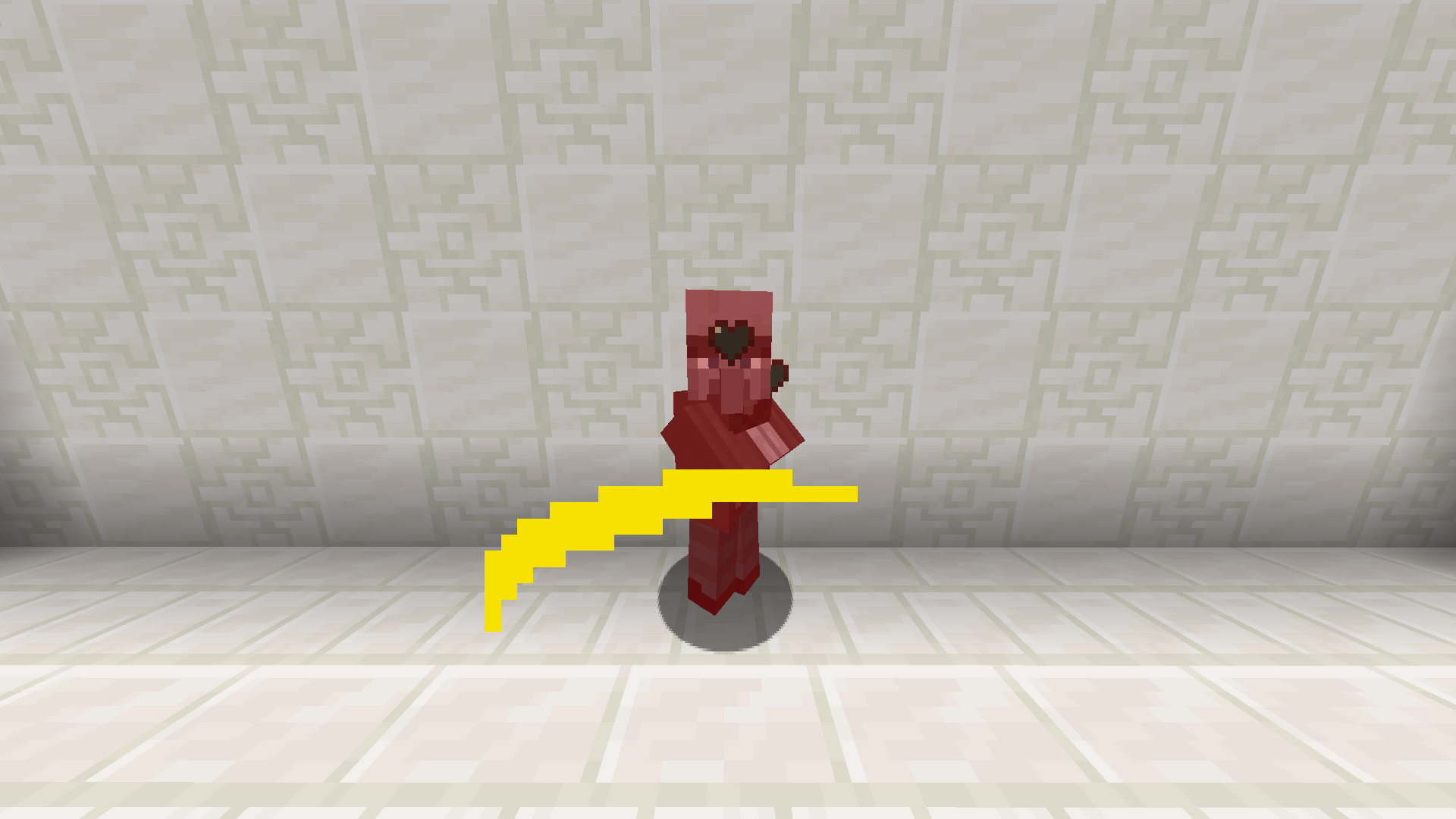
Yellow Sweep
**Changes sweep to yellow**
—
Tired of boring brownish-gray sweeps? Then try spicing up your game with something new!
Yellow Crits
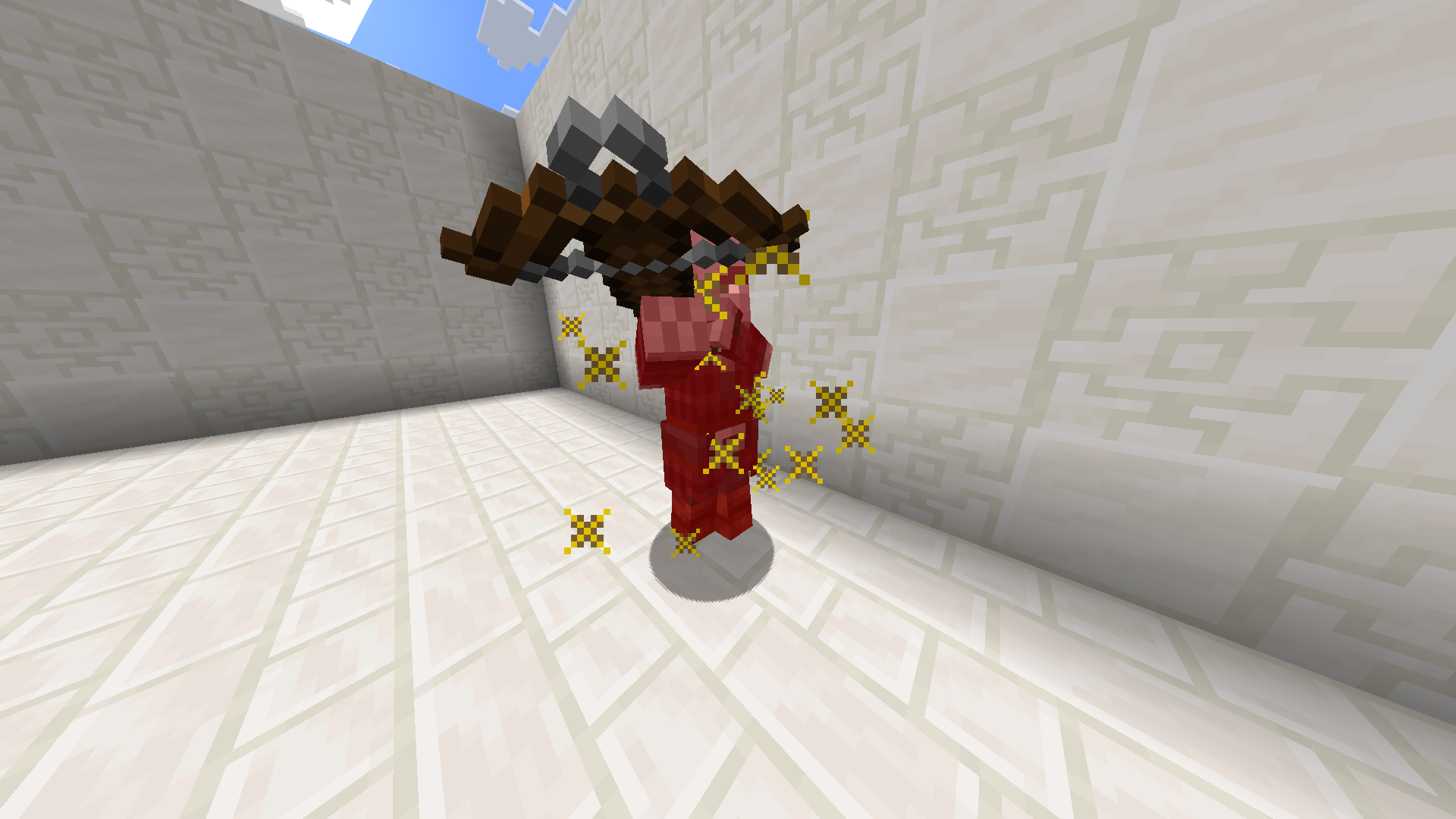
**Changes critical hit to yellow**
—
Tired of boring brownish-gray critical hits? Then try spicing up your game with something new!
Brrrrock+ (Yeeterite Extras)
## Yeeterite Extras
An add-on for [Yeeterite](https://modrinth.com/mod/yeeterite) containing items that don’t fit in the original idea (Everything that isn’t a pickaxe to break bedrock with)
## Features
– Adds a complete new Material Set of Yeeterite
– Includes:
– Yeeterite Sword
– Yeeterite Axe
– Yeeterite Shovel
– Yeeterite Hoe
– Yeeterite Yeeter (All-in-one Tool)
– Yeeterite Hammer (Changeable Dig Size)
– Yeeterite Bow
– Yeeterite Helmet
– Yeeterite Chestplate
– Yeeterite Leggings
– Yeeterite Boots
– Yeeterite Elytra (Armoured Elytra)
### Yeeterite Armour Effects (When Wearing full suit, Elytra/Chestplate switchable)
– Fire Resistance
– Magma Striding (Move faster in lava)
– Includes No Lava Fog & No Fire Display on HUD
– Sound Resistance (sonic boom won’t ignore armour)
– Armour absorbs any damage that would normally ignore armour
All Tools and Items have custom textures and animated with a smooth rainbow effect.
# The Brrrrock Mod
This was a custom made Mod for [StellaGaming](https://www.twitch.tv/stellagaming) in order to break Bedrock in a ‘Vanilla’ way.
This Mod is more of a meme and for fun. Yeeterite tools are considerably OP
# Major Breaking Update
As of v3.0.0. A breaking update was released, this version no longer contains extra items outside the original idea. You must add [Yeeterite Extras](https://modrinth.com/mod/yeeterite-extras) in order to keep everything!
The Mod now only contains
– Yeeterite Pickaxe
– Yeeterite Ingot
– Yeeterite Upgrade Template
– Yeeterite Block
– Yeeterite Bonder
All Tools and Items have custom textures and animated with a smooth rainbow effect.
Yet Another World Protector (YAWP) is _the_ admin tool to protect your minecraft server (dedicated or LAN as well as single-player!). It’s available for (Neo-) Forge and Fabric.
YAWP designed to be used on dedicated servers, but can also be used in single player worlds and worlds opened to LAN.
It allows admins (and players with assigned permission) to protect their creations against various events/actions of
players, mobs and
the environment.
Create regions for your builds and apply region flags to protect them.
Assign players or vanilla teams to regions, so they can manage their own regions.
YAWP was inspired by the forge mod [WorldProtector](https://www.curseforge.com/minecraft/mc-mods/worldprotector) and
the [WorldGuard](https://dev.bukkit.org/projects/worldguard) plugin.
Join our discord if you have any questions or suggestions: [YAWP Discord](https://discord.gg/d7hArKCUtm)
***The mod is currently in its beta state, with many features not yet implemented but to come. These features will
include most of the things you know from WorldProtector and WorldGuard.***
This mod will be released for Minecraft versions 1.16.5+. If you are living in the past and are looking for a version for Minecraft 1.12.2, I suggest looking into using [WorldDefender](https://www.curseforge.com/minecraft/mc-mods/world-defender).
Starting with Minecraft **1.20.4**, YAWP will no longer be available for Forge and adapt **NeoForge** instead.
In YAWP there are three different kinds of regions to protect your server:
## *The* Global Region
The Global Region is… well global. Flags set in the Global Region, apply to all dimensions of the server and thus all
Local Regions.
## Dimensional Regions
Dimensional Regions are special regions which are tied to one dimension – like gamerule-flags for different dimensions.
Dimensional Regions have no spatial restrictions in the corresponding dimension. Dimensional Regions work like normal
regions, but are tied to a dimension.
They can’t be created manually. They are in fact automatically generated with each new dimension. The first Dimensional
Region for the overworld is created when the server is created.
The following Dimensional Regions are created whenever a player travels to a new dimension, thus creating the new
dimension with their respective Dimensional Region. Modded dimensions are supported as well.
## Local Regions
Local Regions are the regions you most likely now from WorldGuard or WorldProtector. They have a defined area in which
they work in and which they are limited to.
With Local Regions you are able to create areas in your world, which you want to protect from certain actions/events
which are caused by players, other entities or the environment.
To create a Local Regions you will need to have the permission of the parent region or permission from the config.
[Local Regions can be created](https://github.com/Z0rdak/Yet-Another-World-Protector/wiki/Commands#creating-a-local-region)
by marking the area with a RegionMarker and executing the corresponding command or by just using a command without the
RegionMarker.
For now the area of a region can be defined as in a cuboid or spherical shape, but I am planning to add more shapes for
region areas in future updates.
***
## Properties of regions
The properties of regions, flags, groups, etc. can all be managed through
an [interactive CLI](https://github.com/Z0rdak/Yet-Another-World-Protector/wiki/Interactive-CLI).
The colored text indicates interactive shortcuts commands or command suggestions. All colored text have a tooltip hint
which explains shortly what clicking on the corresponding link does.
Clicking on them gives the player a suggestion for executing a command or sometimes straight execute the command which
is hinted by the hover text.
Regions can only be managed by their owners, or by players which have the required OP level or have an entry in the
configuration. For more information, visit the wiki.
Whenever a new Local Region is created without supplying a parent region, the parent is set to the Dimensional Region
which the new Local Region is created in.
Local Regions can also have child regions. The children of a Local Regions need to be contained in the area of the
parent region. The region hierarchy also defines the region priorities. Child regions always must have a higher priority
than their parent.
Dimensional Regions always have the Global Region as a parent, and thus the Global Region all Dimensional Regions as
child regions.
Regions have owners and normal members. Owners are allowed to manage the region and bypass the flags, members are
only allowed to bypass the flags set in the region.
Owners and Members can be individual players or a [team](https://minecraft.fandom.com/wiki/Commands/team).
Groups allow you assign specific region permissions to different players and teams. Currently, there are only two
default groups: **owners** and **members**.
– **Owners** can manage their region themselves and add other players/teams to the region. They can also create their
own sub-regions within their region, manage flags, ect. and of course owners bypass flags.
– **Members** are only allowed to bypass flags only.
I am planning on adding a [LuckPerms](https://www.curseforge.com/minecraft/mc-mods/luckperms) integration with a future
update, so you can define your own groups and permissions.
If you have trouble with setting up regions, visit the discord for help.
Flags are the core of the region protection system. They define which actions are allowed or denied in a region. Flags
can be set to
– **Allowed**, to allow the corresponding action,
– **Denied**, to deny the corresponding action,
– **Disabled**, to disable the specific flag for flag checks.
Child regions inherit the flags from their parent regions. It is further possible to override the flag state for child
regions by setting the **override** property of the flag of the parent region accordingly.
See the [Flags](https://github.com/Z0rdak/Yet-Another-World-Protector/wiki/Flags) page for more details about the
different flags.
I am planning to add more flag in the future. A list of suggested flags which I’ll slowly add to the mod can be found
here: [Flag suggestions](https://github.com/Z0rdak/Yet-Another-World-Protector/issues/66)
There will also be more complex flags in the future. Like *ListFlag* which will allow you to define a list of allowed
blocks/entities/.. which are forbidden in the context of a flag.
YAWP provides a growing mod integration API for easier mod and modpack integration. Currently, the API allows other mods
to listen for events for region creation, changes and deletion and cancel these events to prevent them from happening.
Additionally, there are events for flag checks and their results, which can be used to manipulate the outcome of the
flag check.
***
[](https://github.com/Z0rdak/Yet-Another-World-Protector/wiki)
The client side installation of the mod provides language support (I18n) in form of a resource pack. Currently, english,
german and russian language is supported.
Starting with mod version 0.0.2.9-beta2 and Minecraft Version 1.19.4, YAWP provides a default english translation.
If your language is not yet supported, feel free to reach out to me via discord or issue a pull request via github! 🙂
The configuration of the mod allows you to control which is allowed to use the mod, sets default flags for Local and
Dimension Regions, command line interface options, etc.
The configuration is split in different files, covering different topics.
– `yawp-common.toml` – config for command permissions
– `yawp-flags.toml` – config for flags, custom flag messages, etc
– `yawp-region-defaults.toml` – config for default region properties
Since YAWP is a server-side mod, the config for it is found in the directory `/serverconfig` in your minecraft world
directory.
The documentation of the mod is small but growing. I am trying to keep up with the content. You can find the
documentation [<< here >>](https://github.com/Z0rdak/Yet-Another-World-Protector/wiki).
The documentation covers
* descriptions of different regions
* getting started & FAQ
* available commands & flags
* configuration
* and more …
If something is not covered feel free to hop on our discord server and ask your question there. 🙂
___
## Roadmap
There are many more features to come. The mod is in active development!
The following list is not comprehensive.
* Different flag types (List, Effect, …) for more granular control
* Data pack driven flag configuration
* Region boundary visualization
* Define your own region groups for more granular management of regions (LuckPerms)
* More granular permission system (combined with the more granular group features)
* Region templates for easier managing same regions with different spatial properties
* Region triggers for entering/leaving a region (for displaying messages, executing commands, etc)*
* Regions with different shapes (Cylinder, Prism, 3DPolygon)*
*
YardWatch
# YardWatch (for server owners)
Implementation of [YardWatchAPI](https://github.com/YouHaveTrouble/YardWatchAPI) for common protection plugins. If any of supported plugins implements the API itself, then this plugin will stop providing its implementation to allow the
plugin to take over.
If you’re a developer looking for information how to implement YardWatchAPI in your plugin, see
[YardWatchAPI](https://github.com/YouHaveTrouble/YardWatchAPI)
## Plugin you’re using is not implementing YardWatchAPI?
Contact the plugin developer and send them [here](https://github.com/YouHaveTrouble/YardWatchAPI/blob/master/readme.md)!
You can also request a temporary implementation within this plugin [here](https://github.com/YouHaveTrouble/YardWatch/issues/new?assignees=&labels=enhancement&projects=&template=implementation-request.yml&title=%5BNEW+IMPLEMENTATION%5D%3A+).
# YardWatchAPI (for developers)
API to unify protection plugins for minecraft bukkit servers to allow easy protection queries without having to import
10 different plugin apis with separate implementations.
Current version: [](https://jitpack.io/#YouHaveTrouble/YardWatchAPI)
If you’re looking for a plugin implementing YardWatchAPI for common protection plugins, see [YardWatch plugin](https://github.com/YouHaveTrouble/YardWatch).
# Usage
### Import the api using dependency manager
In any case of usage you will need to import the API. Replace `VERSION` with current version tag. You should also adjust your `` to `provided` if you’re not implementing the api and just querying it.
#### Maven
“`xml jitpack.io https://jitpack.io
com.github.YouHaveTrouble YardWatchAPI VERSION compile
## For plugins wanting to see if something is protected
### Check if player can break a block
Example handling of block breaking check. There’s no need to depend on any plugins for this.
“`java
public boolean canBreakBlock(Player player, Block block) {
ServicesManager servicesManager = getServer().getServicesManager();
Collection> protections = servicesManager.getRegistrations(Protection.class);
for (RegisteredServiceProvider protection : protections) {
if (protection.getProvider().canBreakBlock(player, block.getState(true))) continue;
return false; // if any protection plugin disallowed breaking the block, return false
}
// If all protection plugins allowed breaking the block, return true
return true;
}
“`
## For protection plugins
### Depend on YardWatch plugin
You can optionally softdepend and check if YardWatch is present to add an optional integration.
“`yml
depend:
– “YardWatch”
“`
### Implement Protection interface
Implement all the methods required by the interface
“`java
public class YourPluginProtection implements Protection {}
“`
### Register your implementation as a service
“`java
@Override
public void onEnable() {
getServer().getServicesManager().register(
Protection.class,
new YourPluginProtection(),
this,
ServicePriority.Normal
);
}
“`
Yandex Music
EU: Yandex music is a Fabric mod that brings Yandex Music directly into Minecraft. Listen to your favorite tracks, search for songs, and launch “My Wave” without ever leaving the game. It features a custom GUI with volume control, track scrubbing, and seamless playback, fully integrated into your survival or creative experience.
Paste the token into the top field and enjoy the music!
You can get the token at this link: https://oauth.yandex.ru/authorize?response_type=token&client_id=23cabbbdc6cd418abb4b39c32c41195d
———————————————————————-
RU: Yandex music – это продвинутый Fabric-мод, который интегрирует Яндекс Музыку прямо в Minecraft. Слушайте любимые треки, ищите конкретные песни по названию и бесконечно наслаждайтесь «Моей Волной», не сворачивая игру. Мод предлагает удобный внутриигровой интерфейс с полным управлением плейлистом, громкостью и плавной перемоткой для максимального комфорта во время выживания.
Вставьте токен в верхнее поле и наслаждайтесь музыкой!
Токен можно получить по этой ссылке https://oauth.yandex.ru/authorize?response_type=token&client_id=23cabbbdc6cd418abb4b39c32c41195d
YAML Config is a powerful Minecraft configuration mod that enables mod developers to create and manage configuration settings using the YAML file format. It offers a user-friendly GUI, extensive support for data types, and robust networking for client-server synchronization.
### Features
* **YAML File Format:** YAML Config utilizes the YAML file format, known for its readability and ease of use.
* **GUI Interface:** A well-designed GUI allows players to easily navigate and edit their configuration settings.
* **Extensive Data Type Support:** The mod supports a wide range of data types, including:
* **Primitive Types:** `boolean`, `int`, `float`, `double`, `String`, `ResourceLocation`, `Registry`
* **Collections:** `List`, `Map`
* **Date and Time:** `LocalDateTime`
* **Server-Client Synchronization:** Changes made to configurations on the server are automatically synchronized to clients, ensuring consistency across the gameplay experience.
* **Modpack Support:** The mod is designed to work seamlessly with existing modpacks, offering a flexible and expandable configuration system.
* **Validation and Error Handling:** The mod includes robust validation and error handling, ensuring that configurations meet the expected requirements.
### Installation and Usage
#### Installation
1. **Download the mod:** Download the latest version of YAML Config from the mod’s official website, CurseForge, or Modrinth.
2. **Place the mod file:** Move the downloaded JAR file into the “mods” folder within your Minecraft directory.
3. **Launch Minecraft:** Start Minecraft and join a world.
#### Usage
1. **Open the Configs Screen:** Press “F12” on your keyboard to open the Configs screen.
2. **Navigate to the Config:** The Configs Screen displays a list of available configurations. Select the mod whose configuration you want to modify.
3. **Edit Config Entries:** The Config Screen displays the available settings. Each entry includes:
* **Title:** The name of the setting.
* **Input Field:** A field for editing the value.
* **Reset Button:** A button for resetting the value back to its default.
4. **Save Changes:** Click the “Save Changes” button to save your modifications. The mod will automatically save the changes to the configuration file and synchronize them with other players on the server (if applicable).
### Development
#### Creating Configurations
**1. Define a Config Class:**
* Create a new Java class within your mod’s codebase that represents your mod’s configuration.
“`java
public class MyModConfig {
public static IConfig config;
public static IConfigEntry debug;
public static void init() {
ConfigBuilder builder = new ConfigBuilder(MyMod.MOD_ID, “mymod-config”, ConfigExtension.YAML, ConfigType.CLIENT);
}
}
“`
**2. Define Config Entries:**
* Use the `ConfigBuilder` class to define the settings for your configuration.
* Choose the appropriate data type for each entry using the `define*` methods.
“`java
// Example of defining a boolean entry:
debug = builder.defineBoolean(“debug”, false);
// Example of defining an integer entry with range:
intEntry = builder.defineInteger(“intEntry”, 10, 0, 100); // Min 0, Max 100
// Example of defining a string entry with pattern:
stringEntry = builder.defineString(“stringEntry”, “test”, “test\d+”);
// Example of defining a registry entry:
registryEntry = builder.defineRegistry(“registryEntry”, Blocks.GRASS_BLOCK, BuiltInRegistries.BLOCK);
// Example of defining a list:
stringListEntry = builder.defineStringList(“stringListEntry”, List.of(“test1”, “test2”, “test3”), 3, 10); // Min 3, Max 10
// Example of defining a map:
integerMapEntry = builder.defineIntegerMap(“integerMapEntry”, Map.of(“test1”, 1, “test2”, 2, “test3”, 3), 3, 10); // Min 3, Max 10
“`
**3. Build the Configuration:**
* Call the `build()` method on the `ConfigBuilder` to create your configuration.
* Store the configuration in a static field for easy access within your mod’s code.
* Use the `get()` method to retrieve the current value of a config entry.
* Use the `set()` method to modify the value of a config entry.
“`java
// Example:
boolean debugEnabled = MyModConfig.debug.get(); // Retrieve the current value of the “debug” setting
if (debugEnabled) {
// Perform debug-related actions
}
MyModConfig.intEntry.set(25); // Set the value of the “intEntry” to 25
“`
#### Config Type
* **`ConfigType.CLIENT`:** Client-side configurations are specific to the client who has installed the mod. They are not shared with other players on the server.
* **`ConfigType.SERVER`:** Server-side configurations are specific to dedicated servers. They will not be used on single player worlds and are not synced to the players on the server.
* **`ConfigType.COMMON`:** Common configurations are shared between both clients and the server. They can be edited on the server by editing the config file directly and restarting the server or by editing the values using the in-game GUI and saving the changes.
#### Using Custom Data Types
* Use the `IConfigEntryType` interface to register custom data types with the YAML Config mod.
* Implement a custom serializer for handling the serialization and deserialization of your custom data type.
#### Modpack Configuration
* If you are creating a modpack, you can use YAML Config to define the configuration settings for your modpack.
* Place the configuration file for your modpack in the “config” folder within your modpack’s directory.
 ](https://modrinth.com/mod/totem-party-popper)
 ](https://modrinth.com/mod/modern-advancement-screen)
 ](https://modrinth.com/mod/area-sign-alerts)
 ](https://modrinth.com/mod/yeeterite)
 ](https://modrinth.com/mod/yeeterite-extras)
 ](https://modrinth.com/mod/adventure-bags)
 ](https://modrinth.com/mod/hopper-the-hedgehog)
 ](https://modrinth.com/mod/smelter-the-hedgehog)
 ](https://modrinth.com/mod/note-block-tuner)
 ](https://modrinth.com/mod/stonecutter-gui-remastered)
 ](https://modrinth.com/mod/loom-gui-remastered)
 ](https://modrinth.com/mod/glass-carpet)
 ](https://modrinth.com/mod/explosive-party)
 ](https://modrinth.com/mod/stacks-are-stacks)
 ](https://modrinth.com/mod/fov-toggle)
 ](https://modrinth.com/mod/spongesucc)
 ](https://modrinth.com/mod/wwg)
 ](https://modrinth.com/mod/party-spores)
 ](https://modrinth.com/mod/party-cacti)
 ](https://modrinth.com/mod/party-flames)
 ](https://modrinth.com/mod/superflat-plus)
 ](https://modrinth.com/mod/cottagecraft-mod)
 ](https://modrinth.com/mod/cottagecraft-axolotls)
 ](https://modrinth.com/mod/cottagecraft-festive-eggs)