Worlium

Worlium replaces all vanilla cave generators with a Worley-noise-based carver modeled on the classic Worley’s Caves mod by fluke. The Worlium carver produces sprawling, winding, interconnected tunnels. From a gameplay perspective, the underground becomes a massive, labyrinth-like cave system that feels both claustrophobic and expansive.
The mod ships for both Fabric and NeoForge through a shared common module that implements the carver as a custom `DensityFunction` (`worlium:worley_caves`). Under the hood, the density function samples a seeded 3D Worley F1/F3-edge cellular noise warped by a 2D Perlin displacement field, applies a depth-scaled warp amplitude so caves become more chaotic closer to bedrock, and eases the cutoff back toward solid near the surface.
## Features
– replaces all vanilla caves with a Worley noise-based carver
– custom aquifer logic (prevents caves from being flooded with water)
– first-class support for Moderner Beta’s world preset
– increased diamond rarity
– removal of diorite, andesite, and granite blobs
– large lava lakes near bedrock (y=-63 to y=-56)
## Known Issues
– when close to aquatic biomes (oceans, rivers, etc) the carver will occasionally terminate with a flat stone wall
– the current aquifer removal logic uses biome tags, which works pretty well but is horrible for compatibility with other worldgen mods
## Compatibility
– **Moderner Beta**: supported
– – **CliffTree**: decent
– **Terralith**: suboptimal
– **Tectonic**: very suboptimal
– **Cave Overhaul**: no
Worldthreader
Worldthreader is a free and open-source Minecraft mod which optimizes the processing of multiple dimensions, by ticking
dimensions in parallel. Thread safety is ensured, with fallbacks to serial execution if no other solution can be found.
After each tick the dimensions wait for each other to ensure that everything stays in sync, avoiding breaking many
advanced redstone contraptions. Mod incompatibilities are expected, please report any issues to the worldthreader
issue tracker.
The mod works on both the **client (singleplayer) and server**, and **does not** require the mod to be installed on both
sides.
## Installation
The mod must be installed on the server to work in multiplayer. For use in singleplayer worlds, the mod must be
installed on the client.
1. Download the mod from Modrinth
or CurseForge.
2. Place the downloaded `.jar` file into the `mods` folder of your Minecraft directory.
3. Launch Minecraft with the Fabric mod loader.
### Configuration
To use the gamerules, you need the Fabric API. Without the Fabric API, Worldthreader will use the default settings.
– `/gamerule worldthreader_Active ` (default true) enables/disables the mod
– `/gamerule worldthreader_AdditionalEntityTickAfterTeleport ` (default false) enables/disables ticking
entities immediately after teleporting from the main overworld to the nether or end to simulate the timings of vanilla
portal use
– `/gamerule worldthreader_Debug ` (default false) enables/disables debug logging and illegal world access
detection. Use this to find issues, both correctness and performance related. If nothing shows up in the logs, that
only means that no issues were found, not that none can exist.
—
### FAQ
##### Does the mod change Vanilla behaviour?
Worldthreader aims to conserve vanilla-parity in most points.
Behavior based on the timing of entities going through portals might be delayed by a game tick when the entity is
leaving the overworld. However, `/gamerule worldthreader_AdditionalEntityTickAfterTeleport` ticks entities that are not
teleporting to the overworld once after being placed in the world. This should allow them to catch up on the tick they
missed. However, this happens at the end of the tick, meaning that no other mobs or pistons were able to push or damage
the entity in that tick because it hasn’t been there yet.
Interdimensional commands in command blocks or shared scoreboard accesses from different dimensions can be observed to
be in a different order since there are no interdimensional ordering guarantees within a single game tick for
interdimensional commands. The order of commands within one dimension remains the same as in vanilla.
##### Can my dimensions get de-synchronized?
No. Worldthreader will always synchronize the dimensions with each other, setting the overall MSPT to that of the
slowest individual dimension.
##### Are dimension counts above 3 supported?
Yes.
##### Can I use Worldthreader if I have fewer threads on my CPU than dimensions?
Yes, but that may reduce the performance.
##### How is the compatibility with other mods?
Compatibility issues with other mods may be very common. Please report all issues you encounter to Worldthreader
directly to avoid giving other mod authors headaches. The author of Worldthreader is willing to cooperate and suggest
changes to other mods for compatibility.
##### What about older versions of Minecraft?
There is the DimThread mod which supports a few older versions: https://github.com/WearBlackAllDay/DimensionalThreading
Worlds
## Worlds – World Management for Paper & Folia
Worlds is a modern, lightweight world management plugin designed for **Paper** and **Folia** servers.
It brings seamless world handling with **customization presets**, eliminating the need for extra plugins just to create
void or custom flat maps. Simply pick a predefined preset, or create your own!
### Why Choose Worlds?
**Vanilla Flat World Preset** – No more extra plugins for void or flat maps
**No Extra Data Files** – Worlds doesn’t store extra files, no more messy file syncing when sharing worlds
**Drag & Drop Import** – Just place the world in the folder & use /world import
**Full World Regeneration** – Reset any world (even the Overworld!) with one command
**Modern & Efficient** – Uses up-to-date server mechanics, not outdated methods
**World Keys** – Worlds are referenced by unique keys, improving compatibility with client mods
**World Linking** – Restore vanilla Nether and End portal behavior for custom worlds
### What’s Next?
**Custom Dimension Creation** – Like datapacks, but usable from commands and API!
Download now on Modrinth
Latest version supporting 1.20.6 (Java 21)
Latest version supporting 1.19/1.20.4 (Java 19)
Latest version supporting 1.19/1.20.4 (Java 17)
For further information check out the Wiki

World Portal
# World Portal
World Portal can create custom world portal to travel between dimensions. You can make your own portal for your custom dimension easily.
### Important
– [0.0.8] Portal frame corner left and right will be swapped.
– [0.0.10] Client side issue fix and data migration. Load world with this version first before updating.
## Features
– No client needed custom portal.
– Transform nether portal to custom portal by changing it’s frame corners.
– Horizontal portal (>=0.0.8).
– Simple configuration and datapack support.
**Can be added to existing modpack or world and can be removed from existing world easly. Please make sure backup your world first.**
### Planned
– End portal mode.
– Customized portal frame.
– Customized portal spawned mobs not just piglin or disable it.
– Customized portal minimum spawn height.
– Add or change portal particles.
– Command or function execution when entering and exiting portal.
– Destination based on biome, dimension, height, moon phase, time, and weather.
– Destination based on player level, saturation, or even economy and mana.
– Destination based on executed command or function.
– Destination restricted by dimension and player permissions.
– Destination override gamerule.
– Support for economy, permission, and quest mods.
– And many more including compat mods in the way.
Suggest new features for world portal on GitHub Discussion or Discord would be appreciated.
## Usage
You can configure this mod by config or data driven by using datapack.
Config (worldportal.json)
The id “minecraft:example” can be anything as long as it’s unique.
“`
{
“portals”: {
“minecraft:example”: {
“frame_top_right”: “minecraft:gold_block”,
“frame_top_left”: “minecraft:iron_block”,
“frame_bottom_right”: “minecraft:iron_block”,
“frame_bottom_left”: “minecraft:gold_block”,
“mode”: “worldportal:default”,
“destination”: “customdimension:dimension”
},
“minecraft:example_horizontal”: {
“frame_top_right”: “minecraft:gold_block”,
“frame_top_left”: “minecraft:iron_block”,
“frame_bottom_right”: “minecraft:iron_block”,
“frame_bottom_left”: “minecraft:gold_block”,
“mode”: “worldportal:horizontal”,
“destination”: “customdimension:dimension_flat”
}
}
}
“`
Datapack
In your datapack namespace folder, create “worldportal” folder with “portal” folder inside. In portal folder create json file with any name with content:
“`
{
“frame_top_right”: “minecraft:gold_block”,
“frame_top_left”: “minecraft:iron_block”,
“frame_bottom_right”: “minecraft:iron_block”,
“frame_bottom_left”: “minecraft:gold_block”,
“mode”: “worldportal:default”,
“destination”: “test:test”
}
“`
-> data\{namespace}worldportalportal\{id}.json
For now you can only customize portal frame corner and destination dimension if matches. More mechanics will be added on the next update, for now it’s enough for my use case.
## Compatibility
– Passengers Portal Fix
– **Create** Addons: Create: Portal Integration
## Issues
– [Radium]
Use Canary instead for better mod compatibility or manually disable “mixin.ai.poi.fast_portals”.
There are no new compatibility issues or bugs being reported. Please report it on GitHub so it can be fixed.
## Support
🟩 26.1-26.1.2 / 🟩 1.21.1 / 🟥 1.21-1.21.11 / 🟩 1.20.1 / 🟪 1.16.5 / 🟪 1.12.2
🟩 Supported
🟥 Support Dropped
🟨 In Progress
🟪 Considered
## Important Note
This mod can only be used to create custom portal. To make dimension, you need datapack or another mod to do it.
Made for personal gameplay tinkering, server customization, and modpack creation. Feel free to use in modpacks, videos, stream, or similar media. Consider help me financially if you like this mod, I will be really grateful.


WorldGuard ItemBlocker
# Summary:
Restrict Players from entering specific regions with restricted items.
Good for pvp zones, mace vs sword area etc
# Features
– Hooks into WorldGuard to prevent users from entering regions with any items you list in the config
– Sends hotbar and or chat message about the block & whats blocking you from entering
– Easily configurable and reload new restrictions and regions with one command
# Commands:
/wgib reload
# Permissions:
– worldguarditemblocker.reload – Reload config
– worldguarditemblocker.bypass – Bypass restrictions
# Dependancies:
– WorldGuard
Config:
“`
# AUTHOR: JAMPLIFIER
# SUPPORT: http://discord.gg/simplestudio
WARNINGS:
HOTBAR: true
CHAT: true
REGION-BLOCKS:
test:
BLOCKED-ITEMS:
– MACE
test2:
BLOCKED-ITEMS:
– MACE
– FIREWORK_ROCKET
MESSAGES:
BLOCKED-HOTBAR: “&cBlocked Item – &f- ”
BLOCKED-CHAT: “&cYou cannot bring &f- &cint
“`
WorldGuard

**Protect your server!**
WorldGuard lets you and players guard areas of land against griefers and undesirables as well as tweak and disable various gameplay features of Minecraft.

🛑 Make sure that you are using the Java version of Minecraft.
1. Set up a Bukkit server such as Spigot or Paper (Paper is recommended over Spigot).
2. Download WorldEdit from the WorldEdit page.
3. Download WorldGuard from this page (see the Files tab above for all versions).
4. Put the WorldEdit and WorldGuard plugin files into your plugins folder.
Check YouTube for tutorials, or read the official documentation.


Join our Discord server if you need help with installing or using WorldGuard.
**Make sure to check the docs first!**

- Create zones in your world that only permit mods or certain players from building within
- Set additional game rules on your server (deny wither block damage, falling damage, etc.)
- Set game rules on specific areas (food regen, health regen, disable PvP, TNT, control mob damage) in your world
- Blacklist certain items and blocks so they can’t be used
- Dump useful statistics and information about your server (/wg report -p)
- CPU profile your server (/wg profile -p)
- Add useful commands like an immediate “STOP ALL FIRE SPREAD” command.
- Works, more or less, with mods (other Bukkit plugins and FTB mods)
- Protects against many types of grief (fire spread, tree growth, TNT cannons, piston machines, crop trampling, paintings and item frames, etc.), and certain interactions can also be allowed (door open, lever usage, etc.)
- Well documented, and one of the oldest Minecraft projects (older than Bukkit!)
- Open source
- Enable only features you want! Everything is off by default. You can just install WorldGuard and configure it later.

**Can anyone use it?**
Only opped users or users with permissions supplied with a permissions plugin can use WorldGuard.
**How do you use WorldGuard?**
To learn how to use WorldGuard, read the docs. Check YouTube for tutorials too!
**I need help!!**
You may visit our documentation or Discord Guild.
**I have some feature requests…**
Visit our issue tracker. However, if you just have a question, please try one of the methods above.
**Can I edit the source code?**
Visit our GitHub repository. WorldGuard is licensed under LGPLv3 and you can compile it with Gradle.
🎉 Support us on GitHub Sponsors!
Need a host? We recommend Apex Hosting

WorldGameRules
# WorldGameRules
A fabric mod to change all gamerules to be separate per world
## Commands
The vanilla gamerule command has been replaced with a custom command that requires a dimension.
The gamerule command requires `world-gamerules.commands.gamerule` or operator level 2.
– `/gamerule [dimension selector]` – Query the gamerule `` in all specified dimensions
– `/gamerule [dimension selector]` – Set the gamerule `` to `` in all specified dimensions
### Dimension selectors
Dimension selectors allow you to specify what dimensions should be queried / set
– `@all` – Selects all dimensions
– `@namespace ` – Selects dimensions with the specified namespace (eg. namespace `minecraft` selects `minecraft:overworld`, `minecraft:the_nether` and `minecraft:the_end`, but not `custom:dimension`)
– `@regex ` – Selects all dimensions, where the dimension id matches the regex
– `` – To select a specific dimension
World Events

# 🌍 World Events & World Events Pro
### The Ultimate Immersion Engine
*Atmospheric Weather, Psychological Horror, Realistic Physics, and Custom Rewards.*
  
—
# 🚀 World Events Pro: JUST RELEASED!
**Bring your server to the next level with the Pro version.**

Upgrade now to unlock enterprise-grade features designed for big networks and content creators:
* **⚡ Folia & Multi-Threading Support:** Built for modern hardware with true multi-threading support.
* **💾 Database Persistence:** Sync active events and player data across your network using **MySQL** or **Redis**.
* **🎥 Twitch & Discord Integration:** Let your stream viewers trigger events via bits/subs, and announce events to your Discord automatically.
* **💻 JavaScript Scripting Engine:** Create your own completely custom events using the powerful JS scripting API.
* **🏆 Achievements & Betting:** Let players bet money on event outcomes and hunt for custom achievements.
* **⚔️ Boss Rush Mode:** Chain events together for the ultimate PVE challenge.
—
## ⚡ Why Choose World Events?
Static worlds lead to bored players. **World Events** transforms your server into a living, breathing ecosystem where every hour brings a new challenge or reward. Whether it’s a terrifying **Blood Moon** or a lucrative **Diamond Fever**, your players will always have a reason to stay logged in.
* **🚀 80+ Pre-Configured Events:** Ready to use out of the box. From simple buffs to complex environmental changes.
* **👻 Immersive Horror:** Features unique “Hidden Events” (**Paranoia**, **Silent Mobs**) that play tricks on players’ minds without obvious warnings.
* **🌲 Realistic Physics:** Trees that topple with gravity, meteors that leave craters, and acid rain that requires actual shelter.
* **🎨 In-Game Editor:** Create, edit, and tweak events live with a beautiful GUI. No YAML knowledge required.
* **✨ Smart Boss Bars:** A single, elegant bar that handles multiple active events with smooth carousel animations and MiniMessage gradient support.
* **⚡ Zero Lag Promise:** Highly optimized implementation maintaining **0.02% CPU usage** even on high-population servers.
—
## 📂 Explore The Categories
### 🌪️ Atmosphere & Weather
* **Acid Rain:** Seek shelter or take toxic damage during storms.
* **Solar Flare:** Direct sunlight burns! Stay in the shadows or underwater to survive.
* **Meteor Shower:** Watch the skies for falling stars that drop rare loot (and cause explosions).
* **Gravity Trees:** Chop one log, and the entire tree falls with realistic animations.
### 👁️ Psychological Horror
* **Paranoia:** Players hear footsteps, creeper hisses, and whispers that aren’t actually there.
* **The Mist:** A thick, blinding fog rolls in, reducing visibility to just a few blocks.
* **Silent Mobs:** Hostile mobs spawn invisible and completely silent—you won’t see them until they strike.
### ⚔️ Combat & Survival
* **Blood Moon:** Mobs spawn with custom **Boss Attributes** (150+ HP), iron/diamond gear, and aggressive AI.
* **Vampirism:** Players heal a percentage of all damage dealt to entities.
* **Exploding Mobs:** Every mob becomes a potential TNT trap upon death.
* **Mob Surge:** 2x-5x spawn rates for a true apocalypse experience.
### 💎 Mining & Economy
* **Diamond Fever:** Greatly increased chance to find diamonds in ores or even regular stone.
* **Auto-Smelt:** All mined ores drop as refined ingots instantly.
* **Treasure Hunt:** A loot-filled chest spawns in the wilderness with coordinates broadcasted to all players.
* **Bumper Harvest:** Massive multipliers for all crop yields.
—
## 🛠️ Administration Made Easy
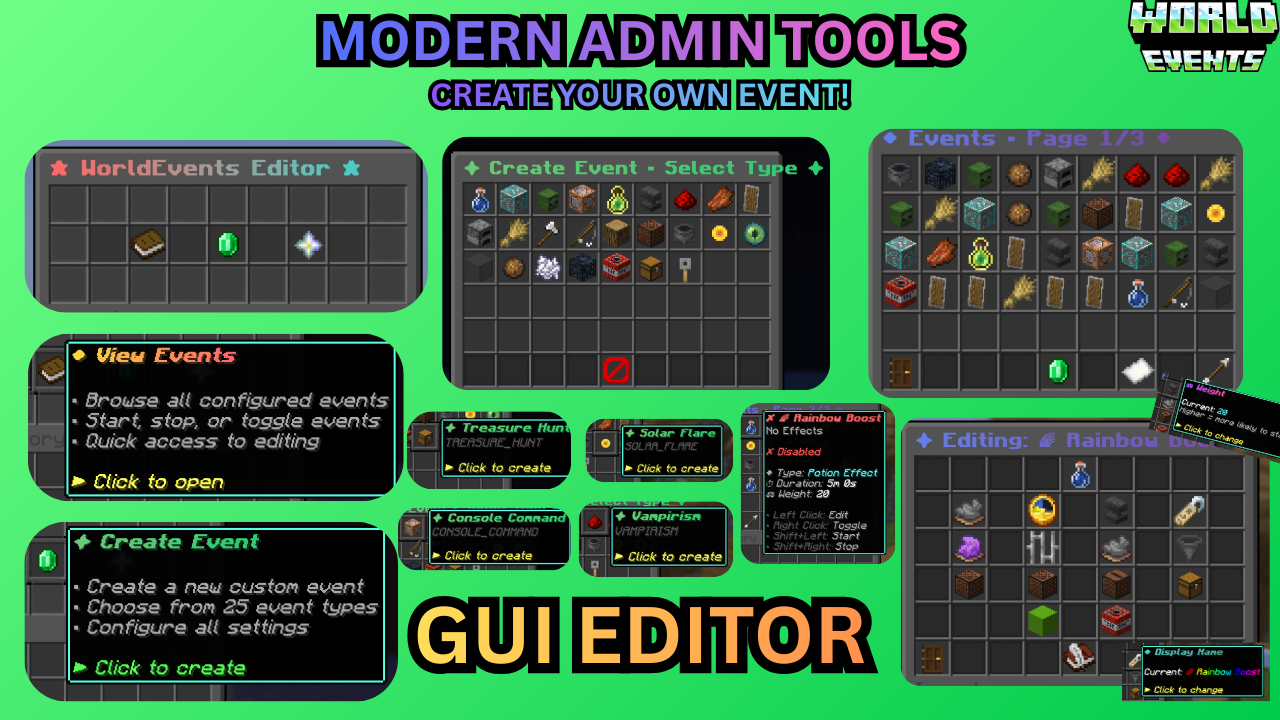
* **/wevent editor:** The ultimate GUI tool. Create, delete, and modify events live.
* **/wevent list:** View exactly what’s running, how much time is left, and which events are hidden.
* **/wevent extend :** Keep the hype going by adding time to an active event on the fly.
* **/wevent debug:** One-click diagnostic check for PAPI, Vault, WorldGuard, and version status.
* **/wevent reload:** Instantly reload all configurations without restarting the server.
—
## 🔌 Smart Integrations
We respect your server’s rules. World Events integrates natively with:
* **🛡️ Protection:** **WorldGuard, GriefPrevention, Towny,** and **Lands**. Meteors and explosions won’t grief protected claims.
* **📱 Bedrock:** **Floodgate** support ensures boss bars and MiniMessage symbols look perfect on mobile/console.
* **💰 Economy:** **Vault** integration for survival rewards and console command rewards.
* **⚔️ Custom Items:** Full support for **ItemsAdder** and **Nexo** in loot pools and mob equipment.
* **📊 Display:** **PlaceholderAPI** support for `%worldevents_active%` and per-event timers.
—
## 📊 Live Performance Metrics

## ❓ Need Support?

WorldEditDisplay
# WorldEditDisplay


A server-side WorldEdit selection visualization plugin
—
### About
WorldEditDisplay is a server-side plugin for Minecraft that adds visual selection rendering for WorldEdit. It intercepts WorldEdit’s CUI (Client User Interface) protocol packets and renders selections using Display Entities on the server side. This means players can see their WorldEdit selections without installing any client-side mods.
### Features
**Selection Types**
– Cuboid – Box selections with edge lines and grid display
– Polygon – 2D polygon boundaries with vertical columns
– Ellipsoid – Smooth elliptical selections
– Cylinder – Circular selections with adjustable height
– Polyhedron – Complex 3D polyhedral structures
**Visual Rendering**
– Uses Minecraft’s Display Entity (TextDisplay) system
– Customizable hex colors (#RRGGBBAA) for all visual elements
– Adjustable line thickness and grid density
– Translucent face filling for Cuboid, Polygon, and Polyhedron regions
– Grid overlay for easier size calculation
**Multi-language Support**
The interface is available in multiple languages with automatic client language detection:
– Traditional Chinese (zh_tw)
– English (en_us)
**Player Settings**
Players can customize their own rendering preferences:
– Choose preferred hex colors for elements
– Enable or disable face filling
– Adjust line thickness within server limits
– Control grid spacing and density
– Changes apply immediately
**Selection Sharing**
– Share your WorldEdit selection with other players in real-time
– Invite, accept, revoke, and unwatch shares via `/wedisplay share`
– Each shared selection is displayed in a unique auto-generated color
– Share relationships persist across server restarts
**View All Mode** *(op-only by default)*
– Toggle monitoring of all online players’ selections via `/wedisplay view`
– Hide specific players from your view, toggle name labels, and list monitored players
**Configuration System**
– Server-wide defaults in `config.yml`
– Per-player overrides in `player_config/*.yml`
– Hot reload without server restart
### Requirements
– Minecraft 1.20 ~ 1.21.x (Paper / Folia / Spigot)
– Java 21 or higher
– Required plugins:
– PacketEvents 2.11.1+
### Installation
1. Make sure WorldEdit and PacketEvents are installed on your server
2. Download `WorldEditDisplay.jar`
3. Place it in your server’s `plugins` folder
4. Restart the server
5. Edit `plugins/WorldEditDisplay/config.yml` if needed
6. Use `/wedisplayreload` to reload the configuration
### Commands
**Admin Commands**
`/wedisplayreload` – Reload plugin configuration
– Permission: `worldeditdisplay.reload` (default: op)
**Player Commands**
`/wedisplay set ` – Configure personal rendering settings
– Example: `/wedisplay set cuboid edge_color #FFD700FF`
– Permission: `worldeditdisplay.use.settings`
`/wedisplay reset [setting]` – Reset to server defaults
– Example: `/wedisplay reset cuboid` (reset all settings)
– Example: `/wedisplay reset cuboid edge_color` (reset specific setting)
`/wedisplay show [renderer]` – Show current settings
– Example: `/wedisplay show` (show all)
– Example: `/wedisplay show cuboid` (show specific renderer)
`/wedisplay toggle` – Toggle rendering on/off
– Quick command to enable or disable selection visualization
– Works independently for each player
`/wedisplay reloadplayer` – Reload your personal configuration file
`/wedisplay lang ` – Set interface language
– Example: `/wedisplay lang en_us`
– Supported: zh_tw, en_us
`/wedisplay share invite ` – Invite a player to view your selection
– Permission: `worldeditdisplay.use.share.invite`
`/wedisplay share accept ` – Accept a pending share invitation
– Permission: `worldeditdisplay.use.share.accept`
`/wedisplay share revoke ` – Revoke a share you previously granted
– Permission: `worldeditdisplay.use.share.revoke`
`/wedisplay share unwatch ` – Stop watching another player’s selection
– Permission: `worldeditdisplay.use.share.unwatch`
`/wedisplay share list [page]` – List current share relationships
– Permission: `worldeditdisplay.use.share.list`
**View All Sub-commands** *(op-only by default)*
`/wedisplay view` – Toggle view-all mode (see all online players’ selections)
– Permission: `worldeditdisplay.use.view`
`/wedisplay view hide ` – Exclude a player from your view-all mode
– Permission: `worldeditdisplay.use.view.hide`
`/wedisplay view hideall` – Exclude all online players from view-all mode
– Permission: `worldeditdisplay.use.view.hide`
`/wedisplay view unhide ` – Remove exclusion for a player
– Permission: `worldeditdisplay.use.view.hide`
`/wedisplay view label` – Toggle name label display for watched selections
– Permission: `worldeditdisplay.use.view.label`
`/wedisplay view list [page]` – Show view-all monitoring status
– Permission: `worldeditdisplay.use.view.list`
### Configuration
The main configuration file is `config.yml`:
“`yaml
language:
default: “en-us” # Default language
auto_detect: true # Auto-detect player’s client language
allow_player_change: true # Allow players to change language manually
renderer:
cuboid:
edge_color: “#FFD700FF” # Color for edges in #RRGGBBAA
edge_thickness: 0.05 # Line thickness
grid_spacing: 8 # Grid spacing
fill_enabled: true # Enable face filling
fill_color: “#FF000040” # Face fill color
# … more settings
player_limits:
thickness:
min: 0.01 # Minimum thickness
max: 0.5 # Maximum thickness players can set
# … more limits
“`
Each renderer type has its own configuration section:
– **cuboid**

– **polygon**

– **ellipsoid**

– **cylinder**

– **polyhedron**

### How It Works
**Core Components**
– Packet listener intercepts WorldEdit CUI protocol messages
– Render engine creates Display Entities to visualize selections
– Configuration manager handles server-wide and per-player settings
– Language manager provides multi-language support
**Rendering Technology**
The plugin uses Minecraft’s Display Entity system:
– Display entities render the visual elements
– More efficient than particle effects
– Works with vanilla clients (no mods required)
**Performance**
– Only updates when selections change
– Server admins can limit grid density and segment counts
– Each player’s settings are independent
### Permissions
“`yaml
worldeditdisplay.use: # Use visualization features (default: true)
worldeditdisplay.use.settings: # Manage personal rendering settings (default: true)
worldeditdisplay.use.share: # General share feature toggle (default: true)
worldeditdisplay.use.share.invite: # Send share invitations (default: true)
worldeditdisplay.use.share.accept: # Accept share invitations (default: true)
worldeditdisplay.use.share.revoke: # Revoke granted shares (default: true)
worldeditdisplay.use.share.unwatch: # Stop watching a shared selection (default: true)
worldeditdisplay.use.share.list: # List share relationships (default: true)
worldeditdisplay.use.view: # Toggle view-all mode (default: op)
worldeditdisplay.use.view.defaultenable: # Auto-enable view-all on join (default: op)
worldeditdisplay.use.view.hide: # Hide players from view-all (default: op)
worldeditdisplay.use.view.list: # List view-all monitoring status (default: true)
worldeditdisplay.use.view.label: # Toggle name label display (default: true)
worldeditdisplay.use.view.label.defaultenable: # Auto-enable labels on join (default: true)
worldeditdisplay.reload: # Reload configuration (default: op)
worldeditdisplay.render.auto-enable: # Automatically enable rendering on join (default: true)
“`
**About Auto-Enable Permission**
The `worldeditdisplay.render.auto-enable` permission controls whether rendering is automatically enabled when a player joins the server:
– **With permission**: Rendering is enabled by default when logging in
– **Without permission**: Players must manually use `/wedisplay toggle` to enable rendering
This allows server admins to control which player groups have rendering enabled by default.
### Usage
**Basic Usage**
1. Use WorldEdit’s `//wand` command to get the selection tool
2. Left/right click blocks to define your selection
3. The selection is automatically visualized (no extra steps needed)
4. Use `/wedisplay` commands to customize the appearance
**Customization Examples**
“`bash
# Change cuboid edges to solid diamond blue
/wedisplay set cuboid edge_color #55FF55FF
# Make lines thicker
/wedisplay set cuboid edge_thickness 0.08
# Change grid spacing
/wedisplay set cuboid height_grid_division 2
# Enable face filling with half-transparent red
/wedisplay set cuboid fill_enabled true
/wedisplay set cuboid fill_color #FF000080
# Toggle rendering on/off
/wedisplay toggle
# Reset all settings
/wedisplay reset cuboid
“`
### Building
To build the plugin from source:
“`bash
mvn clean package
“`
The compiled jar will be in `target/WorldEditDisplay-version-platform.jar`
**Project Structure**
“`
src/main/java/dev/twme/worldeditdisplay/
├── event/ # CUI event system
├── display/ # Render engine
│ └── renderer/ # Renderer implementations
├── config/ # Configuration management
├── lang/ # Language system
├── command/ # Command handlers
├── listener/ # Packet listeners
└── player/ # Player data management
“`
### Contributing
Issues and pull requests are welcome.
### License
See [LICENSE](LICENSE) file for details.
### Credits
– **TWME-TW** – Developer
### Related Projects
– WorldEdit – The core editing tool
– WorldEditCUI – Client-side CUI mod (protocol reference)
– PacketEvents – Packet handling library
– TextDisplayShapes – Shape rendering library used by the plugin
—
**Made with ❤️ by TWME-TW**
WorldEdit Hang Fix
A simple mod that prevents WorldEdit from hanging the Minecraft server when the server is stopping
It fixes https://github.com/EngineHub/WorldEdit/issues/2459. What it does:
– Shutdown `WorldEdit.getInstance().getExecutorService()` on dedicated server stop (or it will hang the server for maximum 60s)
– Ensure the singleton `java.util.Timer` object in `FutureProgressListener` runs on a daemon thread (or it will hang the server forever)
Supported environment
| Platform | Minecraft | WorldEdit |
|———-|————–|———–|
| fabric | MC >= 1.14 | >=7.0.0 |
| forge | MC >= 1.15 | >=7.0.0 |
| neoforge | MC >= 1.20.6 | >=7.0.0 |