Wynn At Dusk
#

## Wynn At Dusk
This project is a dark recolor/texture of the default Wynncraft resource pack. Designed for players who prefer a sharp and atmospheric aesthetic, this pack preserves some elements from Wynncraft while toning down brightness and enhancing contrast for a moodier in-game experience.
### Features
Recolor and added elements to GUI such as the character info tab and inventory as seen in gallery.
# Requirements
Make sure to place this pack above the default server resource pack after extracting the .zip.
**[Server IP]:play.wynncraft.com**
WWOO Islands
WWOO Islands worldgen is an addon for **[William Wythers Overhauled Overworld](https://modrinth.com/datapack/william-wythers-overhauled-overworld-(datapack))**, which changes the world generation to floating islands.
### If you prefer to add a new floating dimension, instead of modifying the overworld, look at [WWOO Islands Dimension](https://modrinth.com/datapack/wwoo-islands-dimension)
## Installation
– Download this datapack.
– Download official [WWOO Worldgen](https://modrinth.com/datapack/william-wythers-overhauled-overworld-datapack).
– Create a new world and drag the datapacks upon world’s creation.
– Put the WWOO Islands on top (above WWOO).
– Make sure the spawn is correct.
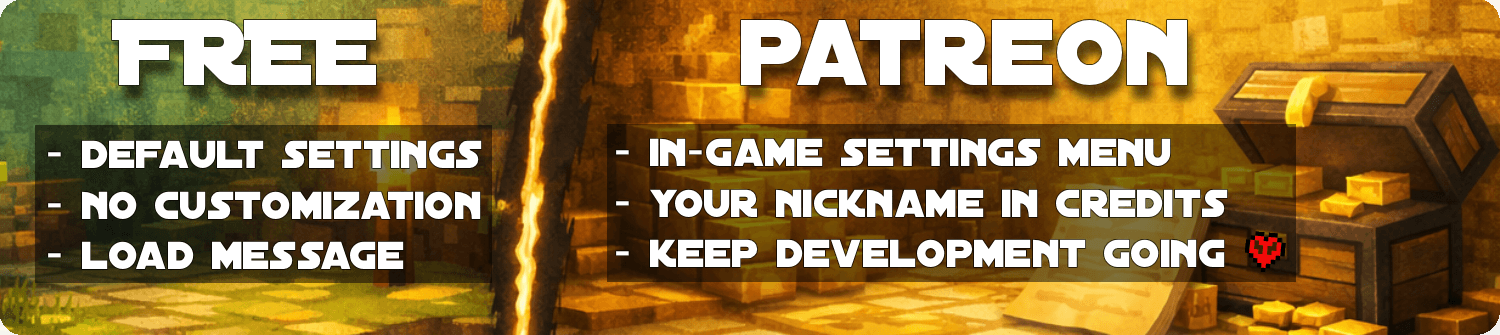
## Islands densities (Patreon feature)
You can chose islands density between 5 values: tiny, small, medium, large and massive.
A different datapack can be downloaded for each density.
Patreon Supporters
– **26.1 (10/04/2026):** Setsu-P, varinyc, nfnpgllxhn
– **1.21.11 (28/01/2026):** Azerxim, Setsu-P, varinyc, nfnpgllxhn
– **1.21.9 (12/10/2025):** CYKLOPPS, Azerxim, varinyc, Setsu-P, Wani P, Lionel Felke
– **1.21.2 (2024-12-02):** Delivator, Screaming Man, ZMH, Darklad32, CYKLOPPS, Azerxim, Aidan McCreary, varinyc, Setsu-P, Maximilian Adler, ODS, Jamie B
– **1.21 (2024-07-04):** 아아앨, Screaming Man, ZMH, Darklad32, CYKLOPPS, Aidan McCreary, Azerxim, Setsu-P, Gaming Grotto, Kobe Prokopetz
– **1.20.5+ (2024-06-10):** 아아앨, EXcore, Screaming Man, ZMH, Darklad32, CYKLOPPS, Memick Kung, Aidan McCreary, Setsu-P, Multi-Flamme
– **1.20.4 (2024-01-08):** Angelo Russo, 깔수, Screaming Man, ZMH, CYKLOPPS, Darklad32, God Emperor Leto II Atriedes
– **1.20.2 rewritten (2023-11-23):** Angelo Russo, 깔수, Screaming Man, ZMH, Darklad32, CYKLOPPS, God Emperor Leto II Atriedes
– **Mineshafts & Ancient Cities (2023-09-19):** Angelo Russo, 깔수, Eleanor Blackwood, Screaming Man, Dorian Dejean, ooF, ZMH, TerfyHorizon
– **1.20 (2023-07-06):** Delivator, Jonathan Fanelli, Angelo Russo, Phantom-Glitch-Wolf, John Stampe, Screaming Man, Dorian Dejean, ooF, ZMH, Yokie, Deadlot3, Darklad32
– **Islands noise V2 (2023-04-10):** Jonathan Fanelli, Angelo Russo, Screaming Man, Dorian Dejean, ooF, ZMH, Darklad32
– **V1 (2022-09-28):** Screaming Man, Dorian Dejean, ooF
Patreon Version
The free versions are designed to be fun and fully playable.
The Patreon version is for players and server owners who want more control, comfort, and flexibility through an in-game settings menu to tweak the parameters live, without file editing.
Becoming a Gold Patreon also means:
– Getting access to every Patreon versions of every projects.
– Getting your name listed in each project and on this page (see above).
– Supporting long-term development, updates, and new features 💛
Visitors

Waypoints (wWaypoints)
**Officially Allowed on Hoplite**
wWaypoints is the new best waypoint mod. It has unique features including, multi-block waypoints, block and item icon’s, clean folders, tons of customization and much more.
The mod has additional features such as toggle sneak improvement and a toggleable sign GUI popup designed to make trapping much better.
# Watch Sheet’s Showcase:
_(quite outdated; from 0.1.0, new one coming soon)_
WUH totem
Changes the totem texture to an animated [wuh](https://7tv.app/emotes/01GV56F8QR0006FW5TVZVMFVWE) 7tv.app emote

(donation link is to original creator)
White Tulips Make White Dye
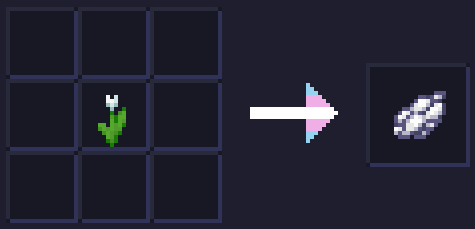
White Tulips Make White Dye replaces the recipe for making Light Gray Dye from White Tulips and crafts White Dye instead!
WTHIT
# What The Hell Is That?
[](https://modrinth.com/mod/fabric-api)
[](https://modrinth.com/mod/badpackets)
> _“I am no longer interested in modding.”_
> – TehNut
Hwyla is 🦀!!1 Now how the hell I can play Minecraft??!!1!
Don’t worry, ladies and gentlemen, I got you covered!
Introducing WTHIT – a fork of [HWYLA](https://minecraft.curseforge.com/projects/hwyla) by [TehNut](https://www.curseforge.com/members/tehnut), which is itself is a fork of [WAILA](https://minecraft.curseforge.com/projects/waila) by [ProfMobius](https://minecraft.curseforge.com/members/ProfMobius)
WTHIT is a mod that adds an ingame tooltip with information about what block (or fluid) the player is looking at.
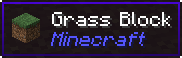
It also has an API for other mod to add more info about their blocks.
### Does WTHIT work with plugin X?
Of course, although make sure to use Fabric Loader 0.11+.
### Does it work with [insert minor version]?
Probably. The thing on brackets for every release is the version WTHIT compiled on.
It should work with any minor version if you want for some reason (like bruh just update)
### it’s A CLiEnt OnlY mod
It’s not. While some simpler feature may work in client only, more advanced stuff requires a server that has it installed. Feature that requires accessing NBT data (eg. inventory content) probably needs wthit on the server.
### Plz rENAmE
No. ~~Now that I think about it, “The hell I’m looking at” would work better :/~~
### Mod compatibility?
Check out [Megane](https://modrinth.com/mod/megane), it adds compatibility for tech mods to WTHIT.
WSkinLoader
# English
# WSkinLoader
A **Minecraft Fabric mod** that allows **custom skins and capes for offline players**, while keeping full support for **official skins for premium players**.
—
## Features
* ✅ Premium players use Mojang’s official skin system
* ✅ Offline players load skins and capes from custom APIs
* ✅ Supports multiple API sources with fallback order
* ✅ Graphical configuration interface via Cloth Config API
* ✅ ModMenu integration
* ✅ Player override configuration for specific players
* ✅ Hybrid mode: official skins + third-party capes (or vice versa)
* ✅ Player head icons displayed in the Tab list (multiplayer supported)
* ✅ Custom skins applied to player heads
—
# Default Configuration
By default, **LittleSkin** is used as the skin provider.
**Skin**
“`
https://littleskin.cn/skin/%name%.png
“`
**Cape**
“`
https://littleskin.cn/cape/%name%.png
“`
`%name%` will automatically be replaced with the player’s username.
—
# Configuration
## Configure In-Game
Recommended method.
1. Install **ModMenu**
2. Open **Main Menu → Mods → WSkinLoader → Configure**
3. Add, remove, or modify API URLs
4. Use the **Player Overrides** tab to configure specific players
—
## Configure via File
Configuration file location:
“`
.minecraft/config/wskinloader.json
“`
### Basic Configuration
“`json
{
“skinUrls”: [
“https://littleskin.cn/skin/%name%.png”,
“https://example.com/skins/%name%.png”
],
“capeUrls”: [
“https://littleskin.cn/cape/%name%.png”
],
“enableTabListHeads”: true
}
“`
### Configuration Fields
* **enableTabListHeads**
Whether player head icons are displayed in the Tab list.
Default: `true`.
—
# Advanced Configuration
## Player Overrides
You can configure custom rules for specific players.
“`json
{
“skinUrls”: [“https://littleskin.cn/skin/%name%.png”],
“capeUrls”: [“https://littleskin.cn/cape/%name%.png”],
“playerOverrides”: {
“PlayerName”: {
“skipPremiumCheck”: true,
“skin”: {
“useCustomApi”: true,
“apiIndex”: 0
},
“cape”: {
“useCustomApi”: true,
“apiIndex”: -1
}
},
“AnotherPlayer”: {
“skipPremiumCheck”: false,
“skin”: {
“useCustomApi”: true,
“apiIndex”: 0
},
“cape”: {
“useCustomApi”: false
}
}
}
}
“`
### Field Explanation
**skipPremiumCheck**
Skip Mojang premium check.
`true` = always use custom API.
**skin.useCustomApi**
Whether to use a custom API for skins.
`false` = Mojang skin.
**skin.apiIndex**
* `0` → first API
* `1` → second API
* `-1` → try all APIs in order
**cape.useCustomApi**
Whether to use a custom API for capes.
—
# Example Use Cases
## Force third-party skins for a premium player
“`json
“PlayerName”: {
“skipPremiumCheck”: true,
“skin”: { “useCustomApi”: true, “apiIndex”: 0 },
“cape”: { “useCustomApi”: true, “apiIndex”: 0 }
}
“`
## Hybrid mode
Official skin + custom cape
“`json
“PlayerName”: {
“skipPremiumCheck”: false,
“skin”: { “useCustomApi”: false },
“cape”: { “useCustomApi”: true, “apiIndex”: 0 }
}
“`
## Use a specific API
“`json
“PlayerName”: {
“skipPremiumCheck”: true,
“skin”: { “useCustomApi”: true, “apiIndex”: 1 },
“cape”: { “useCustomApi”: true, “apiIndex”: 1 }
}
“`
—
# How It Works
## Skin Loading Process
1. When Minecraft attempts to load a player skin, the mod first queries the Mojang API:
“`
https://api.mojang.com/users/profiles/minecraft/{name}
“`
2. **Premium players**
* The mod directly queries the Mojang Session Server:
“`
https://sessionserver.mojang.com/session/minecraft/profile/{UUID}
“`
* Retrieves the real skin and cape URLs
* Downloads and caches them locally.
3. **Offline players**
* The mod tries custom API URLs in the configured order.
4. Downloaded textures are cached in **SkinCache**.
5. If all sources fail, Minecraft’s **default skin** will be used.
—
## Tab List Player Heads
Player type detection:
* **HTTP 200** → Premium player
* **HTTP 404** → Offline player
For premium players, the mod directly retrieves the skin and cape URLs from the Mojang Session Server and downloads them immediately, ensuring the correct head texture appears in the Tab list without waiting for vanilla logic.
# 中文
# WSkinLoader
一个 **Minecraft Fabric 模组**,支持为 **离线玩家加载自定义皮肤和披风**,同时保持 **正版玩家使用 Mojang 官方皮肤系统**。
—
# 功能特性
* ✅ 正版玩家使用 Mojang 官方皮肤系统
* ✅ 离线玩家从自定义 API 加载皮肤和披风
* ✅ 支持多个 API 源并按顺序回退加载
* ✅ 通过 Cloth Config API 提供图形化配置界面
* ✅ 支持 ModMenu 集成
* ✅ 支持玩家级别的覆盖配置
* ✅ 混合模式:正版皮肤 + 第三方披风(或反之)
* ✅ Tab 列表中显示玩家头像(支持多人服务器)
* ✅ 玩家头颅显示自定义皮肤
—
# 默认配置
默认使用 **LittleSkin** 作为皮肤源。
**皮肤**
“`
https://littleskin.cn/skin/%name%.png
“`
**披风**
“`
https://littleskin.cn/cape/%name%.png
“`
`%name%` 会被自动替换为玩家名。
—
# 配置方法
## 游戏内配置(推荐)
1. 安装 **ModMenu**
2. 进入 **主菜单 → Mods → WSkinLoader → 配置**
3. 在配置界面中添加、删除或修改 API 地址
4. 在 **玩家覆盖(Player Overrides)** 标签页中配置特定玩家
—
## 通过配置文件
配置文件路径:
“`
.minecraft/config/wskinloader.json
“`
### 基础配置
“`json
{
“skinUrls”: [
“https://littleskin.cn/skin/%name%.png”,
“https://example.com/skins/%name%.png”
],
“capeUrls”: [
“https://littleskin.cn/cape/%name%.png”
],
“enableTabListHeads”: true
}
“`
### 配置说明
**enableTabListHeads**
是否在 Tab 玩家列表中显示玩家头像。
默认值:
“`
true
“`
—
# 高级配置
## 玩家覆盖配置(Player Overrides)
可以为特定玩家设置独立规则。
“`json
{
“skinUrls”: [“https://littleskin.cn/skin/%name%.png”],
“capeUrls”: [“https://littleskin.cn/cape/%name%.png”],
“playerOverrides”: {
“PlayerName”: {
“skipPremiumCheck”: true,
“skin”: {
“useCustomApi”: true,
“apiIndex”: 0
},
“cape”: {
“useCustomApi”: true,
“apiIndex”: -1
}
},
“AnotherPlayer”: {
“skipPremiumCheck”: false,
“skin”: {
“useCustomApi”: true,
“apiIndex”: 0
},
“cape”: {
“useCustomApi”: false
}
}
}
}
“`
### 配置字段说明
**skipPremiumCheck**
是否跳过正版检测。
“`
true = 直接使用自定义 API
false = 按正常流程检测正版
“`
—
**skin.useCustomApi**
皮肤是否使用自定义 API。
“`
false = 使用 Mojang 官方皮肤
true = 使用自定义皮肤 API
“`
—
**skin.apiIndex**
指定使用哪个 API。
“`
0 = 第一个 API
1 = 第二个 API
-1 = 按顺序尝试所有 API
“`
—
**cape.useCustomApi**
披风是否使用自定义 API。
“`
false = 使用官方披风
true = 使用自定义披风
“`
—
# 使用场景示例
## 正版玩家强制使用第三方皮肤站
“`json
“PlayerName”: {
“skipPremiumCheck”: true,
“skin”: { “useCustomApi”: true, “apiIndex”: 0 },
“cape”: { “useCustomApi”: true, “apiIndex”: 0 }
}
“`
—
## 混合模式
正版皮肤 + 第三方披风
“`json
“PlayerName”: {
“skipPremiumCheck”: false,
“skin”: { “useCustomApi”: false },
“cape”: { “useCustomApi”: true, “apiIndex”: 0 }
}
“`
—
## 指定使用某一个皮肤 API
“`json
“PlayerName”: {
“skipPremiumCheck”: true,
“skin”: { “useCustomApi”: true, “apiIndex”: 1 },
“cape”: { “useCustomApi”: true, “apiIndex”: 1 }
}
“`
—
# 工作原理
## 皮肤加载流程
1. 当 Minecraft 尝试加载玩家皮肤时,模组会首先查询 Mojang API:
“`
https://api.mojang.com/users/profiles/minecraft/{name}
“`
2. **正版玩家**
* 模组会主动请求 Mojang Session Server:
“`
https://sessionserver.mojang.com/session/minecraft/profile/{UUID}
“`
* 获取真实的皮肤与披风 URL
* 下载并缓存到本地。
3. **离线玩家**
* 按配置的 API URL 列表顺序尝试加载皮肤。
4. 下载后的皮肤材质会缓存到 **SkinCache** 中。
5. 如果所有来源都失败,则使用 **Minecraft 默认皮肤**。
—
# Tab 列表头像显示
玩家类型判断方式:
* **HTTP 200** → 正版玩家
* **HTTP 404** → 离线玩家
对于正版玩家,模组会直接通过 **Mojang Session Server** 获取皮肤和披风的真实 URL 并下载,从而在 Tab 列表中立即显示正确的头像,而无需等待原版逻辑。
Wrapped
# Minecraft Wrapped — Play Time Tracker
A Fabric mod that tracks your total playtime across every Minecraft world and server you’ve ever played, plus the detail behind it: blocks, deaths, biomes, mob kills, distance, XP, advancements.
Your lifetime hours show on the title screen as a small HUD. Stats sync to minecraftwrapped.com, where you get a personal dashboard and a shareable Wrapped card every Sunday.
# Features
– Lifetime playtime aggregated across every world and server you join — vanilla tracks per-world, this gives you the total.
– Active vs AFK split, with a configurable idle threshold.
– Title-screen HUD that ticks up in real time as you play.
– Retroactive import of your pre-mod single-player history from `saves/*/stats/.json` on first launch.
– Per-event detail: block break/place include block type, tool, biome, coordinates; deaths include cause and dimension; mob kills include mob type.
– Session boundaries with server attribution for multiplayer sessions.
– Offline-resilient — events queue to a local file and sync when you reconnect.
– Web dashboard: 24h × 7-day activity heatmap, top blocks, top servers, biome wheel, playstyle radar, top death causes.
– Weekly Wrapped card auto-generated every Sunday at 00:00 UTC.
Title-screen idle time does not count toward your hours. Only time spent in a world is recorded.
# How it works
The mod reads Minecraft’s own `ServerStatHandler` and `stats/*.json` files on a poll — vanilla already tracks blocks mined, mobs killed, distance walked, and playtime, so there’s no point re-intercepting them with mixins. A small set of mixins covers the things vanilla doesn’t: per-event coordinates, biome, session boundaries, server hostname, your own chat. Fewer mixins, fewer conflicts. Tested clean against Sodium, Lithium, and FerriteCore.
# Data and privacy
Play data syncs to minecraftwrapped.com. The cross-device total, the dashboard, and the Wrapped card all rely on a server-side aggregate; without sync you’d just have per-machine numbers, which is what vanilla gives you already.
**Consent lives on the client.** The mod stores its own Tier 1 / Tier 2 toggles locally and is the only authority for what it captures. The website cannot change those toggles remotely — there is no endpoint for it, and the mod’s bytecode never reads one. Each sync attaches the mod’s current local consent to the batch it’s sending.
In practice that means: turning a tier off in `/wrapped settings` stops the mod from sending it, full stop. The Data Vault’s **Pause** button on the website is a server-side filter — it tells the ingest endpoint to drop matching events as they arrive. The mod itself keeps capturing locally until you also turn it off there.
What’s captured by default:
– *Tier 1* — session start/end with server hostname, blocks broken/placed, deaths, mobs killed, distance, biome time, XP, advancements, your own chat messages.
– *Tier 2* — per-event coordinates, periodic inventory snapshots, damage dealt/taken, food consumed, fishing events, breeding events.
What’s never captured: IP addresses, device fingerprints, input patterns, system info beyond Minecraft + OS version, chat from other players, private messages, voice-chat audio.
The Data Vault at `minecraftwrapped.com/dashboard/vault` has full JSON export, delete-by-category, and a one-click wipe of every event the service has ever stored. Uninstalling the mod stops new collection. Deleting your account removes everything. Full policy: minecraftwrapped.com/privacy.
# Install
1. Download the jar matching your Minecraft version.
2. Install **Fabric API** (also on CurseForge).
3. Drop both into your `mods/` folder.
4. Launch — tracking starts immediately and your lifetime hours appear on the title screen.
To see the dashboard or share Wrapped cards, sign in at minecraftwrapped.com with Microsoft and paste the one-time install code the mod prints in chat. Skip this and your stats still sync; you just won’t have a dashboard or a public profile.
# Compatibility
– Minecraft **1.21.11 – 1.21.x** (Fabric)
– Java **21**
– Requires **Fabric API**
– Client-only — not needed on the server
– Tested with Sodium, Lithium, FerriteCore
Forge / NeoForge are on the roadmap, not in this build.
***
**Links**
– Site & dashboard — https://minecraftwrapped.com
– Privacy policy — https://minecraftwrapped.com/privacy
– Terms — https://minecraftwrapped.com/terms
– Discord (community, bugs, feature ideas) — https://discord.gg/HqNuvhpD
– Example profile — https://minecraftwrapped.com/p/blocklibrarian
WOT Magic
WOT Magic is a minecraft magic datapack heavily inspired by the series The Wheel of Time. The datapack adds nearly 50 unique spells, but since they can be made smaller or larger and can even be combined the possibilities are endless. The datapack is also compatible with survival gameplay.
**Some of the features included are:**
-Strength system that prevents unlimited magic usage
-Randomized strengths when first joining
-Spells made from 5 elements
-Ability to combine strengths
-Objects that makes you more powerful
-Chat and visual feedback to let you know what others are up to
**The spells include:**
-Spells that cause damage and destruction
-Ways to disable other player’s magic
-Spells that can annoy entities
-Spells that give yourself advantages
-Teleportation
[Basic guide](https://lucasv-github.github.io/Magic_website/)
Keep in mind that this is my interpretation and implementation of a magic system, your views might differ substantially.
For any questions please reach out to me on discord @lprogrammer
Wormy Dirt
This resource pack adds worms to dirt, for just a little more personality in your world. There is not yet any worms on the side of grass, I plan to add that in the future. To install, open the resourcepacks folder in your Minecraft installation and drop the .zip in there.