Xaero’s Minimap & World Map – Waystones Compatibility



– This mod doesn’t support the Xaero’s Minimap (Fair-Play Edition)
– This mod is a sucesor of Waystones2Waypoints which creates a Waypoint in the Xaero’s World Map and Xaero’s Minimap when the player actives a Waystone
– This is needed in Both Client and Server Side
– This is not a Fork, because the previous mod is discontinued we have created a new one for the Forge 1.19.2, 1.19.3, 1.19.4, 1.20 and 1.20.1 versions
# Modders
– Shoqapik12


Xaero’s Minimap Aether Icons
This resource pack adds icons for the Aether mobs while using Xaero’s Minimap.
Xaero’s Maps x Waystones
# Xaero’s Maps x Waystones
[](https://wakatime.com/@e0eb8abf-071e-4f83-bc68-6f100cbe60db/projects/qlzcwbempk?start=2026-04-26&end=2026-05-02)
[](https://modrinth.com/mod/xaeros-maps-x-waystones)
[](https://www.curseforge.com/minecraft/mc-mods/xaeros-maps-x-waystones)
## ⚠️ Read First
– If waypoints are not visible, enable “Render All Waypoint Sets” in Xaero’s Minimap settings
– If you see “YACL is not installed” despite having it installed, try downgrading YACL
– Please report bugs on [GitHub Issues](https://github.com/alinco8/XaerosMaps-x-Waystones/issues)
rather than the CurseForge Comments 🙏
## 🫶 Support
If you enjoy this mod, you can support its development by getting a server through the banner below!
[](https://www.bisecthosting.com/alinco8)
***
## 🗺️ Overview
Just place a Waystone, and it’s automatically added as a waypoint in Xaero’s Minimap / World Map.
Placement, removal, and renaming are all synced automatically.
> Currently, only **Waystones** are supported. Other blocks such as Sharedstones are not.
## ⚙️ Customization
Fine-tune the behavior via the in-game settings or the config file.
## 📷 Screenshots
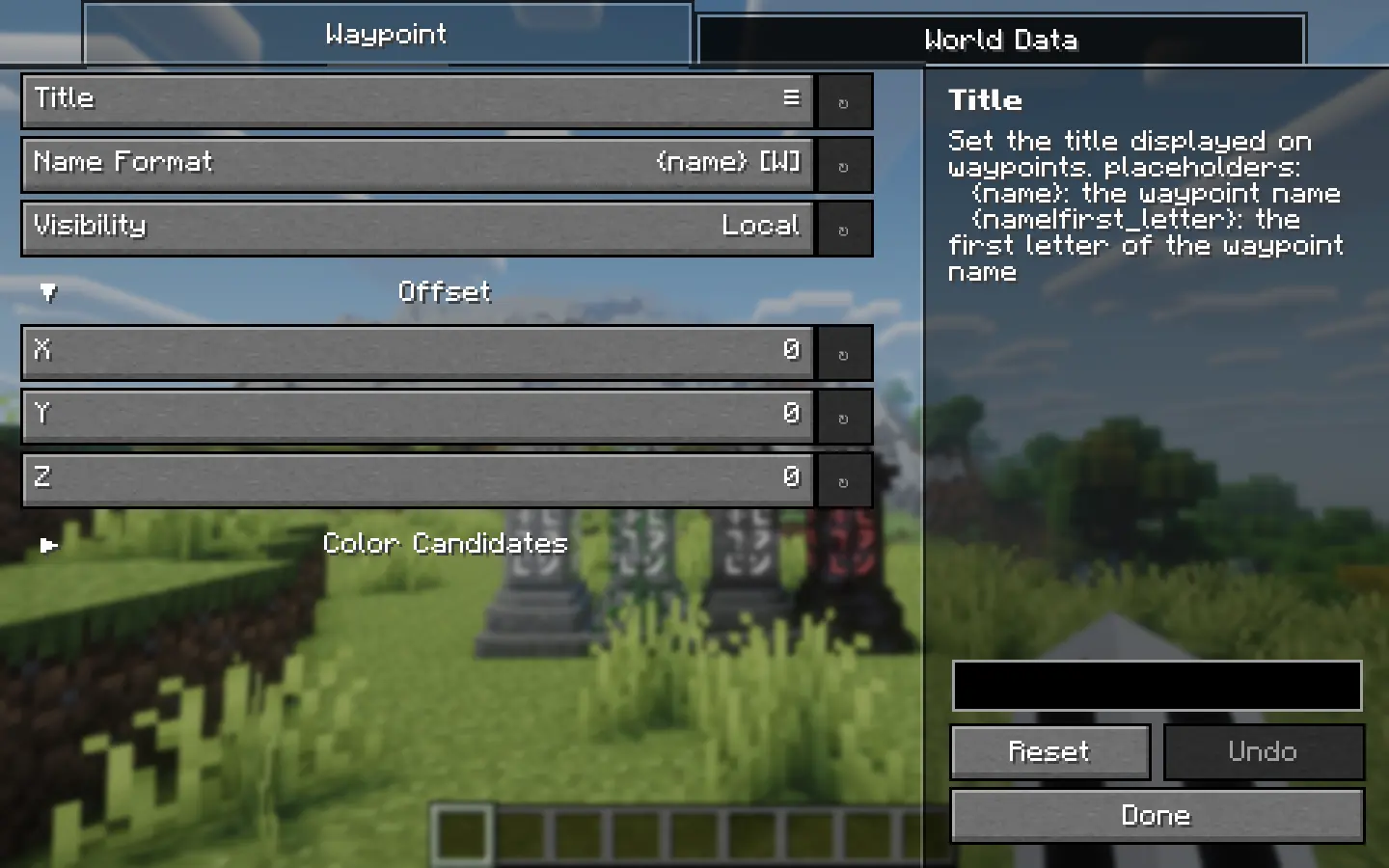
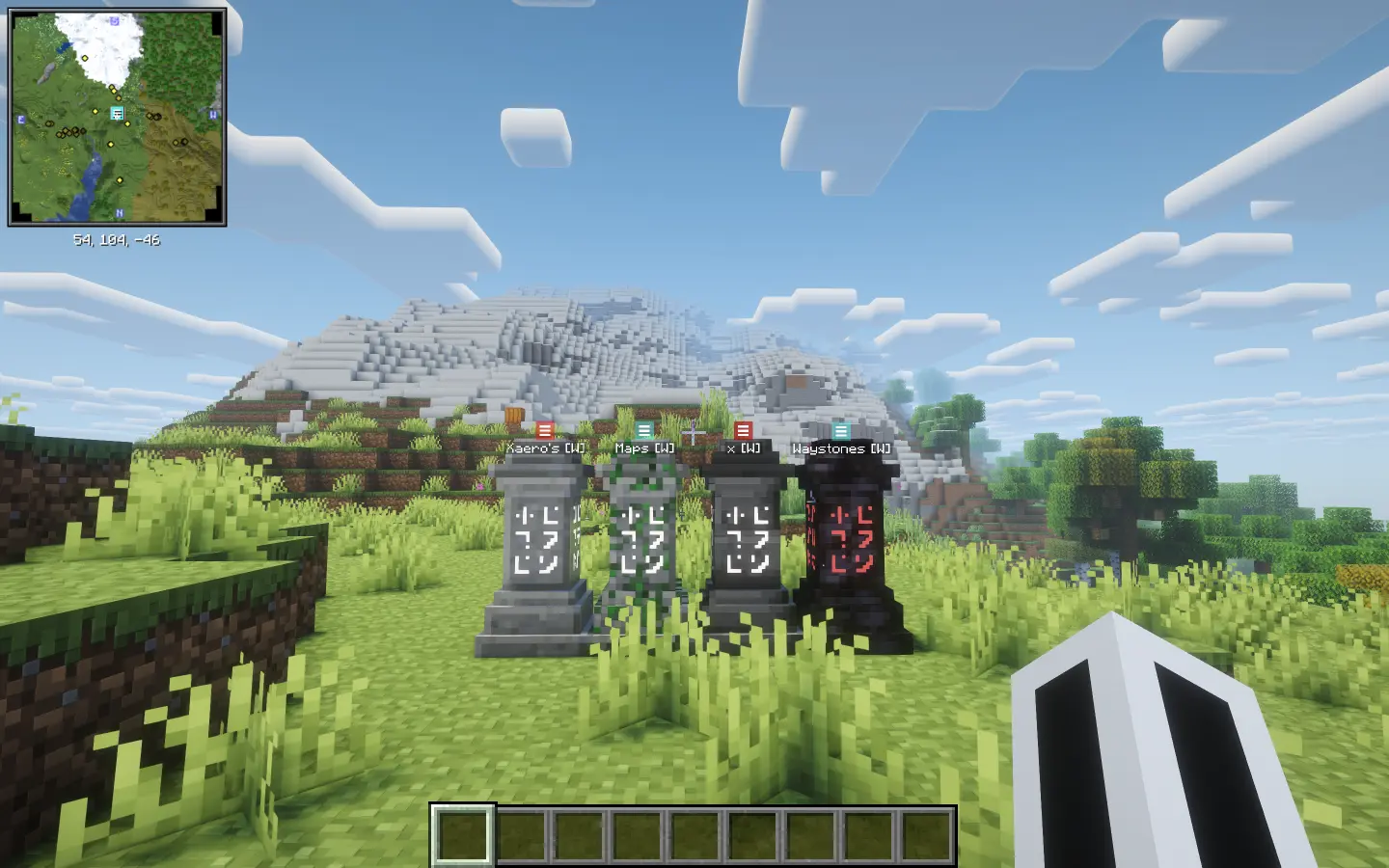
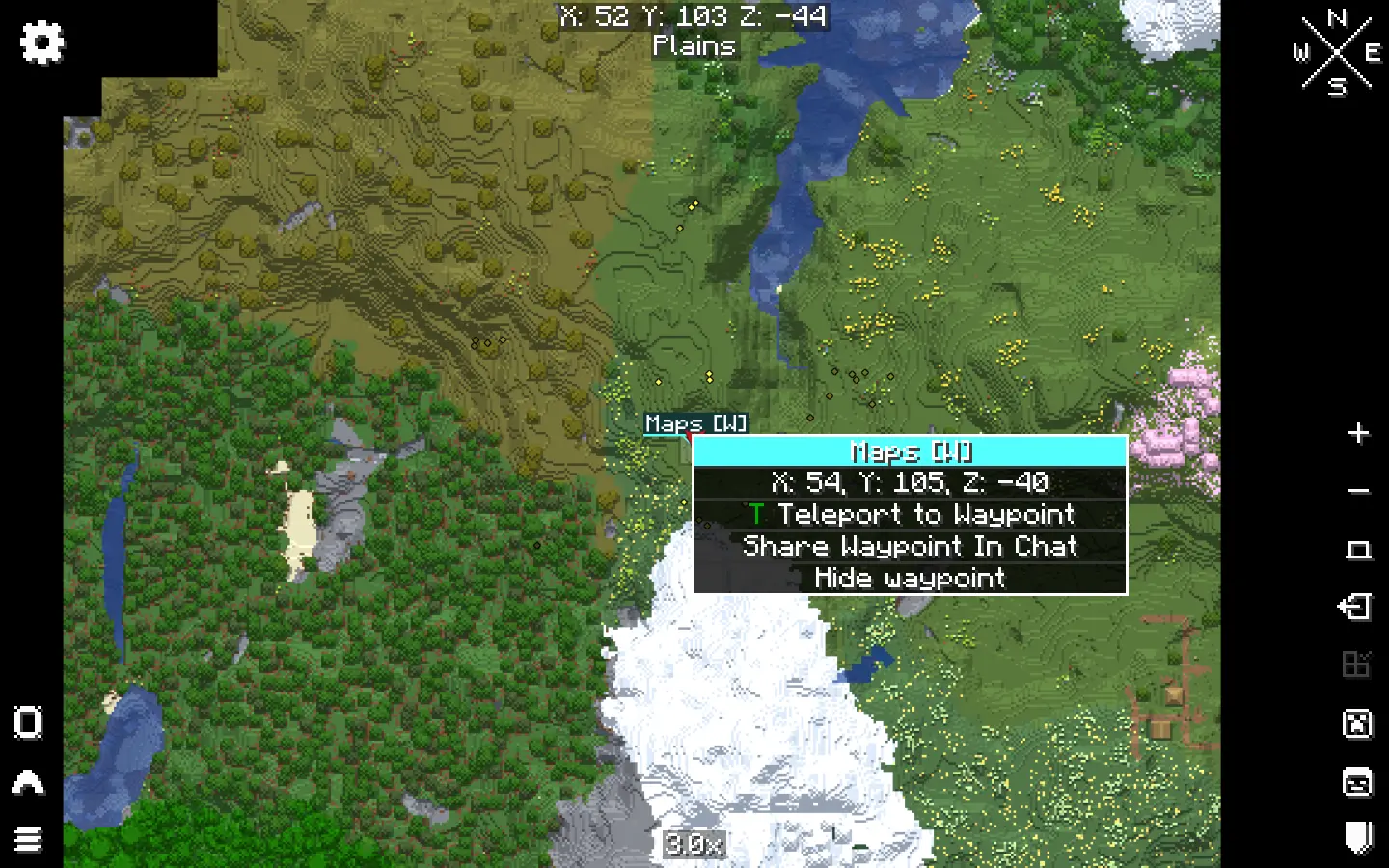
Xaero’s Map Server Utils
## Introduction
This data pack adds some useful commands for server administrators, allowing easy access to make fair modifications needed for gameplay on players’ Xaero’s Map series of mods.
## How it works
See the `How do I prohibit the use of cave mode and/or entity radar on my server?` section of [Xaero’s Minimap Mod](https://modrinth.com/mod/xaeros-minimap).
## Usage
– `/function xaero:fairxaero` causes the minimap to disable cave mode (including world map) and entity radar (fair-play mode)
– `/function xaero:nominimap` disables the minimap completely
– `/function xaero:resetxaero` reset all the system message flags
– `/function xaero:xaerowmnetherisfair` causes world map cave mode to work in the nether despite the minimap being fair-play
These commands above will tell the player what the server administrator used, if you don’t want your players to know which command you used, add `silent/` after `xaero:` (Example: `/function xaero:silent/fairxaero`) (But the player will still receive a blank message)
## Autorun
The newly added autorun feature can automatically execute functions when players join the server, modifying the behavior of their minimap.
– `/function xaero:autorun/set/disabled` disable the feature (default)
– `/function xaero:autorun/set/…` select the function to run automatically
XaeroPlus
# XaeroPlus
XaeroPlus is a client-side Minecraft mod that depends on and modifies the Xaero’s WorldMap and Minimap mods with extra
features and performance improvements – particularly for use on anarchy servers like 2b2t.
XaeroPlus is not affiliated or endorsed by xaero96. Please report issues to XaeroPlus’s [Github](https://github.com/rfresh2/XaeroPlus/issues) or [discord server](https://discord.gg/nJZrSaRKtb).
Example Map

# Xaero Versions
Each XaeroPlus release is only compatible with a specific version of Xaero’s WorldMap and Minimap.
Xaero’s Minimap can be swapped out for [BetterPVP](https://chocolateminecraft.com/betterpvp2.php)
Download and include these mods **in addition** to XaeroPlus (3 jars total).
You can find download links to Xaero’s mods here:
* [Xaero’s World Map](https://modrinth.com/mod/xaeros-world-map/versions)
* [Xaero’s Minimap](https://modrinth.com/mod/xaeros-minimap/versions)
# Modifications
* [1.5-3x your FPS by limiting the framerate the minimap is rendered at!](https://youtu.be/hIG-VyGQLao)
* Tip: For least visual impact, lock the minimap’s north
* [Adjustable minimap scaling that increases how many chunks are visible](https://youtu.be/dNqxGzGAHyk)
* [NewChunks Highlighting in MiniMap and WorldMap.](https://youtu.be/n-Tf6TJSsiA)
* [Baritone](https://github.com/cabaletta/baritone) integration
* Baritone Goals synced as temporary waypoints
* [Point and Click Travel](https://youtu.be/gbguyfXLgi0)
* [Waystones](https://legacy.curseforge.com/minecraft/mc-mods/waystones) and [Fabric Waystones](https://legacy.curseforge.com/minecraft/mc-mods/fabric-waystones) integration
* Syncs Waystones as temporary waypoints
* [WorldTools](https://modrinth.com/mod/worldtools/) World Downloader integration
* [Highlights saved chunks while downloading](https://youtu.be/mtCqwJ_RGcc)
* [Portals Highlighting in Minimap and WorldMap](https://youtu.be/zstGVfVRrAs)
* [Portal Skip Highlighting in Minimap and WorldMap](https://youtu.be/g_yQ8D95RY0). Detects chunks where a portal could have been loaded.
* OldChunks Highlighting in Minimap and WorldMap.
* Intended for use on 2b2t. Highlights chunks that were generated in 1.12.2 or lower in the Overworld and Nether based on the natural blocks present in the chunk.
* [Transparent minimap background instead of wasted black screen space.](https://imgur.com/a/jGgHqL4)
* [Fast map region writes](https://youtu.be/B5d7FaHXDCk). Prevent missed chunks in map while traveling at very high speeds.
* Allow multiple MC instances to read/write to the same map concurrently
* Transparent obsidian roof. Useful for mapping 2b2t spawn.
* Setting to always view and create waypoints in the Overworld when in Nether.
* [Render server view distance square around the player.](https://youtu.be/iY_JTGFK6Yg)
* [Dimension hot-switching on WorldMap and Minimap.](https://youtu.be/hXZQtX2df3I)
* Recommended: Create keybinds for Minimap dimension switching.
* WorldMap GUI:
* WorldMap zoom unlocked
* GUI on WorldMap to pan the map to user entered coordinates.
* WorldMap Follow mode and GUI button
* F1 on WorldMap hides GUI and overlays
* Waypoints GUI:
* [Search](https://youtu.be/7DRMUsmZDxc)
* Display distance to waypoints on Waypoints GUI
* Always sort enabled waypoints before disabled waypoints
* GUI button to enable/disable all waypoints
* [Waypoint Beacons](https://imgur.com/a/jGgHqL4)
* Minecraft world always renders in background while in a Xaero GUI for client travel mods compatibility
* Minimap entity dot fix. Hides the entity dot when arrow mode is selected.
* WorldMap and Waypoint directories optionally indexed by:
* Multiplayer server list name.
* Base Server Domain Name
* Server IP (Xaero’s default)
* **Changing this setting requires you to manually rename existing folders in `.minecraft/XaeroWaypoints/` and `.minecraft/XaeroWorldMap/`**
* Overworld dimension optionally stored in the “DIM0” directory instead of “null”
* **Changing this setting requires you to manually rename existing folders in `.minecraft/XaeroWorldMap/Multiplayer_/`**
* WorldMap 1.30.0 added cave data saving and rendering. There is a setting on by default in XaeroPlus that changes how the nether is rendered with cave mode off to be as it was previously.
* This removes the need to manually move existing world data files.
Configurations are in the Xaero WorldMap and Minimap settings GUI.
Toggleable settings support keybinds through the standard Minecraft Controls GUI.
# Language Translations
PR’s are welcomed for language translations.
Language files are located in `src/main/resources/assets/xaeroplus/lang/`
# Other Useful Tools
* Convert JourneyMap World Files to Xaero: [JMToXaero](https://github.com/Entropy5/JMtoXaero)
* Convert JourneyMap Waypoints to Xaero: [JMWaypointsToXaero](https://github.com/rfresh2/JMWaypointsToXaero)
* 2b2t Atlas Waypoints to Xaero: [JMWaypointsToXaero/atlas](https://github.com/rfresh2/JMWaypointsToXaero/tree/atlas)
* Convert MC Region Files to Xaero: [JMToXaero/Region-Scripts](https://github.com/Entropy5/JMtoXaero/blob/Region-Scripts/src/main/java/com/github/entropy5/RegionToXaero.java)
* 2b2t 256k WDL Xaero Map (20GB): [mc-archive](https://data.mc-archive.org/s/eFDEy2XKof83Kez)
* Xaero World
Merger: [JMToXaero/Region-Scripts](https://github.com/Entropy5/JMtoXaero/blob/Region-Scripts/src/main/java/com/github/entropy5/XaeroRegionMerger.java)
* Can be used to merge 256k WDL into an existing world. With optional darkening only on tiles from 256K
Xaero Zoomout

## XaeroZoomout
Reduces the minimum zoom of [Xaero’s World Map](https://modrinth.com/project/NcUtCpym) from 0.0625x to 0.0025x.
[]()
[](https://modrinth.com/project/T6oqPfxF/versions)
[](https://fabricmc.net/)
[](https://neoforged.net/)
[](https://modrinth.com/project/T6oqPfxF)
[](https://curseforge.com/minecraft/mc-mods/xaerozoomout)
[](https://github.com/TerminalMC/XaeroZoomout)
### Features
No settings, no setup; just zoom out and watch it work.
As a guide, the Xaero’s World Map display is typically about 30k blocks wide when
fully zoomed out. With this mod, the display width is increased to about 760k.
Note: Rendering the world map is quite CPU-intensive, so you’ll probably experience
some lag when fully zoomed out.
### Contact
[](https://discord.terminalmc.dev)
[](https://github.com/TerminalMC/XaeroZoomout/issues)
[](https://github.com/TerminalMC/XaeroZoomout/blob/HEAD/LICENSE.txt)
xaero世界地图汉化
个人汉化的Xaero世界地图,因为Xaero世界地图没有中文,我制作了这个资源包
A personally localized version of Xaero’s World Map, as the original lacks Chinese support, I created this mod pack
X Ray (no cheats)
## X Ray
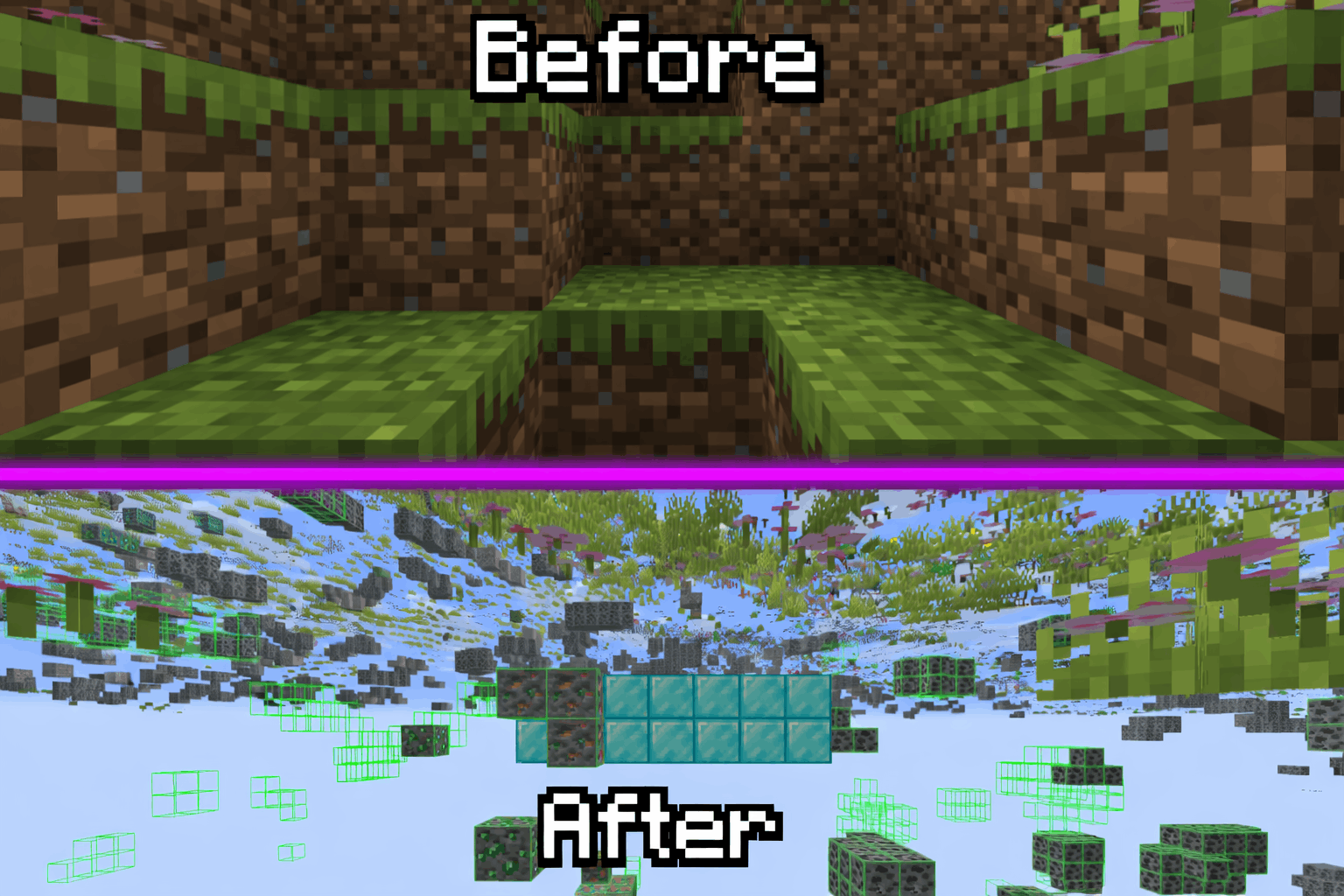
Mod/Datapack that removes stone and other blocks to keep ores visible. Also works in the nether.
X-Ray is a powerful mod that radically changes the way you explore the world of Minecraft. It allows you to see through ordinary blocks, highlighting valuable resources, structures, and objects.
To use it, you need to take a filled map in any hand.

## Usage
The mod is activated automatically and requires no additional settings. However, if you want to temporarily disable the mod, use the command “`/trigger bizcub.x_ray.t“`. Information about the mod’s current status will then appear in the chat.
## Dependencies
– Fabric loader requires [Fabric API](https://modrinth.com/mod/fabric-api)
xTpa
# ⚡ xTpa | The Premium Teleportation Suite

**xTpa** is a professional-grade teleportation plugin for Minecraft servers that prioritizes user experience, visual feedback, and server performance. Say goodbye to boring, text-only teleport requests and welcome a new era of interactive player movement.
—
## 🚀 Why choose xTpa?
Unlike standard teleport plugins that only provide simple chat messages, **xTpa** focuses on **immersive feedback**. With integrated sounds, titles, and action bars, your players will never miss a request again.
### ✨ Key Features at a Glance:
* **🎨 Advanced Visuals:** Uses **Titles**, **Subtitles**, and **ActionBars** to grab the player’s attention immediately when a request arrives.
* **🎵 Audio Feedback:** Every action has a soul! Fully configurable sounds for receiving requests, starting the countdown, and successful arrival.
* **🛡️ Combat-Safe Teleport:** Prevents players from escaping combat or dangerous situations by detecting movement during the teleport countdown.
* **🌈 HEX & Legacy Colors:** Supports the full range of modern HEX colors (`&#RRGGBB`) and legacy formatting codes.
* **⚡ Optimized Performance:** Written with high-concurrency in mind to ensure your server’s TPS stays at a solid 20.
* **🔗 PlaceholderAPI Support:** Fully integrated placeholders like `%xtpa_player%` and `%xtpa_time%` for customized messages.
—
## 🛠️ Detailed Commands & Permissions
| Command | Usage | Description | Permission |
| :— | :— | :— | :— |
| `/tpa` | `/tpa ` | Send a teleportation request to a player. | *None (Default)* |
| `/tpaccept` | `/tpaccept` | Accept the most recent teleport request. | *None (Default)* |
| `/tpdeny` | `/tpdeny` | Decline the current pending request. | *None (Default)* |
| `/xtpa` | `/xtpa reload` | Reload the plugin configuration and messages. | `xtpa.admin` |
### 🔑 Special Permissions
* `xtpa.bypass.cooldown`: Allows the player to send requests without waiting for the cooldown.
* `xtpa.bypass.delay`: Allows instant teleportation without the countdown wait.
—
## ⚙️ Full Configuration Preview
Here is the complete `config.yml` which allows you to customize every single aspect of the plugin to your liking.
“`yaml
# _____
# __ _/__ _ __ __ _
# / / / // ‘_ / _` |
# > < / / | |_) | (_| |
# /_/_\/ | .__/ __,_|
# |_/
# Official Support: https://xplugins.es/discord
# Documentation: https://xplugins.es/plugins/xtpa
# General plugin settings
settings:
tpa-timeout-seconds: 60 # How long a request stays active before expiring
cooldown-seconds: 15 # Time a player must wait between sending requests
teleport-delay-seconds: 3 # Seconds to wait before the teleport happens
teleport-move-cancel: true # If true, teleport cancels if the player moves
center-messages: false # Aesthetic option to center chat messages
# Sound System
# Use standard Spigot sound names (e.g., ENTITY_ENDERMAN_TELEPORT)
sounds:
received-tpa:
enabled: true
sound: "ENTITY_EXPERIENCE_ORB_PICKUP"
volume: 1.0
pitch: 1.0
teleport-start:
enabled: true
sound: "BLOCK_NOTE_BLOCK_HARP"
volume: 0.5
pitch: 1.5
teleport-success:
enabled: true
sound: "ENTITY_ENDERMAN_TELEPORT"
volume: 1.0
pitch: 1.0
# Visual Feedback (Titles & ActionBars)
visuals:
title:
enabled: false
title: "&#FAEDCB ℹ Request Received!"
subtitle: "&f%xtpa_player% wants to teleport to you"
fade-in: 10
stay: 60
fade-out: 10
actionbar:
enabled: true
message: "&fHey! &#FAEDCB&n%xtpa_player%&f has sent you a TPA! Check your chat."
# Message System (Supports HEX Colors)
messages:
prefix: ""
no-permission: "&c ✘ Error! &fYou do not have permission to use this."
player-not-found: "&c ✘ &fThat player is offline or does not exist."
cooldown: "&#FF5252 ✘ Error! &fWait &e%xtpa_time%s &fbefore sending another request."
self-tpa: "&#FF5252 ✘ Error! &fYou cannot teleport to yourself."
tpa-sent: "&#A0FF91 ✔ Success! &fRequest sent to &e%xtpa_player%&f."
tpa-no-pending: "&#FAEDCB ℹ Info! &fYou have no pending requests."
tpa-expired: "&#FAEDCB ℹ Info! &fThe teleport request has expired."
tpa-denied-target: "&#A0FF91 ✔ Success! &fYou denied the request."
tpa-denied-sender: "&#FF5252 ✘ Error! &fPlayer &e%xtpa_player% &fdenied your request."
tpa-accepted-target: "&#A0FF91 ✔ Success! &fRequest accepted."
tpa-accepted-sender: "&#A0FF91 ✔ Success! &e%xtpa_player% &faccepted your request."
teleport-starting-sender: "&#A0FF91 ✔ Success! &fTeleporting you to &e%xtpa_player%&f."
teleport-delay-notice-sender: "&#FAEDCB ℹ Info! &fTeleporting in %xtpa_time% seconds. Do not move!"
teleport-cancelled-moved: "&#FF5252 ✘ Error! &fMovement detected! Teleport cancelled."
teleport-cancelled-quit: "&#FF5252 ✘ Error! &fPlayer disconnected. Teleport cancelled."
teleport-success-sender: "&#A0FF91 ✔ Success! &fYou have arrived safely."
# Interactive Chat Request
received-request:
line1: "&#FAEDCB ℹ Info! &fPlayer &#FAEDCB%xtpa_player% &fwants to teleport to you."
line2-accept: "&fType &a/tpaccept &fTo accept."
line3-deny: "&fType &c/tpdeny &fTo decline."
line4: "&#FAEDCB ℹ Info! &fThe request expires in %xtpa_time% seconds."
hover-accept: "&#A0FF91 Click here to ACCEPT!"
hover-deny: "&c Click here to DENY!"
```
---
## 📥 Installation
1. **Download** the latest `.jar` file from Modrinth.
2. **Drop** the file into your server's `plugins/` folder.
3. **Restart** or **Reload** your server.
4. **Configure** the `config.yml` to your heart's content!
---
## 🌐 Community & Support
Join our growing community of developers and server owners!
[](https://xplugins.es/plugins/xtpa)
[](https://xplugins.es/discord)
---
*Created by the team at xPlugins. Quality matters.*
X to Xray

Tired Of Using X-Ray Resourcepacks? Then Try X To Xray!
Why You Should Use X To Xray
1. > Allows You To Have Good Customisation In Ouer Built In Config Menu! Toggling Ores And Other Blocks Has Never Been Easyer!
2. > Use Our Built In VeinMiner To Never Have Spending Much Time Mining!
3. > We Support Many Modloaders: [Fabric](https://modrinth.com/mod/x-to-xray/versions?l=fabric) , [Forge](https://modrinth.com/mod/x-to-xray/versions?l=forge) And [NEO-Forge](https://modrinth.com/mod/x-to-xray/versions?l=neoforge)
## How To Use!
1. > Download The [Mod](https://modrinth.com/mod/x-to-xray/versions) And An Version Of [Fabric API](https://modrinth.com/mod/fabric-api/versions)
2. > Put Both In Your Mods Folder (If You Use Normal Minecraft Launcher!)
3. > Launch Minecraft And Start X-Raying!
4. > Make Sure To Favorite The Mod!
## Screenshots:
> 
### Supportet Versions:
> **26.1** , **26.1.1** And **26.1.2**
**_We Are Trying To Support Other Versions Too!_**