XPHearts
# **About**
[](https://modrinth.com/plugin/xphearts) [](https://www.curseforge.com/minecraft/bukkit-plugins/xphearts)
[](https://ko-fi.com/J3J71G0IUZ)
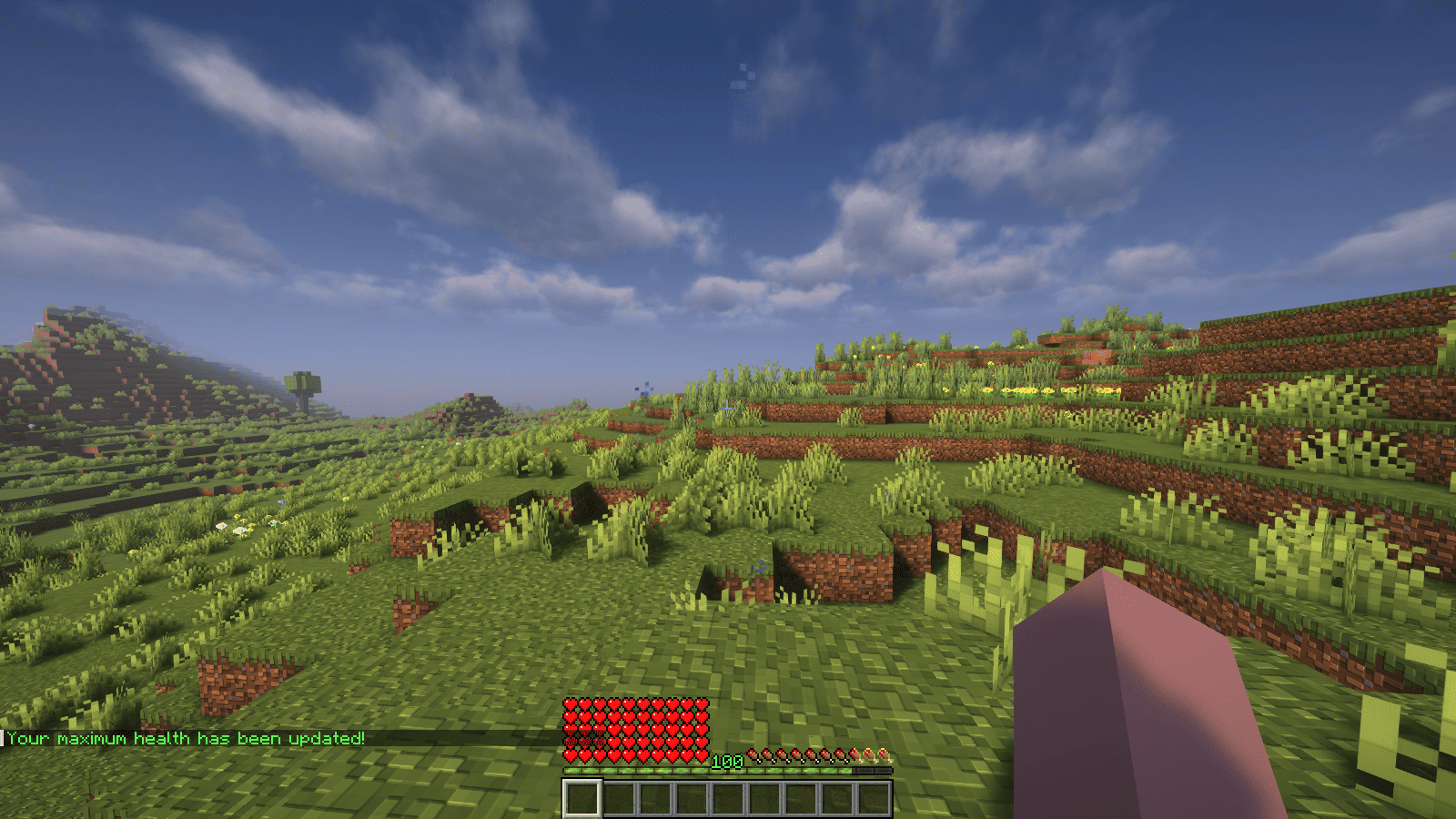
XPHearts is a plugin that automatically adjust maximum hearts/health depending on your experience level. You can configure the amount of experience level needed in the configuration file.
### Features
– Automatically adjust the player’s maximum hearts/health when they reach the experience level specified in the configuration.
– Easy to understand config.
– Lightweight.
### Commands
| Command | Description | Permission |
|—————-|————————————-|—————–|
| `/xh` | Get the information about the plugin. | `xh.use` |
| `/xh reload` | Reloads the config file. | `xh.admin` |
| Command aliases| **xh, xpheart, xphearts** |
### Issues and Suggestions
Suggest and report issues on [Github](https://github.com/seyviyer2/XPHearts/issues).
XP Tome
### Functionality
This mod adds a single item – the XP Tome. With the XP Tome you can store and retrieve XP. It can store up to 1395 XP by default (can be configured), which equals to having 30 levels on the XP bar.
### Usage
– Sneak + right-click to store XP
– Right-click to retrieve XP
### Recipe

### Config/Item Components
Note: For item components, “true” means the component is on the item, and “false” means it isn’t.
Note: If you want to change the default item components of the XP Tome you can still use the config file, however that comes with caveats explained therein. Consider creating a Data Pack and override the XP Tome’s recipe with the components set as you wish. [Here’s an example recipe.](https://gist.github.com/bl4ckscor3/074fc98a3206a01c8ff239923174543d) More info about [data packs](https://minecraft.wiki/w/Data_pack) and [recipes](https://minecraft.wiki/w/Recipe) on the wiki!
– *max_xp* – The maximum amount of XP points that the XP Tome can hold. The default value (1395) represents having 30 levels on the XP bar.
– *retrieval_percentage* – The percentage of XP that the book will give back, as a sort of cost of using it. Example: If this config value is set to 0.75, and an XP Tome has 100 XP stored, attempting to retrieve these 100 XP will give back 75 XP. Note: This will not be 100% accurate, as Minecraft’s XP does not use decimals.
– *retrieve_until_next_level* – Setting this to true will remove only as much XP from the book at a time as is needed for the player to reach their next level.
– *retrieve_xp_orbs* – Setting this to true will remove XP from the book in XP orb form. This is useful if you want to use XP from the book for tools enchanted with Mending.
– *store_until_previous_level* – Setting this to true will store only as much XP from the player’s XP bar until reaching the previous level, meaning only one level at maximum will be added to the book’s storage at a time.
The configuration file for Minecraft versions 1.14.4-1.20.1 can be found in the serverconfig folder of your world.
### Further Info
This mod was created by me, following a request by Shivaxi. It is based off of [XP Book](https://www.curseforge.com/minecraft/mc-mods/xp-book) and was recreated due to a duplication bug in the original mod, as well as a bug which causes the enchanting table to reset each time the book is used. As this mod uses the same modid and item id as the original, the two mods can not be installed at the same time and switching between them will not lose you any items. I did not take any code or assets from the original mod.
You are allowed to use this mod in any modpack.
XP Level = World Border
## Description
This datapack makes the world border grow with your experience level, resulting in a unique and challenging experience.
You can configure how large the border will be at the start and how much it grows with gained levels. When used in multiplayer, the experience of all online players gets added up.
## Configuration
### Menu
Use “`/trigger levelborder“` to open the configuration menu.
### Start Size
To configure how large the border should be at the start, use “`/trigger borderStartSize set “` (replace value with the size is blocks).
### Multiplier
Change how much the border will grow for each level gained, by using “`/trigger borderMultiplier set “` (replace value with the growth in blocks/level).
XP extract
# XP Extract
A Minecraft datapack that allows players to extract their experience levels and convert them into experience bottles for storage or trading.
## Features
– Extract 1, 5, 10, or all experience levels at once
– Converts levels into experience bottles based on accurate XP calculations
– Uses Minecraft’s official experience formulas for precise conversion
– Simple trigger commands – no complex setup required
– Compatible with Minecraft 1.21.6+
## Commands
Use these trigger commands to extract your experience:
– `/trigger extrct-1-lvl` – Extract 1 experience level
– `/trigger extrct-5-lvl` – Extract 5 experience levels
– `/trigger extrct-10-lvl` – Extract 10 experience levels
– `/trigger extrct-all-lvl` – Extract all experience levels
XP Bottling
# XP Bottling Plugin 🧪✨
XP Bottling is a lightweight Minecraft plugin that allows players to store their experience points (XP) into bottles for later use. This plugin is designed for Bukkit/Spigot servers and provides a simple yet useful feature for managing XP.
## Features 🌟
– **XP Bottling**: Players can right-click an enchanting table with a glass bottle to convert their XP into an experience bottle.
– **Permission-Based Access**: Only players with the `xpbottling.use` permission can use the XP bottling feature. (Note: This permission is granted to players by default.)
– **Custom XP Cost**: Bottling XP costs 7 experience points per bottle. (Note: 7 XP points is the average amount of experience an experience bottle will give when thrown, as it drops a random amount of XP between 3 and 11 points.)
– **Sound Effects**: Plays a custom sound when XP is bottled for an immersive experience. 🔊
– **Error Messages**: Players are notified if they lack permissions, XP, or the required items. ❌
## How It Works 🛠️
1. Hold a glass bottle in your main hand. 🍼
2. Right-click an enchanting table. 📚
3. If you have at least 7 XP points, the plugin will:
– Deduct 7 XP points. ➖
– Consume one glass bottle. 🧴
– Add an experience bottle to your inventory. ✨
– Play a sound effect. 🎵
If you don’t meet the requirements, the plugin will notify you with a message. 📢
## Permissions 🔑
– `xpbottling.use`: Grants permission to use the XP bottling feature. (Default: Granted to all players)
## Installation ⚙️
1. Download the plugin `.jar` file. 📥
2. Place the `.jar` file in your server’s `plugins` folder. 📂
3. Restart or reload your server. 🔄
4. Ensure players have the `xpbottling.use` permission to use the plugin.
## Issues 🐛
If you encounter any bugs or have feature requests, please open an issue in the [GitHub Issues](https://github.com/HoneyBerries/xPBottling/issues) section.
## License 📜
This project is licensed under the MIT License. See the `LICENSE` file for details.
Enjoy the plugin and happy bottling! 🧪✨
XP Boost Enchantment
# XP Boost Enchantment
[](https://discord.gg/5UdcDa5xNC)
[](https://modrinth.com/datapack/xp-boost-enchantment)
[](https://github.com/lullaby6/data-packs/blob/main/LICENSE)
## 📖 Description
New enchantment with three levels for get extra xp on using tools and weapons!
The enchantment can be obtained from the enchantment table, loot chests or trading with villagers.
## ⌨️ Commands
Give:
“`mcfunction
/loot give @s loot xp_boost_enchantment:xp_boost/
“`
Enchant:
“`mcfunction
/enchant @s xp_boost_enchantment:xp_boost
“`
## 🪪 License
[AGPL-3.0-or-later](https://github.com/lullaby6/data-packs/blob/main/LICENSE)
## 👾 Bugs/Issues
Please report any problem/bug/issues in the [Discord Server](https://discord.gg/5UdcDa5xNC).
## 💌 Donate
– [Donate on Ko-Fi](https://ko-fi.com/lullaby45743)
– [Donate on PayPal](https://www.paypal.com/paypalme/lucianobrumer)
## 🎁 Server Hosting
Creating your own server can be a very lengthy, tedious and costly process.
But with BisectHosting, you get your own server in just a couple of clicks! With their 24/7 support and fast-response time, no issues shall stand in your way!
Interested? Then we’ve got a deal for you!
https://bisecthosting.com/lullaby

Xmas meowl Totem of Undying
– ENG: **Meowl** (in Russian, “Myaowl” or “Myaul”) is a creature with a cat’s head and an owl’s body, sitting on a branch. Initially, it was a fun photoshop creation.
The first images of the cat owl appeared in 2013 on the Chinese platform Weibo. However, it gained popularity only in October 2025 on TikTok
– RU: **Meowl** (в рунете — «Мяовл» или «Мяул») — существо с кошачьей головой и телом совы, сидящее на ветке. Изначально — это весёлое творение фотошопа.
Первые изображения с котосовой появились в 2013 году на китайской платформе Weibo. Но популярность они обрели только в октябре 2025 года в TikTok
[Meowl Totem](https://modrinth.com/resourcepack/meowl-totem-of-undying/versions)
[ALL RESOURCEPACKS COLLECTION: MEMES + STREAMERS](https://modrinth.com/collection/sfDcDGAi)
xkball’s Auto Translate
# xkball’s Auto Translation
 
This mod add a key binding (default is T) that triggers machine translation when the mouse is over an item or when the FTB quest details screen is open.
本模组添加了一个按键绑定(默认为 T),在鼠标指向一个物品或者打开 FTB 任务详情界面时按下按键绑定触发机器翻译。
Now this mod have three translators:
– Default: Self-built llm translation relay server.
– Google Translate: Use google translate web service.Don’t need api key, and also cannot set an api key.
– Large language model: Use openAI api, user need set the api endpoint , api key and model to use.
目前有三个可用翻译器:
– 默认:作者自建的大语言模型翻译中转;
– 谷歌翻译:使用谷歌翻译,注意根据网络环境,可能需要在配置文件中配置网络代理(全局网络代理可能不起作用)才能使用;
– 大语言模型翻译:按 OpenAI API 的方式调用大语言模型进行翻译。需要在配置文件中填写 API 提供者的 URL、KEY 和所使用的模型。
## Feature List 功能列表
| Minecraft Version | Mod Version | Config Screen | External Cache | Translate Item Tooltip | Translate FTBQ | Translate Written Book | Batch Translate I18n keys | Defalut Translator works out of box. | Full Screen Translate |
| —————– | ———– | ————- | ————– | ———————- | ————— | ———————– | ————————- | ———————————— | ———————- |
| 26.1.2/NeoForge | 1.2.9 | ✅ | ✅ | ✅ | | ✅ | ✅ | ✅ | ✅ |
| 1.21.4/NeoForge | 1.1.4 | ✅ | ✅ | ✅ | | ✅ | ✅ | | |
| 1.21.1/NeoForge | 1.0.8 | ✅ | ✅ | ✅ | ✅ | ✅ | ✅ | ✅ | |
| 1.20.1/Forge | 1.-1.8 | | | ✅ | ✅ | | ✅ | ✅ | |
| 1.19.2/Forge | 1.-2.3 | | | ✅ | ✅ | | | | |
## Demonstrate 效果展示
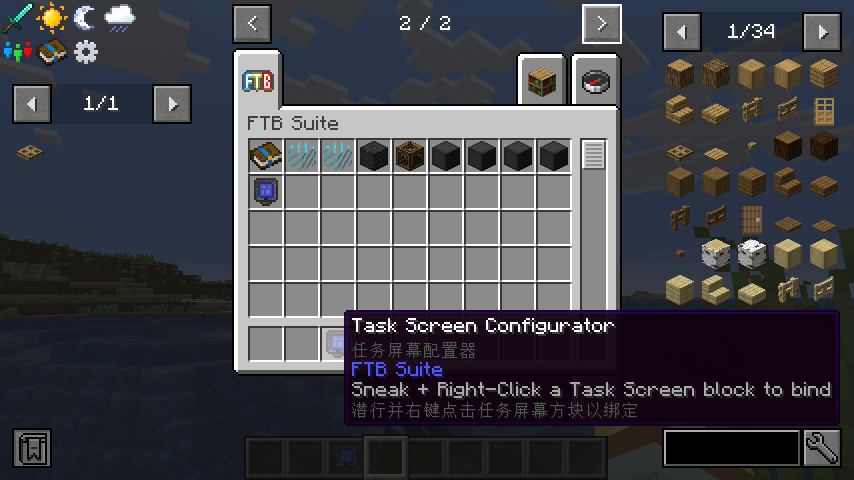
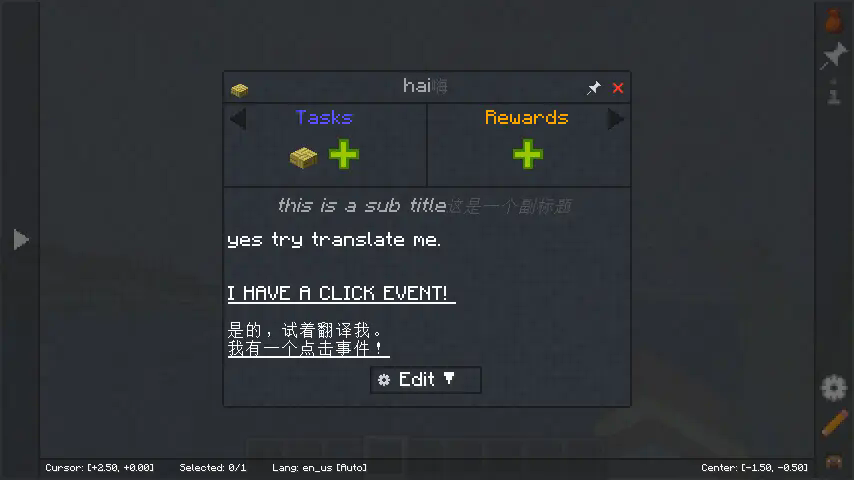
## Some Explanation 一些说明
– Cannot translate multi-line item tooltip, and have no solution for now.
– Can translate multi-line ftg quest, but not have a good support for multi-page quest. All translation will display in the last page.
– Special thanks: https://github.com/SihenZhang/AutoTranslator
– 无法连续翻译多行的物品 Tooltip,且暂时没有解决方案;
– FTB 任务可以一次翻译多行,但是对多页任务的支持暂不完善,会把所有翻译结果放在最后一页;
– – 批量翻译键值对功能暂时只有在配置LLM翻译器后才可以真正批量翻译, 使用默认翻译服务会一条条进行翻译, 很慢;
– 特别感谢: https://github.com/SihenZhang/AutoTranslator
xJobs
# 👷 xJobs | The Ultimate Professional Job System 👷

—
**xJobs** is a high-performance, premium-grade job system designed for modern Minecraft servers. Featuring a stunning **Cyan & Midnight Blue** interface, seamless **Discord integration**, and a robust **database-driven** backend, it provides your players with an immersive and rewarding professional experience.
—
> ## ✨ Premium Features
* **💎 High-End GUI**: A modern, columnar selection menu with custom heads and vibrant accent colors.
* **🌐 100% Internationalized**: Professionally translated into English, with global label management.
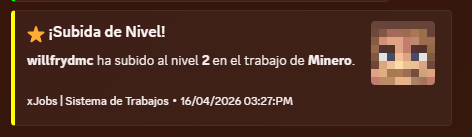
* **🤖 Discord Webhooks**: Real-time notifications for level-ups, job changes, and more with fully customizable embeds.
* **📊 Optimized Backend**: Support for H2 and MySQL databases with efficient caching.
* **🎭 Dynamic Lore**: Each job features unique premium descriptions and action hints.
* **🛠️ Developer Friendly**: Full PlaceholderAPI support and a simple yet powerful YML API for creating jobs.
* **⚡ Lightweight**: Built for performance, ensuring zero impact on your server’s TPS.
—
> ## 🚀 How to Create a Custom Job
Adding new professions to your server is incredibly simple. Follow this step-by-step guide:
1. Navigate to the `/plugins/xJobs/jobs/` folder.
2. Create a new file named `your_job_id.yml` (e.g., `alchemist.yml`).
3. Copy and customize the template below:
“`yaml
name: “Alchemist”
permission: “default”
max-level: 200
icon:
material: PLAYER_HEAD
base64: “eyJ0ZXh0dXJlcyI6eyJTS0lOIjp7InVybCI6Imh0dHA6Ly90ZXh0dXJlcy5taW5lY3JhZnQubmV0L3RleHR1cmUv…”
slot: 10
name: “Alchemist”
lore:
– “”
– ” &#A2FF5C✦ &f{info_label}:”
– ” &e⭐ &f{level_label}: &e{level}&f/&e{max_level}”
– ” &a👥 &f{workers_label}: &#D0FFD3{workers}”
– “”
– ” &#A2FF5C✦ &f{blurb_label}:”
– ” &7A master of volatile reactions. Brew concoctions”
– ” &7and elixirs that grant inhuman strength and life.”
– “”
– ” &#A2FF5C✦ &f{actions_label}:”
– ” &8▪ &7Brew magical potions”
– “”
– ” {join_action}”
actions:
block_break: # Logic for breaking blocks
‘WHEAT’:
xp: 5
money: 10.0
kill_mob: # Logic for hunting
‘ZOMBIE’:
xp: 15
money: 20.0
“`
4. Use `/jobs reload` in-game to apply your new profession immediately!
—
> ## 📌 Placeholders & Variables
Enhance your GUIs and chat with our dynamic placeholders:
| Placeholder | Description |
| :— | :— |
| `{player}` | The name of the player |
| `{job}` | The current profession name |
| `{level}` | The player’s current job level |
| `{max_level}` | The maximum level reachable |
| `{xp}` | Current experience points |
| `{xp_needed}` | Experience needed for next level |
| `{progress}` | A visual progress bar (e.g., `|||||…..`) |
| `{workers}` | Total number of players in that job |
—
> ## 🛠️ Commands & Permissions
Manage your professions with these simple commands:
| Command | Description | Permission |
| :— | :— | :— |
| `/jobs` | Open the main professional selection menu | *None* |
| `/jobs stats` | View your personal progress and statistics | *None* |
| `/jobs leave` | Resign from your current job | *None* |
| `/jobs help` | Show the command help menu | *None* |
| `/jobs reload` | Reload all configurations and jobs | `xjobs.admin` |
—
> ## 📦 Requirements
Ensure your server meets these criteria for optimal performance:
| Requirement | Description | Status |
| :— | :— | :— |
| **Vault** | Essential for economy rewards and money management | **Required** |
| **Java 17+** | Modern runtime required for high-performance execution | **Required** |
| **PlaceholderAPI** | Enables dynamic labels and custom variables | *Recommended* |
—
> ## 🛰️ Discord Integration
Keep your community engaged by linking your Discord server.
In `config.yml`, set `webhooks.discord.enabled: true` and paste your URL.
**Features:**
* **Custom Embeds**: Edit colors, footers, and thumbnails per event.
* **Async Processing**: Webhooks never lag your server.
* **Player Avatars**: Automatically fetches the player’s head for the notification.
—
> **Pro Tip**: You can edit the titles of all GUI sections (like “Information” or “Active Workers”) globally in `messages.yml`. Edit once, update everywhere!
> Got some cash? Get a PREMIUM (ES/EN) config on Discord.
Xisuma’s Hermitcraft Pack
Xisuma’s collection of mods and configurations to enhance the vanilla game!
As seen in his video series from the Hermitcraft Server, these mods will improve your minecraft experience.
This is a **client-side** only modpack.
If you want the best server-side experience use the [Hermitcraft Server Pack](https://modrinth.com/modpack/hermitcraft).