# **X-SetSpawn**
### *Manage your server’s spawn point professionally*
### 📝 **Description**
X-SetSpawn is a lightweight, feature-rich plugin designed to manage spawn points on your server. From simple global spawns to premium visual effects, economy integration, and proxy network support — all packed into one plugin. Compatible with Minecraft 1.8.8 to 26.1+.
### ✨ **Features**
– **Fireworks on arrival:** Launch a firework when a player teleports to spawn. Color and power configurable.
– **Combat & Falling checks:** Block `/spawn` while in combat or falling. Supports CombatLogX, PvPManager, DeluxeCombat.
– **Multi-database storage:** Save spawns to YAML (local), MySQL, MariaDB, H2 or MongoDB for cross-server sync.
– **Custom command aliases:** Define `/hub`, `/lobby` or any alias directly from `config.yml` — no need to edit `plugin.yml`.
– **Economy Integration (Vault):** Charge players to use `/spawn`. Money only deducted if the teleport completes.
– **First-Join Spawn:** Set a unique spawn point for newly joining players with `/setspawn firstjoin`.
– **Smart Respawn:** On death, respects the player’s Bed or Respawn Anchor before falling back to spawn.
– **Void-Teleport:** Automatically teleport players who fall below a configurable Y-level.
– **Post-Teleport Protection:** Temporary invulnerability after teleporting while chunks load.
– **Advanced Proxy Sync:** Dedicated lightweight plugins for Velocity and BungeeCord. Use `/setlobby` to sync your lobby server automatically.
– **Intelligent Proxy Teleport:** Automatically detects if a player is already on the target server and performs a local teleport.
– **Visual Countdown:** ActionBar, BossBar, Titles and particle effects during the delay — each individually toggleable.
– **Countdown sounds:** “Tic-Tac” click sounds each second during the teleport delay.
– **PlaceholderAPI:** Full PAPI support. Exposes `%xsetspawn_cooldown%`, `%xsetspawn_delay%`, `%xsetspawn_is_pending%`, `%xsetspawn_spawn_set%`.
– **Config auto-updater:** Detects outdated configs, creates a backup and rebuilds automatically.
– **100% Customizable:** 6 language files (EN, ES, JA, PT, RU, CUSTOM), per-world spawns, and full config control.
**`/spawn`**
Teleports the player to the established spawn point.
**`/setspawn [x y z] [world] [yaw pitch]`**
Sets the spawn point. Use without arguments for your location, or specify coordinates (supports `~`). Console compatible.
**`/delspawn `**
Deletes a specific named spawn point if named spawns are enabled.
**`/back`**
Teleports the player back to their last location before using a spawn command.
**`/setlobby`**
Sets the lobby coordinates for the proxy network and syncs the configuration with BungeeCord/Velocity.
**`/xss [subcommand]`**
– **`help`** – Shows the help menu.
– **`reload`** – Reloads the plugin configuration.
– **`version`** – Shows the current version info.
– **`update`** – Manually check for updates.
– **`setspawn`** – Sets the spawn point (alias for /setspawn).
– **`delspawn`** – Deletes a spawn (alias for /delspawn).
### 🛡️ **Permissions**
– **`xsetspawn.spawn`** – Use `/spawn`. *(default: everyone)*
– **`xsetspawn.setspawn`** – Use `/setspawn`. *(default: op)*
– **`xsetspawn.admin`** – Admin commands and update notifications. *(default: op)*
– **`xsetspawn.reload`** – Reload the configuration. *(default: op)*
– **`xsetspawn.update`** – Check for updates. *(default: op)*
– **`xsetspawn.bypass.cooldown`** – Skip the teleport cooldown. *(default: op)*
– **`xsetspawn.bypass.delay`** – Skip the teleport delay. *(default: op)*
– **`xsetspawn.bypass.economy`** – Teleport for free. *(default: op)*
> **Tip:** Explicitly denying a node (`-xsetspawn.spawn`) will block the player even if they are OP.
Need help? Join our [Discord](https://discord.com/invite/Yb6GsfGWmd) or report issues in the discussion section.
xSetHome
🏡 xSetHome
A modern, lightweight, and highly customizable home system for your Minecraft server.
* **Interactive GUI Menu:** Let players view and manage their homes through a clean, fully customizable `/homes` inventory. Includes built-in support for empty states and custom buttons.
* **Dynamic Custom Icons:** Players can personalize how their homes look in the menu! Simply **Right-Click** a home icon while holding a block to update its appearance.
* **Safe Teleportation:** Configure a safe teleport delay. If a player moves during the countdown, the teleportation is automatically canceled.
* **Immersive Visuals & Audio:** Enhance the player experience with highly customizable ActionBars, on-screen Titles, sound effects, and particles during teleportation.
* **100% Customizable:** Tailor every single message, prefix, and menu item. Features native support for HEX colors (e.g., `&#FAEDCB`).
* **Custom Head Support:** Use Base64 textures to decorate your menus (perfect for custom “Close Menu” buttons or specific icons).
* **PlaceholderAPI Integration:** Extract data from your players’ homes to display on scoreboards, holograms, or custom UI menus.
—
## 📝 Commands & Permissions
| Command | Description | Permission |
| :— | :— | :— |
| `/sethome ` | Saves your current location as a home. | `xsethome.use.sethome` |
| `/home ` | Teleports you to a saved home. | `xsethome.use.home` |
| `/homes` | Opens the visual homes GUI. | *None (Free for all)* |
| `/delhome ` | Deletes a saved home. | `xsethome.use.delhome` |
| `/xsethome reload` | Reloads the configuration files. | *Admin Only* |
| `/xsethome help` | Displays admin commands. | *Admin Only* |
> **Note:** The default home limit for standard players is **3** (fully adjustable in the `config.yml`).
—
## 🔗 PlaceholderAPI Variables
You can use the following placeholders in your menus, scoreboards, or chat formatting.
*(Make sure to replace `` with the exact name of the home)*:
* `%xsethome__name%` ▸ Returns the name of the home.
* `%xsethome__world%` ▸ Returns the world where it is located.
* `%xsethome__x%` ▸ X coordinate of the home.
* `%xsethome__y%` ▸ Y coordinate of the home.
* `%xsethome__z%` ▸ Z coordinate of the home.
* `%xsethome__date%` ▸ Exact date of creation.
—
## 🚀 Installation Guide
1. **Download** the latest version of `xSetHome.jar`.
2. **Move** the downloaded file into your server’s `plugins` folder.
3. *(Optional but recommended)* Install **PlaceholderAPI** to utilize the custom variables.
4. **Restart** your server to generate the configuration files.
5. **Configure** `config.yml` and `menu.yml` to your liking, then run `/xsethome reload` in-game or from the console.
6. Enjoy!
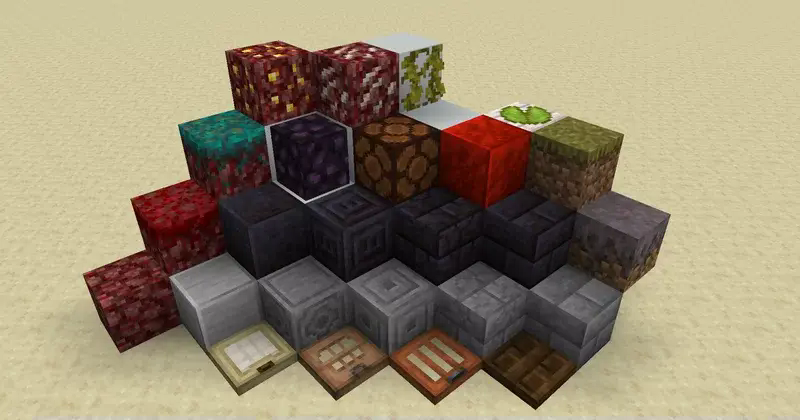
**A pack focused on enhancing Minecraft’s visuals and gameplay while staying true to its essence**
**Note: The pack can have a significant impact on performance, so feel free to change the settings as you see fit.**
_The additions are mostly visual and do not affect gameplay._
XR’s Tiny Edits

## **This is a small resource pack that fixes thing I dislike about the vanilla textures.**
### This Resourcepack is compatible with [Respackopt Mod](https://modrinth.com/mod/respackopts). With this mod, you can disable many different textures
!

# **X-Rooms**
### *Advanced BoxPVP room management for your server*
### 📝 **Description**
X-Rooms is a powerful, all-in-one plugin for creating and managing PvP rooms (BoxPVP) on your server. Define combat zones with WorldEdit, set up custom kits, potion effects, rewards, holograms and winner destinations — all from an intuitive in-game GUI. Compatible with Minecraft 1.8.8 to 1.21.x+.
### ✨ **Features**
– **WorldEdit Integration:** Select a region with WorldEdit/FAWE and instantly create a PvP room with `/xr create`.
– **Full GUI Management:** Edit every room property (name, sounds, abilities, equipment, rewards) from a clean visual interface — no config editing needed.
– **10 Configurable Abilities:** Strength, Speed, Resistance, Haste, Regeneration, Fire Resistance, Jump Boost, Saturation, Absorption, and Fly — each with adjustable levels per room.
– **Ability Level Limits:** Set global maximum levels for each ability in `config.yml` to prevent overpowered setups.
– **Custom Equipment & Rewards:** Define kit items players receive on match start and reward items for the winner, all via GUI.
– **Automatic Inventory Management:** Player inventories are backed up and restored automatically. No items lost.
– **Combat Logging Protection:** Configurable punishment for players who disconnect during PvP — keep or delete their backup inventory.
– **Winner Teleport Location:** Set a custom destination for the match winner per room, or let them stay in the room.
– **Configurable End Delay:** A customizable delay after the match ends before players are teleported out. Players are invulnerable and locked in the room during this period.
– **PvP Countdown:** Visual countdown (Titles + Sounds) before combat begins with a configurable timer.
– **Hologram Support:** Automatic holograms showing room name, player count and time remaining. Supports DecentHolograms and HolographicDisplays.
– **Per-Room Permissions:** Enable or disable permission requirements per room. Rooms are public by default.
– **Anti-Escape System:** Players cannot walk or teleport out of a room during active PvP.
– **Barrier Material:** Configure a visible or invisible barrier material during countdowns.
– **Entry Titles & Sounds:** Custom welcome titles, subtitles and sounds when entering a room region.
– **PlaceholderAPI:** Full PAPI integration for holograms and messages. Supports both internal and global placeholders.
– **HEX Color Support:** Use `&#RRGGBB` colors in messages and titles (1.16+). Falls back gracefully on older versions.
– **Multi-Language:** 3 built-in language files (English, Spanish, French) with automatic config updater.
– **Folia Support:** Full compatibility with Folia’s regionized threading — all teleports and tasks use async-safe methods.
– **Config Auto-Updater:** Detects outdated configs and updates them automatically without losing your settings.
XRayHunter is a tool that is very helpful in the hunt for xrayers. XRayHunter will give you a clear list of the most active miners and the percentages of different ores. Luck has nothing to do with it if the percentages become too high.
**NOTE**: Requires CoreProtect (v21.1+)
**Original author and manager of this was R4zorax until v1.2.0.** For legacy support please use [this](https://www.spigotmc.org/resources/xrayhunter.6225/).
XRayHunter is a plugin created by R4zorax. I have been maintaining it for a few years for my own purposes, but I think XRayHunter is a very good tool so I think it should be available to everyone. R4zorax has given me permission to do this. His original work can be found [here](https://github.com/rlf/XRayHunter).
# Features
– It is EXTREMELY light as it retrieves data from Coreprotect.
– Simple detailed overview with teleport feature for each player.
– You can see the percentage of ores.
## Detail
| Commands | Description |
|—————————-|———————|
| /xhunt detail | Shows a detailed break-down of the veins found by the player.|
| /xhunt d 1 | Displays the top-most miner, from the last lookup.|
| /xhunt detail baktus_79 | Shows the details for baktus_79 (provided he was in the last lookup). |
## Teleport
| Commands | Description |
|—————————-|———————|
| /xhunt teleport | Teleports the player to ore-find at the supplied index.|
| /xhunt tp 1 | Investigate the latest ore-find.|
## Permission
| Commands | Description |
|————–|———————|
| xhunt.use | To use XRayHunter. |
**There is no configuration file for XRayHunter.**
**xQuest** is a modern and fully configurable quest plugin for Minecraft servers. Designed to be lightweight, aesthetic, and easy to use, without the need for complicated external databases.
| Main Dashboard | Quest in Progress | Completed Quest |
|:—:|:—:|:—:|
|  |  |  |
*(The visual design is 100% configurable via `config.yml`)*
—
## 🔥 Key Features
* **⚡ Local Database (H2):** No MySQL needed. The plugin automatically creates its own high-performance local database.
* **🎨 Premium Design:**
* Full support for **HEX Colors** (&#RRGGBB).
* Fully editable GUI menus.
* Support for **Custom Heads** (Base64) and Player Heads (`HEAD-Name`).
* **⚙️ Fully Configurable:**
* Edit main **Commands** (e.g., use `/missions` instead of `/xquest`).
* Customize all **Permissions**.
* Modify sounds, titles, action bars, and fireworks.
* **🏆 Progress System:**
* Visual Top #1, #2, #3 in the quest lore.
* Automatic “Completed” indicators (Replaces the prize line).
* Console-executable rewards.
* **🔌 Hooks / Compatibility:**
* **PlaceholderAPI:** Use variables in texts.
* **Vault:** Economy support.
—
## 📥 Installation
1. Download the **xQuest** `.jar` file.
2. Place it in your server’s `/plugins` folder.
3. Ensure you have **PlaceholderAPI** and **Vault** installed (Optional, but recommended).
4. Restart your server.
5. Done! The database and config will be created automatically.
—
## 📜 Commands and Permissions
> 💡 **Note:** Both the main command and permissions are **editable** in `config.yml`.
| Command (Default) | Permission (Default) | Description |
| :— | :— | :— |
| `/xquest` | `xquest.use` | Opens the main quest menu. |
| `/xquest reload` | `xquest.admin` | Reloads the configuration and quests. |
*You can change `xquest.use` to `false` in the config if you want everyone to access it without permissions.*
—
## 🛠️ Configuration (Snippet)
The `config.yml` file is the heart of the plugin. Here is an example of how to create a quest with a custom head:
## ✨ Features
**xPsMenu** takes the classic ProtectionStones experience and transforms it into a modern, visual, and premium system for your players.
* 🎨 **100% Customizable:** Every single menu, item, lore, and message is fully editable (`gui.yml`, `flags.yml`, `selector.yml`, `config.yml`).
* 🌈 **Hex Colors & MiniMessage:** Full support for modern Hex color codes (`&#FFFFFF`) to make your menus pop out.
* 📋 **Dynamic Region Selector:** A live, auto-updating GUI showing all player regions with an interactive filter (View ALL, OWNERS, or MEMBERS).
* 👤 **Advanced Player Management:** View members and owners using real Player Heads! Kick players directly via Shift + Right-Click.
* ✨ **0-Lag Particle System:** When a protection block is hidden, only the owner will see beautiful magical particles indicating its location (highly optimized, 0 server lag).
* 🚀 **OP / VIP Bypass:** Instantly teleport to your region without the 3-second cooldown using a permission node.
* 🛠️ **Admin Tools:** Nuke all regions from the server database with a single safety-confirmed command.
* 🔌 **Developer API:** Easily hook into the plugin to open menus from other custom plugins or NPCs.
Do you want to acquire the best ES/EN configuration?
– ¡Enter the discord!
– It helps us a lot.
—
## 📥 Installation
1. Stop your server.
2. Download the `xPsMenu-v1.0.0.jar` and place it in your `/plugins/` folder.
3. Ensure you have the required dependencies:
* **ProtectionStones** (2.10+)
* **WorldGuard** & **WorldEdit**
* **PlaceholderAPI** (Optional, but highly recommended)
4. Start the server.
5. Customize the configuration files inside `/plugins/xPsMenu/` and type `/psmenu reload`.
—
## ⌨️ Commands & Permissions
### Player Commands
* `Shift + Right Click` (on a protection block) – Opens the main management GUI for that specific region.
* `/psmenu` – Opens the dynamic Region Selector (Shows all your active regions).
* `/psmenu help` – Shows the help menu.
### Admin Commands
* `/psmenu reload` – Reloads all configuration files seamlessly.
* **Permission:** `psmenu.admin`
* `/psmenu clearall confirm` – ⚠️ *DANGER!* Wipes every single ProtectionStones region from the server database.
* **Permission:** `psmenu.admin`
### Extra Permissions
* `psmenu.bypass` – Bypasses the 3-second teleportation delay. Instant teleport!
—
## 📊 Placeholders
### Internal Menu Variables
Use these exclusively inside your `gui.yml` and `flags.yml` to display dynamic data:
* `%region%` – Displays the ID of the region currently being edited.
* `%hidden_status%` – Displays the current state of the block (e.g., Hidden ✘ or Visible ✔ – editable in config).
* *Note: You can also use any global PlaceholderAPI variable inside the menus (like `%player_name%`).*
### PlaceholderAPI Variables (Global)
You can use these variables anywhere on your server (Scoreboards, Holograms, Chat, etc.):
* `%xpsmenu_version%` – Displays the current plugin version.
* `%xpsmenu_player%` – Displays the player’s name.
—
## 💻 Developer API
Building a custom core or an NPC script? You can easily hook into **xPsMenu** to open interfaces for your players using our static API.
### Add to your build.gradle:
“`gradle
dependencies {
compileOnly fileTree(dir: ‘libs’, include: ‘xPsMenu-v1.0.0.jar’)
}
Example Usage:
Java
import jn.willfrydev.xPsMenuAPI;
import org.bukkit.entity.Player;
public class MyCustomPlugin {
public void openMenuForPlayer(Player player, String regionId) {
// Opens the main Editor GUI for a specific region
xPsMenuAPI.openMainMenu(player, “ps10x64y5z”);
}
public void openListForPlayer(Player player) {
// Opens the Dynamic Region Selector GUI for the player
xPsMenuAPI.openSelector(player);
}
}
“`
**xPickaxes** is a professional Spigot/Paper plugin that adds fully customizable pickaxes with area mining, an intuitive GUI, permission-based access, and special effects — all configurable without touching a single line of Java.
> Compatible with **Minecraft 1.19 – 1.21+** (Paper & Spigot)
—
## ✨ Features
– **Area Mining** — Mine 3×3, 5×5, 7×7, or 9×9 areas with a single block break
– **In-game GUI** — Right-click any custom pickaxe to open a clean configuration menu
– **Special Effects**
– 🔥 **Auto-Smelting** — Ores are smelted directly into ingots
– ✨ **Fortune Boost** — Increased drops on all mined blocks
– ⛏ **Vein Miner** — Mines entire connected ore veins at once (up to 64 blocks)
– 🔍 **Ore Highlight** — Visual glow effect on nearby ores *(framework ready)*
– **Per-player Settings** — Each player can toggle area mining and effects individually
– **Permission System** — Fine-grained control over which players access which pickaxes and effects
– **Custom Area Sizes** — Players can choose their preferred area size from the GUI
– **Blacklist Support** — Prevent area mining on specific blocks (bedrock, command blocks, etc.)
– **WorldGuard Compatible** — Respects protected regions
– **Sound & Particle Effects** — Satisfying feedback on area mines (toggleable)
– **Fully Config-Driven** — Add or edit pickaxe types entirely from `config.yml`
All tiers are fully editable or removable in `config.yml`. You can also add your own!
—
## 🎮 Commands
| Command | Description | Permission |
|———|————-|————|
| `/xpickaxe give [player]` | Give a custom pickaxe | `xpickaxes.give` |
| `/xpickaxe list` | List all available pickaxe types | `xpickaxes.use` |
| `/xpickaxe menu` | Open the GUI for your held pickaxe | `xpickaxes.use` |
| `/xpickaxe reload` | Reload the plugin config | `xpickaxes.reload` |
| `/xpickaxe help` | Show help | — |
**Aliases:** `/xpick`, `/xp`
—
## 🔑 Permissions
| Permission | Default | Description |
|————|———|————-|
| `xpickaxes.use` | Everyone | Use custom pickaxes |
| `xpickaxes.give` | OP | Give custom pickaxes |
| `xpickaxes.reload` | OP | Reload the plugin |
| `xpickaxes.admin` | OP | Full admin access (includes give + reload) |
| `xpickaxes.pickaxe.novice` | Everyone | Access to Novice pickaxe |
| `xpickaxes.pickaxe.adept` | OP | Access to Adept pickaxe |
| `xpickaxes.pickaxe.master` | OP | Access to Master pickaxe |
| `xpickaxes.pickaxe.titan` | OP | Access to Titan pickaxe |
| `xpickaxes.effect.autosmelting` | OP | Use Auto-Smelting effect |
| `xpickaxes.effect.veinminer` | OP | Use Vein Miner effect |
| `xpickaxes.effect.fortune` | OP | Use Fortune Boost effect |
| `xpickaxes.effect.xray` | OP | Use Ore Highlight effect |
—
## 🖥️ GUI Overview
**Right-click** any xPickaxes custom pickaxe (or run `/xpickaxe menu`) to open the configuration panel:
– **Toggle Area Mining** — Enable/disable area mining for this session
– **Area Size** — Select 3×3, 5×5, 7×7, or 9×9 (or reset to pickaxe default)
– **Effects** — Toggle each special effect independently (respects permissions)
—
## ⚙️ Configuration
All pickaxe types, effects, messages, and behavior is defined in `config.yml`. Here’s an example of adding a custom pickaxe:
1. Download `xPickaxes-1.0.0.jar`
2. Drop it into your `plugins/` folder
3. Restart or reload your server
4. Edit `plugins/xPickaxes/config.yml` to customize
5. Run `/xpickaxe reload` to apply changes live
**Requirements:**
– Java 17+
– Paper or Spigot 1.19+