TradeShop
# Tradeshop!
_A simple, no-nonsense trade chest shop plugin._
# Usage
Place any storage block like a chest, barrel, or shulker.
Then put a sign on the side of the block with the following format.
“`
[Shop]
X ItemName (or “[Hand]”)
for
Y ItemName (or “[Hand]”)
“`
ItemName must be the name of the [Bukkit Material](https://jd.papermc.io/paper/1.21.1/org/bukkit/Material.html) (case/space doesn’t matter)
Use `[Hand]` as a temporary placeholder; then right click the sign with the item.
If it works, the sign will reformat itself.
### Example
“`
[Shop]
1 Iron Ingot
for
64 Wheat Seeds
“`
# Note
This plugin is very new! Please report any bugs or recommend any features on GitHub issues or my Discord.
# Rant
I have a strong distaste for plugins with AI-Generated icons. I will NOT download your plugin if the icon is an AI-Generated image. I made the icon for this plugin in 5 minutes using free software.
Zlodyy’s PvP RP
**Ultimate Clear PvP: Crystal, UHC & Mace**
_This resource pack is built from the ground up for serious players across multiple combat styles. Whether you are dominating in Crystal PvP, surviving classic UHCs, or mastering the newest Mace mechanics, this pack provides the visual clarity you need to gain a competitive edge.
The core philosophy of this pack is maximum visibility and zero distractions._
**✨ Key Features:**
_Multi-Mode Optimization: Tailored specifically for Crystal PvP, UHC, Mace combat, and general server duels. Key weapons and items are distinct and easy to read.
Unobstructed View: Features a Small Shield and Small Totem so your off-hand items never block your screen during intense fights.
Perfect Clarity: Completely removes the annoying pumpkin overlay (No Pumpkin Blur) and includes Small Fire to keep your field of vision perfectly clear, even when taking damage._
_Crisp Typography: Comes with a custom, ultra-clean Font that makes chat, player names, and menus look sleek and easy to read at a glance.
Performance Focused: Minimalist textures and reduced visual clutter mean nothing gets between you and your opponent.|
extra feautures glowing totem,dark snow…
“`
If you are looking for a versatile, comfortable pack that just works perfectly across all modern PvP modes, this is the one. Drop it into your folder, queue up a match, and enjoy the clean visuals!_
“`
zLife Season 1
Start with 1 heart and 7–13 lives. On death: lose 1 life, gain 1 heart. On kill: gain 1 life. Name color shows lives: Red (1–3), Yellow (4–6), Lime (7–9), Dark Green (10+). Run out of lives = elimination.
zkxv’s pvp pack
1.8 style texture pack that i made for my friend. It offers a full port of GUIs and items from a 1.8 pack aswell as some blocks like Deepslate i made to match the style of the 1.8 blocks (including wood, boats, deepslate blocks, chests/enderchests)
_qyrox(zkxv) has an updated version on his account.
Zisteau Pigmen

A Minecraft resource pack that changes adult Zombified Piglins named “Zisteau” into Zombie Pigmen.
## Overview
In reference to the [former Minecraft YouTuber](https://www.youtube.com/Zisteau) and [Etho’s EthoCorp cashier](https://youtu.be/FB5C3L-5SkQ?si=38H1MS752CP7OlIG&t=637) of the same name, adult Zombified Piglins named “Zisteau” will change into Zombie Pigmen.
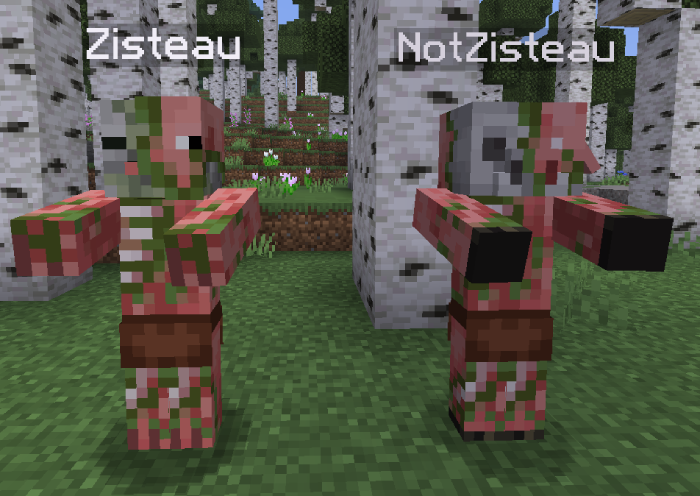
**This resource pack requires OptiFine or a CEM alternative such as [Entity Model Features](https://modrinth.com/mod/entity-model-features)** and may conflict with other resource packs or mods that alter Zombified Piglin textures.
## Versions
| Minecraft Version | Pack Version
| :–: | :–: |
| 1.21.9 – 26.1.2 | [v2.2.1](https://modrinth.com/resourcepack/zisteau_pigmen/version/v2.2.1)
| 1.21 – 1.21.8 | [v1.1.2](https://modrinth.com/resourcepack/zisteau_pigmen/version/v1.1.2)
Older versions can be found [here on Modrinth](https://modrinth.com/resourcepack/zisteau-pigmen/versions).
## Bug Reports
Found a bug? Join [Discord](https://discord.gg/vZJSDjPcmu) and open a ticket.
## Icon Credit (v1.0.0 – v2.2.0)
The pack icon used from v1.0.0 to v2.2.0 is from [Zisteau’s YouTube channel in 2020](https://web.archive.org/web/20200104045132/https://www.youtube.com/user/Zisteau). All credit goes to the original artist.
Ziplines: Rezipped!
# Zipline: Rezipped!
[](https://files.minecraftforge.net/) [](https://fabricmc.net/) [](https://neoforged.net/)
This is a multiloader fork of Tomate0613’s [Zipline](https://modrinth.com/mod/zipline): Ziplines inspired by the hit zipline game [Satisfactory](https://www.satisfactorygame.com/)!
## What’s New?
* **Momentum-Based Physics!** Gain speed going down, lose speed going up. Includes a toggle to disable realistic physics for those who prefer a more arcade-y feel (default).
* **Works With Any Tools!** Add your modded tools to the item tag `#zipline:attachment` to zip around with them.
* **Durability!** Usage wears down your zipline tool (configurable).
## Usage
### How to Zip
1. **Equip a Zipline tool** (see _compatibility_ or _customization_ below).
2. **Aim** at a compatible cable, wire, or chain.
3. **Hold Right-Click** to attach and start zipping.
4. **Look** in the direction you want to travel to influence your momentum.
5. **Jump** to detach and launch yourself off the line, or release right-click.
## Configuration
This mod uses **Cloth Config** (optional but recommended) to allow customization of the mechanics. You can access the config screen via Mod Menu or by editing `config/zipline.json`.
## Compatibility
This mod **does not add any cables on its own**. Instead, it turns existing cables from other mods into ziplines.
Supported mods include:
* [Reconnectible Chains](https://modrinth.com/mod/reconnectible-chains)
* ~~[Create Crafts & Additions](https://modrinth.com/mod/createaddition)~~ (temporarily disabled)
* [Station Decoration (Minecraft Transit Railway addon)](https://modrinth.com/mod/station-decoration)
## Customization
### Adding Zipline Tools
This mod defines the specific tag `zipline:attachment`. Any item added to this tag will function as a zipline tool. By default, this includes Pickaxes and items tagged as Wrenches.
You can add items to this tag via a Data Pack: `data/zipline/tags/item/attachment.json`
“`
{
“replace”: false,
“values”: [
“minecraft:stick”,
“create:red_rose_quartz_pickaxe”
]
}
“`
### API
Developers can add support for their own cables by implementing the `Cable` interface and registering a `CableProvider` via `Cables.registerProvider`.
***
## License
[](https://github.com/evanbones/Ziplines-Rezipped/blob/1.21.1/LICENSE.txt)
Zine
Zine is a “Little Library” mod made to suit my (EightSidedSquare) modding needs. You may use it for your own projects but please do consider this entire library mod unstable as changes are likely.
Registration
- RegistryHelper class with helper methods for all registries
- RegistryQueue class for queueing the registration of values
Data Generation
- Particle Texture data provider
- Sound List data provider (made before Fabric API implemented a sould provider itself, I consider this one to be less verbose)
Data
- DataHelper class for reading and writing to data and byte buffers for mutable objects
- RegistryCodecGroup class for grouping together relevant codecs for a dynamic registry
Advancements
- Modify Advancement event
- VanillaAdvancementModifications helper class for simple modifications to vanilla advancements (i.e. adding a food item as a requirement for the “Balanced Diet” advancement)
Animations
- Extra interpolations derived from Geckolib
Sprite Atlases
- Generator sprite atlas source for generating noise and gradient textures
- Remap sprite atlas source for mapping multiple textures together given a base texture
- Connected textures atlas source for stitching 5 textures into all connected texture permutations
- Modify sources atlas source event
- AtlasSourceUtil class
- PalettedPermutationsAtlasSource extensions for modifying its values
Models
- ModelsEvents.ADD_UNBAKED event for creating unbaked models on resource pack load
- ItemModelEvents.BEFORE_BAKE event for modifying item models before baking (similar to the Fabric API implemtation, except this can resolve references to models)
- ItemModelEvents.ADD_UNBAKED event for creating unbaked item models on resource pack load
- Extensions for all vanilla unbaked item models for modifying their values
- Connected and tessellating block model types
- Custom variants, custom multipart, and direct block model definition creators
- BlockModelDefinitions helper class
- BlockModelParts helper class
- BlockStateModels helper class
Misc
- Client armor trim registry to add trim materials and patterns in a compatibility-safe manner
- Noise-based spawn condition
- Extensions for many predicates to modify their values
- Extensions for advancement criterions to modify their values
- Extensions for many structure-related classes to modify their values
- Extensions for item settings to simply component additions
- AlternativeCodec for codecs with multiple possible encodings
- CodecUtil class
- Modify Translations callback
- Modify block sound group callback
Zilibobka (Зилибобка) Totem of Undying
– EN: **Zilibobka** is a popular Russian meme, which was also stimulated during post-ironic memes in 2017 on the social network VKontakte and Tiktok. Texture pack replaces Totem of Immortality with this meme
– RU: **Zilibobka (Зилибобка)** – популярный российский мем который также был зафоршен во времена постироничных мемов в 2017 году в соц сети ВКонтакте и Тиктоке. Текстурпак заменяет тотем бессмертия на этот мем
[ALL RESOURCEPACKS COLLECTION: MEMES + STREAMERS](https://modrinth.com/collection/sfDcDGAi)
zHomes







zHomes is a modern, fast and fully-configurable homes plugin for Spigot/Paper/Purpur/PufferFish servers. It focuses on simplicity, speed and customization so server owners can give players a familiar — but powerful — teleportation experience.
Some features:
– Create, delete and list homes
– Admin tools for managing and converting homes
– PlaceholderAPI support for message placeholders
– MiniPlaceholders support for minimessage placeholders
– Vault support for economy/command-costs
– GriefPrevention and WorldGuard integration for region checks
– Teleport warmup and safe-teleport checks
– Configurable commands, messages and permissions
– 100% configurable menus
– Uses SQL (H2/SQLite/MariaDB/MySQL) for storage (no local data/ directory)
Maintained by [yL3oft](https://github.com/yL3oft). This project is free and open-source.
—

Requirements
– Java 17+ (check release notes for exact JDK requirement)
– Paper, Spigot or a compatible fork
Installation
1. Download the latest JAR from Releases / Modrinth / Hangar / Spigot.
2. Place the JAR in your server’s `plugins/` folder.
3. Start the server once to generate config files (src/main/resources/config.yml defaults).
4. You’re done!
Quick test
– As a player: `/sethome home1` then `/home home1`
– As an admin: `/zhomes reload`
—

Admin
– `/zhomes info` — Shows plugin info and stats.
– `/zhomes reload` — Reloads plugin configuration and messages.
– `/zhomes version ` — Checks the plugin version and updates if `` is specified.
– `/zhomes nearhomes [radius] <-u -h >` — Check for homes near a location (your location by default). Admins can specify a user and home to check near that home.
– `/zhomes parse ` – Parse a string with Plugin Placeholders & PlaceholderAPI placeholders for a specific player.
– `/zhomes export` — Export all homes to a .json.gz file in the plugin folder.
– `/zhomes import ` — Import homes from a .json.gz file exported by `/zhomes export`.
– `/zhomes converter ` — Inline converter tool to import homes from other plugins (example: `/zhomes converter ultimatehomes`). See detailed converter docs: https://docs.yleoft.me/zhomes/commands-and-permissions/zhomes-converter-less-than-type-greater-than
Player / Home commands
– `/sethome [name]` — Create a home (default name if omitted).
– `/delhome [name]` — Delete a home. Admins can use `/delhome `.
– `/home [name]` — Teleport to a home. Admins can use `/home `.
– `/homes [player]` — List homes. Admins can use `/homes `.
– `/home rename [oldName] [newName]` — Rename a home
Notes
– Command costs and vault integration require Vault to be installed.
– Some commands have admin-only variants (see Permissions below).
Full command list and usage: https://docs.yleoft.me/zhomes/commands-and-permissions
—

Below are the permission nodes and their default intent as defined in the plugin configuration (zHomes/config.yml). Use your permissions plugin to grant or deny these.
Command permissions
– zhomes.command.main — Main command (True by default)
– zhomes.command.main.help — Help SubCommand (Only OP by default)
– zhomes.command.main.version — Version SubCommand (True by default)
– zhomes.command.main.info — Info SubCommand (Only OP by default)
– zhomes.command.main.reload — Reload SubCommand (Only OP by default)
– zhomes.command.main.nearhomes – Nearhomes SubCommand (Only OP by default)
– zhomes.command.main.parse — Parse SubCommand (Only OP by default)
– zhomes.command.main.converter — Converter SubCommand (Only OP by default)
– zhomes.command.main.importexport — Import & Export SubCommand (Only OP by default)
– zhomes.command.sethome — `/sethome` (True by default)
– zhomes.command.delhome — `/delhome` (True by default)
– zhomes.command.delhome.others — `/delhome ` (Only OP by default)
– zhomes.command.homes — `/homes` (True by default)
– zhomes.command.homes.others — `/homes ` (Only OP by default)
– zhomes.command.home — `/home` (True by default)
– zhomes.command.home.others — `/home ` (Only OP by default)
– zhomes.command.home.rename — `/home rename` (True by default)
Bypass / misc permissions (as defined in config.yml)
– zhomes.bypass.limit — Bypass home limits (Only OP by default)
– zhomes.bypass.dimensionalteleportation — Bypass dimension restriction (Only OP by default)
– zhomes.bypass.safeteleport — Bypass safe-teleport checking (False by default)
– zhomes.bypass.warmup — Bypass teleport warmup (Only OP by default)
– %command_permission%.bypass.command-cost — Bypass command-cost (Only OP by default). Command-specific bypass permission is generated from the command permission string (see config.yml)
– %command_permission%.bypass.command-cooldown — Bypass commands cooldown (Only OP by default). Command-specific bypass permission is generated from the command permission string (see config.yml)
If you want to see the authoritative defaults and change them, open src/main/resources/config.yml in the repo or check the live docs: https://docs.yleoft.me/zhomes/commands-and-permissions
—

zHomes contains an inline converter to import homes from well-known plugins. The converter runs in-chat (not a GUI). See full converter details here: https://docs.yleoft.me/zhomes/commands-and-permissions/zhomes-converter-less-than-type-greater-than
—

Supported integrations:
– PlaceholderAPI — Message placeholders supported & custom [placeholders provided by zHomes](https://docs.yleoft.me/zhomes/hooks/placeholderapi).
– MiniPlaceholders – MiniMessage placeholders supported for advanced message formatting & custom [placeholders provided by zHomes](https://docs.yleoft.me/zhomes/hooks/miniplaceholders).
– Vault — for economy-based command-costs.
– GriefPrevention — region checks integration.
– WorldGuard — region and flag checks.
– MiniMessage — advanced message formatting.
– bStats — anonymous metrics (configurable).
Enable or disable integrations from config and ensure the third-party plugins are installed on the server when you expect integration behavior.
—

If you find zHomes helpful or need assistance:
– Discord: https://discord.gg/yCdhVDgn4K
– Issues: https://github.com/yL3oft/zHomes/issues
– Docs: https://docs.yleoft.me/zhomes
Support the project by starring the repo and joining the Discord!
—
Fast Noise
[Keep Android Open | Contact Regulators to stop Google’s lockdown of Android](https://keepandroidopen.org/)
Fast Noise is a modern optimization mod to improve world generation times. I regularly update the mod to latest minecraft versions, bring improvements to the mod, and provide stable releases.
**Does the mod change world generation?** The mod maintains **vanilla parity**, including with any datapacks. Do keep in mind, [Vanilla non-determinism](https://bugs.mojang.com/browse/MC-55596).
**Can I use custom worldgen mods with this?** Yes, I try my best to maintain mod compatibility, and only modify safe code. Specific optimizations that may affect mod compatibility are disabled by default.
**Forge / Neoforge?** Versions for minecraft 1.19.x – 1.21.8 are compatible with sinytra connector.
[](https://codeberg.org/ZenXArch/FastNoise) [](https://www.curseforge.com/minecraft/mc-mods/zfastnoise) [](https://modrinth.com/mod/zfastnoise) [](https://ko-fi.com/I2I31KW58I)
## How does this mod work?
Fast noise optimizes storing block and biome data into chunks for the duration of worldgen.
Technical Details
Fast noise replaces populateNoise,populateBiomes in NoiseChunkGenerator and surfaceBuilder in SurfaceBuilder.
Fast noise optimizes world generation by making several strong assumptions about how world generation works. By replacing vanilla’s generic and debug code for world storage with faster, more packed calculations, fast noise achieves faster throughput.
Some key methods used to achieve that are, **reducing allocations**, **avoiding palette resizing**, **delaying/packing block counting**, **precalculating data**,
**caching block state information** and more.
## How fast is it?
About 10-18% improvement to overall worldgen in overworld in 1.21.11 on latest versions.
Much higher improvement in nether, end
Here is a [Jmh Benchmark Software](https://codeberg.org/ZenXArch/FastNoise/src/branch/performance/perf/src/main/java/org/codeberg/zenxarch/fastnoise/PerfTest.java).
Chunky benchmark
12 threads w/ mod
“`
[12:39:32] [Server thread/INFO]: [Chunky] Task finished for minecraft:overworld. Processed: 16641 chunks (100.00%), Total time: 0:01:37
“`
W/o mod
“`
[12:43:08] [Server thread/INFO]: [Chunky] Task finished for minecraft:overworld. Processed: 16641 chunks (100.00%), Total time: 0:01:47
“`
4 threads w/ mod
“`
[12:56:23] [Server thread/INFO]: [Chunky] Task finished for minecraft:overworld. Processed: 9409 chunks (100.00%), Total time: 0:01:10
“`
W/o mod
“`
[13:01:11] [Server thread/INFO]: [Chunky] Task finished for minecraft:overworld. Processed: 9409 chunks (100.00%), Total time: 0:01:23
“`
With higher distance
W/o mod
“`
[13:11:01] [Server thread/INFO]: [Chunky] Task finished for minecraft:overworld. Processed: 19881 chunks (100.00%), Total time: 0:02:43
“`
W/ mod
“`
[13:16:03] [Server thread/INFO]: [Chunky] Task finished for minecraft:overworld. Processed: 19881 chunks (100.00%), Total time: 0:02:21
“`
Jmh Benchmark
“`
Mods used: Fast Noise 1.0.15+26.1 on 26.1 snapshot-6
ChunkPos: -16,-16 -> 16,16
End ChunkPos: 112,112 -> 144,144
Chunks: 1089
Mods used: (c2me)
With mod:
Benchmark (worldName) Mode Cnt Score Error Units
BiomesBenchmark.biomegen end avgt 5 11.786 ± 0.168 ms/op
BiomesBenchmark.biomegen nether avgt 5 174.833 ± 1.166 ms/op
BiomesBenchmark.biomegen overworld avgt 5 2401.797 ± 31.629 ms/op
NoiseBenchmark.noisegen end avgt 5 3052.242 ± 12.358 ms/op
NoiseBenchmark.noisegen nether avgt 5 1039.086 ± 6.467 ms/op
NoiseBenchmark.noisegen overworld avgt 5 8441.811 ± 41.396 ms/op
With only c2me:
Benchmark (worldName) Mode Cnt Score Error Units
BiomesBenchmark.biomegen end avgt 5 26.058 ± 0.245 ms/op
BiomesBenchmark.biomegen nether avgt 5 185.957 ± 2.203 ms/op
BiomesBenchmark.biomegen overworld avgt 5 2464.937 ± 29.007 ms/op
NoiseBenchmark.noisegen end avgt 5 3925.059 ± 14.292 ms/op
NoiseBenchmark.noisegen nether avgt 5 1920.705 ± 9.864 ms/op
NoiseBenchmark.noisegen overworld avgt 5 11552.674 ± 54.112 ms/op
Vanilla:
Benchmark (worldName) Mode Cnt Score Error Units
BiomesBenchmark.biomegen end avgt 5 27.051 ± 0.118 ms/op
BiomesBenchmark.biomegen nether avgt 5 239.634 ± 1.702 ms/op
BiomesBenchmark.biomegen overworld avgt 5 4589.322 ± 80.331 ms/op
NoiseBenchmark.noisegen end avgt 5 4477.113 ± 36.133 ms/op
NoiseBenchmark.noisegen nether avgt 5 1951.438 ± 5.748 ms/op
NoiseBenchmark.noisegen overworld avgt 5 14249.612 ± 57.388 ms/op
Vanilla:
Benchmark (worldName) Mode Cnt Score Error Units
SurfaceBenchmark.surface overworld avgt 5 5982.828 ± 17.992 ms/op
SurfaceBenchmark.surface nether avgt 5 2677.115 ± 9.293 ms/op
SurfaceBenchmark.surface end avgt 5 924.604 ± 5.376 ms/op
With Mod:
Benchmark (worldName) Mode Cnt Score Error Units
SurfaceBenchmark.surface overworld avgt 5 4820.672 ± 24.669 ms/op
SurfaceBenchmark.surface nether avgt 5 1914.289 ± 644.099 ms/op
SurfaceBenchmark.surface end avgt 5 0.014 ± 0.003 ms/op
Speedup
Overworld: Biome: 1.026x Noise: 1.368x Surface: 1.241x
Nether: Biome: 1.063x Noise: 1.847x Surface: 1.398x
End: Biome: 2.21x Noise: 1.285x Surface: 66357x
“`
The benchmarks may have some inaccuracies.
## Socials
[](https://discord.gg/RFSmd7debX) [](https://mastodon.social/@ZenXArch) [](https://matrix.to/#/#zenxarchs-modding-server:gitter.im)
## FAQ and Help
Q- What Minecraft versions will the mod be supporting?
A- I’ll try to support the latest minecraft version.
Q- Are backports planned?
A- No backports are planned, current backports were a one time thing.
Q- What other mods/dependencies do I need?
A- No dependencies are required.
Q- Will there be a neoforge version?
A- Yes, a NeoForge variant is planned post 26.1.
Versions for 1.19.x,1.20.x,1.21 – 1.21.8 works with sinytra connector

Q- XYZ mod crashes, or generates incorrectly with Fast Noise?
A- Report the issue on codeberg or my socials.
## Incompatible mods
Moonrise is incompatible, as It changes minecraft internals drastically
Noisium is incompatible, as Fast Noise is intended as a replacement for noisium.
Anti-Xray is incompatible for now, as it needs to put extra data in minecraft block storage, which breaks fastnoise
## Credits
– Stevenplays, for developing noisium mod, I started developing fast noise while trying to port noisium to latest minecraft.
– Ishland, for helping with mod, and modern-yarn and neo-loom