Withered Hearts
# Does this support resource packs?
—
Yes! Long story short, Withered Hearts uses the library Mixson to automatically generate textures so that it can match
any texture from any resource pack.
## License
—
This project is under an MIT license.
Wither Skulled
Some people prefer their wither skeleton skulls basically handed to them on a silver platter or crafted with easily accessible materials. What if you went with the later and wanted to be able to craft them but wanted to actually have to work a bit and explore to be able to do so?
**Are you someone who just finds those echo shards sitting in your chests to be useless since you already have a recovery compass?**
_Well with this Mod/Datapack, that’s no longer the case! This datapack offers (what I personally believe) is a much more balanced approach to crafting wither skeleton skulls and also to make use of two items that don’t really have uses!_
Using a single echo shard and a skull surrounded with some soul sand/soil. You now can craft a single skull! Encouraging you to break all those skulls around ancient cities and to horde those echo shards! **Not too easily craftable and doesn’t simply hand them to you on a silver platter with almost always dropping skulls from wither skeletons!**
Wither Cage Fix
—
### Fixes vanilla bug where withers forget their targets. Can also prevent blue skulls.
Works server-side and in single player.
This mod fixes a bug in vanilla minecraft that causes Wither bosses to forget which mob they were targeting when they
unload (due to quitting, going through a portal, etc.).
Additionally, it adds a new gamerule: `wither_cage_fix:allowBlueWitherSkulls` (default = false).
If this is set to false, Withers will never shoot blue skulls
(whenever they would have, they’ll shoot normal skulls instead).
The bug fix allows for much simpler Wither cages because there’s no need to control line-of-sight when entering/leaving
the area.
The gamerule is added as an option because blue Wither skulls have basically no purpose other than to make Wither cages
more difficult to create.
Why would anyone want a caged Wither?
– They provide a fully-automatable, late-game ([subjectively] balanced) way of breaking blocks.
– The above is a nice alternative to TNT duping for those who don’t want to use it (also check out
Carpet TIS Addition
which includes an optional patch for TNT duping).
– It’s cool.
—
Translating

If you’d like to help translate Wither Cage Fix, you can do so on
Crowdin.
—
This mod is only for Fabric (works on Quilt, too!) and I won’t be porting it to Forge. The license is MIT, however,
so anyone else is free to port it.
I’d appreciate links back to this page if you port or otherwise modify this project, but links aren’t required.
Wither Boss Fight Remastered
## Wither Remastered
The Minecraft Wither boss battle has been totally revamped to make it way exciting. This datapack turns the Wither into a Hard Boss with a bunch of combat phases, powerful attacks and cool visuals.
This datapack adds a variety of combat phases, powerful attacks and dramatic visuals to make battling the Wither impressive. You will have a time defeating this Wither. The Wither has **3 combat phases**, which kick in as its health drops. Each phase brings attacks, increased aggression. The Withers combat starts off tough. Gets even tougher.
## 🆕 What’s New in v1.2
– **Black Hole Collapse** – New ultimate ability that pulls players in and explodes
– **Combo Attacks** – Wither chains abilities for deadly combos
– **Smart AI** – Abilities react to player distance and movement
– **Near-Death Rage** – Triggers below 10% HP with speed and aggression boost
– **Better Visuals** – New aura, energy rings, phase changes, and effects
– **Sound Design** – Added charge-up, thunder, and impact sounds
## Features
### 3 Combat Phases
**Phase 1: 100%-50% HP**
The Wither starts by spawning skeleton minions to test your fighting skills.
**Phase 2: 50%-25% HP**
The Wither gets more aggressive moving faster. Lightning storms and debuff auras appear.
**Phase 3: Less than 25% HP**
The Wither goes into rage mode, unleashing attacks pulling players towards it and pulse waves.
### Wither Abilities
* **Wither Skeletons**: The Wither summons minions to fight alongside it.
* **Lightning Storm**: The Wither strikes players with bolts of lightning.
* **Debuff Aura**: The Wither slows down players movements.
* **Pull Vortex**: The Wither physically pulls players back to it.
* **Pulse Wave**: The Wither knocks players back with a wave.
* **Rage Burst**. The Wither unleashes an explosion effect with blindness.
### Visual Effects
* The Wither has a aura with particles.
* The Wither changes visually with each phase.
* The Wither has rotating energy rings surrounding it.
* The Wither has death effects when it dies.
### Rewards
The Wither drops a special **Wither Trophy**
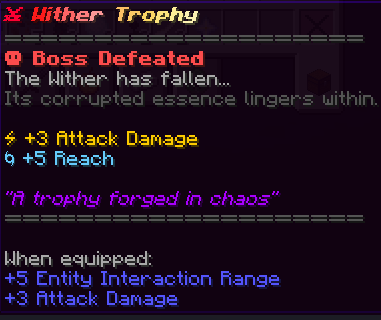
* +3 Attack Damage
* +5 Reach
## Installation
1. Download the datapack.
2. Move it to your worlds `datapacks` folder.
3. Type `/reload` in-game.
4. Summon the Wither.
## Compatibility
* This datapack works in singleplayer and multiplayer.
* It also works with other datapacks.
* It works with Minecraft 1.21.x
## Use Remastered Wither resourcepack for better experience.
## FAQ
**Q: How hard is this?**
A: It’s much harder than the vanilla Wither.
**Q: Can I make it harder/easier?**
A: For now the difficulty is fixed. Its meant to be tough but fair.
**Q: Is it compatible, with servers?**
A: Yes you can install it like any datapack.
**Q: Will it mess with my world?**
A: No it only affects the Wither. Your world is safe.
Wisp Shaders
# **Wisp Shaders**

Primitive shaders with **no fancy effects or PBR**, meant to make the game look good while sticking to the vanilla style.
# Features:
– Directional lighting, lightmap based
– More vibrant environment colors
– Custom clouds
– Adjustable fog
– Waving leaves
– Water foam effect
– Cloud reflections in water
– Rain puddles
# Compatibility
The shaders were developed and are intended for minecraft version **1.21.1 and up**, and Iris version **1.7 and up**, but **may** work on lower versions.
If tag support is present, the tag _**minecraft:leaves**_ will be used for waving leaves, otherwise leaves from **vanilla** and **Biomes O’ Plenty** are used.
Wisp Minigames
# **Wisp Minigames**
Wisp Minigames is a Fabric mod that transforms normal Minecraft survival into chaotic challenge runs with toggleable minigame mechanics.
The minigames are inspired by challenge formats from Wisp’s YouTube channel, then adapted into a playable mod for singleplayer and multiplayer worlds.
You can enable one or multiple minigames at once to create custom chaos combinations for friends, events, or content sessions.
## What this mod is for
Turning regular worlds into fast, unpredictable challenge modes
Adding replayability with modular minigame toggles,
Running multiplayer chaos events without setting up datapacks each time,
Creating “challenge video” style gameplay in your own world!
## Minigames
### Fixed Random Drops
Every block type is remapped to a different drop.
If stone maps to carrots, it will always drop carrots for the whole round. This creates a learnable but completely different progression path.
### Fixed Random Drops (Modded)
Same as Fixed Random Drops, but modded items are included in the possible drop pool for even more variety.
### Fixed Random Drops (Chunked)
Drop mappings depend on the chunk you are in.
The same block can give different drops in different areas, so exploration matters as much as mining.
### Fixed Random Drops (Modded + Chunked)
Chunk-based random drop logic + modded item pool enabled.
Most chaotic version of random drops.
### Chaos Crafting
Crafting outputs are remapped.
Recipes still take normal ingredients, but the result item can be completely different, forcing experimentation and adaptation.
### Random and Multiplied
Randomized drops combined with multipliers.
You still get unexpected items, but in larger amounts, which speeds up progression and escalates chaos.
### Loot Multiplier
Increases item/loot output to make runs faster and more explosive.
Great for short high-intensity sessions.
### Chunk Morph
When you enter a chunk the whole chunk becomes a random block.
### Chunk Locked Inventory
Your usable inventory is effectively tied to chunk progression.
Moving to a new chunk can limit what you can actively use until you unlock items there, forcing route planning and inventory management.
### Death Swap
At intervals, players swap positions.
This creates constant tension: your current location can become your opponent’s trap, and theirs can become yours.
### Rising Lava
Lava level continuously rises over time.
Players must climb, relocate, and route efficiently; stalling is punished.
### Velocity Gamble
Movement behavior can become risky/unpredictable.
Momentum and mobility become a strategic gamble instead of a guaranteed advantage.
### Block Look Mutation
Interacting with or looking at blocks can trigger mutations/changes, making basic traversal and building less reliable and more reactive.
### Target Race
Each player is assigned a target item/block to obtain first.
Targets are from a large early-game-friendly pool for strong variety while staying obtainable.
### Death Message Race
Players race to trigger specific death-message conditions first (easy/hard/very hard types).
It turns normally “bad outcomes” into objectives.
### Would You Rather
Players periodically get two dangerous options and must choose one.
Each choice has consequences/rewards, creating high-risk decisions mid-run.
### Pillars of Fortune
Players gets put on top of pillars. You recive random items. Fight and try to be the last one standing!
## Requirements
Minecraft (Fabric)
Fabric Loader
Fabric API (required)
## Performance recommendation
Sodium is recommended for better FPS and less lag, especially when multiple minigames are active.
## Multiplayer compatibility
Tested and confirmed working on an Essential-hosted world.
## Example:

Wisp Allays
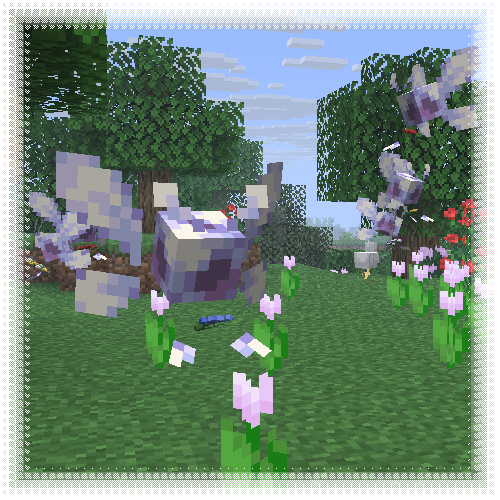
This resourcepack transforms allays into vibrant, cartoony wisps, mostly inspired by Navi from TLOZ :]
**Entity Model Features required!**
Wiretap
# Wiretap
A server-side Simple Voice Chat addon mod for Fabric, that adds a microphone and a speaker block.
## Disclaimer
When installing this on your server,
you are responsible for making sure that players are aware of the functionality of the mod.
This mod is not intended to be used for spying on people, this is **only for role-playing purposes**!
## Usage
– Install this mod alongside Simple Voice Chat on your server
– Make sure you set up the voice chat mod correctly (see here)
– Craft a *Calibrated Skulk Sensor*
– Make sure you have at least one level if you are in survival mode
– Place the *Calibrated Skulk Sensor* in an anvil
– Rename the *Calibrated Skulk Sensor* to `wiretap` (not case-sensitive)
– Take out the microphone block
– When taking out the microphone, you will get a speaker added to your inventory as well
– Place the microphone block where you want to listen in on people
– Place the speaker block where you want to hear people
– The microphone and speaker blocks will have a unique ID shown in their tooltip – Microphones and speakers with the same ID will be connected to each other
– Don’t place multiple microphones or speakers with the same ID, as this will cause issues
## Commands
– `/wiretap items [speaker_radius | ‘infinite’]` – Gives you a microphone and speaker (Requires OP permissions by default)
– If a radius isn’t provided, the server speaker range is used by default.
## Contact
For support with this mod, please contact @CG360 via:
– **Discord:** https://discord.gg/94c45XagEH
– **Github:** /squeeglii
## Configuration
| Property | Description | Default |
|—————————-|—————————————————————————————————|—————|
| `microphone_pickup_range` | The range in which microphones can pick up sounds | `32.0` |
| `speaker_audio_range` | The audible range of speakers | `32.0` |
| `command_permission_level` | The permission level required to use the commands | `2` |
| `packet_buffer_size` | The amount of packets to buffer before playing | `6` |
| `anvil_crafting` | Whether the items can be crafted in the anvil | `true` |
| `speaker_sound_effect` | The sound effect to apply to the speaker – Valid values are: `none`, `old_speaker`, `low_quality` | `old_speaker` |
| `microphone_skin_url` | The skin url for the microphone block | |
| `speaker_skin_url` | The skin url for the speaker block | |
## Credits
– Microphone Skin
– Speaker Skin
Wireless Redstone Plugin
_Releasing general improvement update soon. Found some weird bugs and missing features_
### ⚡ Wireless Redstone: Lightning Rods
Tired of messy redstone trails across your base? This plugin lets you use Lightning Rods as long-range, wireless transmitters and receivers. It’s lightweight, survival-friendly, and integrates perfectly with the vanilla look of Minecraft.
### 🕹️ How to Use
Releasing video tutorial soon
**_1._ The Setup**
> Place a Lightning Rod.
>
> Place a Redstone Torch directly on top of it.
**_2._ Tuning the Frequency**
> Take a Book and Quill and rename it to either Sender or Receiver using an Anvil.
>
> Open the book and type your desired Frequency (e.g., 100, Base_Alpha, or Gate) on the first page.
>
> Right-click the Lightning Rod with the book to register the device.
**_3._ Transmitting Power**
> When a Sender receives power, the torch on top will light up.
>
> All Receivers on the same frequency will instantly activate, triggering a visual “strike” > effect on the rod.
### 🌟 Key Features
– Full Variant Support: Works with all Lightning Rod stages (Normal, Exposed, Weathered, Oxidized) and even Waxed versions.
– Survival Integrated: No commands needed. Everything is done through blocks and items.
– Auto-Cleanup: If you break a rod or the torch above it, the location is automatically removed from the config—no “ghost” data left behind.
### 🛠️ Installation
– Drop the .jar into your plugins folder.
– Restart your server.
– Start linking your machines!
_Note: The Redstone Torch acts as the antenna tip and signal indicator. Use observers or adjacent redstone dust to pull the signal from your receivers._
Winter 2017 Panorama
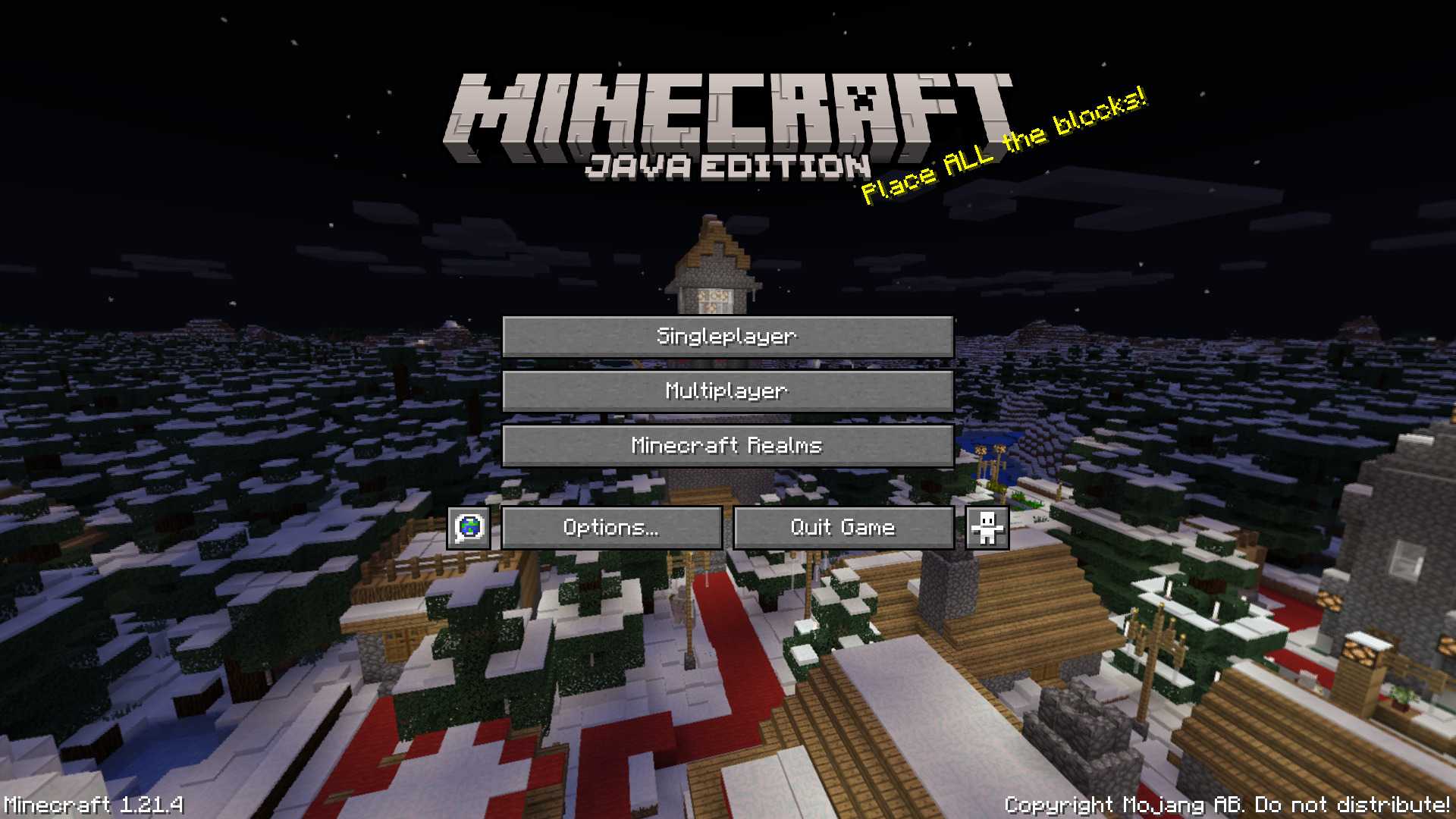
# Winter 2017 Panorama
This panorama was used in Bedrock Edition during the 2017 winter holiday season (1.2.7 to 1.2.8)
### Features:
Adds the Panorama from the Bedrock 2017 winter holiday season (Gallery)
### Credits
The images were taken from the Minecraft Wiki (Check it out!)