World Events

# 🌍 World Events & World Events Pro
### The Ultimate Immersion Engine
*Atmospheric Weather, Psychological Horror, Realistic Physics, and Custom Rewards.*
[](https://mbaconz.gitbook.io/world-events) [](https://discord.com/invite/VQjTVKjs46) [](https://bstats.org/plugin/bukkit/WorldEvents/28090)
—
# 🚀 World Events Pro: JUST RELEASED!
**Bring your server to the next level with the Pro version.**
[](https://builtbybit.com/resources/worldevents-pro.88756/)
Upgrade now to unlock enterprise-grade features designed for big networks and content creators:
* **⚡ Folia & Multi-Threading Support:** Built for modern hardware with true multi-threading support.
* **💾 Database Persistence:** Sync active events and player data across your network using **MySQL** or **Redis**.
* **🎥 Twitch & Discord Integration:** Let your stream viewers trigger events via bits/subs, and announce events to your Discord automatically.
* **💻 JavaScript Scripting Engine:** Create your own completely custom events using the powerful JS scripting API.
* **🏆 Achievements & Betting:** Let players bet money on event outcomes and hunt for custom achievements.
* **⚔️ Boss Rush Mode:** Chain events together for the ultimate PVE challenge.
—
## ⚡ Why Choose World Events?
Static worlds lead to bored players. **World Events** transforms your server into a living, breathing ecosystem where every hour brings a new challenge or reward. Whether it’s a terrifying **Blood Moon** or a lucrative **Diamond Fever**, your players will always have a reason to stay logged in.
* **🚀 80+ Pre-Configured Events:** Ready to use out of the box. From simple buffs to complex environmental changes.
* **👻 Immersive Horror:** Features unique “Hidden Events” (**Paranoia**, **Silent Mobs**) that play tricks on players’ minds without obvious warnings.
* **🌲 Realistic Physics:** Trees that topple with gravity, meteors that leave craters, and acid rain that requires actual shelter.
* **🎨 In-Game Editor:** Create, edit, and tweak events live with a beautiful GUI. No YAML knowledge required.
* **✨ Smart Boss Bars:** A single, elegant bar that handles multiple active events with smooth carousel animations and MiniMessage gradient support.
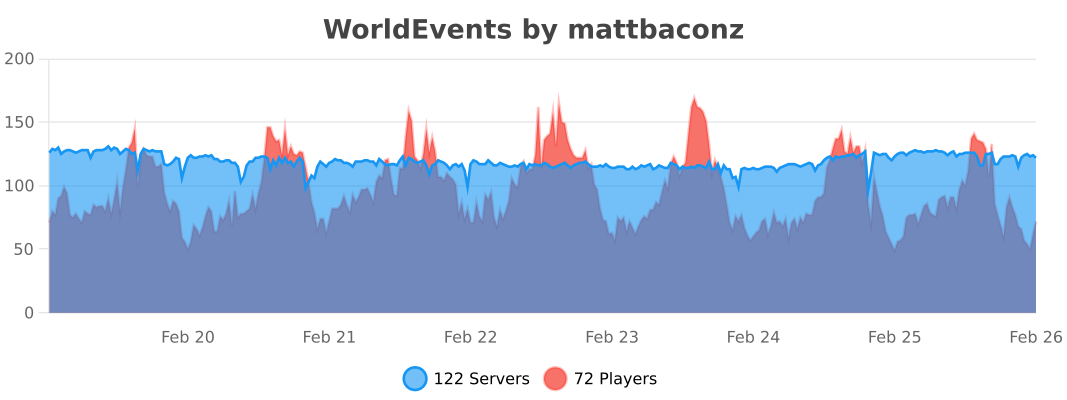
* **⚡ Zero Lag Promise:** Highly optimized implementation maintaining **0.02% CPU usage** even on high-population servers.
—
## 📂 Explore The Categories
### 🌪️ Atmosphere & Weather
* **Acid Rain:** Seek shelter or take toxic damage during storms.
* **Solar Flare:** Direct sunlight burns! Stay in the shadows or underwater to survive.
* **Meteor Shower:** Watch the skies for falling stars that drop rare loot (and cause explosions).
* **Gravity Trees:** Chop one log, and the entire tree falls with realistic animations.
### 👁️ Psychological Horror
* **Paranoia:** Players hear footsteps, creeper hisses, and whispers that aren’t actually there.
* **The Mist:** A thick, blinding fog rolls in, reducing visibility to just a few blocks.
* **Silent Mobs:** Hostile mobs spawn invisible and completely silent—you won’t see them until they strike.
### ⚔️ Combat & Survival
* **Blood Moon:** Mobs spawn with custom **Boss Attributes** (150+ HP), iron/diamond gear, and aggressive AI.
* **Vampirism:** Players heal a percentage of all damage dealt to entities.
* **Exploding Mobs:** Every mob becomes a potential TNT trap upon death.
* **Mob Surge:** 2x-5x spawn rates for a true apocalypse experience.
### 💎 Mining & Economy
* **Diamond Fever:** Greatly increased chance to find diamonds in ores or even regular stone.
* **Auto-Smelt:** All mined ores drop as refined ingots instantly.
* **Treasure Hunt:** A loot-filled chest spawns in the wilderness with coordinates broadcasted to all players.
* **Bumper Harvest:** Massive multipliers for all crop yields.
—
## 🛠️ Administration Made Easy
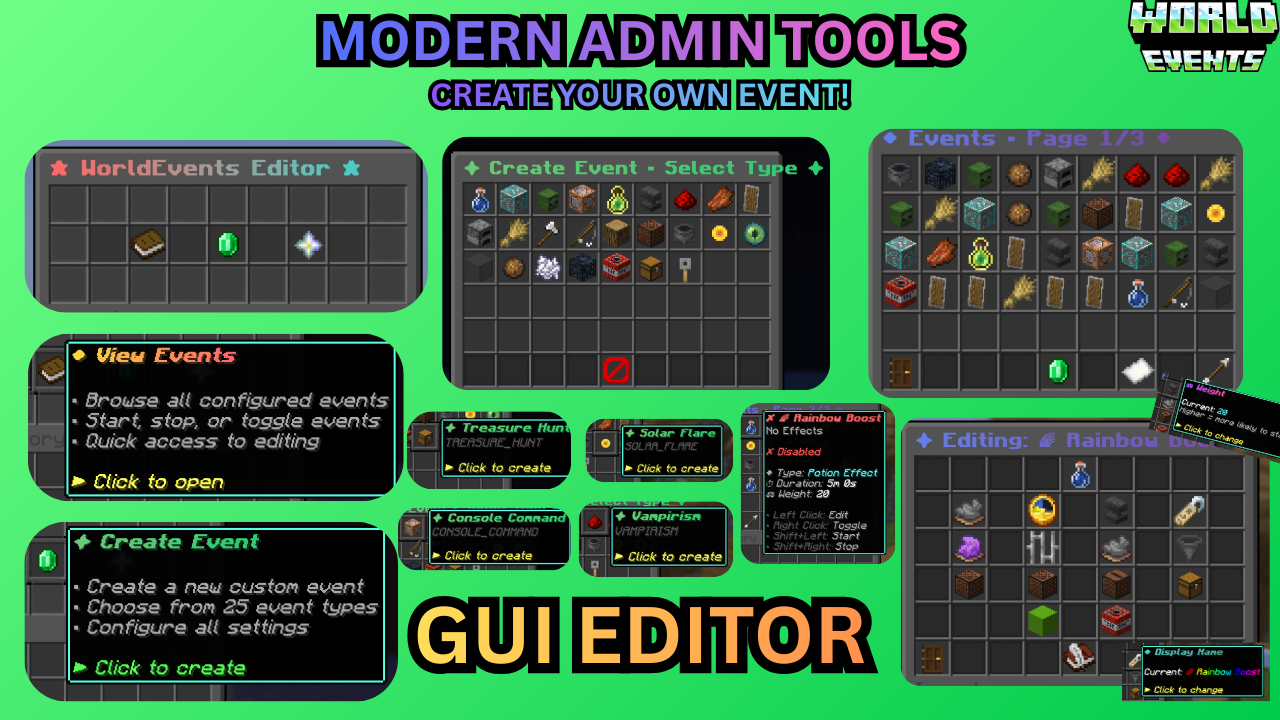
* **/wevent editor:** The ultimate GUI tool. Create, delete, and modify events live.
* **/wevent list:** View exactly what’s running, how much time is left, and which events are hidden.
* **/wevent extend :** Keep the hype going by adding time to an active event on the fly.
* **/wevent debug:** One-click diagnostic check for PAPI, Vault, WorldGuard, and version status.
* **/wevent reload:** Instantly reload all configurations without restarting the server.
—
## 🔌 Smart Integrations
We respect your server’s rules. World Events integrates natively with:
* **🛡️ Protection:** **WorldGuard, GriefPrevention, Towny,** and **Lands**. Meteors and explosions won’t grief protected claims.
* **📱 Bedrock:** **Floodgate** support ensures boss bars and MiniMessage symbols look perfect on mobile/console.
* **💰 Economy:** **Vault** integration for survival rewards and console command rewards.
* **⚔️ Custom Items:** Full support for **ItemsAdder** and **Nexo** in loot pools and mob equipment.
* **📊 Display:** **PlaceholderAPI** support for `%worldevents_active%` and per-event timers.
—
## 📊 Live Performance Metrics
[](https://bstats.org/plugin/bukkit/WorldEvents/28090)
## ❓ Need Support?
[](https://discord.com/invite/VQjTVKjs46)
WorldEditDisplay
# WorldEditDisplay
[](https://www.minecraft.net/)
[](https://www.oracle.com/java/)
[](LICENSE)
A server-side WorldEdit selection visualization plugin
—
### About
WorldEditDisplay is a server-side plugin for Minecraft that adds visual selection rendering for WorldEdit. It intercepts WorldEdit’s CUI (Client User Interface) protocol packets and renders selections using Display Entities on the server side. This means players can see their WorldEdit selections without installing any client-side mods.
### Features
**Selection Types**
– Cuboid – Box selections with edge lines and grid display
– Polygon – 2D polygon boundaries with vertical columns
– Ellipsoid – Smooth elliptical selections
– Cylinder – Circular selections with adjustable height
– Polyhedron – Complex 3D polyhedral structures
**Visual Rendering**
– Uses Minecraft’s Display Entity (TextDisplay) system
– Customizable hex colors (#RRGGBBAA) for all visual elements
– Adjustable line thickness and grid density
– Translucent face filling for Cuboid, Polygon, and Polyhedron regions
– Grid overlay for easier size calculation
**Multi-language Support**
The interface is available in multiple languages with automatic client language detection:
– Traditional Chinese (zh_tw)
– English (en_us)
**Player Settings**
Players can customize their own rendering preferences:
– Choose preferred hex colors for elements
– Enable or disable face filling
– Adjust line thickness within server limits
– Control grid spacing and density
– Changes apply immediately
**Selection Sharing**
– Share your WorldEdit selection with other players in real-time
– Invite, accept, revoke, and unwatch shares via `/wedisplay share`
– Each shared selection is displayed in a unique auto-generated color
– Share relationships persist across server restarts
**View All Mode** *(op-only by default)*
– Toggle monitoring of all online players’ selections via `/wedisplay view`
– Hide specific players from your view, toggle name labels, and list monitored players
**Configuration System**
– Server-wide defaults in `config.yml`
– Per-player overrides in `player_config/*.yml`
– Hot reload without server restart
### Requirements
– Minecraft 1.20 ~ 1.21.x (Paper / Folia / Spigot)
– Java 21 or higher
– Required plugins:
– [PacketEvents](https://github.com/retrooper/packetevents) 2.11.1+
### Installation
1. Make sure WorldEdit and PacketEvents are installed on your server
2. Download `WorldEditDisplay.jar`
3. Place it in your server’s `plugins` folder
4. Restart the server
5. Edit `plugins/WorldEditDisplay/config.yml` if needed
6. Use `/wedisplayreload` to reload the configuration
### Commands
**Admin Commands**
`/wedisplayreload` – Reload plugin configuration
– Permission: `worldeditdisplay.reload` (default: op)
**Player Commands**
`/wedisplay set ` – Configure personal rendering settings
– Example: `/wedisplay set cuboid edge_color #FFD700FF`
– Permission: `worldeditdisplay.use.settings`
`/wedisplay reset [setting]` – Reset to server defaults
– Example: `/wedisplay reset cuboid` (reset all settings)
– Example: `/wedisplay reset cuboid edge_color` (reset specific setting)
`/wedisplay show [renderer]` – Show current settings
– Example: `/wedisplay show` (show all)
– Example: `/wedisplay show cuboid` (show specific renderer)
`/wedisplay toggle` – Toggle rendering on/off
– Quick command to enable or disable selection visualization
– Works independently for each player
`/wedisplay reloadplayer` – Reload your personal configuration file
`/wedisplay lang ` – Set interface language
– Example: `/wedisplay lang en_us`
– Supported: zh_tw, en_us
`/wedisplay share invite ` – Invite a player to view your selection
– Permission: `worldeditdisplay.use.share.invite`
`/wedisplay share accept ` – Accept a pending share invitation
– Permission: `worldeditdisplay.use.share.accept`
`/wedisplay share revoke ` – Revoke a share you previously granted
– Permission: `worldeditdisplay.use.share.revoke`
`/wedisplay share unwatch ` – Stop watching another player’s selection
– Permission: `worldeditdisplay.use.share.unwatch`
`/wedisplay share list [page]` – List current share relationships
– Permission: `worldeditdisplay.use.share.list`
**View All Sub-commands** *(op-only by default)*
`/wedisplay view` – Toggle view-all mode (see all online players’ selections)
– Permission: `worldeditdisplay.use.view`
`/wedisplay view hide ` – Exclude a player from your view-all mode
– Permission: `worldeditdisplay.use.view.hide`
`/wedisplay view hideall` – Exclude all online players from view-all mode
– Permission: `worldeditdisplay.use.view.hide`
`/wedisplay view unhide ` – Remove exclusion for a player
– Permission: `worldeditdisplay.use.view.hide`
`/wedisplay view label` – Toggle name label display for watched selections
– Permission: `worldeditdisplay.use.view.label`
`/wedisplay view list [page]` – Show view-all monitoring status
– Permission: `worldeditdisplay.use.view.list`
### Configuration
The main configuration file is `config.yml`:
“`yaml
language:
default: “en-us” # Default language
auto_detect: true # Auto-detect player’s client language
allow_player_change: true # Allow players to change language manually
renderer:
cuboid:
edge_color: “#FFD700FF” # Color for edges in #RRGGBBAA
edge_thickness: 0.05 # Line thickness
grid_spacing: 8 # Grid spacing
fill_enabled: true # Enable face filling
fill_color: “#FF000040” # Face fill color
# … more settings
player_limits:
thickness:
min: 0.01 # Minimum thickness
max: 0.5 # Maximum thickness players can set
# … more limits
“`
Each renderer type has its own configuration section:
– **cuboid**

– **polygon**

– **ellipsoid**

– **cylinder**

– **polyhedron**

### How It Works
**Core Components**
– Packet listener intercepts WorldEdit CUI protocol messages
– Render engine creates Display Entities to visualize selections
– Configuration manager handles server-wide and per-player settings
– Language manager provides multi-language support
**Rendering Technology**
The plugin uses Minecraft’s Display Entity system:
– Display entities render the visual elements
– More efficient than particle effects
– Works with vanilla clients (no mods required)
**Performance**
– Only updates when selections change
– Server admins can limit grid density and segment counts
– Each player’s settings are independent
### Permissions
“`yaml
worldeditdisplay.use: # Use visualization features (default: true)
worldeditdisplay.use.settings: # Manage personal rendering settings (default: true)
worldeditdisplay.use.share: # General share feature toggle (default: true)
worldeditdisplay.use.share.invite: # Send share invitations (default: true)
worldeditdisplay.use.share.accept: # Accept share invitations (default: true)
worldeditdisplay.use.share.revoke: # Revoke granted shares (default: true)
worldeditdisplay.use.share.unwatch: # Stop watching a shared selection (default: true)
worldeditdisplay.use.share.list: # List share relationships (default: true)
worldeditdisplay.use.view: # Toggle view-all mode (default: op)
worldeditdisplay.use.view.defaultenable: # Auto-enable view-all on join (default: op)
worldeditdisplay.use.view.hide: # Hide players from view-all (default: op)
worldeditdisplay.use.view.list: # List view-all monitoring status (default: true)
worldeditdisplay.use.view.label: # Toggle name label display (default: true)
worldeditdisplay.use.view.label.defaultenable: # Auto-enable labels on join (default: true)
worldeditdisplay.reload: # Reload configuration (default: op)
worldeditdisplay.render.auto-enable: # Automatically enable rendering on join (default: true)
“`
**About Auto-Enable Permission**
The `worldeditdisplay.render.auto-enable` permission controls whether rendering is automatically enabled when a player joins the server:
– **With permission**: Rendering is enabled by default when logging in
– **Without permission**: Players must manually use `/wedisplay toggle` to enable rendering
This allows server admins to control which player groups have rendering enabled by default.
### Usage
**Basic Usage**
1. Use WorldEdit’s `//wand` command to get the selection tool
2. Left/right click blocks to define your selection
3. The selection is automatically visualized (no extra steps needed)
4. Use `/wedisplay` commands to customize the appearance
**Customization Examples**
“`bash
# Change cuboid edges to solid diamond blue
/wedisplay set cuboid edge_color #55FF55FF
# Make lines thicker
/wedisplay set cuboid edge_thickness 0.08
# Change grid spacing
/wedisplay set cuboid height_grid_division 2
# Enable face filling with half-transparent red
/wedisplay set cuboid fill_enabled true
/wedisplay set cuboid fill_color #FF000080
# Toggle rendering on/off
/wedisplay toggle
# Reset all settings
/wedisplay reset cuboid
“`
### Building
To build the plugin from source:
“`bash
mvn clean package
“`
The compiled jar will be in `target/WorldEditDisplay-version-platform.jar`
**Project Structure**
“`
src/main/java/dev/twme/worldeditdisplay/
├── event/ # CUI event system
├── display/ # Render engine
│ └── renderer/ # Renderer implementations
├── config/ # Configuration management
├── lang/ # Language system
├── command/ # Command handlers
├── listener/ # Packet listeners
└── player/ # Player data management
“`
### Contributing
Issues and pull requests are welcome.
### License
See [LICENSE](LICENSE) file for details.
### Credits
– **TWME-TW** – Developer
### Related Projects
– [WorldEdit](https://github.com/EngineHub/WorldEdit) – The core editing tool
– [WorldEditCUI](https://github.com/EngineHub/WorldEditCUI) – Client-side CUI mod (protocol reference)
– [PacketEvents](https://github.com/retrooper/packetevents) – Packet handling library
– [TextDisplayShapes](https://github.com/TWME-TW/TextDisplayShapes) – Shape rendering library used by the plugin
—
**Made with ❤️ by TWME-TW**
WorldEdit Hang Fix
A simple mod that prevents WorldEdit from hanging the Minecraft server when the server is stopping
It fixes https://github.com/EngineHub/WorldEdit/issues/2459. What it does:
– Shutdown `WorldEdit.getInstance().getExecutorService()` on dedicated server stop (or it will hang the server for maximum 60s)
– Ensure the singleton `java.util.Timer` object in `FutureProgressListener` runs on a daemon thread (or it will hang the server forever)
Supported environment
| Platform | Minecraft | WorldEdit |
|———-|————–|———–|
| fabric | MC >= 1.14 | >=7.0.0 |
| forge | MC >= 1.15 | >=7.0.0 |
| neoforge | MC >= 1.20.6 | >=7.0.0 |
WorldEdit CUI
A graphical user interface for [WorldEdit]. WorldEditCUI is designed
to assist in using WorldEdit, as well as preventing accidental errors.
Please note that this is not [WorldEdit], which allows you to make changes
to your world, but WorldEditCUI, a frontend for WorldEdit. You must have
WorldEdit installed on your server.
Installation
————
1. Install [Fabric](https://fabricmc.net/use)
2. Install [this mod](https://modrinth.com/mod/worldedit-cui) into Minecraft mods folder
WorldEdit selections will be shown without any configuration necessary, but the colours used are configurable when [Mod Menu](https://modrinth.com/mod/modmenu) is installed.
Misc
—-
You can subscribe to updates either by watching this project, or by [joining the EngineHub Discord guild](https://discord.gg/enginehub). Support questions
belong in the `#worldedit-cui` channel.
Credits
——-
* [Mumfrey](https://github.com/Mumfrey), [yetanotherx](https://github.com/yetanotherx), [mikroskeem](https://github.com/mikroskeem), and [zml](https://github.com/zml2008) for maintaining WorldEditCUI previously
* [lahwran](https://github.com/lahwran) – Creator of the original WorldEdit CUI!
* [sk89q](http://sk89q.com) for writing the WorldEdit plugin!
* [Mojang](http://mojang.com) – for making such an awesome game!
Legal stuff
———–
The code for WorldEditCUI (and therefore the compiled mod) is licensed under the [Eclipse Public License v1].
[WorldEdit]: https://enginehub.org/worldedit/
[Eclipse Public License v1]: https://www.eclipse.org/org/documents/epl-v10.php
WorldEdit

**A Minecraft Map Editor… that runs in-game!**
With selections, schematics, copy and paste, brushes, and scripting.
Use it in creative, or use it temporarily in survival.
Java Edition required.
Compatible with NeoForge, Fabric, and Bukkit-based platforms (Spigot and Paper).

🛑 Make sure that you are using the Java version of Minecraft. **WorldEdit does not support Bedrock!**
Mod version:
1. Install NeoForge or Fabric.
2. Download WorldEdit from this page (make sure you grab the mod version, not the plugin).
3. Put the WorldEdit mod file into your mods folder.
Plugin version:
1. Set up a Bukkit server such as [Spigot](https://spigotmc.org) or [Paper](https://papermc.io/) (Paper is [recommended](https://madelin
emiller.dev/blog/paper-vs-spigot/) over Spigot).
2. Download WorldEdit from this page (make sure you grab the plugin version, not the mod).
3. Put the WorldEdit plugin file into your plugins folder.
Check YouTube for tutorials, or read the official [documentation](https://worldedit.enginehub.org/)

**The most complete source of WorldEdit information is [our documentation, check them out here](https://worldedit.enginehub.org/en/latest/)!**
If you need further help than what the documentation can provide, you can join our Discord server.
[](https://discord.gg/enginehub)




**Do I need cheats on?**
If you’re playing on single player: Yes, cheats must be enabled for the world to use WorldEdit, but you can change this in the configuration. If you’re running a server: Only opped users can use WorldEdit, though this can be changed too.
**Can anyone use it?**
On servers, only opped users or users with permissions supplied with a permissions plugin can use WorldEdit. On LAN, anyone can use it if cheats are enabled.
**How do you use WorldEdit?**
To learn how to use WorldEdit, read the docs. Check YouTube for tutorials too!
**I need help!!**
You may visit our documentation or Discord Guild.
**I have some feature requests…**
Visit our issue tracker. However, if you just have a question, please try one of the methods above.
**Can I include WorldEdit in my modpack?**
You are free to include WorldEdit, without having to asking for explicit permission.
A link back to this page or our GitHub Sponsors would be appreciated, however.
**Can I edit the source code?**
Visit our GitHub repository. WorldEdit is licensed under GPLv3 and you can compile it with Gradle.
🎉 Support us on GitHub Sponsors!
Need a host? We recommend Apex Hosting

World Size
**World Size** is a lightweight, client-side utility mod for Minecraft Fabric that brings more transparency to your world management.
Ever wondered how much disk space your massive survival world is actually taking up? With this mod, you no longer need to dive into your file explorer to find out.
Features:
– Real-time Size Tracking: View the total disk size of every world directly on the World Selection screen. Or you can use the **/worldsize** command to show it in game.
– Automatic Formatting: Sizes are automatically converted to a readable format (Bytes, KB, MB, or GB) for at-a-glance information.
– Seamless Integration: Designed to blend perfectly with the modern Minecraft UI, featuring a clean, non-intrusive display.
– Performance Optimized: The size calculation happens efficiently in the background, ensuring your menu navigation remains smooth and lag-free.
**Why use World Size Display?**
Whether you are a modpack creator, a dedicated survivalist, or just someone looking to clean up old worlds, this mod provides the essential data you need to manage your storage effectively without ever leaving the game.
World Pregen
# 🗺️ World Pregen
**World Pregen** is a datapack that allows you to automatically pre-generates a map and prevents lag caused by generation while you are playing.
### Commands to know
– ▶️ `/function wp:[dimension]/[size]` > Start pre-generation
– Dimension name: overworld, the_end, the_nether
– Size options: 2k, 4k, 6k, 8k, 10k, 20k (2k → 1000/-1000)
– ⏸️ `/function wp:pause` > Pause pre-generatino
World Editor







## 📖 Description
This datapack adds commands to make building way easier!
Explore the seamless functionality in both single-player and multiplayer modes.
## Commands
Operator permission is **required** to use this datapack/mod.
**V2.4.0+**
“`
/function we:tools/cut
/function we:tools/set {block:stone}
/function we:tools/outline {block:dirt}
/function we:tools/replace {old:dirt, new:stone}
/function we:tools/copy
/function we:tools/paste
/function we:tools/move
/function we:tools/rotate {degrees:90}
/function we:tools/undo
/function we:tools/redo
/function we:movement/up {amount:1}
/function we:movement/down {amount:1}
/function we:give/wand
/function we:give/brush
/function we:misc/outline
/function we:misc/deselect_area
/function we:misc/phasing
“`
## How to use:
Use “`/function we:give/wand“` to get the selector item.
When you have selected two positions named **#1** and **#2**, you can start using the tools.
Use “`/function we:give/brush“` to get the brush item.
Instructions are on the item description.
Use “`/function we:misc/outline“` to enable/disable the outline particles that appear when you select two positions.
Use “`/function we:misc/phasing“` to enable/disable the player being able to phase through blocks when flying.
## Copy-Paste info
You must have an area already copied to use the **paste** function.
Pasted areas will be pasted facing up and south-east. You can also use F3. Make sure that the X, Y, and Z axis lines are all facing away from you. The build is also facing that way.
World Edit Mini
You can run the command `/function editor:get_items` to get an “Open Editor” tool which, when used, will select the block you are looking at, and enter Selection Mode. (You will also get a “Teleport” tool; this is unrelated and just for utility.)
In Selection Mode (where any number of block positions can be selected), these tools are available:
1. Toggle (gold): Select the block position you are looking at, or de-select it if it is already selected.
2. Exit (wooden): De-select all selected blocks and exit the editor.
3. Convert to Cube (diamond): Find the smallest cuboid containing all selected positions. Select this cuboid (deselecting all positions), and switch to Cube Mode.
4. Set Blocks (stone): Set each selected block to the block you are currently looking at.
5. Move (iron): Move all selected positions by one block in the direction you are looking.
In Cube Mode (where a cube(oid) is selected), these tools are available:
1. Exit (wooden): De-select the cube and exit the editor.
2. Generate Structure Block (netherite): Create a structure block configured to contain the selected cube.
3. Fill (stone): Fill the cube with the block you are looking at.
4. Convert to Positions (diamond): Select one position at each corner of the selected cube. De-select the cube and switch to Selection Mode.
5. Move (iron): Move the cube _by its size_ in the direction you are looking. (For example, if the cube is 2 blocks high and you are looking up, it will move 2 blocks up. If you want to move by 1 block, convert to positions first.)
6. Copy (copper): Copy the selected region to the clipboard. You will get a new “clipboard item” representing the copied structure. Holding the clipboard item, you can right-click to paste, or left-click to discard. (Do not destroy the clipboard item through any other means, or you may experience bugs!)
Have fun! 🙂
A few notes:
– As the “fill cube” method is relatively inefficent due to command limitations, `/gamerule max_command_sequence_length` (by default set to 65536) determines (approximately) the maximum number of blocks that may be filled. You may wish to set this to a larger value (for example, `/gamerule max_command_sequence_length 16777216`).
– Similarily, `/gamerule max_block_modifications` (by default set to 32768) determines the number of blocks that may be copied or pasted. You can set this to a larger value (for example, `/gamerule max_block_modifications 2147483647`), however the server may slow down or crash if lots of blocks are being copied or pasted.
– If you find any bugs, let me know! (I’m on Discord!)
_(**Disclaimer**: I haven’t used WorldEdit and have no idea how it works, but I wasn’t really sure what else to name this datapack. I just made this because I wanted to be able to use /fill easier, and use copy-paste.)_
World Cutters
icon by Purpledragonnuke
What if stone cutters could actually cut stone?
… or wood, or dirt, or grass, or ores, or…
Really, why not just make stone cutters annihilate anything in their path? Put them on a flying machine and set them on a path of destruction…