Xaero Zoomout

## XaeroZoomout
Reduces the minimum zoom of [Xaero’s World Map](https://modrinth.com/project/NcUtCpym) from 0.0625x to 0.0025x.
[]()
[](https://modrinth.com/project/T6oqPfxF/versions)
[](https://fabricmc.net/)
[](https://neoforged.net/)
[](https://modrinth.com/project/T6oqPfxF)
[](https://curseforge.com/minecraft/mc-mods/xaerozoomout)
[](https://github.com/TerminalMC/XaeroZoomout)
### Features
No settings, no setup; just zoom out and watch it work.
As a guide, the Xaero’s World Map display is typically about 30k blocks wide when
fully zoomed out. With this mod, the display width is increased to about 760k.
Note: Rendering the world map is quite CPU-intensive, so you’ll probably experience
some lag when fully zoomed out.
### Contact
[](https://discord.terminalmc.dev)
[](https://github.com/TerminalMC/XaeroZoomout/issues)
[](https://github.com/TerminalMC/XaeroZoomout/blob/HEAD/LICENSE.txt)
xaero世界地图汉化
个人汉化的Xaero世界地图,因为Xaero世界地图没有中文,我制作了这个资源包
A personally localized version of Xaero’s World Map, as the original lacks Chinese support, I created this mod pack
X Ray (no cheats)
## X Ray
Mod/Datapack that removes stone and other blocks to keep ores visible. Also works in the nether.
X-Ray is a powerful mod that radically changes the way you explore the world of Minecraft. It allows you to see through ordinary blocks, highlighting valuable resources, structures, and objects.
To use it, you need to take a filled map in any hand.

## Usage
The mod is activated automatically and requires no additional settings. However, if you want to temporarily disable the mod, use the command “`/trigger bizcub.x_ray.t“`. Information about the mod’s current status will then appear in the chat.
## Dependencies
– Fabric loader requires [Fabric API](https://modrinth.com/mod/fabric-api)
xTpa
# ⚡ xTpa | The Premium Teleportation Suite

**xTpa** is a professional-grade teleportation plugin for Minecraft servers that prioritizes user experience, visual feedback, and server performance. Say goodbye to boring, text-only teleport requests and welcome a new era of interactive player movement.
—
## 🚀 Why choose xTpa?
Unlike standard teleport plugins that only provide simple chat messages, **xTpa** focuses on **immersive feedback**. With integrated sounds, titles, and action bars, your players will never miss a request again.
### ✨ Key Features at a Glance:
* **🎨 Advanced Visuals:** Uses **Titles**, **Subtitles**, and **ActionBars** to grab the player’s attention immediately when a request arrives.
* **🎵 Audio Feedback:** Every action has a soul! Fully configurable sounds for receiving requests, starting the countdown, and successful arrival.
* **🛡️ Combat-Safe Teleport:** Prevents players from escaping combat or dangerous situations by detecting movement during the teleport countdown.
* **🌈 HEX & Legacy Colors:** Supports the full range of modern HEX colors (`&#RRGGBB`) and legacy formatting codes.
* **⚡ Optimized Performance:** Written with high-concurrency in mind to ensure your server’s TPS stays at a solid 20.
* **🔗 PlaceholderAPI Support:** Fully integrated placeholders like `%xtpa_player%` and `%xtpa_time%` for customized messages.
—
## 🛠️ Detailed Commands & Permissions
| Command | Usage | Description | Permission |
| :— | :— | :— | :— |
| `/tpa` | `/tpa ` | Send a teleportation request to a player. | *None (Default)* |
| `/tpaccept` | `/tpaccept` | Accept the most recent teleport request. | *None (Default)* |
| `/tpdeny` | `/tpdeny` | Decline the current pending request. | *None (Default)* |
| `/xtpa` | `/xtpa reload` | Reload the plugin configuration and messages. | `xtpa.admin` |
### 🔑 Special Permissions
* `xtpa.bypass.cooldown`: Allows the player to send requests without waiting for the cooldown.
* `xtpa.bypass.delay`: Allows instant teleportation without the countdown wait.
—
## ⚙️ Full Configuration Preview
Here is the complete `config.yml` which allows you to customize every single aspect of the plugin to your liking.
“`yaml
# _____
# __ _/__ _ __ __ _
# / / / // ‘_ / _` |
# > < / / | |_) | (_| |
# /_/_\/ | .__/ __,_|
# |_/
# Official Support: https://xplugins.es/discord
# Documentation: https://xplugins.es/plugins/xtpa
# General plugin settings
settings:
tpa-timeout-seconds: 60 # How long a request stays active before expiring
cooldown-seconds: 15 # Time a player must wait between sending requests
teleport-delay-seconds: 3 # Seconds to wait before the teleport happens
teleport-move-cancel: true # If true, teleport cancels if the player moves
center-messages: false # Aesthetic option to center chat messages
# Sound System
# Use standard Spigot sound names (e.g., ENTITY_ENDERMAN_TELEPORT)
sounds:
received-tpa:
enabled: true
sound: "ENTITY_EXPERIENCE_ORB_PICKUP"
volume: 1.0
pitch: 1.0
teleport-start:
enabled: true
sound: "BLOCK_NOTE_BLOCK_HARP"
volume: 0.5
pitch: 1.5
teleport-success:
enabled: true
sound: "ENTITY_ENDERMAN_TELEPORT"
volume: 1.0
pitch: 1.0
# Visual Feedback (Titles & ActionBars)
visuals:
title:
enabled: false
title: "&#FAEDCB ℹ Request Received!"
subtitle: "&f%xtpa_player% wants to teleport to you"
fade-in: 10
stay: 60
fade-out: 10
actionbar:
enabled: true
message: "&fHey! &#FAEDCB&n%xtpa_player%&f has sent you a TPA! Check your chat."
# Message System (Supports HEX Colors)
messages:
prefix: ""
no-permission: "&c ✘ Error! &fYou do not have permission to use this."
player-not-found: "&c ✘ &fThat player is offline or does not exist."
cooldown: "&#FF5252 ✘ Error! &fWait &e%xtpa_time%s &fbefore sending another request."
self-tpa: "&#FF5252 ✘ Error! &fYou cannot teleport to yourself."
tpa-sent: "&#A0FF91 ✔ Success! &fRequest sent to &e%xtpa_player%&f."
tpa-no-pending: "&#FAEDCB ℹ Info! &fYou have no pending requests."
tpa-expired: "&#FAEDCB ℹ Info! &fThe teleport request has expired."
tpa-denied-target: "&#A0FF91 ✔ Success! &fYou denied the request."
tpa-denied-sender: "&#FF5252 ✘ Error! &fPlayer &e%xtpa_player% &fdenied your request."
tpa-accepted-target: "&#A0FF91 ✔ Success! &fRequest accepted."
tpa-accepted-sender: "&#A0FF91 ✔ Success! &e%xtpa_player% &faccepted your request."
teleport-starting-sender: "&#A0FF91 ✔ Success! &fTeleporting you to &e%xtpa_player%&f."
teleport-delay-notice-sender: "&#FAEDCB ℹ Info! &fTeleporting in %xtpa_time% seconds. Do not move!"
teleport-cancelled-moved: "&#FF5252 ✘ Error! &fMovement detected! Teleport cancelled."
teleport-cancelled-quit: "&#FF5252 ✘ Error! &fPlayer disconnected. Teleport cancelled."
teleport-success-sender: "&#A0FF91 ✔ Success! &fYou have arrived safely."
# Interactive Chat Request
received-request:
line1: "&#FAEDCB ℹ Info! &fPlayer &#FAEDCB%xtpa_player% &fwants to teleport to you."
line2-accept: "&fType &a/tpaccept &fTo accept."
line3-deny: "&fType &c/tpdeny &fTo decline."
line4: "&#FAEDCB ℹ Info! &fThe request expires in %xtpa_time% seconds."
hover-accept: "&#A0FF91 Click here to ACCEPT!"
hover-deny: "&c Click here to DENY!"
```
---
## 📥 Installation
1. **Download** the latest `.jar` file from Modrinth.
2. **Drop** the file into your server's `plugins/` folder.
3. **Restart** or **Reload** your server.
4. **Configure** the `config.yml` to your heart's content!
---
## 🌐 Community & Support
Join our growing community of developers and server owners!
[](https://xplugins.es/plugins/xtpa)
[](https://xplugins.es/discord)
---
*Created by the team at xPlugins. Quality matters.*
X to Xray

Tired Of Using X-Ray Resourcepacks? Then Try X To Xray!
Why You Should Use X To Xray
1. > Allows You To Have Good Customisation In Ouer Built In Config Menu! Toggling Ores And Other Blocks Has Never Been Easyer!
2. > Use Our Built In VeinMiner To Never Have Spending Much Time Mining!
3. > We Support Many Modloaders: [Fabric](https://modrinth.com/mod/x-to-xray/versions?l=fabric) , [Forge](https://modrinth.com/mod/x-to-xray/versions?l=forge) And [NEO-Forge](https://modrinth.com/mod/x-to-xray/versions?l=neoforge)
## How To Use!
1. > Download The [Mod](https://modrinth.com/mod/x-to-xray/versions) And An Version Of [Fabric API](https://modrinth.com/mod/fabric-api/versions)
2. > Put Both In Your Mods Folder (If You Use Normal Minecraft Launcher!)
3. > Launch Minecraft And Start X-Raying!
4. > Make Sure To Favorite The Mod!
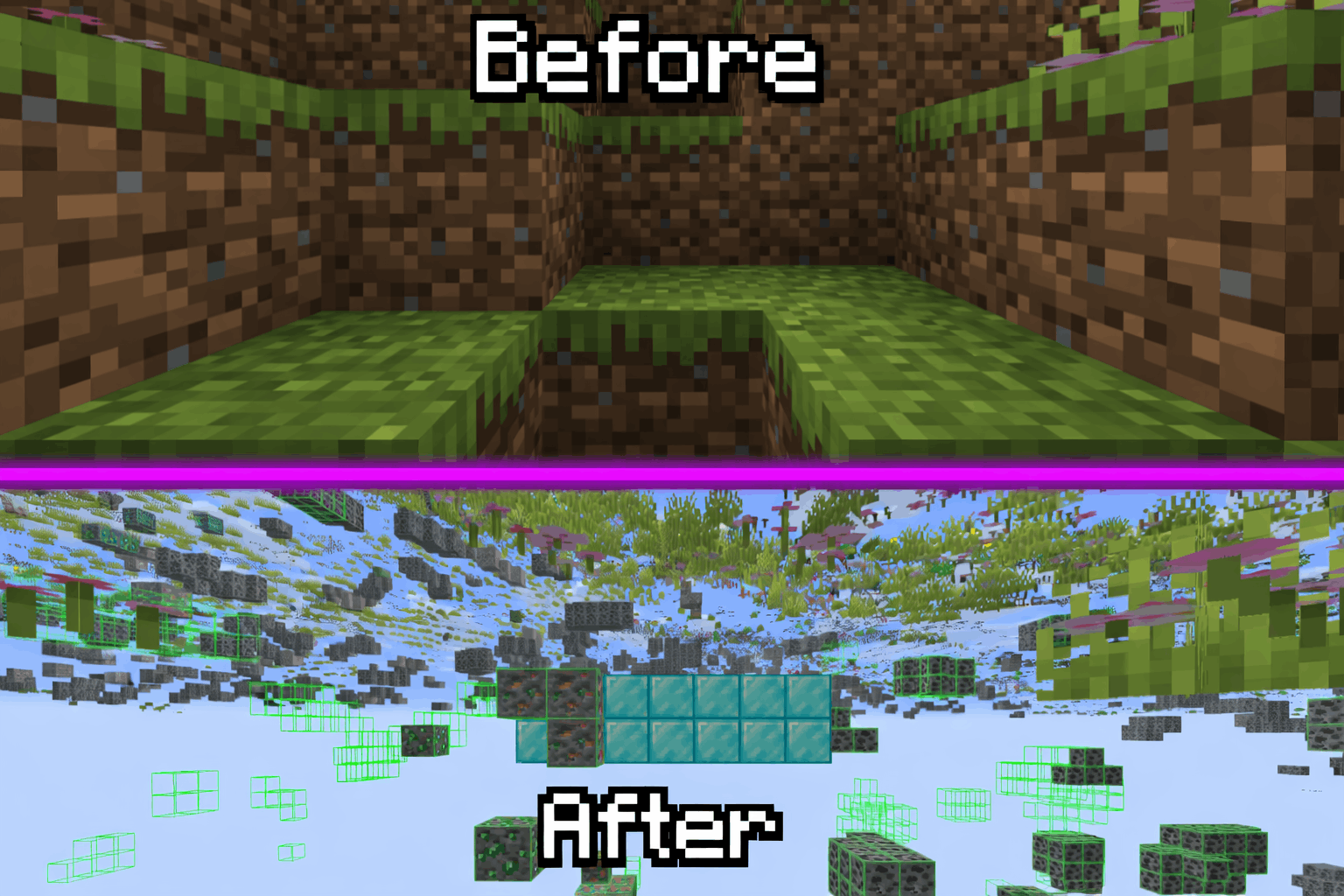
## Screenshots:
> 
### Supportet Versions:
> **26.1** , **26.1.1** And **26.1.2**
**_We Are Trying To Support Other Versions Too!_**
xSetSpawn
# 🌍 xSetSpawn – The Ultimate Global Spawn Management
—
**xSetSpawn** is a modern, lightweight, and highly customizable solution for managing your Minecraft server’s spawn point. Now more global than ever, v1.0.3 introduces a full multi-language system and advanced stability features to give your players the most immersive experience possible.

—
## 🔥 Why choose xSetSpawn?
Unlike standard essentials plugins, **xSetSpawn** gives you granular control over the *feel* of your server’s hub. It’s designed for server owners who care about presentation, performance, and international reach.
### 🚀 Key Features
* **🌍 Global Multi-Language System:** Ship your server in **English**, **Spanish**, or **Portuguese (BR)** out of the box. Switch languages on the fly with a single config setting.
* **✨ Immersive Visuals:** Greet your players with customizable on-screen Titles, Subtitles, and ActionBars. All visual texts are now fully localizable per language!
* **🎨 Modern HEX Support:** Full support for **HEX Colors** (`&#RRGGBB`) in all messages, prefixes, and titles for that premium server aesthetic.
* **🧪 Advanced Stability:** Built-in startup error handling and a robust internal refactor to ensure your plugin always enables correctly.
* **⏱️ Smart Cooldown System:** Prevent command spam with customizable delays. Includes a bypass permission for VIPs or Staff.
* **🚪 Auto-Routing:** Force players to spawn on join or respawn to maintain your server flow.
—
## 🛠️ How it Works
1. **Position:** Walk to your desired location. Camera angle (pitch/yaw) is saved!
2. **Set:** Type `/setspawn`. The location is instantly recorded in `data/data.yml`.
3. **Localize:** Pick your language in `config.yml` (e.g., `lang: es`).
4. **Reload:** Use `/xspawn reload` to apply changes instantly without a restart.
5. **Play:** Your players are greeted with beautiful visuals and sounds upon arrival!
—
## 📜 Commands & Permissions
| Command | Description | Permission |
| :— | :— | :— |
| `/spawn` | Teleport to the server’s spawn point. | `xspawn.use` |
| `/setspawn` | Define the spawn location at your position. | `xspawn.admin` |
| `/xspawn reload` | Reload config and language files instantly. | `xspawn.admin` |
*(Note: `xspawn.bypass` allows instant teleportation).*
—
## ⚙️ Configuration (v1.0.3 Snippet)
The new configuration is cleaner and focused on logic, while all text moved to the `lang/` folder:
“`yaml
# __ __ _____
# / / / ____|
# / | (___ _ __ __ _ __ __ _ __
# / ___ | ‘_ / _` | / / / | ‘_
# /_/_ ____) | | |_) | | (_| | V V / | | | |
# |_____/ | .__/ __,_| _/_/ |_| |_|
# | |
# |_| By xPlugins
settings:
# Plugin language. Options: en, es, br
lang: en
# Require permissions to use /spawn?
require-permission: true
# Cooldown System
cooldown:
enabled: true
seconds: 5
bypass-permission: “xspawn.bypass”
# Auto-Teleport
teleport-on-join: true
teleport-on-respawn: true
visuals:
sound:
enabled: true
name: “ENTITY_PLAYER_LEVELUP”
particles:
enabled: true
name: “TOTEM”
titles:
enabled: true
fade-in: 10
stay: 40
fade-out: 10
# All messages and titles are now in lang/messages_.yml
“`
> xPlugins 2026
X Ray | Spectator xray
# **🕵️♂️ X-Ray for Spectator Mode**
**Enhance your Minecraft Java experience with a lightweight, “one-click by activating spectator” X-ray solution. By simply switching to Spectator Mode, this pack highlights ores and hidden structures, making resource gathering or world-checking a breeze.**
**🚀 How to Use**
For the best results, follow these simple steps:
– Import & Activate: Add the resource pack to your resourcepacks folder and enable it in-game.
– Optimize Visuals: Turn Smooth Lighting: OFF in your Video Settings to make ores glow and stand out against the darkness.
– Enter Spectator Mode:
– Type /gamemode spectator in the chat.
– Pro Tip: Use the shortcut F3 + N to toggle instantly.
–
* 📸 Results
Check out the visibility improvements
# **Results**


📜 Terms of Use
I want you to enjoy this pack, but please respect the following guidelines:
✅ Allowed
* Showcase: Use this pack in your videos or streams (please provide a link to the official download page).
* Personal Use: Feel free to edit the files for your own private use.
❌ Not Allowed
* Monetized Links: Do not redistribute this pack via AdFly, Linkvertise, or similar services.
* Re-uploading: Do not edit and re-share this project as your own.
> [!IMPORTANT]
> Feedback: If you feel the need to leave a low rating, please leave a comment explaining why so I can improve the pack for everyone!
>
❤️ Support the Creator
If you find this tool helpful, consider supporting my work:
Support me on Ko-fi
Would you like me to help you draft a specific “Frequently Asked Questions” section to help reduce common support queries?
X-Hearts
# X-Hearts
Start on one heart, gain a heart every time you die. If you die at 10 hearts you are permanently dead.
Use `/scoreboard players set @s deaths 0` to reset back to 1 heart
Inspired by the X-Life series

## FAQ
**Does this work on a server?**
Yes. Go into your servers folders and go to `world -> datapacks` and put the datapack there. This datapack works multiplayer so play with however many people you would like!
**Is there anyway to change the max amount of hearts?**
Here are all the settings you can change:
– `/function xlife:settings/toggle_hardcore` for toggling whether to go into spectator after running out of hearts or not. By default it is on hardcore mode
– `/function xlife:settings/max_hearts/increase` to increase the max amount of hearts. Default is 10
– `/function xlife:settings/max_hearts/decrease` to decrease the max amount of hearts
## Support us!
Join my Minecraft server **Zonerush.minekeep.gg** for a unique PvP gamemode!
—
**Try my other datapacks! Here are some that you might like.**
[](https://modrinth.com/project/uUdrS8s7) [](https://modrinth.com/project/aik3GVdo)
—
**Join the discord to get updates, support me, and report issues**
[](https://discord.gg/C2WymfUqJx)
## Milestones
– 100 downloads – Dec. 8th | 2025
– 300 downloads – Jan. 13th | 2026
– 1,000 downloads – ???
XPlus Autofish (Fabric / Forge / NeoForge)
## About XPlus Autofish
XPlus autofish is a successor mod to the MrTroot’s autofish mod, including bugfixs and new features.
**If you are looking for autofish mod for 1.19.4-, please check out https://www.curseforge.com/minecraft/mc-mods/autofish .**
## Introduction
In short, just cast the fishing rod into the water once, and it will automatically reel in at the correct time and recast after a couple-second wait. You can open the config screen of the mod via hotkey (V by default).

## Config Screen
– **Autofish**: Easily toggle the entire mod on or off.
– **MultiRod**: Automatically switch to the next fishing rod in your hotbar after using one, allowing you to fish for extended periods.
– **Break Protection**: Ignore fishing rods that are almost broken, preserving your enchanted rods.
– **Persistent Mode**: Keep the fishing rod casted out at all times, automatically recasting it every 10 seconds if necessary. It is useful for dealing with server lag or plugin-related hook clearing.
– **Sound-Based Detection**: In multiplayer, use sounds instead of motion to detect catches. Note that proximity and nearby players’ hooks may affect accuracy.
– **Recast Delay**: Adjust the time interval between reeling in and recasting the rod.
– **Clearlag Chat Pattern**: Some servers clear entities, including fish hooks, to reduce lag and send a chat message when doing so. When the specified chat pattern is matched, the mod will recast the hook.
– **Random Delay**: Add random delay between the reeling in and recasting.
– **Open Water Detection**: Automatically detect whether you are fishing in an open area, which allows you to get treasure loot.
## FAQ
**Q: The auto fishing feature does not work with rods added by mods (such as Aquaculture 2, etc.)**
A: Try enabling “Use Sound Detection” and “Force Multiplayer Detection (Mod Compatibility)” in the config screen of XPlus Autfish (Press V to open by default).
## Installation
– For the **Fabric versions 1.19.4-1.21.11**, [Fabric API](https://modrinth.com/mod/fabric-api) and [Cloth Config API](https://modrinth.com/mod/cloth-config) are needed.
– For the **Fabric versions 26.1+**, [Fabric API](https://modrinth.com/mod/fabric-api) and [Forge Config API Port](https://modrinth.com/mod/forge-config-api-port) are needed.
– For the **Forge or NeoForged versions 1.18.2-1.21.11**, only [Cloth Config API](https://modrinth.com/mod/cloth-config) is needed.

Wynnphony: Tavern
# Wynnphony: Tavern
Wynnphony is two-part resource pack that replaces Wynncraft’s custom note block sounds with new, revamped instruments. This is pack reimagines them in the style of a fantasy folk ensemble.
You can find its twin pack made to resemble an orchestra here!
– [Wynnphony: Orchestra](https://modrinth.com/resourcepack/wynnphony-orchestra)
# Requirements
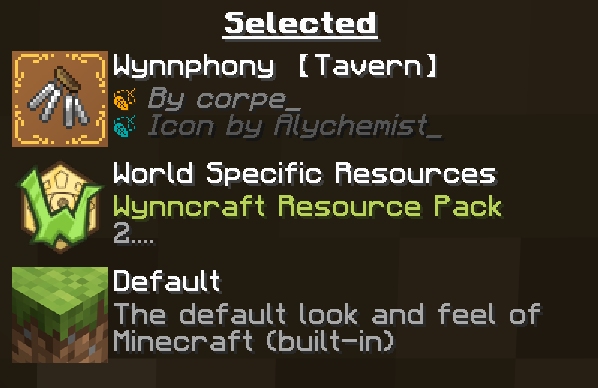
This resource pack must be placed above the server pack in order to function. This can be done by utilizing either:
– [Wynntils](https://modrinth.com/mod/wynntils) for its client side Wynncraft resource packs,
– or a [mod](https://modrinth.com/mod/server-pack-unlocker) that allows server resource packs to be overridden.