XP Bottling
# XP Bottling Plugin 🧪✨
XP Bottling is a lightweight Minecraft plugin that allows players to store their experience points (XP) into bottles for later use. This plugin is designed for Bukkit/Spigot servers and provides a simple yet useful feature for managing XP.
## Features 🌟
– **XP Bottling**: Players can right-click an enchanting table with a glass bottle to convert their XP into an experience bottle.
– **Permission-Based Access**: Only players with the `xpbottling.use` permission can use the XP bottling feature. (Note: This permission is granted to players by default.)
– **Custom XP Cost**: Bottling XP costs 7 experience points per bottle. (Note: 7 XP points is the average amount of experience an experience bottle will give when thrown, as it drops a random amount of XP between 3 and 11 points.)
– **Sound Effects**: Plays a custom sound when XP is bottled for an immersive experience. 🔊
– **Error Messages**: Players are notified if they lack permissions, XP, or the required items. ❌
## How It Works 🛠️
1. Hold a glass bottle in your main hand. 🍼
2. Right-click an enchanting table. 📚
3. If you have at least 7 XP points, the plugin will:
– Deduct 7 XP points. ➖
– Consume one glass bottle. 🧴
– Add an experience bottle to your inventory. ✨
– Play a sound effect. 🎵
If you don’t meet the requirements, the plugin will notify you with a message. 📢
## Permissions 🔑
– `xpbottling.use`: Grants permission to use the XP bottling feature. (Default: Granted to all players)
## Installation ⚙️
1. Download the plugin `.jar` file. 📥
2. Place the `.jar` file in your server’s `plugins` folder. 📂
3. Restart or reload your server. 🔄
4. Ensure players have the `xpbottling.use` permission to use the plugin.
## Issues 🐛
If you encounter any bugs or have feature requests, please open an issue in the [GitHub Issues](https://github.com/HoneyBerries/xPBottling/issues) section.
## License 📜
This project is licensed under the MIT License. See the `LICENSE` file for details.
Enjoy the plugin and happy bottling! 🧪✨
XP Boost Enchantment
# XP Boost Enchantment
[](https://discord.gg/5UdcDa5xNC)
[](https://modrinth.com/datapack/xp-boost-enchantment)
[](https://github.com/lullaby6/data-packs/blob/main/LICENSE)
## 📖 Description
New enchantment with three levels for get extra xp on using tools and weapons!
The enchantment can be obtained from the enchantment table, loot chests or trading with villagers.
## ⌨️ Commands
Give:
“`mcfunction
/loot give @s loot xp_boost_enchantment:xp_boost/
“`
Enchant:
“`mcfunction
/enchant @s xp_boost_enchantment:xp_boost
“`
## 🪪 License
[AGPL-3.0-or-later](https://github.com/lullaby6/data-packs/blob/main/LICENSE)
## 👾 Bugs/Issues
Please report any problem/bug/issues in the [Discord Server](https://discord.gg/5UdcDa5xNC).
## 💌 Donate
– [Donate on Ko-Fi](https://ko-fi.com/lullaby45743)
– [Donate on PayPal](https://www.paypal.com/paypalme/lucianobrumer)
## 🎁 Server Hosting
Creating your own server can be a very lengthy, tedious and costly process.
But with BisectHosting, you get your own server in just a couple of clicks! With their 24/7 support and fast-response time, no issues shall stand in your way!
Interested? Then we’ve got a deal for you!
https://bisecthosting.com/lullaby

xokz’s Glowing Toggle
**To use, run `/trigger glowing` to toggle the glowing effect!**
This simple datapack allows players to toggle a permenant glowing effect for easy tracking in multiplayer.
This pack was created with compatibility and performance in mind. It is fully compatible with other sources of glowing. Toggling off glowing will not remove sources of glowing not from xokz’s glowing toggle.
Admin Commands
– To lock a players ability to toggle glowing, run `/execute as run function glowing:admin/lock_trigger`
– To unlock a players ability to toggle glowing, run `/execute as run function glowing:admin/unlock_trigger`
– To make a player glow, run `/execute as run function glowing:admin/make_glow`
– To make a player stop glowing, run `/execute as run function glowing:admin/stop_glow`
### Sponsor: Sparkedhost
Want a great server for a cheap price? Click the banner below, with code `xokz25` for a 25% discount!
[](https://billing.sparkedhost.com/aff.php?aff=3077)
Xmas meowl Totem of Undying
– ENG: **Meowl** (in Russian, “Myaowl” or “Myaul”) is a creature with a cat’s head and an owl’s body, sitting on a branch. Initially, it was a fun photoshop creation.
The first images of the cat owl appeared in 2013 on the Chinese platform Weibo. However, it gained popularity only in October 2025 on TikTok
– RU: **Meowl** (в рунете — «Мяовл» или «Мяул») — существо с кошачьей головой и телом совы, сидящее на ветке. Изначально — это весёлое творение фотошопа.
Первые изображения с котосовой появились в 2013 году на китайской платформе Weibo. Но популярность они обрели только в октябре 2025 года в TikTok
[Meowl Totem](https://modrinth.com/resourcepack/meowl-totem-of-undying/versions)
[ALL RESOURCEPACKS COLLECTION: MEMES + STREAMERS](https://modrinth.com/collection/sfDcDGAi)
xJobs
# 👷 xJobs | The Ultimate Professional Job System 👷

—
**xJobs** is a high-performance, premium-grade job system designed for modern Minecraft servers. Featuring a stunning **Cyan & Midnight Blue** interface, seamless **Discord integration**, and a robust **database-driven** backend, it provides your players with an immersive and rewarding professional experience.
—
> ## ✨ Premium Features
* **💎 High-End GUI**: A modern, columnar selection menu with custom heads and vibrant accent colors.
* **🌐 100% Internationalized**: Professionally translated into English, with global label management.
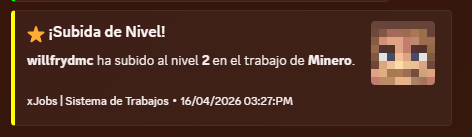
* **🤖 Discord Webhooks**: Real-time notifications for level-ups, job changes, and more with fully customizable embeds.
* **📊 Optimized Backend**: Support for H2 and MySQL databases with efficient caching.
* **🎭 Dynamic Lore**: Each job features unique premium descriptions and action hints.
* **🛠️ Developer Friendly**: Full PlaceholderAPI support and a simple yet powerful YML API for creating jobs.
* **⚡ Lightweight**: Built for performance, ensuring zero impact on your server’s TPS.
—
> ## 🚀 How to Create a Custom Job
Adding new professions to your server is incredibly simple. Follow this step-by-step guide:
1. Navigate to the `/plugins/xJobs/jobs/` folder.
2. Create a new file named `your_job_id.yml` (e.g., `alchemist.yml`).
3. Copy and customize the template below:
“`yaml
name: “Alchemist”
permission: “default”
max-level: 200
icon:
material: PLAYER_HEAD
base64: “eyJ0ZXh0dXJlcyI6eyJTS0lOIjp7InVybCI6Imh0dHA6Ly90ZXh0dXJlcy5taW5lY3JhZnQubmV0L3RleHR1cmUv…”
slot: 10
name: “Alchemist”
lore:
– “”
– ” &#A2FF5C✦ &f{info_label}:”
– ” &e⭐ &f{level_label}: &e{level}&f/&e{max_level}”
– ” &a👥 &f{workers_label}: &#D0FFD3{workers}”
– “”
– ” &#A2FF5C✦ &f{blurb_label}:”
– ” &7A master of volatile reactions. Brew concoctions”
– ” &7and elixirs that grant inhuman strength and life.”
– “”
– ” &#A2FF5C✦ &f{actions_label}:”
– ” &8▪ &7Brew magical potions”
– “”
– ” {join_action}”
actions:
block_break: # Logic for breaking blocks
‘WHEAT’:
xp: 5
money: 10.0
kill_mob: # Logic for hunting
‘ZOMBIE’:
xp: 15
money: 20.0
“`
4. Use `/jobs reload` in-game to apply your new profession immediately!
—
> ## 📌 Placeholders & Variables
Enhance your GUIs and chat with our dynamic placeholders:
| Placeholder | Description |
| :— | :— |
| `{player}` | The name of the player |
| `{job}` | The current profession name |
| `{level}` | The player’s current job level |
| `{max_level}` | The maximum level reachable |
| `{xp}` | Current experience points |
| `{xp_needed}` | Experience needed for next level |
| `{progress}` | A visual progress bar (e.g., `|||||…..`) |
| `{workers}` | Total number of players in that job |
—
> ## 🛠️ Commands & Permissions
Manage your professions with these simple commands:
| Command | Description | Permission |
| :— | :— | :— |
| `/jobs` | Open the main professional selection menu | *None* |
| `/jobs stats` | View your personal progress and statistics | *None* |
| `/jobs leave` | Resign from your current job | *None* |
| `/jobs help` | Show the command help menu | *None* |
| `/jobs reload` | Reload all configurations and jobs | `xjobs.admin` |
—
> ## 📦 Requirements
Ensure your server meets these criteria for optimal performance:
| Requirement | Description | Status |
| :— | :— | :— |
| **Vault** | Essential for economy rewards and money management | **Required** |
| **Java 17+** | Modern runtime required for high-performance execution | **Required** |
| **PlaceholderAPI** | Enables dynamic labels and custom variables | *Recommended* |
—
> ## 🛰️ Discord Integration
Keep your community engaged by linking your Discord server.
In `config.yml`, set `webhooks.discord.enabled: true` and paste your URL.
**Features:**
* **Custom Embeds**: Edit colors, footers, and thumbnails per event.
* **Async Processing**: Webhooks never lag your server.
* **Player Avatars**: Automatically fetches the player’s head for the notification.
—
> **Pro Tip**: You can edit the titles of all GUI sections (like “Information” or “Active Workers”) globally in `messages.yml`. Edit once, update everywhere!
> Got some cash? Get a PREMIUM (ES/EN) config on Discord.
xHub
# 🛡️ xHub Core (Beta)
### The Ultimate All-in-One Lobby Solution | 1.20+




**xHub** is a high-performance, premium core designed to replace multiple lobby plugins.
It now includes advanced features like Parkour, Cosmetics, Developer API, and dynamic permissions.
[Discord Support](https://discord.gg/xplugins) • [Website](https://xplugins.es)

—
## ✨ Key Features (v1.0.1)
* **🏃 Parkour System:** Automatic checkpoints, rewards, void detection, and Double Jump.
* **🎩 Cosmetics:** Particle trails and hats with a GUI menu.
* **💻 Developer API:** `xHubAPI` class for easy integration with other plugins.
* **🎨 Full RGB/Hex Support:** Use `&#RRGGBB` colors anywhere.
* **📂 Modular Menu System:** Create unlimited GUI menus using YAML files.
* **📊 Animated Boards:** Flicker-free Scoreboard and Tablist (PAPI supported).
* **🎒 Hotbar Manager:** Custom items on join (Compass, PvP Sword, Cosmetics).
* **📢 Chat Manager:** Formatting with Rank support (`[Admin] Player: Hello`).
* **🤖 Discord Logs:** Built-in Webhooks for Join/Quit events.
—
## 🚀 Installation
1. Download `xHub-1.0.0.jar`.
2. Place it in your server’s `plugins` folder.
3. **(Required)** Install [PlaceholderAPI](https://papi.extendedclip.com/) for variables.
4. **(Optional)** Install [Vault](https://www.spigotmc.org/resources/vault.34315/) for economy rewards.
5. Restart the server.
—
## 📂 Directory Structure
“`text
plugins/xHub/
├── config.yml <-- Main settings
└── menus/ <-- Drop your menu files here
├── principal.yml <-- Main Menu
├── selector.yml <-- Server Selector
├── socials.yml <-- Social Media
└── cosmetics.yml <-- Cosmetics Menu
```
---
## 📜 Commands & Permissions
| Command | Permission | Description |
| :--- | :--- | :--- |
| `/xhub setlobby` | `xhub.admin` | Sets the spawn point. |
| `/xhub spawn` | `xhub.spawn` | Teleports you to the lobby spawn. |
| `/xhub reload` | `xhub.admin` | Reloads all configs and menus. |
| `/xhub menu ` | `xhub.menu` | Opens a specific menu. |
| `/xhub cosmetic` | `xhub.cosmetic` | Manage cosmetic effects. |
> **Note:** Permissions can be disabled in `config.yml` by setting them to `false`.
—
## 👨💻 Developer API
xHub exports a static API class for developers to hook into the core:
“`java
// Teleport a player to the Hub
xHubAPI.teleportToSpawn(player);
// Check if player is doing parkour
if (xHubAPI.isInParkour(player)) {
// do something
}
// Activate a cosmetic trail
xHubAPI.setTrail(player, “FLAME”);
“`
—
## 🛠️ Default Configuration
Below is the full generated `config.yml` file explaining every feature.
“`yaml
# _
# __ __ / /_ _| |__
# / // /_/ / | | | ‘_
# > Developed with ❤️ by **xPlugins.
Copyright** © 2026 xPlugins. All rights reserved.
XGamemode

### “*You’re not switching modes, you’re switching dimensions.*”
~~*2000 Downloads?! Thanks!*~~
# 1 Feature
## 1.1 Offline Player
You can change the gamemode of a player, **even he (or she) was offline**.
## 1.2 Permissions
Allow permission group plugins (_like Luckperms_) to manage **which gamemodes can be switched to** and **which gamemodes cannot be switched to**.
_e.g. Allow to switch to survival mode but not to any other mode._
## 1.3 Alias
**/gamemode** is simplified to **/gm** and **/g**.
_(of course you can still use /gamemode)_
## 1.4 Cross-Server Storage
Support **MySQL** and **SQLite** storage backends. Player gamemodes are saved and synchronized across multiple servers in a network.
## 1.5 Folia Support
**Fully compatible with Folia servers** — using region-based scheduling for optimal performance.
## 1.6 Lightweight
The Plugin size is only **~25 KB** and has **almost no impact** on server performance!
# 2 Caution
## 2.1 Shortcut Keys
If you need to use shortcut keys such as **F3+F4**, please install another plugin **F3NPerm**.
## 2.2 Versions
**1.8.X +**
**All Bukkit based server** (Paper, Spigot, Purpur, Folia, etc.)
# 3 Commands
“`markdown
– /xgamemode
– /xgamemode reload
– /gm
– /gm
– /gm -all
– /gm -online
– /gm -offline
/g = /gm = /gamemode
/xg = /xgm = /xgamemode
“`
# 4 Permission Node
“`markdown
– xgamemode.survival
– xgamemode.creative
– xgamemode.adventure
– xgamemode.spectator
– xgamemode.others.survival
– xgamemode.others.creative
– xgamemode.others.adventure
– xgamemode.others.spectator
– xgamemode.reload
– xgamemode.admin
“`
# 5 Custom Config
## 5.1 Basic Settings
“`yaml
lang: en-US
“`
**Language** setting
“`yaml
default_gamemode: survival
“`
If a **new player joined your server**, **which gamemode should he (she) be**?
**survival**, **creative**, **adventure**, **spectator**
“`yaml
show_logo: true
“`
Show logo or not when plugin enabled.
**true**, **false**
“`yaml
debug: false
“`
Enable debug logging for troubleshooting.
**true**, **false**
## 5.2 Storage Configuration
“`yaml
storage:
type: yaml
“`
**Storage backend type**: **yaml**, **sqlite**, **mysql**
### SQLite Example
“`yaml
storage:
type: sqlite
# No additional config needed — data.db will be created automatically
“`
### MySQL Example
“`yaml
storage:
type: mysql
mysql:
host: localhost
port: 3306
database: minecraft
username: root
password: your_password
“`
## 5.3 Custom Messages
“`yaml
messages:
en-US: # Original en-US Language by Wind_Blood
reloaded: “&aXGamemode Reloaded!”
# ……
custom_lang: # Add Your Custom Language!
reloaded: “Thank you for using XGamemode!”
# ……
“`
**Customizable Messages**. You can add **your own new language** here!
## 5.4 An Example config.yml
“`yaml
lang: msgForMyServer
default_gamemode: survival
show_logo: false
debug: false
storage:
type: yaml
messages:
msgForMyServer:
reloaded: “很明显作者是中国人 会说中文很正常 然后我也不知道为什么我要在一堆英文里写一段中文 挺好笑的 哈哈哈 对了 看到我就是缘分 XGamemode 官方 QQ 反馈交流群:点击链接加入群聊【XGamemode 反馈群】:https://qm.qq.com/q/rpTk5LK7w4 欢迎加”
usage: “&cUsage: /gm [player/-all/-online/-offline]”
console_usage: “&cUsage: /gm ”
invalid_gamemode: “&cInvalid Gamemode!”
invalid_player: “&cInvalid Player!”
gamemode_self: “&aYour Gamemode Changed to {mode}!”
gamemode_all: “&aChanged All Player’s Gamemode to {mode}!”
gamemode_online: “&aAll Online Player’s Gamemode Changed to {mode}!”
gamemode_offline: “&aAll Offline Player’s Gamemode Changed to {mode}!”
no_permission: “&cYOU ARE NOT ALLOWED TO DO THAT!”
gamemode_other: “&a{player}’s Gamemode Changed to {mode}!”
gamemode_other_offline: “&a{player} (Offline)’s Gamemode Changed to {mode}!”
“`
# 6 Developer API (Async)
## Get Instance
“`java
Main plugin = Main.getInstance();
“`
## Get Player Gamemode
“`java
plugin.getPlayerMode(playerUUID).thenAccept(mode -> {
if (mode != null) {
// mode is GameMode.SURVIVAL, CREATIVE, ADVENTURE, or SPECTATOR
// Player is online or has saved data
} else {
// Player not found or no saved gamemode yet
}
});
“`
## Set Player Gamemode
“`java
plugin.setPlayerMode(playerUUID, GameMode.SURVIVAL).thenAccept(success -> {
if (success) {
// Gamemode changed and saved successfully
// Works for both online and offline players
} else {
// Failed to save (database error, etc.)
}
});
“`
## Listen to Gamemode Changes
“`java
@EventHandler
public void onGamemodeChange(GamemodeChangeEvent event) {
Player player = event.getPlayer(); // Online player only
GameMode oldMode = event.getOldMode();
GameMode newMode = event.getNewMode();
}
“`
> **Note:** All APIs are **fully async** and thread-safe. The `GamemodeChangeEvent` is only fired for **online players** when their mode is actually changed. The `getPlayerMode()` method returns `null` if the player has no saved gamemode data.
# 7 Reprint Post
www.minebbs.com/resources/xgamemode.11041
hangar.papermc.io/Wind_Blood/XGamemode
modrinth.com/plugin/xgamemode
# 8 Feedback
Just e-mail me with **[email protected]**. Thanks!
Xeon’s Katanas
Enhance your Minecraft combat with this texture pack that turns every sword into a cool katana, made from in-game materials for a more realistic look. The wooden sword becomes a wooden training stick, and even the powerful Netherite sword transforms into a sleek Netherite katana. From the basic stone katana to the sharp and powerful diamond and Netherite blades, each sword has its own unique design. Whether you’re fighting mobs or dueling friends, this pack brings a fresh, Japanese vibe to your game. Perfect for anyone who loves the elegance of katanas and wants a more immersive experience in Minecraft!
### Can I request any features?
Yes, You can join my discord server and request new features! i will be available most of the times.
[Discord](https://discord.gg/Sd9FsMBU3K)
### **All community suggestions will be acknowledged. (added ones will be featured here)**
– Made The Wooden Training stick smaller and elegent!
– Added Red Sweeping Edge particles!
– Backported V3 to 1.20.1 Version!
XDBar
A small mod that you can use to _visually tweak_ how the level indicator looks (toggle shadow or outline, change the text color or the _Y position_) and toggle whether the experience bar should still appear while the locator bar waypoints are present.
The settings can be accessed via [ModMenu](https://modrinth.com/mod/modmenu) in-game or directly with the file `.minecraft/config/xdbar.properties`!
> There are some cool examples at the gallery tab!
XColor
###### **Update for this plugin incoming!!**
### Features
1. **Customizable Prefixes:**
– Modify the your Name as the owner want with Minimessage Format:
`/cosmetics prefix ` – MiniMessage Support
2. **Reset Options:**
– Reset customizations for name or prefix:
`/cosmetics reset`
### Benefits:
– **Enhanced Personalization:** Express yourself with unique colors, bold styles, and custom statuses.
– **Easy Reset Options:** Quickly return to default settings without hassle.
– **Role-Specific Access (Upcoming):** Admins can control access with a detailed permission system for better server management.
### Commands:
– “/cosmetics prefix “
– “/cosmetics reset“
### Permissions
– “colorstatus.command.cosmetics.reset“
– “colorstatus.command.cosmetics.prefix“
## Placeholder API
– Placeholder
– `%xcolor_cosmetics_prefix_name%`
– `%xcolor_cosmetics_prefix_text%`
### Coming SOON
– ~~Placeholder API~~
– Database for Multi-server support
– More Cosmetics
– More Commands/Commands Options