xQuest
# xQuest ⚔️ | Advanced Quest System
  
**xQuest** is a modern and fully configurable quest plugin for Minecraft servers. Designed to be lightweight, aesthetic, and easy to use, without the need for complicated external databases.

—
## 📸 Dashboard Screenshots
| Main Dashboard | Quest in Progress | Completed Quest |
|:—:|:—:|:—:|
|  |  |  |
*(The visual design is 100% configurable via `config.yml`)*
—
## 🔥 Key Features
* **⚡ Local Database (H2):** No MySQL needed. The plugin automatically creates its own high-performance local database.
* **🎨 Premium Design:**
* Full support for **HEX Colors** (&#RRGGBB).
* Fully editable GUI menus.
* Support for **Custom Heads** (Base64) and Player Heads (`HEAD-Name`).
* **⚙️ Fully Configurable:**
* Edit main **Commands** (e.g., use `/missions` instead of `/xquest`).
* Customize all **Permissions**.
* Modify sounds, titles, action bars, and fireworks.
* **🏆 Progress System:**
* Visual Top #1, #2, #3 in the quest lore.
* Automatic “Completed” indicators (Replaces the prize line).
* Console-executable rewards.
* **🔌 Hooks / Compatibility:**
* **PlaceholderAPI:** Use variables in texts.
* **Vault:** Economy support.
—
## 📥 Installation
1. Download the **xQuest** `.jar` file.
2. Place it in your server’s `/plugins` folder.
3. Ensure you have **PlaceholderAPI** and **Vault** installed (Optional, but recommended).
4. Restart your server.
5. Done! The database and config will be created automatically.
—
## 📜 Commands and Permissions
> 💡 **Note:** Both the main command and permissions are **editable** in `config.yml`.
| Command (Default) | Permission (Default) | Description |
| :— | :— | :— |
| `/xquest` | `xquest.use` | Opens the main quest menu. |
| `/xquest reload` | `xquest.admin` | Reloads the configuration and quests. |
*You can change `xquest.use` to `false` in the config if you want everyone to access it without permissions.*
—
## 🛠️ Configuration (Snippet)
The `config.yml` file is the heart of the plugin. Here is an example of how to create a quest with a custom head:
“`yaml
quests:
example_quest:
name: “&fQuest &8• &dSlayer”
type: KILL
target: “ENDER_DRAGON”
amount: 1
slot: 12
# Icon using Base64 texture
icon: “TEXTURE-eyJ0ZXh0dXJlcyI6eyJTS0lOIjp7InVybCI6Im…”
rewards:
– “eco give %player% 5000”
– “msg %player% &aYou killed the dragon!”
lore:
– “&7Defeat the final boss.”
– “”
– “&e⚡ Progress: &f%progress%/%total%”
– “&c✦ Reward: &c5000 Coins”
“`
## Available Quest Types:
– BREAK (Break blocks)
– KILL (Kill entities)
– CONSUME (Eat/Drink)
– WALK (Walk distance)
– SWIM (Swim distance)
– FISH (Catch fish)
– CRAFT (Craft items)
– BREED (Breed animals)
## 👨💻 Credits
* Developed by xPlugins. Made with ❤️ for the Minecraft community.
XP SMP Datapack
# XP SMP Datapack
### About
A datapack used for the XP SMP that makes it so every level you get you gain a heart. But there’s a twist: every so often you lose a bit of xp.
### Tips
– Try to get high level quick because when your level is higher you lose xp slower.
### Installation
Installed just like any other datapack. A tutorial on how to do that can be found on the minecraft wiki here.
xPsMenu
🛡️ xPsMenu – Premium ProtectionStones GUI
The most advanced, interactive, and fully customizable GUI menu for ProtectionStones.
[]()
[]()
[]()

—
## ✨ Features
**xPsMenu** takes the classic ProtectionStones experience and transforms it into a modern, visual, and premium system for your players.
* 🎨 **100% Customizable:** Every single menu, item, lore, and message is fully editable (`gui.yml`, `flags.yml`, `selector.yml`, `config.yml`).
* 🌈 **Hex Colors & MiniMessage:** Full support for modern Hex color codes (`&#FFFFFF`) to make your menus pop out.
* 📋 **Dynamic Region Selector:** A live, auto-updating GUI showing all player regions with an interactive filter (View ALL, OWNERS, or MEMBERS).
* 👤 **Advanced Player Management:** View members and owners using real Player Heads! Kick players directly via Shift + Right-Click.
* ✨ **0-Lag Particle System:** When a protection block is hidden, only the owner will see beautiful magical particles indicating its location (highly optimized, 0 server lag).
* 🚀 **OP / VIP Bypass:** Instantly teleport to your region without the 3-second cooldown using a permission node.
* 🛠️ **Admin Tools:** Nuke all regions from the server database with a single safety-confirmed command.
* 🔌 **Developer API:** Easily hook into the plugin to open menus from other custom plugins or NPCs.
# 🎢 Examples:


Do you want to acquire the best ES/EN configuration?
– ¡Enter the discord!
– It helps us a lot.
—
## 📥 Installation
1. Stop your server.
2. Download the `xPsMenu-v1.0.0.jar` and place it in your `/plugins/` folder.
3. Ensure you have the required dependencies:
* **ProtectionStones** (2.10+)
* **WorldGuard** & **WorldEdit**
* **PlaceholderAPI** (Optional, but highly recommended)
4. Start the server.
5. Customize the configuration files inside `/plugins/xPsMenu/` and type `/psmenu reload`.
—
## ⌨️ Commands & Permissions
### Player Commands
* `Shift + Right Click` (on a protection block) – Opens the main management GUI for that specific region.
* `/psmenu` – Opens the dynamic Region Selector (Shows all your active regions).
* `/psmenu help` – Shows the help menu.
### Admin Commands
* `/psmenu reload` – Reloads all configuration files seamlessly.
* **Permission:** `psmenu.admin`
* `/psmenu clearall confirm` – ⚠️ *DANGER!* Wipes every single ProtectionStones region from the server database.
* **Permission:** `psmenu.admin`
### Extra Permissions
* `psmenu.bypass` – Bypasses the 3-second teleportation delay. Instant teleport!
—
## 📊 Placeholders
### Internal Menu Variables
Use these exclusively inside your `gui.yml` and `flags.yml` to display dynamic data:
* `%region%` – Displays the ID of the region currently being edited.
* `%hidden_status%` – Displays the current state of the block (e.g., Hidden ✘ or Visible ✔ – editable in config).
* *Note: You can also use any global PlaceholderAPI variable inside the menus (like `%player_name%`).*
### PlaceholderAPI Variables (Global)
You can use these variables anywhere on your server (Scoreboards, Holograms, Chat, etc.):
* `%xpsmenu_version%` – Displays the current plugin version.
* `%xpsmenu_player%` – Displays the player’s name.
—
## 💻 Developer API
Building a custom core or an NPC script? You can easily hook into **xPsMenu** to open interfaces for your players using our static API.
### Add to your build.gradle:
“`gradle
dependencies {
compileOnly fileTree(dir: ‘libs’, include: ‘xPsMenu-v1.0.0.jar’)
}
Example Usage:
Java
import jn.willfrydev.xPsMenuAPI;
import org.bukkit.entity.Player;
public class MyCustomPlugin {
public void openMenuForPlayer(Player player, String regionId) {
// Opens the main Editor GUI for a specific region
xPsMenuAPI.openMainMenu(player, “ps10x64y5z”);
}
public void openListForPlayer(Player player) {
// Opens the Dynamic Region Selector GUI for the player
xPsMenuAPI.openSelector(player);
}
}
“`
xPickaxes
# ⛏️ xPickaxes
**xPickaxes** is a professional Spigot/Paper plugin that adds fully customizable pickaxes with area mining, an intuitive GUI, permission-based access, and special effects — all configurable without touching a single line of Java.
> Compatible with **Minecraft 1.19 – 1.21+** (Paper & Spigot)
—
## ✨ Features
– **Area Mining** — Mine 3×3, 5×5, 7×7, or 9×9 areas with a single block break
– **In-game GUI** — Right-click any custom pickaxe to open a clean configuration menu
– **Special Effects**
– 🔥 **Auto-Smelting** — Ores are smelted directly into ingots
– ✨ **Fortune Boost** — Increased drops on all mined blocks
– ⛏ **Vein Miner** — Mines entire connected ore veins at once (up to 64 blocks)
– 🔍 **Ore Highlight** — Visual glow effect on nearby ores *(framework ready)*
– **Per-player Settings** — Each player can toggle area mining and effects individually
– **Permission System** — Fine-grained control over which players access which pickaxes and effects
– **Custom Area Sizes** — Players can choose their preferred area size from the GUI
– **Blacklist Support** — Prevent area mining on specific blocks (bedrock, command blocks, etc.)
– **WorldGuard Compatible** — Respects protected regions
– **Sound & Particle Effects** — Satisfying feedback on area mines (toggleable)
– **Fully Config-Driven** — Add or edit pickaxe types entirely from `config.yml`
—
## 📦 Pickaxe Tiers
| Tier | Area | Material | Effects | Permission |
|——|——|———-|———|————|
| **Novice** | 3×3 | Iron Pickaxe | — | `xpickaxes.pickaxe.novice` |
| **Adept** | 5×5 | Golden Pickaxe | Fortune Boost | `xpickaxes.pickaxe.adept` |
| **Master** | 7×7 | Diamond Pickaxe | Fortune + Auto-Smelting | `xpickaxes.pickaxe.master` |
| **Titan** | 9×9 | Netherite Pickaxe | Fortune + Auto-Smelting + Vein Miner | `xpickaxes.pickaxe.titan` |
All tiers are fully editable or removable in `config.yml`. You can also add your own!
—
## 🎮 Commands
| Command | Description | Permission |
|———|————-|————|
| `/xpickaxe give [player]` | Give a custom pickaxe | `xpickaxes.give` |
| `/xpickaxe list` | List all available pickaxe types | `xpickaxes.use` |
| `/xpickaxe menu` | Open the GUI for your held pickaxe | `xpickaxes.use` |
| `/xpickaxe reload` | Reload the plugin config | `xpickaxes.reload` |
| `/xpickaxe help` | Show help | — |
**Aliases:** `/xpick`, `/xp`
—
## 🔑 Permissions
| Permission | Default | Description |
|————|———|————-|
| `xpickaxes.use` | Everyone | Use custom pickaxes |
| `xpickaxes.give` | OP | Give custom pickaxes |
| `xpickaxes.reload` | OP | Reload the plugin |
| `xpickaxes.admin` | OP | Full admin access (includes give + reload) |
| `xpickaxes.pickaxe.novice` | Everyone | Access to Novice pickaxe |
| `xpickaxes.pickaxe.adept` | OP | Access to Adept pickaxe |
| `xpickaxes.pickaxe.master` | OP | Access to Master pickaxe |
| `xpickaxes.pickaxe.titan` | OP | Access to Titan pickaxe |
| `xpickaxes.effect.autosmelting` | OP | Use Auto-Smelting effect |
| `xpickaxes.effect.veinminer` | OP | Use Vein Miner effect |
| `xpickaxes.effect.fortune` | OP | Use Fortune Boost effect |
| `xpickaxes.effect.xray` | OP | Use Ore Highlight effect |
—
## 🖥️ GUI Overview
**Right-click** any xPickaxes custom pickaxe (or run `/xpickaxe menu`) to open the configuration panel:
“`
┌─────────────────────────────────────────────────────┐
│ [Pickaxe] [Pickaxe Configuration] │
│ │
│ [Toggle Area] [Compass] [3×3][5×5][7×7][9×9][✗]│
│ │
│ [★] [Effect1] [Effect2] [Effect3] [Effect4] │
│ │
│ [ℹ Info] │
│ [✖ Close] │
└─────────────────────────────────────────────────────┘
“`
– **Toggle Area Mining** — Enable/disable area mining for this session
– **Area Size** — Select 3×3, 5×5, 7×7, or 9×9 (or reset to pickaxe default)
– **Effects** — Toggle each special effect independently (respects permissions)
—
## ⚙️ Configuration
All pickaxe types, effects, messages, and behavior is defined in `config.yml`. Here’s an example of adding a custom pickaxe:
“`yaml
pickaxes:
my_custom_pick:
enabled: true
display-name: “&5✦ Void Pickaxe”
lore:
– “&7Area Mining: &e11x11”
– “”
– “&8▸ Right-click to configure”
material: NETHERITE_PICKAXE
area-size: 11
durability-multiplier: 4.0
enchantments:
EFFICIENCY: 5
UNBREAKING: 3
FORTUNE: 3
effects:
– FORTUNE
– AUTOSMELTING
– VEINMINER
permission: myplugin.voidpickaxe
give-command-enabled: true
custom-model-data: 0
“`
### Auto-Smelt Mappings
Add custom smelting recipes in `config.yml`:
“`yaml
smelt-map:
IRON_ORE: IRON_INGOT
GOLD_ORE: GOLD_INGOT
SAND: GLASS
# Add your own!
“`
—
## 🔧 Installation
1. Download `xPickaxes-1.0.0.jar`
2. Drop it into your `plugins/` folder
3. Restart or reload your server
4. Edit `plugins/xPickaxes/config.yml` to customize
5. Run `/xpickaxe reload` to apply changes live
**Requirements:**
– Java 17+
– Paper or Spigot 1.19+
XPHearts
# **About**
[](https://modrinth.com/plugin/xphearts) [](https://www.curseforge.com/minecraft/bukkit-plugins/xphearts)
[](https://ko-fi.com/J3J71G0IUZ)
XPHearts is a plugin that automatically adjust maximum hearts/health depending on your experience level. You can configure the amount of experience level needed in the configuration file.
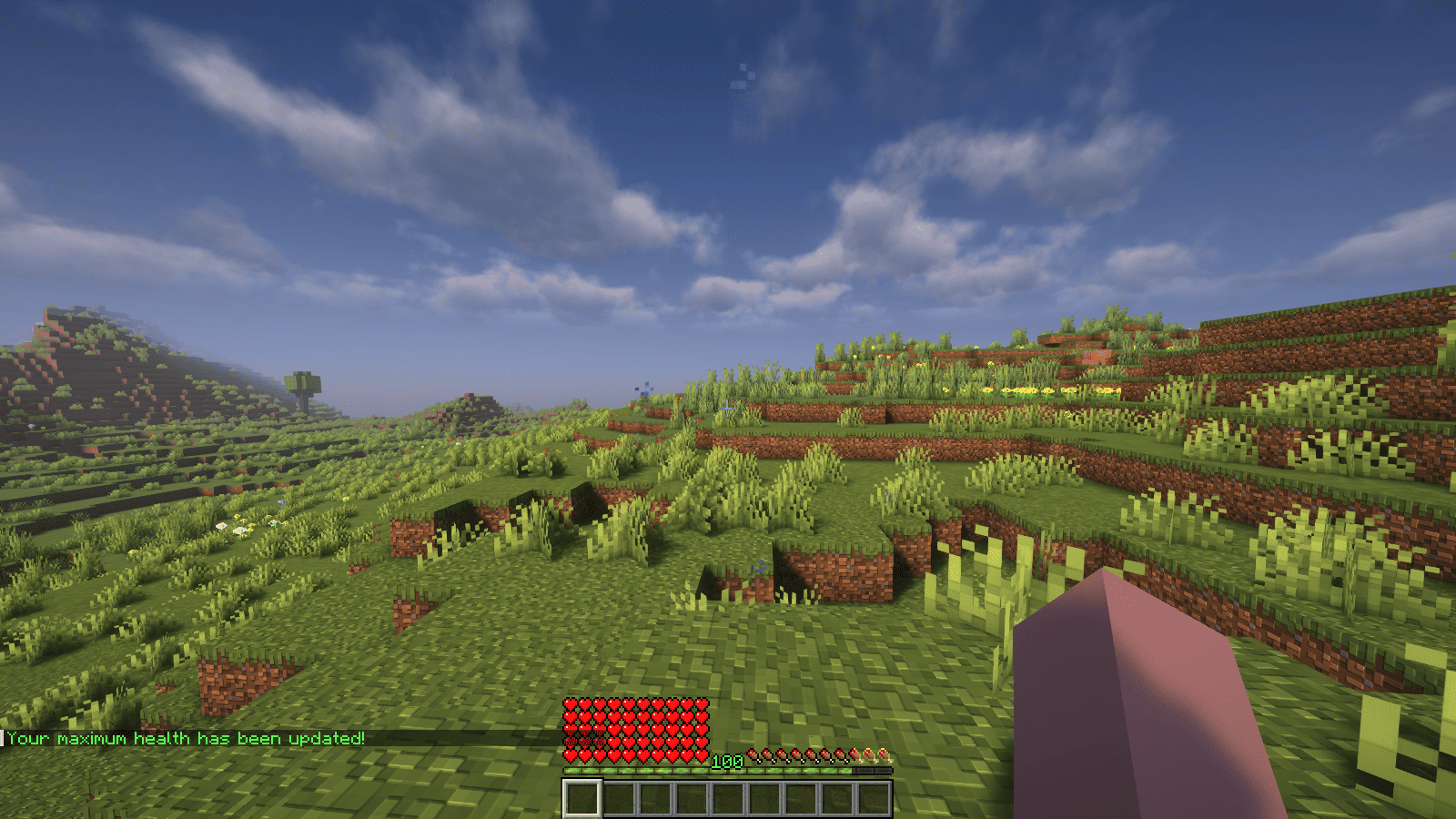
### Features
– Automatically adjust the player’s maximum hearts/health when they reach the experience level specified in the configuration.
– Easy to understand config.
– Lightweight.
### Commands
| Command | Description | Permission |
|—————-|————————————-|—————–|
| `/xh` | Get the information about the plugin. | `xh.use` |
| `/xh reload` | Reloads the config file. | `xh.admin` |
| Command aliases| **xh, xpheart, xphearts** |
### Issues and Suggestions
Suggest and report issues on [Github](https://github.com/seyviyer2/XPHearts/issues).
XPGui
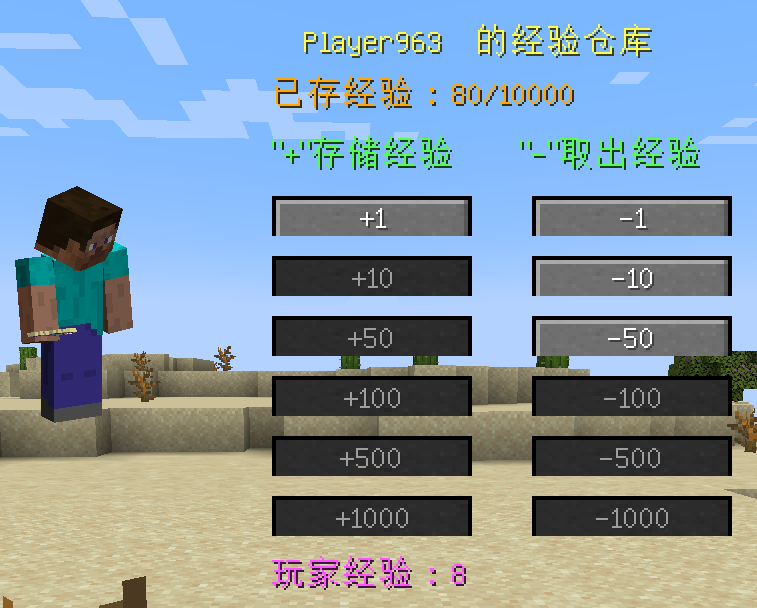
A simple fabric mod: can store player experience
zh_cn:
打开背包,点击角色旁边的“体验瓶”按钮,打开储存体验的屏幕。
点击“+”或“-”存储玩家的经验。
即使玩家死亡,仓库中的经验也可以保存。
en_us:
Open the Player Inventory and click the “Experience Bottle” button next to the character to open the screen for storing experiences.
Click “+” or “-” to store the player’s experience.
Experience in the warehouse can be saved even if the player dies.
The Modpack DangerousWorld.
XpBottle


[](https://discord.com/invite/ydn5S7FC7q)
—
– 🧪 **XP Bottle Creation**: Convert XP into bottles using the `/xpbottle` command.
– 💰 **Tax System**: Configurable tax on XP conversion to prevent abuse.
– ⏳ **Cooldown System**: Prevent command spamming with configurable cooldowns.
– 🔐 **Protected Bottles**: Bottles can be protected from dropping on death.
– 🎨 **Customizable Bottles**: Customize bottle appearance, including material, name, lore, and glow effect.
– 🔒 **Permission-Based Limits**: Different XP limits based on permissions.
– 🔊 **Sound Effects**: Play sounds on bottle creation and redemption.
– 🔧 **ItemsAdder Integration**: Support for custom items via ItemsAdder.
– 👑 **Admin Commands**: Admins can give bottles to players and reload config.
– 🌍 **Multi-Language Support**: Configurable messages.
—

| Command | Description | Permission |
| —————————————————- | ——————————————————– | ———- |
| `/xpbottle ` | Create bottles with a specified amount and XP per bottle | None |
| `/xpbottle help` | Display the help message | None |
| `/xpbottle admin reload` | Reload the configuration and messages | `xp.admin` |
| `/xpbottle admin give ` | Give a bottle to a player | `xp.admin` |
| `/xpbottle admin help` | Display the admin help message | `xp.admin` |
Aliases: `/xp`
—

| Permission | Description | Default |
| ————- | —————————— | ——- |
| `xp.default` | Allows basic use of XP bottles | true |
| `xp.resident` | Allows higher XP limits | op |
| `xp.admin` | Allows admin commands | op |
—

In bottle lore and messages:
| Placeholder | Description |
| ———– | —————————————– |
| `%exp%` | Amount of XP in the bottle |
| `%signer%` | Name of the player who created the bottle |
| `%xp%` | Player’s current XP |
| `%cost%` | Cost in XP for the action |
| `%amount%` | Number of bottles |
| `%time%` | Remaining cooldown time |
| `%player%` | Target player name |
—

The plugin uses `config.yml` for configuration:
## Preview
“`yaml
max-bottle-amount: 1000000 # Maximum bottles per command
min-bottle-amount: 50 # Minimum XP per bottle
conversion-tax: 0.05 # Tax percentage (5%)
cooldown-seconds: 10 # Cooldown in seconds
bottle:
use-itemsadder: false # Use ItemsAdder for custom items
itemsadder-id: “exp_bottle”
material: EXPERIENCE_BOTTLE
name: “#F2EC27&lʙᴏᴛᴛʟᴇ ᴅ’ᴇxᴘᴇʀɪᴇɴᴄᴇ”
lore:
– “”
– “&7xᴘ : &f%exp%”
– “&7ᴘʀᴏᴘʀɪᴇᴛᴀɪʀᴇ : &f%signer%”
– “”
– “#F2EC27ᴄʟɪᴄᴋ ᴅʀᴏɪᴛ &7| &7utiliser la bouteille”
glow: false
reject-crafting: true
reject-villager-trading: true
withdraw-sound:
sound: “ENTITY_COW_DEATH”
enabled: false
redeem-sound:
sound: “ENTITY_PLAYER_LEVELUP”
enabled: true
drop-bottle:
enabled: false
protected-bottles: true
use-perm-based-exp: false
permission:
default:
max-bottle-amount: 1000
min-bottle-amount: 50
resident:
max-bottle-amount: 5000
min-bottle-amount: 50
“`

– **ItemsAdder**: Enable custom bottle items using ItemsAdder.
– **Permissions Plugins**: Supports permission-based XP limits.
XP Tome
### Functionality
This mod adds a single item – the XP Tome. With the XP Tome you can store and retrieve XP. It can store up to 1395 XP by default (can be configured), which equals to having 30 levels on the XP bar.
### Usage
– Sneak + right-click to store XP
– Right-click to retrieve XP
### Recipe

### Config/Item Components
Note: For item components, “true” means the component is on the item, and “false” means it isn’t.
Note: If you want to change the default item components of the XP Tome you can still use the config file, however that comes with caveats explained therein. Consider creating a Data Pack and override the XP Tome’s recipe with the components set as you wish. [Here’s an example recipe.](https://gist.github.com/bl4ckscor3/074fc98a3206a01c8ff239923174543d) More info about [data packs](https://minecraft.wiki/w/Data_pack) and [recipes](https://minecraft.wiki/w/Recipe) on the wiki!
– *max_xp* – The maximum amount of XP points that the XP Tome can hold. The default value (1395) represents having 30 levels on the XP bar.
– *retrieval_percentage* – The percentage of XP that the book will give back, as a sort of cost of using it. Example: If this config value is set to 0.75, and an XP Tome has 100 XP stored, attempting to retrieve these 100 XP will give back 75 XP. Note: This will not be 100% accurate, as Minecraft’s XP does not use decimals.
– *retrieve_until_next_level* – Setting this to true will remove only as much XP from the book at a time as is needed for the player to reach their next level.
– *retrieve_xp_orbs* – Setting this to true will remove XP from the book in XP orb form. This is useful if you want to use XP from the book for tools enchanted with Mending.
– *store_until_previous_level* – Setting this to true will store only as much XP from the player’s XP bar until reaching the previous level, meaning only one level at maximum will be added to the book’s storage at a time.
The configuration file for Minecraft versions 1.14.4-1.20.1 can be found in the serverconfig folder of your world.
### Further Info
This mod was created by me, following a request by Shivaxi. It is based off of [XP Book](https://www.curseforge.com/minecraft/mc-mods/xp-book) and was recreated due to a duplication bug in the original mod, as well as a bug which causes the enchanting table to reset each time the book is used. As this mod uses the same modid and item id as the original, the two mods can not be installed at the same time and switching between them will not lose you any items. I did not take any code or assets from the original mod.
You are allowed to use this mod in any modpack.
XP Level = World Border
## Description
This datapack makes the world border grow with your experience level, resulting in a unique and challenging experience.
You can configure how large the border will be at the start and how much it grows with gained levels. When used in multiplayer, the experience of all online players gets added up.
## Configuration
### Menu
Use “`/trigger levelborder“` to open the configuration menu.
### Start Size
To configure how large the border should be at the start, use “`/trigger borderStartSize set “` (replace value with the size is blocks).
### Multiplier
Change how much the border will grow for each level gained, by using “`/trigger borderMultiplier set “` (replace value with the growth in blocks/level).
XP extract
# XP Extract
A Minecraft datapack that allows players to extract their experience levels and convert them into experience bottles for storage or trading.
## Features
– Extract 1, 5, 10, or all experience levels at once
– Converts levels into experience bottles based on accurate XP calculations
– Uses Minecraft’s official experience formulas for precise conversion
– Simple trigger commands – no complex setup required
– Compatible with Minecraft 1.21.6+
## Commands
Use these trigger commands to extract your experience:
– `/trigger extrct-1-lvl` – Extract 1 experience level
– `/trigger extrct-5-lvl` – Extract 5 experience levels
– `/trigger extrct-10-lvl` – Extract 10 experience levels
– `/trigger extrct-all-lvl` – Extract all experience levels