Windows 8-11 aero busy crosshair
### This resourse pack was ONLY made for
– changing your crosshair
### Features
– Animated
– Customizable (Read file in assets folders)
### Preview of crosshairs (Use dark mode)


Both of those images can be made to be active to be in the pack
if you ever want change your crosshair then un-zip the zip file then go into the last of the assets folders.
Also make sure you didn’t forget to read the file.
(IMPORTANT!)
### IMPORTANT NOTICE :
We will not make versions for this pack before 1.20.2 (Support might be added for 1.20 and 1.20.1)
Wildborne – Worldgen & Data Tweaks

**Designed for the Wildborne Modpack (Coming soon) – This Modded Datapack implements various custom JSON files, functions and other code to change world generation, tags, structures and other various features to enhance the realism, support, or immersion of various vanilla mechanics, as well as modded mechanics!**
## IMPORTANT NOTES – READ FOR AN IDEAL EXPERIENCE:
**This Data Pack is currently a work in progress! Expect new files to be added to the project, & changes to existing ones until the project is fully finished!**
**This pack IS NO LONGER COMPATIBLE WITH JUST VANILLA ALONE!**
**THE EPIC TERRAIN COMPATIBLE MOD IS NOW REQUIRED FOR THIS DATAPACK TO WORK!**
**FEATURE RECYCLER, WORLDGEN FEATURE FIX & LAKE FEATURE FIX MODS ARE ALSO NOW REQUIRED FOR THIS DATAPACK TO WORK!**
**I tried my best to get my custom biomes, features/structures and data to load in vanilla regardless of mods, but due to the MAJOR bug in vanilla Minecraft that causes “minecraft:lake” features and “minecraft:freeze_top_layer” features to crash when dealing with water, it was simply not possible to do this & keep using Epic Terrain Compatible :(**
**Maybe in a future version of the datapack I can delve deep into the nightmarish mess of density function and noise settings to add my own custom epic looking terrain when I have time, but for now, this is the best solution**
**For MODDED use, I HIGHLY recommend the Global Packs mod, so that this datapack can apply to EACH new world you create when placed in global_packs -> required_data!**
**Use this pack in combination with the Wildborne – Photorealistic VANILLA Resource Pack (Currently in BETA) for full immersion/realism! Link here:**
[https://modrinth.com/resourcepack/wildborne-photorealistic-vanilla-resource-pack](https://modrinth.com/resourcepack/wildborne-photorealistic-vanilla-resource-pack)
### CURRENTLY IMPLEMENTED FEATURES:
– TASTEFULLY increased Grass, Tall Grass, Fern, Large Fern & Cactus in all world generation in all biomes for increased realism/immersion
– Tags that attempt to add Ocean Ruins to Ocean Explorer Maps (WIP, still iffy at times)
– Tags that add more items to the Lit On Fire mod so that more fire ignition sources can light torches/campfires
– CUSTOM VILLAGER TRADES when combined with the Villager Config mod (WIP, more to be added/implemented – _**NOTE => SOME TRADES MAY BREAK DUE TO MISSING ITEMS FROM OTHER MODS/KUBEJS SCRIPTS DESIGNED FOR THE UPCOMING WILDBORNE MODPACK – USE AT YOUR OWN RISK**_)
– 5 NEW EPIC WILDBORNE BIOMES ADDED TO THE OVERWORLD! – The Sinkhole Biomes! – Based off a bug that was previously patched out of Minecraft 1.19.3 world generation – I’ve now added 5 different biomes with the chance of generating full fledged MASSIVE sinkholes! – The Desert Sinkhole, Badlands Sinkhole, Temperate Sinkhole, Icy Sinkhole and Jungle Sinkhole biomes! (See more in the image gallery)

– Compatibility for Epic Terrain Compatible mod/datapack in a way that smoothly tranistions biomes based on temperature, humidity/vegetation, erosion, continents, and size, while the world also generates 400 block tall mountains with 450 block deep sinkholes that just add a breathtaking sense of wonder and adventure to any world!
– IMPROVED/NEW FOSSIL STRUCTURES! – These can generate on BOTH the surface of the overworld, AND underground in caves/Sinkhole biomes, with 4 variations of each part of the fossil (Skull, Spine, Tail) – support for modded biomes from Biomes O’ Plenty, YUNG’s Cave Biomes, Regions Unexplored, & Biomes We’ve Gone included! (See more in the image gallery)

### WIP/PLANNED FEATURES:
– Increased/decreased foliage placed features for Vanilla/other mods featured in the upcoming Wildborne Modpack as needed (ie, Biomes O’ Plenty, Regions Unexplored etc)
– MORE Custom Villager Trades using the Villager Config mod for the modpack as needed
– More tag additions/removals as needed for fine tuning items/blocks/mechanics in the upcoming modpack as well
– Minor tweaks to improve vanilla structure generation for compatibility with the new Sinkhole Biomes
WI Zoom
# WI Zoom (Wurst-Imperium Zoom)
The WI Zoom Minecraft mod lets you zoom in and out with the mouse wheel, providing up to 50x magnification without the need for a spyglass. This mod is fully compatible with OptiFine and Sodium, but unlike OptiFine’s zoom, WI Zoom lets the camera move in a logical way, without making it wobble around. WI Zoom supports all of the latest Minecraft versions, including snapshots.

## Features
– Up to 50x zoom!
– No spyglass needed!
– Zoom in and out with the mouse wheel!
– No wobbly camera nonsense!
– Dynamic mouse sensitivity! (since v1.1)
– Fully compatible with OptiFine / Sodium!
## How To Zoom
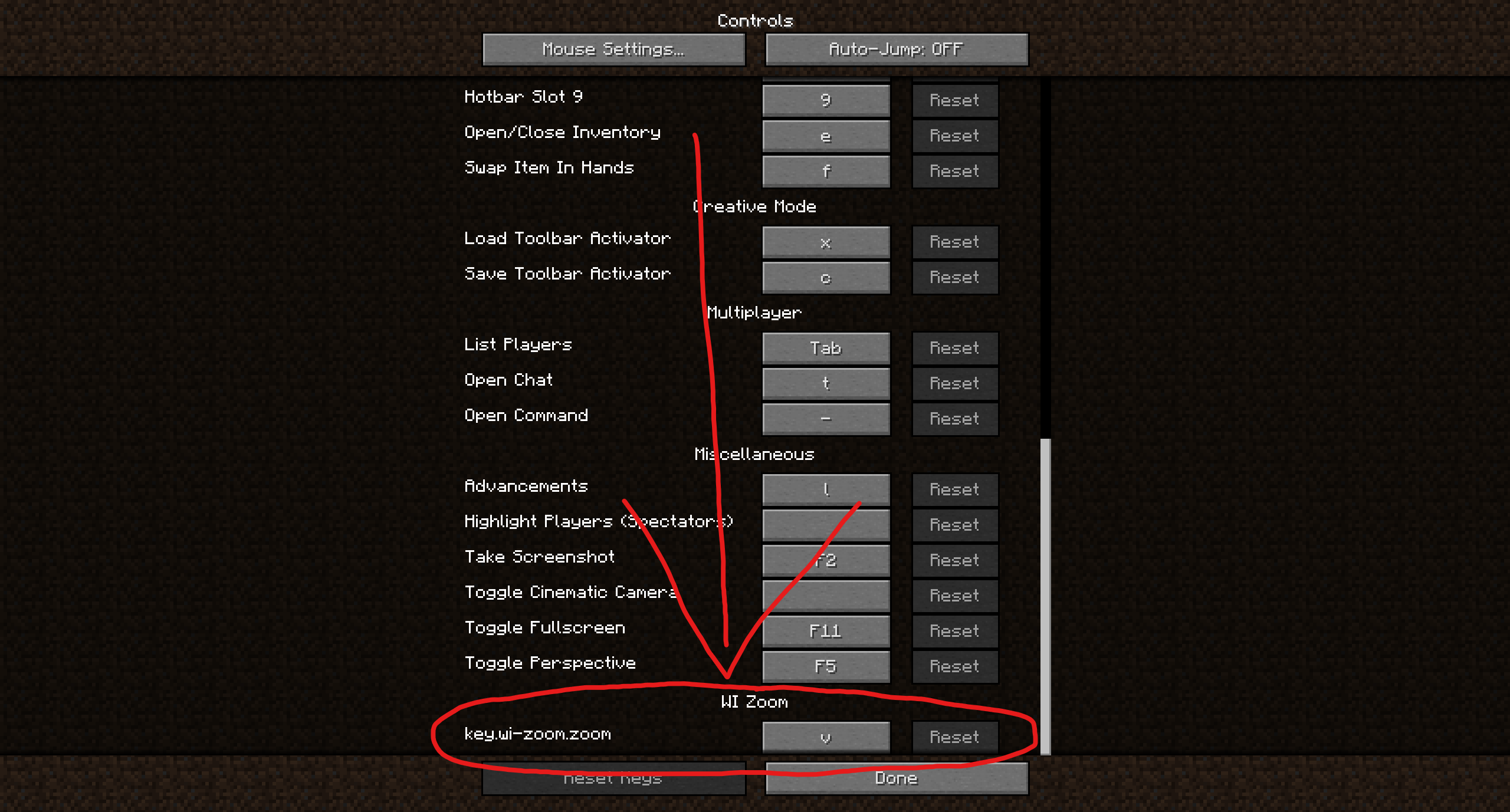
Hold down the V key to activate the zoom (this keybind can be changed).
While zooming, you can use the mouse wheel to zoom in further.
## Changing The Zoom Keybind
How to change the keybind (click to expand)
In the pause menu, click on “Options…”.
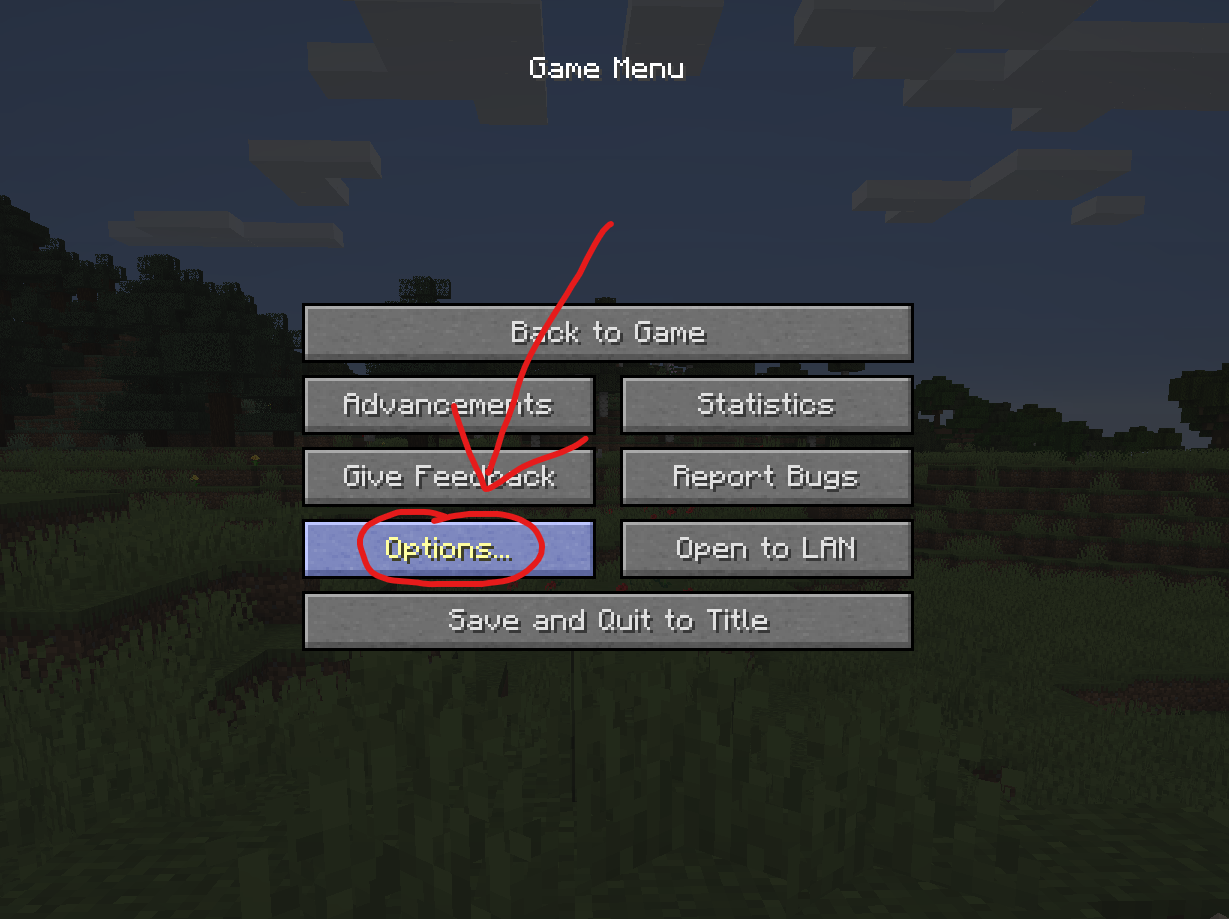
In the Options menu, click on “Controls…”.

In the Controls menu, scroll down to the “WI Zoom” section. If you don’t have any other mods installed, you will find this section at the very bottom.
## Supported Languages
– Azerbaijani (Azerbaijan) (since v1.5)
– Chinese (Simplified/Mainland) (since v1.4)
– Chinese (Traditional/Taiwan) (since v1.4)
– Cantonese (Hong Kong) (since v1.4)
– Classical Chinese (since v1.4)
– Dutch (Netherlands) (since v1.5)
– English (US)
– Estonian (Estonia) (since v1.4)
– French (France) (since v1.4)
– German (Germany)
– Kurdish (since v1.5)
– Portuguese (Brazil) (since v1.5)
– Russian (Russia) (since v1.3)
– Turkish (Turkey) (since v1.5)
– Ukrainian (Ukraine) (since v1.5)
White Iron Ore
# White iron ore
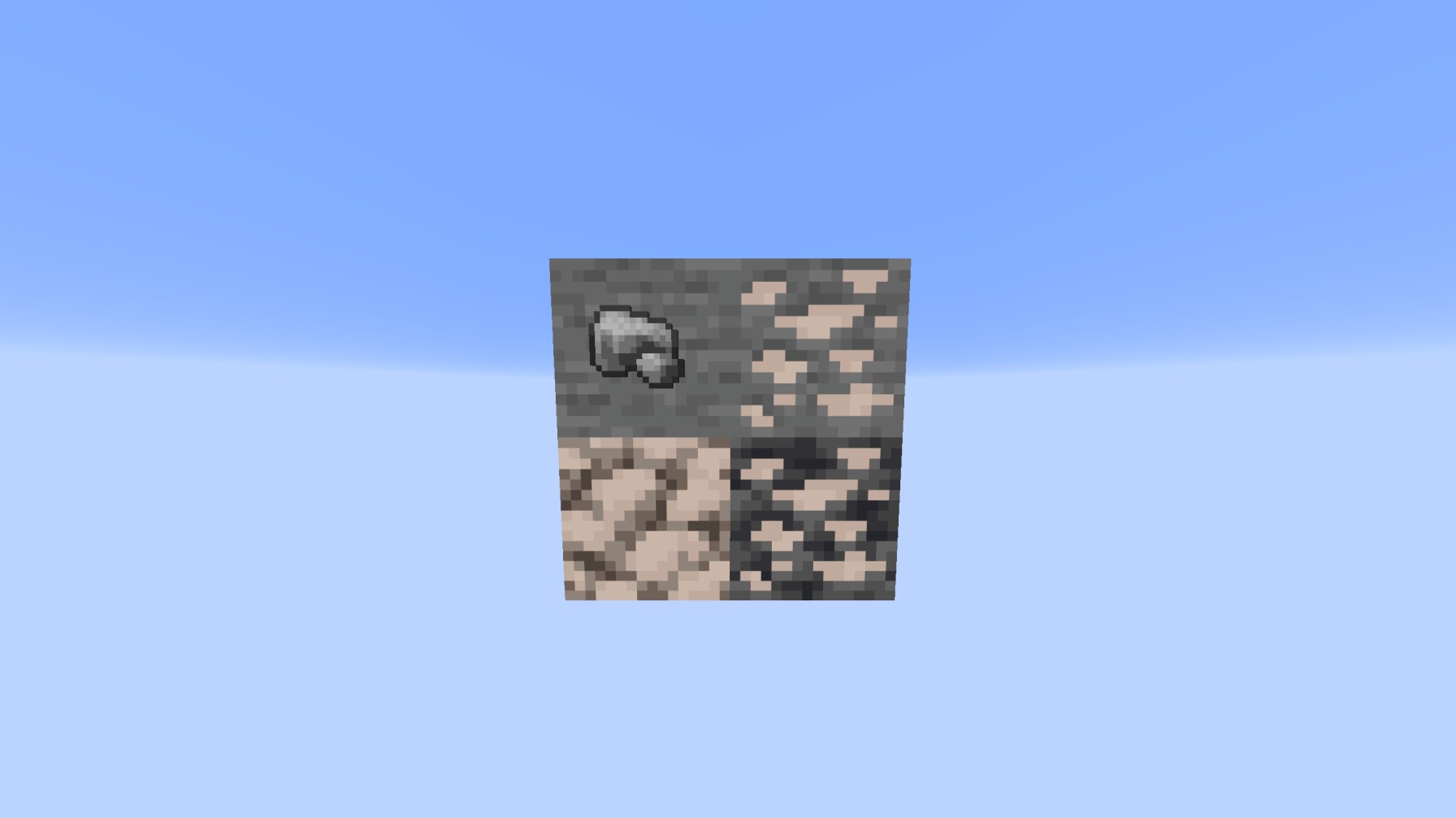
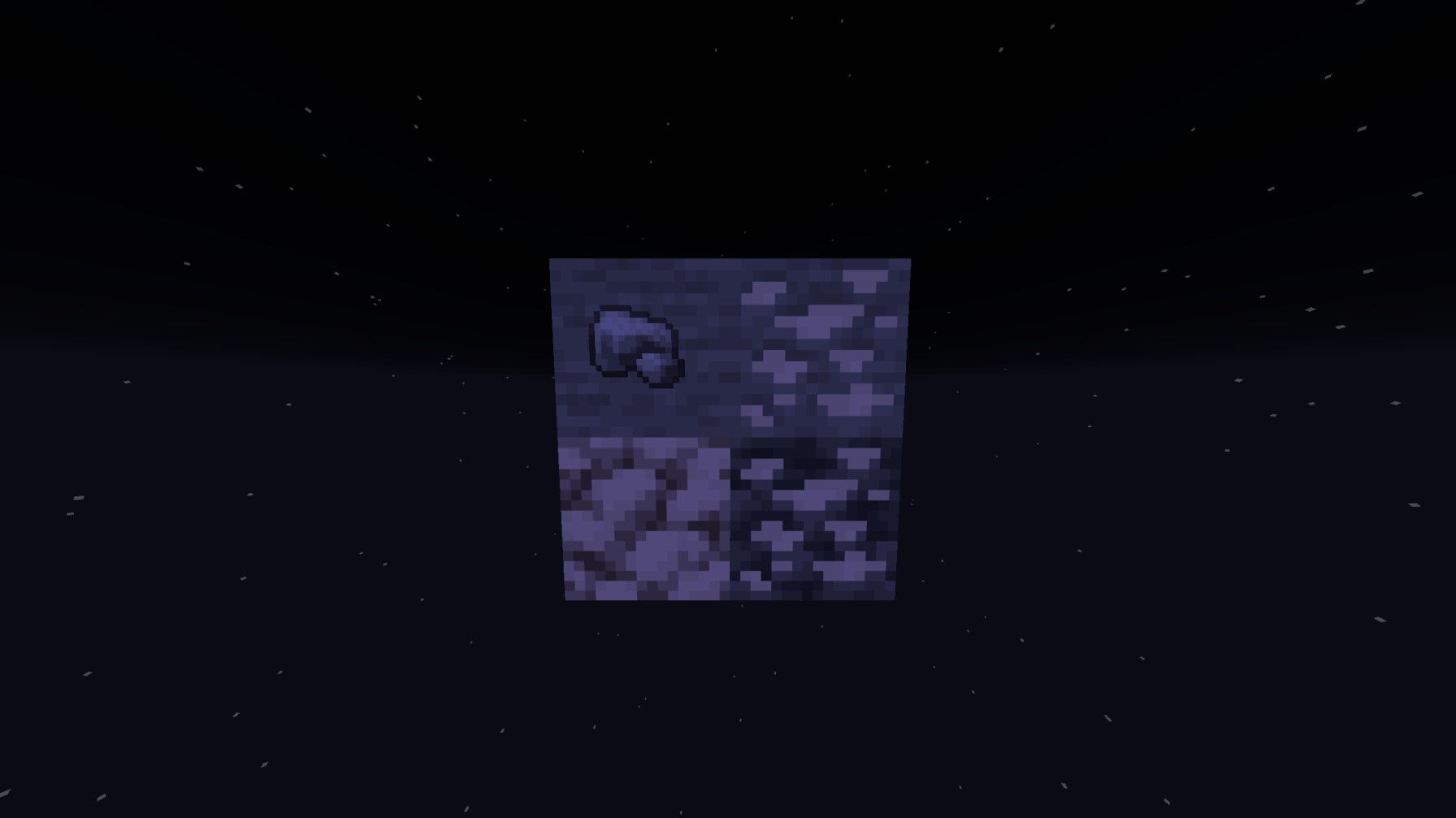
**This resource pack actually glow’s with your shaders so the iron will glow white unlike other white or accurate iron textures, this will ALSO replace the Block of raw iron AND the raw iron unlike others!**
Preview WITH shaders
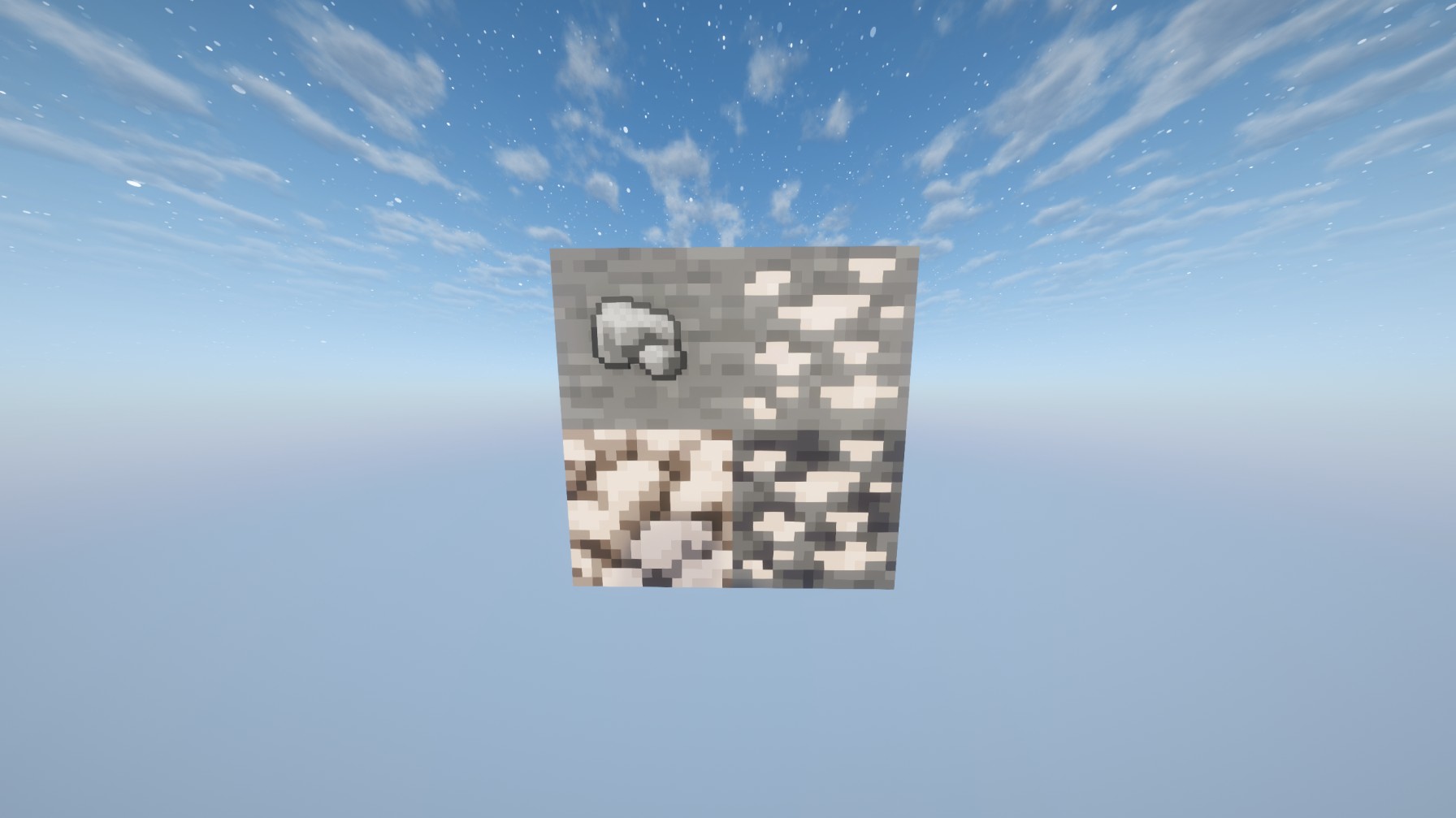
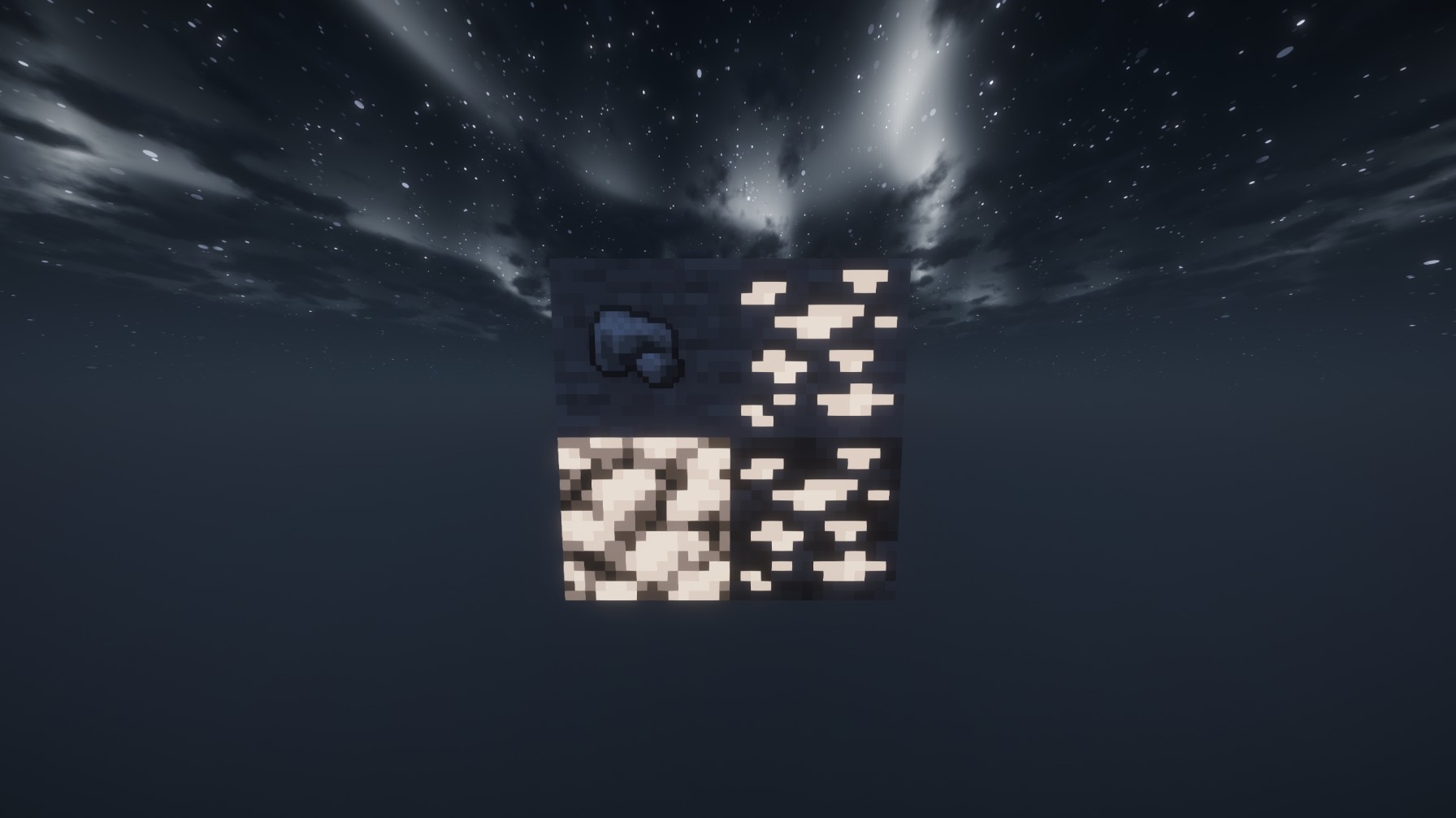
Preview WITHOUT shaders:
White Anime Girl Totem
A clean and stylish Totem of Undying texture pack featuring a white-haired anime girl. This pack replaces the default Minecraft totem with a cute high-quality anime design while keeping the vanilla style smooth and lightweight. Perfect for PvP, survival, and aesthetic gameplay
Whimscape Spears
# Whimsical Spears
[Discord](https://discord.gg/DSQPNbDW7r)
Whimscape spears is my early interpretation of what spears might look like when the official pack (and its dependincies) update to 1.21.11, or whatever the new version is.
## What about the nautilus and camel husk?
I tryed, they didn’t turn out that well, I’ll leave that to the creater of whimscape.
## Compatability with Spears-O-Plenty?
I will when I have the time.
### One last thing
If you like my packs: please consider supporting and/or donating to me on [Ko-Fi](https://ko-fi.com/limeimortal),
My Ko-Fi supporters also get a say in what packs I make next.
It helps so much, and means a lot.
Also: for anyone wanting a custom pack made for them; also send a dm to Lime_void on the Imortals Packs discord with your specific suggestion, your reason (if you have one) and a colour pallet if you want, a size, a name (optional) and what mod (or base minecraft) it should be for within.
Weird and powerful weapons – Texture pack
**This ressource pack add custom textures on the items of the datapack [Weird and powerful weapons](https://modrinth.com/project/Jr3nq9JV)**
## Totem of protection

Pouches!
# **Pouches!**
This data pack is a simple concept. You add extra string to a bundle, it becomes a pouch. It looks exactly identical, except that you can wear it!
It takes over the leggings slot, turning it into an extra storage slot.
# **The download**
I’ve included both the resourcepack and datapack in the datapack download. So uhh you can copy the thing onto ur resourcepack folder incase you ever lose the rp.
_Do also note: Recoloring *may* be a little broken when your gamemode is set to creative from what I’ve tested. No clue why._
Vanilla Shader
## Hello everyone!
I’m excited to share my **Vanilla Shader Project** with you all. I’m still a beginner in the world of programming, but it’s been an incredible journey learning how this works and seeing the results of many hours spent in front of the screen.

I’ve just released **Version 2 (V2)**. While it was technically “ready,” I felt it needed some extra polishing (and it still does!). Please keep in mind that there are still plenty of bugs, but I’m committed to fixing them as I learn.
> **Note:** Currently, it does not support Sodium, but I’m working hard to make that happen soon!
### 🟢 What’s New in V2
* **Toon/Retro Lighting:** Light sources now feature silhouettes for a stylized, classic game aesthetic.
* **Bouncing & Indirect Light:** New mechanics for light accumulation and bounce.
* **True Darkness:** Nights are now significantly darker and more atmospheric.
—
### 1) What this shader does
* **Enhanced Lighting:** Change global illumination and light.
* **Diferrent Visuals:** Tweaks colors and contrast.
* **Performance is not bad:** Designed to run on mid-range hardware.
### 2) Why you should try it
* **New Feel:** provide a “moody” atmosphere.
* **Plug & Play:** No complex installations—it’s a standard resource pack.
### 3) Critical Info & Compatibility
* **Visual Only:** This is a purely aesthetic pack; it does not change gameplay mechanics or add any “cheats.”
*
* **Feedback Welcome:** Since I’m learning, your feedback is incredibly valuable! Feel free to report bugs or share your thoughts.
Vanilla+ TPS
**Vanilla+ TPS** — это простой и удобный мод, разработанный для просмотра данных сервера в реальном времени. С его помощью игроки могут легко отслеживать производительность сервера, используя удобные команды и интерфейс.
### Основные функции:
– **Команды для просмотра данных:**
– **/vtps bossbar** — отображает информацию о TPS (количество тиков в секунду) в виде босс-бара, что делает мониторинг производительности ещё более наглядным.
– **/tps** — предоставляет краткую информацию о TPS и задержке (ping) в чате.
– **/vtps actionbar** — выводит данные о TPS и задержке в строке действий (action bar) для удобного мониторинга в реальном времени.
### Особенности:
– **Простота использования:** Мод не требует сложной настройки — достаточно установить и начать использовать команды.
– **Информативность:** Получайте важные данные о производительности сервера в удобном формате, включая наглядный босс-бар для TPS.
– **Гибкость:** Выбирайте, как именно отображать информацию — в чате, босс-баре или строке действий.
– **Лёгкий в установке:** Мод не требует дополнительных зависимостей и легко интегрируется в ваш игровой процесс.
– **Быстрое обновление:** Мы активно поддерживаем мод и быстро выпускаем обновления для новых версий Minecraft, чтобы вы всегда могли использовать последние функции.
### Статус мода:
– **Текущий статус:** Мод находится в **бета-версии**, что означает, что он стабилен и готов к использованию, но пока что не поддерживает настройку прав доступа для команд.
– **Будущие обновления:** В ближайших обновлениях планируется добавить систему прав доступа, что позволит ограничить использование команд **/vtps bossbar**, **/tps** и **/vtps actionbar** только для администраторов или других указанных групп игроков. После этого мод будет считаться **полноценным релизом**.
**Vanilla+ TPS** идеально подходит как для администраторов серверов, так и для обычных игроков, которые хотят лучше понять, как работает их сервер. Установите мод и наслаждайтесь прозрачностью и контролем над игровой средой!
**Vanilla+ TPS** is a simple and convenient mod designed to view server data in real time. With its help, players can easily monitor server performance using convenient commands and an interface.
### Key features:
– **Commands for viewing data:**
– **/vtps bossbar** – displays TPS (ticks per second) information in the form of a boss bar, which makes performance monitoring even more visual.
– **/tps** – provides brief information about TPS and latency (ping) in the chat.
– **/vtps actionbar** – displays TPS and latency data in the action bar for convenient monitoring in real time.
### Features:
– **Ease of use:** The mod does not require complex configuration – just install and start using commands.
– **Informative:** Get important server performance data in a convenient format, including a visual boss bar for TPS.
– **Flexibility:** Choose how you want to display information – in the chat, boss bar, or action bar.
– **Easy to install:** the mod does not require additional dependencies and easily integrates into your gameplay.
– **Fast update:** we actively support the mod and quickly release updates for new versions of Minecraft, so you always have the latest features.
### Mod status:
– **Current status:** the mod is in **beta**, which means that it is stable and ready for use, but does not yet support setting access rights for commands.
– **Future updates:** in future updates, we plan to add a permissions system that will limit the use of the **/vtps bossbar**, **/tps** and **/vtps actionbar** commands to admins or other specified groups of players. After that, the mod will be considered a **full release**.
**Vanilla+ TPS** is great for both server admins and casual players who want to better understand how their server works. Install the mod and enjoy transparency and control over your gaming environment!