Trial Spawner Recipe
🧿 Trial Spawner Recipe Datapack
Summon the vault challenge—no structure scanning or RNG required!
This datapack introduces a custom recipe for the Trial Spawner, letting players craft their own mob wave generator using keys and vault essence.
✨ Features
✅ Shapeless recipe using 1 Ominous Trial Key + 1 Trial Key + 1 Echo Shard + 1 Block of Redstone
🧩 Lore-friendly integration with Trial Chamber progression and redstone circuitry
🔁 Modular JSON structure for easy editing and expansion
🛠️ Compatible with Minecraft 1.21+
Trial Key Recipe
🗝️ Trial Key Recipe Datapack
Unlock the challenge—no vault looting required!
This datapack introduces a custom recipe for the Trial Key, giving players a survival-friendly way to access Trial Chambers in Minecraft 1.21+.
✨ Features
✅ Shapeless recipe using 1 Tuff + 2 Copper Ingots
🧩 Lore-friendly integration with underground exploration and copper-age progression
🔁 Modular JSON structure for easy editing and expansion
🛠️ Compatible with Minecraft 1.21+
Trial Chamber Fix
# Trial Chamber Fix
Free and open-source datapack for Minecraft 1.21 and higher that corrects a chest that was not being generated correctly in trial chamber.
## Features
Fixed a problem with a chest not generating correctly in trials chambers.
Allows you to obtain an enchanted wind burst book at any level.
Tree Vein Miner




# Tree Miner
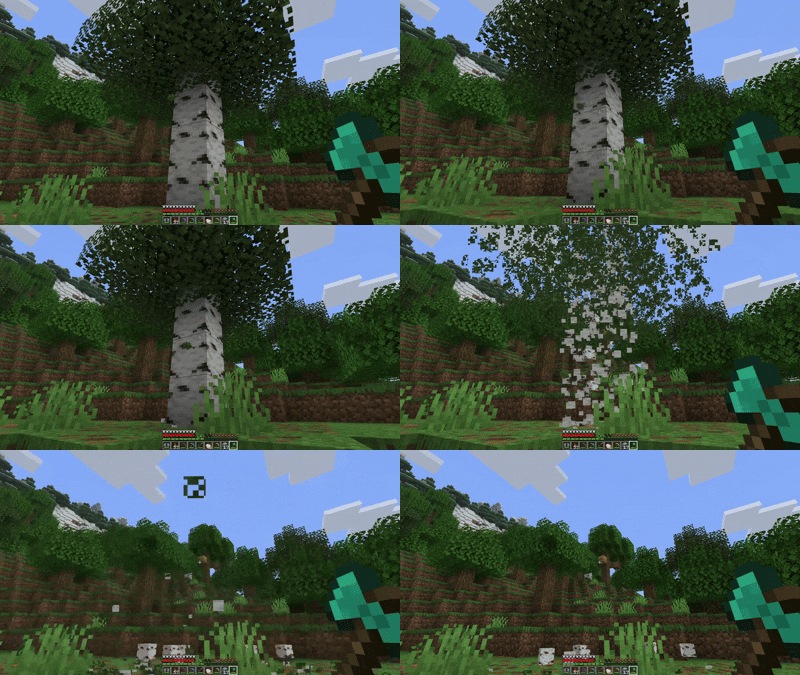
A Minecraft datapack that automatically chops down entire trees when you break a log while crouching.
## Notes
– The tree miner only activates when you’re crouching (sneaking)
– Break logs normally without crouching if you only want to break one block
– Leaves drop their normal items (saplings, sticks) just like breaking them manually
– There’s a small cooldown between uses to prevent performance issues
Transparent GUI
This texture pack makes **all GUIs transparent**, this allows for **better visibility** while in the inventory menu or in any GUI. as far as i know this **isn’t banned** in any major PVP servers or competitions. this is mainly made to help **competitive** players and for **convenience**.
and also compatible with Modmenu
Transparent Buttons
Simple **transparent buttons** in menus, compatible with **older AND newer versions** of the game. So yes, it works in **1.8**, just **ignore the red Incompatible marker** in the pack selection screen.
Have any specific mods you would like me to add support for? Join the [**discord**](https://discord.gg/cjBypn33tZ)!
Transparent Better GUI
### **Resource Pack Name:** Transparent Better GUI
### **Resource Pack Description:**
Tired of bulky interfaces blocking the breathtaking views of your Minecraft world? This resource pack aims to eliminate the barrier between you and the game, delivering an unprecedented immersive experience.
**◆ Core Concept ◆**
Transforms most of the vanilla Graphical User Interface (GUI) textures into elegant semi-transparent effects. Whether it’s the gorgeous title menu background, your meticulously built home, or the perilous landscapes of underground caves, everything will be displayed clearly without obstruction.
**★ Key Features ★**
* **Panoramic Title Menu:** From the moment you launch the game, enjoy an unobstructed view of Minecraft’s iconic rotating title background panorama. Every login becomes a refreshing experience.
* **Seamless In-Game Experience:**
* **Transparent Inventory & Menus:** When opening your inventory, chests, furnaces, and other interfaces, you can still clearly observe your surroundings. No more worrying about surprise attacks while organizing your items!
* **Subtle HUD:** Critical information such as health, hunger bar, and experience level becomes soft and unobtrusive. It blends into the background when not needed yet remains clear and readable when necessary.
* **Transparent Chat & Notifications:** The backgrounds of chat messages and system prompts are now transparent, ensuring communication without compromising your field of view.
**▼ Important Notes ▼**
* This resource pack is primarily a **visual enhancement** and is fully compatible with vanilla gameplay. It does not alter any game mechanics.
* Designed for **Minecraft Java Edition**. Please ensure the pack is enabled in your settings.
* The transparency effect applies to almost all GUI elements, including the world selection screen, pause menu, and more, providing a comprehensive visually transparent experience.
**Download now and unlock a clearer, broader, and more immersive block world!**
—
### **资源包名称:** 更好的透明界面 [Transparent Better GUI]
### **资源包介绍:**
厌倦了厚重的界面遮挡住Minecraft世界的壮丽景色?本资源包旨在消除您与游戏世界之间的隔阂,为您带来前所未有的沉浸式体验。
**◆ 核心理念 ◆**
将原版游戏中大部分用户界面(GUI)材质转换为优雅的半透明效果。让华丽的标题菜单背景、您精心建造的家园、以及险象环生的地下洞穴景观都能毫无阻碍地呈现在您的眼前。
**★ 主要特性 ★**
* **全景标题菜单:** 首次进入游戏,即可无遮挡地欣赏Minecraft标志性的旋转标题背景 panorama 全景图,每一次登录都心旷神怡。
* **无缝游戏内体验:**
* **透明背包与菜单:** 打开物品栏、箱子、熔炉等界面时,仍能清晰观察周围环境,再也不用担心在整理背包时被“惊喜”偷袭。
* **低调的HUD:** 生命值、饥饿条、经验栏等关键信息显示变得柔和而不突兀,在您不需要时悄然融入背景,需要时又能清晰可读。
* **透明聊天框与提示:** 聊天文字和系统提示信息背景变为透明,确保沟通交流的同时,最大程度保留屏幕视野。
**▼ 注意事项 ▼**
* 本资源包主要为**视觉优化**,完全兼容原版游戏,不会修改任何游戏机制。
* 适用于**Minecraft Java版**,请确保在设置中启用了本资源包。
* 透明化处理涉及几乎所有GUI元素,包括选择世界、暂停菜单等,为您提供全方位的视觉通透感。
**即刻下载,解锁一个更清晰、更广阔、更沉浸的方块世界吧!**
Villager Trading Plus

This mod allows for trading with Villagers with just one click. It’s great for quickly trading entire double chests of crops to farmers, or Paper to librarians.
Villager Trading Plus works clientside, and does not need to be installed on the server. Some servers may view it as a cheat and block its behaviour. There’s nothing I can do about this, all servers have their own rules.
You can trade normally by holding down Ctrl.
## Installation
Villager Trading Plus is a completely clientside mod for Fabric and NeoForge.
– On Fabric, [Fabric API](https://modrinth.com/mod/fabric-api) is required.
– On NeoForge, no dependencies are required.
– Since v1.3, Mod settings are available with [McQoy](https://modrinth.com/mod/mcqoy). Older versions require [Cloth Config](https://modrinth.com/mod/cloth-config).
## Credits
This is a port of Giselbaer’s Easier Villager Trading to 1.21.x, allowing for the mod to be used on both loaders. Easier Villager Trading is available under the [MIT License](https://github.com/gbl/EasierVillagerTrading/blob/fabric_1_20/LICENSE).
Mod Menu/Cloth Config integration in older versions of the mod is based on the integration present in [idwtialsimmoedm](https://modrinth.com/mod/idwtialsimmoedm) under its [MIT License](https://github.com/gliscowo/idwtialsimmoedm/blob/1.21/LICENSE).
Yellow Tooltip (Monochrome)
#
Yellow Tooltip (Monochrome)

Replaces the default Minecraft Tooltip with a **Yellow Tooltip (Monochrome)**.
Looking for different colors/flags or styles? Check out the [Pride Tooltips Organization Page](https://modrinth.com/organization/pride-tooltips)!
Looking for packs with the same color(s)/flag but with different styles?
Can’t find a color, flag, or style you are looking for?
Feel free to [open an issue on GitHub](https://github.com/Pridecraft-Studios/pridetooltips/issues) or [join the Pridecraft Discord](https://discord.pridecraft.gay/) and ping `@rotgruengelb`!
Color Palette
The following colors where used to create this pack:
* #ffd800
Style
Monochrome = A simple monochrome style with one color.
Additional Information
* build_time: `2026-02-26T18:58:59+01:00`
* build_user: `rotgruengelb`
## Installation
Download and place into your `resourcepacks` folder. (Only works in versions **after 1.21.1**)
## About Pride Tooltips
A collection of resource packs that change tooltips to be colorful and/or pride themed.
### Rotgruengelb (Developer & Artist):
[](https://youtube.com/rotgruengelb)
[](https://github.com/rotgruengelb)
### Pridecraft Studios:
If you also want other bits of your UI to be themed with pride:
[](https://modrinth.com/project/pridegui)
You can chat with us and check out the source of our projects here:
[](https://discord.pridecraft.gay)
[](https://github.com/Pridecraft-Studios/pridetooltips?tab=readme-ov-file#pride-tooltips)
### Additional Credit
* Cursor texture, used in the banner, from the [Minecraft Cursor Mod by fishstiz](https://modrinth.com/mod/minecraft-cursor).
* The Pridecraft team for all their support and help.
White Tooltip (Frame-only Monochrome)
#
White Tooltip (Frame-only Monochrome)

Replaces the default Minecraft Tooltip with a **White Tooltip (Frame-only Monochrome)**.
Looking for different colors/flags or styles? Check out the [Pride Tooltips Organization Page](https://modrinth.com/organization/pride-tooltips)!
Looking for packs with the same color(s)/flag but with different styles?
Can’t find a color, flag, or style you are looking for?
Feel free to [open an issue on GitHub](https://github.com/Pridecraft-Studios/pridetooltips/issues) or [join the Pridecraft Discord](https://discord.pridecraft.gay/) and ping `@rotgruengelb`!
Color Palette
The following colors where used to create this pack:
* #ffffff
Style
Frame-only Monochrome = A simple monochrome style with one color. This style only applies the color to the frame, leaving the background black.
Additional Information
* build_time: `2026-02-26T18:59:01+01:00`
* build_user: `rotgruengelb`
## Installation
Download and place into your `resourcepacks` folder. (Only works in versions **after 1.21.1**)
## About Pride Tooltips
A collection of resource packs that change tooltips to be colorful and/or pride themed.
### Rotgruengelb (Developer & Artist):
[](https://youtube.com/rotgruengelb)
[](https://github.com/rotgruengelb)
### Pridecraft Studios:
If you also want other bits of your UI to be themed with pride:
[](https://modrinth.com/project/pridegui)
You can chat with us and check out the source of our projects here:
[](https://discord.pridecraft.gay)
[](https://github.com/Pridecraft-Studios/pridetooltips?tab=readme-ov-file#pride-tooltips)
### Additional Credit
* Cursor texture, used in the banner, from the [Minecraft Cursor Mod by fishstiz](https://modrinth.com/mod/minecraft-cursor).
* The Pridecraft team for all their support and help.