No More Nice Golems
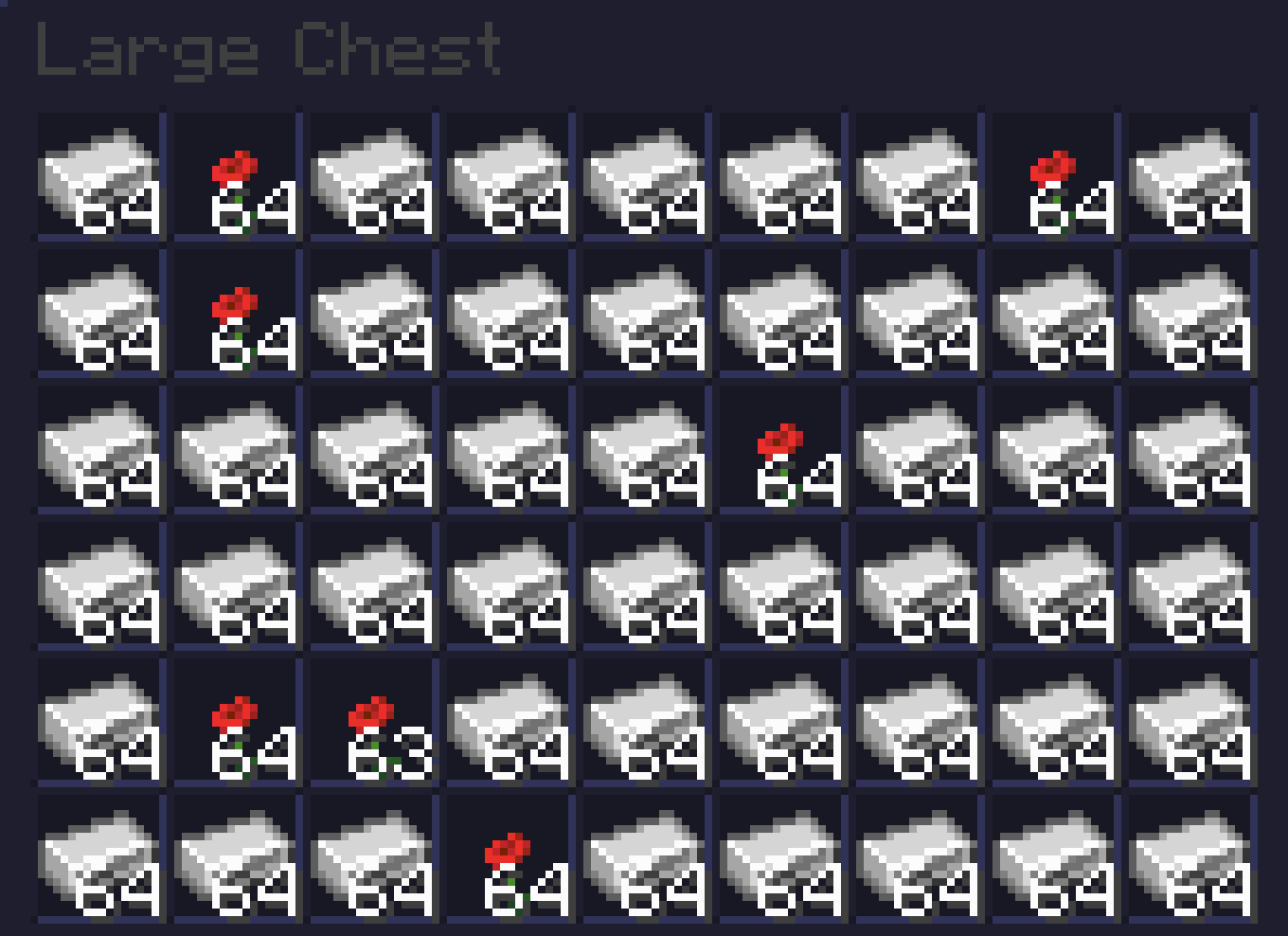
# Ever get tired of your iron farms filling up with Poppys?
Well worry no more as I have fixed your problem!
This simple Datapack removes Poppys from the Iron Golem loot table so you don’t need those pesky sorters!
This pack is based off of No Iron Golem Poppy Drops which hasn’t been updated for awhile.
# BEFORE
# AFTER
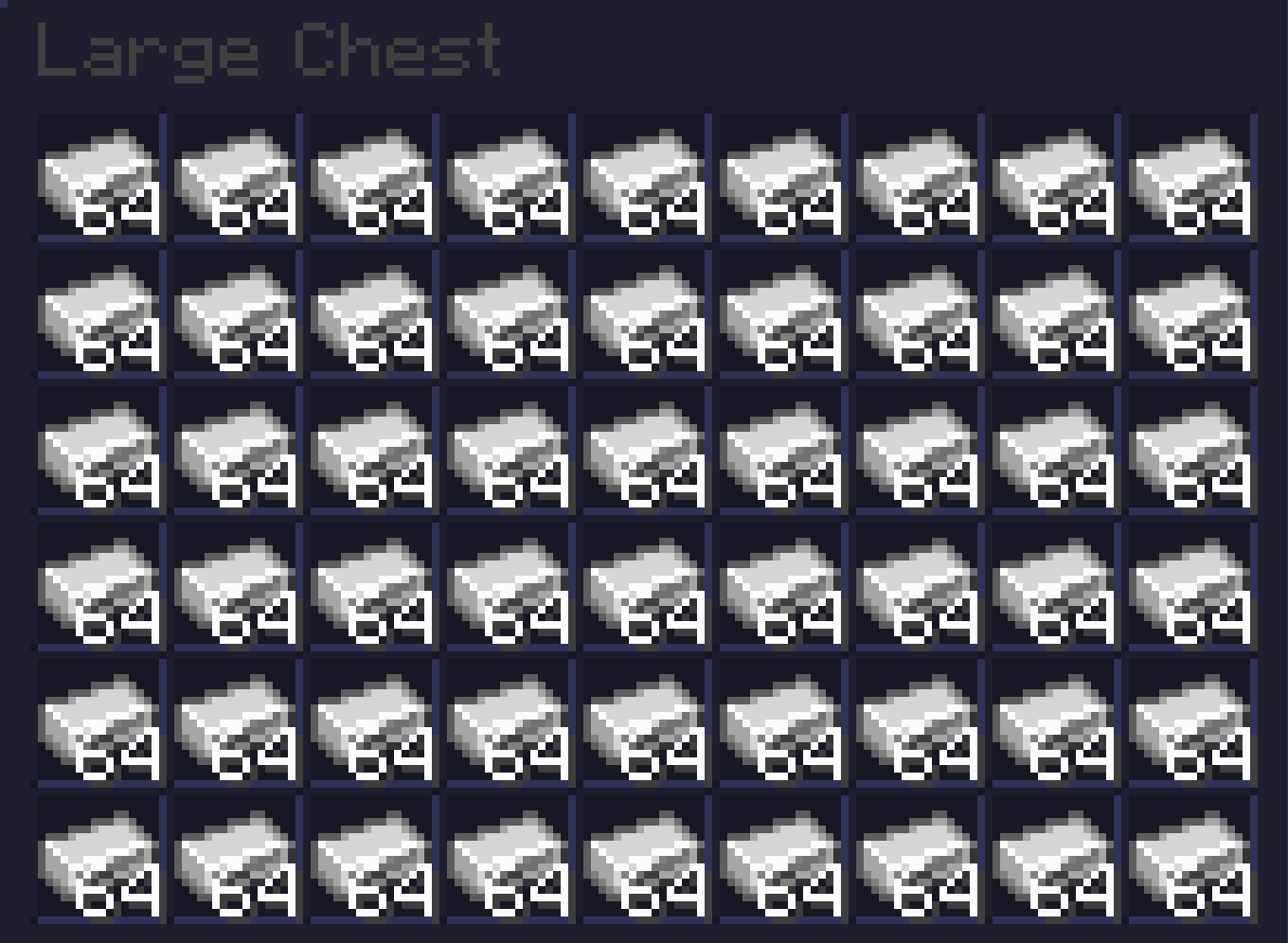
Beautiful, innit?
## INSTALLATION GUIDE
– Go to your saves folder located here on Windows:
“`
C:Users(your name)AppDataRoaming.minecraftsaves
“`
– Put the zipped file in the data packs folder, and either restart your world or execute /reload
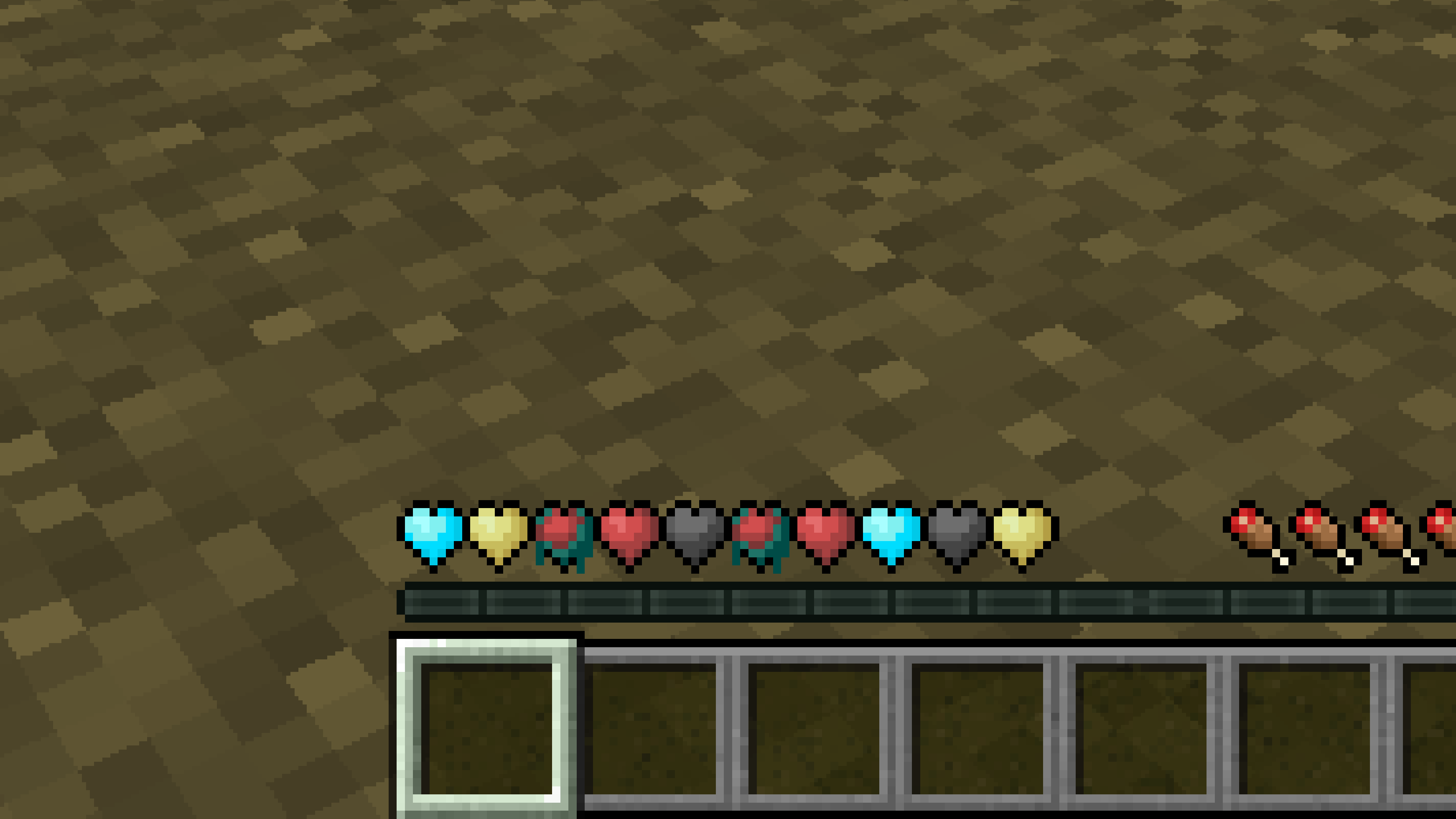
New Hearts, classic colors
# **New Hearts, classic colors**
**Not a fan of the pastel hearts in the New Hearts texture pack?**
**This texture pack is for you.**
—
—
New Hearts
# **New Hearts**
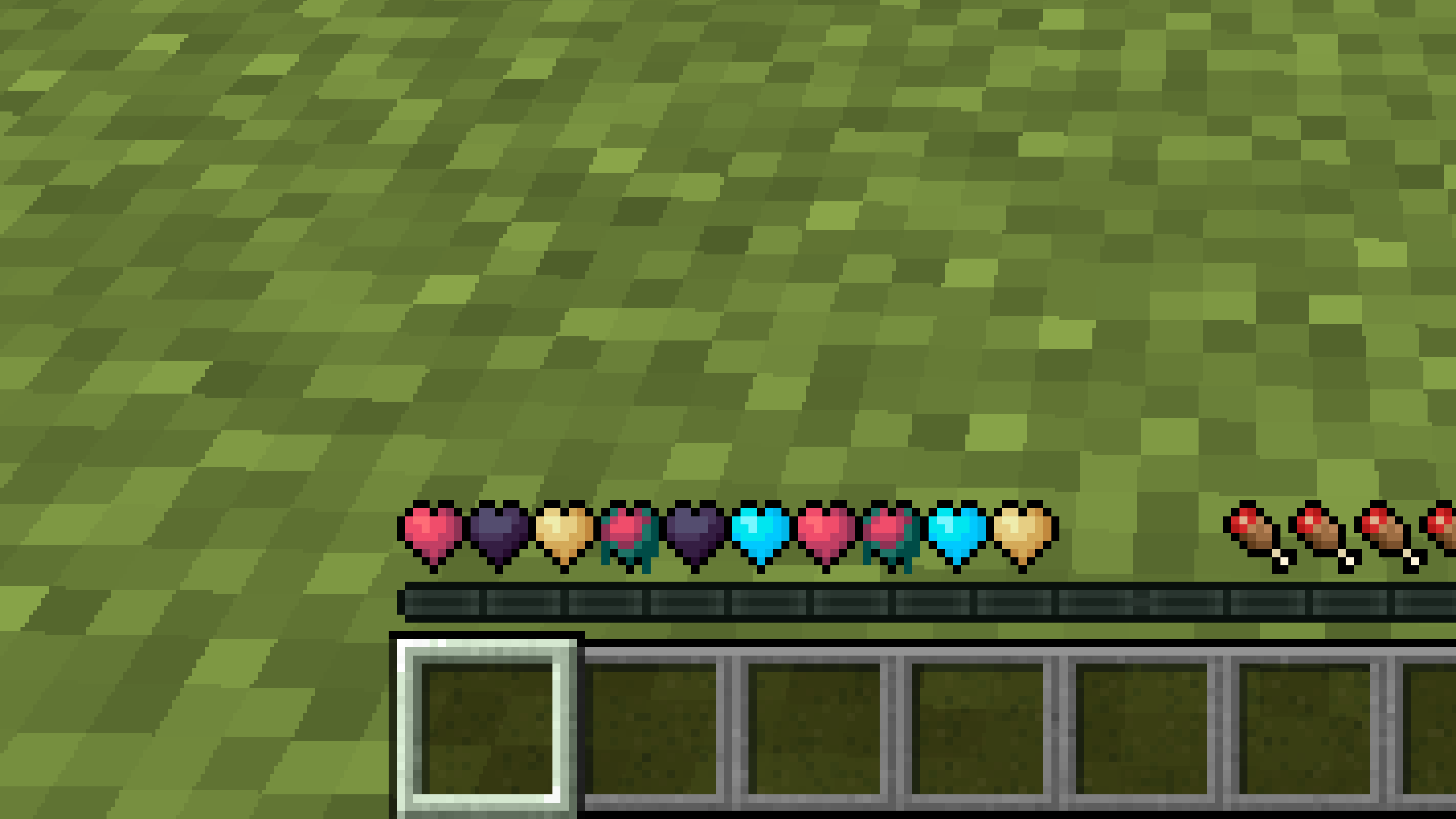
**Don’t like the bright colors of the hearts?**
**This texture pack is for you.**
—
—
## **Description**
**Pastel-colored hearts with softer color transitions.**
—
**Texture pack in classic colors: New Hearts, classic colors**
New end stone
# **New end stone**
**Like pink and pastel colors?**
**This texture pack is for you.**
—

—
## **Description**
**This pack slightly modifies end stone, giving it a softer, pastel pink tone.**
Nether Structure Highlighter
Spot Nether structures instantly! This pack highlights bastions and nether fortresses by subtly enhancing key blocks, making survival exploration faster and easier without cheating. It makes nether fortresses green and bastions and bastion remnants yellow. I personally tried it myself and it saves 10x more time than manually finding one.
credits:**PlanetGuy_122**
Netherite Styled Default Armors
Gives all default armors the look of netherite. UPDATED FOR 1.0-1.22+
Variants:
Ashen 16x https://modrinth.com/resourcepack/netherite-styled-ashen-16x-armors
Bare Bones https://modrinth.com/resourcepack/netherite-styled-bare-bones-armors
Bronze https://modrinth.com/resourcepack/bronze-netherite-styled-armor
SimpleOres https://modrinth.com/resourcepack/simpleores-netherite-styled-armor
View the whole collection here! https://modrinth.com/collection/J5xlug9g
Subscribe to Subsetgaming on YouTube
https://www.youtube.com/@subset.gaming
Type “Subsetg4ming” in your search bar to find everything by me!
Nether Star Recipe
🌟 Nether Star Recipe Datapack
Craft the beacon’s heart—no Wither fight required!
This datapack introduces a custom recipe for the Nether Star, letting players access this powerful item through rare materials and late-game progression.
✨ Features
✅ Shapeless recipe using 4 Netherite Scrap + 4 Nether Quartz + 1 Block of Gold
🧩 Lore-friendly integration with Nether and beacon progression
🔁 Modular JSON structure for easy editing and expansion
🛠️ Compatible with Minecraft 1.16+
Nether Quartz Recipe
🔮 Nether Quartz Recipe Datapack
Craft precision circuitry—no mining trips to the Nether required!
This datapack introduces a custom recipe for Nether Quartz, letting players convert decorative blocks back into redstone components.
✨ Features
✅ Shapeless recipe using 1 Block of Quartz
🧩 Lore-friendly integration with quartz refinement and reverse crafting logic
🔁 Modular JSON structure for easy editing and expansion
🛠️ Compatible with Minecraft 1.13+
nerdPVP
# NerdPVP – A Clean & Competitive PVP Resource Pack
### WARNING : This pack is still in alpha and NOT complete
## Overview
Nerd PVP is a streamlined resource pack designed for competitive Minecraft PVP. It enhances visibility, reduces distractions, and optimizes key elements to give you a tactical edge in combat. Whether you’re playing Bedwars, SkyWars, or Faction PVP, this pack keeps your focus sharp and your performance crisp.
## Key Features
– ✔ Clear & Minimalist Textures – Removes visual clutter for better enemy tracking.
– ✔ Optimized Sword & Tool Designs – Clean, high-visibility models for fast-paced combat.
– ✔ Low Fire – Less obstruction during fights.
– ✔ 16x Resolution – Balanced performance for smooth gameplay.
## Compatibility
Works on Minecraft [version (1.16.x, 1.17.x, 1.18.x,1.19.x, etc) ]
Supports OptiFine (connected textures, custom skies).
FPS-friendly (compatible with Sodium, Iris, etc.).
## Installation
Download the .zip file.
Place it in your resourcepacks folder.
Activate in-game via Options > Resource Packs.
## Feedback & Updates
Suggestions or bug reports? Say it in the discord server or DM me directly. Updates focus on community-driven improvements!
## Developer note
You can use textures from this pack, just credit the pack maker “membercatcousin”
NeoFullbright
# NeoFullbright
**NeoFullbright** is a **lightweight, 100% vanilla resource pack** that applies a **permanent fullbright effect** — no commands, no mods required, and without breaking text or the UI.
—
## ✨ Features
– Clear vision as if it’s daytime, even in caves or at night
– Interface and text remain **fully visible** (no broken fonts)
– Custom pack icon included
– **OptiFine compatible** (includes lightmaps)
– Ultra-light pack with **zero performance impact**
—
—

—
## 📥 Installation
1. Download the `.zip` file
2. Place it in your:
“`
.minecraft/resourcepacks
“`
3. Launch Minecraft → **Options → Resource Packs**
4. Enable **NeoFullbright** and move it to the top of the list
—
## 📥 Installation (via NeoFullbright Installer)
The easiest way to install the NeoFullbright resource pack is by using the **NeoFullbright Installer** — a small Java application that handles everything automatically.
1. Download has to wait 30 seconds and run the **NeoFullbright Installer** (`.jar` file)
2. Select your Minecraft version and confirm the default folder:
“`
.minecraft/resourcepacks
“`
3. Click **Install** — the latest compatible NeoFullbright version will be downloaded and activated automatically
4. Launch Minecraft → **Options → Resource Packs**
5. Confirm that **NeoFullbright** is enabled and placed at the top of the list
—
## 🔧 Compatibility
– ✅ **Minecraft 1.21.11**
– ✅ Works in **vanilla** (no mods required)
– ✅ Compatible with **OptiFine/Fabric/Iris**
– ⚠️ Not compatible with external shaders (they will override the effect)
—
## ⚠️ Note
If you use an external shader (BSL, Complementary, etc.), the NeoFullbright effect will be overridden.
