UUID Hex
## ✅ Features
– **Efficiently** converts UUIDs to hex format
– Optimized for speed by relying on a precomputated hexadecimal range (`0000-FFFF`), increasing static data usage
## 📖 Usage
Call the `uuid:_` function as an entity and use its output in `storage uuid:out plain`
Alternatively, assign a 4-integer array to `storage uuid:in UUID`, then call the `uuid:convert` function to format it.
unsup
***Un**a’s **S**imple **Up**dater*
unsup is a somewhat minimal implementation of a generic working directory
syncer in Java. It supports running as a Java agent, to piggy-back off of the
launch of another program.
***It is particularly good at syncing small private modpacks or one-offs in small groups, where a full public distribution (e.g. on Modrinth!) is overkill or undesirable.*** It is capable of downloading mods from their original sources, wherever that may be… as long as it speaks HTTP(S).
An [unsup.ini](https://git.sleeping.town/unascribed/unsup/wiki/Config-format)
must be placed in the working directory for unsup to know what to do, or a `-Dunsup.bootstrapUrl=` JVM argument specifying where to find such a file.
The updater works hard to ensure the working directory is never left in an
inconsistent state. Short of a sudden power loss in the middle of applying
changes (an incredibly short time window), an unsup update cannot result in
an inconsistent or corrupted working directory.
It does hash-based consistency validation (with your choice of function, SHA-256 recommended) on all downloads and on files before overwriting
them, warning the user if they’ve changed something that has been updated. It
additionally supports signing manifests using OpenBSD Signify for additional
security.
unsup’s unique simplified design means it is compatible with **all launchers**,
from the vanilla launcher to MultiMC. Just add `-javaagent:unsup.jar` to the
JVM arguments, and place `unsup.jar` and `unsup.ini` in the .minecraft
directory.
In Prism Launcher, you can utilize unsup as a “component” by importing the
`com.unascribed.unsup.json` from the latest release on Forgejo. (I can’t upload JSON files to Modrinth). This will allow Prism
Launcher to download and manage unsup. (MultiMC does not support Java agent
components, despite requests.)
It also has a built-in concept of *environments* and *flavors*, allowing it to
be used to manage server installs rather than just clients, and allowing users
to pick between multiple mutually incompatible mod sets with a feature-packed interface unlike any other updater tool.
unsup is also capable of updating MultiMC’s “components”, including
unsup itself if it is added as one. This means you can update mod loaders or
Minecraft itself.
## Creating Packs
You can either point unsup at a [Packwiz](https://packwiz.infra.link/) pack.toml (recommended),
or write a native unsup manifest by hand. See [the wiki](https://git.sleeping.town/unascribed/unsup/wiki/Manifest-format) for info on the
native manifest format. The Creator GUI is on hold, as Packwiz has become a
de-facto standard for Minecraft modpacks.
## Stability
unsup has been used for modpacks on versions from b1.7.3 to 1.21.5, both client and server,
and is known to work with Forge (both legacy and modern), Fabric, Quilt, and NeoForge. It
has successfully powered many modpacks, from [small](https://git.sleeping.town/Rewind/Upsilon)
to [large](https://github.com/ModFest/bc23-pack). Native manifest and Packwiz manifest
support are both quite stable, and have been used extensively.
Signing support is still somewhat experimental, and has not been deployed by anyone at
large scale. That someone could be you — please let me know if it works well!
## GUI
unsup has a minimal and elegant GUI that works everywhere (yes, including
macOS) and can have all of its colors customized to make it fit in with your
branding. It ships with a dark theme with minty accents. Check out the gallery tab!
## License
unsup is released under the LGPLv3.
Unshaded Blocks
This resource pack removes the legacy block shading that darkens the sides and bottoms of blocks. YouTubers such as Grian and Mumbo Jumbo often use mods like [Simply No Shading](https://modrinth.com/mod/simply-no-shading) that disable legacy block shading to brighten up the game, but with this resource pack, you don’t need any mods at all, and it will work in snapshots, too!
Pairs well with [No Shade by masenaut](https://modrinth.com/resourcepack/no-entity-shade)!
This is a fork of LavatearsRune’s original resource pack that I’ve taken up maintaining, you can check out the original here:
[https://www.planetminecraft.com/texture-pack/new-lighting-1-16/](https://www.planetminecraft.com/texture-pack/new-lighting-1-16/)
Universal Outlined Ores
This is a Minecraft resource pack that adds outlines to ores in mods, making them more visible.
It is trying to be compatible with all mods that add ores (work also with vanilla ores) and for all versions of Minecraft.
It will probably be compatible with OptiFine’s connected textures.
Links : [Github](https://github.com/Seltade-MC/UniversalOutlinedOres)/[Modrinth](https://modrinth.com/resourcepack/universal-outlined-ores)
# Compatible mods :
Available=✅ Not Tested=❓ Work in progress=⏳ Impossible=❌
|Mods|Links|Status|
|—|—|—|
|AdAstra|[Github](https://github.com/terrarium-earth/Ad-Astra)/[Modrinth](https://modrinth.com/mod/ad-astra)/[CurseForge](https://www.curseforge.com/minecraft/mc-mods/ad-astra)|⏳|
|Aether Addon: Overworld Ores|[Github](https://github.com/The-Aether-Team/Overworld-Ores)/[Modrinth](https://modrinth.com/mod/aether-overworld-ores)/[CurseForge](https://www.curseforge.com/minecraft/mc-mods/aether-overworld-ores)|⏳|
|Alex’s Caves|[Github](https://github.com/AlexModGuy/AlexsCaves)/[Modrinth](https://modrinth.com/mod/alexs-caves)/[CurseForge](https://www.curseforge.com/minecraft/mc-mods/alexs-caves)|⏳|
|Ancient Aether|[Github](https://github.com/Builderdog841/Ancient-Aether)/[Modrinth](https://modrinth.com/mod/ancient-aether)/[CurseForge](https://www.curseforge.com/minecraft/mc-mods/ancient-aether)|⏳|
|Better End|[Github](https://github.com/quiqueck/BetterEnd)/[Modrinth](https://modrinth.com/mod/betterend)/[CurseForge](https://www.curseforge.com/minecraft/mc-mods/betterend)|⏳|
|Better Nether|[Github](https://github.com/quiqueck/BetterNether)/[Modrinth](https://modrinth.com/mod/betternether)/[CurseForge](https://www.curseforge.com/minecraft/mc-mods/betternether)|⏳|
|Bewitchment|[Github](https://github.com/MoriyaShiine/bewitchment)/[Modrinth](https://modrinth.com/mod/bewitchment)/[CurseForge](https://www.curseforge.com/minecraft/mc-mods/bewitchment)|⏳|
|Cobblemon|[Gitlab](https://gitlab.com/cable-mc/cobblemon)/[Modrinth](https://modrinth.com/mod/cobblemon)/[CurseForge](https://www.curseforge.com/minecraft/mc-mods/cobblemon)|⏳|
|Create|[Github](https://github.com/Creators-of-Create/Create)/[Modrinth](https://modrinth.com/mod/create)/[CurseForge](https://www.curseforge.com/minecraft/mc-mods/create)|⏳|
|Create Fabric|[Github](https://github.com/Fabricators-of-Create/Create)/[Modrinth](https://modrinth.com/mod/create-fabric)/[CurseForge](https://www.curseforge.com/minecraft/mc-mods/create-fabric)|⏳|
|Create: Metallurgy|[Github](https://github.com/Lucreeper74/Create-Metallurgy)/[Modrinth](https://modrinth.com/mod/create-metallurgy)/[CurseForge](https://www.curseforge.com/minecraft/mc-mods/create-metallurgy)|⏳|
|Create: New Age|[Gitlab](https://gitlab.com/antarcticgardens/create-new-age)/[Modrinth](https://modrinth.com/mod/create-new-age)/[CurseForge](https://www.curseforge.com/minecraft/mc-mods/create-new-age)|⏳|
|Deep Aether|[Github](https://github.com/RazorDevs/Deep-Aether)/[Modrinth](https://modrinth.com/mod/deep-aether)/[CurseForge](https://www.curseforge.com/minecraft/mc-mods/deep-aether)|⏳|
|Deeper and Darker|[Github](https://github.com/KyaniteMods/DeeperAndDarker)/[Modrinth](https://modrinth.com/mod/deeperdarker)/[CurseForge](https://www.curseforge.com/minecraft/mc-mods/deeperdarker)|⏳|
|ExtraGems|[Github](https://github.com/XxRexRaptorxX/ExtraGems)/[Modrinth](https://modrinth.com/mod/extragems)/[CurseForge](https://www.curseforge.com/minecraft/mc-mods/extra-gems)|⏳|
|Galosphere|[Github](https://github.com/0rc1nus/Galosphere-Main)/[Modrinth](https://modrinth.com/mod/galosphere)/[CurseForge](https://www.curseforge.com/minecraft/mc-mods/galosphere)|⏳|
|Ice and Fire: Dragons|[Github](https://github.com/AlexModGuy/Ice_and_Fire)/[Modrinth](https://modrinth.com/mod/ice-and-fire-dragons)/[CurseForge](https://www.curseforge.com/minecraft/mc-mods/ice-and-fire-dragons)|⏳|
|Immersive Engineering|[Github](https://github.com/BluSunrize/ImmersiveEngineering)/[Modrinth](https://modrinth.com/mod/immersiveengineering)/[CurseForge](https://www.curseforge.com/minecraft/mc-mods/immersive-engineering)|⏳|
|Industrial Craft|[Modrinth](https://modrinth.com/mod/industrial-craft)/[CurseForge](https://www.curseforge.com/minecraft/mc-mods/industrial-craft)|⏳|
|Industrial Revolution|[Github](https://github.com/GabrielOlvH/Industrial-Revolution)/[Modrinth](https://modrinth.com/mod/industrial-revolution)/[CurseForge](https://www.curseforge.com/minecraft/mc-mods/industrial-revolution)|⏳|
|Infernal Expansion|[Github](https://github.com/infernalstudios/Infernal-Expansion)/[Modrinth](https://modrinth.com/mod/infernal-expansion)/[CurseForge](https://www.curseforge.com/minecraft/mc-mods/infernal-expansion)|⏳|
|Infinite Abyss|[Modrinth](https://modrinth.com/mod/infinite-abyss)/[CurseForge](https://www.curseforge.com/minecraft/mc-mods/infinite-abyss)|⏳|
|Magneticraft|[Github](https://github.com/Magneticraft-Team/Magneticraft)/[CurseForge](https://www.curseforge.com/minecraft/mc-mods/magneticraft)|⏳|
|Marium’s Soulslike Weaponry|[Github](https://github.com/mariumbacchus/Soulslike-Weaponry)/[Modrinth](https://modrinth.com/mod/mariums-soulslike-weaponry)/[CurseForge](https://www.curseforge.com/minecraft/mc-mods/mariums-soulslike-weaponry)|⏳|
|Mekanism|[Github](https://github.com/mekanism/Mekanism)/[Modrinth](https://modrinth.com/mod/mekanism)/[CurseForge](https://www.curseforge.com/minecraft/mc-mods/mekanism)|⏳|
|Mekanism: AdAstraOres|[Gitlab](https://gitlab.com/libertymods/mekanism-ad-astra-ores)/[Modrinth](https://modrinth.com/mod/mekanism-ad-astra-ores)/[CurseForge](https://www.curseforge.com/minecraft/mc-mods/mekanism-ad-astra-ores)|⏳|
|Modern Industrialization|[Github](https://github.com/AztechMC/Modern-Industrialization)/[Modrinth](https://modrinth.com/mod/modern-industrialization)/[CurseForge](https://www.curseforge.com/minecraft/mc-mods/modern-industrialization)|⏳|
|Mythic Metals|[Github](https://github.com/Noaaan/MythicMetals)/[Modrinth](https://modrinth.com/mod/mythicmetals)/[CurseForge](https://www.curseforge.com/minecraft/mc-mods/mythicmetals)|⏳|
|NetherEx|[Github](https://github.com/LogicTechCorp/NetherEx)/[Modrinth](https://modrinth.com/mod/netherex)/[CurseForge](https://www.curseforge.com/minecraft/mc-mods/netherex)|⏳|
|Oh The Biomes You’ll Go|[Github](https://github.com/Potion-Studios/BYG)/[Modrinth](https://modrinth.com/mod/biomesyougo)/[CurseForge](https://www.curseforge.com/minecraft/mc-mods/oh-the-biomes-youll-go)|⏳|
|Oritech|[Github](https://github.com/Rearth/Oritech)/[Modrinth](https://modrinth.com/mod/oritech)/[CurseForge](https://www.curseforge.com/minecraft/mc-mods/oritech)|⏳|
|Palladium|[Github](https://github.com/ThreeTAG/Palladium)/[Modrinth](https://modrinth.com/mod/threetag-palladium)/[CurseForge](https://www.curseforge.com/minecraft/mc-mods/threetag-palladium)|⏳|
|Pixelmon|[Modrinth](https://modrinth.com/mod/pixelmon)/[CurseForge](https://www.curseforge.com/minecraft/mc-mods/pixelmon)|⏳|
|Powah!|[Github](https://github.com/Technici4n/Powah)/[Modrinth](https://modrinth.com/mod/powah)/[CurseForge](https://www.curseforge.com/minecraft/mc-mods/powah-rearchitected)|⏳|
|Railcraft|[Github](https://github.com/Railcraft/Railcraft)/[CurseForge](https://www.curseforge.com/minecraft/mc-mods/railcraft)|⏳|
|Samurai Dynasty|[Github](https://github.com/VeroxUniverse/SamuraiDynasty-neoforge)/[Modrinth](https://modrinth.com/mod/epic-samurais)/[CurseForge](https://www.curseforge.com/minecraft/mc-mods/samurai-dynasty)|⏳|
|Tech Reborn|[Github](https://github.com/TechReborn/TechReborn)/[Modrinth](https://modrinth.com/mod/techreborn)/[CurseForge](https://www.curseforge.com/minecraft/mc-mods/techreborn)|⏳|
|Thaumcraft|[CurseForge](https://www.curseforge.com/minecraft/mc-mods/thaumcraft)|⏳|
|Thermal Foundation|[Modrinth](https://modrinth.com/mod/thermal-foundation)/[CurseForge](https://www.curseforge.com/minecraft/mc-mods/thermal-foundation)|⏳|
|Things|[Github](https://github.com/wisp-forest/things)/[Modrinth](https://modrinth.com/mod/things)/[CurseForge](https://www.curseforge.com/minecraft/mc-mods/things-fabric)|⏳|
|Tinkers Construct|[Github](https://github.com/SlimeKnights/TinkersConstruct)/[CurseForge](https://www.curseforge.com/minecraft/mc-mods/tinkers-construct)|⏳|
|Traincraft|[Github](https://github.com/EternalBlueFlame/Traincraft-5)/[CurseForge](https://www.curseforge.com/minecraft/mc-mods/traincraft)|⏳|
|Universal Ores|[Github](https://github.com/DawnTeamMC/UniversalOres)/[Modrinth](https://modrinth.com/mod/universal_ores)/[CurseForge](https://www.curseforge.com/minecraft/mc-mods/universal-ores-fabric)|✅|
|Werewolves|[Github](https://github.com/TeamLapen/Werewolves)/[Modrinth](https://modrinth.com/mod/werewolves)/[CurseForge](https://www.curseforge.com/minecraft/mc-mods/werewolves-become-a-beast)|⏳|
### If the ore mod you want is not listed above, please report it [here](https://github.com/Seltade-MC/UniversalOutlinedOres/issues).
UniLink
## 🔗 UniLink
A mod that allows you to use resources from other directories
## 💼 Usage
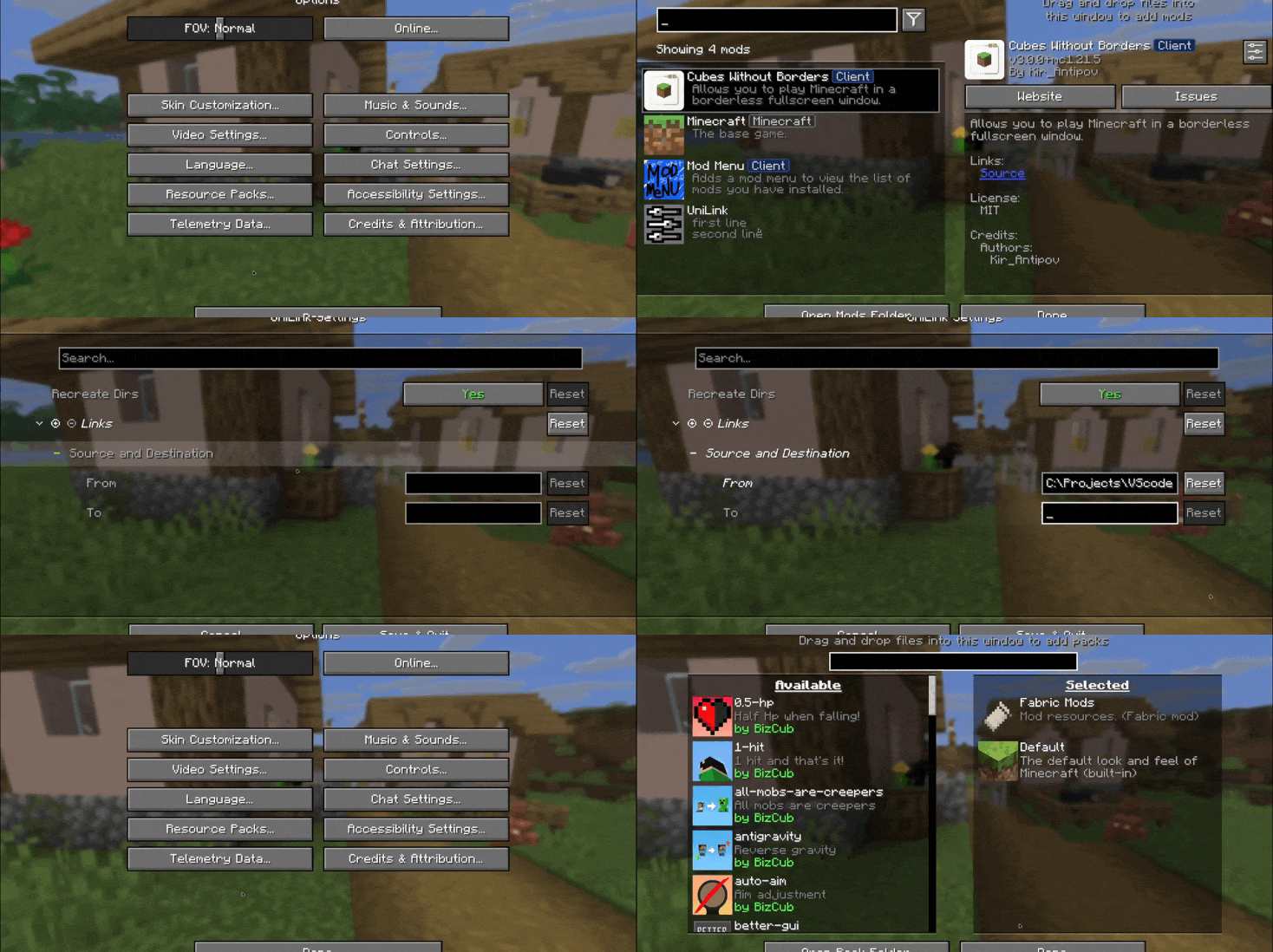
This mod works using symbolic links, which can be used like a folder but don’t require reusing (copying) resources. Some launchers also use symbolic links, but the mod works independently of them. It’s a configuration file. The first field specifies the path to the directory to use, and the second field specifies the path to the folder where the symbolic link should be placed. The final path can be absolute (e.g., “`C:….minecraftsaves“`) or abbreviated (“`saves“`).

If you change the directory used for worlds and then revert the change, the game may freeze while searching for and failing to find the required folder. For this purpose, the configuration file has an option to recreate the folders used by the game.
## 🛠️ How it works
By default, the mod does nothing. However, you can add data to the configuration to create a link: the path from which resources will be used and the path where the symbolic link will be created.
### What follows from this:
* After changing the configuration, new links will be added. Therefore, old, unused links will be deleted.
* Since Minecraft creates some folders, the mod will have to delete the existing folder before creating the link. However, since the mod deletes folders without asking, it has a limitation on deleting directories with files inside. This means that if a folder contains any files, it won’t be deleted and the link won’t be created.
Creating symbolic links requires certain permissions. Therefore, some launchers that don’t have them won’t be able to create links. Solution: Run the launcher as administrator.
## 🤝 Support

UniLib
# UniLib
A common set of Utilities, designed for over 50 versions of Minecraft!
[](https://opensource.org/licenses/MIT)
[](https://app.codacy.com/gl/CDAGaming/UniLib/dashboard?utm_source=gl&utm_medium=referral&utm_content=&utm_campaign=Badge_grade)
[](https://gitlab.com/CDAGaming/UniLib/commits/main)
[](https://www.curseforge.com/minecraft/mc-mods/unilib)
[](https://www.curseforge.com/minecraft/mc-mods/unilib)
[](https://modrinth.com/mod/unilib)
[](https://modrinth.com/mod/unilib)
## General Notes
* This mod identifies as a **Client Side-only** mod
* This means it **will not run** on the Server’s side.
* Fabric and Quilt mod loaders will simply ignore the
mod, while other mod loaders may crash.
* Some versions of the mod for Minecraft 1.14.x and above require
the [Fabric API](https://modrinth.com/mod/fabric-api)
and the [Fabric mod loader](https://fabricmc.net/use/installer)
* Some versions of the mod for Minecraft 1.13.x require
the [Rift API](https://www.curseforge.com/minecraft/mc-mods/rift)
and the [Rift mod loader](https://github.com/DimensionalDevelopment/Rift/releases)
* Some versions of the mod for Minecraft 1.1.0 and below
require [Risugami’s ModLoader](https://mcarchive.net/mods/modloader)
## Features
This library mod offers various API utilities that have been developed over the years,
initially part of [CraftPresence](https://gitlab.com/CDAGaming/CraftPresence),
that have been designed to work on over 50 versions of Minecraft, from the earliest Alphas to the latest Releases.
These APIs range from utilities that can help with Rendering/UI design, Update Checker and Translation ease-of-access,
as well as the APIs provided through the sibling-project, [UniCore](https://github.com/CDAGaming/UniCore)
## Disclaimers & Additional Info
### Minecraft Issues + Additional Build Info
Despite best efforts, issues can occur due to the state of the Minecraft Codebase.
These issues can hinder certain portions of the backend in addition to cause certain parts of the mod to not work.
With this in mind, please note the following:
* **Minecraft 1.16 and above**
* As more parts of the game become data-driven, some modded data is no longer able to be automatically retrieved
without first being in the world.
* **Minecraft 1.15 and below**
* `MC-112292`: When interacting with the `RenderUtils#drawItemStack` method, used in the v2 Item Renderer, blocks
using certain renderers may fail to display properly.
* Additionally, on 1.15.x exclusively, z-level issues may occur on Screens using this method
* **Miscellaneous Issues**
* Due to obfuscation issues in earlier versions of Minecraft, incorrect data may appear when using certain parts of
the mod.
Additionally, some settings or API calls may perform differently under certain MC versions.
### Support
Need some assistance with one of my mods or wish to provide feedback?
I can be contacted via the following methods:
* [Email](mailto:[email protected])
* [CurseForge](https://www.curseforge.com/minecraft/mc-mods/unilib)
* [Discord :: ](https://discord.com/invite/BdKkbpP)
Additionally, codebase documentation for this mod is
available [here](https://cdagaming.gitlab.io/unilib-documentation/) with further guides available
on [the wiki](https://gitlab.com/CDAGaming/UniLib/-/wikis/Home)
#### Licensing
This Mod is under the MIT License as well as the Apache 2.0 License
This project currently makes usage of the following dependencies internally:
* [UniCore](https://github.com/CDAGaming/UniCore) by [CDAGaming](https://github.com/CDAGaming)
* [Classgraph](https://github.com/classgraph/classgraph) by [lukehutch](https://github.com/lukehutch)
* [Lenni Reflect](https://github.com/Lenni0451/Reflect) by [Lenni0451](https://github.com/Lenni0451)
Unfinite Freecam
## What makes this freecam datapack special?
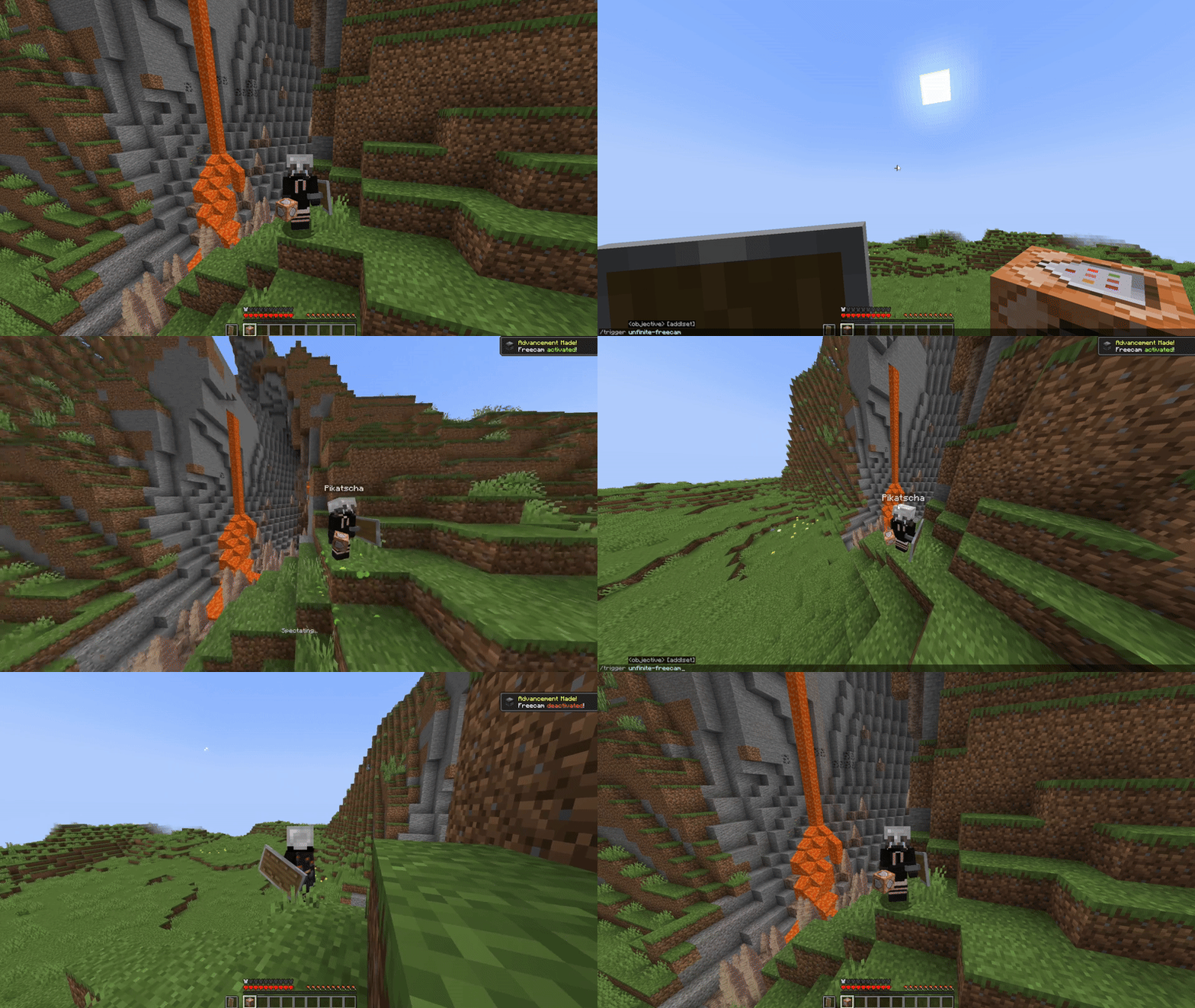
– A replica player figure spawns while using the Freecam
– **v1**: Nearly accurate figures with capes. Made out of item displays. Details below
– **v2**: Using the **new Mannequin** Entity
– ✔ **Survival friendly** and works without “Commands” enabled
– ✔ **Multiplayer friendly** *(Must be installed on the server)*
– ✔ No resourcepacks, plugins or mods are needed
– ✔ **Can be installed as a mod** [1.21.9+] (v2.0.1+)
## v2 Rework: Mannequins and external support! [1.21.9+]
– **Mannequins replicate**: Pose/Effects/Attributes/Vehicles/Leashes etc.
– **Better Admin Settings Menu with export button**
– **External Use**: Dis- and Reconnecting players from mannequins
—
—

—
https://projekte.der-seite.de/unfinite-freecam
—
## How to use
1. Install (**Datapack/Mod**) on the **Serverside** *(In Singleplayer your World/Instance is the Server)*
2. (Enable and reload)
3. By default, every player can use:
– `/trigger unfinite-freecam` to enter/exit freecam *(No /op needed)*
4. Admin settings via `/function unfinite-freecam:admin/.settings` and more admin options under admin/…
—
## This project started even before mannequins existed…
More Information on the old version [v1]
– Player figures are display entity based and made out of custom player heads
– These figures are generated with the [bdengine.app](https://bdengine.app)
– All default skins available as player body + own skins addable!
– Multiple capes selectable
—
—
## How to use
1. **Enable and reload the datapack**
2. By default, every player can use:
– `/trigger unfinite-freecam` to enter/exit freecam
– `/trigger unfinite-freecam-options` to select a skin and cape [v1 only]
3. Admin settings via `/function unfinite-freecam:admin/settings`:
– Enable/disable freecam permission
– Enable/disable skin/cape selection
– Manually select skin and cape for an online(!) player [v1 only]
– Enable/disable limited vision underground
– Enable/disable spectating through blocks
– Select freecam range (default: 32 blocks)
4. **Add own skins into the datapack:** [v1 only]
### Creating the player figure
– YouTube Tutorial:
1. [Make Player Statues in Vanilla Minecraft](https://youtu.be/GYRHcLHhJSA) – by Sister (Realms creator)
_Covers setting up bdengine and creating the player figure_
– Setup [bdengine](https://bdengine.app) with a [Mineskin Account](https://account.mineskin.org/) to auto-generate player heads
– Generate a player figure with your IGN or texture file
– Rotate it 180° and lower it until only the head is above floor level
– For all parts, set **additional NBT** to:
“`json
Tags: [“unfinite_freecam_dummy”]
“`
– For the head only, set **additional NBT** to:
“`json
Tags: [“head”]
“`
– Click “export to Minecraft” and copy the `/summon` command
### Adding it into the datapack
– Create a new file at:
“`
data/unfinite-freecam/function/system/skin/*namespace*.mcfunction
“`
– Paste the `/summon` command inside the file
– Remove the `/` at the beginning
– Change:
“`
~-0.5 ~ ~-0.5
“`
to:
“`
~ ~ ~
“`
– Add a new command line to the `.options` and `.select_option` functions inside the `system` folder
– Follow the correct structure using your `*namespace*` and the next number
– Note: You may need to copy the modifyed files, so they are not deleted in case of an update
Underwater Swim Fix (MC-220390)
Fixes [MC-220390](https://bugs.mojang.com/browse/MC/issues/MC-220390) a bug where if you hit an entity while swimming and holding the sprint hotkey, the hitboxes server and clientside will be different. Resulting in weird behaviour where the client thinks that theyre swimming while the server doesnt think that. So when you for example try to go into a 1×1 block space while experiencing this bug, you will glitch out until you stop swimming and swim again.
The bug really annoyed me in monuments so I fixed it.
Join the [Discord!](https://discord.gg/p6ShJPq98d) You can ask for help, a mod, just suggest something, hangout or request the source code of any mod I have made (if I still have the source code)
Or donate to my [Kofi](https://ko-fi.com/bikerboys) incase you are feeling generous!
ukia’s copper tools
change the copper tools to be the color palette of the ingot because the vanilla ones look wierd (espcially the sword) and makes tools Oxidize!!!
Makes the tools more in line with the ingot and the armor.
There is a version with the vanilla style of hoes and a version with my ukia’s hoes that are cozy and much better.
Most Gas Fire Flames Copper ever.
oxidization is yippers!
Durability threshholds are (0.0, 0.3, 0.5, 0.7) so they spend more time as fully non-oxidized and fully oxidized. If you want to change this, they are in the JSONS in the items folder.
No mods required.

vs.

ukia’s hoes
Improved Stardew Valley style hoes, which actually look like hoes rather than weird scythe things. Cozier, cozy hoes for farming, regular hoes can’t compare to these. Cute cottage core hoes.
I also made a retexture of copper tools with oxidization that match the ingot better and look less flat/washed-out and it’s compatable with this one!
If the model is broken, ensure another pack’s hoe JSON isn’t interfering. Culprit in testing was Vanilla Tweaks item model fix I believe.

