Plankton End Flash
This resource pack replaces new End flashes with the well-known plankton meme
This resource pack replaces new End flashes with the well-known plankton meme
#
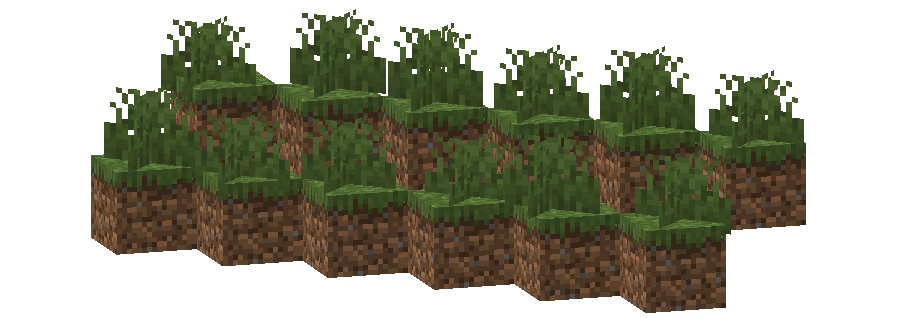
This pack changes the **Grass colormap** so that it always matches the color of the **Plains biome(s)**.
The Plains uses the color `#91BD59` in vanilla Minecraft.
* Plains
* Sunflower Plains
* Beach
* Dripstone Caves
* Deep Dark
* build_time: `2025-10-06T02:13:38+02:00`
* build_user: `rotgruengelb`
## Limitations
Some biomes use hardcoded colors that cannot be overridden by resource packs.
This is a limitation of Minecraft itself, not of this pack.
## Installation
Download the pack and place it in your `resourcepacks` folder.
## About “Oh My Colormap!”
A collection of resource packs that change Minecraft’s colormaps.
### Rotgruengelb (Developer & Artist):



Step back in time and relive the classic Minecraft experience with **PixelPaw’s Back To Nostalgia!** This resource pack brings back the charming simplicity of the early days of Minecraft, combining pixel-perfect textures with a cozy, retro vibe. Perfect for players who miss the nostalgic feel of vanilla Minecraft or want to experience a “classic” world in modern versions.
With **PixelPaw’s Back To Nostalgia**, you’ll enjoy:
– Classic, programmer-style textures that feel just like the old Minecraft days.
– Vibrant and simple blocks, items, and mobs reminiscent of early Minecraft.
– A soothing, retro atmosphere that makes every world feel familiar yet fresh.
### **Requirements** ⚙️
1. **Programmer Art Resource Pack** – Must be pre-installed.
2. **Classic Lightning Resource Pack** – Any version will work.
3. **Optifine/Polytone** – Optional but recommended if you don’t want swamp biomes to look strange.
4. **Smooth Lighting** – Optional but recommended to be turned off for the default alpha version.
5. **Biome Blend** – Optional but recommended to be turned off for the default alpha version.


### **Features** 🌟
– **Blocks & Items**: Every block and item has been carefully retextured to capture the essence of early Minecraft while keeping it playable in modern versions.
– **Mobs**: Classic, simplified mob textures make creatures look exactly how you remember them from your first adventures.
– **Environment**: Old-school colors and minimalistic shading bring back the feeling of exploration in a simpler world.
– **UI & Fonts**: Subtle touches to menus and fonts complete the nostalgic vibe. Everything looks and feels like the Minecraft you loved.
– **Compatibility**: Works seamlessly with most mods and resource packs that don’t alter textures drastically.
### **Recommended Settings** 🛠️
For the **best nostalgic experience**, try the following:
**Smooth Lighting:** Off
**Biome Blend:** Off
**Use Optifine/Polytone:** Recommended to avoid strange swamp colors and lighting issues
**Preload Programmer Art:** Required for authentic retro textures
**Why Choose PixelPaw’s Back To Nostalgia? 🎮**
Whether you’re returning to Minecraft after years away or simply love the charm of the early versions, this pack makes your world feel cozy, simple, and timeless. It’s the perfect combination of nostalgia and modern functionality, giving players a chance to **revisit the classics without losing compatibility with today’s features.
**
Bring the past back to life—**explore, build, and survive in a world that feels like Minecraft used to be.**
Makes the Shadows under Entities Pixelated Squares.

VS Vanilla:

Makes the shadows under Entities Pixelated. Retro Style!

VS Vanilla:

This texture pack replaces the music disc “13” and replaces it with the song “Purity” by A$AP Rocky ft. Frank Ocean. This makes it so that the name of the music disc is changed, and the music from that song is played. This music is from the album “Testing,” featuring many different artists, but for Purity, it features Frank Ocean.
## !!!ATTENTION!!!
### !!!There are no panoramas in “Addons”!!!
### Only titles for panoramas!
The author of Patrix Background is the author of Patrix Background New.
Patrix Background – not an official texture pack for Patrix changing the background, logo and loading screen!
## !!!ВНИМАНИЕ!!!
### !!!В “Addons” нету панорам!!!
### Только титулы для панорам!
Автор Patrix Background является автором Patrix Background New.
Patrix Background – не официальный текстур пак для Patrix изменяющий фон, логотип и экран загрузки!
Version: **1.4**
For Minecraft:
1.1 – 1.19.4 rc3-1.20.2
**1.2-1.4 – 1.19.4 rc3-26.1 snapshot 7+**
Addons:
1. **Halloween**
2. **Christhmas**
3. **Realistic**
4. **Halloween Remake**
5. **Simple**
6. **Neon**
### PlanetMinecraft page (Full HD Gallery): https://www.planetminecraft.com/texture-pack/patrix-background/
### Old Modrinth page: https://modrinth.com/resourcepack/patrix-background-no-official
# PackCENHeaderFix
There is no longer an error invalid CEN header (bad entry name or comment)
It solves this problem by replacing Java Zip implementation with Apache Commons Compress implementation.
## Example Story
You downloaded a ResourcePack from a RP author. You put it in your RP folder and tried to load it as usual, but you don’t see it in the RP selector.
Instead, Minecraft prints the following error in the log:
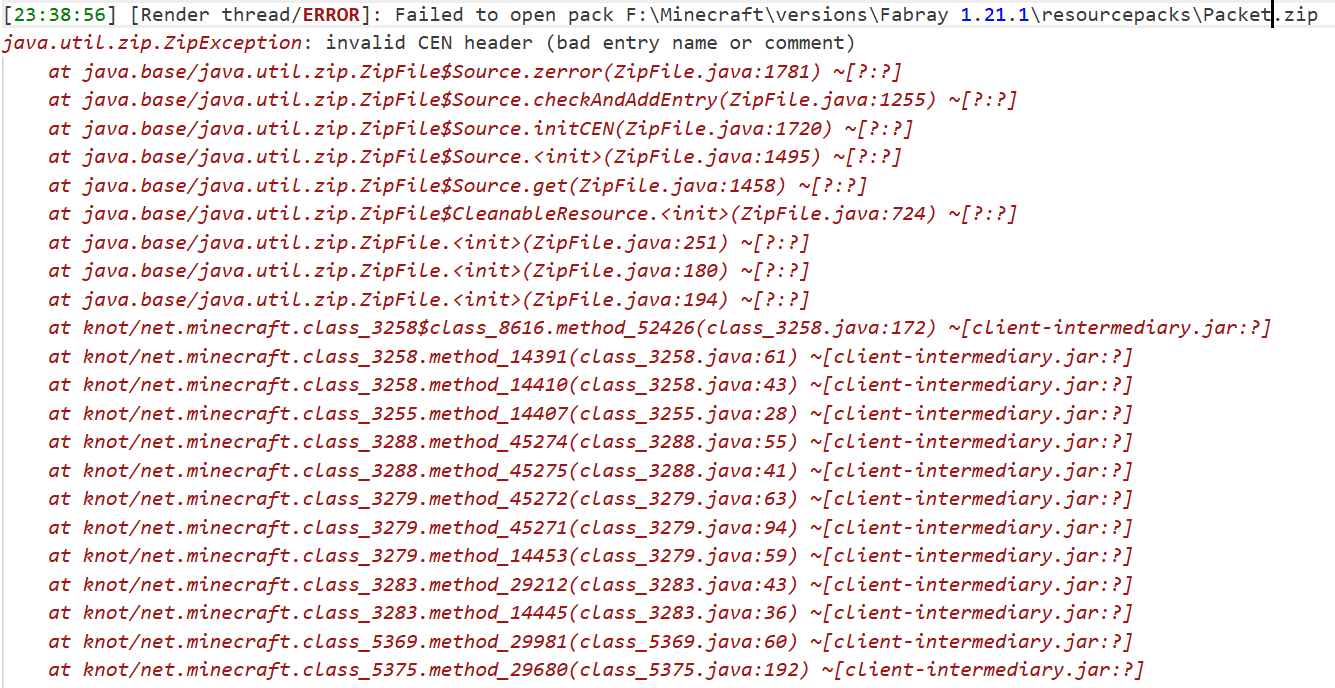
It doesn’t appear in Mojira, precisely because it’s a bug that only appears under very extreme conditions. I haven’t seen it in the past few years of the game, and only very, very few RP authors have accidentally allowed their RP to be contaminated by this bug.
The cause of this bug is unknown, but it only affects the Java Zip implementation. RPs that experience this bug can still be force-loaded (although you won’t be able to find them in the selector), but I think it’s better to try to fix it.
## About API
It’s intended for use with another mod of mine, which will rely on this one for additional functionality.
If you want to do something with it, my advice is don’t, I don’t want it to behave unexpectedly.
## How to build?
After the clone repository, be sure to use the `./gradlew clean build` command to build,
rather than executing any of them separately.
After the build is completed, a jars folder will be generated in the root directory,
where the final build results will be stored.
## For Modpack
If you comply with the license, you can use it freely for Modpack.
Modpacks that redistribute Minecraft game body (i.e. packages that package the entire Minecraft game including Mod files, Config, ShaderPacks, ResourcePacks, Library and launcher into a whole zip file) are not allowed to use this mod.
## License
This work has a restrictive license in addition to the original license to prevent some unexpected behavior, see 404Setup Public License
# Outlined Ores
### 1.20.2 and below are discontinued
The Outlined Ores texture pack is one of the most useful texture packs available. While exploring caves or strip mining, it is easy to overlook a surprising number of ore blocks. With the Outlined Ores texture pack, ores become highly visible even from a distance, making resource gathering far more efficient. The outlines are vibrant and clear, and best of all, the pack does not require any additional mods.
Despite its enhanced visibility, the texture pack maintains a natural appearance. All ore outlines are created using the existing colors of each ore block, ensuring they blend seamlessly with the game’s original style. This prevents the pack from looking unnatural or distracting, an issue commonly found in similar texture packs.
## Looking for a server to play on with your friends?
Look no further, because CloudNord is by far the best server hosting site I’ve found. Really. I actually used their servers back when I used to host a Minecraft server and the pricing was literally the best out of ANY server hosting provider I saw. Their customer service is outstanding and they respond within minutes. Click the image (or link) below to order a server for as low as only $2.67 a month!
cloudnord.net/r0k3tkutt3r

# **Optimum Realism**
**The realistic Minecraft resource pack with PBR, POM, and custom 3D models. 3M+ downloads across all platforms. Actively updated monthly.**
—
## **What is Optimum Realism?**
Optimum Realism replaces Minecraft’s blocks, items, and mobs with their real-world counterparts. It’s built with a focus on visual depth, shader compatibility, and consistent performance. The goal is a pack for players who want their world to feel grounded and tactile without the framerate cost that usually comes with realistic textures.
Over 650+ blocks reworked. Custom 3D mob models. PBR maps, parallax occlusion mapping, emissive textures, and depth-write POM, all in a single pack that runs on a GTX 1050.
—
## **Features**
– **650+ blocks reworked** with realistic PBR textures
– **Custom 3D models** for mobs and items (spiders, chickens, and more added monthly)
– **Parallax Occlusion Mapping, depth-write POM, emissive blocks, and full PBR support**
– **Compatible with Minecraft 1.21.x** and earlier versions back to 1.16
– **Works with all major shaders**: Kappa, BSL, SEUS PTGI, Complementary, and more
– **Java + Bedrock support**, with a dedicated **Bedrock RTX edition** launching soon
– **Performance-first design**. 64x runs smoothly on mid-range hardware
– **Actively updated monthly** with new textures, models, and features
– **3M+ total downloads** across CurseForge, Modrinth, and direct distribution
—
## **How Optimum Realism is different**
– **Real 3D models, not just retextures.** Mobs and blocks have actual geometry, not painted-on detail.
– **Depth-write POM.** Textures genuinely interact with each other. Sand fills the crevices between planks instead of sitting flat on top.
– **Performance balance.** Most realistic packs sacrifice framerate. Optimum Realism is built to run on hardware that other realistic packs choke on.
– **Consistent monthly updates.**

—
## **What’s free and what’s paid?**
– **64x edition: Free.** Fully featured, available here on Modrinth. Updated monthly.
– **128x edition: Patreon.** Higher-resolution textures, early access to monthly updates, and exclusive previews. **Subscribe on Patreon** (preferred)
– **Alternative :** Available at **store.optimumrealism.com**


—
## **Before you install**
**Playing with Iris / Sodium?** You’ll need additional mods to run Optimum Realism properly. Two easy options:
– **Full installation guide**: step by step, with all required mods listed
– **Ultimate PBR Essentials modpack**: one-click install of everything you need
—
## **System requirements**

Optimum Realism runs well on a decent gaming computer. You don’t need an RTX card unless you’re using the Bedrock RTX edition.
– **64x version:** GTX 1050 or equivalent, 8GB RAM minimum
– **128x version:** GTX 1060 / RTX 2060 recommended for shaders at higher resolutions
– **Bedrock RTX edition:** RTX 2060 or better
—
## **Community & support**
If Optimum Realism has improved your game, leaving a **review here on Modrinth** genuinely helps the project grow.

– **Join the Discord**: WIP previews, monthly polls on what gets reworked next, screenshot showcases, and direct support from the dev
– **Visit the wiki**: installation guides, troubleshooting, and feature breakdowns
– **Instagram @optimum_realism**: behind-the-scenes block previews and dev updates