Raw Blocks | Smeltery and Blasting
# Description
“Raw Blocks | Smeltery and Blasting” or for short “Smeltery” is a light weight datapack with a simple goal, to make smelting raw iron in to iron a whole lot faster, with the edition of Raw Blocks Smelting!
Rarity Tooltips
# Rarity Tooltips
This datapack customises item tooltips to reflect their rarity. Affected items
⚠️ **Will only work for 24w36a (1.21.2) and newer, resource pack is required.**
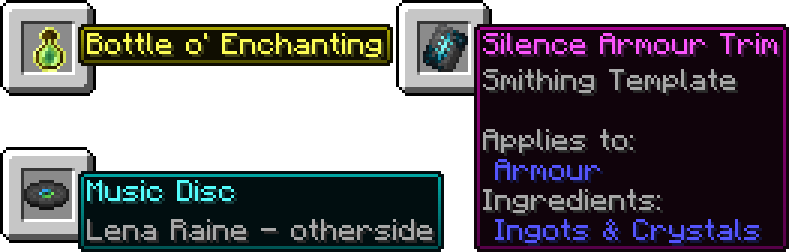
### Help
If you are using this on a server, paste the resource pack download link after “resource-pack=“ in the “server.properties“ file.
Most items will just work but for some you will need to drop them on the ground to change them, for example if you enchant/disenchant an item or items from before the pack was installed.
### Issues/Feature Requests
Please report issues and/or request features on the GitHub Issues Page, any help is greatly appreciated.
RandomScale
## 🎲 RandomScale
**This data pack / mod adds a small feature that randomizes all spawned or loaded mobs in your world to a one-time size between 0.01 and 20.**
Each mob receives a random size only once. The ender dragon receives no random size (due to a minecraft bug). The player and items are unaffected.

## 📚 How to Install the Datapack
### 👤 Singleplayer
Drag the downloaded .zip file into the “`”.minecraftsavesYOURWORLDdatapacks”“` folder.
Now enter your world. You can check whether the datapack is enabled with /datapack list.
### 👥 Multiplayer (Server)
Drag the downloaded .zip file into the datapack folder, which is located in the default “world” folder.
Now join your server. You can check whether the datapack is enabled with /datapack list.
Enjoy!
## 📹 Videos
Videos created by Content Creators.
### Wichtiger (German)
Enderdragon from this Video is not working in the Datapack!
Cheetahs Rainbow Hearts
Cheetahs Rainbow Hearts!
—
Simply makes your health bar RAINBOW!!
—


Rail Recipe Rebalance
## Are you for re-ail?
You know what really steams my engine? **Rails**. Specifically, how _expensive_ they are.
Rails are not a bad method of transportation, especially early-game. They’re pretty fast, and can even be automated using redstone, making them an immersive choice!
There’s just one problem: accessibility. During the period of a world that they would be useful (pre-elytra), most people don’t have a surplus of ingots to spend on tracks. I mean, just for regular, unpowered rails, it costs roughly 1 ingot for 3 blocks of track.

That’s what this recipe change aims to fix. By making rails more affordable, it’s now a more realistic goal to make a train between your friend’s base!
## Available wherever the tracks take you!
**Rail Recipe Rebalance** is available all the way from version **1.15** to **26.1**, and will continue to be updated for newer versions! You can install it as a datapack, or as a mod for your favorite modloader!
Additionally, RRR aims to add compatibility with mods, and currently adds new recipes for the following mods:
> – **Copper Rails**
> – **Create**
*If you would like to request a mod to be supported, DM me at* **palm1**!
## Try these couplings!
Rails get even better with these amazing projects, and they are highly recommended for use with this pack!
### Server
> – **Linkart** – Link your minecarts together!
> – **Fast Minecart** – Double the speed of minecarts!
### Client and Server
> – **Copper Rails** – Adds two new rail types in the vanilla style!
> – **Create** – Allows you to couple minecarts, control rail speed, and create custom multi-block trains!
## You May Also Like
Rabbit Shield
# Rabbit Shield
This resource pack replaces the default shield with a custom 3D model.
The design uses a rabbit theme.
No OptiFine required. Vanilla compatible.
## More Shield Themes
– Black
– Blue
– Creeper
– Dark Red
– Mirror
– Navy Blue
– Red
Qube Pack
This resource pack gives some blocks more volume, while maintaining the original texture of the block.
Full White Quartz
Retextures the Block of Quartz to a Full-White Texture. Perfect for photos.

Qrazy Target Dummy
# 🌾 Target Dummies
This data pack adds the Target Dummies as they appear in the Camp in Minecraft Dungeons as craftable items.
## 🔨 How to Use
To craft a Target Dummy, surround an Armor Stand with 4 Hay Bales in a Crafting Table. Place the Target Dummy by right clicking on the ground, and it will face toward the player.
When taking any kind of damage, a Target Dummy will shake and display the amount of damage with a red number.
A Target Dummy cannot be killed, unless over 1000 damage is done to it at once. To remove a Target Dummy, break the block underneath it.
PvP particles
Most particles will have a yellow background. The only exceptions are :
– Strength (orange)
– Slowness (greenish)
– Regeneration (red)
– Weakness (dark greenish)
– Luck (green)
– Fire resistance (orange)
– Water breathing (green)
– Swiftness (flashy green)
– Poison (greenish)
Every other potion effect are yellow tints.
