Rail Recipe Rebalance
## Are you for re-ail?
You know what really steams my engine? **Rails**. Specifically, how _expensive_ they are.
Rails are not a bad method of transportation, especially early-game. They’re pretty fast, and can even be automated using redstone, making them an immersive choice!
There’s just one problem: accessibility. During the period of a world that they would be useful (pre-elytra), most people don’t have a surplus of ingots to spend on tracks. I mean, just for regular, unpowered rails, it costs roughly 1 ingot for 3 blocks of track.

That’s what this recipe change aims to fix. By making rails more affordable, it’s now a more realistic goal to make a train between your friend’s base!
## Available wherever the tracks take you!
**Rail Recipe Rebalance** is available all the way from version **1.15** to **26.1**, and will continue to be updated for newer versions! You can install it as a datapack, or as a mod for your favorite modloader!
Additionally, RRR aims to add compatibility with mods, and currently adds new recipes for the following mods:
> – **[Copper Rails](https://modrinth.com/mod/copperrails)**
> – **[Create](https://modrinth.com/mod/create)**
*If you would like to request a mod to be supported, DM me at* **palm1**!
## Try these couplings!
Rails get even better with these amazing projects, and they are highly recommended for use with this pack!
### Server
> – **[Linkart](https://modrinth.com/mod/linkart-refabricated)** – Link your minecarts together!
> – **[Fast Minecart](https://modrinth.com/mod/fast-minecart)** – Double the speed of minecarts!
### Client and Server
> – **[Copper Rails](https://modrinth.com/mod/copperrails)** – Adds two new rail types in the vanilla style!
> – **[Create](https://modrinth.com/mod/create)** – Allows you to couple minecarts, control rail speed, and create custom multi-block trains!
## You May Also Like
[ ](https://modrinth.com/datapack/planked-chests)
[ ](https://modrinth.com/datapack/backported-shelves)
Rabbit Shield
# Rabbit Shield
This resource pack replaces the default shield with a custom 3D model.
The design uses a rabbit theme.
No OptiFine required. Vanilla compatible.
## More Shield Themes
– [Black](https://modrinth.com/project/noire-shield)
– [Blue](https://modrinth.com/project/blue-shield)
– [Creeper](https://modrinth.com/project/creeper-shield)
– [Dark Red](https://modrinth.com/project/dark-red-shield)
– [Mirror](https://modrinth.com/project/mirror-shield)
– [Navy Blue](https://modrinth.com/project/navy-blue-shield)
– [Red](https://modrinth.com/project/red-shield)
Qube Pack
This resource pack gives some blocks more volume, while maintaining the original texture of the block.
Full White Quartz
Retextures the Block of Quartz to a Full-White Texture. Perfect for photos.

Qrazy Target Dummy
# 🌾 Target Dummies
This data pack adds the Target Dummies as they appear in the Camp in Minecraft Dungeons as craftable items.
## 🔨 How to Use
To craft a Target Dummy, surround an Armor Stand with 4 Hay Bales in a Crafting Table. Place the Target Dummy by right clicking on the ground, and it will face toward the player.
When taking any kind of damage, a Target Dummy will shake and display the amount of damage with a red number.
A Target Dummy cannot be killed, unless over 1000 damage is done to it at once. To remove a Target Dummy, break the block underneath it.
PvP particles
Most particles will have a yellow background. The only exceptions are :
– Strength (orange)
– Slowness (greenish)
– Regeneration (red)
– Weakness (dark greenish)
– Luck (green)
– Fire resistance (orange)
– Water breathing (green)
– Swiftness (flashy green)
– Poison (greenish)
Every other potion effect are yellow tints.
PvP Crosshair
[

](https://modrinth.com/resourcepack/pvp-crosshair-bba)
[
](https://discord.gg/FVH3GaMHJz)
[](https://modrinth.com/resourcepack/pvp-crosshair-bba)
[](https://ko-fi.com/titan1um)

**This resource pack improves the current crosshair and the block breaking animation for PvP!**
# 📥Installation:
This ressource pack improves the current crosshair and the block breaking animation for PvP! The pack is *made for* **all versions and snapshots between 1.6 and 26.1.1**.

# ✨Features:
Improves the current crosshair and the block breaking animation for PvP -> replaces them with a super assistive and useful crosshair and a loading bar block breaking animation!

# 🛠️Versioning:
This ressource pack uses the following versioning system:
– **Base pack:** standard versioning + Minecraft version
– -> *e.g.* **v1.0-1.21.8, v2.4-v1.21.11,…**

Credits:
Thanks to all the resource packs and their authors, who either licensed their projects under the MIT license or allowed me to use their resource packs!
– [PvP Crosshair](https://modrinth.com/resourcepack/pvp-crosshair)
– [Loading Bar Breaking Animation Pack](https://modrinth.com/resourcepack/loading-bar-breaking-animation-1.8.9-version)
Without these projects and their authors, PvP Crosshair & BBA Pack would not have been possible to make. **Special thanks!**
# 💘 Support me!
To help me and make me develop more fascinating projects, share and recommend this resourcepack. Thank you so much!!!
You can also try my other projects [here](https://modrinth.com/user/Titan1um) or the projects me and Polr made [here](https://modrinth.com/organization/titan1um-x-polr)! 😀

PVGUI
Restyles various GUI elements including the in-game HUD. Features occasional plants.
Provides support/compatibility for the following mods:
– [Appleskin](https://modrinth.com/mod/appleskin)
– [Better Command Block UI](https://modrinth.com/mod/bettercommandblockui)
– [Client Sort](https://modrinth.com/mod/clientsort)
– [Controlify](https://modrinth.com/mod/controlify)
– [Dynamic Crosshair](https://modrinth.com/mod/dynamiccrosshair)
– [EMI](https://modrinth.com/mod/emi)
– [Entity Model Features](https://modrinth.com/mod/entitymodelfeatures)
– [Entity Sound Features](https://modrinth.com/mod/entitysoundfeatures)
– [Entity Texture Features](https://modrinth.com/mod/entitytexturefeatures)
– [Figura](https://modrinth.com/mod/figura)
– [Gamma Utils](https://modrinth.com/mod/gamma-utils)
– [Iris](https://modrinth.com/mod/iris)
– [ItemSwapper](https://modrinth.com/plugin/itemswapper)
– [Jade](https://modrinth.com/mod/jade)
– [Mod Menu](https://modrinth.com/mod/modmenu)
– [No Chat Reports](https://modrinth.com/mod/no-chat-reports)
– [Origins](https://modrinth.com/mod/origins)
– [Overflowing Bars](https://modrinth.com/mod/overflowing-bars)
– [Raised](https://modrinth.com/mod/raised)
– [Sidekick](https://modrinth.com/plugin/sidekick)
– [WTHIT](https://modrinth.com/mod/wthit)
Check out the
(https://modrinth.com/resourcepack/pvgui/gallery).
Unfinished. Leave feedback/suggestions at [GitHub](https://github.com/PencilVoid/PVGUI/issues).
Only supports 1.20.2 and onwards. Versions earlier than 1.20.2 will not be supported.
Recommended for use alongside this resource pack (this pack is not endorsed by these creators, I just like their work):
– [Caxton](https://modrinth.com/mod/caxton)
– [Atkinson Hyperlegible](https://modrinth.com/resourcepack/atkinson-hyperlegible)
– [Geometric Font 2](https://modrinth.com/resourcepack/geometric-font-2)
– [Lithos:Font](https://modrinth.com/resourcepack/lithosfont)
Pusheen Crosshair
since i made a python script to make gifs into minecraft textures i wanted to make a cute crosshair so i made one out of a pusheen gif using my python script that makes GIF’s into spritesheets so u can have an animated texture in minecraft
Programmer Art Fixes
# Programmer Art Fixes
A collection of small fixes for programmer art.
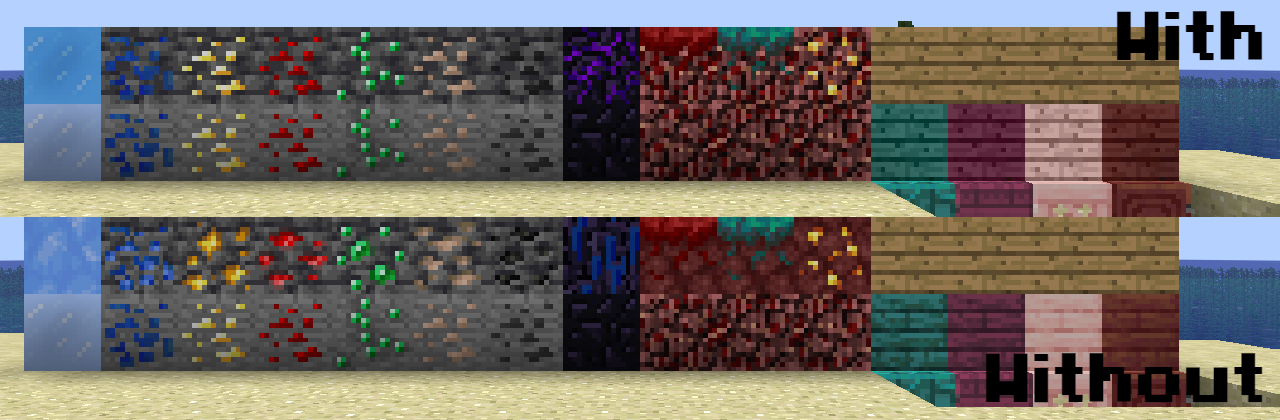
**Please note that you must enable Programmer Art alongside this resource pack!**
