theBestHeight
这个数据包可以让你的世界高度范围变得更大,对于建筑与服务器很实用,特别是生电玩家,更高的高度能让你造出更大型的机器。我准备后续让世界生成范围也变得更大。欢迎下载我的数据包!
This data pack allows you to expand the height limit of your world, making it highly practical for building projects and servers. It is especially useful for technical players, as a greater height range enables the construction of larger-scale machines. I plan to further extend the world generation boundary in future updates. Feel free to download my data pack!
注意:使用此数据包时,须使用实验性设置!如果数据包没有效果,请尝试重启存档。
Note: When using this data pack, you must enable experimental settings!If the data pack doesn’t work, try restarting the save file.
The White Pumpkin
this is **inspired by Minecraft story mode (a telltale games creation) episode 6**, this is what happened on that episode:
In **Minecraft Story mode** (mcsm) season 1 episode 6, jesse goes on a journey and stubles apon a mansion in one of the dimentions he was exploring to find his way home, on his way to enter the mansion, he spots a figure with a white pumpkin. apon entering the mansion to get sheltered from hords of zombies, he and his friends meet another group of people who are popular minecraft youtubers, but they one by one get trapped, killed and more. jesse and his gang finds out “the white pumpkin” was up to all these traps. they go after him/her to kill the white pumpkin, they discover one of the other group of friends who were in the mansion (cassie rose) was the white pumpkin, they go on to defeat her leaving her trapped in her dimention while they continue their journey.
please try to give me feedback on what to do to make this texture pack better
The Pigstep Remix (AvM Remix for Pigstep)
### Hello fellow user!
Today i introduce you The Pigstep Remix!
This datapack/resourcepack changes the default pigstep sound to the AvM remix made by Alan Becker, Scott Buckley and Aaron Grooves. This makes your experience with Pigstep longer and better.
### Where it came from?
This music came from a series called Animation Vs Minecraft (AvM), which was made by Alan Becker on youtube. The music came from the _[Episode 25](https://www.youtube.com/watch?v=8kiPjEeTaW4)_ of the series. One of the producer of the music also posted it on their own channel so you can clearly hear it as you can see _[here](https://www.youtube.com/watch?v=oDZK3_c-Vkc)_.
### How to play it?
First download the datapack from here and put it on your datapacks folder, then clone it and add the copy to your resourcepacks folder. The datapack makes the jukebox music stays for long enough so the music dont cut out of nowhere, and the resourcepacks changes the pigstep sound overriding the default pigstep and adding the remix into it.
### Another way to use it on public servers
You see, if you join a normal server that does not use this datapack, the music will cut off. But if you can install a mod called Jukebox Custom Disc Fix, it will fix the cut off in any server, which you can download it [here](https://modrinth.com/mod/jukebox-custom-disc-fix).
**Have fun!**
the copper age title

# English
## Description
The **the copper age title** resource pack is a unique visual modification for Minecraft, meticulously crafted by emad611985. Its primary purpose is to introduce a thematic title screen that resonates with the highly anticipated Copper Update (version 1.21.9). Unlike resource packs that overhaul vast aspects of the game, this pack offers a focused and elegant change, specifically altering the `edition.png` file within the game’s textures to display a custom “MINECRAFT COPPER UPDATE” title.
This pack is ideal for players who:
* Are excited about the Copper Update and wish to see its theme reflected from the moment they launch the game.
* Appreciate subtle yet impactful visual enhancements.
* Seek to personalize their Minecraft experience with thematic consistency.
The `pack.mcmeta` file indicates a `pack_format` of 34, ensuring compatibility with Minecraft versions that support this format, specifically targeting the 1.21.9 update. The description within the pack itself, “§eCopper update title”, uses Minecraft’s internal color codes to display the title in a vibrant yellow, further emphasizing the theme.
### Key Features:
* **Thematic Title Screen:** Replaces the default title screen text with a custom “MINECRAFT COPPER UPDATE” graphic.
* **Subtle Enhancement:** Provides a focused visual change without altering core gameplay textures.
* **Compatibility:** Designed for Minecraft version 1.21.9 and compatible versions supporting `pack_format` 34.
* **Creator Attribution:** Made by emad611985.
### Installation Guide:
1. **Download the Resource Pack:** Obtain the `§a§lcopperupdatetittle.zip` file.
2. **Locate your Minecraft Directory:**
* **Windows:** Press `Win + R`, type `%appdata%.minecraft`, and press Enter.
* **macOS:** Open Finder, click `Go` in the menu bar, hold `Option`, and click `Library`. Then navigate to `Application Support/minecraft`.
* **Linux:** Navigate to `~/.minecraft`.
3. **Open the `resourcepacks` Folder:** Inside your `.minecraft` directory, you will find a folder named `resourcepacks`. Open it.
4. **Place the Zip File:** Drag and drop the downloaded `§a§lcopperupdatetittle.zip` file directly into the `resourcepacks` folder. **Do not unzip the file.**
5. **Activate in Minecraft:**
* Launch Minecraft.
* From the main menu, click `Options…`.
* Click `Resource Packs…`.
* Locate “Copper Update Title” in the list of available resource packs on the left.
* Click the arrow button on the pack icon to move it to the “Selected Resource Packs” list on the right.
* Click `Done`.
Your game’s title screen should now reflect the Copper Update theme!

# العربية
## الوصف
حزمة موارد **عنوان تحديث النحاس (the copper age)** هي تعديل بصري فريد لماينكرافت، تم تصميمه بدقة بواسطة emad611985. هدفها الأساسي هو تقديم شاشة عنوان موضوعية تتوافق مع تحديث النحاس المرتقب بشدة (الإصدار 1.21.9). على عكس حزم الموارد التي تُحدث تغييرات شاملة في جوانب واسعة من اللعبة، تقدم هذه الحزمة تغييرًا مركزًا وأنيقًا، حيث تقوم بتعديل ملف `edition.png` داخل نسيج اللعبة لعرض عنوان مخصص “MINECRAFT COPPER UPDATE”.
هذه الحزمة مثالية للاعبين الذين:
* متحمسون لتحديث النحاس ويرغبون في رؤية سمته منعكسة منذ لحظة إطلاق اللعبة.
* يقدرون التحسينات البصرية الدقيقة ولكنها مؤثرة.
* يسعون لتخصيص تجربتهم في ماينكرافت باتساق موضوعي.
يشير ملف `pack.mcmeta` إلى `pack_format` بقيمة 34، مما يضمن التوافق مع إصدارات ماينكرافت التي تدعم هذا التنسيق، وتستهدف بشكل خاص تحديث 1.21.9. الوصف داخل الحزمة نفسها، “§eCopper update title”، يستخدم أكواد الألوان الداخلية لماينكرافت لعرض العنوان باللون الأصفر الزاهي، مما يزيد من تأكيد السمة.
### الميزات الرئيسية:
* **شاشة عنوان موضوعية:** تستبدل نص شاشة العنوان الافتراضي برسم مخصص “MINECRAFT COPPER UPDATE”.
* **تحسين دقيق:** يوفر تغييرًا بصريًا مركزًا دون تغيير نسيج اللعب الأساسي.
* **التوافق:** مصمم لإصدار ماينكرافت 1.21.9 والإصدارات المتوافقة التي تدعم `pack_format` 34.
* **نسبة للمنشئ:** تم إنشاؤه بواسطة emad611985.
### دليل التثبيت:
1. **تنزيل حزمة الموارد:** احصل على ملف `§a§lcopperupdatetittle.zip`.
2. **تحديد موقع دليل ماينكرافت الخاص بك:**
* **ويندوز:** اضغط `Win + R`، اكتب `%appdata%.minecraft`، ثم اضغط Enter.
* **ماك أو إس:** افتح Finder، انقر على `Go` في شريط القائمة، اضغط باستمرار على `Option`، ثم انقر على `Library`. ثم انتقل إلى `Application Support/minecraft`.
* **لينكس:** انتقل إلى `~/.minecraft`.
3. **افتح مجلد `resourcepacks`:** داخل دليل `.minecraft` الخاص بك، ستجد مجلدًا باسم `resourcepacks`. افتحه.
4. **ضع ملف Zip:** اسحب وأفلت ملف `§a§lcopperupdatetittle.zip` الذي تم تنزيله مباشرة في مجلد `resourcepacks`. **لا تقم بفك ضغط الملف.**
5. **التنشيط في ماينكرافت:**
* شغل ماينكرافت.
* من القائمة الرئيسية، انقر على `Options…`.
* انقر على `Resource Packs…`.
* حدد موقع “Copper Update Title” في قائمة حزم الموارد المتاحة على اليسار.
* انقر على زر السهم الموجود على أيقونة الحزمة لنقلها إلى قائمة “Selected Resource Packs” على اليمين.
* انقر على `Done`.
يجب أن تعكس شاشة عنوان لعبتك الآن سمة تحديث النحاس!
Text Formatting Everywhere
## Text Formatting Everywhere
Utility mod that returns an ability to use [Minecraft’s old formatting system](https://minecraft.wiki/w/Formatting_codes).
In order to format text, you simply put section sign (**§**), followed by [formatting code](https://minecraft.wiki/w/Formatting_codes), followed by your desired text. For instance: __§1Hello__, will color __Hello__ into blue
## Places status:
### Chat
—
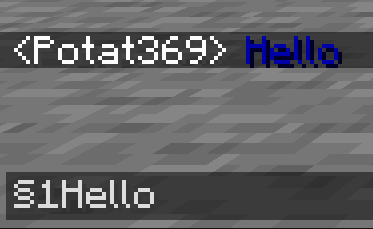
– **Required on**
– **Client**: Yes
– **Server**: Yes
### Anvil
—
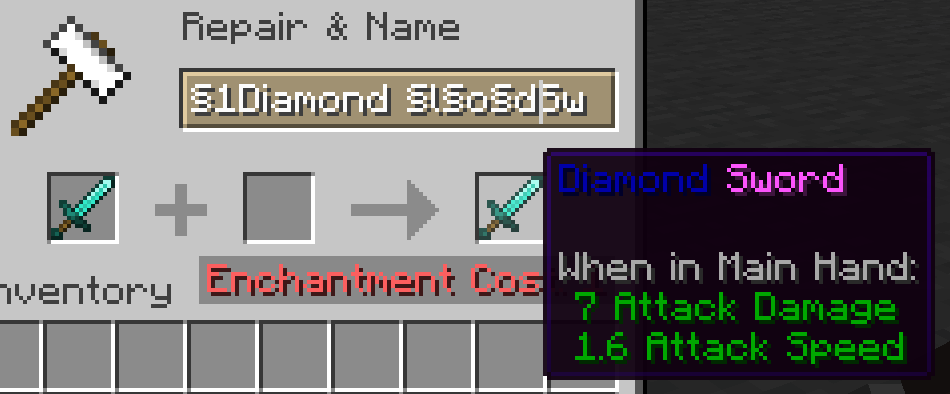
– **Required on**
– **Client**: Yes
– **Server**: Yes
### Sign
—
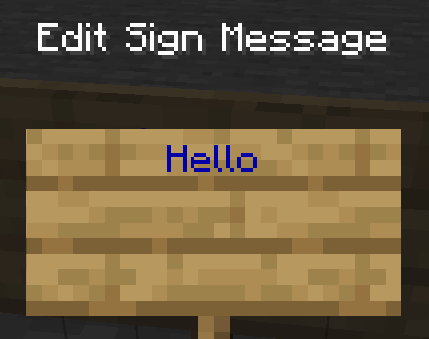
– **Required on**
– **Client**: No
– **Server**: Yes. However, there is a way to circumvent the requirement by doubling the code, like this: `§§11Hello`.
> Note: formatting will disappear after opening and closing.
### Book and Quill Body
—
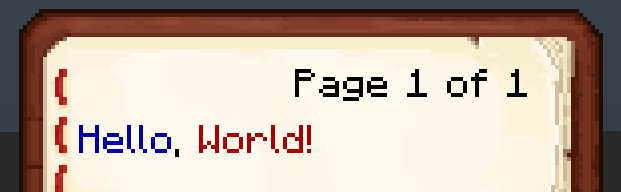
– **Required on**
– **Client**: Yes
– **Server**: No
### Book and Quill Title
—
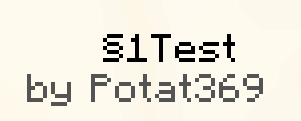
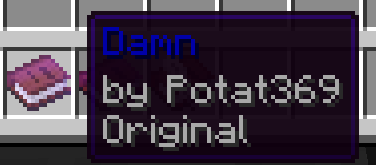
– **Required on**
– **Client**: Yes
– **Server**: No
Tab Player Health
# Tab Player Health
Free and open-source datapack for Minecraft 1.21 and higher that display players health.
## Features
By default the players health is displayed in the tab.
Sword Blocking
# What this datapack/mod adds
This datapack/mod will let you block with swords like it was in 1.8 but with all the other 1.9 features. You can explore the world and say hello by waggling your sword at people.
# Note
once added to world it cannot be reversed
# Report bugs here
[My Discord Server](https://discord.gg/bDhK6ZK6Mc)
Svrve’s Dragon Egg
[
](https://www.planetminecraft.com/member/nickshoof/) | [](https://www.curseforge.com/members/nickshoof/projects) | [](https://modrinth.com/user/NickShoof) | [](https://discord.com/)
[
](https://ko-fi.com/nickshoof)
You can buy monthy subscription to get faster updates on KO-FI
****
#
**About**
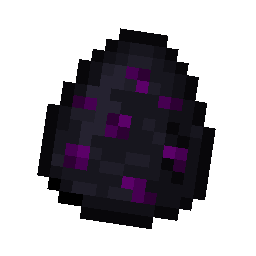
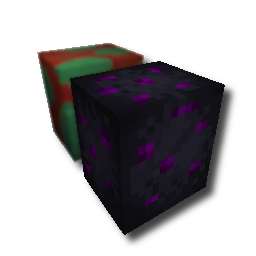
With this pack i modeled the dragon egg becouse why it its so old looking and different than sniffer’s.
.
#
**FAQ**
> **How to install resourcepacks?**
– There are a lot of tutorial out there on youtube, that will explain this better than me, but just download something from trusted sites like modrinth or curseforge, then drag this file to folder that will pop out if you click “Open Pack Folder” in Minecraft.
> **Can i use some textures from Svrve’s Dragon Egg in my pack**
– As long as its not distributed, yes you can. If you want to publish it, just ask me before doing it.
Immersive Torches
[
](https://www.planetminecraft.com/member/svrve/) | [](https://www.curseforge.com/members/svrve/projects) | [](https://modrinth.com/user/Svrve) | [](https://discord.com/)
[
](https://ko-fi.com/svrve)
You can buy monthy subscription to get faster updates on KO-FI
****
#
**About**
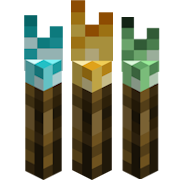
This pack is all about torches, make them an item texture, animate it, change model, also animate it. Thats all.
.
#
**FAQ**
> **How to install resourcepacks?**
There are a lot of tutorial out there on youtube, that will explain this better than me, but just download something from trusted sites like modrinth or curseforge, then drag this file to folder that will pop out if you click “Open Pack Folder” in Minecraft.
> **Can i use some resources from it in my pack?**
After installing it, open the file you downloaded (.zip). Here you will find licence. Read it.
survival2hardcore
A resource pack that makes your survival heart look like hardcore.
For alternative download options, go here