Rebalanced Music
# Rebalanced Music
Tweaked version of Balanced Music. Older tracks now have an equal chance of playing compared to newer tracks (where applicable).
Yeets the non-menu music from the menu, and evens out the weight of newer music. The new music is great, but it plays instead of the old tracks far too often. Seriously, why does Rubedo have a weight of 6?
### Important:
If you have other resource packs that change music or sounds, put them above this. This pack uses the `replace` option to remove music, and will remove any music added if placed above that pack.
Changes
Entries in **bold** are subject to change.
Entries in _italics_ are not applicable as of the latest Minecraft: Java Edition snapshot.
Entries in ~~strikethrough~~ are not applicable as of the latest stable Minecraft: Java Edition version.
Menu Music: Menu Music + Update Music -> Menu Music (1.18+)
Basalt Deltas: So Below weight 7 -> 1 (1.16+)
Crimson Forests: Chrysopoeia weight 7 -> 1 (1.16+)
Nether Wastes: Rubedo weight 6 -> 1 (1.16+)
Soul Sand Valley: So Below weight 7 -> 1 (1.16+)
Badlands: Crescent Dunes weight 2 -> 1 (1.20+)
Bamboo Jungle: Bromeliad weight 2 -> 1 (1.20+)
Cherry Grove:
* Below and Above weight 2 -> 1 (1.21.6+)
* ~~_Bromeliad weight 3 -> 1 (1.20-1.21.5)_~~
* ~~_Echo in the Wind weight 3 -> 1 (1.20-1.21.5)_~~
* ~~_Featherfall 3 -> 1 (1.21-1.21.5)_~~
Desert:
* ~~_Crescent Dunes weight 3 -> 1 (1.20-1.21.5)_~~
* Fireflies weight 2 -> 1 (1.21.6+)
Dripstone Caves:
* Eld Unknown weight 2 -> 1 (1.21+)
* Endless weight 2 -> 1 (1.21+)
* pokopoko weight 2 -> 1 (1.21+)
* Wending weight 2 -> 1 (1.18+)
Flower Forest: Featherfall weight 2 -> 1 (1.21+)
Forest: Broken Clocks weight 2 -> 1 (1.21.6+)
Frozen Peaks: Stand Tall weight 2 -> 1 (1.18+)
Grove: Lilypad weight 2 -> 1 (1.21.6+)
Lush Caves:
* ~~_Aerie weight 1 -> 2 (1.19-1.21.5)_~~
* ~~_Firebugs weight 1 -> 2 (1.19-1.21.5)_~~
* ~~_Labyrinthine weight 1 -> 2 (1.19-1.21.5)_~~
* ~~_Left To Bloom weight 2 -> 1 (1.18-1.18.2)_~~
* ~~_Left To Bloom weight 4 -> 2 (1.19-1.21.5)_~~
* O’s Piano weight 2 -> 1 (1.21.6+)
Jungle: Bromeliad weight 3 -> 1 (1.20+)
Meadow: One More Day weight 2 -> 1 (1.18+)
Old Growth Taiga:
* Aerie weight 1 -> 3 (1.19+)
* Firebugs weight 1 -> 3 (1.19+)
* Labyrinthine weight 1 -> 3 (1.19+)
Sparse Jungle: Bromeliad weight 2 -> 1 (1.20+)
Stony Peaks:
* Eld Unknown weight 2 -> 1 (1.21+)
* Stand Tall weight 2 -> 1 (1.18+)
Versioning scheme
The version name consists of the minimum supported stable Minecraft: Java Edition version followed by the iteration of the resource pack for that version of Minecraft: Java Edition. If there is no supported stable Minecraft: Java Edition version, then the minimum supported Minecraft: Java Edition version is used instead.
For example, version 1.16.2 v1 means that it is the first iteration of the resource pack to support at least Minecraft: Java Edition version 1.16.2. Meanwhile, version 21w39a v2 means that it is the second iteration of the resource pack to support at least Minecraft: Java Edition version 21w39a.
The maximum supported Minecraft: Java Edition version is specified in the changelog of the respective version of the resource pack.
Raised
*Take control of the position of your GUI and fix the broken hotbar selection texture!*
### Move around the GUI!
Raised lets you move around both vanilla and modded GUI layers (that are supported)!
Want the hotbar closer to the middle of the screen? Raised has got your back! Take control of a layer and move it where you please! Control them individually or sync them to make the entire in-game GUI move together!
### Working with mods!
Raised allows mods to register layer entries for their own GUI overlays for you to configure their movement. However, Raised can also natively work with mods in several ways that do not require their support!
Any mod that registers their (Neo)Forge overlay via the respective registry is automatically captured and added to Raised’s layer registry. This allows you to individually control the layers of many mods without any special support!
Any mod that renders its overlay solely via a (Neo)Forge render event for one of the vanilla layers that Raised supports will be moved along with that vanilla layer. Much the same on Fabric, any mod that injects its overlay render within the scope of Raised’s targets in the code will also be moved!
### Set it up however you like!
You can edit the layer configurations directly from the config, from a suite of commands, or from the options screen (openable via `~` by default or from the (Neo)Forge mods screen). Please note that the options screen limits the amount that a layer may be displaced to accommodate the use of slider controls. For unlimited displacement, use commands or directly edit the config!
### Get the goods!
You can find releases of Raised on both *[Modrinth]* and *[CurseForge]* and also access development builds on *[GitHub]*!
Raised supports Fabric 1.16+, Forge 1.16+, and NeoForge 1.20.2+.
### Figure it all out!
You can delve into the *[wiki]* for details or submit a *[bug report]* if something isn’t quite right!
Still need something? Head on over to the *[discussions]* forum for support, to read announcements, or discuss anything about the mod!
[Modrinth]: https://modrinth.com/mod/raised
[CurseForge]: https://www.curseforge.com/minecraft/mc-mods/raised
[GitHub]: https://github.com/yurisuika/raised
[wiki]: https://github.com/yurisuika/raised/wiki
[bug report]: https://github.com/yurisuika/raised/issues
[discussions]: https://github.com/yurisuika/raised/discussions
[Discord]: https://discord.gg/0zdNEkQle7Qg9C1H
Rail Recipe Rebalance
## Are you for re-ail?
You know what really steams my engine? **Rails**. Specifically, how _expensive_ they are.
Rails are not a bad method of transportation, especially early-game. They’re pretty fast, and can even be automated using redstone, making them an immersive choice!
There’s just one problem: accessibility. During the period of a world that they would be useful (pre-elytra), most people don’t have a surplus of ingots to spend on tracks. I mean, just for regular, unpowered rails, it costs roughly 1 ingot for 3 blocks of track.

That’s what this recipe change aims to fix. By making rails more affordable, it’s now a more realistic goal to make a train between your friend’s base!
## Available wherever the tracks take you!
**Rail Recipe Rebalance** is available all the way from version **1.15** to **26.1**, and will continue to be updated for newer versions! You can install it as a datapack, or as a mod for your favorite modloader!
Additionally, RRR aims to add compatibility with mods, and currently adds new recipes for the following mods:
> – **Copper Rails**
> – **Create**
*If you would like to request a mod to be supported, DM me at* **palm1**!
## Try these couplings!
Rails get even better with these amazing projects, and they are highly recommended for use with this pack!
### Server
> – **Linkart** – Link your minecarts together!
> – **Fast Minecart** – Double the speed of minecarts!
### Client and Server
> – **Copper Rails** – Adds two new rail types in the vanilla style!
> – **Create** – Allows you to couple minecarts, control rail speed, and create custom multi-block trains!
## You May Also Like
Racks
# **Racks**
**Showcase your tools!**
Your tools and weapons will no longer envy the armor stands.
From now on, they will also have their own exhibition space!
**This presentation concerns the latest version of the data pack**
For older ones, you can check them on Github:
– **V.2.2.0 for 1.20 to 1.20.4**
# 🪄Introduction
## What is Racks ?
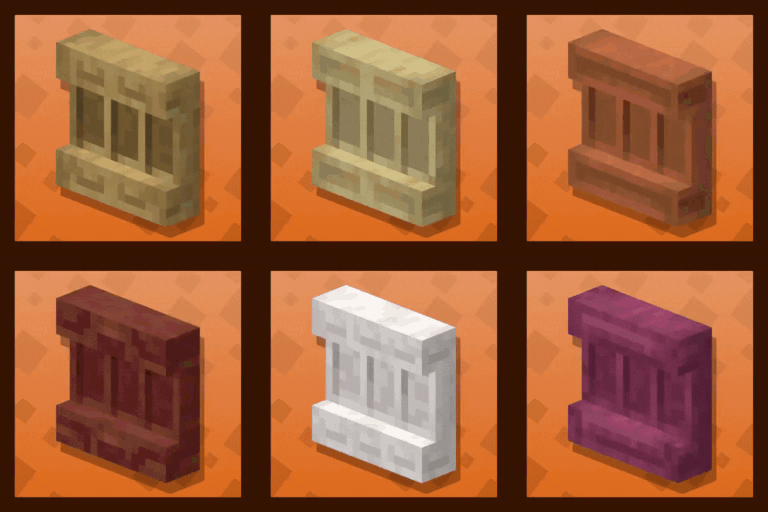
Racks allow you to showcase your tool and weapons, so you don’t need to hide them in your chests anymore. This data pack brings a complementary support to armor stands that only support armors (without using commands) on the Java Edition.
## How to craft and use a rack?
Racks can be crafted using:
– 2 **Sticks**
– 3 **Planks** of any wood (oak, dark oak, spruce, bamboo, cherry, warped, etc.)
The recipe is the following:

After you crafted it, you can simply place down your rack. You can either place it on the ground, allowing you to set up to two tools in it. Or on a wall, allowing you to showcase a single tool.
In order to set a tool in it, you need to **right click** the rack while holding the item you want to place, **whithout sneaking**. To take the item back, **right click** it the same way having your mainhand empty.
Racks placed on the ground can handle: axes, hoes, pickaxes, shovels, swords, fishing rod, carrot on a stick, warped fungus on a stick, mace and spears.
Racks placed on a wall can handle: axes, hoes, pickaxes, shovels, swords, bow, crossbow, trident, fishing rod, shield, shears, brush, spyglass, carrot on a stick, warped fungus on a stick, mace and spears.
**Right clicking racks while sneaking** will change their **pose** (their items rotation and position). Ground racks have 6 different poses, and wall racks have 4 different poses.
## Misc. information about racks
– Ground racks have separated interaction entities for both tools, meaning you can focus the tool slot you want to update without the need of removing or adding a tool in the first slot.
– If you wonder, of course, racks support enchanted and custom items. They keep all their items components. For tools modified with a resource pack, I can’t guarantee the exhibition will show an adequate render. This depends on whether the creator of the resource pack changed the item’s model or the texture’s orientation, or kept them like the vanilla item.
# ⚙️Settings
Ignore Wall Rack Support
If enabled, racks placed on wall **ignore** the fact their block support get broken or not, and won’t break if it is the case. By default, wall racks break check if their support block is removed every 10 ticks and break if it is the case. This is almost the same behavior as for paintings for example.
You can **enable**, **disable** or **get** the current state of the setting using these following commands respectively:
“`
/function pk_racks:settings/ignore_wall_rack_support/true
/function pk_racks:settings/ignore_wall_rack_support/false
/function pk_racks:settings/ignore_wall_rack_support/get
“`
# 🧰 Other Commands
Give yourself a rack
If you are an operator of your server or if cheats are enabled in your single-player world, you can give yourself a rack of any variant using these following commands:
“`
/function pk_racks:cmd/give/rack/
“`
Where `` is any type of wood, among: acacia, bamboo, birch, cherry, crimson, dark_oak, jungle, mangrove, oak, spruce and warped.
For example, the command to give yourself an oak rack:
“`
/function pk_racks:cmd/give/rack/oak
“`
Troubleshooting: Recreate all racks from the database
If ever racks have been broken accidentally (using a `kill @e` command for example) you can run the following command to recreate all racks from the database:
“`
/function pk_racks:cmd/debug/recreate_all_racks
“`
The process will automatically remove all remaining entities and blocks of broken racks before placing fresh ones. All data (id, owner, type, items, variant…) will be preserved.
It may take some time for it to complete, so be sure to get the message telling the process ended successfully before interacting with or placing a rack.
# 🔧 Update from V.2
The data pack provides a process to convert all existing racks from **V.2** to **V.3**.
In order to do so, follow the steps written below. _I would also advice you to create a backup of your world using V.2, in case another data pack / plugin / mod accidentally breaks the updating process._
1. Remove the Racks V.2 data pack from the `/datapacks/` folder of your world, **don’t** uninstall V.2 upstream with the uninstall function, as you should keep its database.
2. Upgrade your world to the desired version of Minecraft if needed, if it isn’t already done.
3. Install Racks V.3 by placing it in the `/datapacks/` forlder, then using `/reload` in game.
4. Use this following command: `/function pk_racks:cmd/upgrade/from_v2` and wait for the updating process to end. If it managed to do so, you should get a message “Updated all racks from Racks (V.2) successfully”.
**Note:** Old racks items from V.2 will automatically be replaced by their V.3 equivalent when you get them in your inventory.
# 🧹 Uninstall
Racks comes with an automatic uninstallation process. Running it will:
– Remove all racks that have been placed in your world, in every dimensions
– Store the potential items that racks contained to a chest at their respective location
– Remove all scores and storage specific to the Racks data pack
– If there is no more KawaMood data packs installed, also remove all common scores and storages
The uninstalling process may take some seconds to complete. Be sure to wait for the message telling you that you can safely remove the data pack from your world’s folder before doing it.
The command to start the uninstalling process is the following one:
“`
/function pk_racks:cmd/uninstall
“`
# ❓ F.A.Q
Do I need to install a resources pack?
No, this data pack doesn’t involve any resources pack.
The texture of the item shows regular player heads, how can I fix that?
You need to be connected to the internet the first time you craft a new type of rack. The textures of the player heads that are used to create their looks are indeed loaded and cached on the client-side, from (old or current) players skins that are stored on a Mojang server.
If you accidentally used a content that required to be online the first time you use it, and now see regular players heads instead of the expected texture, you can still go in the “.minecraft/assets/skins/” folder, then sort the sub-folders by date, and delete some recent folders. Once that is done, if your game was already started, you will need to restart it to update the cached content.
# 🪠 Report an issue
If you encountered an issue with this data pack, preferably join the Discord server, and open a post in the dedicated **#data-pack-issues** channel to describe your problem. Please, don’t forget to provide all necessary informations including:
– The Minecraft version you’re using.
– The version of the concerned data pack you’re using.
– If you’re using any modified version like Forge, Paper or Spigot.
– If you do, the plugins or mods you’re using that may alter the functioning of data packs.
– The list of other data packs you’re using, if you have others.
– A clear description of your issue, and a way to reproduce it.
– If necessary, a video or a screenshot of the issue in game.
Before doing that, please read the F.A.Q. section just above. The issue you’re facing may be a common one, and a way to fix it may already have been provided in it.
# 📌 Other links
Thank you for using Racks! It makes me happy to know people are enjoying it.
If you want to support its development and the development of other data packs, you can support me on my other social networks:
– Youtube
– Planet Minecraft
– Or if you’re in a generous mood, I accept donation on paypal or buy me a kawa (slang term for “coffee”)!





 Furnace
 Blast Furnace


