Underwater Swim Fix (MC-220390)
Fixes [MC-220390](https://bugs.mojang.com/browse/MC/issues/MC-220390) a bug where if you hit an entity while swimming and holding the sprint hotkey, the hitboxes server and clientside will be different. Resulting in weird behaviour where the client thinks that theyre swimming while the server doesnt think that. So when you for example try to go into a 1×1 block space while experiencing this bug, you will glitch out until you stop swimming and swim again.
The bug really annoyed me in monuments so I fixed it.
Join the [Discord!](https://discord.gg/p6ShJPq98d) You can ask for help, a mod, just suggest something, hangout or request the source code of any mod I have made (if I still have the source code)
Or donate to my [Kofi](https://ko-fi.com/bikerboys) incase you are feeling generous!
Uncraftables Datapack
See GitHub for more info
## Recipes (A-Z)
– Bell
– Chainmail Armour Set
– Coral Blocks
– Coral Items
– Dirt
– Elytra
– Experience Bottle
– Fish
– Gilded Blackstone
– Horse Armors
– Name Tag
– Reinforced Deepslate
– Saddle
– Spawn Eggs
– Spawner
– Totem of Undying
– Trident
– Wither Rose
All recipes are unlocked when completeing the `[Minecraft]` advancement
Ultimate Roleplay Kit – Resourcepack
# About
This is a dependency resourcepack, that all of my other Ultimate Roleplay Kit (URK) datapacks utilize, it does not affect the game in any way by itself.
If you want to use any of the URK datapacks, you must also install & enable this resourcepack.
Having one centralized dependency resourcepack is a lot more convinient, especially for server enviroments, because you don’t have to install a unique resourcepack for each datapack separately, which comes at the cost of a bit more disk space taken by unused models,unless you’re running all of the URK datapacks.
## Installation
– First of all, download the resourcepack version compatible with the URK datapacks you’re gonna use (This is written in datapack changelogs). After that, drag the downloaded resourcepack into your “`.minecraft/resourcepacks“` folder, and then enable it via the in-game menu.
## All URK Packs:
### Mandatory Resourcepack:
– **Ultimate roleplay kit – Resourcepack** – A mandatory dependency resourcepack, utilized by all other Datapacks.
### Content Datapcks:
– [Ultimate roleplay kit – Hats](https://modrinth.com/project/ultimate-roleplay-kit) – Adds 36 cosmetic hats, that are sold by the wandering trader.
– [Ultimate roleaply kit – Mail](https://modrinth.com/datapack/ultimate-roleplay-kit-mail) – Adds 36 postel item designs, that can also be customised further with 11 unique seals.
Ultimate Roleplay Kit – Mail
**THIS DATAPACK/MOD REQUIRES A** [**DEPENDENCY RESOURCEPACK**](https://modrinth.com/resourcepack/ultimate-roleplay-kit-resourcepack) **TO FUNCTION CORRECTLY!**
# About
Ultimate roleplay kit (URK) is collection of datapacks, focused on adding vanilla friendly, multiplayer-focused features! So, items that don’t add any innate gameplay, but can greatly enchance player interractions. which makes them a perfect addition to any vanilla-style server!
This specific URK pack adds postal items, such as envelopes & parcel boxes.
The mod version **still requires a resourcepack**
# Features

– **Mail items** – The main feature of this datapack is so called *postal items*. These are roleplay-oriented resprties you can apply to certain items, to give them a new look:
– Written books can be transformed into **envelopes**, for sending people letters. This also works with “Book and quil”, and will result in an unfinished letter.
– Bundles can be turned into **postal boxes**, to deliver packages to players.
– **Customisation** – Each postal item is made out of 2 components: a cover & a seal. Covers are flavourful reskins of the postal items, and seals are more specialised additions that are independant from the cover, and help give your mail more meaning.
– **Flexibility** – 36 Different covers, along with 11 seal patterns, which results in over **400** unique combinations, and each one can also be applied to each one of 3 postals items, yielding over **1200** options total!
– **Advancements** – An advancement system has been introduced, to guide players through the mail-making process without requiring external resources. Some fun challenge-advancements are also included.
In addition:
– Adding stamps or a cover does not affect the content, be that items or text.
– Stamps and covers can be changed at any time.
– Closed envelops can be copied just like regular books. The copies retain the design of the original, that way you can save up on materials.
## Mail items
### Covers

This is the crafting list for all the currently available covers. Every single one of them is crafted on a smithing table, by combining a piece of paper with the designated item (Written book/Bundle), and a cover-specific item as showed in the table above.
Cover list
– **Paper** – Paper.
– **Coloured** – One for each dye colour.
– **Solar** – Glowstone.
– **Aquatic** – Nautilus shell.
– **Prismarine** – Prismarine shard.
– **Lush** – Azalea bush.
– **Magmatic** – Magma cream.
– **Prismatic** – (any) Enchanted book.
– **Netherly** – Nether Brick
– **Regal** – (any) Trial key
– **Weathered** – Copper
– **Cherry** – Cherry Sapling.
– **Ender** – Popped chorus fruit.
– **Lunar** – Glow ink sac
– **Bamboo** – Bamboo.
– **Ominous** – (any) Ominous bottle
– **Earthly** – Short Grass.
– **Ancient** – Sculk Block.
– **Pale** – Open Eyeblossom.
– **Frozen** – Ice.
– **Golden** – Gold.
– **Striped** – Amethyst.
## Seals

Seals are applied to the postal items via a simillar process, except a honeycomb replaces the piece of paper, and you can use any *armour trim material* in place a cover-specific item.
List of seals
1. Restone Circle
2. Resin Exclamation
3. Copper Cross
4. Golden Star
5. Emerald
6. Diamong Sword
7. Lapis Hourglass
8. Amethyst Heart
9. Quartz Square
10. Iron pickaxe
11. Netherite Skull
URK items also include a few tooltip tags, which are supposed to signify what can be done with the items, to make the pack easier to use without a tutorial.
The following tags are used in this datapack:
– **Readable** – This item can be used as a written book, and it may contain text.
– **Container** – This item can store items inside it, just like a bundle.
## Advancements

These server as an in-game guide, along with a couple fun challenges!
## How to install
**In order to function properly, this datapack relies on a** [**URK core resourcepack!**](https://modrinth.com/resourcepack/ultimate-roleplay-kit-resourcepack)
The resourcepack adds the models & textures themselves, while the datapack makes the items actually accessible in-game!
Datapack installation
– To install the datapack, you will need to do one of the following:
– If you’re creating a new world: in the world creation screen, naviagate to the “More” tab. Find & press the “Data packs” button, and then press “Open Pack Folder” in the new menu. Drag the downloaded file into this folder. After that, enable the newly added datapack via the in-game menu.
– If you’re adding the pack to an existing world: drag the downloaded files into your “`.minecraft/saves/[WorldName]/datapacks“` folder, then re-enter the world. You may need to use the /datapack enable [pack_name] command, to activate the datapack.
Removing the packs
– In order to remove the Ultimate Roleplay kit from your world, you can simply delete the datapacks located in the “`.minecraft/saves/[WorldName]/datapacks“` folder. Items added by this datapack will no longer be craftable. The items themselves will stay, and can be destroyed. Removing the resourcepack will also remove the item’s custom models & textures
– When updating to a newer version of the Ultimate Roleplay Kit, please update both the [**resourcepack!**] **AND** the datapack!
## Knowns issues & Planned features
Issues:
– Seals cannot be removed, even though they can be replaced.
– envelopes & boxes with a cover cannot be turned back into regular books or bundles.
Plans:
– More envelope & box textures will be added from time to time, depending on my availability.
– More seals designs will be added whenever Minecraft gets new armour trim materials
– 🚧 **WIP:** An in-game guide-book
– ✅ **Implemented:** An advancement-based in-game guide
## All URK Packs:
### Mandatory Resourcepack:
– [Ultimate roleplay kit – Resourcepack](https://modrinth.com/resourcepack/ultimate-roleplay-kit-resourcepack) – A mandatory dependency resourcepack, utilized by all other Datapacks.
### Content Datapcks:
– [Ultimate roleplay kit – Hats](https://modrinth.com/project/ultimate-roleplay-kit) – Adds 36 cosmetic hats, that are sold by the wandering trader.
– **Ultimate roleaply kit – Mail** – Adds 36 postel item designs, that can also be customised further with 11 unique seals.
Ultimate Roleplay Kit – Hats
**THIS DATAPACK/MOD REQUIRES A** [**DEPENDENCY RESOURCEPACK**](https://modrinth.com/resourcepack/ultimate-roleplay-kit-resourcepack) **TO FUNCTION CORRECTLY!**
Ultimate roleplay kit (URK) is collection of datapacks, focused on adding vanilla friendly, multiplayer-focused features! So, items that don’t add any innate gameplay, but can greatly enchance player interractions, which makes them a perfect addition to any vanilla-style server!
This specific URK pack adds 36 diffirent cosmetic hats, that are sold by the Wandering Trader.
The mod version **still requires a resourcepack**
# Features:

– **Hats** – Wandering traders now additionally sell 3 random hats from the datapack’s pool. Each hat costs 4 emeralds + some a special items, to the specific hat (full list below). This is made in order to encourage exploration, as some of the items may be quite obscure.
– **Customisation** – Most hats can be dyed any colour, just like leather armour!
– **Locator Bar Integration** – All the hats also change your *locator bar icon*, and some may hide it alltogether.
– **Config Menu** A config menu can be called via this command: “`/function ndwthats:config_menu“`. This menu allows you to configure the amount of diffirent hats sold per trader, and the locator bar settings.
– **Advancements** – An advancement tree including a brief tutorial, as well as some fun challenges for hat collectors out-there.
– ~~If you simply want to get all the hats right away, you can use the following command: “`/function ndwthats:giveallhats“`~~ **Feature currently unavailable.**
## Hats

URK items also include a few tooltip tags, which are supposed to signify what can be done with the items, to make the pack easier to use without a tutorial.
The following tags are used in this datapack:
– [H] **Headwear** – The item can be worn in your head slot, and will be displayed accordingly!
– [D] **Dyeable** – The item can be dyed any colour, just like leather armor!
– [E] **Emissive** – Some part, or the whole cosmetic glows in the dark. It does not emit light, or stop mobs from spawning, but the cosmetic item itself will be visible regardless of the light level.
– [S] **Stealth** – Hides your waypoint from the locator bar, if it’s enabled.
Full list of cosmetics & trades
## Hats
Each hat requires 4 emeralds + some uniqie items to buy. Only the unique items are listed below. Each trade can only be done once per trader, and only 4 random ones are available at a time.
1. [H,D] **Duelist’s hat:** 3 feathers
2. [H,D] **Bad boy cap:** 1 Flint and steel
3. [H,D] **Artistic berete:** 1 Brush
4. [H,D] **Library Bookstack:** 6 Books
5. [H,D,S] **Super sneaky bush-hat:** 3 Azalea
6. [H,D] **Sea-captain’s hat:** 3 Prismarine crystals
7. [H,D,S] **Carnival mask:** 9 Paper
8. [H,D] **Mastershef’s hat:** 4 Pumpkin pie
9. [H,D] **Jeweled crown:** 3 Golden Apples
10. [H,D,E] **Crown of the cult:** 1 Eye of ender
11. [H,D] **Solemn draped hat:** 2 Cobwebs
12. [H,D] **Potted torchflower:** 1 Torchflower
13. [H,D,E] **Radient halo:** 12 Glowstone dust
14. [H,D] **The Legendary Xiaolong plushie:** 2 Horn corals
15. [H,D,E] **Gameing Headset:** 4 Noteblocks
16. [H,D] **Showmaster’s tophat:** 7 Amethyst shards
17. [H,D] **Winter ushanka:** 16 Snowballs
18. [H] **Sculk Tendrils:** 2 Sculk Sensors
19. [H,D,S] **Mysterious spirit’s mask:** 18 Bamboo
20. [H] **Dreamy Flower crown:** 4 Sunflowers
21. [H,D] **Cozy Beanie:** 5 Red wool
22. [H,D] **Geometric Copper Glasses:** 8 Copper Ingots
23. [H,D] **Scerene Flutterby** – 2 Honey Blocks
24. [H,D] **Holiday Hat** – 9 Spruce Saplings
25. [H,D] **Deco Cake** – 1 Cake
26. [H,D] **Straw hat** – 14 Wheat
27. [H,D] **Pilot’s cap** – 1 Leather Helmet
28. [H,D] **Cute Bow** – 12 String
29. [H,D] **Historic Helmet Replica** – 1 Iron Helmet
30. [H,D] **Badass Bandana** – 7 Leather
31. [H,D,E] **Arcane Hat** – 6 Glistering Watermelon Slices
32. [H,D] **Bewitching Skull** – 11 Bones
33. [H,D] **Fedora** – 13 Gunpowder
34. [H,D,E] **Hard Hat** – 16 Bricks
35. [H,D,E] **Itty-bitty Spider** – 5 Spider Eyes
36. [H,D] **Jester Hat** – 3 Poisonous Potatoes
## Locator bar

Wearing a hat changes ones locator bar icon (but not the colour). Some hats *hide* your icon from the locator bar, and are marked by the **Stealth** tag. By default these fetures apply to players only, but can be changed in the settings menu – “`/function ndwthats:config_menu“`.
## Advancements

A few advancements were added to serve as an in-game tutorial to the datapack, so the players don’t have to go online for the information on the pack. In addition, there are a couple of fun challenge advancements. These provide no EXP reward.
**To unlock the advancement tree, you need to pick up a single emerald.**
## How to install
In order to access the cosmetic items, you will have to install **both the datapack & the resourcepack!** The resourcepack adds the models & textures themselves, while the datapack makes the cosmetic items actually accessible in-game by adding them to the wandering trader’s pool! **THIS IS STILL THE CASE IF YOU’RE USING THE MOD VERSION INSTEAD OF THE DATAPACK**
Resourcepack installation
– First of all, download the [resourecpack](https://modrinth.com/resourcepack/ultimate-roleplay-kit-resourcepack) version appropriate for the datapack version. This can be checked in the specific version’s changelog. drag the downloaded files into your “`.minecraft/resourcepacks“` folder, and then enable it via the in-game menu.
Datapack installation
– To install the datapack, you will need to do one of the following:
– If you’re creating a new world: in the world creation screen, naviagate to the “More” tab. Find & press the “Data packs” button, and then press “Open Pack Folder” in the new menu. Drag the downloaded file into this folder. After that, enable the newly added datapack via the in-game menu.
– If you’re adding the pack to an existing world: drag the downloaded files into your “`.minecraft/saves/[WorldName]/datapacks“` folder, then re-enter the world. You may need to use the /datapack enable [pack_name] command, to activate the datapack.
Removing the packs
– In order to remove the Ultimate Roleplay kit from your world, you can simply delete the datapacks located in the “`.minecraft/saves/[WorldName]/datapacks“` folder. Any newly spawned wandering traders will not include the custom trades. The cosmetic items themselves will stay, and can be destroyed. Removing the resourcepack will also remove the cosmetic’s custom models & textures
– When updating to a newer version of the Ultimate Roleplay Kit, please update both the resourcepack **AND** the datapacks! So don’t forget to also download the resourcepack.
## Knowns issues & Planned features
Issues:
– Hats containing transparent elements may display incorrectly if you’re using the **[3D skin layers mod](https://modrinth.com/mod/3dskinlayers)**
– This datapack may conflict with other ones that change the locator bar icons. In order to avoid any conflicts, open the settings menu via “`/function ndwthats:config_menu“` > Waypoint Display Mode > Affected Entities > None.
Plans:
– More hats will be added from time to time, depending on my availability.
– ✅ **Implemented** ~~Locator bar support **will be** added as it comes to an official release.~~
– ✅ **Implemented** ~~Some sort of Settings/Options system to further customise the datapack for your needs.~~
– ✅ **Implemented** ~~Implementing minecraft’s translate strings, to allow localisations.~~
## Other URK Packs:
### Mandatory Resourcepack:
– [Ultimate roleplay kit – Resourcepack](https://modrinth.com/resourcepack/ultimate-roleplay-kit-resourcepack) – A mandatory dependency resourcepack, utilized by all other Datapacks.
### Content Datapcks:
– **Ultimate roleplay kit – Hats** – Adds 36 cosmetic hats, that are sold by the wandering trader.
– [Ultimate roleaply kit – Mail](https://modrinth.com/datapack/ultimate-roleplay-kit-mail) – Adds 36 postel item designs, that can also be customised further with 11 unique seals.
TrustMeBro – Bundle
TrustMeBro – Bundle brings the funniest and most ridiculous features inspired by the r/shittymcsuggestions community straight to your Minecraft server. Enable or disable each challenge with simple commands and enjoy chaotic, meme-worthy gameplay with your friends. Perfect for streamers, community servers, or anyone looking to spice up their Minecraft experience with unexpected twists!
– Features / Commands:
– /extremebabyzombie on|off — Toggle if baby zombies are extreme
– /shearmobs on|off — Toggle if you can shear: Villagers, Endermen, Spiders, Striders
– /breadrename on|off — Toggle bread rename (to “Raw Toast”) and potatoes to “Raw Potatoes”
– /powderwater on|off — Toggle if powder dissolves in water
– /nearmobsbecomeinvis on|off — Toggle if near mobs become invisible
– /moss on|off — Toggle if moss duplicates in your inventory and if moss is edible
– /sunblind on|off — Toggle if you could be blinded by looking directly at the sun
– /trowabledragonegg on|off — Toggle if you can throw the dragon egg, like an normal egg, to spawn the ender dragon
– /hotsand on|off — Toggle whether you take damage while sneaking on sand.
– /throwingsnowballvillager on|off — Toggle if you become a really cool advancement if you throw a snowball against a villager.
CODE MADE BY ME!
Keywords:
minecraft, plugin, fun, meme, r/shittymcsuggestions, challenge, bundle, chaos, minigame, server, dumb ideas, community, gameplay, commands
No Armor Trims
**Remove Armor Trims** is texture pack designed to remove all armor trims from Minecraft.
## Before

## After

Trial Chamber Fix
# Trial Chamber Fix
Free and open-source datapack for Minecraft 1.21 and higher that corrects a chest that was not being generated correctly in trial chamber.
## Features
Fixed a problem with a chest not generating correctly in trials chambers.
Allows you to obtain an enchanted wind burst book at any level.
Tree Vein Miner




# Tree Miner
A Minecraft datapack that automatically chops down entire trees when you break a log while crouching.
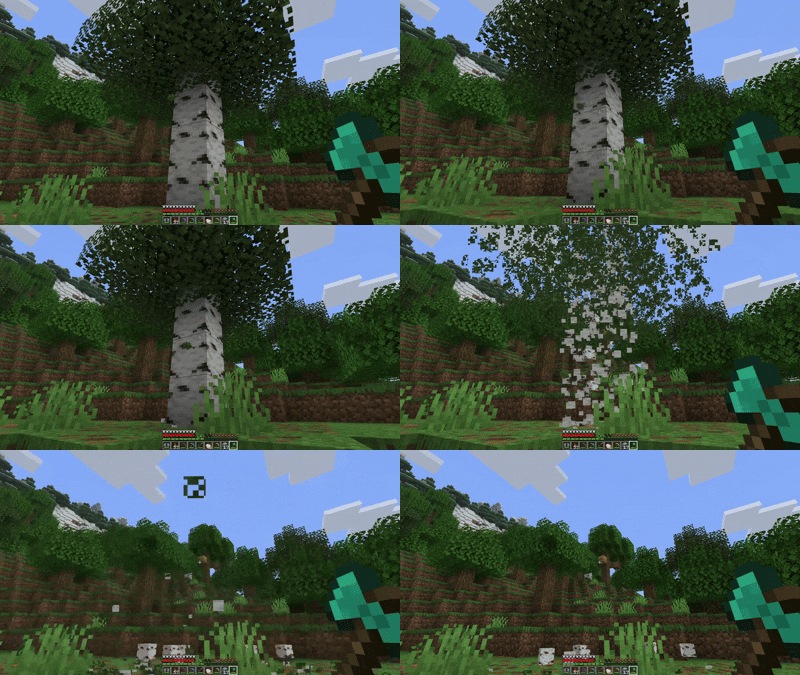
## Notes
– The tree miner only activates when you’re crouching (sneaking)
– Break logs normally without crouching if you only want to break one block
– Leaves drop their normal items (saplings, sticks) just like breaking them manually
– There’s a small cooldown between uses to prevent performance issues
Transparent Totem
This small resource pack makes Totems of Undying appear **transparent**.
> ### [Check out my other packs!]()
> [**All My Packs**]()
> [**Visual Enchantments**]()
> [**Transparent Items**]()
>
> ### And my [Discord Server]()!