No Bugs
# What’s No Bugs ?
**No Bugs** is a project to fix as many bugs found on the Minecraft Bug tracker as possible.
It was designed to be lightweight, discrete and to go straight to the point, without impact on your gameplay.
## How does it work ?
**No Bugs** uses Mixin to replace buggy parts of the Minecraft code with a modified and fixed version of it.
## What bugs does it fix ?
For now, **No Bugs** fixes :
– MC-274478 If you take an invisibility potion and approach an armadillo, the armadillo will detect you
– MC-223827 Goats can ram invisible entities
Planned bugs to be fixed :
– https://bugs.mojang.com/browse/MC-262422
– https://bugs.mojang.com/browse/MC-84789
– https://bugs.mojang.com/browse/MC-238105
– https://bugs.mojang.com/browse/MC-197578
– https://bugs.mojang.com/browse/MC-232710
– https://bugs.mojang.com/browse/MC-73964
You can also use Stackable Heads.
## Compatibility
**No Bugs** should work with any mod. If you encounter any incompability, feel free to contact me so I can find a fix or add it here. **No bugs** includes fixes on both the client and server, so you can use it on both.
## Support me!
Join my Hardcore Minecraft server: `38.143.19.130:51965`
No Armour Armor HUD Hotbar
Removes the Armor Icons from the HUD, for a cleaner GUI. Protection still works!
v1.20.2 (latest) and above is compatible with every other resourcepack.
Just select and put this resourcepack above others in order to work.
🌙 Night UI – A Dark Themed Resource Pack



🌙 **NightUI** is a dark-themed Minecraft resource pack focused on clarity, comfort, and compatibility. It replaces the vanilla interface with a clean, minimalist design that’s lightweight, easy on the eyes, and compatible with other resource packs — ideal for late-night play or users who prefer a sleek, distraction-free UI.
## Legacy4J Compatibility
🌙 NightUI integrates seamlessly with **Legacy4J** — a mod that restores the look and feel of the legacy console editions of Minecraft. With NightUI applied, the retro interface becomes easier on the eyes.
## Future Plans
### Configuration Website
A dedicated NightUI configuration site is currently in development.
This tool will allow users to:
– Toggle specific UI features on or off
– Select only the mod support they need for lighter, optimized builds
– Choose from presets tailored to popular modpacks
This system will make it easier to support a broader range of mods and give users more control over their experience.
### Version Backports
NightUI is currently designed for the latest Minecraft versions. However, plans are in place to backport the pack for broader compatibility across older versions of the game.
### Bedrock Edition Support
A Bedrock-compatible version of NightUI is also in the works, allowing Bedrock players to enjoy the night.
Mod Support
🌙 NightUI provides support for the following mods:
– DeathLog
– Entity Model Features / Entity Texture Features
– Iris
– ModMenu
– Shulker Box Tooltip
– Simple Voice Chat
– Legacy4J
Want support for another mod? Request it on Discord →
License
🌙 NightUI is © NotToBlame. You are permitted to:
– ✅ Use in modpacks **if downloaded from official sources** (Modrinth, CurseForge)
– ✅ Create and publish **addon packs** (as long as no original files are included)
– ✅ Make **personal edits** (not for redistribution)
You may **not**:
– ❌ Reupload or redistribute this pack or its assets
– ❌ Include original files in your own uploads or forks
– ❌ Use the pack commercially without explicit permission
Read the full license →
New Sword Blocking

A simple data pack & Fabric/Quilt mod that restores and enhances sword blocking in Minecraft 1.21.5 – 1.21.8.
# End of Life Announcement
New Sword Blocking is no longer supported. The data pack and mod are available as-is and there won’t be any updates or assistance. Please read more here.
## Features
* Newly crafted swords can be used to block attacks by right-clicking while holding the sword in the main hand
* Swords block a percentage of damage from incoming attacks and lose durability points for each attack blocked, based on the material type of the sword:
| Sword | Damage Blocked | Durability Lost*
| :–: | :–: | :–: |
Wooden | 20% | 7
Golden | 25% | 9
Stone | 30% | 5
Iron | 40% | 4
Diamond | 50% | 3
Netherite | 60% | 2
*per 10 damage blocked
**NOTE:**
The changes made by this pack do not apply to:
– Swords crafted before installation
– Swords dropped by mobs
– Swords traded by Villagers
– Swords found in loot chests
– Swords combined by crafting
– Swords taken from the Creative inventory
– Swords given through commands
– Modded or non-vanilla swords

## Versions
**Fabric API is required to run the mod version of New Sword Blocking.** Be sure to install the correct Fabric API version that matches your Minecraft and New Sword Blocking versions.
| Minecraft Version | Pack Version | Mod Version
| :–: | :–: | :–: |
| 1.21.5 – 1.21.8 | v1.1.2 | v1.1.2+mod
| 1.21.5 – 1.21.7 | v1.1.1 | v1.1.1+mod
| 1.21.5 – 1.21.6 | v1.1.0 | v1.1.0+mod
| 1.21.5 | v1.0.0 | v1.0.0+mod
A full list of versions can be found here on Modrinth or here on GitHub.
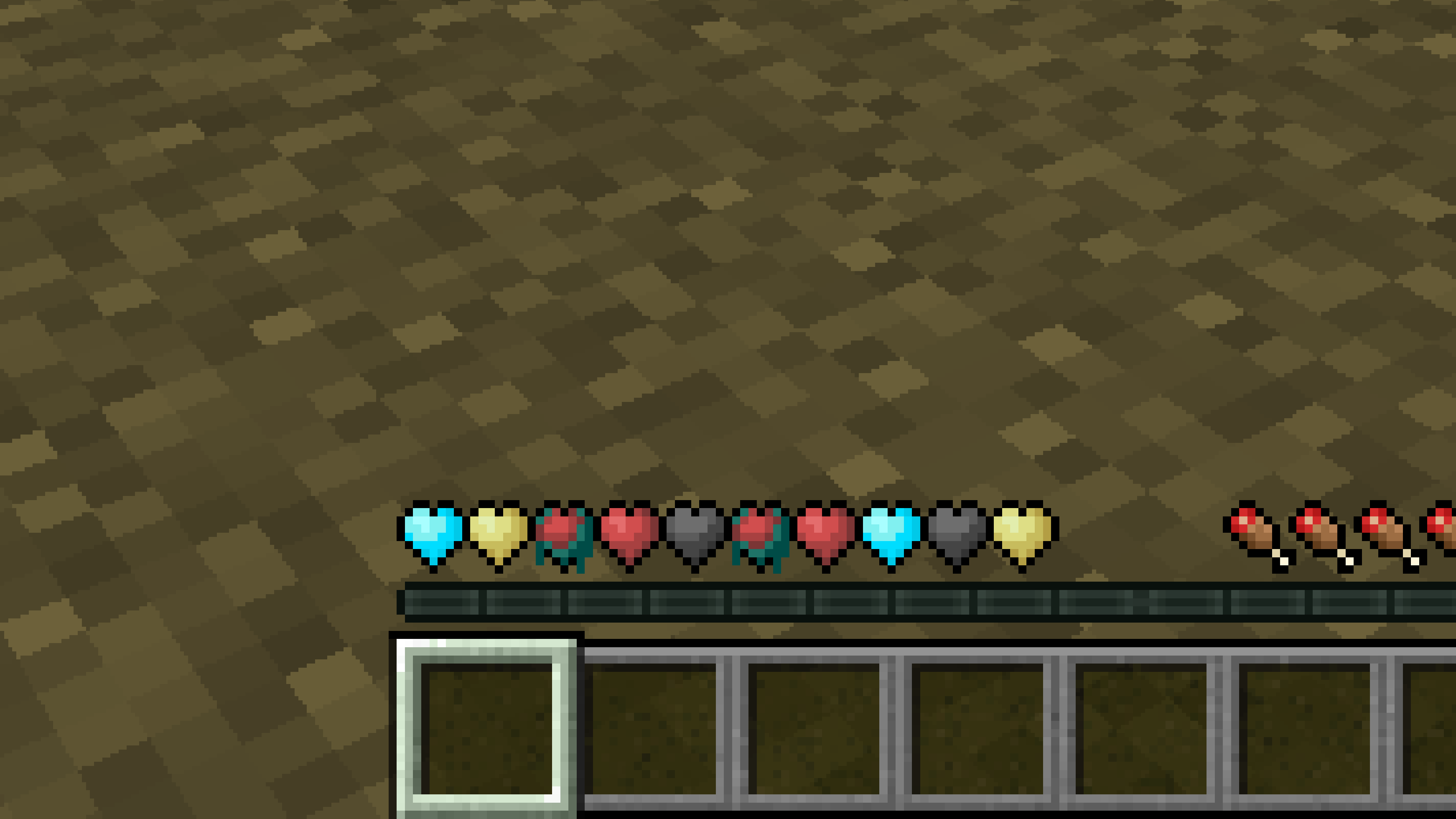
New Hearts, classic colors
# **New Hearts, classic colors**
**Not a fan of the pastel hearts in the New Hearts texture pack?**
**This texture pack is for you.**
—
—
New Hearts
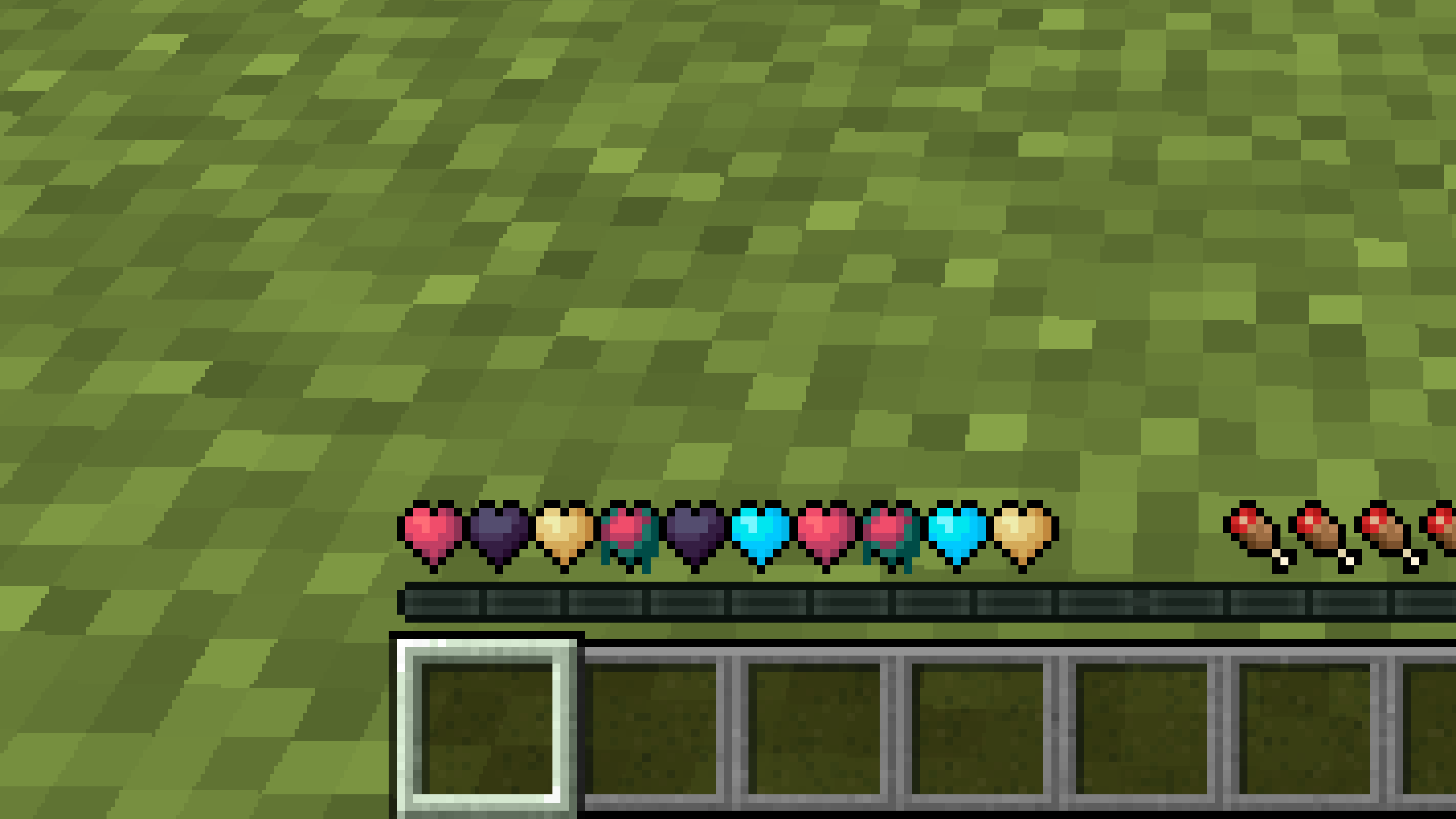
# **New Hearts**
**Don’t like the bright colors of the hearts?**
**This texture pack is for you.**
—
—
## **Description**
**Pastel-colored hearts with softer color transitions.**
—
**Texture pack in classic colors: New Hearts, classic colors**
New end stone
# **New end stone**
**Like pink and pastel colors?**
**This texture pack is for you.**
—

—
## **Description**
**This pack slightly modifies end stone, giving it a softer, pastel pink tone.**
Nether Structure Highlighter
Spot Nether structures instantly! This pack highlights bastions and nether fortresses by subtly enhancing key blocks, making survival exploration faster and easier without cheating. It makes nether fortresses green and bastions and bastion remnants yellow. I personally tried it myself and it saves 10x more time than manually finding one.
credits:**PlanetGuy_122**
Netherite Styled Default Armors
Gives all default armors the look of netherite. UPDATED FOR 1.0-1.22+
Variants:
Ashen 16x https://modrinth.com/resourcepack/netherite-styled-ashen-16x-armors
Bare Bones https://modrinth.com/resourcepack/netherite-styled-bare-bones-armors
Bronze https://modrinth.com/resourcepack/bronze-netherite-styled-armor
SimpleOres https://modrinth.com/resourcepack/simpleores-netherite-styled-armor
View the whole collection here! https://modrinth.com/collection/J5xlug9g
Subscribe to Subsetgaming on YouTube
https://www.youtube.com/@subset.gaming
Type “Subsetg4ming” in your search bar to find everything by me!
nerdPVP
# NerdPVP – A Clean & Competitive PVP Resource Pack
### WARNING : This pack is still in alpha and NOT complete
## Overview
Nerd PVP is a streamlined resource pack designed for competitive Minecraft PVP. It enhances visibility, reduces distractions, and optimizes key elements to give you a tactical edge in combat. Whether you’re playing Bedwars, SkyWars, or Faction PVP, this pack keeps your focus sharp and your performance crisp.
## Key Features
– ✔ Clear & Minimalist Textures – Removes visual clutter for better enemy tracking.
– ✔ Optimized Sword & Tool Designs – Clean, high-visibility models for fast-paced combat.
– ✔ Low Fire – Less obstruction during fights.
– ✔ 16x Resolution – Balanced performance for smooth gameplay.
## Compatibility
Works on Minecraft [version (1.16.x, 1.17.x, 1.18.x,1.19.x, etc) ]
Supports OptiFine (connected textures, custom skies).
FPS-friendly (compatible with Sodium, Iris, etc.).
## Installation
Download the .zip file.
Place it in your resourcepacks folder.
Activate in-game via Options > Resource Packs.
## Feedback & Updates
Suggestions or bug reports? Say it in the discord server or DM me directly. Updates focus on community-driven improvements!
## Developer note
You can use textures from this pack, just credit the pack maker “membercatcousin”