Transparent Crossbow
This small resource pack makes crossbows appear **transparent**.
> ### [Check out my other packs!](
> [**All My Packs**](
> [**Visual Enchantments**](
> [**Transparent Items**](
>
> ### And my [Discord Server](
This small resource pack makes crossbows appear **transparent**.
> ### [Check out my other packs!](
> [**All My Packs**](
> [**Visual Enchantments**](
> [**Transparent Items**](
>
> ### And my [Discord Server](
Simple **transparent buttons** in menus, compatible with **older AND newer versions** of the game. So yes, it works in **1.8**, just **ignore the red Incompatible marker** in the pack selection screen.
Have any specific mods you would like me to add support for? Join the [**discord**](https://discord.gg/cjBypn33tZ)!
This small resource pack makes bows appear **transparent**.
> ### [Check out my other packs!](
> [**All My Packs**](
> [**Visual Enchantments**](
> [**Transparent Items**](
>
> ### And my [Discord Server](
This resource pack translates all April Fools’ Day updates into Russian. In addition to blocks, objects, etc., it also translates interface buttons and splashes.
– **26w14a**
> Language (ru_ru.json)
> Splashes
– [**25w14craftmine**](https://modrinth.com/resourcepack/25w14craftmine_translation_into_russian )
> Language (ru_ru.json)
> Splashes
> Text on the texture of the sky block “SKY LOL”
> Text in the dimension control’s gui “SKY”
– [**24w14potato**](https://modrinth.com/resourcepack/24w14potato_translation_into_russian )
> Language (ru_ru.json)
> Splashes
> The Potato Poem (potato.txt )
> Text on the texture of the painting “This is not a potato” (ceci.png)
> The “MINECRAFT POISONOUS POTATO” logo in the main menu
– **23w13a_or_b**
> Language (ru_ru.json)
> Splashes
> “Vote” button
– **22w13oneBlockAtATime**
> Language (ru_ru.json)
> Splashes
– **20w14∞**
> Language (ru_ru.json)
– **3D Shareware v1.34**
> Language (ru_ru.json)
> Splashes
> The words “Health” and “Armor” in hotbar
– **1.RV-Pre1**
> Language (ru_RU.lang)
> The text on the “Obey” sign, displayed when wearing reality vision
– **15w14a (The Love and Hugs Update)**
> Language (ru_RU.lang)
> Splashes
– **Minecraft 2.0**
> Language (langru_RU.lang)
> The name of the setting is “Super HD graphics”
– **25w14a**
> The “HERDCRAFT” logo in the main menu and advancements
> The message that appears when an action cannot be performed because there are no blocks in the selected group
– [**25w14craftmine**](https://modrinth.com/resourcepack/25w14craftmine_translation_into_russian )
> The “CRAFTMINE” logo in the main menu
– **23w13a_or_b**
> Voting for “Tried to remove Herobrine”
> Tooltips for the player to click on the **v** button
– **22w13oneBlockAtATime**
> The name of the block/item is “How did we get here?” (minecraft:generic_item_block)
– **20w14∞**
> Messages on sign in dimensions
> Messages from blocks in dimensions
> Messages in books in dimensions
> The text “Home Sweet Home” on the item “A very fine item”
– **3D Shareware v1.34**
> Episode titles and difficulty levels
> Cheat codes
> The text “UNREGISTERED VERSION” above the screen
> Loading and exiting screens
> Games and products in the store
– **15w14a**
> The name of the game is “Minescreeper”
– **Minecraft 2.0**
> Messages from blocks and mobs in speech bubbles
> Splash
Этот набор ресурсов переводит все первоапрельские обновления на русский. Кроме блоков, предметов и т.д., он также переводит кнопки нтерфейса и сплеши.
– **26w14a**
> Язык (langru_ru.json)
> Сплеши (splashes)
– [**25w14craftmine**](https://modrinth.com/resourcepack/25w14craftmine_translation_into_russian )
> Язык (langru_ru.json)
> Сплеши (splashes)
> Текст на текстуре блока неба «НЕБО ЛОЛ»
> Текст в интерфейсе управления измерением «НЕБО»
– [**24w14potato**](https://modrinth.com/resourcepack/24w14potato_translation_into_russian)
> Язык (langru_ru.json)
> Сплеши (splashes)
> Поэма картофеля (potato.txt)
> Текст на текстуре картины «Это не картошка» (ceci.png)
> Логотип «MINECRAFT ЯДОВИТЫЙ КАРТОФЕЛЬ» в главном меню
– **23w13a_or_b**
> Язык (langru_ru.json)
> Сплеши (splashes)
> Кнопка «Голосовать»
– **22w13oneBlockAtATime**
> Язык (langru_ru.json)
> Сплеши (splashes)
– **20w14∞**
> Язык (langru_ru.json)
– **3D Shareware v1.34**
> Язык (langru_ru.json)
> Сплеши (splashes)
> Слова «Здоровье» и «Броня» в хотбаре
– **1.RV-Pre1**
> Язык (langru_RU.lang)
> Текст на табличке «Подчиняйтесь», отоброжаемый, когда надеты очки реальной видимости
– **15w14a (The Love and Hugs Update)**
> Язык (langru_RU.lang)
> Сплеши (splashes)
– **Minecraft 2.0**
> Язык (langru_RU.lang)
> Название настройки «Супер HD графика»
– **25w14a**
> Логотип «HERDCRAFT» в главном меню и достижениях
> Сообщение, появляющееся, когда действие нельзя выполнить из-за того, что в выбранной группе отсутствуют блоки
– [**25w14craftmine**](https://modrinth.com/resourcepack/25w14craftmine_translation_into_russian )
> Логотип «CRAFTMINE» в главном меню
– **23w13a_or_b**
> Голосование за «Tried to remove Herobrine»
> Всплывающие подсказки о том, чтобы игрок нажал на кнопку **v**
– **22w13oneBlockAtATime**
> Название блока/предмета «How did we get here?» (minecraft:generic_item_block)
– **20w14∞**
> Сообщения на табличках в измерениях
> Сообщения из блоков в измерениях
> Сообщения в книгах в измерениях
> Текст «Home Sweet Home» на предмете «Очень хороший предмет»
– **3D Shareware v1.34**
> Названия эпизодов и уровни сложности
> Чит-коды
> Текст «UNREGISTERED VERSION» над экраном
> Экраны загрузки и выхода из игры
> Игры и товары в магазине
– **15w14a**
> Название игры «Minescreeper»
– **Minecraft 2.0**
> Сообщения блоков и мобов в 💬
> Сплеш
## · 这是什么资源包?
**这是一个将Minecraft 1.20.x以上版本的繁体中文转换为简体中文的资源包**
## · 为什么会有这个资源包,这个资源包有什么用处吗?
**我十分喜欢游玩Minecraft的小地图 不管是什么语言。**
**但我在游玩使用繁体字制作的地图时,当我看多了繁体字 就会觉得眼睛酸疼 特别是在读剧情时。**
**繁体字笔划都偏多,而在Minecraft中那种表现力就更不用说了。有的就是糊成一团,看久了十分难受。**
**于是便有了这么一个资源包。**
## · 为什么仅限于1.20.x及以上版本?
**是因为已经有了1.20.x以下版本的繁转简资源包了 [点我前往](https://www.bilibili.com/video/BV1zE411P77Y/?vd_source=3982530a4a5e02cb3246bd30664b89aa)**
**然而Mojang在快照[23w17a](https://www.minecraft.net/fi-fi/article/minecraft-snapshot-23w17a)版本更新了字体 导致了原本的方法失效 所以我就制作了它**
**而这也成了资源包的版本分隔符**
## · 它会保持更新吗?
**会的,如果您发现有字体错误或漏掉的字符 可以在Github提Issues 我会去解决它**
## · What resource pack is this??
**This is a resource package that converts Traditional Chinese into Simplified Chinese for Minecraft 1.20.x or above.**
# About
This Datapack is designed to make your life hard by making it where you have to touch grass or other green stuff to live
# BLocks You can step on (work in progress update)
– minecraft:air
– minecraft:grass_block
– minecraft:short_grass
– minecraft:tall_grass
– minecraft:fern
– minecraft:large_fern
– minecraft:dead_bush
– minecraft:moss_block
– minecraft:moss_carpet
– minecraft:farmland
– minecraft:water
– minecraft:kelp
– minecraft:kelp_plant
– minecraft:seagrass
– minecraft:tall_seagrass
– minecraft:snow
– minecraft:obsidian
– minecraft:end_gateway
– minecraft:end_portal
– minecraft:end_portal_frame
– minecraft:nether_portal
– minecraft:torch
– minecraft:soul_torch
– minecraft:tripwire
– minecraft:scaffolding
– minecraft:bamboo
– minecraft:sweet_berry_bush
– minecraft:small_dripleaf
– minecraft:big_dripleaf
– minecraft:big_dripleaf_stem
– minecraft:glow_lichen
– minecraft:oak_sapling
– minecraft:spruce_sapling
– minecraft:birch_sapling
– minecraft:jungle_sapling
– minecraft:acacia_sapling
– minecraft:dark_oak_sapling
– minecraft:mangrove_propagule
– minecraft:cherry_sapling
– minecraft:bamboo_sapling
– minecraft:white_carpet
– minecraft:orange_carpet
– minecraft:magenta_carpet
– minecraft:light_blue_carpet
– minecraft:yellow_carpet
– minecraft:lime_carpet
– minecraft:pink_carpet
– minecraft:gray_carpet
– minecraft:light_gray_carpet
– minecraft:cyan_carpet
– minecraft:purple_carpet
– minecraft:blue_carpet
– minecraft:brown_carpet
– minecraft:green_carpet
– minecraft:red_carpet
– minecraft:black_carpet
– minecraft:stone_button
– minecraft:oak_button
– minecraft:spruce_button
– minecraft:birch_button
– minecraft:jungle_button
– minecraft:acacia_button
– minecraft:dark_oak_button
– minecraft:mangrove_button
– minecraft:cherry_button
– minecraft:bamboo_button
– minecraft:crimson_button
– minecraft:warped_button
– minecraft:light_weighted_pressure_plate
– minecraft:heavy_weighted_pressure_plate
– minecraft:stone_pressure_plate
– minecraft:oak_pressure_plate
– minecraft:spruce_pressure_plate
– minecraft:birch_pressure_plate
– minecraft:jungle_pressure_plate
– minecraft:acacia_pressure_plate
– minecraft:dark_oak_pressure_plate
– minecraft:mangrove_pressure_plate
– minecraft:cherry_pressure_plate
– minecraft:bamboo_pressure_plate
– minecraft:crimson_pressure_plate
– minecraft:warped_pressure_plate
– minecraft:rail
– minecraft:powered_rail
– minecraft:detector_rail
– minecraft:activator_rail
– minecraft:redstone_wire
– minecraft:redstone_torch
– minecraft:lever
– minecraft:repeater
– minecraft:comparator
– minecraft:dandelion
– minecraft:poppy
– minecraft:blue_orchid
– minecraft:allium
– minecraft:azure_bluet
– minecraft:red_tulip
– minecraft:orange_tulip
– minecraft:white_tulip
– minecraft:pink_tulip
– minecraft:oxeye_daisy
– minecraft:cornflower
– minecraft:lily_of_the_valley
– minecraft:wither_rose
– minecraft:wheat
– minecraft:carrots
– minecraft:potatoes
– minecraft:beetroots
– minecraft:nether_wart
– minecraft:torchflower_crop
– minecraft:pitcher_crop
—
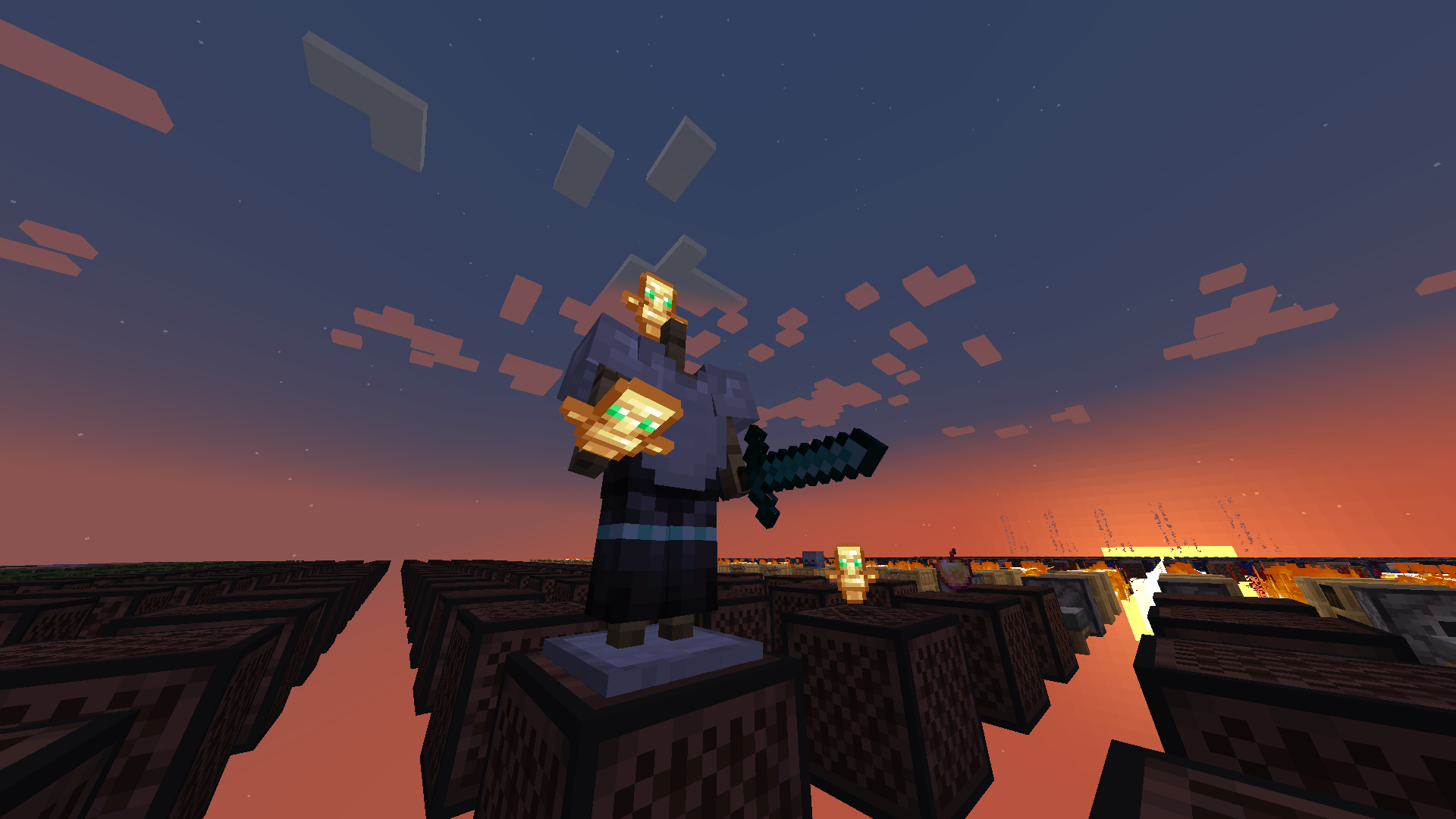
**Totem No Shading** is a simple Minecraft mod that removes [directional shading](https://en.wikipedia.org/wiki/Shading) and block and sky lighting effects to **[Totem of Undying](https://minecraft.wiki/w/Totem_of_Undying)** items. Holding totems in either hands, worn on head (through commands), or on the ground will render said items to **full brightness**.
Totem No Shading is a subset of [Simply No Shading](https://modrinth.com/mod/simply-no-shading) (SNS), concepts and technologies thereof aided in realizing this mod. The creation of [issue 119 for SNS at Github](https://github.com/StartsMercury/simply-no-shading/issues/119) requests supporting selective application, specifically the Totem of Undying item; at that time there was no clear way to implement this. After SNS‘ entity shading now exiting its experimental phase, the aforementioned issue was reconsidered and now released as its separate mod, **Totem No Shading**.
# Torchcraft Lobby Panorama
This is a panorama of the lobby of the Dutch Minecraft server Torchcraft. You can use the resource pack in all new versions of Minecraft. If you have any questions or problems you can always send me a message on Discord (name: tibodp).
| Screenshot was made with the Nostalgia shader that you can download here: https://modrinth.com/shader/nostalgia-shader
## Support
If you have any problems, ideas, or other feedback about this project, please contact me via discord or email. You can contact me on Discord by sending a friend request, so you can send me a message.
Discord: tibodp
Mail: [email protected]
## 🌟 My other projects:
– [Torchcraft Lobby Panorama](https://modrinth.com/resourcepack/torchcraft-lobby-panorama)
– [The Ultimate Creator](https://modrinth.com/modpack/the-ultimate-creator)
– [Chromakey Blocks](https://modrinth.com/modpack/the-ultimate-creator)
– [No Worldborder](https://modrinth.com/modpack/the-ultimate-creator)
– [Vuurwerkshow Modpack](https://modrinth.com/modpack/the-ultimate-creator)
– [Vuurwerkshow Panorama](https://modrinth.com/modpack/the-ultimate-creator)
– [Vuurwerkshow Paintings](https://modrinth.com/resourcepack/vuurwerkshow-paintings)
#

Replaces the default Minecraft Tooltip with a **Yellow Tooltip (Monochrome)**.
Looking for different colors/flags or styles? Check out the [Pride Tooltips Organization Page](https://modrinth.com/organization/pride-tooltips)!
Looking for packs with the same color(s)/flag but with different styles?
Can’t find a color, flag, or style you are looking for?
Feel free to [open an issue on GitHub](https://github.com/Pridecraft-Studios/pridetooltips/issues) or [join the Pridecraft Discord](https://discord.pridecraft.gay/) and ping `@rotgruengelb`!
The following colors where used to create this pack:
* #ffd800
Monochrome = A simple monochrome style with one color.
* build_time: `2026-02-26T18:58:59+01:00`
* build_user: `rotgruengelb`
## Installation
Download and place into your `resourcepacks` folder. (Only works in versions **after 1.21.1**)
## About Pride Tooltips
A collection of resource packs that change tooltips to be colorful and/or pride themed.
### Rotgruengelb (Developer & Artist):
[](https://youtube.com/rotgruengelb)
[](https://github.com/rotgruengelb)
### Pridecraft Studios:
If you also want other bits of your UI to be themed with pride:
[](https://modrinth.com/project/pridegui)
You can chat with us and check out the source of our projects here:
[](https://discord.pridecraft.gay)
[](https://github.com/Pridecraft-Studios/pridetooltips?tab=readme-ov-file#pride-tooltips)
### Additional Credit
* Cursor texture, used in the banner, from the [Minecraft Cursor Mod by fishstiz](https://modrinth.com/mod/minecraft-cursor).
* The Pridecraft team for all their support and help.