UUID Hex
## ✅ Features
– **Efficiently** converts UUIDs to hex format
– Optimized for speed by relying on a precomputated hexadecimal range (`0000-FFFF`), increasing static data usage
## 📖 Usage
Call the `uuid:_` function as an entity and use its output in `storage uuid:out plain`
Alternatively, assign a 4-integer array to `storage uuid:in UUID`, then call the `uuid:convert` function to format it.
user flags
> **communicating with non-friends in 26.2**
>
> first, open the game at least once to generate the config. then open `config/user-flags.properties` and put `false` next to the line reading `chat_friends_only=`.
>
> this will also allow you to see your own messages. an upcoming update will make this the default option.
# user flags
unblock chat, disable telemetry, and more. configure your safety settings!
by default, this mod simply prevents chat from being disabled by account settings. see below for more configuration information!
this mod works on all versions from 1.18 to 26.1!
## how it works
when starting up the game, minecraft gets [some information about what privileges your account has](https://minecraft.wiki/w/Mojang_API#Query_player_attributes), known internally as user flags. this is what controls various account features such as whether you can see chat. this mod simply changes those values to whatever you want!
## configuration
this mod creates a `config/user-flags.properties` file which can be used to make local changes to your account’s safety settings. simply put true/false next to the values you want to change.
users may want to configure these settings:
– chat allowed — bypasses account chat restrictions
– telemetry enabled — disable all minecraft telemetry
developers may want to use these settings for debugging:
– servers allowed — can be disabled (cannot bypass bans)
– profanity filter enabled — enables use of `text-filtering-config`
for more information about what all the flags do, check out [this document](https://codeberg.org/orifu/user-flags#readme)!
default config:
“`properties
#use true/false to override
chat_allowed=true
telemetry_enabled=
optional_telemetry_available=
servers_allowed=
realms_allowed=
profanity_filter_enabled=
“`
Upgraded Stair Recipes
# What this Datapack/Mod does
This makes it where you can craft stairs with only 3 planks. the below is what the crafting recipe looks like
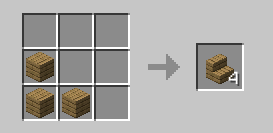
so you can craft it in you inventory
# Important
### All versions before 1.4 are unsupported and they may or may not work
if you have problems go to [The discord server](https://discord.gg/ZRTzwxD7WD)
**as you may have noticed this is pretty inactive it is mainly because nothing has really needed to be done xD**
unsup
***Un**a’s **S**imple **Up**dater*
unsup is a somewhat minimal implementation of a generic working directory
syncer in Java. It supports running as a Java agent, to piggy-back off of the
launch of another program.
***It is particularly good at syncing small private modpacks or one-offs in small groups, where a full public distribution (e.g. on Modrinth!) is overkill or undesirable.*** It is capable of downloading mods from their original sources, wherever that may be… as long as it speaks HTTP(S).
An [unsup.ini](https://git.sleeping.town/unascribed/unsup/wiki/Config-format)
must be placed in the working directory for unsup to know what to do, or a `-Dunsup.bootstrapUrl=` JVM argument specifying where to find such a file.
The updater works hard to ensure the working directory is never left in an
inconsistent state. Short of a sudden power loss in the middle of applying
changes (an incredibly short time window), an unsup update cannot result in
an inconsistent or corrupted working directory.
It does hash-based consistency validation (with your choice of function, SHA-256 recommended) on all downloads and on files before overwriting
them, warning the user if they’ve changed something that has been updated. It
additionally supports signing manifests using OpenBSD Signify for additional
security.
unsup’s unique simplified design means it is compatible with **all launchers**,
from the vanilla launcher to MultiMC. Just add `-javaagent:unsup.jar` to the
JVM arguments, and place `unsup.jar` and `unsup.ini` in the .minecraft
directory.
In Prism Launcher, you can utilize unsup as a “component” by importing the
`com.unascribed.unsup.json` from the latest release on Forgejo. (I can’t upload JSON files to Modrinth). This will allow Prism
Launcher to download and manage unsup. (MultiMC does not support Java agent
components, despite requests.)
It also has a built-in concept of *environments* and *flavors*, allowing it to
be used to manage server installs rather than just clients, and allowing users
to pick between multiple mutually incompatible mod sets with a feature-packed interface unlike any other updater tool.
unsup is also capable of updating MultiMC’s “components”, including
unsup itself if it is added as one. This means you can update mod loaders or
Minecraft itself.
## Creating Packs
You can either point unsup at a [Packwiz](https://packwiz.infra.link/) pack.toml (recommended),
or write a native unsup manifest by hand. See [the wiki](https://git.sleeping.town/unascribed/unsup/wiki/Manifest-format) for info on the
native manifest format. The Creator GUI is on hold, as Packwiz has become a
de-facto standard for Minecraft modpacks.
## Stability
unsup has been used for modpacks on versions from b1.7.3 to 1.21.5, both client and server,
and is known to work with Forge (both legacy and modern), Fabric, Quilt, and NeoForge. It
has successfully powered many modpacks, from [small](https://git.sleeping.town/Rewind/Upsilon)
to [large](https://github.com/ModFest/bc23-pack). Native manifest and Packwiz manifest
support are both quite stable, and have been used extensively.
Signing support is still somewhat experimental, and has not been deployed by anyone at
large scale. That someone could be you — please let me know if it works well!
## GUI
unsup has a minimal and elegant GUI that works everywhere (yes, including
macOS) and can have all of its colors customized to make it fit in with your
branding. It ships with a dark theme with minty accents. Check out the gallery tab!
## License
unsup is released under the LGPLv3.
Universal Outlined Ores
This is a Minecraft resource pack that adds outlines to ores in mods, making them more visible.
It is trying to be compatible with all mods that add ores (work also with vanilla ores) and for all versions of Minecraft.
It will probably be compatible with OptiFine’s connected textures.
Links : [Github](https://github.com/Seltade-MC/UniversalOutlinedOres)/[Modrinth](https://modrinth.com/resourcepack/universal-outlined-ores)
# Compatible mods :
Available=✅ Not Tested=❓ Work in progress=⏳ Impossible=❌
|Mods|Links|Status|
|—|—|—|
|AdAstra|[Github](https://github.com/terrarium-earth/Ad-Astra)/[Modrinth](https://modrinth.com/mod/ad-astra)/[CurseForge](https://www.curseforge.com/minecraft/mc-mods/ad-astra)|⏳|
|Aether Addon: Overworld Ores|[Github](https://github.com/The-Aether-Team/Overworld-Ores)/[Modrinth](https://modrinth.com/mod/aether-overworld-ores)/[CurseForge](https://www.curseforge.com/minecraft/mc-mods/aether-overworld-ores)|⏳|
|Alex’s Caves|[Github](https://github.com/AlexModGuy/AlexsCaves)/[Modrinth](https://modrinth.com/mod/alexs-caves)/[CurseForge](https://www.curseforge.com/minecraft/mc-mods/alexs-caves)|⏳|
|Ancient Aether|[Github](https://github.com/Builderdog841/Ancient-Aether)/[Modrinth](https://modrinth.com/mod/ancient-aether)/[CurseForge](https://www.curseforge.com/minecraft/mc-mods/ancient-aether)|⏳|
|Better End|[Github](https://github.com/quiqueck/BetterEnd)/[Modrinth](https://modrinth.com/mod/betterend)/[CurseForge](https://www.curseforge.com/minecraft/mc-mods/betterend)|⏳|
|Better Nether|[Github](https://github.com/quiqueck/BetterNether)/[Modrinth](https://modrinth.com/mod/betternether)/[CurseForge](https://www.curseforge.com/minecraft/mc-mods/betternether)|⏳|
|Bewitchment|[Github](https://github.com/MoriyaShiine/bewitchment)/[Modrinth](https://modrinth.com/mod/bewitchment)/[CurseForge](https://www.curseforge.com/minecraft/mc-mods/bewitchment)|⏳|
|Cobblemon|[Gitlab](https://gitlab.com/cable-mc/cobblemon)/[Modrinth](https://modrinth.com/mod/cobblemon)/[CurseForge](https://www.curseforge.com/minecraft/mc-mods/cobblemon)|⏳|
|Create|[Github](https://github.com/Creators-of-Create/Create)/[Modrinth](https://modrinth.com/mod/create)/[CurseForge](https://www.curseforge.com/minecraft/mc-mods/create)|⏳|
|Create Fabric|[Github](https://github.com/Fabricators-of-Create/Create)/[Modrinth](https://modrinth.com/mod/create-fabric)/[CurseForge](https://www.curseforge.com/minecraft/mc-mods/create-fabric)|⏳|
|Create: Metallurgy|[Github](https://github.com/Lucreeper74/Create-Metallurgy)/[Modrinth](https://modrinth.com/mod/create-metallurgy)/[CurseForge](https://www.curseforge.com/minecraft/mc-mods/create-metallurgy)|⏳|
|Create: New Age|[Gitlab](https://gitlab.com/antarcticgardens/create-new-age)/[Modrinth](https://modrinth.com/mod/create-new-age)/[CurseForge](https://www.curseforge.com/minecraft/mc-mods/create-new-age)|⏳|
|Deep Aether|[Github](https://github.com/RazorDevs/Deep-Aether)/[Modrinth](https://modrinth.com/mod/deep-aether)/[CurseForge](https://www.curseforge.com/minecraft/mc-mods/deep-aether)|⏳|
|Deeper and Darker|[Github](https://github.com/KyaniteMods/DeeperAndDarker)/[Modrinth](https://modrinth.com/mod/deeperdarker)/[CurseForge](https://www.curseforge.com/minecraft/mc-mods/deeperdarker)|⏳|
|ExtraGems|[Github](https://github.com/XxRexRaptorxX/ExtraGems)/[Modrinth](https://modrinth.com/mod/extragems)/[CurseForge](https://www.curseforge.com/minecraft/mc-mods/extra-gems)|⏳|
|Galosphere|[Github](https://github.com/0rc1nus/Galosphere-Main)/[Modrinth](https://modrinth.com/mod/galosphere)/[CurseForge](https://www.curseforge.com/minecraft/mc-mods/galosphere)|⏳|
|Ice and Fire: Dragons|[Github](https://github.com/AlexModGuy/Ice_and_Fire)/[Modrinth](https://modrinth.com/mod/ice-and-fire-dragons)/[CurseForge](https://www.curseforge.com/minecraft/mc-mods/ice-and-fire-dragons)|⏳|
|Immersive Engineering|[Github](https://github.com/BluSunrize/ImmersiveEngineering)/[Modrinth](https://modrinth.com/mod/immersiveengineering)/[CurseForge](https://www.curseforge.com/minecraft/mc-mods/immersive-engineering)|⏳|
|Industrial Craft|[Modrinth](https://modrinth.com/mod/industrial-craft)/[CurseForge](https://www.curseforge.com/minecraft/mc-mods/industrial-craft)|⏳|
|Industrial Revolution|[Github](https://github.com/GabrielOlvH/Industrial-Revolution)/[Modrinth](https://modrinth.com/mod/industrial-revolution)/[CurseForge](https://www.curseforge.com/minecraft/mc-mods/industrial-revolution)|⏳|
|Infernal Expansion|[Github](https://github.com/infernalstudios/Infernal-Expansion)/[Modrinth](https://modrinth.com/mod/infernal-expansion)/[CurseForge](https://www.curseforge.com/minecraft/mc-mods/infernal-expansion)|⏳|
|Infinite Abyss|[Modrinth](https://modrinth.com/mod/infinite-abyss)/[CurseForge](https://www.curseforge.com/minecraft/mc-mods/infinite-abyss)|⏳|
|Magneticraft|[Github](https://github.com/Magneticraft-Team/Magneticraft)/[CurseForge](https://www.curseforge.com/minecraft/mc-mods/magneticraft)|⏳|
|Marium’s Soulslike Weaponry|[Github](https://github.com/mariumbacchus/Soulslike-Weaponry)/[Modrinth](https://modrinth.com/mod/mariums-soulslike-weaponry)/[CurseForge](https://www.curseforge.com/minecraft/mc-mods/mariums-soulslike-weaponry)|⏳|
|Mekanism|[Github](https://github.com/mekanism/Mekanism)/[Modrinth](https://modrinth.com/mod/mekanism)/[CurseForge](https://www.curseforge.com/minecraft/mc-mods/mekanism)|⏳|
|Mekanism: AdAstraOres|[Gitlab](https://gitlab.com/libertymods/mekanism-ad-astra-ores)/[Modrinth](https://modrinth.com/mod/mekanism-ad-astra-ores)/[CurseForge](https://www.curseforge.com/minecraft/mc-mods/mekanism-ad-astra-ores)|⏳|
|Modern Industrialization|[Github](https://github.com/AztechMC/Modern-Industrialization)/[Modrinth](https://modrinth.com/mod/modern-industrialization)/[CurseForge](https://www.curseforge.com/minecraft/mc-mods/modern-industrialization)|⏳|
|Mythic Metals|[Github](https://github.com/Noaaan/MythicMetals)/[Modrinth](https://modrinth.com/mod/mythicmetals)/[CurseForge](https://www.curseforge.com/minecraft/mc-mods/mythicmetals)|⏳|
|NetherEx|[Github](https://github.com/LogicTechCorp/NetherEx)/[Modrinth](https://modrinth.com/mod/netherex)/[CurseForge](https://www.curseforge.com/minecraft/mc-mods/netherex)|⏳|
|Oh The Biomes You’ll Go|[Github](https://github.com/Potion-Studios/BYG)/[Modrinth](https://modrinth.com/mod/biomesyougo)/[CurseForge](https://www.curseforge.com/minecraft/mc-mods/oh-the-biomes-youll-go)|⏳|
|Oritech|[Github](https://github.com/Rearth/Oritech)/[Modrinth](https://modrinth.com/mod/oritech)/[CurseForge](https://www.curseforge.com/minecraft/mc-mods/oritech)|⏳|
|Palladium|[Github](https://github.com/ThreeTAG/Palladium)/[Modrinth](https://modrinth.com/mod/threetag-palladium)/[CurseForge](https://www.curseforge.com/minecraft/mc-mods/threetag-palladium)|⏳|
|Pixelmon|[Modrinth](https://modrinth.com/mod/pixelmon)/[CurseForge](https://www.curseforge.com/minecraft/mc-mods/pixelmon)|⏳|
|Powah!|[Github](https://github.com/Technici4n/Powah)/[Modrinth](https://modrinth.com/mod/powah)/[CurseForge](https://www.curseforge.com/minecraft/mc-mods/powah-rearchitected)|⏳|
|Railcraft|[Github](https://github.com/Railcraft/Railcraft)/[CurseForge](https://www.curseforge.com/minecraft/mc-mods/railcraft)|⏳|
|Samurai Dynasty|[Github](https://github.com/VeroxUniverse/SamuraiDynasty-neoforge)/[Modrinth](https://modrinth.com/mod/epic-samurais)/[CurseForge](https://www.curseforge.com/minecraft/mc-mods/samurai-dynasty)|⏳|
|Tech Reborn|[Github](https://github.com/TechReborn/TechReborn)/[Modrinth](https://modrinth.com/mod/techreborn)/[CurseForge](https://www.curseforge.com/minecraft/mc-mods/techreborn)|⏳|
|Thaumcraft|[CurseForge](https://www.curseforge.com/minecraft/mc-mods/thaumcraft)|⏳|
|Thermal Foundation|[Modrinth](https://modrinth.com/mod/thermal-foundation)/[CurseForge](https://www.curseforge.com/minecraft/mc-mods/thermal-foundation)|⏳|
|Things|[Github](https://github.com/wisp-forest/things)/[Modrinth](https://modrinth.com/mod/things)/[CurseForge](https://www.curseforge.com/minecraft/mc-mods/things-fabric)|⏳|
|Tinkers Construct|[Github](https://github.com/SlimeKnights/TinkersConstruct)/[CurseForge](https://www.curseforge.com/minecraft/mc-mods/tinkers-construct)|⏳|
|Traincraft|[Github](https://github.com/EternalBlueFlame/Traincraft-5)/[CurseForge](https://www.curseforge.com/minecraft/mc-mods/traincraft)|⏳|
|Universal Ores|[Github](https://github.com/DawnTeamMC/UniversalOres)/[Modrinth](https://modrinth.com/mod/universal_ores)/[CurseForge](https://www.curseforge.com/minecraft/mc-mods/universal-ores-fabric)|✅|
|Werewolves|[Github](https://github.com/TeamLapen/Werewolves)/[Modrinth](https://modrinth.com/mod/werewolves)/[CurseForge](https://www.curseforge.com/minecraft/mc-mods/werewolves-become-a-beast)|⏳|
### If the ore mod you want is not listed above, please report it [here](https://github.com/Seltade-MC/UniversalOutlinedOres/issues).
UniLink
## 🔗 UniLink
A mod that allows you to use resources from other directories
## 💼 Usage
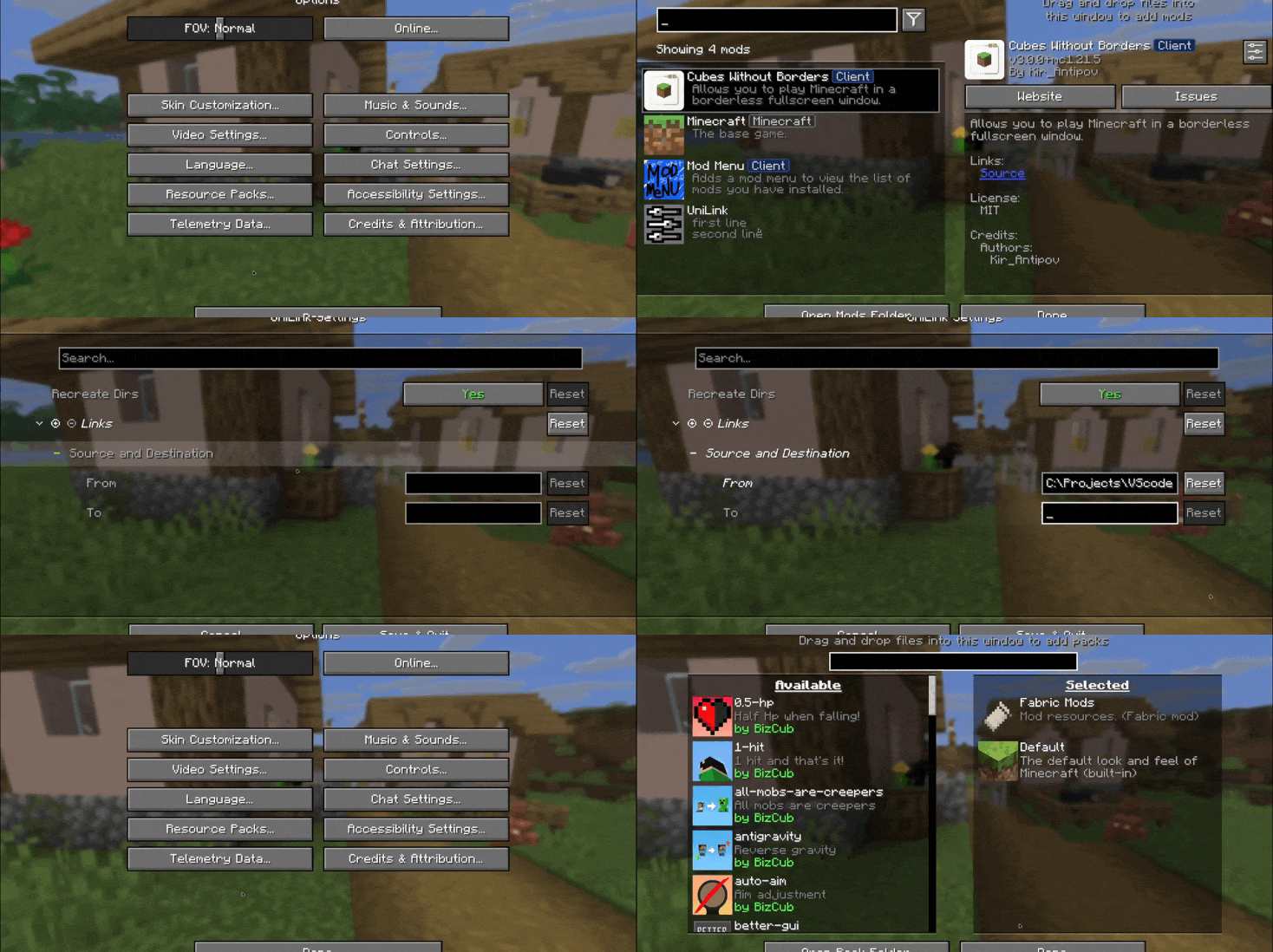
This mod works using symbolic links, which can be used like a folder but don’t require reusing (copying) resources. Some launchers also use symbolic links, but the mod works independently of them. It’s a configuration file. The first field specifies the path to the directory to use, and the second field specifies the path to the folder where the symbolic link should be placed. The final path can be absolute (e.g., “`C:….minecraftsaves“`) or abbreviated (“`saves“`).

If you change the directory used for worlds and then revert the change, the game may freeze while searching for and failing to find the required folder. For this purpose, the configuration file has an option to recreate the folders used by the game.
## 🛠️ How it works
By default, the mod does nothing. However, you can add data to the configuration to create a link: the path from which resources will be used and the path where the symbolic link will be created.
### What follows from this:
* After changing the configuration, new links will be added. Therefore, old, unused links will be deleted.
* Since Minecraft creates some folders, the mod will have to delete the existing folder before creating the link. However, since the mod deletes folders without asking, it has a limitation on deleting directories with files inside. This means that if a folder contains any files, it won’t be deleted and the link won’t be created.
Creating symbolic links requires certain permissions. Therefore, some launchers that don’t have them won’t be able to create links. Solution: Run the launcher as administrator.
## 🤝 Support

UniLib
# UniLib
A common set of Utilities, designed for over 50 versions of Minecraft!
[](https://opensource.org/licenses/MIT)
[](https://app.codacy.com/gl/CDAGaming/UniLib/dashboard?utm_source=gl&utm_medium=referral&utm_content=&utm_campaign=Badge_grade)
[](https://gitlab.com/CDAGaming/UniLib/commits/main)
[](https://www.curseforge.com/minecraft/mc-mods/unilib)
[](https://www.curseforge.com/minecraft/mc-mods/unilib)
[](https://modrinth.com/mod/unilib)
[](https://modrinth.com/mod/unilib)
## General Notes
* This mod identifies as a **Client Side-only** mod
* This means it **will not run** on the Server’s side.
* Fabric and Quilt mod loaders will simply ignore the
mod, while other mod loaders may crash.
* Some versions of the mod for Minecraft 1.14.x and above require
the [Fabric API](https://modrinth.com/mod/fabric-api)
and the [Fabric mod loader](https://fabricmc.net/use/installer)
* Some versions of the mod for Minecraft 1.13.x require
the [Rift API](https://www.curseforge.com/minecraft/mc-mods/rift)
and the [Rift mod loader](https://github.com/DimensionalDevelopment/Rift/releases)
* Some versions of the mod for Minecraft 1.1.0 and below
require [Risugami’s ModLoader](https://mcarchive.net/mods/modloader)
## Features
This library mod offers various API utilities that have been developed over the years,
initially part of [CraftPresence](https://gitlab.com/CDAGaming/CraftPresence),
that have been designed to work on over 50 versions of Minecraft, from the earliest Alphas to the latest Releases.
These APIs range from utilities that can help with Rendering/UI design, Update Checker and Translation ease-of-access,
as well as the APIs provided through the sibling-project, [UniCore](https://github.com/CDAGaming/UniCore)
## Disclaimers & Additional Info
### Minecraft Issues + Additional Build Info
Despite best efforts, issues can occur due to the state of the Minecraft Codebase.
These issues can hinder certain portions of the backend in addition to cause certain parts of the mod to not work.
With this in mind, please note the following:
* **Minecraft 1.16 and above**
* As more parts of the game become data-driven, some modded data is no longer able to be automatically retrieved
without first being in the world.
* **Minecraft 1.15 and below**
* `MC-112292`: When interacting with the `RenderUtils#drawItemStack` method, used in the v2 Item Renderer, blocks
using certain renderers may fail to display properly.
* Additionally, on 1.15.x exclusively, z-level issues may occur on Screens using this method
* **Miscellaneous Issues**
* Due to obfuscation issues in earlier versions of Minecraft, incorrect data may appear when using certain parts of
the mod.
Additionally, some settings or API calls may perform differently under certain MC versions.
### Support
Need some assistance with one of my mods or wish to provide feedback?
I can be contacted via the following methods:
* [Email](mailto:[email protected])
* [CurseForge](https://www.curseforge.com/minecraft/mc-mods/unilib)
* [Discord :: ](https://discord.com/invite/BdKkbpP)
Additionally, codebase documentation for this mod is
available [here](https://cdagaming.gitlab.io/unilib-documentation/) with further guides available
on [the wiki](https://gitlab.com/CDAGaming/UniLib/-/wikis/Home)
#### Licensing
This Mod is under the MIT License as well as the Apache 2.0 License
This project currently makes usage of the following dependencies internally:
* [UniCore](https://github.com/CDAGaming/UniCore) by [CDAGaming](https://github.com/CDAGaming)
* [Classgraph](https://github.com/classgraph/classgraph) by [lukehutch](https://github.com/lukehutch)
* [Lenni Reflect](https://github.com/Lenni0451/Reflect) by [Lenni0451](https://github.com/Lenni0451)
Underwater Swim Fix (MC-220390)
Fixes [MC-220390](https://bugs.mojang.com/browse/MC/issues/MC-220390) a bug where if you hit an entity while swimming and holding the sprint hotkey, the hitboxes server and clientside will be different. Resulting in weird behaviour where the client thinks that theyre swimming while the server doesnt think that. So when you for example try to go into a 1×1 block space while experiencing this bug, you will glitch out until you stop swimming and swim again.
The bug really annoyed me in monuments so I fixed it.
Join the [Discord!](https://discord.gg/p6ShJPq98d) You can ask for help, a mod, just suggest something, hangout or request the source code of any mod I have made (if I still have the source code)
Or donate to my [Kofi](https://ko-fi.com/bikerboys) incase you are feeling generous!
Undertale 2 Effect Sprites (*AND SPELL ICONS!)
Ever gotten tired of how Minecraft status effect icons look? No? Too bad.
This resource pack replaces THOUSANDS of effect icons with sprites from hit 2021 sequel UNDERTALE 2 – REVENGE OF THE ROBOTS!
(also featuring sprites from undertale yellow 2, an in-developement fan sequel to the fangame undertale yellow!)
# ALSO HAS FULL SUPPORT FOR IRON’S SPELLS & SPELLBOOK SPELL ICONS! (+ SOME ADDONS!) #
## PLAY UNDERTALE 2! ##
[UNDERTALE 2 – REVENGE OF THE ROBOTS](https://pep.itch.io/undertale-2)
## ALSO PLAY UNDERTALE YELLOW 2’S DEMO! ##
[UNDERTALE YELLOW 2](https://darkworldralsei.itch.io/undertale-yellow-2)
## ALSO ALSO PLAY SORRYPONIKO’S OTHER GAME, GIMMIKO!!! (COMING SOON!!!) ##
[GIMMIKO](https://store.steampowered.com/app/2101420/GIMMIKO/)
## USE MOREMCMETA, OPTIGUI OR ANIMATICA TO EXPERIENCE THE FULL CAPABILITIES OF THIS PACK! (NOT REQUIRED, BUT RECOMMENDED!) ##
[MoreMcmeta](https://modrinth.com/mod/moremcmeta)
[Animatica](https://modrinth.com/mod/animatica)
[OptiGUI](https://modrinth.com/mod/optigui)
## SUPPORTS OVER 180 MODS! ##
From Ars Nouveau to Farmer’s Delight, this pack’s got you covered! Here’s a full list of mods:
– The Aether
– The Aether: Redux
– Alex’s Caves
– Alex’s Caves Exemplified
– Alex’s Caves: Stuff & Torpedoes
– Alex’s Herps
– Alex’s Mobs
– Alex’s Mobs Interaction
– Alshanex’s Familiars
– Apotheotic Additions
– Apothic Attributes
– ArPhEx/Arthropod Phobia Expansions + Horror Bosses (Spiders, Arachnophobia)
– Aquamirae
– Aquamirae Delight
– Archers (RPG Series)
– Archery Expansion
– Ars Additions
– Ars Elemental
– Ars Nouveau
– Ars Scalaes
– Ars Delight
– Atmospheric
– Autumnity
– Better Beacons
– Better End
– Biome Makeover
– Born in Chaos
– Botania
– Box of Horrors
– Blue Skies
– BrassAmber Battle Towers
– Brewin’ and Chewin’
– The Bumblezone
– Buzzier Bees
– CAS’ Extra Potions
– Casualness Delight
– Cataclysm
– Caverns & Chasms
– CoFH Core
– Cold Sweat
– Compat Delight
– Confluence: Otherworld
– Contagion – A Zombie Infection Mod
– Cracker’s Wither Storm Mod
– Create: Confectionery
– Create: Crafts & Additions
– Create: Estrogen
– Create: Testosterone
– Creeping Woods
– Deep Aether
– Deeper and Darker
– Destroy (Create Addon)
– Doom & Gloom
– Dungeons Content
– Dungeons Delight
– Dungeons Mobs Port
– Eidolon
– Ender’s Delight
– Enderscape
– Ender Sins (Sons of Sins/Unusual End Addon)
– Enemy Expansion
– Environmental
– Epic Fight Mod
– EvilCraft
– Farmer’s Delight
– Farmer’s Respite
– Fazcraft
– First Aid
– Five Nights at Freddy’s: Management Wanted
– The Five Nights at Freddy’s/FNAF Mod
– The Flesh that Hates
– Forbidden Arcanus
– Fruits Delight
– Frycook Delight
– Friends & Foes
– Fungal Infection: Spore
– Galosphere
– GTBC’s Spellbooks – Iron’s Spells Addon
– Gigeresque
– Guns Without Roses
– The Hordes
– Hotdog Delight
– Ice & Fire Delight
– Illage and Spell-age: Iron’s Spells Addon
– Illage and Spillage
– Illage and Spillage: Respillaged
– Iron’s Spells ‘n Spellbooks
– Immersive Engineering
– Infernal Expansion
– Integrated Simply Swords
– I Wanna Skate
– Jujutsu Craft (Sorcery Fight)
– Just Enough Effect Descriptions (JEED)
– Jaden’s Nether Expansion
– KuroLIB
– Legendary Monsters
– [Let’s Do (Legacy)] Bakery
– [Let’s Do] Brewery
– [Let’s Do] Farm & Charm
– [Let’s Do] Meadow
– [Let’s Do] Nether Vinery
– [Let’s Do] Vinery
– Library Ferret
– Lycanites Mobs
– Lucky TNT Mod (Too Much TNT)
– Marvelous Menagerie
– MC Dungeons Artifacts
– Minecraft (up to 1.21.8!)
– Minestuck
– Mobs of Sins: Alex’s Mobs Integration
– Moderately Enough Effect Descriptions (MEED)
– Modular Golems
– Monsters & Girls
– Mowzie’s Mobs
– MrCrayfish’s Gun Mod
– Mutants Buff
– Mutant Monsters
– My Nether’s Delight
– Neapolitan
– Nirvana
– Obscure API
– The One Who Watches
– Oreganized
– Paladins & Priests (RPG Series)
– Parcool!
– Pixelmon
– Potion of Bees
– Potion+
– Prion Infection: Whispers From Within
– Projectile Damage Attribute
– Quark
– RangedWeaponAPI
– Rats
– Relics
– Reliquary Reincarnations
– Rogues & Warriors (RPG Series)
– RunicLib
– Savage & Ravage
– Scape and Run: Parasites
– SCORCHED GUNS 2
– SCP: Overtime
– SimpleDifficulty
– Simply More
– Simply Swords
– Sleep Tight
– Sleepy Hollows
– SoniCraft
– SoniCraft: Demons
– Sons Of Sins
– Species
– Spell Power Attributes
– Smelting Villagers
– Stalwart Dungeons
– Supplementaries
– Survival Instinct
– Sussare Cibum
– Terra Curio
– Tide’s Delight
– Tinker’s Construct
– Tiny Foes
– TipsyLib
– Too Many Bows
– Tough as Nails
– T.O Magic ‘n Extras – Iron’s Spells Addon
– Trials Chambers [1.20.1 Backport]
– The Twilight Forest
– Twilight’s Flavors & Delight
– THE UNDEAD REVAMPED
– Unusual End
– Unusual Prehistory
– Upgrade Aquatic
– Vampirism
– Vanilla Degus
– Via Romana
– Vintage Delight
– Voidscape
– Wandering Bags
– Wilder Wild
– Wizards (RPG Series)
– Xaero’s Minimap
– Xaero’s World Map
– Xtra Arrows
## WANT MORE MODS? IS ONE OF THESE OUTDATED? ASK ME! ##
It shouldn’t be too hard to track me down, my username is the same everywhere lol
## HAQ! (HYPOTHETICALLY ASKED QUESTIONS) ##
Q: *These sprites aren’t accurate to **X**’s source material!*
A: Some of these mods are based off of properties i’ve yet to watch/read/play, so apologies if some of the effects are innacurate (primarily with Jujutsu Craft.)
Q: *Some of these sprites aren’t accurate to the effects they represent!*
A: I don’t really have the time or motivation to play through each individual mod listed here, so some of these (albeit few) are moreso based off of descriptions found on wikis, or their names.
Q: *Do I have to install ALL of the mods in order to use this resource pack?*
A: Not at all! Heck, this pack will work even if you have no mods! (DISCLAIMER: I DO NOT RECCOMEND USING ALL OF THESE MODS AT ONCE! IT WILL (MOST LIKELY) BREAK YOUR GAME, OR AT THE VERY LEAST LAG A LOT!!)
Q: *Some sprites look all squished & weird!*
A: Some of the effects have animated sprites, which requires you to install a mod that allows you to animate UI elements (Optifine, OptiGUI, MoreMcmeta, Animatica, ect.) Unfortunately, this means if you don’t install one of these mods, those sprites are just stuck like that.
Q: *Okay, but what if i’m playing multiplayer? I don’t wanna install a mod that changes the game just to enjoy goofy pictures.*
A: Optifine, Optigui, Moremcmeta and Animatica are all client side, so it shouldn’t really affect your experience.
Q: *Is this for Fabric or Forge?*
A: Both. It should work for Quilt, NeoForge and Vanilla as well.
Q: *Does this work in older versions than 1.20.1?*
A: Probably. I didn’t go through every single mod and check it in every different minecraft version. At least 3 of the supported mods aren’t avaliable for modern minecraft versions, but that doesn’t really cause any problems.
Q: *Does this work in the latest updates?*
A: It seems so, even though I swear I heard somewhere that they were changing where effect sprites were stored in one of the new updates. Unfortunately, the latest Minecraft versions lack most major content mods, but the pack should still work regardless.
Q: *Can I use some of these for something I’m creating?*
A: I don’t really have the authority to allow things like that. You’d probably have to ask Zizou or Raltzy, depending on which game the sprite is from. I’ve drawn a few of these myself, but a majority is edited/taken directly from Undertale 2 and Undertale Yellow 2.
Q: *Will this take up a lot of space?*
A: No, unless you have a computer from the 90’s. The pack is only about 1 mb.
Q: *Why is **X** included here???*
A: A couple of these mods are just some of the most downloaded mods on curseforge and modrinth. Most of them are ones I regularly use in modpacks or just generally like. I’m completely out of the loop when it comes to mod developement drama, so if I unintentionally include a mod made by a bad person, I apologize.
Q: *Is the **Y** fork/port of **X** mod supported, even though it isn’t listed?*
A: Usually, unless the fork or port uses a different namespace.
Q: *Why did you spend so much time and effort on something so ridiculous and inconsequential?*
A: I have no clue.
## F-F-FUN FACTS! ##
This resource pack (as of v10) has just over 2000 files in it (including duplicates)!
I’ve officially been working on this pack for almost a whole year now!
This resource pack includes references to way more things than just Undertale 2! (Deltarune, Undertale, Undertale Yellow, etc.)
All of the effect sprites & spell (aside from effects pertaining to a cooldown) are 24×24 pixels in resolution.
There may or may not be some ~~g~~easter eggs in here…
There’s more than 20 seperate (and functionally identical) ‘bleeding’ effects in this list of mods! Cool…?
turn PojavLauncher app icon to crafting table
This pack turns the crafting table texture to the [PojavLauncher ](https://pojavlauncher.app/) app icon