Simple Leads
✨ Features
🧪 Main description
This datapack allows you to craft leads (leashes) more easily using common and renewable materials, removing the need to hunt slimes early in the game.
Ideal for players who manage animals frequently or want quicker access in survival.
🧪 Recipes
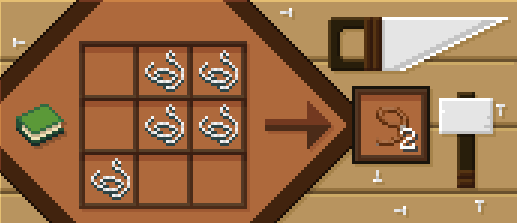
📥 Installation
📁 Datapack
Drop the .zip file into your world’s datapacks folder.
Reload the world or use /reload.
Enjoy your enchanted adventure!
⚙️ Mod
Drop the .jar file into the mods folder of your instance.
Restart your game.
Have fun!
Simple hit sound
This resource pack enhances PvP hit sounds to make combat feel more responsive and satisfying ⚔️🔥 The sounds are clearer and less distracting, helping you stay focused and track your hits better 🎯 Perfect for players looking for a smoother, more engaging PvP experience 🚀
Simple Datapacks
## 📂 Simple Datapacks
The purpose of this mod is to simplify the ways of adding datapacks to the game. To do this, the mod creates a folder in the root directory of Minecraft called datapacks. In my opinion, the capabilities of datapacks are underestimated by players, mostly because not everyone understands how to install datapacks into the game. This is more difficult to do than to install a mod or resource pack, although many datapacks bring a lot of content to the game.
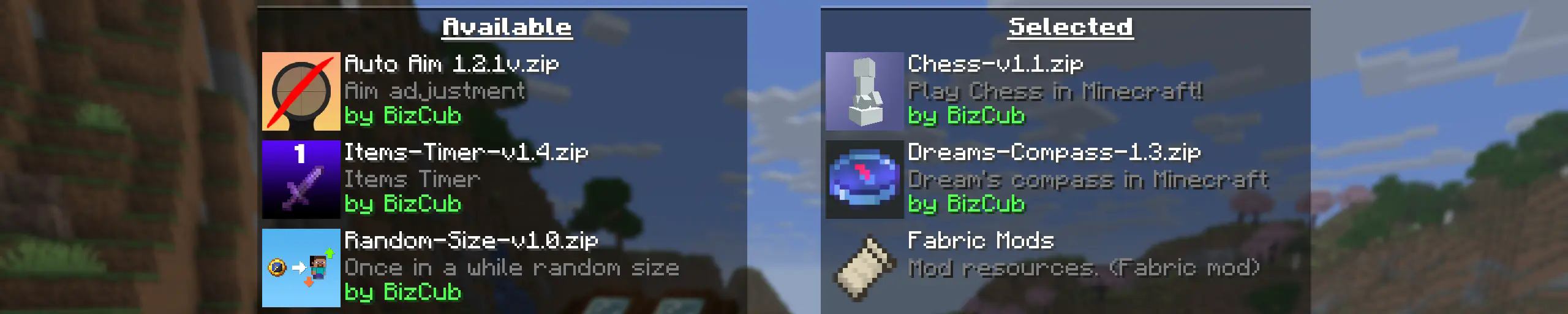
My goal is to make a mod that will help players with installing datapacks into the game so that they can get a new portion of unforgettable impressions.
## 💼 Usage

In order to launch a world with datapacks, you need to download any datapack that is compatible with the selected version of Minecraft, open and place the datapack in the datapacks folder, start creating a world and select the desired datapack from the list. However, when using Cloth Config, the mod settings specify the path to the downloads folder, so to use datapacks, you only need to download them, then simply open the datapack selection menu and enable the desired one.
## ✨ Features
Whenever possible, I added the most basic features for the mod that I could imagine.
Click to open
* Since the main thing for me is that as many players as possible start using datapacks, I made the mod available on 4 different loaders so that it can be launched from almost any modpack.
* The mod has a configuration. The values used by the mod can be changed in the mod menu (Fabric requires ModMenu), and can also be changed in the configuration file, which is available using the Cloth Config API.
* The mod allows players to add and load datapacks from different folders. To change the sources of these packs, you need to configure them in the mod settings. If you want to specify a folder in the game’s root directory, for example, “`my_datapacks“` instead of the full path “`C:Users{USERNAME}AppDataRoaming.minecraftmy_datapacks“`, simply enter the folder name in the field in the mod settings menu.
* By default, datapacks are loaded from the datapacks folder in the root directory and the downloads folder, allowing them to appear in the game immediately after installation (provided Cloth Config API is loaded; otherwise, only the datapacks folder will be used).
* The mod settings have two lists: one for required and one for optional datapacks. The first list specifies the paths to datapacks that are automatically applied when entering a world. The second list contains datapacks that remain inactive but can be enabled at any time using the “`/datapack enable“` command.
* The Simple Datapacks mod runs on the server. Since the mod settings are not accessible on the server, it automatically uses all datapacks from the datapacks folder.
* It’s possible to disable feature packs (experimental datapacks). If you don’t use feature packs, you can disable them to save space on the datapack selection screen. In the mod settings, function packages can be set to required, and then they will be applied when the world starts.
* Unlike similar mods, datapacks will continue to work in the world, even if you disable the mod. In the mod settings, you can enable copying datapacks to the world folder. In this case, the datapack will work without the mod, because the game will read it from the world.
## 🤝 Support

Silkiest Touch
This is a datapack that makes so most unobtainable blocks are now obtainable with silk touch. this includes reinforced deepslate, spawners, trial spawners, dirt paths, chorus plants, suspicious sand and gravel, budding amethyst, and trial vaults. There is no way of obtaining spawn eggs in this datapack so both of the spawner types are purely decorative.
Silent Horns
**Are you tired of hearing goat horns again and again?
Does your SMP friend annoy you with spamming goat horns while flying around you like a bug?**
This resourcepack will help you! 🤝
❌ There is currently no way to lower the volume of goat horn sounds exclusively, the only way is to lower the master game volume.
🔇 In this pack all goat horn sounds are replaced with silence, so you can enjoy peace without lowering your overall game volume all the way down.
### Troubleshooting
❓ If the horn sounds aren’t silenced after enabling resourcepack, you can try to rejoin the world/server or just relaunch the game entirely.
Silent Discs Plus
This Silent Discs resource pack is made specifically for use with redstone disk/jukebox ROMs. It not only silences all music discs, but also removes the “now playing” text and silences minecarts too
(Minecarts have a bad habbit of taking up the sound cap even if you can’t hear them, this pack fixes that)
Shorty Swords
Shortened Sword are Just Built Different! Aren’t they look hot?
Texture-pack makes swords a bit shorter. Supports almost **EVERY** ever existed Minecraft Version.
Ship With Robber
My social networks

—
## Description👀
**This datapack adds a pirate ship with robbers to your world. The upper chests contain raw cod, fried cod, charcoal, gunpowder, crossbow, fishing rod, ore iron. The middle chests contain tnt, fried cod, raw cod, charcoal, ore iron, gunpowder, fishing rod, trident with a small chance. In the lower chests there is a blacksmith template Shore, gunpowder, tnt, iron ingot, ore iron, charcoal, raw cod, fried cod, with a small chance you can drop a trident and a raid bottle (and there is also a secret barrel with good loot!)**
—
## Useful Сommands🔧
– **Use /locate structure elysianfields:ship_woth_robber for see dungeon coordinates**
– **Use /place structure elysianfields:ship_with_robber for spawn dungeon**
—

shea’s simple Totem x bare bones
# shea’s simple Totem x bare bones
## what does this pack does
### it takes Totems and cleans it up
This pack does not include any bare bones textures
**Bare Bones is required for the intended look**
disclaimer if you use this pack make sure to place this pack above bare Bones in your resource pack list for it to use its own instead of bare bones
i recomend using other shader and resource packs like bliss to improve looks but that is optional
**you can showcase this if you want just dont redistrabute it**
Shady’s Dark Okami GUI
The default Minecraft interface is too bright for me, and other dark mode packs I’ve downloaded in the past are just a step away from perfect. So, I made my own.
Features a dark mode interface that’s not too dark and not too light, double resolution font, and a custom-made Okami inspired HUD for hearts, air, armor, and hunger. To go a bit farther, the sun and moon are also replaced with custom Okami textures.
**_Check the gallery for more examples of how this pack looks when applied._**




