Vincent Van Gogh The Starry Night Style Paintings Pixel Art

Bring timeless art into your game with the Vincent Van Gogh The Starry Night Style Paintings Pixel Art Mod. Inspired by Van Gogh’s world-famous masterpiece The Starry Night, this mod transforms classic paintings into beautiful pixel art that perfectly blends with retro-style gameplay.
—
### How many paintings does it have?
**1.0**: 19 paintings

—
With this mod, you can decorate your world with pixel art recreations of Van Gogh’s paintings, giving every space a unique artistic touch. Whether you’re building a cozy house, a creative gallery, or just want to add a bit of culture to your world, these pixel-perfect artworks will make your creations shine.

The Starry Night pixel art paintings are carefully designed to maintain the essence of Van Gogh’s brushstrokes while adapting them to a pixelated aesthetic. This makes the mod not only visually stunning but also lightweight and compatible with many builds.
Perfect for art lovers, pixel art fans, and players who enjoy customization, this mod combines history, creativity, and style. Experience Van Gogh’s art like never before and transform your world into a living gallery of pixel art masterpieces.
Villager Rebalanced
# Villager Rebalanced
Free and open-source datapack for Minecraft 1.21 and higher that modifies and adds new exchanges with villagers.
## Features
This datapack modifies the trades of the armorer, the weaponsmith and the toolsmith as well as those of the wandering trader in order to mix the current trades with those of the trade rebalanced.
Only the changes to the librarian have not been implemented, although the price of the name tag has been reduced from 20 to 10 emeralds.
This datapack requires the installation of the [Villager Config](https://modrinth.com/mod/villagerconfig) mod.
Version Detector
Version Detector is a proof of concept that more is possible with datapacks than you’d think, and also an API for datapacks to detect what version they’re running.
It doesn’t do much on its own, but can be useful for other datapacks.
Note: when adding the datapack to a world, if you’re using a game version older than 1.20.2, Minecraft will warn you that the pack was made for an older version of Minecraft. Ignore this warning, I can’t do anything about it on versions older than 1.20.2 as the feature of pack.mcmeta that allows me to add a range of supported versions instead of having just 1 was added in 1.20.2.
Questions/Issues? Post them in my discord as they are more likely to get seen there. Find it on the sidebar.
This pack uses the fact that Minecraft completely removes functions with invalid syntax when loading a datapack, for example “execute if entity @e[type=pillager]” is invalid syntax in 1.13, because Pillagers don’t exist yet, causing the whole function to get removed in 1.13, but the function will load successfully and will exist in 1.14 and later because there is no more invalid syntax because Pillagers were added, and the command was written correctly. Each function sets a number in a scoreboard objective to a number and runs the next function, which has a different syntax to the previous one, for example “execute if entity @e[type=bee]” instead of “execute if entity @e[type=pillager]” when moving from the 1.14 function to the 1.15 function, checking for a different feature. If at any point the chain stops, the number stops changing, which matches your version of Minecraft.
The ID is stored in a score for “MinecraftVersion” in the “VersionInfo” objective. It goes from 0 (1.13) up to whatever the latest detectable version is.
This pack also has NeoForge and Forge detection. Fabric and Quilt are currently undetectable, as there is nothing I can detect that fabric or quilt (without mods installed) adds to the game.
## To Modpack Creators:
I permit the use of this datapack/mod in your modpacks. You can include it in modpacks without the need to ask me about it. However, notifying me if it is being included in your modpack would be nice.
## Versions Detected
List of versions detected, in order from oldest to newest, starting at ID 0 (1.13) and going up (if a version isn’t in this list it is grouped with the newest version from before the version, example 1.21.3 is grouped with 1.21.2):
## Releases/Snapshots
0. 1.13
1. 1.13.1
2. 1.14
3. 1.14.3
4. 1.14.4
5. 1.15
6. 1.15.2
7. 1.16
8. 1.16.2
9. 1.17
10. 1.18
11. 1.18.2
12. 1.19
13. 1.19.3
14. 1.19.4
15. 1.20
16. 1.20.2
17. 1.20.3
18. 1.20.5
19. 1.21
20. 1.21.2
21. 1.21.4
22. 25w02a
23. 25w03a
24. 25w04a
25. 25w05a
26. 25w06a
27. 25w07a
28. 25w08a
29. 25w09a
30. 25w10a
31. 1.21.5
32. 25w15a
33. 25w20a
34. 1.21.6
35. 1.21.7-1.21.8
36. 25w31a
37. 25w32a
38. 25w34a
39. 25w35a
40. 25w36a
41. 1.21.9-1.21.10
42. 25w41a
43. 25w42a
44. 25w43a
45. 25w44a
46. 1.21.11
47. 26.1 Snapshot 1 (Yay new versioning system)
48. 26.1 Snapshot 2
49. 26.1 Snapshot 3
50. 26.1 Snapshot 4
51. 26.1 Snapshot 5
52. 26.1 Snapshot 6 – Snapshot 7 (Don’t you DARE say it)
53. 26.1 Snapshot 8 – Snapshot 9
54. 26.1 Snapshot 10
55. 26.1 Snapshot 11
56. 26.1
### April Fools Snapshots:
1001. 20w14infinite
1002. 22w13oneBlockAtATime
1003. 23w13a_or_b
1004. 24w14potato
Currently no 25w14craftmine yet, been too lazy to add that
VerdantLight Pro
# VerdantLight Pro
**VerdantLight Pro** is a high-quality shader pack based on VerdantLight for Minecraft 1.18.X – 26.1, designed to deliver natural and realistic lighting while maintaining smooth performance. Featuring path-traced lighting, dynamic shadows, day-night cycles, realistic sun and moon halos, and smart plant shadow detection to prevent small plants from casting unnatural shadows.
VerdantLight Lite
# VerdantLight Lite
**VerdantLight Lite** is a lightweight shader pack based on VerdantLight for Minecraft 1.18.X – 26.1, designed to deliver natural and realistic lighting while maintaining smooth performance. Featuring path-traced lighting, dynamic shadows, day-night cycles, realistic sun and moon halos, and smart plant shadow detection to prevent small plants from casting unnatural shadows.
VerdantLight
# VerdantLight
—
**VerdantLight** is a lightweight, high-quality shader pack for Minecraft 1.21.4, designed to deliver natural and realistic lighting while maintaining smooth performance. Featuring path-traced lighting, dynamic shadows, day-night cycles, realistic sun and moon halos, and smart plant shadow detection to prevent small plants from casting unnatural shadows.
**Outstanding Performance:**
* On Intel Iris Plus 640, with render distance 6 and simulation distance 8, standing still gives around **75 FPS**.
* Walking across open plains maintains around **45 FPS**, providing a smooth experience without sacrificing visual quality.
**Key Features:**
* **Lightweight Optimization**: Designed for low-end hardware and high performance.
* **Dynamic Shadows**: Path-traced lighting ensures smooth, stable shadows without jittering.
* **Natural Sky**: Day-night cycle with realistic sunset/sunrise transitions, glowing sun square, and subtle moon halos.
* **Smart Plant Shadows**: Small plants cast no unnatural shadows, trees cast realistic shadows.
* **Enhanced Lighting**: Compatible with Minecraft’s native lightmaps, adds ambient occlusion for richer scene depth.
* **Rain Effects**: Sky color dynamically adjusts in rain, enhancing immersion.
**Perfect For:**
* Players seeking a lightweight, high-performance shader experience
* Builders who enjoy natural, soft lighting effects
* Low-end hardware users who want smooth FPS without compromising visuals
—
# VerdantLight
**中文介绍:**
**VerdantLight** 是专为 Minecraft 1.21.4 打造的轻量级高质量光影包,旨在在保持流畅性能的同时呈现自然、真实的光影效果。它采用路径追踪光照算法,支持动态阴影、昼夜循环、真实的太阳与月亮光晕效果,并通过智能植物阴影识别技术,让小型植物不会投射不自然的阴影,从而保证视觉的自然与细腻。
**性能表现极佳**:
* 在 Intel Iris Plus 640 上,渲染距离 6、模拟距离 8 时,玩家站立即可达到约 **75 FPS**。
* 在草原环境行走时,也能保持约 **45 FPS**,兼顾了流畅体验与光影品质。
**核心特点:**
* **轻量优化**:专为低配硬件和轻量化体验设计,减少不必要的计算负载。
* **动态阴影**:路径追踪光照算法实现实时阴影,无跳动问题。
* **自然天空**:昼夜循环、日落/日出色彩过渡,太阳正方形发光和月亮光晕自然呈现。
* **智能植物阴影**:小型植物不会投射不合理的阴影,树叶投射真实阴影。
* **光照贴图增强**:兼容 Minecraft 原生光照贴图,同时加入环境光遮蔽,使场景层次更丰富。
* **雨天效果**:雨天时天空颜色自动调整,增加沉浸感。
**适用人群**:
* 想要轻量、高性能光影体验的玩家
* 喜欢自然柔和光影效果的建造者
* 在低配硬件上追求流畅帧率的玩家
—
If there is a problem or advice, just say in the Discord Server.
Various Starting Loot

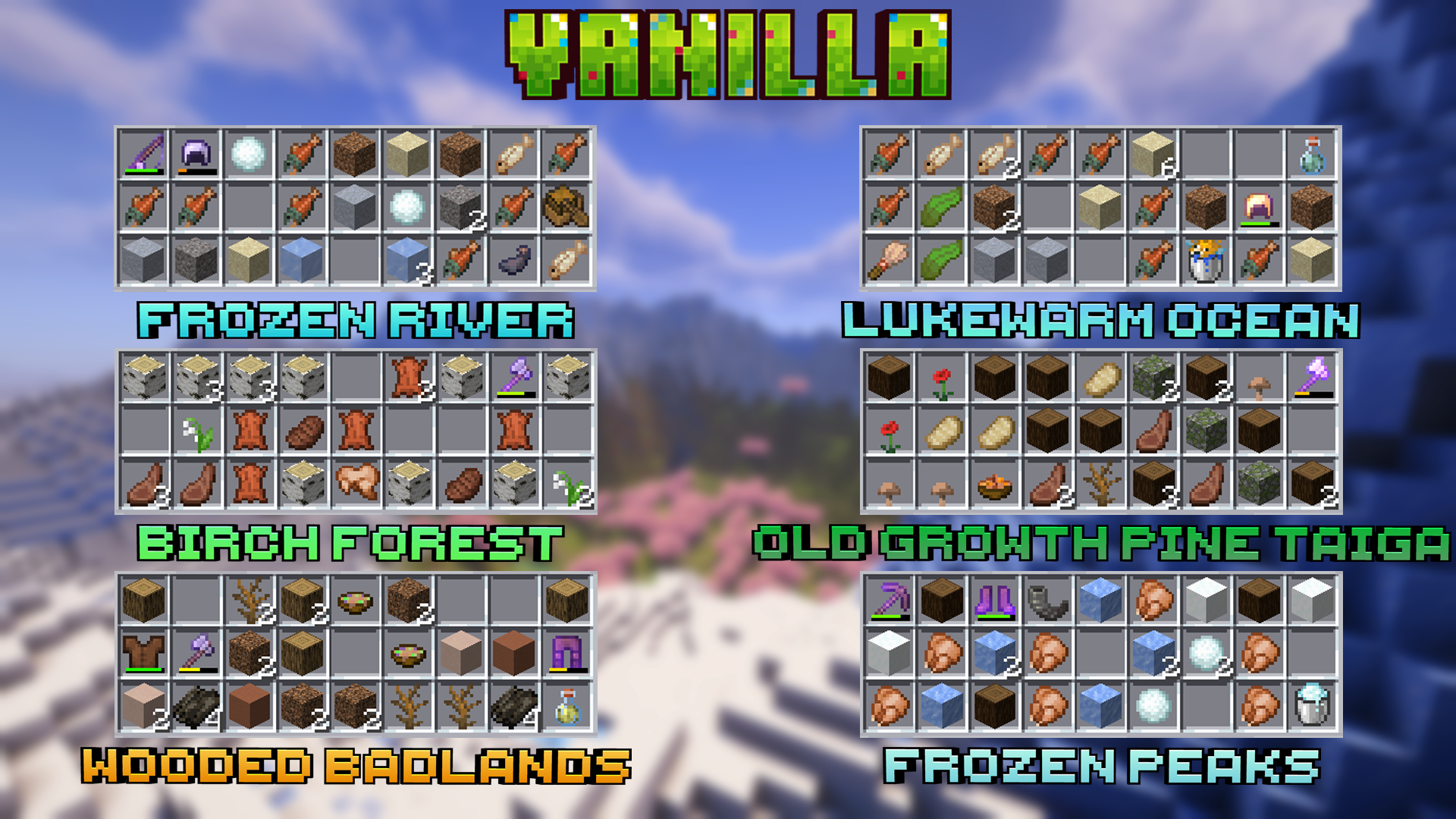
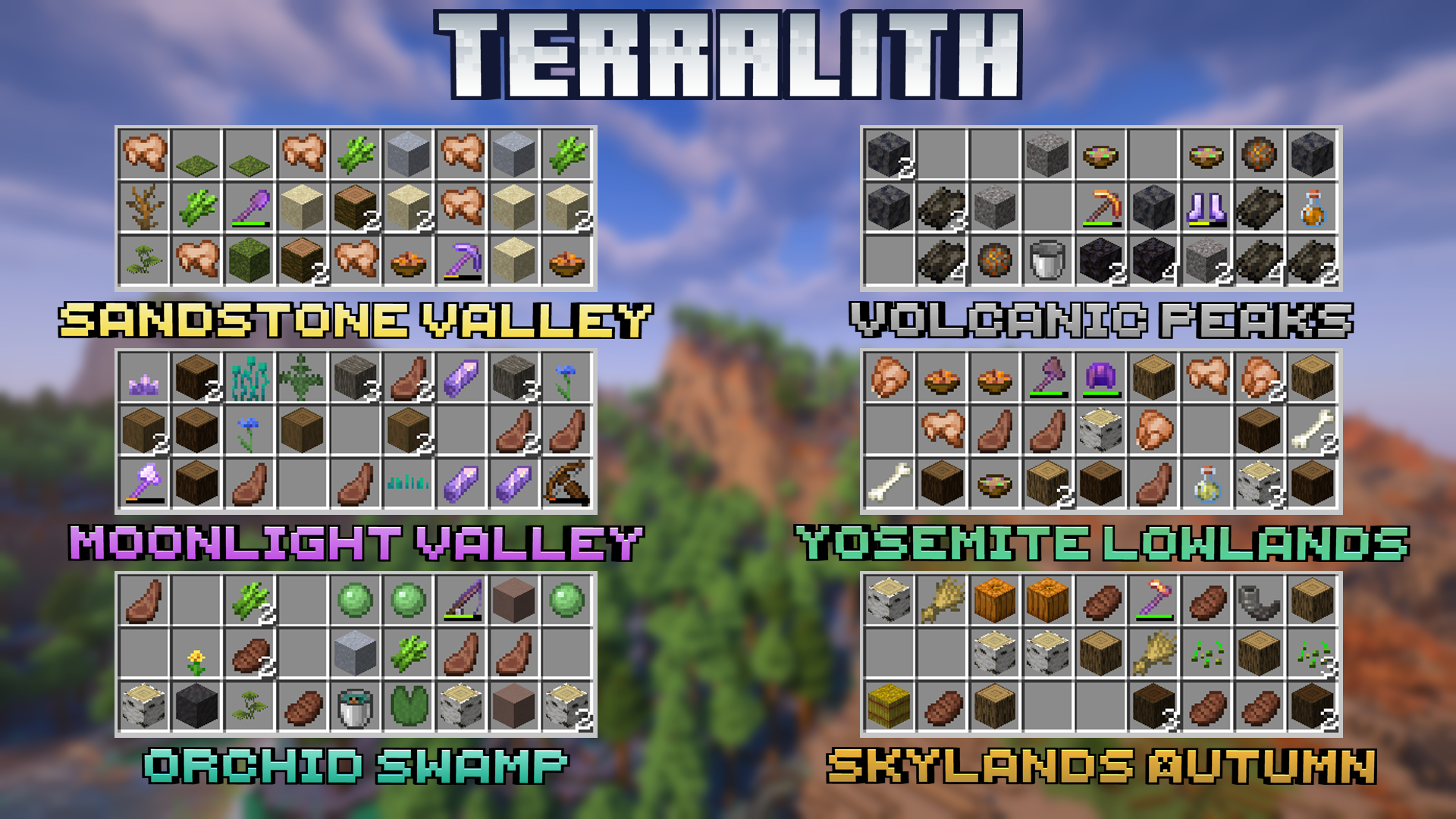
#### A datapack that changes the standard loot of the bonus chest, now it depends on biomes.
### You have to enable “Bonus Chest” to make the datapack work!!
## 🖼️Examples
## 🏞️Supported biomes:
– #### 🌳Vanilla
– #### 🌋Terralith (From version 4.0)
## 📚Modes:
**Datapack has two modes**
– First one is enabled by default and changes spawn bonus chest
– If you enable the second mode, loot will be given to the all new players directly in their inventories as a chest, that they can place and get loot
– To enable this mode use `/function various_starting_loot:settings`
– In this mode you don’t have to enable bonus chest at all
## 📂Installing as datapack
– Download and install datapack in the world
– For a new world: You can click the “Data Packs” option when creating a new world and select this datapack
– Enable Bonus Chest
## 🔧Installing as mod
– Download and put mod in your .minecraft/mods folder
– Enable Bonus Chest
### ❓FAQ:
1. **How to enable bonus chest on server?** Add –bonusChest argument to your JVM arguments
2. **Is it possible to get chest with bonus loot again?** Yes, use `/function various_starting_loot:loot`
3. **Support for “X” datapack/mod** Will be done someday if this datapack/mod is popular
enough
– Projects that I want to support: [Regions Unexplored](https://modrinth.com/mod/regions-unexplored), [Expanded Ecosphere](https://modrinth.com/mod/expanded-ecosphere), [Oh The Biomes You’ll Go](https://modrinth.com/mod/biomesyougo)
If you have any questions, bugs, suggestions you can [create an issue on github](https://github.com/Komaru-cats/Various-Starting-Loot/issues) or [join our discord server](https://discord.gg/j9VKsyXPhz)
Variated Spawn Eggs
This resource pack adds numerous more Spawn Egg textures based off the ones added in the 25w08a snapshot! It is meant to show the visual differences of each mob. The way to obtain these eggs are through /give commands with specific [Component Data](https://minecraft.wiki/w/Data_component_format).
To easily use the commands, I recommend using [MCStacker](https://mcstacker.net/?cmd=give) to quickly create and copy/paste the commands in-game.
**TERMS OF USE**
“`
You cannot use any of my original assets or resources for commercial use
You can redistribute my assets in your own resource pack as long I receive credit for it in a credits.txt file within the resource pack and on the page it is being hosted
You can use this resource pack within videos or live streams, however a link to my profile would be appreciated
“`
Basically, follow the [CC-BY-NC-SA License](https://creativecommons.org/licenses/by-nc-sa/4.0/).
**This resource pack only works in Java snapshot version 25w08a (1.21.5) and onward! Please do not use in 1.21.4 and below!**
Variants cakes
# **Variants cakes**
**The texture pack adds 26 cake variants. Cake textures can be swapped using OptiFine or CIT Resewn.**
**Contents:**
Spoiler
1. 6 cakes with sweet berries on a milk glaze
1. 6 cakes with glow berries on a milk glaze
1. 6 cakes with sweet berries on a chocolate glaze
1. 6 cakes with glow berries on a chocolate glaze
1. 1 cake with milk glaze and no berries
1. 1 cake with chocolate glaze and no berries
**Renamings:**
Spoiler
1. Cake 2
1. Cake 3
1. Cake 4
1. Cake 5
1. Cake no berries
1. Cake with glow berries 1
1. Cake with glow berries 2
1. Cake with glow berries 3
1. Cake with glow berries 4
1. Cake with glow berries 5
1. Cake with one glow berry
1. Cake with one sweet berry
1. Choco cake 1
1. Choco cake 2
1. Choco cake 3
1. Choco cake 4
1. Choco cake 5
1. Choco cake no berries
1. Choco cake with glow berries 1
1. Choco cake with glow berries 2
1. Choco cake with glow berries 3
1. Choco cake with glow berries 4
1. Choco cake with glow berries 5
1. Choco cake with one glow berry
1. Choco cake with one sweet berry
Variable Spawner Hardness
Makes spawners take longer to destroy depending on your difficulty for a slight extra challenge.
Default spawner hardnesses
– Peaceful: Same hardness as vanilla (5F)
– Easy: Same as end stone (9F)
– Normal: Same as ender chests (22.5F)
– Hard: Same as ancient debris (30F)
– Hardcore: Same as obsidian (50F)
Unlike some of the blocks mentioned above, you can still destroy a spawner with any tool you want as long as you don’t use your bare hands.
Config
As of v1.3.0, the spawner hardnesses are configurable in the `variablespawnerhardness-common.toml` config file.
Sponsors
Thanks to the following [GitHub sponsors](https://github.com/sponsors/PaintNinja) for donating towards my modding efforts, who help motivate me to continue working on projects like Variable Spawner Hardness:
– (None at the moment)