The Pigstep Remix (AvM Remix for Pigstep)
### Hello fellow user!
Today i introduce you The Pigstep Remix!
This datapack/resourcepack changes the default pigstep sound to the AvM remix made by Alan Becker, Scott Buckley and Aaron Grooves. This makes your experience with Pigstep longer and better.
### Where it came from?
This music came from a series called Animation Vs Minecraft (AvM), which was made by Alan Becker on youtube. The music came from the _[Episode 25](https://www.youtube.com/watch?v=8kiPjEeTaW4)_ of the series. One of the producer of the music also posted it on their own channel so you can clearly hear it as you can see _[here](https://www.youtube.com/watch?v=oDZK3_c-Vkc)_.
### How to play it?
First download the datapack from here and put it on your datapacks folder, then clone it and add the copy to your resourcepacks folder. The datapack makes the jukebox music stays for long enough so the music dont cut out of nowhere, and the resourcepacks changes the pigstep sound overriding the default pigstep and adding the remix into it.
### Another way to use it on public servers
You see, if you join a normal server that does not use this datapack, the music will cut off. But if you can install a mod called Jukebox Custom Disc Fix, it will fix the cut off in any server, which you can download it [here](https://modrinth.com/mod/jukebox-custom-disc-fix).
**Have fun!**
The Ancient Ruins
The Ancient Ruins is a survival-focused datapack that introduces a brand new custom biome inspired by the Jungle biome, but twisted into something much more challenging. With extremely dense vegetation, low visibility, and tangled terrain, this biome tests your survival skills like never before.
This unforgiving environment features:
– Thick, dark foliage and massive twisted trees that make movement and visibility difficult.
– Fewer passive mobs like cows, pigs, and sheep – making food scarce and forcing strategic survival.
– More hostile mobs, including increased spawn rates at all times of day, and the occasional unique ambush.
– Ruined structures hidden deep in the jungle, full of loot – but also traps and powerful enemies.
– Custom advancements to reward your progress as you overcome each challenge of the wild.
This datapack is meant to be played in a Single Biome World. When creating your world, go to “More Options” → “World Type” → select Single Biome, and choose the biome “The Ancient Ruins”.
Prepare for a brutal journey. Will you uncover the secrets of the ruins, or become just another lost soul in the jungle?
Toggle Chat
# Toggle Chat
A Minecraft mod for Fabric and Quilt mod loaders that toggles chat visibility with a key binding (period [`.`] by default).
Text Formatting Everywhere
## Text Formatting Everywhere
Utility mod that returns an ability to use [Minecraft’s old formatting system](https://minecraft.wiki/w/Formatting_codes).
In order to format text, you simply put section sign (**§**), followed by [formatting code](https://minecraft.wiki/w/Formatting_codes), followed by your desired text. For instance: __§1Hello__, will color __Hello__ into blue
## Places status:
### Chat
—
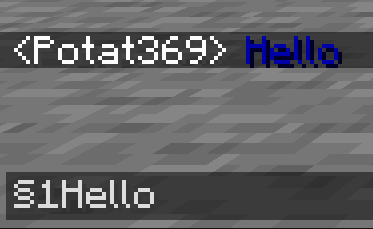
– **Required on**
– **Client**: Yes
– **Server**: Yes
### Anvil
—
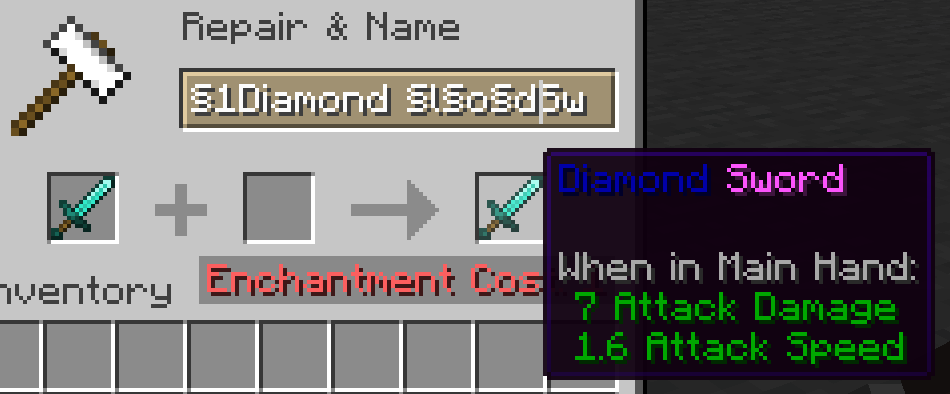
– **Required on**
– **Client**: Yes
– **Server**: Yes
### Sign
—
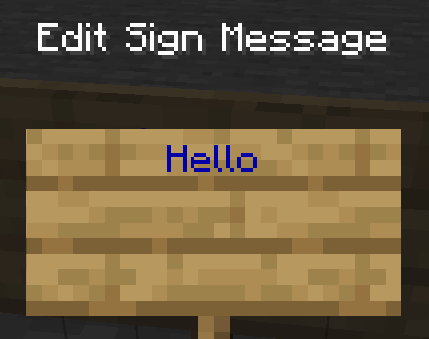
– **Required on**
– **Client**: No
– **Server**: Yes. However, there is a way to circumvent the requirement by doubling the code, like this: `§§11Hello`.
> Note: formatting will disappear after opening and closing.
### Book and Quill Body
—
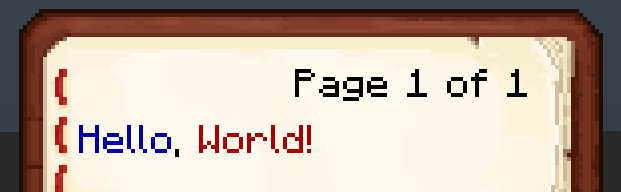
– **Required on**
– **Client**: Yes
– **Server**: No
### Book and Quill Title
—
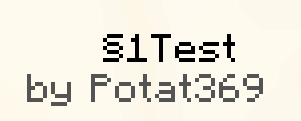
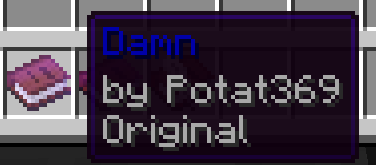
– **Required on**
– **Client**: Yes
– **Server**: No
Tab Player Health
# Tab Player Health
Free and open-source datapack for Minecraft 1.21 and higher that display players health.
## Features
By default the players health is displayed in the tab.
Timo Translations
This is a Translation Pack for my project [Timo](https://modrinth.com/datapack/timo_11).
When using mods like [Coordinates Display](https://modrinth.com/mod/coordinates-display) it displays **”biome.timo.rich”** without this Pack but with this pack **”Rich”**
Supported Languages:
“`
English (United States)
ɥsᴉluƎ(uʍop ǝpᴉsd∩)
“`
Sword Blocking
# What this datapack/mod adds
This datapack/mod will let you block with swords like it was in 1.8 but with all the other 1.9 features. You can explore the world and say hello by waggling your sword at people.
# Note
once added to world it cannot be reversed
# Report bugs here
[My Discord Server](https://discord.gg/bDhK6ZK6Mc)
Sword Block
Re-adds sword blocking from 1.8 PVP
This is only visual, does not reduce damage
Requires 1.21.5 (technically 25w04a) or above
Join my discord here:
https://discord.gg/cADUG34C
Svrve’s Dragon Egg
[
](https://www.planetminecraft.com/member/nickshoof/) | [](https://www.curseforge.com/members/nickshoof/projects) | [](https://modrinth.com/user/NickShoof) | [](https://discord.com/)
[
](https://ko-fi.com/nickshoof)
You can buy monthy subscription to get faster updates on KO-FI
****
#
**About**
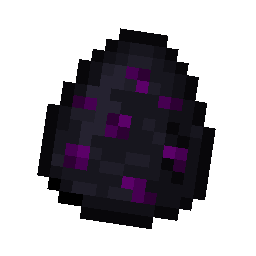
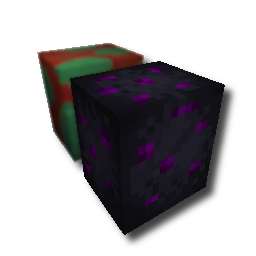
With this pack i modeled the dragon egg becouse why it its so old looking and different than sniffer’s.
.
#
**FAQ**
> **How to install resourcepacks?**
– There are a lot of tutorial out there on youtube, that will explain this better than me, but just download something from trusted sites like modrinth or curseforge, then drag this file to folder that will pop out if you click “Open Pack Folder” in Minecraft.
> **Can i use some textures from Svrve’s Dragon Egg in my pack**
– As long as its not distributed, yes you can. If you want to publish it, just ask me before doing it.
Immersive Torches
[
](https://www.planetminecraft.com/member/svrve/) | [](https://www.curseforge.com/members/svrve/projects) | [](https://modrinth.com/user/Svrve) | [](https://discord.com/)
[
](https://ko-fi.com/svrve)
You can buy monthy subscription to get faster updates on KO-FI
****
#
**About**
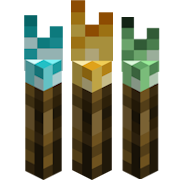
This pack is all about torches, make them an item texture, animate it, change model, also animate it. Thats all.
.
#
**FAQ**
> **How to install resourcepacks?**
There are a lot of tutorial out there on youtube, that will explain this better than me, but just download something from trusted sites like modrinth or curseforge, then drag this file to folder that will pop out if you click “Open Pack Folder” in Minecraft.
> **Can i use some resources from it in my pack?**
After installing it, open the file you downloaded (.zip). Here you will find licence. Read it.