transparency – SMP Pack
# Description
_**transparency**_ is a clean and modern Minecraft resource pack made for **SMP** and **PVP** players who prefer a minimal, distraction-free experience. It keeps the vanilla style while improving visibility and refining the overall interface with a sleek glass and acrylic-inspired design.

The UI has been carefully reworked with transparent and soft blur effects, giving menus and inventories a smooth, professional look. The glassy design creates a lightweight and immersive atmosphere without affecting readability or performance.
## Features
Glass / transparent styled transparent UI
effects on menus
Reworked GUI elements
Reduced fire overlay (No Fire)
Side-positioned shield model
Small Totem of Undying
Small Golden Apple
Small Ender Pearl
3D End Crystal

Translations for Disable Dimensions
# Translations for Disable Dimensions
Official translations for the **Disable Dimensions** data pack/mod.
Contributions for additional languages are very welcome!
## Supported translations
– `Deutsch (Deutschland)` by @nwrenger (me)
## Adding a Translation
1. Go to the repository
2. Duplicate `resourcepack/assets/disable_dimensions/lang/de_de.json`
3. Rename it to your language code (e.g. `en_us.json`, `fr_fr.json`)
4. Translate the values appropiatly
5. Open a PR on the repository
## Key Reference
### General
| Key | Description |
| ———————————————- | ——————————————————— |
| `disable_dimensions.description.resource_pack` | Shown as the resource pack description |
| `disable_dimensions.description.data_pack` | Shown as the datapack description |
| `disable_dimensions.status.now` | Word for “now”, used inline in status messages |
| `disable_dimensions.enabled` | Word for “enabled” |
| `disable_dimensions.disabled` | Word for “disabled” |
| `disable_dimensions.title_by_author` | Header pattern — `%1$s` = pack name, `%2$s` = author name |
### About Screen
| Key | Description |
| —————————————– | ——————————————- |
| `disable_dimensions.about.other_projects` | Intro text before the author’s website link |
| `disable_dimensions.about.issue_prefix` | Intro text before the issue tracker link |
| `disable_dimensions.about.issue_link` | Clickable link label for the issue tracker |
| `disable_dimensions.about.config` | Intro text before the config command |
### Actions (buttons)
| Key | Description |
| —————————————- | ——————————————- |
| `disable_dimensions.action.add` | Label for add buttons |
| `disable_dimensions.action.edit` | Label for edit buttons |
| `disable_dimensions.action.toggle` | Label for toggle buttons |
| `disable_dimensions.action.toggle.hover` | Tooltip shown when hovering a toggle button |
| `disable_dimensions.action.reset` | Label for reset buttons |
| `disable_dimensions.action.replace` | Label for replace buttons |
| `disable_dimensions.action.remove` | Label for remove buttons |
### Config — General
| Key | Description |
| ————————————————– | ————————————— |
| `disable_dimensions.config.title` | Title of the config screen |
| `disable_dimensions.config.hover.add_dimension` | Tooltip for the add dimension button |
| `disable_dimensions.config.hover.reset_dimensions` | Tooltip for the reset dimensions button |
### Config — World Spawn
| Key | Description |
| —————————————————– | ———————————————- |
| `disable_dimensions.config.world_spawn.label` | Label shown before the world spawn coordinates |
| `disable_dimensions.config.world_spawn.hover.replace` | Tooltip for the replace spawn button |
### Config — Reset / Repair Notices
| Key | Description |
| ———————————————- | —————————————————————————————— |
| `disable_dimensions.config.reset.title` | Title shown when the config has been reset |
| `disable_dimensions.config.reset.description` | Description shown when the config was reset because it was missing, empty, or incompatible |
| `disable_dimensions.config.repair.title` | Title shown when the config has been updated |
| `disable_dimensions.config.repair.description` | Description shown when missing default fields were added |
### Config — Dimension Entry
| Key | Description |
| ———————————————————- | ——————————————————————————————————————————————————- |
| `disable_dimensions.config.dimension.hover.remove` | Tooltip for the remove dimension button |
| `disable_dimensions.config.dimension.status.label` | Label for the dimension status field |
| `disable_dimensions.config.dimension.status.pattern` | Status pattern — `%1$s` = dimension name, `%2$s` = “disable_dimensions.status.now”, `%3$s` = “disable_dimensions.enabled”/”disable_dimensions.disabled” |
| `disable_dimensions.config.dimension.message.label` | Label for the block message field |
| `disable_dimensions.config.dimension.message.hover.edit` | Tooltip for the edit message button |
| `disable_dimensions.config.dimension.conditions.label` | Label for the conditions list |
| `disable_dimensions.config.dimension.conditions.hover.add` | Tooltip for the add condition button |
### Config — Condition Entry
| Key | Description |
| —————————————————— | —————————————————————————————————————————————————– |
| `disable_dimensions.config.condition.hover.remove` | Tooltip for the remove condition button |
| `disable_dimensions.config.condition.status.label` | Label for the condition’s status override field |
| `disable_dimensions.config.condition.status.pattern` | Status pattern — `%1$s` = “disable_dimensions.config.condition.status.following”, `%2$s` = “disable_dimensions.enabled”/”disable_dimensions.disabled” |
| `disable_dimensions.config.condition.status.following` | Phrase used as `%1$s` in the condition status pattern |
| `disable_dimensions.config.condition.trigger.label` | Label for the trigger field |
| `disable_dimensions.config.condition.hover.edit` | Tooltip for the edit trigger button |
Trans Flag Spyglass
This is a small texture pack, making a 2d spyglass with trans flag colors! I initially made it for the Pirates Pride jam on Planet Minecraft, for Bedrock, but this is my attempt at a Java version! It’s also intended to remove the spyglass overlay, but this may be difficult if you’re using sodium :’D
Trade receive villager
changes vanilla villager trade GUI to the “Trade receive” meme guy style
Touched UI
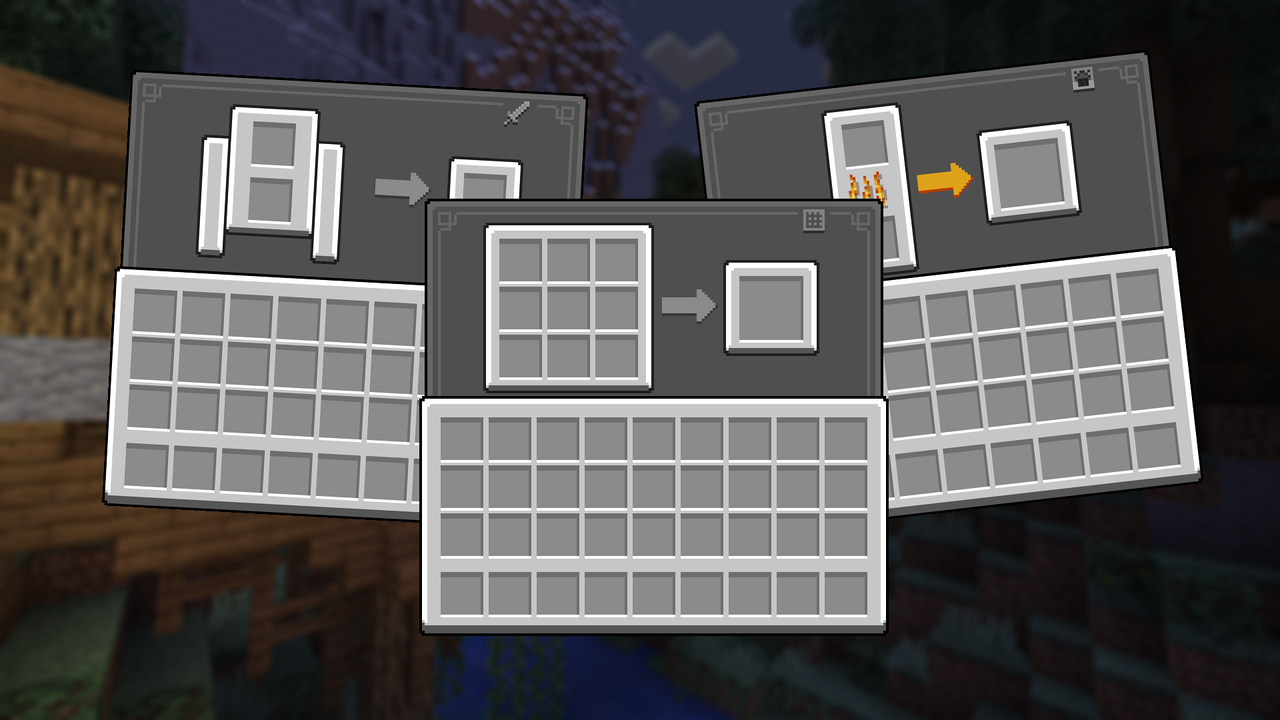
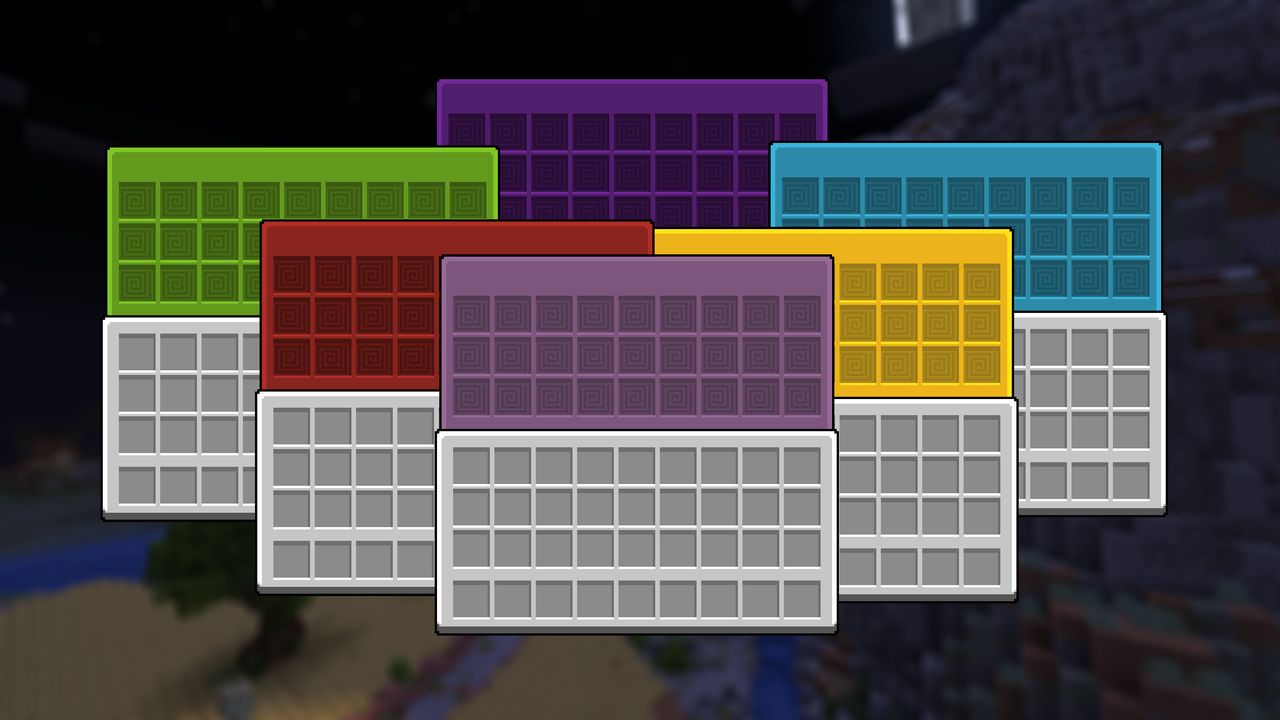
A transformative texture pack revamping inventory, buttons, icons, and resolving visual glitches for an immersive and polished gaming experience.
NOTE* Using Optifine or Optigui will grant you access to some add-ons, such as the colored shulker GUI and the various chest type GUIs
Visit my twitter profile to see news and leak about futures update
Touch Grass
# About
This Datapack is designed to make your life hard by making it where you have to touch grass or other green stuff to live
Blocks you can walk on
# BLocks You can step on (work in progress update)
– minecraft:air
– minecraft:grass_block
– minecraft:short_grass
– minecraft:tall_grass
– minecraft:fern
– minecraft:large_fern
– minecraft:dead_bush
– minecraft:moss_block
– minecraft:moss_carpet
– minecraft:farmland
– minecraft:water
– minecraft:kelp
– minecraft:kelp_plant
– minecraft:seagrass
– minecraft:tall_seagrass
– minecraft:snow
– minecraft:obsidian
– minecraft:end_gateway
– minecraft:end_portal
– minecraft:end_portal_frame
– minecraft:nether_portal
– minecraft:torch
– minecraft:soul_torch
– minecraft:tripwire
– minecraft:scaffolding
– minecraft:bamboo
– minecraft:sweet_berry_bush
– minecraft:small_dripleaf
– minecraft:big_dripleaf
– minecraft:big_dripleaf_stem
– minecraft:glow_lichen
– minecraft:oak_sapling
– minecraft:spruce_sapling
– minecraft:birch_sapling
– minecraft:jungle_sapling
– minecraft:acacia_sapling
– minecraft:dark_oak_sapling
– minecraft:mangrove_propagule
– minecraft:cherry_sapling
– minecraft:bamboo_sapling
– minecraft:white_carpet
– minecraft:orange_carpet
– minecraft:magenta_carpet
– minecraft:light_blue_carpet
– minecraft:yellow_carpet
– minecraft:lime_carpet
– minecraft:pink_carpet
– minecraft:gray_carpet
– minecraft:light_gray_carpet
– minecraft:cyan_carpet
– minecraft:purple_carpet
– minecraft:blue_carpet
– minecraft:brown_carpet
– minecraft:green_carpet
– minecraft:red_carpet
– minecraft:black_carpet
– minecraft:stone_button
– minecraft:oak_button
– minecraft:spruce_button
– minecraft:birch_button
– minecraft:jungle_button
– minecraft:acacia_button
– minecraft:dark_oak_button
– minecraft:mangrove_button
– minecraft:cherry_button
– minecraft:bamboo_button
– minecraft:crimson_button
– minecraft:warped_button
– minecraft:light_weighted_pressure_plate
– minecraft:heavy_weighted_pressure_plate
– minecraft:stone_pressure_plate
– minecraft:oak_pressure_plate
– minecraft:spruce_pressure_plate
– minecraft:birch_pressure_plate
– minecraft:jungle_pressure_plate
– minecraft:acacia_pressure_plate
– minecraft:dark_oak_pressure_plate
– minecraft:mangrove_pressure_plate
– minecraft:cherry_pressure_plate
– minecraft:bamboo_pressure_plate
– minecraft:crimson_pressure_plate
– minecraft:warped_pressure_plate
– minecraft:rail
– minecraft:powered_rail
– minecraft:detector_rail
– minecraft:activator_rail
– minecraft:redstone_wire
– minecraft:redstone_torch
– minecraft:lever
– minecraft:repeater
– minecraft:comparator
– minecraft:dandelion
– minecraft:poppy
– minecraft:blue_orchid
– minecraft:allium
– minecraft:azure_bluet
– minecraft:red_tulip
– minecraft:orange_tulip
– minecraft:white_tulip
– minecraft:pink_tulip
– minecraft:oxeye_daisy
– minecraft:cornflower
– minecraft:lily_of_the_valley
– minecraft:wither_rose
– minecraft:wheat
– minecraft:carrots
– minecraft:potatoes
– minecraft:beetroots
– minecraft:nether_wart
– minecraft:torchflower_crop
– minecraft:pitcher_crop
Totem of Yuri
## What it does?
Replaces the texture of totem of undying with quite popular animation of ship from genshin impact.
## Installation
Throw into resource packs and it should be good to go.
## Credits:
**Original animation author** – nomianims
Totem Of Bing Bong
this pack allows you to bring bing bong from peak into minecraft as a totem of undying by sonico.
enjoy!!
unknown support for:
hold my items
punchy
——
——
——
added in future:
bing bongs wife miriam
custom totem particles
Totem No Shading
—
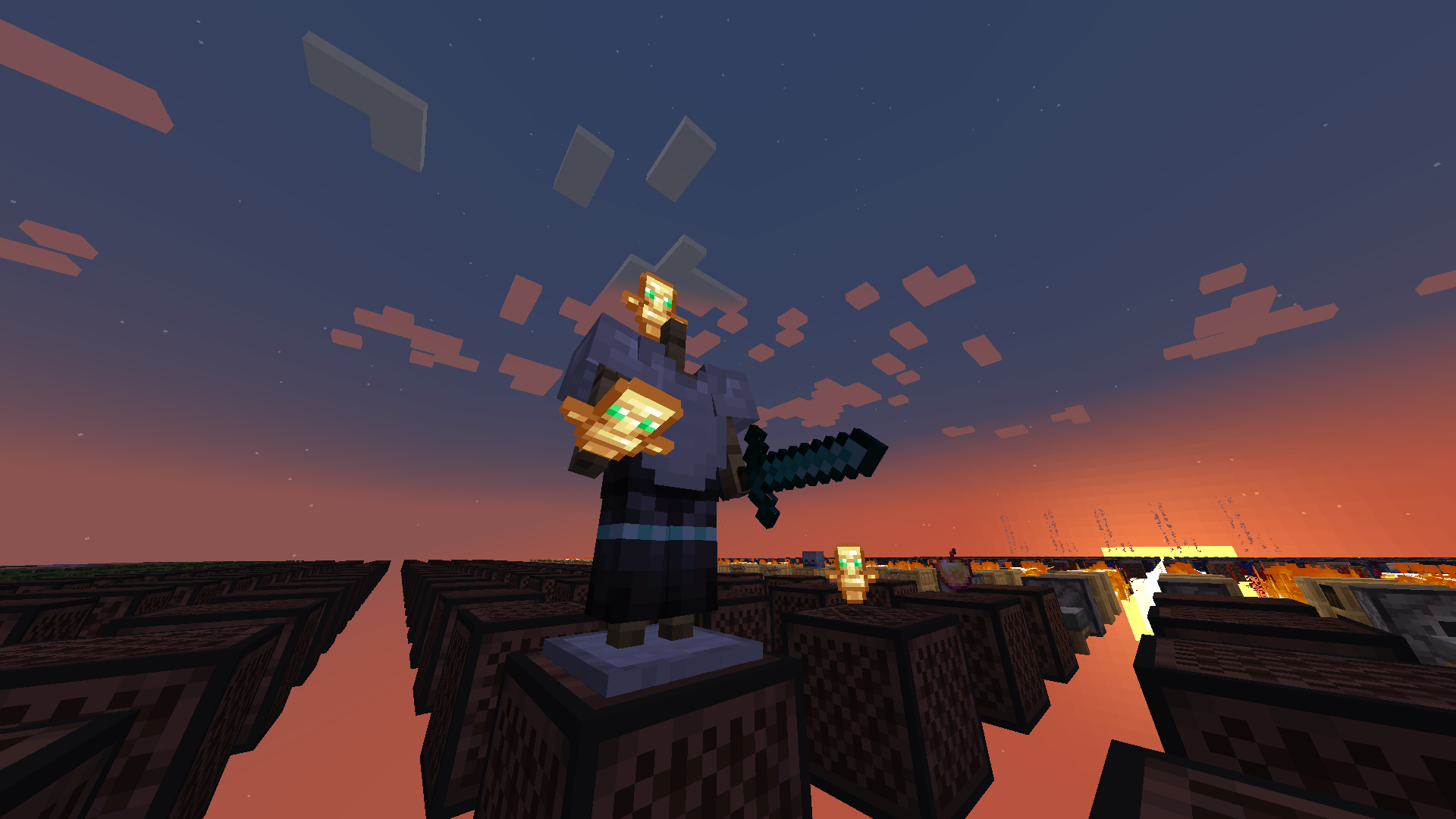
**Totem No Shading** is a simple Minecraft mod that removes directional shading and block and sky lighting effects to **Totem of Undying** items. Holding totems in either hands, worn on head (through commands), or on the ground will render said items to **full brightness**.
Totem No Shading is a subset of Simply No Shading (SNS), concepts and technologies thereof aided in realizing this mod. The creation of issue 119 for SNS at Github requests supporting selective application, specifically the Totem of Undying item; at that time there was no clear way to implement this. After SNS‘ entity shading now exiting its experimental phase, the aforementioned issue was reconsidered and now released as its separate mod, **Totem No Shading**.
Totem messages!
A simple lightweight datapack that sends a message whenever a player uses a totem of undying. Easily customizable, you can customise the message in the loop.mcfunction file
So what are you waiting for? get this datapack and add a spice to your hardcore forever world or your server!