Unique Maces
**The BEST Mace PvP texture pack out there**
This pack features:
> Custom textures and models for:
– Breach mace – has a blue handle
– Density mace – has a red hande
– Breach mace in THIRD PERSON – fully blue texture (for better visibility during ground fights)
– Netherite axe in THIRD PERSON – fully red texture (for better visibility of shield disables)
**How to use:**
– Download this recource pack and drop it into your AppData/Roaming/.minecraft/resourcepacks folder
– Select this pack in the recource packs tab in the pause menu
– Enjoy the pack!
– **REQUIRES VARIENTS CIT FROM 1.21.2 TO 1.21.4:** https://modrinth.com/mod/variants-cit
– **REQUIRES CIT RESEWN FOR 1.21.1 OR LOWER:** https://modrinth.com/mod/cit-resewn
**While I made the models for this to work, the textures and idea was from Ospree14**
– https://discord.gg/2kCwf8TNV4
**Join my discord if you want to support me :)** https://discord.gg/MQfnkB3pNQ
Unique Gear
For years, most of Minecraft’s tools and armor have looked almost identical, differing only in color. This texture pack changes that by giving every tool its own unique design, making each material feel distinct and recognizable. Instead of simple recolors, tools now have visual details that reflect their strength and purpose and what they are made off.
Armor has also been completely redesigned. Each set features new item textures and updated in-game model textures, adding more personality and variety to what you wear. These changes make progression more satisfying, as upgrading your gear doesn’t just make you stronger—it makes you look different too.
Overall, this pack enhances Minecraft’s visuals while staying true to its style, making equipment feel more immersive and rewarding.
UniLink
## 🔗 UniLink
A mod that allows you to use resources from other directories
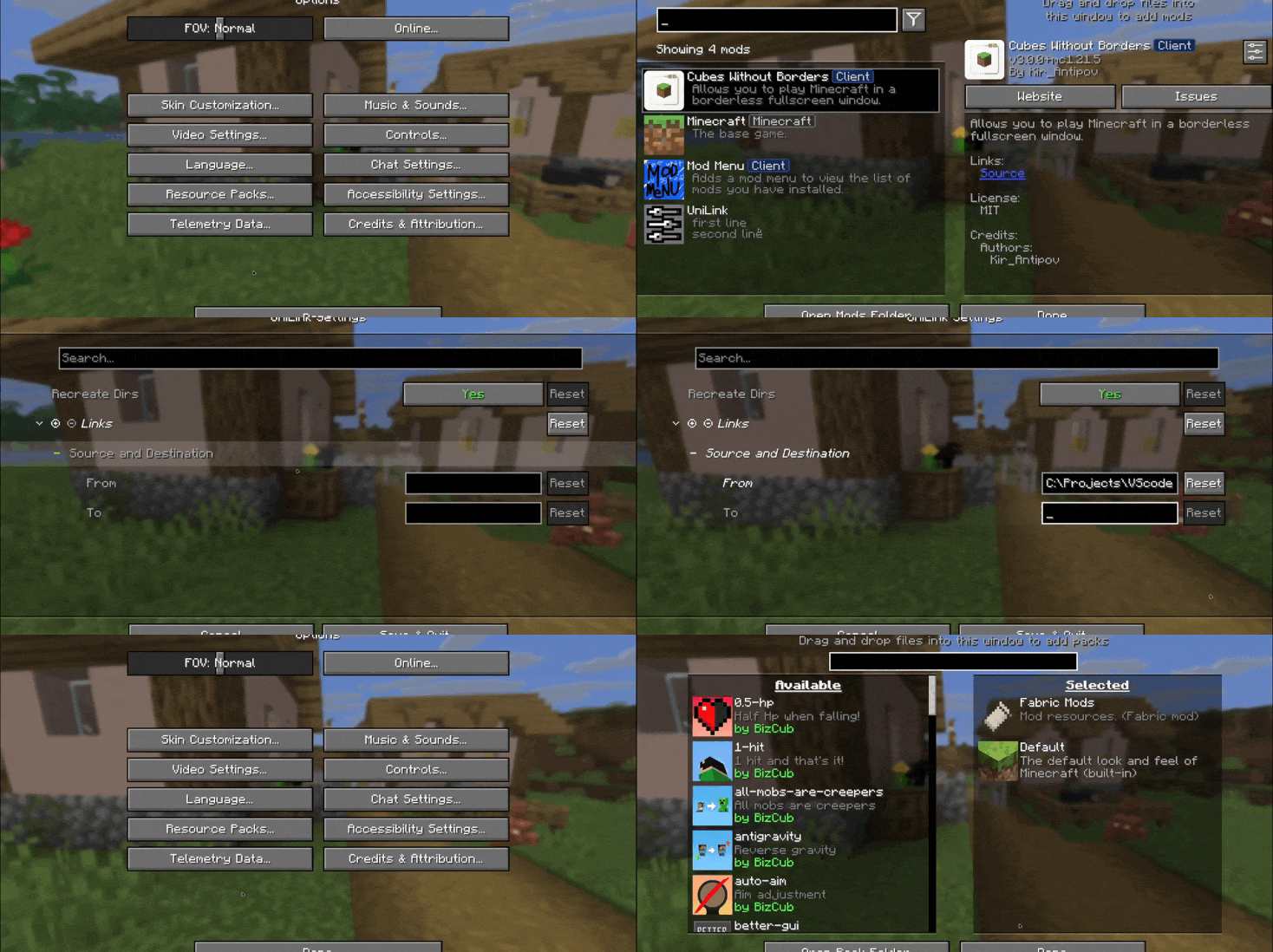
## 💼 Usage
This mod works using symbolic links, which can be used like a folder but don’t require reusing (copying) resources. Some launchers also use symbolic links, but the mod works independently of them. It’s a configuration file. The first field specifies the path to the directory to use, and the second field specifies the path to the folder where the symbolic link should be placed. The final path can be absolute (e.g., “`C:….minecraftsaves“`) or abbreviated (“`saves“`).

If you change the directory used for worlds and then revert the change, the game may freeze while searching for and failing to find the required folder. For this purpose, the configuration file has an option to recreate the folders used by the game.
## 🛠️ How it works
By default, the mod does nothing. However, you can add data to the configuration to create a link: the path from which resources will be used and the path where the symbolic link will be created.
### What follows from this:
* After changing the configuration, new links will be added. Therefore, old, unused links will be deleted.
* Since Minecraft creates some folders, the mod will have to delete the existing folder before creating the link. However, since the mod deletes folders without asking, it has a limitation on deleting directories with files inside. This means that if a folder contains any files, it won’t be deleted and the link won’t be created.
Creating symbolic links requires certain permissions. Therefore, some launchers that don’t have them won’t be able to create links. Solution: Run the launcher as administrator.
## 🤝 Support

UniLib
# UniLib
A common set of Utilities, designed for over 50 versions of Minecraft!
[](https://opensource.org/licenses/MIT)
[](https://app.codacy.com/gl/CDAGaming/UniLib/dashboard?utm_source=gl&utm_medium=referral&utm_content=&utm_campaign=Badge_grade)
[](https://gitlab.com/CDAGaming/UniLib/commits/main)
[](https://www.curseforge.com/minecraft/mc-mods/unilib)
[](https://www.curseforge.com/minecraft/mc-mods/unilib)
[](https://modrinth.com/mod/unilib)
[](https://modrinth.com/mod/unilib)
## General Notes
* This mod identifies as a **Client Side-only** mod
* This means it **will not run** on the Server’s side.
* Fabric and Quilt mod loaders will simply ignore the
mod, while other mod loaders may crash.
* Some versions of the mod for Minecraft 1.14.x and above require
the [Fabric API](https://modrinth.com/mod/fabric-api)
and the [Fabric mod loader](https://fabricmc.net/use/installer)
* Some versions of the mod for Minecraft 1.13.x require
the [Rift API](https://www.curseforge.com/minecraft/mc-mods/rift)
and the [Rift mod loader](https://github.com/DimensionalDevelopment/Rift/releases)
* Some versions of the mod for Minecraft 1.1.0 and below
require [Risugami’s ModLoader](https://mcarchive.net/mods/modloader)
## Features
This library mod offers various API utilities that have been developed over the years,
initially part of [CraftPresence](https://gitlab.com/CDAGaming/CraftPresence),
that have been designed to work on over 50 versions of Minecraft, from the earliest Alphas to the latest Releases.
These APIs range from utilities that can help with Rendering/UI design, Update Checker and Translation ease-of-access,
as well as the APIs provided through the sibling-project, [UniCore](https://github.com/CDAGaming/UniCore)
## Disclaimers & Additional Info
### Minecraft Issues + Additional Build Info
Despite best efforts, issues can occur due to the state of the Minecraft Codebase.
These issues can hinder certain portions of the backend in addition to cause certain parts of the mod to not work.
With this in mind, please note the following:
* **Minecraft 1.16 and above**
* As more parts of the game become data-driven, some modded data is no longer able to be automatically retrieved
without first being in the world.
* **Minecraft 1.15 and below**
* `MC-112292`: When interacting with the `RenderUtils#drawItemStack` method, used in the v2 Item Renderer, blocks
using certain renderers may fail to display properly.
* Additionally, on 1.15.x exclusively, z-level issues may occur on Screens using this method
* **Miscellaneous Issues**
* Due to obfuscation issues in earlier versions of Minecraft, incorrect data may appear when using certain parts of
the mod.
Additionally, some settings or API calls may perform differently under certain MC versions.
### Support
Need some assistance with one of my mods or wish to provide feedback?
I can be contacted via the following methods:
* [Email](mailto:[email protected])
* [CurseForge](https://www.curseforge.com/minecraft/mc-mods/unilib)
* [Discord :: ](https://discord.com/invite/BdKkbpP)
Additionally, codebase documentation for this mod is
available [here](https://cdagaming.gitlab.io/unilib-documentation/) with further guides available
on [the wiki](https://gitlab.com/CDAGaming/UniLib/-/wikis/Home)
#### Licensing
This Mod is under the MIT License as well as the Apache 2.0 License
This project currently makes usage of the following dependencies internally:
* [UniCore](https://github.com/CDAGaming/UniCore) by [CDAGaming](https://github.com/CDAGaming)
* [Classgraph](https://github.com/classgraph/classgraph) by [lukehutch](https://github.com/lukehutch)
* [Lenni Reflect](https://github.com/Lenni0451/Reflect) by [Lenni0451](https://github.com/Lenni0451)
Underwater Swim Fix (MC-220390)
Fixes [MC-220390](https://bugs.mojang.com/browse/MC/issues/MC-220390) a bug where if you hit an entity while swimming and holding the sprint hotkey, the hitboxes server and clientside will be different. Resulting in weird behaviour where the client thinks that theyre swimming while the server doesnt think that. So when you for example try to go into a 1×1 block space while experiencing this bug, you will glitch out until you stop swimming and swim again.
The bug really annoyed me in monuments so I fixed it.
Join the [Discord!](https://discord.gg/p6ShJPq98d) You can ask for help, a mod, just suggest something, hangout or request the source code of any mod I have made (if I still have the source code)
Or donate to my [Kofi](https://ko-fi.com/bikerboys) incase you are feeling generous!
UnBlockEnchant
Are you tired of not being able to craft top-tier armor with top-tier enchantments? The game constantly refuses to connect Ice Drift and Underwater Ladder. This datapack will solve your problem! After all, it combines incompatible enchantments. I was wondering what would happen if I set Luck to 3 and Silk Touch? Download the datapack and try it out!
**Additional information!** When entering a world, the game may unexpectedly enter “Safe Mode.” This disables datapacks when entering a world, but you can re-enable them later with the datapack Enable command.
Un-Hidden Snow
# Un-Hidden Snow
Change the powder snow to have yellow and black edges so you don’t fall into powder snow traps
### UNFORTUNATELY NOT COMPATIBLE WITH OPTIFINE AND SODIUM
ULTRAJACKHAMMER
# ULTRAJACKHAMMER
Tired of the default minecraft mace model?
***ULTRAKILL*** fan/addict?
Perfect.
Indeed, you have found the right resource pack.
Replace your *ugly* default mace with the **jackhammer** from ***ULTRAKILL*** !!
Replaces all mace hit sounds and the mace model correspondingly.
Ultimate vanilla 16×
## This pack
This pack make minecraft looking better.
## How to install and use it
• First click the download options and select your game version now download
• Copy or cut as you wish then past game resourcepack folder
• Start your game and click my resourcepack and enjoy it.
If you want to use this pack in videos or projects, please credit me.
Ultimate Classic Fishing Loot Datapack
Back when fishing felt simple, rewarding, and a little bit lucky.
No bloated tables. No weird junk. Just the classic drops you remember.
Do you wanna have that nostalgic feel again?
This datapack restores the original 1.16 fishing loot table, bringing back the drops you remember before later versions changed the balance.
Fish up:
Enchanted books with classic enchantments
Bows and fishing rods with natural enchant rolls
Name tags, saddles, and other rare treasures
Familiar “junk” and “treasure” items balanced the old way