XP-Book
# 📗 XP-Vault: The Professional XP Ledger
**XP-Vault** (v1.21.11) is a high-performance, survival-integrated utility designed to bridge the gap between risk and reward. By providing a balanced “Banking” system for your experience levels, it adds a layer of strategy to your survival world while protecting your time investment from accidental deaths.
—
## ✨ Primary Features
* 🔒 **Persistent Storage:** Stored levels are linked to the player via scoreboards, meaning they persist through death and even if the book is lost or destroyed.
* 📈 **Precision increments:** Full control with buttons for **1, 3, 10, or 30** levels.
* ⚡ **Bulk Operations:** Rapidly clear your XP bar or withdraw your entire bank with **[STORE ALL]** and **[TAKE ALL]** buttons.
* 🔊 **Dynamic Feedback:** Includes high-fidelity vanilla sound effects and color-coded chat messages to confirm every transaction.
* 🛠️ **Universal Access:** Designed with the `/trigger` system, allowing **Survival players without OP/Cheats** to use the interface seamlessly.
> 
—
## 🔨 Survival Crafting & Initialization
We believe in “Vanilla+” balance. The recipe is expensive enough to feel earned, requiring 8 Bottles o’ Enchanting.
**The Recipe Pattern:**
* **Outer Ring:** 8x Experience Bottles
* **Center:** 1x Regular Book
* **Output:** 1x Knowledge Book (Auto-converts to XP-Vault upon holding)
> 
—
## 💻 Technical Documentation (For Server Admins)
XP-Vault is built for stability and zero TPS impact. It avoids “Every-Tick” heavy NBT scanning, favoring a lightweight trigger-based architecture.
### 📊 Scoreboard Management
The pack uses the following internal objectives:
* `exp_stored`: The master objective. Stores the player’s banked level count.
* `exp_current`: A temporary calculation buffer for XP bar data.
* `exp_takeX` / `exp_storeX`: Individual trigger objectives.
### 🛠️ Admin Utility Commands
* **Check a Player’s Bank:** `/scoreboard players get exp_stored`
* **Manually Set a Balance:** `/scoreboard players set exp_stored 50`
* **Add/Reward Levels:** `/scoreboard players add exp_stored 10`
* **Spawn a Vault Book:** `/function exp_book:give_book`
### 🧪 Testing Procedures
To verify the pack is working correctly after installation:
1. Run `/reload` and look for the “[Book of Experience] Datapack loaded” message.
2. Grant yourself 30 levels: `/experience add @s 30 levels`.
3. Craft or give yourself the book and click **[STORE ALL]**.
4. Run `/scoreboard players get @s exp_stored`. If it returns **30**, the system is 100% operational.
—
## 📝 Changelog v1.0.0 (v1.21.11)
* **1.21.x Component Migration:** Fully updated to the new `written_book_content` and `item_component` syntax (1.20.5+).
* **Recursion Optimization:** Rewrote the `take_all_loop` to handle massive level counts (1000+) without causing server hanging.
* **Syntax Hardening:** Replaced deprecated `clickEvent` keys with modern `click_event` formatting for 1.21.11 compatibility.
* **Auto-Conversion:** Improved the knowledge book detection logic to be more responsive.
—
## ⚖️ License & Permissions
**License:** MIT License
* ✅ **You may:** Use this in modpacks, featured on servers, and modify the code for personal use.
* ❌ **You may not:** Re-upload this to other platforms (9Minecraft, etc.) or claim it as your own creation.
* 💎 **Credit:** Mentioning “Sentrax” or linking to this Modrinth page is appreciated but only required if you redistribute modified versions.
—
## 📥 How to Install
1. Download the `XP-Vault.zip`.
2. Open your Minecraft world folder -> `datapacks`.
3. Drop the `.zip` inside.
4. Join the world and type `/reload`.
—
**Author:** Sentrax
**Compatibility:** 1.20.5, 1.20.6, 1.21, 1.21.11
**Checkout my other datapacks from [OPSIBA007](https://modrinth.com/user/OPSIBA007)**
xokz’s Particle Effects
A collection of novel visual effects for datapack creation.
### Lightning Effect
To make a bolt of lightning, execute the function `xze:effects/lightning/spawn` **at** the location the bolt should start, and **as** the entity the bolt should target. For example, the command block in the gif is running:
`execute positioned ~ ~ ~ as @p run function xze:effects/lightning/spawn`
– To change the lightning segment length and angles, you can change the ranges in the `generate_pitch_yaw_len.mcfunction` function.
– To change the chance of a branch being made, change the value in the `lightning_branch_chance.json` predicate.
This effect uses no entities and only @s selectors, resulting in great performance.
### Block Outline Effect
To do the block outline, simply run `function xze:effects/block_outline/spawn` at the block you want. It will automatically snap to the block grid, so don’t worry about positioning it perfectly!
Xenocontendi Revived x Fresh Animations: Player Extension
[Fresh Animations: Player Extension](https://modrinth.com/resourcepack/fa-player-extension) by [FreshLX](https://modrinth.com/user/FreshLX) working with Xenocontendi Revived x16.
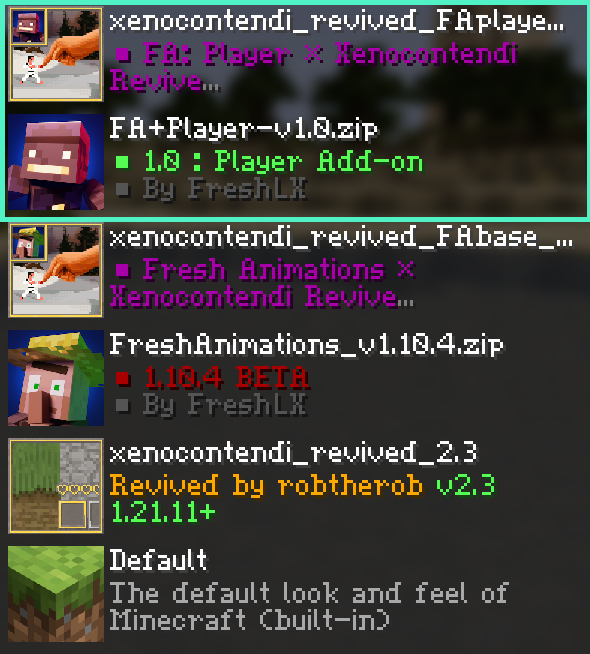
This resource pack fix the default leggings texture when using [FA+Player](https://modrinth.com/resourcepack/fa-player-extension)
You have to place it above Fresh Animations: Player Extension in the resource pack list:
**Also check out the [Xenocontendi Revived x Fresh Animations add-on pack](https://modrinth.com/resourcepack/xenocontendi-revived-x-fresh-animations) too!**
Glint
Replaces vanilla enchantment glow with periodic orange pulses inspired by TF2 Specialized Killstreak Kits
xali’s Potions
# xali’s Potions

Introducing Xali’s Potions, an extraordinary texture pack that revolutionizes the world of Minecraft. Say farewell to the mundane as every potion undergoes a mesmerizing transformation, breaking free from the uniformity of default textures.
Immerse yourself in a realm where creativity knows no bounds, as each potion radiates with distinct and captivating designs. From the ethereal glow of the night vision potion to the fiery essence of strength, experience a visual feast that brings enchantment to life. Unleash your brewing prowess and embark on a thrilling journey where every sip becomes an immersive and magical adventure. Upgrade your Minecraft experience with Xali’s Potions and redefine the art of potion-making in truly mesmerizing ways.
xaero世界地图汉化
个人汉化的Xaero世界地图,因为Xaero世界地图没有中文,我制作了这个资源包
A personally localized version of Xaero’s World Map, as the original lacks Chinese support, I created this mod pack
X Ray (no cheats)
## X Ray
Mod/Datapack that removes stone and other blocks to keep ores visible. Also works in the nether.
X-Ray is a powerful mod that radically changes the way you explore the world of Minecraft. It allows you to see through ordinary blocks, highlighting valuable resources, structures, and objects.
To use it, you need to take a filled map in any hand.

## Usage
The mod is activated automatically and requires no additional settings. However, if you want to temporarily disable the mod, use the command “`/trigger bizcub.x_ray.t“`. Information about the mod’s current status will then appear in the chat.
## Dependencies
– Fabric loader requires [Fabric API](https://modrinth.com/mod/fabric-api)
X Ray | Spectator xray
# **🕵️♂️ X-Ray for Spectator Mode**
**Enhance your Minecraft Java experience with a lightweight, “one-click by activating spectator” X-ray solution. By simply switching to Spectator Mode, this pack highlights ores and hidden structures, making resource gathering or world-checking a breeze.**
**🚀 How to Use**
For the best results, follow these simple steps:
– Import & Activate: Add the resource pack to your resourcepacks folder and enable it in-game.
– Optimize Visuals: Turn Smooth Lighting: OFF in your Video Settings to make ores glow and stand out against the darkness.
– Enter Spectator Mode:
– Type /gamemode spectator in the chat.
– Pro Tip: Use the shortcut F3 + N to toggle instantly.
–
* 📸 Results
Check out the visibility improvements
# **Results**


📜 Terms of Use
I want you to enjoy this pack, but please respect the following guidelines:
✅ Allowed
* Showcase: Use this pack in your videos or streams (please provide a link to the official download page).
* Personal Use: Feel free to edit the files for your own private use.
❌ Not Allowed
* Monetized Links: Do not redistribute this pack via AdFly, Linkvertise, or similar services.
* Re-uploading: Do not edit and re-share this project as your own.
> [!IMPORTANT]
> Feedback: If you feel the need to leave a low rating, please leave a comment explaining why so I can improve the pack for everyone!
>
❤️ Support the Creator
If you find this tool helpful, consider supporting my work:
Support me on Ko-fi
Would you like me to help you draft a specific “Frequently Asked Questions” section to help reduce common support queries?
Wynnphony: Tavern
# Wynnphony: Tavern
Wynnphony is two-part resource pack that replaces Wynncraft’s custom note block sounds with new, revamped instruments. This is pack reimagines them in the style of a fantasy folk ensemble.
You can find its twin pack made to resemble an orchestra here!
– [Wynnphony: Orchestra](https://modrinth.com/resourcepack/wynnphony-orchestra)
# Requirements
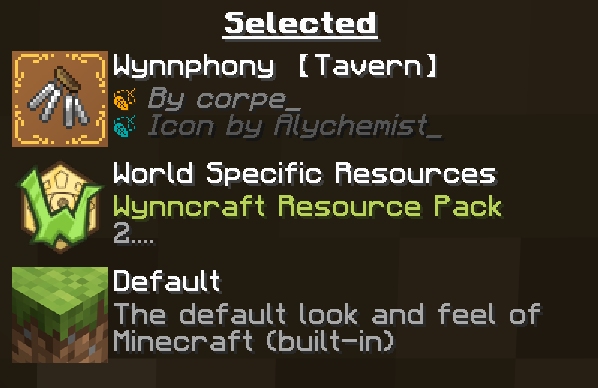
This resource pack must be placed above the server pack in order to function. This can be done by utilizing either:
– [Wynntils](https://modrinth.com/mod/wynntils) for its client side Wynncraft resource packs,
– or a [mod](https://modrinth.com/mod/server-pack-unlocker) that allows server resource packs to be overridden.
Wynnphony: Orchestra
# Wynnphony: Orchestra
Wynnphony is two-part resource pack that replaces Wynncraft’s custom note block sounds with new, revamped instruments. This is pack reimagines them in the style of an orchestra.
You can find its twin pack made to resemble a fantasy folk ensemble here!
– [Wynnphony: Tavern](https://modrinth.com/project/wynnphony-tavern)
# Requirements
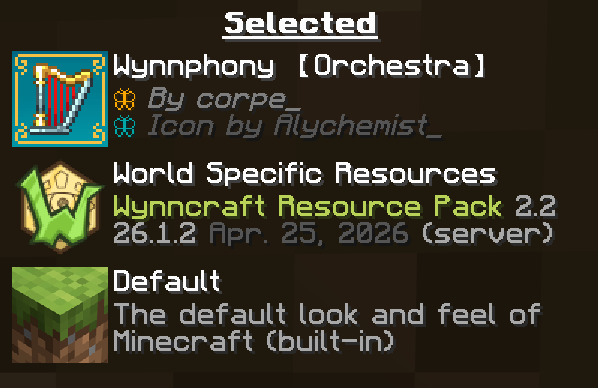
This resource pack must be placed above the server pack in order to function. This can be done by utilizing either:
– [Wynntils](https://modrinth.com/mod/wynntils) for its client side Wynncraft resource packs,
– or a [mod](https://modrinth.com/mod/server-pack-unlocker) that allows server resource packs to be overridden.