Tick Stasis
# **Tick Stasis**
[](https://git.sr.ht/~arm32x/tick-stasis/tree/master/item/LICENSE)
Pauses your Minecraft server when no players are online and seamlessly
resumes it when a player joins.
While the server is paused:
– No updates will occur in the game world, including block updates,
entity movement, and random ticks.
– In-game time will be paused, which prevents your world’s [local
difficulty][] from increasing.
– Server CPU usage will be reduced to 0% or near-0% (version 1.1.0+).
Commands you enter into the server console will continue to work.
## Version compatibility
Tick Stasis is built to be compatible with the following Minecraft
versions, including snapshots and April Fools’ updates.
| Tick Stasis version | Minecraft version |
|:——————–|:———————————————-|
| 1.1.1 (latest) | 19w11a or later (including 1.14+) |
| 1.1.0 | 19w11a or later (including 1.14+) |
| 1.0.0 | 19w04a through 23w51b (including 1.14–1.20.4) |
## FAQ
#### Can you update this to a newer version of Minecraft?
Try using the latest version of the mod, even if Modrinth doesn’t list
the Minecraft version as supported. If you find a version that isn’t
compatible (due to a crash or other issue), please let me know on the
[mailing list][].
#### Can you port this to an older version of Minecraft?
This would likely require porting to a different mod loader. See the
next question.
#### Can you port this to Forge/Bukkit/Paper/Spigot?
I might port this to other mod/plugin loaders at some point if I feel
like it, but please *don’t ask about it*. In the meantime, the mod is
open source and permissively licensed, so you can try porting it
yourself.
[local difficulty]: https://minecraft.fandom.com/wiki/Difficulty#Regional_difficulty
[mailing list]: https://lists.sr.ht/~arm32x/public-inbox
Thorough Keybindings
For as many Minecraft versions as possible, this mod makes the keybindings of usually fixed mappings rebindable. This is a client side mod.
For example, this lets you remap Escape and F3 in-game, even in versions before F3 was made rebindable. Also adds rebinding options for Shift, Control, Alt as well as the digits to navigate the profiling pie chart. Furthermore, backports mappings to earlier game versions, like rebinding F5 or hotbar slot keys.
For versions 1.14 to 1.21, this mod uses [Fabric](https://fabricmc.net/) and requires the [Fabric API](https://modrinth.com/mod/fabric-api) to run.
For versions beta 1.0 to release 1.13, this mod uses [Ornithe](https://ornithemc.net/) with Fabric and requires the [Ornithe Standard Libraries](https://modrinth.com/mod/osl) to run.
Thigh Highs
# Thigh Highs
This is a resource pack that adds thigh-highs in black, blue, pink, red, and yellow instead of armor.
—

The White Pumpkin
this is **inspired by Minecraft story mode (a telltale games creation) episode 6**, this is what happened on that episode:
In **Minecraft Story mode** (mcsm) season 1 episode 6, jesse goes on a journey and stubles apon a mansion in one of the dimentions he was exploring to find his way home, on his way to enter the mansion, he spots a figure with a white pumpkin. apon entering the mansion to get sheltered from hords of zombies, he and his friends meet another group of people who are popular minecraft youtubers, but they one by one get trapped, killed and more. jesse and his gang finds out “the white pumpkin” was up to all these traps. they go after him/her to kill the white pumpkin, they discover one of the other group of friends who were in the mansion (cassie rose) was the white pumpkin, they go on to defeat her leaving her trapped in her dimention while they continue their journey.
please try to give me feedback on what to do to make this texture pack better
The Pigstep Remix (AvM Remix for Pigstep)
### Hello fellow user!
Today i introduce you The Pigstep Remix!
This datapack/resourcepack changes the default pigstep sound to the AvM remix made by Alan Becker, Scott Buckley and Aaron Grooves. This makes your experience with Pigstep longer and better.
### Where it came from?
This music came from a series called Animation Vs Minecraft (AvM), which was made by Alan Becker on youtube. The music came from the _[Episode 25](https://www.youtube.com/watch?v=8kiPjEeTaW4)_ of the series. One of the producer of the music also posted it on their own channel so you can clearly hear it as you can see _[here](https://www.youtube.com/watch?v=oDZK3_c-Vkc)_.
### How to play it?
First download the datapack from here and put it on your datapacks folder, then clone it and add the copy to your resourcepacks folder. The datapack makes the jukebox music stays for long enough so the music dont cut out of nowhere, and the resourcepacks changes the pigstep sound overriding the default pigstep and adding the remix into it.
### Another way to use it on public servers
You see, if you join a normal server that does not use this datapack, the music will cut off. But if you can install a mod called Jukebox Custom Disc Fix, it will fix the cut off in any server, which you can download it [here](https://modrinth.com/mod/jukebox-custom-disc-fix).
**Have fun!**
Toggle Chat
# Toggle Chat
A Minecraft mod for Fabric and Quilt mod loaders that toggles chat visibility with a key binding (period [`.`] by default).
Text Formatting Everywhere
## Text Formatting Everywhere
Utility mod that returns an ability to use [Minecraft’s old formatting system](https://minecraft.wiki/w/Formatting_codes).
In order to format text, you simply put section sign (**§**), followed by [formatting code](https://minecraft.wiki/w/Formatting_codes), followed by your desired text. For instance: __§1Hello__, will color __Hello__ into blue
## Places status:
### Chat
—
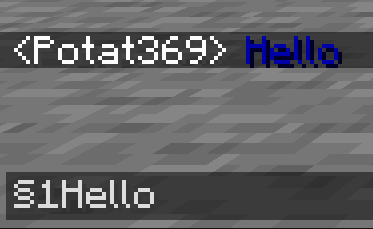
– **Required on**
– **Client**: Yes
– **Server**: Yes
### Anvil
—
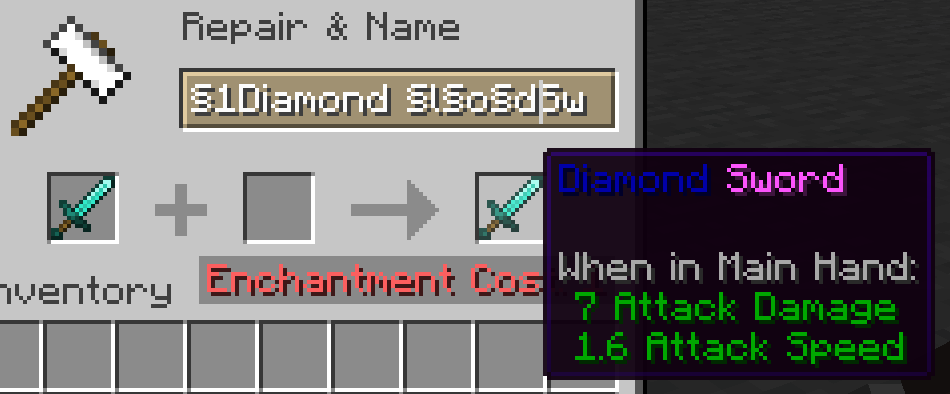
– **Required on**
– **Client**: Yes
– **Server**: Yes
### Sign
—
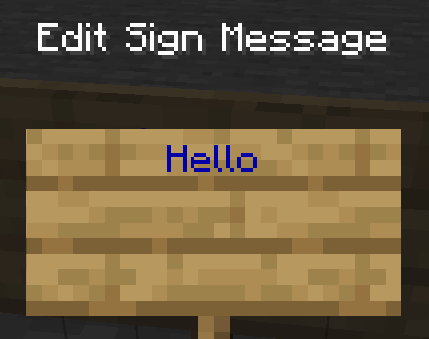
– **Required on**
– **Client**: No
– **Server**: Yes. However, there is a way to circumvent the requirement by doubling the code, like this: `§§11Hello`.
> Note: formatting will disappear after opening and closing.
### Book and Quill Body
—
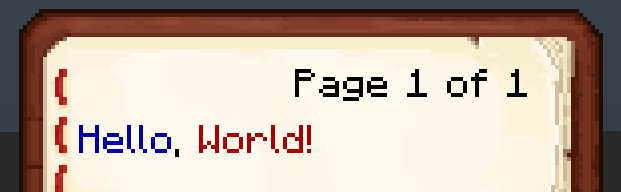
– **Required on**
– **Client**: Yes
– **Server**: No
### Book and Quill Title
—
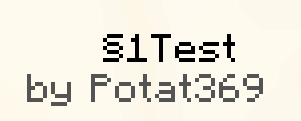
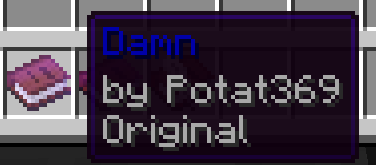
– **Required on**
– **Client**: Yes
– **Server**: No
Tab Player Health
# Tab Player Health
Free and open-source datapack for Minecraft 1.21 and higher that display players health.
## Features
By default the players health is displayed in the tab.
Timo Translations
This is a Translation Pack for my project [Timo](https://modrinth.com/datapack/timo_11).
When using mods like [Coordinates Display](https://modrinth.com/mod/coordinates-display) it displays **”biome.timo.rich”** without this Pack but with this pack **”Rich”**
Supported Languages:
“`
English (United States)
ɥsᴉluƎ(uʍop ǝpᴉsd∩)
“`
Svrve’s Dragon Egg
[
](https://www.planetminecraft.com/member/nickshoof/) | [](https://www.curseforge.com/members/nickshoof/projects) | [](https://modrinth.com/user/NickShoof) | [](https://discord.com/)
[
](https://ko-fi.com/nickshoof)
You can buy monthy subscription to get faster updates on KO-FI
****
#
**About**
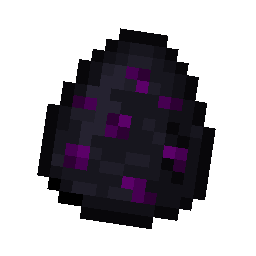
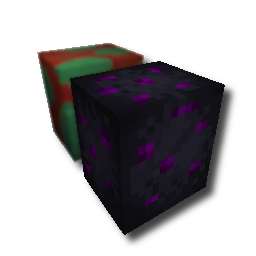
With this pack i modeled the dragon egg becouse why it its so old looking and different than sniffer’s.
.
#
**FAQ**
> **How to install resourcepacks?**
– There are a lot of tutorial out there on youtube, that will explain this better than me, but just download something from trusted sites like modrinth or curseforge, then drag this file to folder that will pop out if you click “Open Pack Folder” in Minecraft.
> **Can i use some textures from Svrve’s Dragon Egg in my pack**
– As long as its not distributed, yes you can. If you want to publish it, just ask me before doing it.