Unique Maces
**The BEST Mace PvP texture pack out there**
This pack features:
> Custom textures and models for:
– Breach mace – has a blue handle
– Density mace – has a red hande
– Breach mace in THIRD PERSON – fully blue texture (for better visibility during ground fights)
– Netherite axe in THIRD PERSON – fully red texture (for better visibility of shield disables)
**How to use:**
– Download this recource pack and drop it into your AppData/Roaming/.minecraft/resourcepacks folder
– Select this pack in the recource packs tab in the pause menu
– Enjoy the pack!
– **REQUIRES VARIENTS CIT FROM 1.21.2 TO 1.21.4:** https://modrinth.com/mod/variants-cit
– **REQUIRES CIT RESEWN FOR 1.21.1 OR LOWER:** https://modrinth.com/mod/cit-resewn
**While I made the models for this to work, the textures and idea was from Ospree14**
– https://discord.gg/2kCwf8TNV4
**Join my discord if you want to support me :)** https://discord.gg/MQfnkB3pNQ
Unique Gear
For years, most of Minecraft’s tools and armor have looked almost identical, differing only in color. This texture pack changes that by giving every tool its own unique design, making each material feel distinct and recognizable. Instead of simple recolors, tools now have visual details that reflect their strength and purpose and what they are made off.
Armor has also been completely redesigned. Each set features new item textures and updated in-game model textures, adding more personality and variety to what you wear. These changes make progression more satisfying, as upgrading your gear doesn’t just make you stronger—it makes you look different too.
Overall, this pack enhances Minecraft’s visuals while staying true to its style, making equipment feel more immersive and rewarding.
UniLink
## 🔗 UniLink
A mod that allows you to use resources from other directories
## 💼 Usage
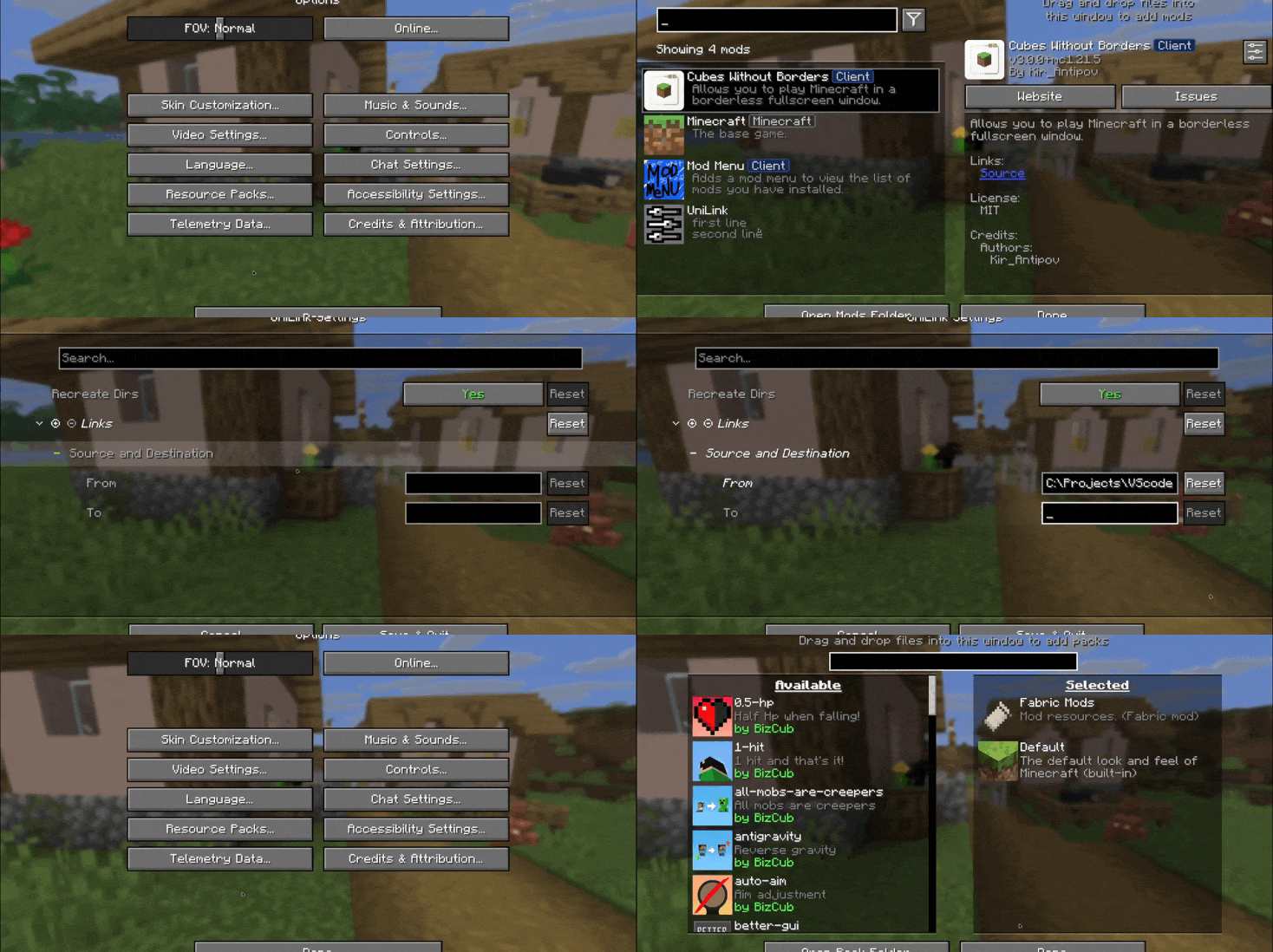
This mod works using symbolic links, which can be used like a folder but don’t require reusing (copying) resources. Some launchers also use symbolic links, but the mod works independently of them. It’s a configuration file. The first field specifies the path to the directory to use, and the second field specifies the path to the folder where the symbolic link should be placed. The final path can be absolute (e.g., “`C:….minecraftsaves“`) or abbreviated (“`saves“`).

If you change the directory used for worlds and then revert the change, the game may freeze while searching for and failing to find the required folder. For this purpose, the configuration file has an option to recreate the folders used by the game.
## 🛠️ How it works
By default, the mod does nothing. However, you can add data to the configuration to create a link: the path from which resources will be used and the path where the symbolic link will be created.
### What follows from this:
* After changing the configuration, new links will be added. Therefore, old, unused links will be deleted.
* Since Minecraft creates some folders, the mod will have to delete the existing folder before creating the link. However, since the mod deletes folders without asking, it has a limitation on deleting directories with files inside. This means that if a folder contains any files, it won’t be deleted and the link won’t be created.
Creating symbolic links requires certain permissions. Therefore, some launchers that don’t have them won’t be able to create links. Solution: Run the launcher as administrator.
## 🤝 Support

Underwater Swim Fix (MC-220390)
Fixes [MC-220390](https://bugs.mojang.com/browse/MC/issues/MC-220390) a bug where if you hit an entity while swimming and holding the sprint hotkey, the hitboxes server and clientside will be different. Resulting in weird behaviour where the client thinks that theyre swimming while the server doesnt think that. So when you for example try to go into a 1×1 block space while experiencing this bug, you will glitch out until you stop swimming and swim again.
The bug really annoyed me in monuments so I fixed it.
Join the [Discord!](https://discord.gg/p6ShJPq98d) You can ask for help, a mod, just suggest something, hangout or request the source code of any mod I have made (if I still have the source code)
Or donate to my [Kofi](https://ko-fi.com/bikerboys) incase you are feeling generous!
Un-Hidden Snow
# Un-Hidden Snow
Change the powder snow to have yellow and black edges so you don’t fall into powder snow traps
### UNFORTUNATELY NOT COMPATIBLE WITH OPTIFINE AND SODIUM
Ultimate vanilla 16×
## This pack
This pack make minecraft looking better.
## How to install and use it
• First click the download options and select your game version now download
• Copy or cut as you wish then past game resourcepack folder
• Start your game and click my resourcepack and enjoy it.
If you want to use this pack in videos or projects, please credit me.
Ultimate Bright
A brightness resource pack that changes the gamma of minecraft to 1500% to make the game bright and see ores in caves and clear water resource pack is included in theis resource pack
……………..
Переклад модів українською | UA Translation (MUTP)
Description
This pack provides an amateur translation of 800+ mods into Ukrainian.
The project is constantly updated, and there may be incorrect locale. The complete list of locales can be found [here](https://www.curseforge.com/linkout?remoteUrl=https%253a%252f%252fwww.notion.so%252f1ccc9a417437802ab567fbbe2c85dd98%253fv%253d1ccc9a41743780e0a9fb000cdd24f7b6%2526pvs%253d4).
In addition to complete translations of mods, the pack also contains corrections to existing translations and copies of translations of some mods to unify different versions. I do not claim credit for the work done by other translators so you can see in the table how original each translation is.
For all questions, feel free to contact me via Discord dm’s: @tenwoc
## Опис
Цей пакет надає аматорський переклад 800+ модів українською. Більшість ваших улюблених модів вже перекладені та чекають на вас тут! У галереї є кілька прикладів.
### Повне зведення по цьому набору можна переглянути [тут](https://www.notion.so/1ccc9a417437802ab567fbbe2c85dd98?v=1ccc9a41743780e0a9fb000cdd24f7b6&pvs=4)
Над пакетом загалом працює одна людина, тож він може містити дуже багато помилок. Крім повного перекладу модів, пакет також містить виправлення вже наявних перекладів та копії перекладів деяких модів для уніфікації різних версій. Я в жодному разі не привласнюю роботу, яку зробили інші перекладачі, тому у таблиці ви можете подивитись, який переклад наскільки є оригінальним.
Спочатку цей набір був частиною перекладу модпаків, в котрі я грав з кінця 2023. Та розширюючись із кожним модпаком набір перекваліфікувався в автономний локалізатор. Відтепер і ви також можете зручно грати у модифікований Minecraft українською!
## Зв’язок зі мною
У пакеті не вистачає вашого улюбленого моду? Хочете вказати на помилки чи допомогти проєкту? Дивіться [GitHub](https://github.com/Tenwoc/Mods-Ukrainian-Translate-Pack), або шукайте мене у Discord (@tenwoc)
Ви також можете знайти мене в інших соцмережах [за цим посиланням](https://linktr.ee/tenwoc)
Якщо хочете підтримати мене, це можна зробити у [Donatello](https://donatello.to/Tenwoc).
[Сторінка на CurseForge](https://www.curseforge.com/minecraft/texture-packs/mods-ukrainian-translate-pack)
UK Signs [MTR 3/4]
**Requires Joban Client mod >2.0.0 for the departure boards to work.**
# UK Signs
Adds UK style train station signs, British Rail logo, and departure boards to the MTR mod.
For instructions on how to use the British Rail logo, as well as for the departure boards, please see the wiki: https://github.com/ProbablyIdiot/UK-Signs/wiki
## Credits:
@british2 – Images and fonts
@bitone – British Rail 3D model
@probablyidiot – Coding, distribution and general upkeep
Please open an issue on the Github for bug reports, issues and feature requests.
UHC Gapples
# UHC Gapples
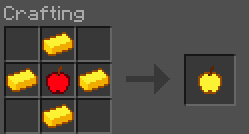
Replaces the vanilla golden apple crafting recipe with a shaped cross pattern using only 4 gold ingots.
## Recipe
## Features
– **Half the cost**: only 4 gold ingots required instead of 8
– **Multi-version**: supports 1.20.4 through 26.1.2
– **No dependencies**: drop it in and go
## Installation
1. Download the `.jar` file
2. Place it in your `.minecraft/mods/` folder
3. Make sure **Fabric Loader** is installed
4. Launch the game and enjoy cheaper golden apples!
## Compatibility
1.20.4 · 1.20.5 · 1.21.1 · 1.21.2 · 26.1 · 26.1.1 · 26.1.2
—
*by qlttqb · AAR License*