Description: 🌳⚙️
This resource pack replaces the standard model and texture of the Iron Golem with a Wooden Golem! Now the village defender is crafted entirely from wood, bringing a rustic and natural feel to your protection. 🛡️🌲
Model: The Iron Golem has been completely replaced with a Wooden Golem. 🌲🤖
Spoiler
(Note: This resource pack replaces only the look. Game balance remains untouched!)
Wither’s Wrath
### **Optional Resource pack for Music and Models:** [withers-wrath-rp](https://modrinth.com/resourcepack/withers-wrath-rp)
### There are 2 versions available for the pack:
1. **Wither’s Wrath** being the default hard boss fight
2. **Bedrock**, which only has the bedrock features (click the picture)
This is my take on the Wither, designed to make it more of a challenge by introducing brand-new attack patterns and increasing its health to 600 HP, matching the Bedrock Edition Wither. Since not everyone enjoys all the changes, I’ve included toggles to reduce chaos for more flexibility. However, there will be no “easy” version of this Wither.
This Wither was created as a personal project to present a tougher fight and primarily to showcase it to friends. It was never meant to be perfect, but I hope it brings a fun challenge.
—
**This pack was designed for Minecraft version 1.21 and up.**
—
What does this wither include?
The Wither has **600HP** with slightly higher armour. It occasionally spawns Wither Skeletons and has stronger Wither skull projectiles.
#### Start “Animation”
#### Wither Homing Skull
Weaker but never misses. _Blocking with a shield is advised._
#### Wither Half HP
#### Wither Charge Attack
This attack only occurs when the Wither has 250 HP left.
#### Wither Dash Attack
This happens when the Wither has 100 HP left.
#### Wither Death
and More!
—
## How to enable Bedrock Animations + Showcase
## Showcase of the Normal Fight
### if you have any video showcase of the datapack please let me know to add it here.
—
### **Toggle Options**
To configure settings, use the following command:
`/function wither:config`
> ⚠️ **Warning:**
> This Wither is highly destructive. Fight it far from your base, or toggle the option to disable destructive features.
—
### **Links**
Click below to view or download the data pack in other platforms:
### **Issues**
If you run into some issues please take a look [here](https://github.com/ImHer0/witherswrath/wiki/ERROS-ISSUES-fixes)
### **Server Usage**
If you’re using this on a server, I’d appreciate feedback on any potential performance impacts. Due to limited testing with larger player groups, there might be areas needing optimisation.
### **Permissions**
Feel free to use this in any packs, modify it, and make it look more polished or fancy!
A small pack that changes the Lantern and Soul Lantern model to be a little fancier without breaking the Vanilla style (aka adding way too many cubes…).
**Q: How do I install the pack?**
A: Follow [this guide](https://www.planetminecraft.com/blog/how-to-install-minecraft-texture-packs-4615399/).
**Q: Can you port this to Bedrock?**
A: I currently have no plans to port this to Bedrock.
**Q: Can someone else port this to Bedrock?**
A: No, I do not allow third-party ports of my packs.
**Q: Can you add this feature?**
A: Maybe! Comment any suggestions and we can see what happens.
**Q: I found a bug!**
A: Comment all bugs and I will fix them as soon as possible.
**Q: Does this pack work on X version?**
A: The pack is confirmed to work as far as **1.15**. It is unlikely to work on any earlier version due to changes to filenames.
**Q: Can I add this to my modpack?**
A: Of course! You must give credit and can not claim any of my work as your own.
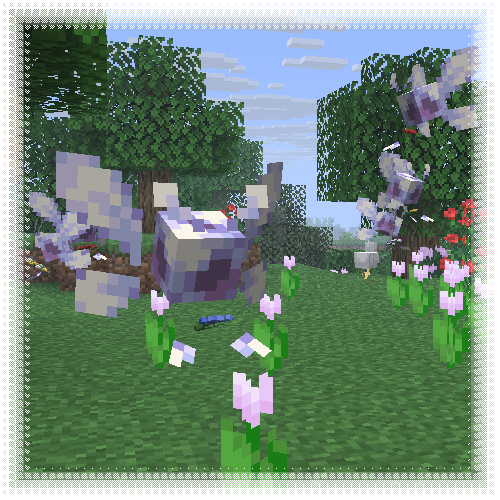
This resourcepack transforms allays into vibrant, cartoony wisps, mostly inspired by Navi from TLOZ :]
**Entity Model Features required!**
Winterglide’s Extra Animations [Cobblemon]
This Resource pack reworks the animations of the following cobblemon pokemons:
– Emolga
– Clodsire
If you put this ResourcePack in the datapack folder of your world you’ll be able to put Emolga on your shoulder 🙂
WingAuth

[
](https://github.com/Elytrium)
# WingAuth
WingAuth is a modern Velocity authentication plugin for offline/hybrid networks.
## How it works
It runs login/register protection before players reach backend servers, using a Limbo-based auth flow.
Designed for server admins who want strong account protection with flexible setup.
## Key features
– Velocity-only architecture (runs the login on a virtual world)
– Session handling and brute-force protection
– Premium/hybrid and Floodgate-compatible scenarios (Bedrock support)
– Configurable messages and behavior
– Database-backed account storage (legacy-compatible migration path)
Windswept Mace (2D+3D)
## Windswept Swirl
The mace’s heavy core now swirls with a wind effect when held!
[**🛜Get 25% off on BisectHosting using the code “konci”**](https://www.bisecthosting.com/konci)
Windows 8-11 aero busy crosshair
### This resourse pack was ONLY made for
– changing your crosshair
### Features
– Animated
– Customizable (Read file in assets folders)
### Preview of crosshairs (Use dark mode)


Both of those images can be made to be active to be in the pack
if you ever want change your crosshair then un-zip the zip file then go into the last of the assets folders.
Also make sure you didn’t forget to read the file.
(IMPORTANT!)
### IMPORTANT NOTICE :
We will not make versions for this pack before 1.20.2 (Support might be added for 1.20 and 1.20.1)
Wildborne – Worldgen & Data Tweaks

**Designed for the Wildborne Modpack (Coming soon) – This Modded Datapack implements various custom JSON files, functions and other code to change world generation, tags, structures and other various features to enhance the realism, support, or immersion of various vanilla mechanics, as well as modded mechanics!**
## IMPORTANT NOTES – READ FOR AN IDEAL EXPERIENCE:
**This Data Pack is currently a work in progress! Expect new files to be added to the project, & changes to existing ones until the project is fully finished!**
**This pack IS NO LONGER COMPATIBLE WITH JUST VANILLA ALONE!**
**THE EPIC TERRAIN COMPATIBLE MOD IS NOW REQUIRED FOR THIS DATAPACK TO WORK!**
**FEATURE RECYCLER, WORLDGEN FEATURE FIX & LAKE FEATURE FIX MODS ARE ALSO NOW REQUIRED FOR THIS DATAPACK TO WORK!**
**I tried my best to get my custom biomes, features/structures and data to load in vanilla regardless of mods, but due to the MAJOR bug in vanilla Minecraft that causes “minecraft:lake” features and “minecraft:freeze_top_layer” features to crash when dealing with water, it was simply not possible to do this & keep using Epic Terrain Compatible :(**
**Maybe in a future version of the datapack I can delve deep into the nightmarish mess of density function and noise settings to add my own custom epic looking terrain when I have time, but for now, this is the best solution**
**For MODDED use, I HIGHLY recommend the Global Packs mod, so that this datapack can apply to EACH new world you create when placed in global_packs -> required_data!**
**Use this pack in combination with the Wildborne – Photorealistic VANILLA Resource Pack (Currently in BETA) for full immersion/realism! Link here:**
– TASTEFULLY increased Grass, Tall Grass, Fern, Large Fern & Cactus in all world generation in all biomes for increased realism/immersion
– Tags that attempt to add Ocean Ruins to Ocean Explorer Maps (WIP, still iffy at times)
– Tags that add more items to the Lit On Fire mod so that more fire ignition sources can light torches/campfires
– CUSTOM VILLAGER TRADES when combined with the Villager Config mod (WIP, more to be added/implemented – _**NOTE => SOME TRADES MAY BREAK DUE TO MISSING ITEMS FROM OTHER MODS/KUBEJS SCRIPTS DESIGNED FOR THE UPCOMING WILDBORNE MODPACK – USE AT YOUR OWN RISK**_)
– 5 NEW EPIC WILDBORNE BIOMES ADDED TO THE OVERWORLD! – The Sinkhole Biomes! – Based off a bug that was previously patched out of Minecraft 1.19.3 world generation – I’ve now added 5 different biomes with the chance of generating full fledged MASSIVE sinkholes! – The Desert Sinkhole, Badlands Sinkhole, Temperate Sinkhole, Icy Sinkhole and Jungle Sinkhole biomes! (See more in the image gallery)

– Compatibility for Epic Terrain Compatible mod/datapack in a way that smoothly tranistions biomes based on temperature, humidity/vegetation, erosion, continents, and size, while the world also generates 400 block tall mountains with 450 block deep sinkholes that just add a breathtaking sense of wonder and adventure to any world!
– IMPROVED/NEW FOSSIL STRUCTURES! – These can generate on BOTH the surface of the overworld, AND underground in caves/Sinkhole biomes, with 4 variations of each part of the fossil (Skull, Spine, Tail) – support for modded biomes from Biomes O’ Plenty, YUNG’s Cave Biomes, Regions Unexplored, & Biomes We’ve Gone included! (See more in the image gallery)

### WIP/PLANNED FEATURES:
– Increased/decreased foliage placed features for Vanilla/other mods featured in the upcoming Wildborne Modpack as needed (ie, Biomes O’ Plenty, Regions Unexplored etc)
– MORE Custom Villager Trades using the Villager Config mod for the modpack as needed
– More tag additions/removals as needed for fine tuning items/blocks/mechanics in the upcoming modpack as well
– Minor tweaks to improve vanilla structure generation for compatibility with the new Sinkhole Biomes
WI Zoom
# WI Zoom (Wurst-Imperium Zoom)
The WI Zoom Minecraft mod lets you zoom in and out with the mouse wheel, providing up to 50x magnification without the need for a spyglass. This mod is fully compatible with OptiFine and Sodium, but unlike OptiFine’s zoom, WI Zoom lets the camera move in a logical way, without making it wobble around. WI Zoom supports all of the latest Minecraft versions, including snapshots.
## Features
– Up to 50x zoom!
– No spyglass needed!
– Zoom in and out with the mouse wheel!
– No wobbly camera nonsense!
– Dynamic mouse sensitivity! (since v1.1)
– Fully compatible with OptiFine / Sodium!
## How To Zoom
Hold down the V key to activate the zoom (this keybind can be changed).
While zooming, you can use the mouse wheel to zoom in further.
## Changing The Zoom Keybind
How to change the keybind (click to expand)
In the pause menu, click on “Options…”.
In the Options menu, click on “Controls…”.
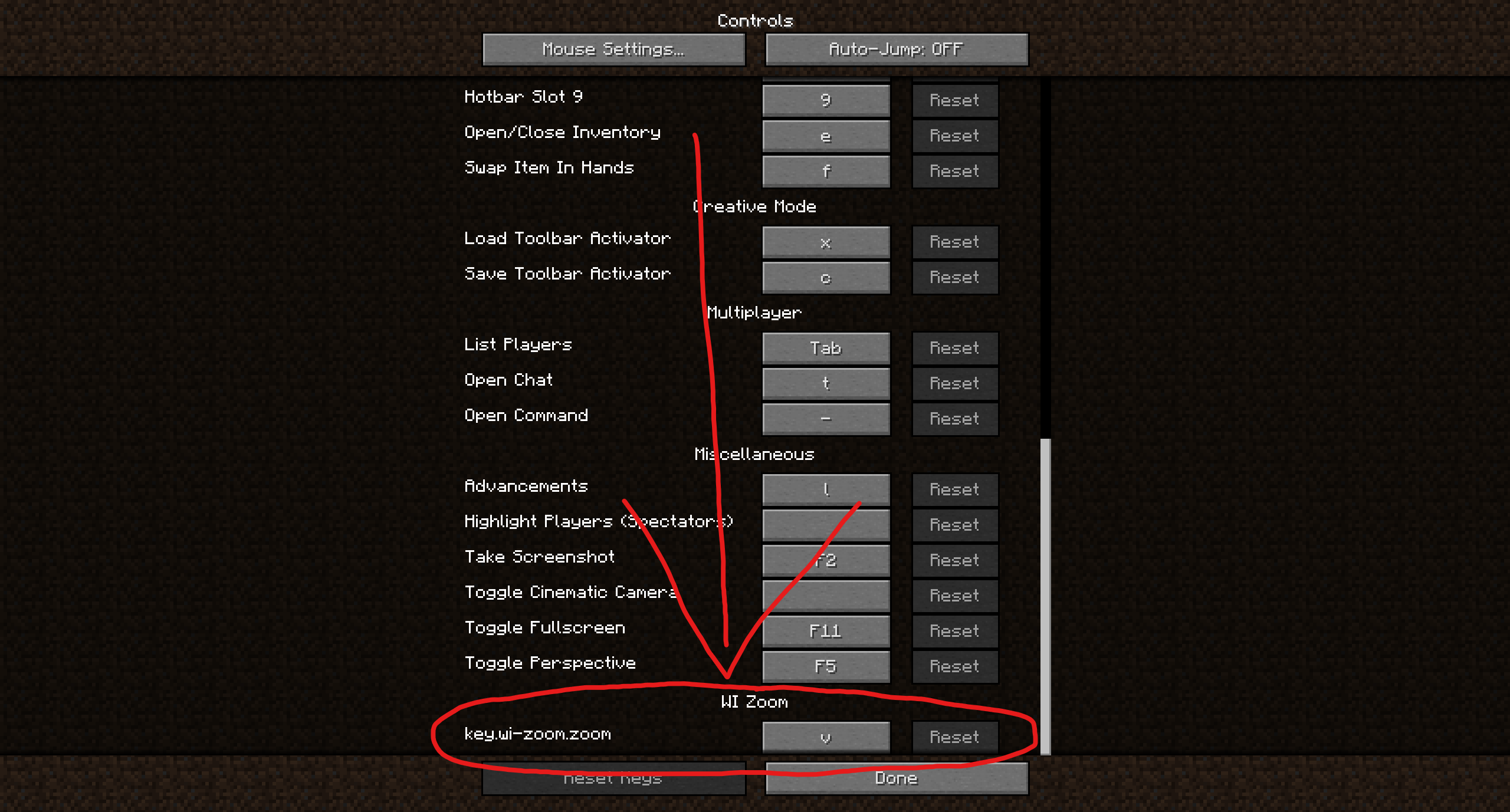
In the Controls menu, scroll down to the “WI Zoom” section. If you don’t have any other mods installed, you will find this section at the very bottom.
## Supported Languages
– Azerbaijani (Azerbaijan) (since v1.5)
– Chinese (Simplified/Mainland) (since v1.4)
– Chinese (Traditional/Taiwan) (since v1.4)
– Cantonese (Hong Kong) (since v1.4)
– Classical Chinese (since v1.4)
– Dutch (Netherlands) (since v1.5)
– English (US)
– Estonian (Estonia) (since v1.4)
– French (France) (since v1.4)
– German (Germany)
– Kurdish (since v1.5)
– Portuguese (Brazil) (since v1.5)
– Russian (Russia) (since v1.3)
– Turkish (Turkey) (since v1.5)
– Ukrainian (Ukraine) (since v1.5)