UK Signs [MTR 3/4]
**Requires Joban Client mod >2.0.0 for the departure boards to work.**
# UK Signs
Adds UK style train station signs, British Rail logo, and departure boards to the MTR mod.
For instructions on how to use the British Rail logo, as well as for the departure boards, please see the wiki: https://github.com/ProbablyIdiot/UK-Signs/wiki
## Credits:
@british2 – Images and fonts
@bitone – British Rail 3D model
@probablyidiot – Coding, distribution and general upkeep
Please open an issue on the Github for bug reports, issues and feature requests.
UHC Gapples
# UHC Gapples
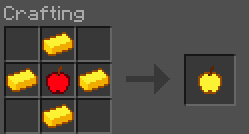
Replaces the vanilla golden apple crafting recipe with a shaped cross pattern using only 4 gold ingots.
## Recipe
## Features
– **Half the cost**: only 4 gold ingots required instead of 8
– **Multi-version**: supports 1.20.4 through 26.1.2
– **No dependencies**: drop it in and go
## Installation
1. Download the `.jar` file
2. Place it in your `.minecraft/mods/` folder
3. Make sure **Fabric Loader** is installed
4. Launch the game and enjoy cheaper golden apples!
## Compatibility
1.20.4 · 1.20.5 · 1.21.1 · 1.21.2 · 26.1 · 26.1.1 · 26.1.2
—
*by qlttqb · AAR License*
Typewriter Day Counter
## About
Adds an RPG like daycounter, displaying at the start of each day with a type writer effect and sound. See the
(https://modrinth.com/datapack/typewriter-daycounter/gallery) for a preview!
– The day counter displays at the start of each minecraft day
– It also displays when first joining a server
– On milestone days like day 100, a special day counter animation will play. This is included for all multiples of 100
– Vanilla minecraft starts on day 0, so to solve this, +1 day is added to the world. The daycounter starts at Day 1!
## Timestop
You can configure the day counter to only increment when there are players in your server, this way, a milestone will never go unseen. Use the command below:
– `/function vanilla_refresh:day_counter/_toggle_offline_timestopper`
***

This pack is a standalone, mini-pack of a feature from [Vanilla Refresh](https://modrinth.com/datapack/vanilla-refresh)
TV Trivia
# 1000 points or bust! Can you do it!?
**Say goodbye to Trivia Bot, say hello to everyone’s favourite host! _MR (ANT) TENNA!_**
This resource pack replaces both Trivia and Santa bot with Tenna from Deltarune. This also includes the Trivia Snail.
## Sick of the CLASSICS?! We’ll make ’em NEO!
This also replaces Trivia Bot’s music with songs from Deltarune. With plans to replace Santa Bot’s… At some point.
Credit to Toby Fox as the composer and Materia Music Publishing as the copyright administrator.
# IT’S! TV! TIME!
What are you waiting for? Download and play with The King of Only today!
> _I… I just wanted to be watched…_
Tuxedo Cat of Undying
# Tuxedo Cat of Undying 🐾
Ever wanted a Totem of Undying with a touch of feline elegance? This mod replaces the standard Totem of Undying with a 3D model of a cute minecraft tuxedo cat.
## Features:
– Fully 3D tuxedo cat model as your Totem of Undying
– Lightweight and compatible with any resource packs
– That kitty is big when thrown on the ground but the item hitbox stays the same
– Supports putting the totem on item frame, shelf and even player head!
– With this resourcepack you can get nine lives, use them wisely :3
turn PojavLauncher app icon to crafting table
This pack turns the crafting table texture to the [PojavLauncher ](https://pojavlauncher.app/) app icon
TrustMeBro – Bundle
TrustMeBro – Bundle brings the funniest and most ridiculous features inspired by the r/shittymcsuggestions community straight to your Minecraft server. Enable or disable each challenge with simple commands and enjoy chaotic, meme-worthy gameplay with your friends. Perfect for streamers, community servers, or anyone looking to spice up their Minecraft experience with unexpected twists!
– Features / Commands:
– /extremebabyzombie on|off — Toggle if baby zombies are extreme
– /shearmobs on|off — Toggle if you can shear: Villagers, Endermen, Spiders, Striders
– /breadrename on|off — Toggle bread rename (to “Raw Toast”) and potatoes to “Raw Potatoes”
– /powderwater on|off — Toggle if powder dissolves in water
– /nearmobsbecomeinvis on|off — Toggle if near mobs become invisible
– /moss on|off — Toggle if moss duplicates in your inventory and if moss is edible
– /sunblind on|off — Toggle if you could be blinded by looking directly at the sun
– /trowabledragonegg on|off — Toggle if you can throw the dragon egg, like an normal egg, to spawn the ender dragon
– /hotsand on|off — Toggle whether you take damage while sneaking on sand.
– /throwingsnowballvillager on|off — Toggle if you become a really cool advancement if you throw a snowball against a villager.
CODE MADE BY ME!
Keywords:
minecraft, plugin, fun, meme, r/shittymcsuggestions, challenge, bundle, chaos, minigame, server, dumb ideas, community, gameplay, commands
OverGrown Tools
OverGrown Tools — A nature-themed resource pack that reclaims your gear for the forest. Every tool and weapon is now entwined with lush leaves, vines, and crawling ivy.
Features:
Complete overhaul of all material tiers: from Wood to Netherite.
Netherite gear is wrapped in glowing Warped vines from the Nether.
Perfect for “Lost Civilization”, “Ancient”, or “Druid” playstyles.
Supported versions: 1.16 through 1.21.11.
True Doors
True Doors replaces the flat vanilla door item textures with proper models so doors look natural when held in your hand.

Every door uses a custom item model, making them appear correctly shaped instead of a flat rectangle in the inventory.


This resource pack specifically supports Not Enough Animations mod and First-person Model mods.
Many other mods are also affected automatically.
Not Enough Animations mod:

First-person Model mod:

Hold My Items mod:


This update improves the accuracy and polish of the pack.
Door edge textures (top, bottom, left, and right) now use proper textures instead of stretched pixels.
Update 1.1:
Door edges now use proper textures. “Broken or incompatible” warnings have been fixed.


The pack icon has been updated.

The pack icon has been updated and the resource pack “Broken or incompatible” warnings in Minecraft have been fixed.


Trims – Color Splash!
# Trims – Color Splash!
Adds 29 trim materials that you can apply to your armor in the smithing table!
Heavily inspired by [More Trim Colors](https://modrinth.com/datapack/more-trim-colors) by [Skottify](https://modrinth.com/user/Skottify)!

Please join the Discord if you have questions!
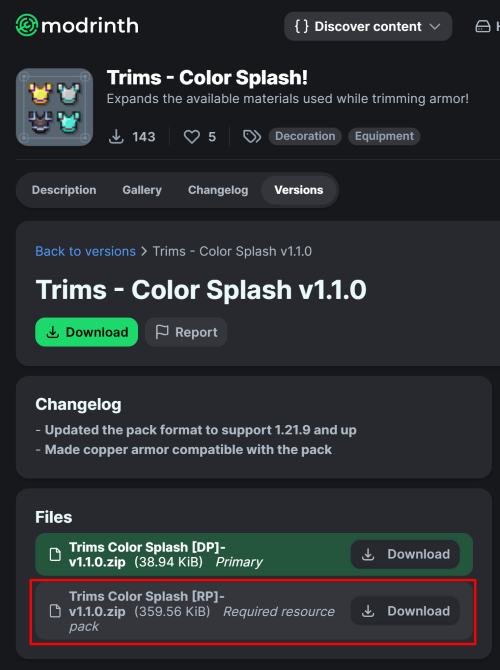
(When using the datapack version, please make sure you install the required resource pack as it is needed for it to function correctly!)
All new trim materials
1.21.4 and up
 Armadillo Scute
 Blaze Rod
 Blue Ice
 Breeze Rod
 Crying Obsidian
 Dragon Breath
 Dripstone Block
 Echo Shard
 End Crystal
 Ender Pearl
 Ghast Tear
 Glass (Removes trims)
 Glowstone Dust
 Heart Of The Sea
 Leather
 Magma Cream
 Nautilus Shell
 Nether Star
 Nether Wart
 Netherite Scrap
 Obsidian
 Phantom Membrane
 Prismarine Shard
 Prismarine Crystals
 Rabbit Hide
 Rose Gold
 Shulker Shell
 Slime Ball
 Turtle Scute
Older versions
- Armadillo Scute ->
 Brick (< 1.20.5)
- Rose Gold ->
 Honey Block (< 1.21)
 Resin Brick ->
  Magma Block (< 1.21.4)
- Breeze Rod ->
 Pearlescent Froglight (< 1.21)
Rose Gold Recipe
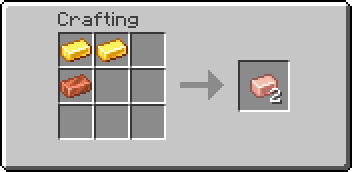
(Shapeless)
This data pack is compatible with:
Compatible Mods
## FAQ:
### Q: Why does the smithing table recipe have a red ‘X’ over it when I try to trim my armor?
**A**: First, drop the trim material on the ground, pick it up again, and try crafting. If the issue persists, restart your server. If neither of these steps resolves the problem, please report the issue in the Discord Server or on the github page.
### Q: Why can’t I place the materials in the smithing table?
**A**: If the issue continues after trying the fixes above, double-check that you have installed the datapack correctly. If you are certain the datapack is installed right, please report the issue in the Discord Server or on the github page.
### Q: Why are none of the recipes working?
**A**: You might need to restart your world, server, or realm. The recipes should function correctly after the restart.
### Q: I am seeing a missing texture when I try to use this. How can I fix it?
**A**: When using the datapack version, you must download and install the required resource pack.
### Q: Where can I find and download the resource pack?
A: The main download button on Modrinth only provides the datapack, not the resource pack. You need to go to the “Versions” tab to find and download the resource pack file. (see img at the top of the page)
Special thanks to [Lynx](https://modrinth.com/user/lynx-xdg) for help with generating files!


