Larger Ore Veins: Deluxe
### Join our discord to report bugs and make suggestions.
The Larger Ore Veins: Deluxe combines the Classic, Diamond, and Nether editions into a single data pack as well as bringing lapis and redstone ore generation to match the larger ore vein generation style.
### Notice
This is a world generation data pack. World generation data packs work best when added to your world during the world creation phase. You can still add them to your world after generating it, you just need to generate new chunks to see the effects.
## Modifying this pack
– Download the **datapack version** of the project
– Unzip the pack
– Open the unzipped folder.
To modify the size of the ores, go to `data/minecraft/worldgen/configured_feature` and change the `size` value in the desired JSON files (The maximum size is 64).
To modify the rarity of the ores, go to `data/minecraft/worldgen/placed_feature` and edit the `count` field in the desired JSON files, this number represents the number of generation attempts per chunk.
### Weighted Counts
Some files use a weighted count system, with multiple data values being assigned a weight.
Higher weights increase the chance of the associated data value (or `data`) to be selected as the count.
With the weight system, there is a `/` chance of a particular value to be selected for the count.
Example 1
“`JSON
“count”: {
“type”: “minecraft:weighted_list”,
“distribution”: [
{
“weight”: 7,
“data”: 0
},
{
“weight”: 3,
“data”: 1
}
]
}
“`
In this example, there is a total weight of 10. 7 “points” are associated with `”data”:0` and 3 “points” being associated with `”data”:1`. Therefore, there is a 7 in 10 (70%) chance of `count` being 0 and a 3 in 10 (30%) chance of `count` being 1.
In other words, each chunk has 30% chance to attempt generating an ore blob once and a 70% chance of not attempting.
Example 2
“`JSON
“count”: {
“type”: “minecraft:weighted_list”,
“distribution”: [
{
“weight”: 7,
“data”: 0
},
{
“weight”: 3,
“data”: 1
},
{
“weight”: 1,
“data”: 5
}
]
}
“`
This time there is a total weight of 1. 7 “points” are associated with `”data”:0`, 3 “points” being associated with `”data”:1`, and 1 “point” for `”data”:5`. Therefore, there is a 7 in 11 (64%) chance of `count` being 0, a 3 in 11 (27%) chance of `count` being 1, and a 1 in 11 chance (9%) of `count` being 5.
In other words, each chunk has 9% chance of making 5 attempts to generate ore blobs,
a 27% chance to attempt generating an ore blob once
and a 64% chance of not attempting to generate any ore.
Klinbee’s Vast Vistas: Otherview
# Klinbee’s Vast Vistas: Otherview
Vanilla world generation is notorious for its jagged terrain. Some may like this, while others would prefer a smoother world generation experience. The goal of Vast Vistas is to make smooth and satisfying world generation.
### Usage
If using the datapack, you can just add it to the world at world creation. You can then create a world on the default world preset, or even use large biomes! If using the mod, it replaces the default and large biome preset to use the Vast Vistas: Otherview ones.
### Dedication
This project was a commission for Aulderis. Initially I was going to release this version, along side my preferred version (which will just be Klinbee’s Vast Vistas), but I will be focusing on other projects in the meantime. That version will be a decent bit different from this one (biomes will not be fuzzy, windswept biomes are *completely* different, there will be more types of caves, rivers will be slightly different as well). If this project ends up doing well though, I may release Klinbee’s Vast Vistas sooner though.
### Changes
– Terrain noise is smoothed significantly
– Rivers are much wider and typically more shallow
– Biome scale is a bit smaller
– Biomes are “messier”
– Caves are simpler (like air pockets)
– Old carver caves still exist (they can be removed with No Old Caves)
– Aulderis prefers them removed if you want to see his true vision of this pack
– Icebergs are smoother, smaller icebergs are removed
– Badlands Hoodoos are smoother and simplified
Kirin
# Kirin UI


Embedded common code used across several Mine Little Pony projects to create their GUIs.
## If you’re a player
This mod is a _library_ and is usually embedded or installed as a dependency for other mods, so installing it on its own doesn’t do anything.
It will occasionally get updates independent of other projects that depend on it, so whilst installing it separately is not recommended it is permitted if you’re having issues that updating solves but the downstream project hasn’t (or can’t) be updated for whatever reason.
## If you’re a mod developer
Kirin provides support for creating GUIs, and hooking into existing GUIs to add a variety of different controls: Buttons, Toggles, Cyclers, and scrolling containers that makes them both simpler and easier to configure, with more customisation options than the regular game’s classes. It also provides an advanced configuration system for loading a config file in json format with support for live updates whilst the game is running.
For more on how to use it, I recommend checking out the projects source on github.
https://minelittlepony-mod.com
Killer Head


___
## What’s Killer Head ?
**Killer Head** is a project to drop the killer’s head when his victim dies.
## How it works ?
### Edit player loot table `entities/player.json`
Adds a player head to the death of a player and correlates the characteristics of the killer.
## Complementary
You can also use Drop Head.
Here’s Stackable Heads which is interesting to use.
## Compatibility
**Killer Head** should work anywhere.
## Support me!
Join my Hardcore Minecraft server: `38.143.19.130:51965`
Keep Inventory Always
## Keep Inventory Always
The mod turns on a game rule that allows you to save your inventory when you die in each world
## How to use
To use the mod, you only need to install it. Now when creating a world, the game rule keepInventory will always be enabled
## Dependencies
– Fabric loader requires Fabric API
KDCraft
这是一个魔幻恐怖淡色偏中世纪生存向材质包,它做到了不影响原版体验而仅仅只是改变了美术风格,感受稍微恐怖又美丽魔幻的世界
This is a magical horror pastel color partial medieval survival resource pack, which does not affect the original experience but only changes the art style, and feels a slightly scary and beautiful magical world
Kaths Teleporter
| Bugs&News | All Projects |
|-|-|
|  |
|  |
|
|Direct link|Direct link|
—
# What does it do?
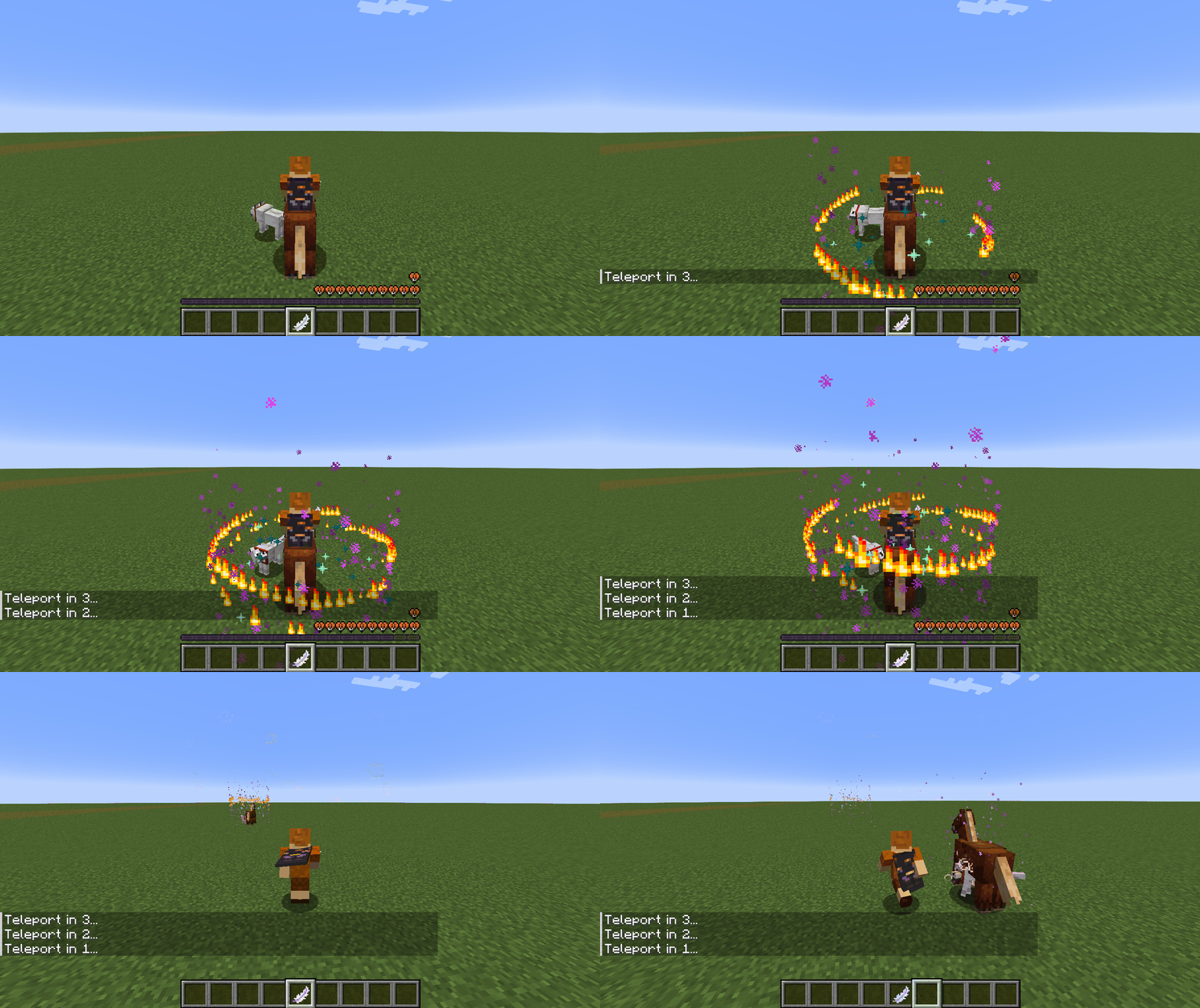
It lets you make your own custom teleporter without additional blocks or constructions to set up. **All you need is one item** and you can have as many teleporters to anywhere you want.
# 1.2.1 and older are Dependent on a Resource pack!
This datapack (version 1.2.1 and older) is dependent on my resource pack, without you not see the right models only a *carrot on a stick*
**Not needed from version 1.3 and newer!**
| Download: |
|- |
| 
—
## Features:
– Create as many teleporters as you like.
– Multiplayer capable.
– **Teleport your horse/donkey/mule/camel with you (while riding)**
– **Through dimensions**
– Only works in vanilla dimensions !
– [1.3+] Even through modded dimensions
– [1.3+] Pets that are following are getting teleported (not sitting)
– [1.3+] Renaming the teleporter on an anvil will keep the name
– [1.3+] **Group teleport**
– Created by trowing **one ender eye** with the Teleporter on the ground
– The teleporter loses as many uses as players are teleported
– if the Teleporter has not enough uses for all players it will not work
– Players in creative are not losing any uses on the Teleporter
– [1.3+] Using a group Teleporter in creative will let you port as many players as you want
– Also if option “infinit use of the *teleporter*” is on 1, no uses will be consumed and groups are not limited by the Teleporters uses anymore
## Multiuse:
– After crafting, the teleporter has 3 uses.
– The player can sacrifice items and HP to add more uses.
1. Throw the teleporter on the ground
2. Throw the **item/s** in the right amount also on it.
3. Have more then 6 hearts.
### Items that can be used:
**+1 Use** => **3 blaze powder**
**+100 Uses** => **1 Nether star**
**Set 420691337 Uses** => **3 Nether star, 64 Blaze powder, 4 end crystal all thrown onto aincent debris**
## Other
– Configurable (see *all useful commands*)
– Craft-able or via command (see *all useful commands*)
– In creative the teleporter and blank teleporter will not be used.
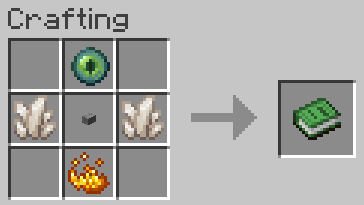
**The knowledge book will change into the teleporter when crafted.**
all useful commands:
### infinit use of the *teleporter*
**ON:** /scoreboard players set k_clear k_tel_s 1
**OFF [Default]:** /scoreboard players set k_clear k_tel_s 0
—
### infinit use of the *blank teleporter*
**ON:** /scoreboard players set k_clear_r k_tel_s 1
**OFF [Default]:** /scoreboard players set k_clear_r k_tel_s 0
—
### Give raw teleporter:
– /function k_tel:give_telepor
—
### Uninstall
– /function k_tel:uninstall
Note:
After using this command the datapack in completely disabled.
If you want to re-enable it again use: /datapack enable “file/Kaths-Teleporter”
# How to …
### … choose your playstyle:
Do you want the teleporter you to be consumed or have infinit uses?
**see *all useful commands*** Then chose you playstyle.
### … getting the item:
Craft the item or use the command to get the blank teleporter.
### … using the items:
You can use the blank teleporter wherever you want to create a active teleporter to your current location.
Using the active teleporter will instantly teleport you to the position you created the **active teleporter**.
You can even port through dimensions and with your horse, mule, donkey or camel
Now you set up and ready to go.
# Notes:
– You can always uninstall the datapack and all scores will be removes.
# Note for content creators:
I’m interested in seeing people playing and/or giving feedback on my Datapacks. So if you are creating a video of any kind with or about my datapacks, I would be really happy to get notified on my discord about it, so I can see your feedback.
Also if you allow me to, I would put it on the Modrinth page, so others can see a first impression.
**This is not necessary, you don’t have to!**
Kai Fixes Sand
As the name suggests, Kai Fixes Sand improves the textures of sand and related blocks in Minecraft to make them more usable as building blocks.
________________________________________________________________________________________________
This resource pack is a small part of a much larger resource pack being worked on called Kai Fixes Minecraft.
The concept behind what Kai Fixes Minecraft is bringing to the table is:
– Significantly reduce redundancies within the block textures
– Greatly increase the building opportunities from blocks that often get overlooked
– Reduce the unintentional texture repetition effect without heavy reliance on noise or random block variants by focusing on patterns that seamlessly splice together and proper shading
– Identify colors missing from the game and the best texture to go with that color while maintaining balance with what feels appropriate for the block in accordance with its fit in the game
– Maintain the highest quality of block textures in the Minecraft ecosystem
________________________________________________________________________________________________
Terms of Use
– Captain Kai is the creator and owner of this resource pack
– If you use assets from this resource pack in your own, credit is required. Preferably including its name and a link to an official CurseForge, Modrinth, or Planet Minecraft page
– You may not port this resource pack or its assets to work on Minecraft Bedrock Edition
– You may not include assets from this resource pack in a paid product or paid access to a product
Kai Fixes Quartz
As the name suggests, Kai Fixes Quartz improves the texture of quartz and related blocks in Minecraft to make them more usable as building blocks.
________________________________________________________________________________________________
This resource pack is a small part of a much larger resource pack being worked on called Kai Fixes Minecraft.
The concept behind what Kai Fixes Minecraft is bringing to the table is:
– Significantly reduce redundancies within the block textures
– Greatly increase the building opportunities from blocks that often get overlooked
– Reduce the unintentional texture repetition effect without heavy reliance on noise or random block variants by focusing on patterns that seamlessly splice together and proper shading
– Identify colors missing from the game and the best texture to go with that color while maintaining balance with what feels appropriate for the block in accordance with its fit in the game
– Maintain the highest quality of block textures in the Minecraft ecosystem
________________________________________________________________________________________________
Terms of Use
– Captain Kai is the creator and owner of this resource pack
– If you use assets from this resource pack in your own, credit is required. Preferably including its name and a link to an official CurseForge, Modrinth, or Planet Minecraft page
– You may not port this resource pack or its assets to work on Minecraft Bedrock Edition
– You may not include assets from this resource pack in a paid product or paid access to a product
Kai Fixes Purpur
As the name suggests, Kai Fixes Purpur improves the texture of purpur blocks and purpur pillars in Minecraft to make them more usable as building blocks.
________________________________________________________________________________________________
This resource pack is a small part of a much larger resource pack being worked on called Kai Fixes Minecraft.
The concept behind what Kai Fixes Minecraft is bringing to the table is:
– Significantly reduce redundancies within the block textures
– Greatly increase the building opportunities from blocks that often get overlooked
– Reduce the unintentional texture repetition effect without heavy reliance on noise or random block variants by focusing on patterns that seamlessly splice together and proper shading
– Identify colors missing from the game and the best texture to go with that color while maintaining balance with what feels appropriate for the block in accordance with its fit in the game
– Maintain the highest quality of block textures in the Minecraft ecosystem
________________________________________________________________________________________________
Terms of Use
– Captain Kai is the creator and owner of this resource pack
– If you use assets from this resource pack in your own, credit is required. Preferably including its name and a link to an official CurseForge, Modrinth, or Planet Minecraft page
– You may not port this resource pack or its assets to work on Minecraft Bedrock Edition
– You may not include assets from this resource pack in a paid product or paid access to a product