Mediumcore datapack port
# Mediumcore vanilla datapack unofficial port
Original mod – AlexModGuy: Mediumcore
His github
## What does this datapack do?
As AlexModGuy wrote,
> Mediumcore is a new difficulty option that is designed to be more difficult than regular survival, but far less punishing than vanilla’s Hardcore Mode. The only significant change mediumcore has over default survival is that each death decreases the maximum available health a player can regenerate. The player looses a heart of max health per death, until they only have 3 hearts of health left. At this point, they will not loose anymore and can continue to play the game in their hobbled, feeble state. Luckily, this punishment isn’t permanent – if you’re willing to do what it takes to get your hearts back. Consuming a Golden Apple or Enchanted Golden Apple will grant you one of your missing hearts, along with the usual effects of consuming these foods.

↑ ↑ ↑ ↑
if the player died 3 times
This is my first datapack coded with minecraft variables.
It was a hard journey and in the end almost all functions from original mod are working
## How to configure it?
the main config file is located in `datamediumcorefunctionconfig.mcfunction`
(in `datamediumcorefunctionsconfig.mcfunction` for 1.20.2)

Here’s what each value does
| in config | what it means |
|———-|—-|
| items:[“enchanted_golden_apple”,…] | items, that when consumed will regenerate your health |
| max:10 | maximum player hearts |
| max_1:11 | maximum player hearts+1 (please do not set it with wrong values, that are not “max”+1) |
| max_deaths:7 | maximum player deaths (when you die a lot you will end up with (max)-(max_deaths) hearts. By default your minimum hearts is 3) |
## If the project will get some attention
### I will make this datapack more configurable
In original mod you can change, how many health an item will regenerete you, how many hearts will disappear after death and so on
### I will make a better 1.20.2 version
in 1.20.2 – `function` is `functions` and `minecraft:max_health` is `minecraft:generic.max_health` and also something just doest work, so I did a temporarly solution: I put `load.mcfunction` inside `tick.mcfuction`
If this project gets attention I’ll try to find an error and make a better solution
### I’ll TRY to make support for <=1.20.1
Mojang added "$" macros in mcfunction only in 1.20.2, and my datapack uses it a lot
Will stretch this datapack to 1.20.1 if only project gets a lot of attention
Medium Biomes
# Medium biomes
Medium Biomes is a Minecraft datapack that adjusts world generation by introducing a biome scale between default and large biomes.
This creates a more balanced terrain layout, where biomes are neither too small and fragmented nor excessively large and repetitive.
The result is a smoother exploration experience with improved biome transitions and more coherent world generation.
## Features
– Adds a biome scale between default and large biome generation
– Creates more cohesive and naturally distributed biomes
– Improves exploration by reducing excessive biome fragmentation
– Only affects newly generated chunks
## Installation
– Download the datapack
– Move the datapack inside “.minecraft/saves//datapacks“ (How to find .minecraft?)
– Reload the world or run “/reload“
## Support the Project
If you enjoy this datapack and find it useful, please consider giving the repository a star and following me on GitHub.
This helps the project gain visibility and motivates further development and maintenance.
## Contributing
Contributions are welcome! Please read CONTRIBUTING.md for commit conventions and guidelines.
Mechanical Arm
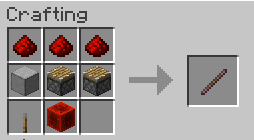
This Datapack and Resource Pack Combo adds the Mechanical Arm, an item that allows for block breaking and placing at further distances.
This is inspired by the lost crab claw from the 2023 mob vote.
The reach when held goes from 5 blocks to 8. Works with tools and block placement.
THIS DATAPACK IS MADE FOR THE NEW 1.20.5 SNAPSHOTS AND WILL NOT WORK ON PREVIOUS VERSIONS
The Resource pack is important for the datapacks use.
THE Resource Pack says wrong version but I can not find the correct version for it.
The Recipe:
MCSM enchantment glint
**Enchantment glint in Minecraft story mode looks different than the one in minecraft**, so i decided to **make a texture pack** that **looks similar** to the one seen in Minecraft story mode, it **isnt the same** but its good enough. this texture pack **will be updated in the future** because it **isnt perfect**
Perspective

## About
Perspective is a Minecraft mod developed for Fabric/Quilt. It allows players to zoom, change and hold perspectives, have custom textures on named/random entities, take panoramic screenshots, and use super secret settings!
## Dependencies
– Fabric API or Quilted Fabric API (QFAPI)
– `fabric-resource-loader-v0`
– `fabric-key-binding-api-v1`
– `fabric-rendering-v1`
– `fabric-lifecycle-events-v1`
– Luminance (Bundled)
– Java 21 or later.
## FAQ
– **Can I add my own shader to Super Secret Settings?**
– Yes! You can add more shaders using resource packs.
– **Do you have a guide for this?**
– I recommend checking out the Souper Secret Settings: Resourcepack Guide.
– Perspective specific documentation is not yet available.
– Perspective is cross-compatible with Souper Secret Settings, meaning resource packs made for either mod will work!
– **Is Perspective compatible with other mods?**
– We try to be as compatible as possible, but sometimes things break.
– If you find an incompatible mod, let us know!
– We are cross-compatible with Souper Secret Settings’ resource packs, and our shaders can run alongside Iris Shaders.
– **Can I use this in a modpack or video?**
– Yes, you can use this mod in modpacks or videos.
– **Will you port this mod to 1.x.x?**
– I am unlikely to port to specific versions, but I do try to keep up to date with the latest Minecraft version. However, other developers are free to port this mod, as long as they adhere to the conditions of the LGPL-3.0-or-later license.
– **Is this compatible with Forge?**
– No. However, other developers are free to port this mod, as long as they adhere to the conditions of the LGPL-3.0-or-later license.
– **Is this compatible with Quilt Loader?**
– Yes, currently Perspective is developed and built for Fabric Loader, with Quilt Loader compatibility in mind.
– Fabric Loader support may get dropped in favour of Quilt Loader at a future date.
– **Why are some keybinding(s) not working?**
– Make sure there are no conflicts with any keybinding(s).
– `Load Hoatbar Activator` and `Save Hotbar Activator` may be conflicting by default.
## Also check out
Souper Secret Settings by Nettakrim
Luminance Mod Collection
—
Licensed under LGPL-3.0
**This mod is not affiliated with/endorsed by Mojang Studios or Microsoft.**
Some game assets are property of Mojang Studios and fall under Minecraft EULA.
Max Totem of Undying
– ENG: Max is a Russian cross-platform instant messaging service based on the digital system of the same name. It was founded in 2025 by the VK technology company. Resourcepack replaces the immortality totem with the logo
– RU: Max — российский кроссплатформенный сервис мгновенного обмена сообщениями на базе одноимённой цифровой системы. Основан в 2025 году технологической компанией VK. Ресурспак заменяет тотем бессмертия на логотип
Check collection with all memes + streamers Totems
– Тотем Я уже Красный-totem-of-undying)
– Тотем Меллстрой
– Colored Bricks
– MACAN Totem of Undying
Marker Command Engine
# Marker Command Engine (MCE)


**Marker Command Engine** is a lightweight and high-performance command execution engine for Minecraft datapacks. It allows you to run commands directly from storage using a clean marker entity + command block technique.
## Features
– Execute commands stored in `storage mce:cmd`
– Very low performance impact
– Simple and clean API
– Clean marker entity method
– Supports Minecraft 1.21+ (`pack_format: 57`)
## Installation
1. Download or clone this repository.
2. Put the `marker-command-engine` folder into your world’s `datapacks` folder.
3. Run `/reload` in your Minecraft world.
4. You should see a successful load message in chat.
## Usage
### Run a Command
“`mcfunction
# Store the command
data modify storage mce:cmd Command set value “say Hello World!”
# Execute it
function mce:api/run
“`
### Show Help
“`mcfunction
function mce:api/help
“`
## Available Functions
| Function | Description |
|———————–|————————————————–|
| `mce:api/run` | Executes the command stored in storage |
| `mce:api/help` | Shows help information |
| `mce:core/load` | Runs when datapack is loaded |
| `mce:core/reset` | Cleans up marker and command block |
## Technical Details
– **Marker**: Tagged with `Tags:[“mce.cmd”]`
– **Command Block**: Temporarily placed at `0 -64 0` and removed immediately
– Reset operation runs automatically after 3 ticks
## For Developers
Storage structure:
“`json
{
“Command”: “your command here”
}
“`
## License
This project is licensed under the **MIT License** — you are free to use, modify, and distribute.
—
**Made with ❤️ for the Minecraft Datapack Community**
Manhunt
This datapack implements a simple manhunt game. It is compatible with realms due to the fact that it is a datapack. But it is also available bundled as a mod.
### Installation
**If you get a message saying the pack is not supported in lower versions I have marked it as working in, ignore this as it will still work**
**Datapack installation:**
1. Locate the datapack folder for the specific world
2. Drag the Manhunt.zip file into the datapack folder
3. Enable the datapack with /datapack enable “file/Manhunt.zip”
**Mod installation:**
1. Follow the instructions on how to install your prefered modloader (be it Forge, Fabric, NeoForge or Quilt)
2. Drag the downloaded .jar file into (on windows) %appdata%.minecraftmods
3. Launch the world and start playing
### Playing
Hunters are added with:
“`
/team join hunters player_name
“`
And runners with:
“`
/team join runners player_name
“`
The game is started with:
“`
/function manhunt:start_game
“`
You can pause the game if you want to leave without having to restart and clear your inventory with:
“`
/function manhunt:pause_game
“`
And then resume the game with:
“`
/function manhunt:resume_game
“`
### Configuration
The start delay can be changed from the default of 45 to whatever you like with:
“`
/scoreboard players set Temp manhunt_lead 60
“`
The minumum tracking distance (within this distance from the runners the compass goes crazy)
Can be removed (done by default) with:
“`
/scoreboard players reset Temp manhunt_min_dst
“`
And set to your desired distance with:
**If you want a distance of 20 you will use the value 20 * 20 = 400**
“`
/scoreboard players set Temp manhunt_min_dst 400
“`
The scoreboard can be removed with:
“`
/scoreboard objectives setdisplay sidebar
“`
**Please report any problems on github or on my discord server.**
MacOS Input Fixes
Fixes MC-122296
Fixes MC-121772
Fixes MC-59810
Fixes MC-22882
Fixes control + tab and control + escape not being detected
Specific fixes:
– Correctly detects left click while control is pressed
– Make trackpad scrolling not scroll a ridiculous number of items at once
– It also fixes momentum scrolling (which changes the number of scroll events based on how quickly you did it, even by like x5-10, meaning you couldn’t easily scroll to the correct item)
– On the trackpad it also only considers scrolling while fingers are on the trackpad (and the same for any fancy mice that support the relevant api e.g. probably apple’s fancy mice/trackpad thing)
– It also fixes scrolling being broken when shift is down on some older mice.
– When dropping an item, Minecraft checks for command + the key, since the default key is Q, this doesn’t make sense, so this mod allows both control + key and command + key to work
– Fixes control + tab and control + escape not being detected
Menu Options (under Mouse Settings Screen):
– Option for trackpad scrolling sensitivity (macOS only)
– Option to enable momentum scrolling on hotbar (macOS only)
– Option to disable workaround for smooth scrolling in interfaces (macOS only)
– Option to reverse scrolling of the whole game
– Option to reverse scrolling of the hotbar
– Option to disable the fix for the ctrl + left click becomes right click bug (macOS only)
On platforms other than macOS, the mod does nothing (except the aformentioned menu options), so it can be safely included in any modpack.
Requires Fabric Loader 0.18.5+
Requires Minecraft 1.14+
NOTE!
If you get an error like the following, you need to update Fabric Launcher to the version specified above. Some launchers may require you to update fabric launcher, remove macos input fixes mod fully, and then re-add macos input fixes mod. See https://github.com/hamarb123/MCMacOSInputFixes/issues/60 for the original issue. Note that the “More details” section is very misleading, and parts around it about my mod should be ignored (try disabling it, after the steps before for re-installing, if you are still getting errors to confirm that it is actually an issue with this mod).

Github repository: https://github.com/hamarb123/MCMacOSInputFixes.
And yes, I know I need a better icon 😉
### DISCLAIMER
As required to mention prominently according to Mojang – THIS IS NOT AN OFFICIAL MINECRAFT PRODUCT. NOT APPROVED BY OR ASSOCIATED WITH MOJANG OR MICROSOFT.
View the license for the disclaimer of the actual mod.
Low Fire & Side Shield
# 🔥Low Fire & Side Shield
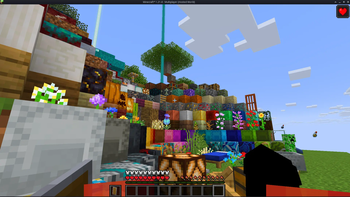
**Low Fire & Side Shield** is a **Minecraft resource pack** designed to keep your screen clear and focused.
It lowers both the **fire overlay** and the **shield position**, introducing a **minimal side shield** that lets you see more of your surroundings without losing the vanilla feel.
Whether you’re in the middle of a **PvP battle**, exploring dangerous caves, or just want a cleaner screen, this pack makes gameplay smoother and more immersive.
It’s lightweight, **FPS-friendly**, and works seamlessly with default Minecraft textures.
—
## ✨ Features
– 🔥 **Reduced fire overlay** — less visual clutter during combat.
– 🛡️ **Lowered side shield** — improved visibility without removing functionality.
– 🎮 **Vanilla-friendly look** — keeps the original Minecraft style intact.
– ⚙️ **Optimized for PvP and survival** — clear visuals, faster reactions.
– 💻 **Lightweight & compatible** — works with most other packs and versions.
—
## 📦 Perfect For
– PvP players needing better visibility
– Streamers who prefer a clean HUD
– Anyone wanting a minimal, modern look in Minecraft
—
**Tags / Keywords:**
`low fire`, `low shield`, `side shield`, `minecraft pvp`, `clear hud`, `visibility pack`, `vanilla friendly`, `clean screen`, `minimal resource pack`, `fps boost`, `combat tweaks`, `minecraft texture pack`, `darkshadowx21`
—
### 📜 License
This project is licensed under the **MIT License**.
You’re free to use, modify, and share this resource pack — just include proper credit to **Darkshadowx21**.