TrustMeBro – Bundle
TrustMeBro – Bundle brings the funniest and most ridiculous features inspired by the r/shittymcsuggestions community straight to your Minecraft server. Enable or disable each challenge with simple commands and enjoy chaotic, meme-worthy gameplay with your friends. Perfect for streamers, community servers, or anyone looking to spice up their Minecraft experience with unexpected twists!
– Features / Commands:
– /extremebabyzombie on|off — Toggle if baby zombies are extreme
– /shearmobs on|off — Toggle if you can shear: Villagers, Endermen, Spiders, Striders
– /breadrename on|off — Toggle bread rename (to “Raw Toast”) and potatoes to “Raw Potatoes”
– /powderwater on|off — Toggle if powder dissolves in water
– /nearmobsbecomeinvis on|off — Toggle if near mobs become invisible
– /moss on|off — Toggle if moss duplicates in your inventory and if moss is edible
– /sunblind on|off — Toggle if you could be blinded by looking directly at the sun
– /trowabledragonegg on|off — Toggle if you can throw the dragon egg, like an normal egg, to spawn the ender dragon
– /hotsand on|off — Toggle whether you take damage while sneaking on sand.
– /throwingsnowballvillager on|off — Toggle if you become a really cool advancement if you throw a snowball against a villager.
CODE MADE BY ME!
Keywords:
minecraft, plugin, fun, meme, r/shittymcsuggestions, challenge, bundle, chaos, minigame, server, dumb ideas, community, gameplay, commands
Trims – Color Splash!
# Trims – Color Splash!
Adds 29 trim materials that you can apply to your armor in the smithing table!
Heavily inspired by [More Trim Colors](https://modrinth.com/datapack/more-trim-colors) by [Skottify](https://modrinth.com/user/Skottify)!

Please join the Discord if you have questions!
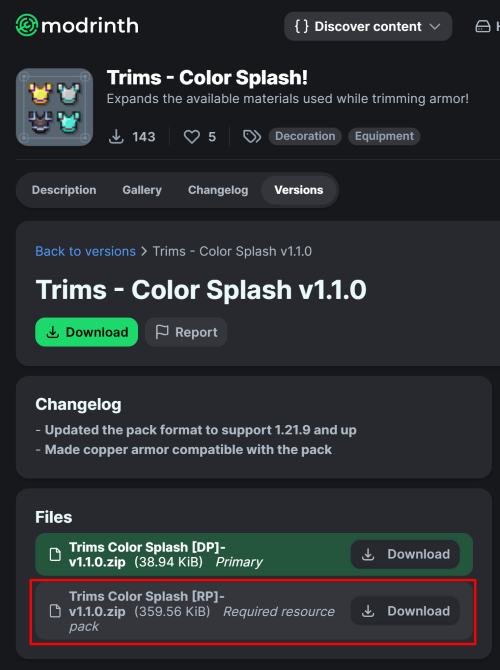
(When using the datapack version, please make sure you install the required resource pack as it is needed for it to function correctly!)
All new trim materials
1.21.4 and up
 Armadillo Scute
 Blaze Rod
 Blue Ice
 Breeze Rod
 Crying Obsidian
 Dragon Breath
 Dripstone Block
 Echo Shard
 End Crystal
 Ender Pearl
 Ghast Tear
 Glass (Removes trims)
 Glowstone Dust
 Heart Of The Sea
 Leather
 Magma Cream
 Nautilus Shell
 Nether Star
 Nether Wart
 Netherite Scrap
 Obsidian
 Phantom Membrane
 Prismarine Shard
 Prismarine Crystals
 Rabbit Hide
 Rose Gold
 Shulker Shell
 Slime Ball
 Turtle Scute
Older versions
- Armadillo Scute ->
 Brick (< 1.20.5)
- Rose Gold ->
 Honey Block (< 1.21)
 Resin Brick ->
  Magma Block (< 1.21.4)
- Breeze Rod ->
 Pearlescent Froglight (< 1.21)
Rose Gold Recipe
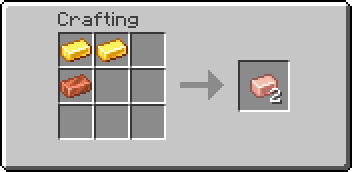
(Shapeless)
This data pack is compatible with:
Compatible Mods
## FAQ:
### Q: Why does the smithing table recipe have a red ‘X’ over it when I try to trim my armor?
**A**: First, drop the trim material on the ground, pick it up again, and try crafting. If the issue persists, restart your server. If neither of these steps resolves the problem, please report the issue in the Discord Server or on the github page.
### Q: Why can’t I place the materials in the smithing table?
**A**: If the issue continues after trying the fixes above, double-check that you have installed the datapack correctly. If you are certain the datapack is installed right, please report the issue in the Discord Server or on the github page.
### Q: Why are none of the recipes working?
**A**: You might need to restart your world, server, or realm. The recipes should function correctly after the restart.
### Q: I am seeing a missing texture when I try to use this. How can I fix it?
**A**: When using the datapack version, you must download and install the required resource pack.
### Q: Where can I find and download the resource pack?
A: The main download button on Modrinth only provides the datapack, not the resource pack. You need to go to the “Versions” tab to find and download the resource pack file. (see img at the top of the page)
Special thanks to [Lynx](https://modrinth.com/user/lynx-xdg) for help with generating files!
No Armor Trims
**Remove Armor Trims** is texture pack designed to remove all armor trims from Minecraft.
## Before

## After

Tree trimmer
This datapack allows you to break one of the logs in a tree multiple times. If a tree is 10 block tall, you can now chop down that tree by breaking that block 10 times. The datapack will make sure to drop the correct items, thus it work even if the tree is stripped.
**Datapack installation:**
**If you get a message saying the pack is not supported in lower versions I have marked it as working in, ignore this as it will still work**
1. Locate the datapack folder for the specific world
2. Drag the Tree_trimmer.zip file into the datapack folder
3. Enable the datapack with /datapack enable “file/Tree_trimmer.zip”
**Mod instalation:**
1. Follow the instructions on how to install your prefered modloader (be it Forge, Fabric, NeoForge or Quilt)
2. Drag the downloaded .jar file into (on windows) %appdata%.minecraftmods
3. Launch the world and start playing
**Please report any problems on my discord server.**
Transparent Totem
This small resource pack makes Totems of Undying appear **transparent**.
> ### [Check out my other packs!]()
> [**All My Packs**]()
> [**Visual Enchantments**]()
> [**Transparent Items**]()
>
> ### And my [Discord Server]()!
Transparent Tools
This small resource pack makes all tools appear **transparent**.
**Even with the new copper tools!**
> ### [Check out my other packs!]()
> [**All My Packs**]()
> [**Visual Enchantments**]()
> [**Transparent Items**]()
>
> ### And my [Discord Server]()!
Transparent Swords
This small resource pack makes all swords appear **transparent**.
**Even with the new copper swords!**
> ### [Check out my other packs!]()
> [**All My Packs**]()
> [**Visual Enchantments**]()
> [**Transparent Items**]()
>
> ### And my [Discord Server]()!
Transparent Potions
This small resource pack makes all potions appear **transparent**.
> ### [Check out my other packs!]()
> [**All My Packs**]()
> [**Visual Enchantments**]()
> [**Transparent Items**]()
>
> ### And my [Discord Server]()!
Transparent GUI
This texture pack makes **all GUIs transparent**, this allows for **better visibility** while in the inventory menu or in any GUI. as far as i know this **isn’t banned** in any major PVP servers or competitions. this is mainly made to help **competitive** players and for **convenience**.
and also compatible with Modmenu
Transparent Crossbow
This small resource pack makes crossbows appear **transparent**.
> ### [Check out my other packs!]()
> [**All My Packs**]()
> [**Visual Enchantments**]()
> [**Transparent Items**]()
>
> ### And my [Discord Server]()!


