Manhunt
This datapack implements a simple manhunt game. It is compatible with realms due to the fact that it is a datapack. But it is also available bundled as a mod.
### Installation
**If you get a message saying the pack is not supported in lower versions I have marked it as working in, ignore this as it will still work**
**Datapack installation:**
1. Locate the datapack folder for the specific world
2. Drag the Manhunt.zip file into the datapack folder
3. Enable the datapack with /datapack enable “file/Manhunt.zip”
**Mod installation:**
1. Follow the instructions on how to install your prefered modloader (be it Forge, Fabric, NeoForge or Quilt)
2. Drag the downloaded .jar file into (on windows) %appdata%.minecraftmods
3. Launch the world and start playing
### Playing
Hunters are added with:
“`
/team join hunters player_name
“`
And runners with:
“`
/team join runners player_name
“`
The game is started with:
“`
/function manhunt:start_game
“`
You can pause the game if you want to leave without having to restart and clear your inventory with:
“`
/function manhunt:pause_game
“`
And then resume the game with:
“`
/function manhunt:resume_game
“`
### Configuration
The start delay can be changed from the default of 45 to whatever you like with:
“`
/scoreboard players set Temp manhunt_lead 60
“`
The minumum tracking distance (within this distance from the runners the compass goes crazy)
Can be removed (done by default) with:
“`
/scoreboard players reset Temp manhunt_min_dst
“`
And set to your desired distance with:
**If you want a distance of 20 you will use the value 20 * 20 = 400**
“`
/scoreboard players set Temp manhunt_min_dst 400
“`
The scoreboard can be removed with:
“`
/scoreboard objectives setdisplay sidebar
“`
**Please report any problems on github or on my discord server.**
MacOS Input Fixes
Fixes MC-122296
Fixes MC-121772
Fixes MC-59810
Fixes MC-22882
Fixes control + tab and control + escape not being detected
Specific fixes:
– Correctly detects left click while control is pressed
– Make trackpad scrolling not scroll a ridiculous number of items at once
– It also fixes momentum scrolling (which changes the number of scroll events based on how quickly you did it, even by like x5-10, meaning you couldn’t easily scroll to the correct item)
– On the trackpad it also only considers scrolling while fingers are on the trackpad (and the same for any fancy mice that support the relevant api e.g. probably apple’s fancy mice/trackpad thing)
– It also fixes scrolling being broken when shift is down on some older mice.
– When dropping an item, Minecraft checks for command + the key, since the default key is Q, this doesn’t make sense, so this mod allows both control + key and command + key to work
– Fixes control + tab and control + escape not being detected
Menu Options (under Mouse Settings Screen):
– Option for trackpad scrolling sensitivity (macOS only)
– Option to enable momentum scrolling on hotbar (macOS only)
– Option to disable workaround for smooth scrolling in interfaces (macOS only)
– Option to reverse scrolling of the whole game
– Option to reverse scrolling of the hotbar
– Option to disable the fix for the ctrl + left click becomes right click bug (macOS only)
On platforms other than macOS, the mod does nothing (except the aformentioned menu options), so it can be safely included in any modpack.
Requires Fabric Loader 0.18.5+
Requires Minecraft 1.14+
NOTE!
If you get an error like the following, you need to update Fabric Launcher to the version specified above. Some launchers may require you to update fabric launcher, remove macos input fixes mod fully, and then re-add macos input fixes mod. See https://github.com/hamarb123/MCMacOSInputFixes/issues/60 for the original issue. Note that the “More details” section is very misleading, and parts around it about my mod should be ignored (try disabling it, after the steps before for re-installing, if you are still getting errors to confirm that it is actually an issue with this mod).

Github repository: https://github.com/hamarb123/MCMacOSInputFixes.
And yes, I know I need a better icon 😉
### DISCLAIMER
As required to mention prominently according to Mojang – THIS IS NOT AN OFFICIAL MINECRAFT PRODUCT. NOT APPROVED BY OR ASSOCIATED WITH MOJANG OR MICROSOFT.
View the license for the disclaimer of the actual mod.
Low Fire & Side Shield
# 🔥Low Fire & Side Shield
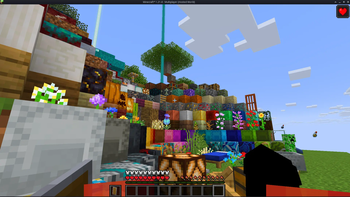
**Low Fire & Side Shield** is a **Minecraft resource pack** designed to keep your screen clear and focused.
It lowers both the **fire overlay** and the **shield position**, introducing a **minimal side shield** that lets you see more of your surroundings without losing the vanilla feel.
Whether you’re in the middle of a **PvP battle**, exploring dangerous caves, or just want a cleaner screen, this pack makes gameplay smoother and more immersive.
It’s lightweight, **FPS-friendly**, and works seamlessly with default Minecraft textures.
—
## ✨ Features
– 🔥 **Reduced fire overlay** — less visual clutter during combat.
– 🛡️ **Lowered side shield** — improved visibility without removing functionality.
– 🎮 **Vanilla-friendly look** — keeps the original Minecraft style intact.
– ⚙️ **Optimized for PvP and survival** — clear visuals, faster reactions.
– 💻 **Lightweight & compatible** — works with most other packs and versions.
—
## 📦 Perfect For
– PvP players needing better visibility
– Streamers who prefer a clean HUD
– Anyone wanting a minimal, modern look in Minecraft
—
**Tags / Keywords:**
`low fire`, `low shield`, `side shield`, `minecraft pvp`, `clear hud`, `visibility pack`, `vanilla friendly`, `clean screen`, `minimal resource pack`, `fps boost`, `combat tweaks`, `minecraft texture pack`, `darkshadowx21`
—
### 📜 License
This project is licensed under the **MIT License**.
You’re free to use, modify, and share this resource pack — just include proper credit to **Darkshadowx21**.
LoginPhaseProxy
**LoginPhaseProxy** is a somewhat “*simple*” Velocity Plugin that allows you to proxy the LoginPluginMessagePacket from backend server to the player and LoginPluginResponsePacket from the player to the backend server. This is useful for modded backend servers that rely on Login Plugin Message communication to work, such as AutoModpack.
> Disclaimer: This plugin is in early development and may contain bugs and performance issues. Use it at your own risk.
## 🔁 When to use
| Author(s) | Mod |
|—————————————–|——————————————————————————–|
| Skidam | AutoModpack (Fabric/Forge/Neoforge) |
> You’re welcome to suggest new use cases via Issue or Pull Request!
## ❓ What does it solve (detailed)

Normal Setup ⦁ Made in Figma
On a normal Velocity setup, when a player connects to the proxy, they go through the (P ↔ V) Login Phase, exchanging packets with the Velocity until the proxy sends a Server Login Success Packet, completing the (P ↔ V) Login Phase and triggering the backend connection process. The backend server then goes through its own (V ↔ B) Login Phase, where it may send Login Plugin Message Packets to the Velocity, and they can’t be forwarded to the player, because the (P ↔ V) Login Phase is already complete, so Velocity reponds them with an empty data Login Plugin Response Packet, as it doesn’t know how to handle them. This is a problem for modded backend servers that rely on Login Plugin Message communication to work, such as AutoModpack, as they won’t be able to send the necessary data to the player during the Login Phase, and the player won’t be able to join the backend server. This plugin tries to solve this issue by proxying the Login Plugin Message communication between the player and the backend server, allowing modded backend servers to work with Velocity without any issues.
## ✨ How it works (detailed)
~~Basically black magic 🪄🔮~~. It uses Java Reflection to access the internal Velocity classes ProxyServer -> ConnectionManager[[1]](https://github.com/caiostoduto/LoginPhaseProxy/blob/main/src/main/java/com/caiostoduto/loginPhaseProxy/initializer/VelocityChannelInitializer.java) to override the serverChannelInitializer[[2]](https://github.com/caiostoduto/LoginPhaseProxy/blob/main/src/main/java/com/caiostoduto/loginPhaseProxy/initializer/FrontendChannelInitializer.java) and backendChannelInitializer[[3]](https://github.com/caiostoduto/LoginPhaseProxy/blob/main/src/main/java/com/caiostoduto/loginPhaseProxy/initializer/BackendChannelInitializer.java), so it can intercept the Velocity communication with the player (P <-> V)[[4]](https://github.com/caiostoduto/LoginPhaseProxy/blob/main/src/main/java/com/caiostoduto/loginPhaseProxy/intercept/FrontendInterceptor.java) and backend server (V <-> S)[[5]](https://github.com/caiostoduto/LoginPhaseProxy/blob/main/src/main/java/com/caiostoduto/loginPhaseProxy/intercept/BackendInterceptor.java), respectively.

Plugin Implementation ⦁ Made in Figma
With that, our plugin watches the Login Phase player connection until it sees a SetCompressionPacket(5) (optionally) and ServerLoginSuccessPacket(6), adding them to a buffer instead of sending them to the player and synthetically sends a loginAcknowledgedPacket(7) to the Velocity pipeline, tricking it into thinking the Login Phase is complete and starting the backend connection process. To make sure the Velocity doesn’t mess the packet interception and sending process, our plugin removes stealthly (so that it doesn’t trigger it’s handlerRemoved lifecycle[[6]](https://github.com/caiostoduto/LoginPhaseProxy/blob/main/src/main/java/com/caiostoduto/loginPhaseProxy/utils/StealthPipeline.java)) the handlers from the Velocity serverChannel pipeline[[4]](https://github.com/caiostoduto/LoginPhaseProxy/blob/main/src/main/java/com/caiostoduto/loginPhaseProxy/intercept/FrontendInterceptor.java) that were added after the Login Phase to Config Phase transition (MinecraftCompressorAndLengthEncoder and MinecraftCompressDecoder, others are removed naturally afterwards). Also, our plugin adds the MinecraftVarintLengthEncoder[[4]](https://github.com/caiostoduto/LoginPhaseProxy/blob/main/src/main/java/com/caiostoduto/loginPhaseProxy/intercept/FrontendInterceptor.java) back (was removed at the transition) and sets the MinecraftDecoder state to StateRegistry.LOGIN[[4]](https://github.com/caiostoduto/LoginPhaseProxy/blob/main/src/main/java/com/caiostoduto/loginPhaseProxy/intercept/FrontendInterceptor.java) so the packets are properly encoded and decoded.
If the backend server sends a LoginPluginMessagePacket(10) during its Login Phase, our plugin will intercept it and send it to the player(11), and if the player sends a LoginPluginResponsePacket(12), our plugin will intercept it and send it to the backend server(13). This way, we can effectively proxy the LoginPluginMessagePacket and LoginPluginResponsePacket between the player and the backend server, allowing modded backend servers to work with Velocity without any issues. Then, when the backend server ends the Login Phase sending the ServerLoginSuccessPacket(15), our plugin will flush the buffered packets to the player, completing the Login Phase and allowing the player to join the backend server as normal. Afterwards, if the user sends a LoginAcknowledgedPacket (clientProtocolVersion >= ProtocolVersion.MINECRAFT_1_20_2)(16) after the Login Phase is complete, our plugin will simply ignore it, as it is not expected to be sent by the player at that point. Finally, the plugin will restore the MinecraftDecoder state to its previous state (Config Phase).
So, yeah, *basically black magic* 🪄🔮. Yayyyy!
## 🙏 Acknowledgements
– Skidam, who inspired me to create this plugin!
– lucas-gcp, who supported me and helped with testing!
Lo-Fi Music
# Lo-Fi Music 🎶
This resource pack adds Monolism’s wonderful remixes of the Minecraft soundtrack to the game! This pack includes new songs for:
– Echo in the Wind
– A Familiar Room
– Bromeliad
– Crescent Dunes
– Relic
This pack is not compatible with any other resource pack that modifies these songs.
MAKE YOUR BUILDING LIMIT UP
# MAKE YOUR BUILDING LIMIT UP
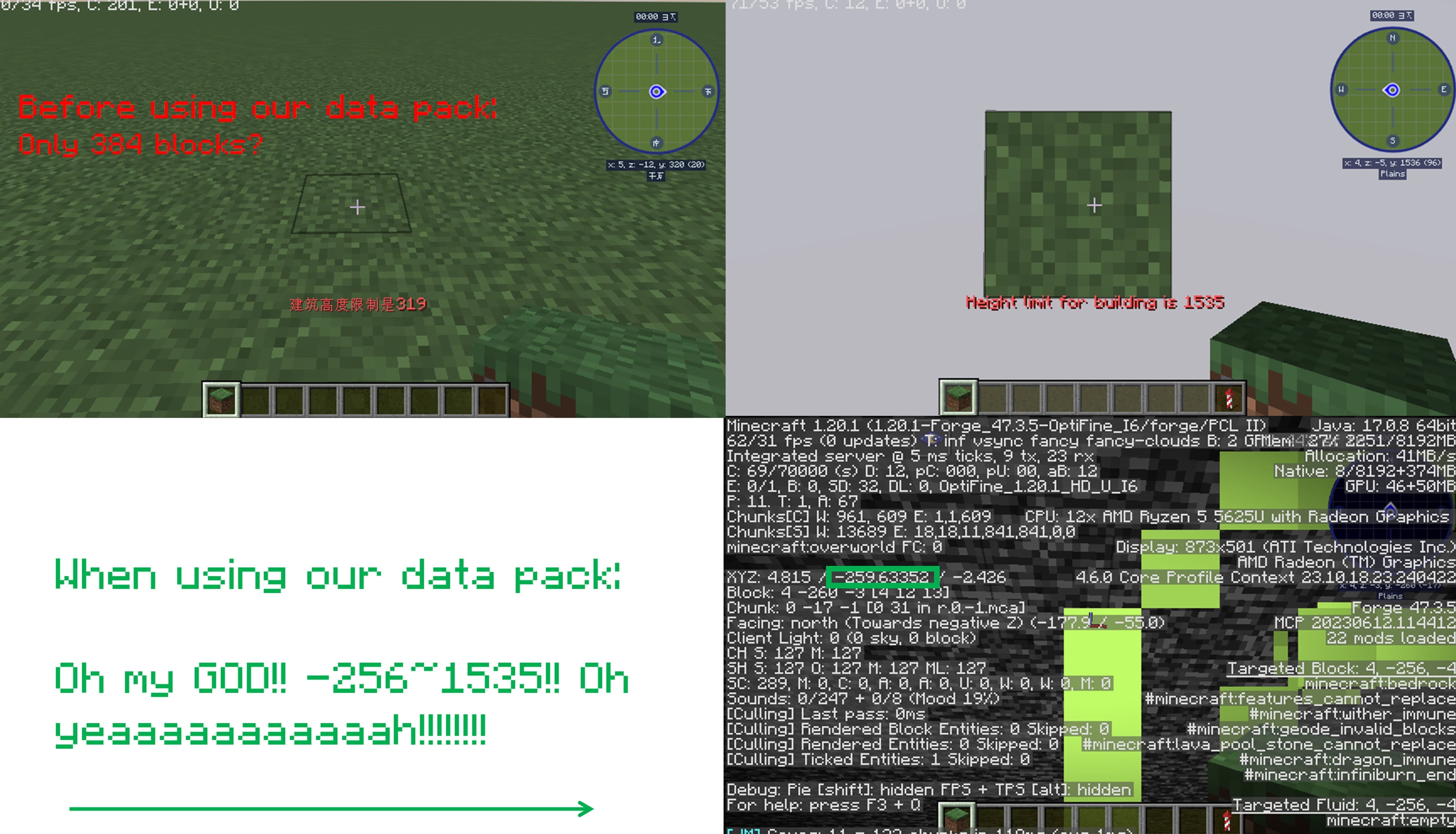
_**Think Minecraft doesn’t have enough building space? Want to build taller buildings? Try our data pack and you can increase the building limit up to 4064 blocks!!**_
## How to install it?
**You may need to create your game world before install the data pack**
1.Open your game folder(“.minecraft”)
### If you use version isolation:
2.Open your “versions” folder
3.Choose your version
4.Open your “saves” folder
5.Choose your save
6.Open your “datapacks” folder
7.Put our data pack in the folder
### If you Don’t use version isolation
2.Open your “saves” folder
3.Choose your save
4.Open your “datapacks” folder
5.Put our data pack in the folder
**PLEASE PAY ATTENTION!! This datapack may affect the normal operation of other mods**

_This is a DATAPACK! Please put it in the “datapacks” folder in your saves folder_
**NOT THE “recoursepacks” FOLDER**
Lighty
Instead of rendering crosses or numbers on the top face of blocks, Lighty takes a different approach – It renders a transparent carpet-like block on top! Or, new in version 1.1.0 – Renders the actual light level numbers, but Lighty Style!
Make sure to check out the Gallery for some pictures!
## Configuration
– To activate the overlay, press `F7` and choose the desired mode. This key is configurable in the key binds menu.
– As of version 1.2.0, you can quickly toggle the light overlay on or off using `F8`! This key is configurable in the key binds menu.
– As of version 1.3.0, you can change the “red”/”orange” threshold in the new config menu (accessible using `F7`). Useful for those that want to light their places up aesthetically, or maybe you are playing with some mods that change the mobs spawning rules.
## Meaning of colors:
– Green: No mobs can spawn here!
– Orange: If the sun goes down, Mobs will spawn! Be careful!
– Red: Mobs can spawn here!
If you have some ideas for this mod, feel free to open a new Codeberg Issue!
If you like this mod, consider following the project to get notified about new updates!
This mod was inspired by LightLevel.
Less Obstructive Better Leaves
Less Obstructive Better Leaves makes Leaves look better by making it not be as flat.
the texture pack is diffrent than other better leaves because it is not as obstructive + it is not that bad with fast textures
the pack only replace the models so you can have other packs over it.
_this texture pack can get a bit laggy because of all of the new cubes on the block_
Less Aquifers

### What is `Less Aquifers`?
Picture this: you go mining, brand new pickaxe, food and a whole inventory to fill with shiny ores. However all you can find is caves filled with water. WATER EVERYWHERE. You cannot pick any ore because they are underwater and navigating this caves is a nightmare.
This is why I created this simple Datapack: to reduce the amount of aquifers that generate in your world. This is just an adjustment, aquifers will generate, but less than in vanilla Minecraft.
### Installation
Installation is easy: download this datapack, drop it in your datapack folder (inside saves –> your world) and start playing. Make sure you are doing this with Minecraft fully closed, you will need to start the game from launcher!
### It’s me, hi!
All my social media can be found here: Danymaddox.
And if you like to add more gold to your life, follow me on Modrinth and take a look: Dark Resource Pack with gold details and tons of mod support, BINGO! Modpack ready to play and much more to come.
Legacy Glint
## What does this pack do?
Legacy Glint brings back the ‘old’ enchantment glint texture for armor from pre 1.19.3, to 1.19.4 and beyond