OverGrown Tools
OverGrown Tools — A nature-themed resource pack that reclaims your gear for the forest. Every tool and weapon is now entwined with lush leaves, vines, and crawling ivy.
Features:
Complete overhaul of all material tiers: from Wood to Netherite.
Netherite gear is wrapped in glowing Warped vines from the Nether.
Perfect for “Lost Civilization”, “Ancient”, or “Druid” playstyles.
Supported versions: 1.16 through 1.21.11.
True Doors
True Doors replaces the flat vanilla door item textures with proper models so doors look natural when held in your hand.

Every door uses a custom item model, making them appear correctly shaped instead of a flat rectangle in the inventory.


This resource pack specifically supports Not Enough Animations mod and First-person Model mods.
Many other mods are also affected automatically.
Not Enough Animations mod:

First-person Model mod:

Hold My Items mod:


This update improves the accuracy and polish of the pack.
Door edge textures (top, bottom, left, and right) now use proper textures instead of stretched pixels.
Update 1.1:
Door edges now use proper textures. “Broken or incompatible” warnings have been fixed.


The pack icon has been updated.

The pack icon has been updated and the resource pack “Broken or incompatible” warnings in Minecraft have been fixed.


Trims – Color Splash!
# Trims – Color Splash!
Adds 29 trim materials that you can apply to your armor in the smithing table!
Heavily inspired by More Trim Colors by Skottify!

Please join the Discord if you have questions!
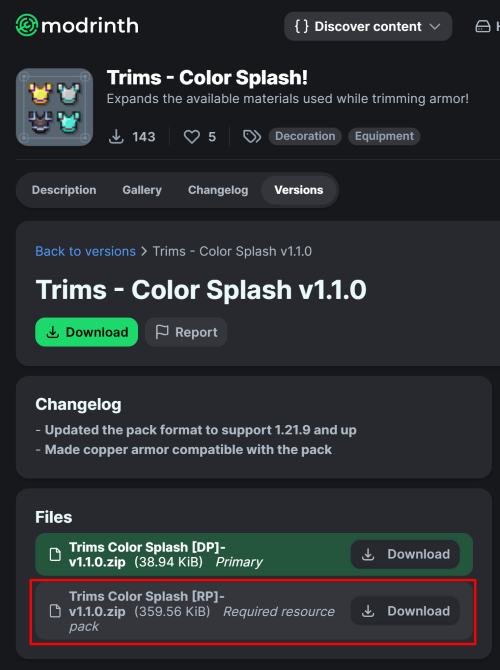
(When using the datapack version, please make sure you install the required resource pack as it is needed for it to function correctly!)
All new trim materials
1.21.4 and up
 Armadillo Scute
 Blaze Rod
 Blue Ice
 Breeze Rod
 Crying Obsidian
 Dragon Breath
 Dripstone Block
 Echo Shard
 End Crystal
 Ender Pearl
 Ghast Tear
 Glass (Removes trims)
 Glowstone Dust
 Heart Of The Sea
 Leather
 Magma Cream
 Nautilus Shell
 Nether Star
 Nether Wart
 Netherite Scrap
 Obsidian
 Phantom Membrane
 Prismarine Shard
 Prismarine Crystals
 Rabbit Hide
 Rose Gold
 Shulker Shell
 Slime Ball
 Turtle Scute
Older versions
- Armadillo Scute ->
 Brick (< 1.20.5)
- Rose Gold ->
 Honey Block (< 1.21)
 Resin Brick ->
  Magma Block (< 1.21.4)
- Breeze Rod ->
 Pearlescent Froglight (< 1.21)
Rose Gold Recipe
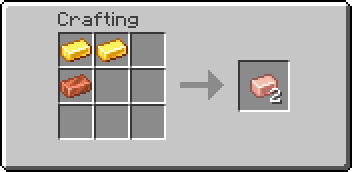
(Shapeless)
This data pack is compatible with:
Compatible Mods
-
Elytra Trims (KikuGie)
 – ( No item texture )
-
Alex’s Caves (AlexModGuy)

-
Ancient Aether (Builderdog841)

-
Frostiful (TheDeathlyCow)

-
Geode+ (Team Chorus)

-
More Armor Trims (masik16u)

-
More Sniffer Flowers (Nikdo53)

-
TaTe’s Extra Trims (AverageTaTeMan)

-
Too Many Trims (Herobrine011840)

-
Trims Expanded (Omniv)

## FAQ:
### Q: Why does the smithing table recipe have a red ‘X’ over it when I try to trim my armor?
**A**: First, drop the trim material on the ground, pick it up again, and try crafting. If the issue persists, restart your server. If neither of these steps resolves the problem, please report the issue in the Discord Server or on the github page.
### Q: Why can’t I place the materials in the smithing table?
**A**: If the issue continues after trying the fixes above, double-check that you have installed the datapack correctly. If you are certain the datapack is installed right, please report the issue in the Discord Server or on the github page.
### Q: Why are none of the recipes working?
**A**: You might need to restart your world, server, or realm. The recipes should function correctly after the restart.
### Q: I am seeing a missing texture when I try to use this. How can I fix it?
**A**: When using the datapack version, you must download and install the required resource pack.
### Q: Where can I find and download the resource pack?
A: The main download button on Modrinth only provides the datapack, not the resource pack. You need to go to the “Versions” tab to find and download the resource pack file. (see img at the top of the page)
Special thanks to Lynx for help with generating files!
No Armor Trims
**Remove Armor Trims** is texture pack designed to remove all armor trims from Minecraft.
## Before

## After

Trident Revamp
# ikili_kartal’s Trident Revamp

**This resource pack does not support vanilla Minecraft. You need to download OptiFine or EMF to make sure that this resource pack is working.**

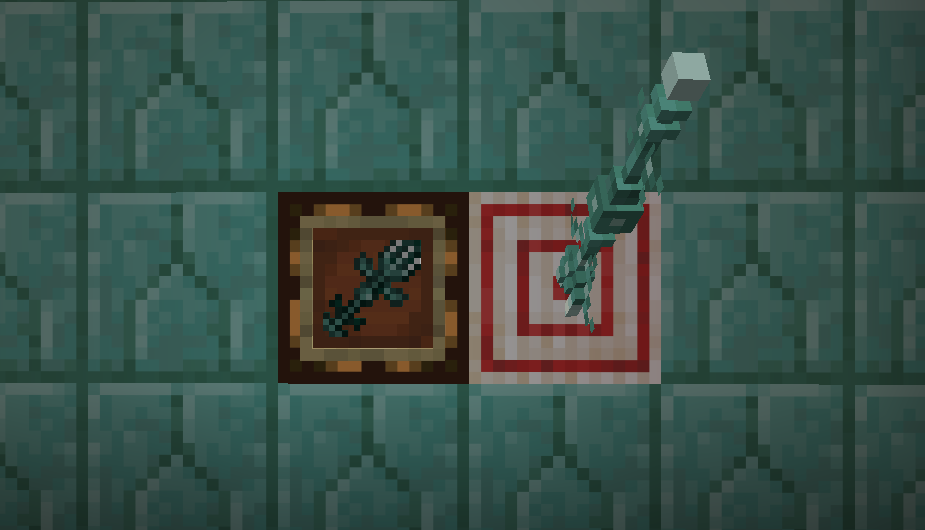
This resource pack redesigns tridents with a fresh, vanilla-like 3D model, replacing the default simple three-spiked stick, including a brand new inventory look. It makes your tridents look far more modern and unique. It also glows if you use a shader pack.
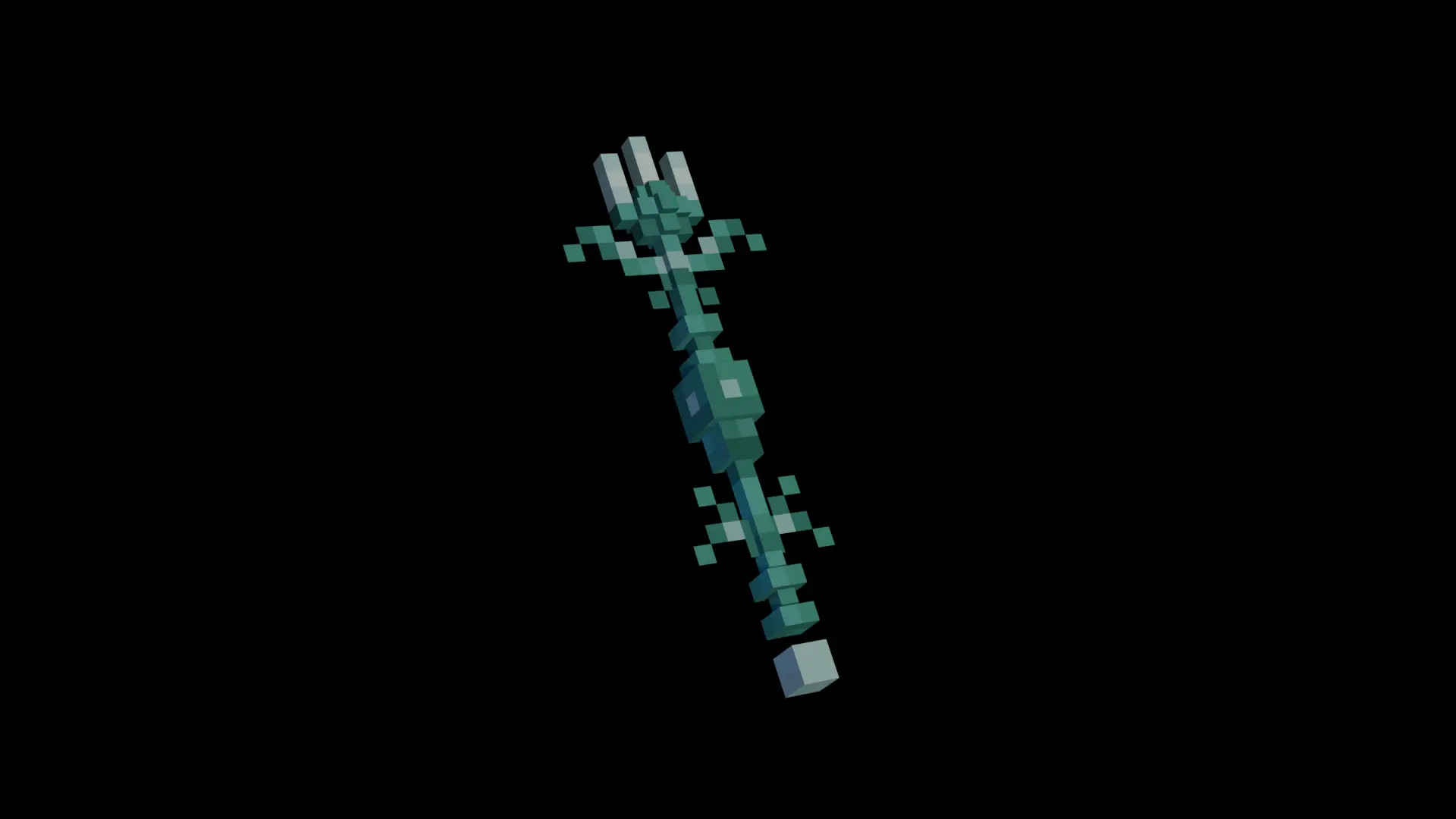

**3D models**
– Titles and model are created in Blockbench
– Cinematic shots are created in Blender
**2D images**
– Advertisement content are created in Affinity
– Textures are created in Pixilart
**i really love free stuff**

This resource pack is licensed under Creative Commons Attribution-NonCommercial-ShareAlike 4.0 International (CC BY-NC-SA 4.0).
For more information you can check our repository.
Trident Reforged
### Do you think the vanilla trident is a bit boring? Well I do, so I made a cooler version!
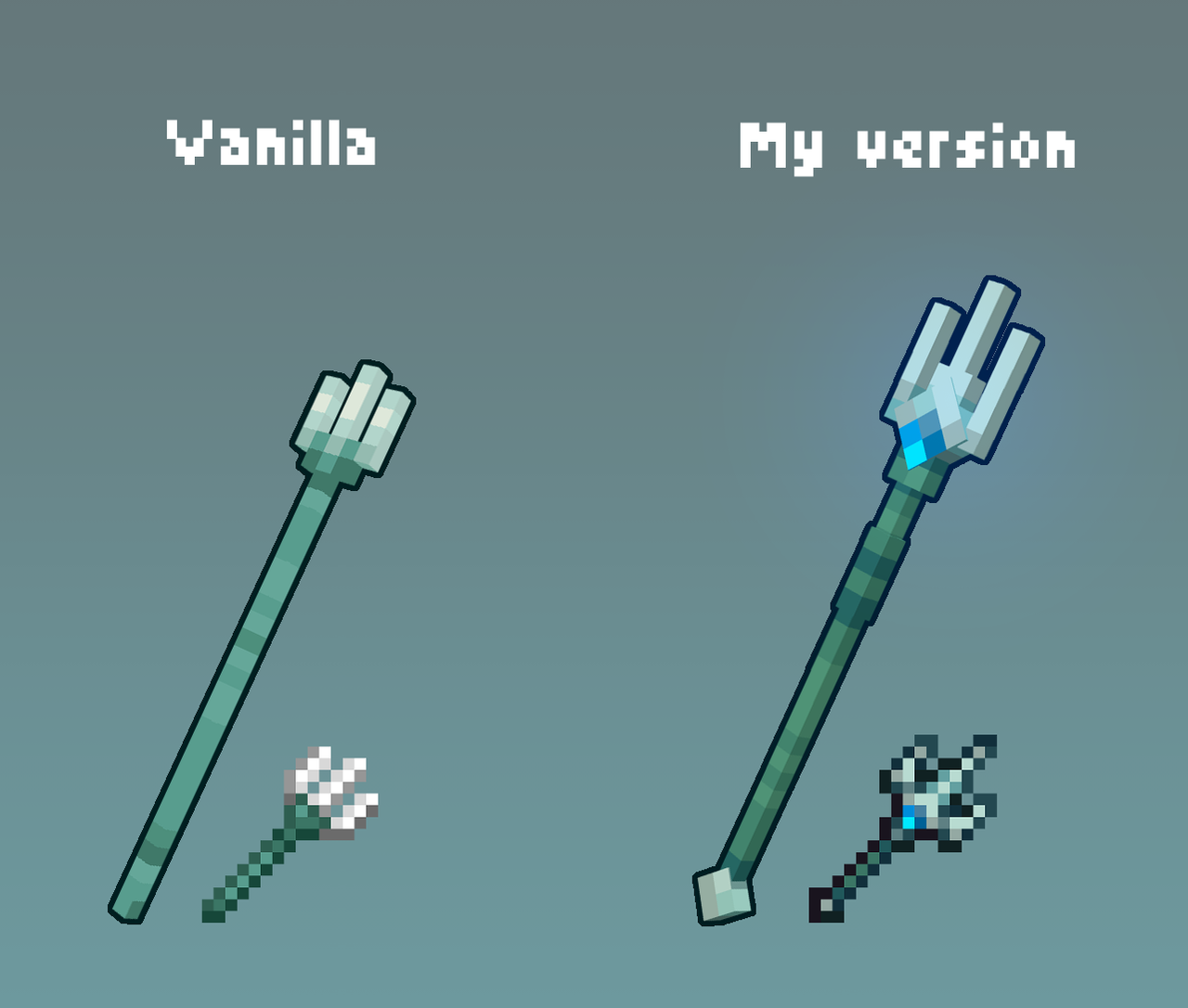
## The following mods are required for this pack to work
Spoiler
ETF
EMF
The contents of this mini pack are from a greater project I’m working on called Rappenem’s Reforge which aims to resprite the whole game in this style. So if you like the pixel art on display here consider checking it out and supporting me on Patreon for early access as well as bonus content!
Tree trimmer
This datapack allows you to break one of the logs in a tree multiple times. If a tree is 10 block tall, you can now chop down that tree by breaking that block 10 times. The datapack will make sure to drop the correct items, thus it work even if the tree is stripped.
**Datapack installation:**
**If you get a message saying the pack is not supported in lower versions I have marked it as working in, ignore this as it will still work**
1. Locate the datapack folder for the specific world
2. Drag the Tree_trimmer.zip file into the datapack folder
3. Enable the datapack with /datapack enable “file/Tree_trimmer.zip”
**Mod instalation:**
1. Follow the instructions on how to install your prefered modloader (be it Forge, Fabric, NeoForge or Quilt)
2. Drag the downloaded .jar file into (on windows) %appdata%.minecraftmods
3. Launch the world and start playing
**Please report any problems on my discord server.**
Tree Seeds
# Features
✔️Textures of saplings in inventory are now changed to corresponding tree seed

✔️Saplings on the ground are looking just the same
✔️Names of the saplings are changed to “Seed” (English)
🎨Compatible with most other resource packs

Credits to ferreusveritas owner of Dynamic Trees mod for beautiful textures :3
(https://www.curseforge.com/minecraft/mc-mods/dynamictrees The resource pack in under MIT licence because it uses textures from “Dynamic Trees” mod!)
If you have feedback or request write them in the comments and I will try to help you.
TrapFix

TrapFix removes trapdoor handles and corrects some patterns for cleaner, more consistent visuals—perfect for builders who care about detail.
– Easy drop-in install – no mods needed
– Updated patterns for better symmetry and visual clarity
– Updated for Minecraft **1.21.11**
👤 Created by Avrok
© 2025 Avrok. All rights reserved.
Transparent Totem
This small resource pack makes Totems of Undying appear **transparent**.
> ### Check out my other packs!
> **All My Packs**
> **Visual Enchantments**
> **Transparent Items**
>
> ### And my Discord Server!