PVP: Golden Knight

# 🛡️ [Pack Name]
> A focused resource pack designed to enhance and refine your PvP experience.

—
### 🎯 Core Features
Essential tweaks to elevate your combat:
* **Low Fire:** Reduced fire size so flames don’t fill up your screen while burning.
* **Redesigned Equipment:** Fresh, high-quality textures for all armor, tools, and swords.
* **PvP Essentials:** Custom textures for Netherite, Totems of Undying, Ender Pearls, and End Crystals.
* **Item Animations:** Fluid, custom animations applied to Netherite items and Totems.
* **Refined Colormap:** A slightly lighter colormap that makes the environment much more pleasant on the eyes.
—
### 🚧 Development Status
**Early Access.** This resource pack is currently in early development. The foundation is set, but expect massive content additions and ports to newer Minecraft versions in future updates.
PvP particles
Most particles will have a yellow background. The only exceptions are :
– Strength (orange)
– Slowness (greenish)
– Regeneration (red)
– Weakness (dark greenish)
– Luck (green)
– Fire resistance (orange)
– Water breathing (green)
– Swiftness (flashy green)
– Poison (greenish)
Every other potion effect are yellow tints.
PVP Optimizer
Focus’ PVP Optimizer
This texture pack combines the best texture packs for
Minecraft 1.21+ PVP.
It includes:
– Fullbright
– Low shield
– Low fire
– Low ground fire
– Smaller handhelds
– Higher color saturation
– Smaller PVP particles
These make the game look a lot cleaner, which helps you improve your skill.
You can still add other texture packs to the game, but this one combines the essential ones for PVP.
PvP Crosshair Pack
Title: PvP Crosshair Pack
Description:
Take your Minecraft gameplay to the next level with the Neon X Crosshair Pack! This pack completely replaces the default crosshair with a clean, modern X design that is easy to see and stylish. Perfect for both PvP battles and survival adventures, it helps you aim precisely without cluttering your screen.
Designed for clarity and visibility, the bright neon colors make it easy to spot the center of your screen, even on dark or busy backgrounds. The minimalistic design ensures your view stays clear while adding a touch of flair to your HUD.
This pack is lightweight and easy to install, requiring only Minecraft’s built-in resource pack system—no mods or extra software needed. Ideal for players who want a small but impactful visual upgrade that enhances their gameplay immediately.
Features:
-Bright, neon X crosshair for maximum visibility
-Minimalistic design that doesn’t block your view
-Works in both PvP and survival
-Lightweight and easy to install
-Fully compatible with Minecraft 1.20+
Perfect for:
-PvP enthusiasts
-Builders who want a clean HUD
-Anyone looking for a small, stylish upgrade to Minecraft’s GUI
PvP Crosshair
](https://modrinth.com/resourcepack/pvp-crosshair-bba)



**This resource pack improves the current crosshair and the block breaking animation for PvP!**
# 📥Installation:
This ressource pack improves the current crosshair and the block breaking animation for PvP! The pack is *made for* **all versions and snapshots between 1.6 and 26.1.1**.

# ✨Features:
Improves the current crosshair and the block breaking animation for PvP -> replaces them with a super assistive and useful crosshair and a loading bar block breaking animation!

# 🛠️Versioning:
This ressource pack uses the following versioning system:
– **Base pack:** standard versioning + Minecraft version
– -> *e.g.* **v1.0-1.21.8, v2.4-v1.21.11,…**

Credits:
Thanks to all the resource packs and their authors, who either licensed their projects under the MIT license or allowed me to use their resource packs!
– PvP Crosshair
– Loading Bar Breaking Animation Pack
Without these projects and their authors, PvP Crosshair & BBA Pack would not have been possible to make. **Special thanks!**
# 💘 Support me!
To help me and make me develop more fascinating projects, share and recommend this resourcepack. Thank you so much!!!
You can also try my other projects here or the projects me and Polr made here! 😀

Purple Night Sky Overlay
This resource pack contains a dark sky with a purple hue, and not to mention, many stars scattered throughout the sky.
**This resource pack requires either Skyboxify, Optifine, Nuit, or fabricskyboxes. Without it you will not be able to see it.**
If you want to see more like this join my discord: https://discord.gg/YrSWPbWDUF

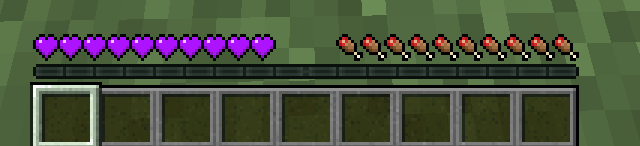
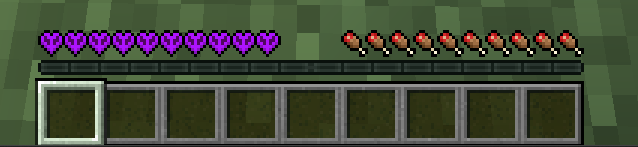
Purple Hearts
This resource pack only changes the hearts in the gui. It does not change other elements.
Punched Better Fresher 3D books

### Note: you HAVE to install Better, Fresher 3D books to use this pack
Better, Fresher 3D books models aren’t properly positioned with punchy, making it kinda bad to use, so i tried to fix it with this resource pack
Before:

After:

also, be sure to always use the latest version of Punchy!
please head to my discord server for feature requests, suggestions and bugs
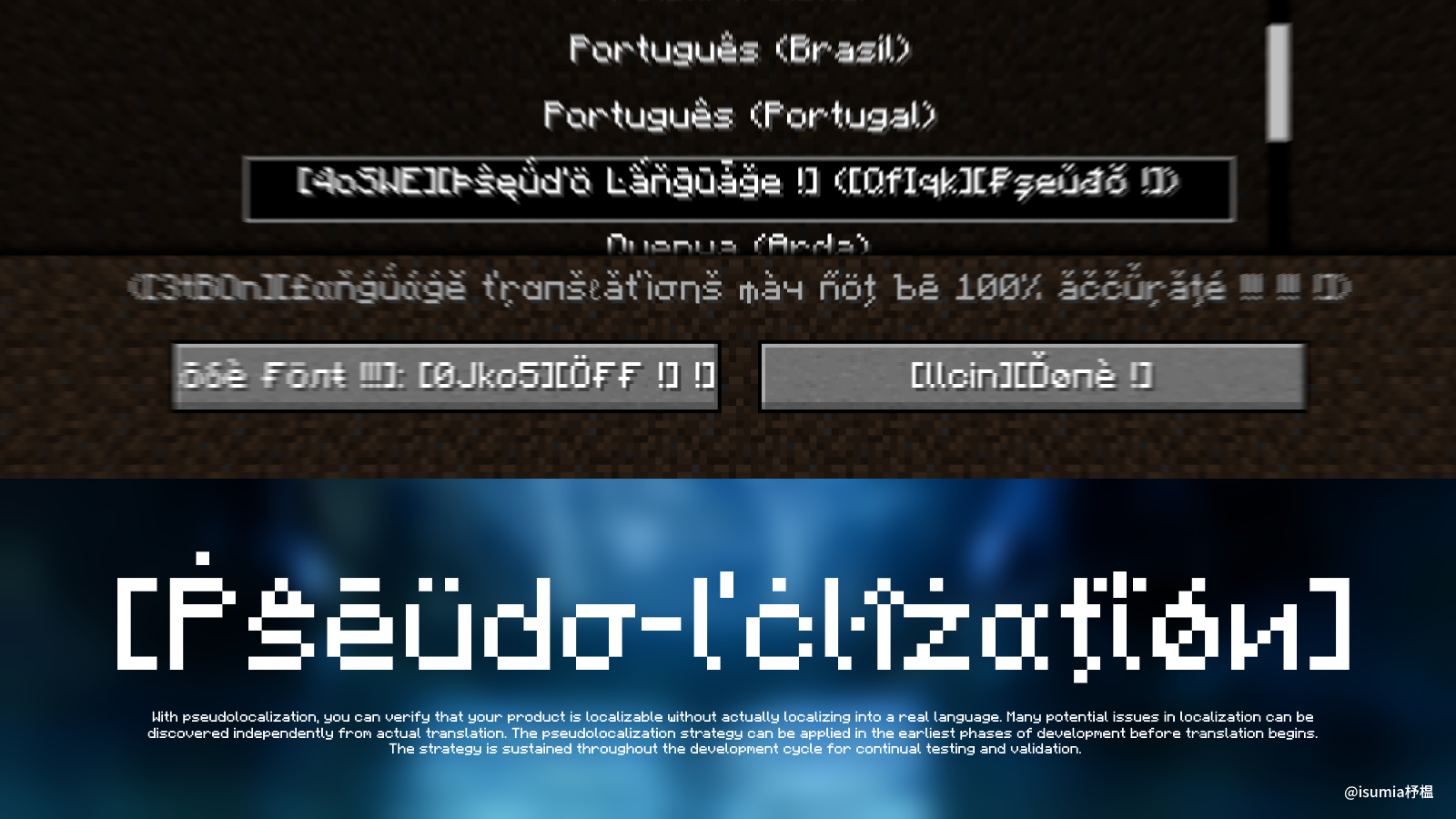
Pseudo-localization Language Pack
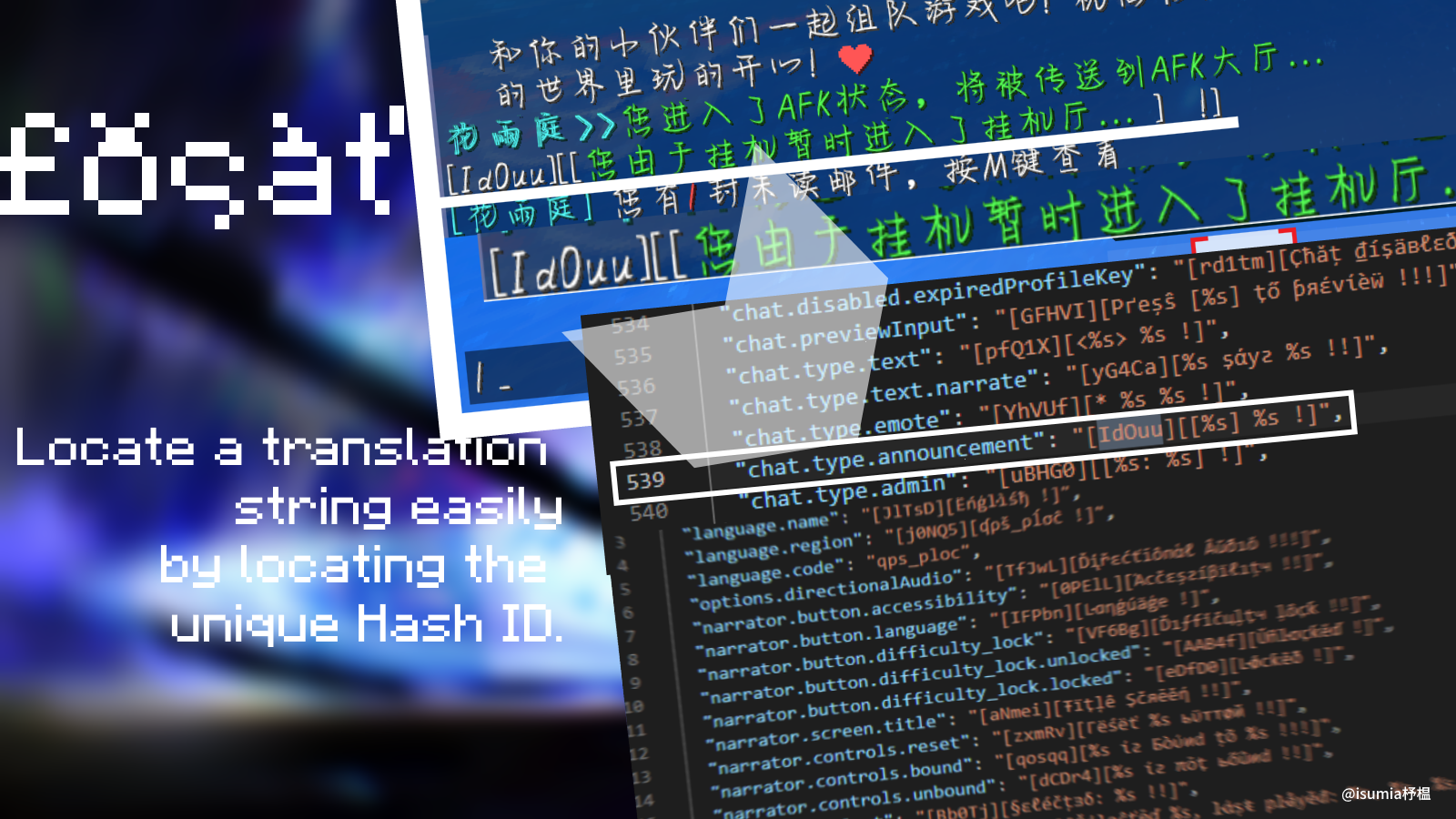
# What is pseudo-localization?
Imagine trying to read Shakespeare, but every third letter has been replaced by a random symbol. That’s pseudo-localization for you! It’s the art of transforming your regular text into something that looks like it’s from another planet—Mars, perhaps.
### The Benefits:
– **Bug Buster**: It helps developers catch those pesky layout bugs. Because nothing says “fix me” like text overflowing everywhere.
– **Universal Translator**: It’s like having a universal translator… that doesn’t actually translate. It prepares your software for the diverse world of real languages.
– **Stress Tester**: It tests the strength of your user interface. If your UI can survive pseudo-localization, it can survive anything. Unlike Zenless Zone Zero, a video game from Mihoyo. It failed in this challenge, unfortunately.
### Another note:
– **Developer’s Nightmare**: “Did the cat walk across your keyboard?” “Nope, just some pseudo-localization magic.”
– **User’s Perspective**: “Is this the secret language of coders?” “Well, sort of. If coders were aliens.”
– **The Silent Hero**: “Why does this gibberish matter?” “Because it’s secretly saving your app from a thousand tiny bugs.”
In summary, pseudo-localization is like giving your software a wild, nonsensical workout to ensure it’s ready for the real world. It’s an invaluable tool in the developer’s toolkit, disguised as an alien script. And remember, if you can read pseudo-localized text without going cross-eyed, you’re practically a superhero in the tech world.
(written by Microsoft Copilot)
For more information about pseudolocalization,you can visit https://learn.microsoft.com/globalization/methodology/pseudolocalization.
For Chinese users,there is also a readable article written Simplified Chinese.bilibili cv18226873
# How can I do with this pack?
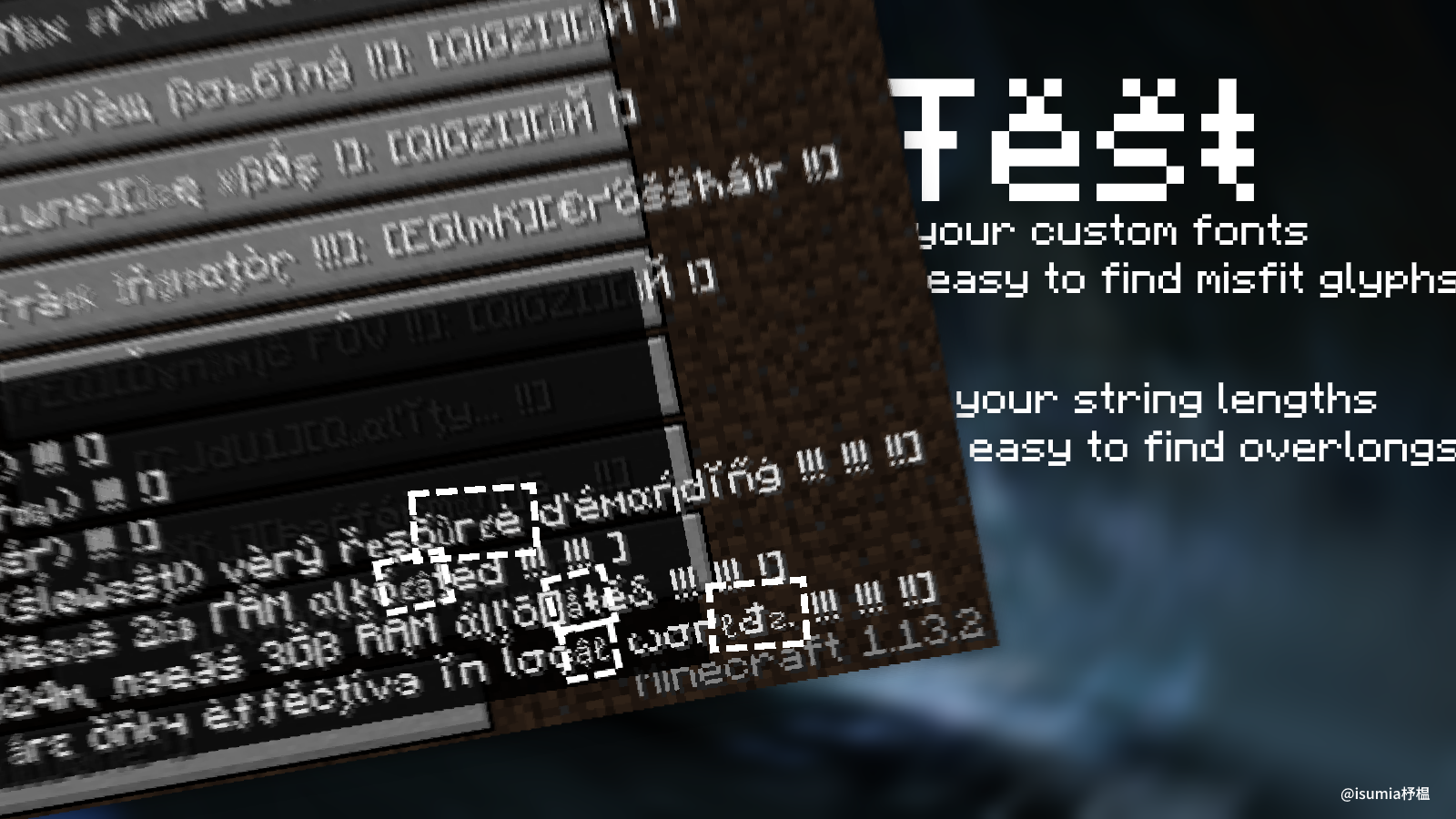
– * Test your custom fonts in an international multilingual environment.
– * Locate a translation string easily by locating the unique Hash ID.
– * Match your pseudolocalizated Windows Builds
– * Just for fun
– * (No Hash-ID Spy included)
# Bugs & Ideas
Github Issues
Note that the author might be very busy and only have a little spare time,so the problem might not be seen by the author timely.
Also,This pack might not be updated in time.:(
# Known Issues
Conflict with `AuthMe` plugin for unknown reasons.
You might need to switch back to any normal languages to connect any server using AuthMe plugin.
Or try to switch qps-ploc language after joining the server.
Tested on these server:
* `AriaCraft`
* `神域天堂 (Clover Pixel)`
* `洛花星雨`
* `Remiaft Network`


# Special Thanks
@suntrise
@what_damon
# License
CC0 1.0 Universal (since Alpha #7)
PROJECT ZWPACK & Pslo4MC by zhuWin
To the extent possible under law, the person who associated CC0 with
Pslo4MC has waived all copyright and related or neighboring rights
to Pslo4MC.
You should have received a copy of the CC0 legalcode along with this
work. If not, see https://creativecommons.org/publicdomain/zero/1.0/.
original webpage
# Screenshots


![https://img1.imgtp.com/2023/08/30/N0g5zMyt.png
Proxy Protocol Support
# Proxy Protocol Support
Proxy Protocol Support is a Fabric and Quilt mod which adds support for Proxy Protocol (HAProxy) for your Minecraft server. It allows to accept both proxied and direct connections simultaneously.
For example you can use TCPShield or other software (Nginx, FRP) to forward traffic, and hide your server’s IP address. Without Proxy Protocol, your console will only show the proxy’s IP address. By reading the Proxy Protocol packet, this mod makes showing the player’s real IP address possible.
**This is a Server-Side only mod; it does nothing when installed on a client.**
Supports Minecraft versions 1.14-26.1 and probably later (untested).
—
## Secure Hybrid Mode
This mod allows your Minecraft server to simultaneously accept connections from a **trusted proxy** (using the PROXY protocol) and from **trusted direct-access IPs**. This is perfect for setups where you want to hide your server’s IP behind a proxy, while still allowing admins or local players to connect directly.
The mod operates on a secure **”Default Deny”** principle. If an incoming connection’s IP address is not explicitly whitelisted in one of the lists below, it will be **rejected**. This prevents unauthorized users from bypassing your proxy and connecting directly to your server’s real IP address.
—
## Configuration
Configuration is handled in `config/proxy_protocol_support.json`.
### `enableProxyProtocol`
Set to `true` to enable the mod’s functionality.
– **Default**: `true`
### `proxyServerIPs`
A list of IP addresses that are your trusted proxy servers. Connections from these IPs **must** send a PROXY Protocol header.
– **Default**: `[“127.0.0.1”]`
### `directAccessIPs`
A list of IPs or CIDR ranges that are allowed to connect directly **without** a PROXY Protocol header. This is ideal for admins, local network players, and server-side tools.
– **Default**: `[“127.0.0.1”, “192.168.0.0/16”]`
### `whitelistTCPShieldServers`
When `true`, the mod automatically fetches TCPShield’s official proxy IPs and adds them to the trusted `proxyServerIPs` list.
– **Default**: `false`
—
## Example Scenarios
#### Scenario 1: Server behind FRP on the same machine
You run `frpc` on the same machine as the Minecraft server. Players from the internet connect through the proxy. You want to connect directly from your gaming PC on the same LAN (`192.168.1.100`).
“`toml
proxyServerIPs = [“127.0.0.1”]
directAccessIPs = [“127.0.0.1”, “192.168.1.100”]
“`
#### Scenario 2: Server protected by a remote proxy service
Your server is at home, and you use a VPS with the IP 203.0.113.10 as a proxy. You want your entire home network (192.168.0.0/24) to have direct access.
“`toml
proxyServerIPs = [“203.0.113.10”]
directAccessIPs = [“127.0.0.1”, “192.168.0.0/24”]
“`
#### Scenario 3: Maximum Security (Proxy Only)
You only want to allow connections through your proxies and nothing else (not even from the local machine).
“`toml
proxyServerIPs = [“1.2.3.4”, “5.6.7.8”] # Your proxy IPs
directAccessIPs = [] # Leave empty
“`
Looking for Minecraft server? Visit BedrockHost.pl