Red Shield
# Red Shield
This resource pack replaces the default shield with a custom 3D model.
The design uses a red theme.
No OptiFine required. Vanilla compatible.
## More Shield Themes
– Black
– Blue
– Creeper
– Dark Red
– Mirror
– Navy Blue
– Rabbit
Red Iron Golem Flowers
This resourcepack recolors the **flowers on the iron golem** so that they have the **same red colors as poppies** do.
It is inspired by the **Vanilla Tweaks** resourcepack “Red Iron Golem Flowers”, although the flowers in this pack are **slightly darker**.
Works with Fresh Animations.
Check out the gallery to see what it looks like.
Red Creepers
Are you tired of not seeing a creeper in the middle of a grass field? Just use this pack for more contrast between the creeper and the blocks around it.
– This version is for Fresh Animations and is not suitable for Vanilla Minecraft.
– This version is for Vanilla Minecraft and is not suitable for Fresh Animations.
Recipes Galore
July 2, 2024: For now I have archived this project because I haven’t been playing Minecraft at all for the past few months plus I still need to fix it for 1.20.5 and above.
July 31, 2023: I have re-branded to Recipes Galore
The purpose of this datapack is to restore or add recpes to the game and making Minecraft have a bit more of quality of life. So far there are over 29+ recipes (unless you consider the woodcutter and others that I have merged than it’s way over 100+)
Click me to see all the recipes!
God Powers
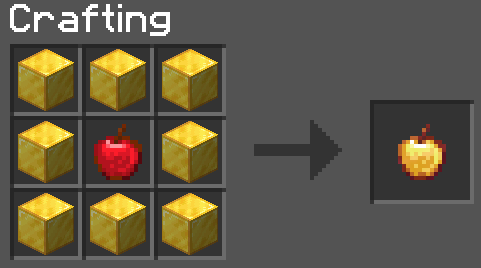
Enchanted Golden Apple
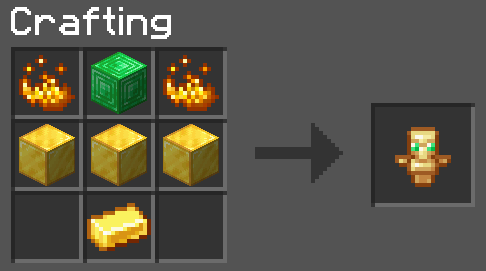
Totem of Undying
Uncategorized Recipes
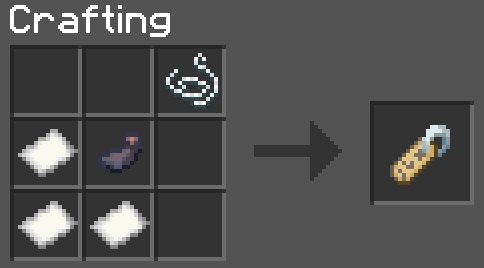
Nametag
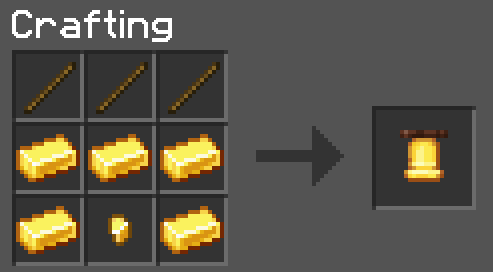
Bell
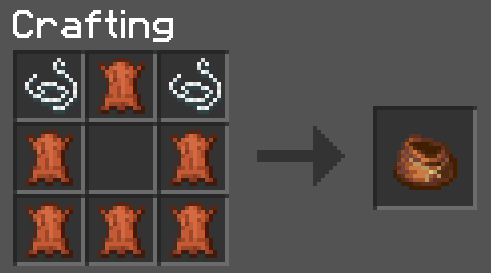
Bundles (rabbit hide is the same setup)
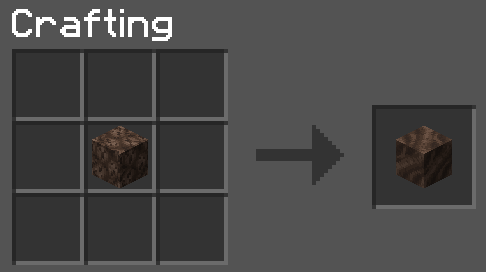
Soul sand to soil (and vice versa)
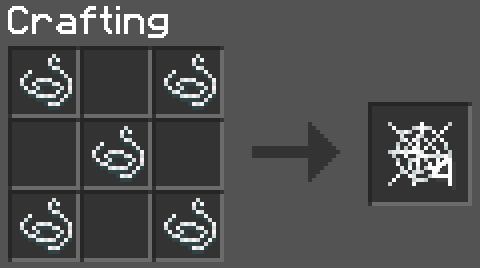
Cobwebs
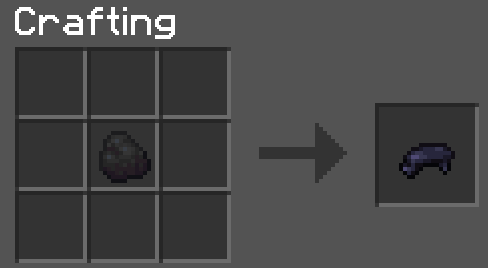
Coal/Charcoal to black dye
Armour and Horse Stuff
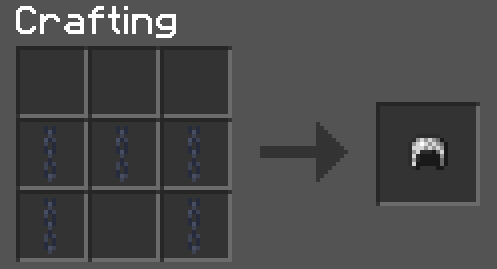
Chainmail Armour (you know the rest)
Saddle #1
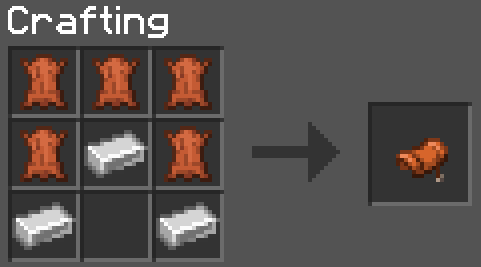
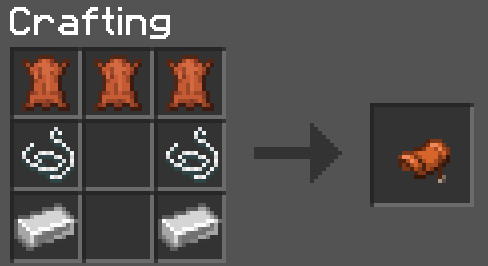
Saddle #2
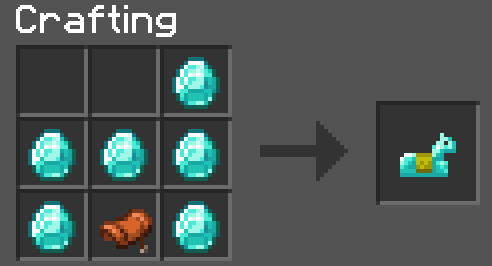
Horse Armour (gold and iron have the same setup)
Unpackables
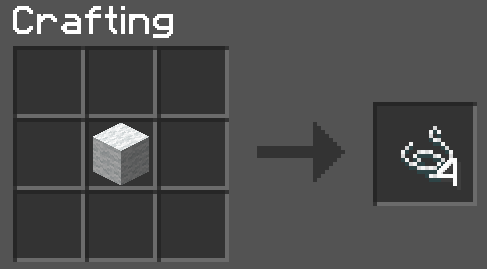
Wool to String (works with every wool variant)
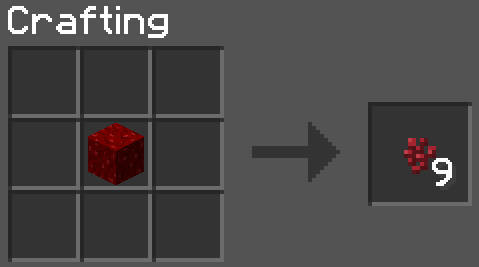
Wart block to wart
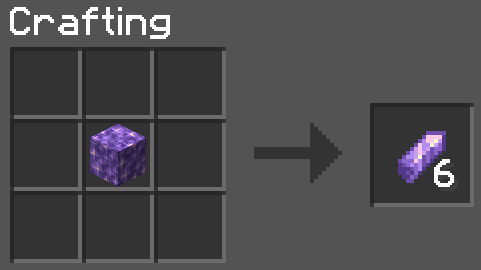
Amethyst block to shards
Quartz block to quartz
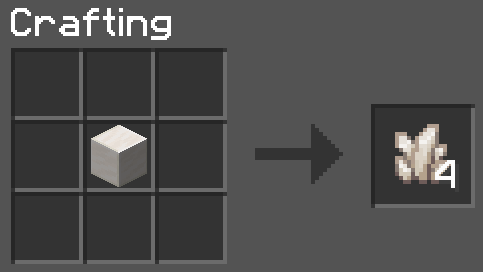
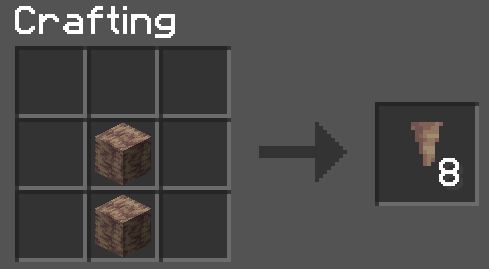
Dripstone block to pointed dripstone
Bulk Crafting
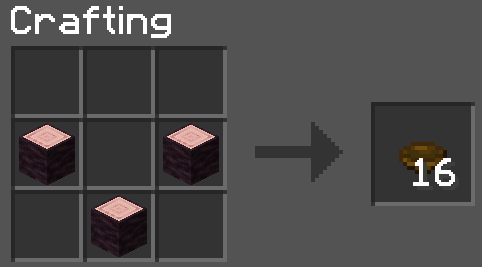
Bulk bowls
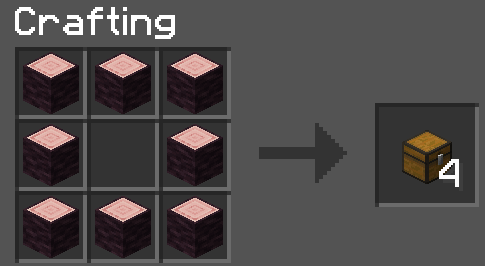
Bulk chests
Cheaper Items
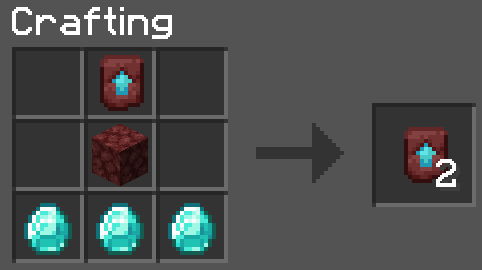
Templates
Tinted Glass
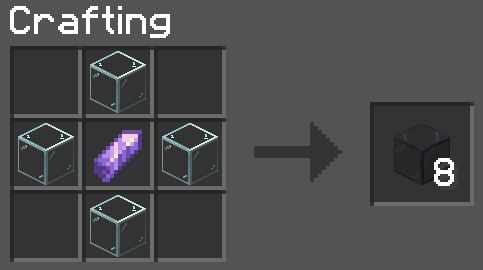
Smelting
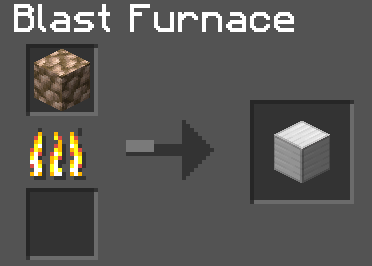
Raw blocks to block of X (smelting time takes the exact same as if you were smelting 1 raw ore and also gives exact experience if you were to smelt 9 raw ore)
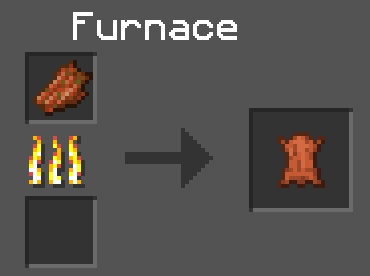
Rotten flesh to leather
Shapeless Crafting
Shulker #1
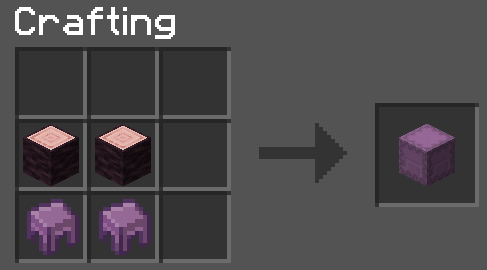
Shulker #2
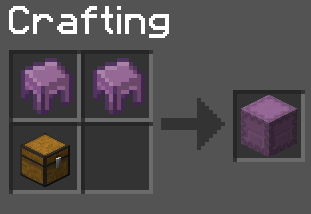
Bread
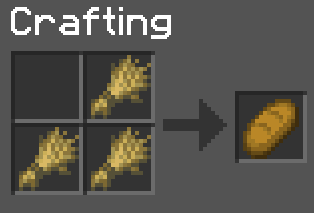
Paper
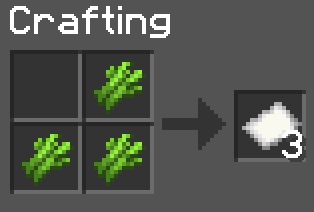
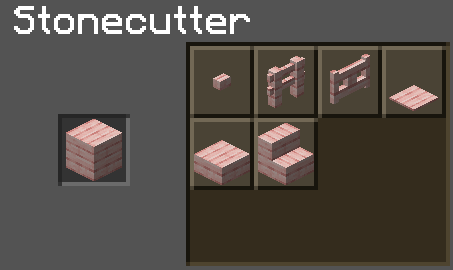
Woodcutter
Woodcutter #1
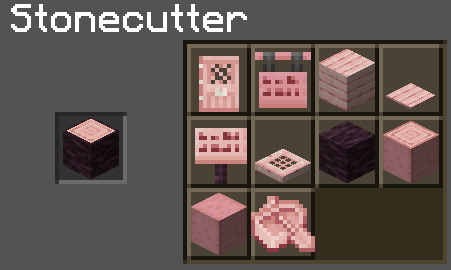
Woodcutter #2
**Note: I mainly focus on 1.20.x for now. I might revisit previous Minecraft versions in the future**
Future:
1) More bulk craftables
2) More faster crafting
3) Glowberries → Glowstone dust
4) Craftable budding amethyst
5) Craftable reinforced deepslate
6) Craftable shroomlight
7) Craftable elytra
8) Craftable eggs (dragon, sniffer, turtle)
Recipefy
Recipefy – Recipes for Uncraftable Items
Tired of searching endless chests for valuable items or raiding dungeons to find what you need? The Recipefy data pack is here to solve that! This pack introduces balanced, vanilla-friendly crafting recipes for many of the game’s most sought-after but uncraftable items.
Our goal is to reduce the reliance on pure luck (RNG) and reward your effort and resource gathering. Now, instead of leaving it to chance, you can craft powerful items like the Enchanted Golden Apple or the Trident right at your crafting table. Take control of your adventure!
(Main Features)
Features
Fully Vanilla-Friendly: No new items, blocks, or textures. Recipefy only adds recipes for existing vanilla items.
Balanced Recipes: Each recipe has been carefully designed to be fair, challenging, and rewarding, ensuring it doesn’t break the core game balance.
Easy Installation: No mods required. Simply drop the data pack into your world’s folder and you’re ready to go!
What Can You Craft?
Here are some of the items you can now craft with Recipefy:
Enchantment Golden Apple
Horse Armor (İron,Gold,Diamond)
Elytra
Name Tag
Sponge
Trident
Totem Of Undying
Dead Bush
Crying Obsidian
Cobweb
Bell
End Portal Frame
How to Install
Download the .zip file for the data pack.
Navigate to your Minecraft saves folder (usually found at %appdata%/.minecraft/saves).
Open the folder of the world you want to add the data pack to.
Place the downloaded .zip file directly into the datapacks folder.
If you are in the world, run the command /reload. If not, just start the world, and it will be loaded automatically.
Enjoy your new recipes!
Rebalanced Piglins
Introduction:
This datapack improves piglins and rebalances piglins by the following changes and it supports minecraft versions from 1.16.2 to 1.21.11.
Changes from datapack:
- Piglin Brute’s New Stats:
- HP ♥️: Then = 50 (25 hearts), Now = 20 (10 hearts)
- Armor 🛡️: Then = No Armor, Now = Random Golden and Netherite Armor
- Weapon ⚔️: Golden Axe (70% chance), Netherite Axe (30% chance)
- Attack Damage 🩸:
- Golden Axe 🪓: 13 (6.5 hearts)
- Netherite Axe 🪓: 16 (8 hearts)
- Will alert nearby piglins about “your presence”, and “the purpose of your presence”, if you break into their bastion.
NOTE: Piglin Brute will never drop any armor or weapon on death. It will only drop its death loot which is mentioned further. This is for maintaining balance in the game.
- Piglin’s New Stats:
- HP ♥️: Then = 16 (8 hearts), Now = 20 (10 hearts)
- Piglins cannot be distracted by gold ingots when in attack mode.
- Piglins, that are alerted by piglin brutes, will attack you. Doesn’t matter if you wear golden armor.
- Piglins will now hunt Hoglin more oftenly, just like a real hunter should.
- Piglins will keep outsider mobs like skeletons, blazes, zombies, and some mobs away from bastion. If those mobs enter bastion, they will be attacked by Piglins.
- Sometimes, instead of attacking you, they will only threaten you if you are not wearing gold armor. Eventually, they will start attacking.
NOTE: Piglin’s universal anger is removed. Now if a player runs away from angry piglin and come back, it will not recognize the player.
- Zombified Piglin’s New Stats:
- Zombified Piglins will now spawn barehanded by default, but oftenly, they will spawn with golden swords and crossbows as their main weapon. Zombified Piglins will now only spawn in the nether wastes biome and not crimson forests biome.
- Zombified Piglins are now hostile to piglins and players just like how real zombies should be. This is a toggleable feature. See admin commands to understand “How to disable?”. Since hoglins are already controlled by piglins, you are recommended to keep this feature for a balanced gameplay.
- Zombified Piglins can now convert piglins into zombies. The rate of conversion depends upon the following game difficulty:
- Easy : Lower rate
- Normal : Medium rate
- Hard : Higher rate
- New Death Loot Tables (Toggleable Feature):
- Piglin: 1-2 Gold Nuggets, 2-4 Arrows (for Ranged Piglins only)
- Piglin Brute: 1-2 Gold Ingots, 1 Golden Carrot
- Zombified Piglins: Piglin’s Loot + 1-2 Rotten Flesh
NOTE: Looting Enchantment will not work on Golden Carrot dropped by Piglin Brute.
- New Game Mechanics:
- Hoglins are restricted to spawn in Piglin Brute’s territory. This feature is toggleable. See admin commands.
- Zombified Piglins, and Zoglins are restricted to spawn anywhere near Piglin Brute’s Territory and in Nether Forests (Toggleable Feature).
- Zombified Piglins, and Zoglins will have more chance to spawn as a baby variant. This only feature is an exception for the below notation.
NOTE: The above features will not work if there is a player 8 blocks nearby, this avoids the mobs spawned by the player (using commands or spawn eggs) from being replaced or deleted. And mobs do not naturally spawn in 24 blocks area from player, so basically, players will face NO inconvenience. Spectators do not count as player in this case.
Admin Commands:
-
/function toggles:rebal_piglins
Here, you can toggle datapack specific features as you want. These features are:
- New Loot Table for Piglins and Brutes : When Enabled, Piglins will drop gold nugget on death and Piglin Brutes will drop gold ingot and golden carrot. Both Piglins and Zombified Piglins holding crossbows in hand will drop arrows on death.
- Chainmail Helmet for Ranged Piglins : When Enabled, Piglins carrying crossbows will have 50% chance to spawn with Chainmail Helmet.
- Crazy Hoglin Hunting : When Enabled, Piglins will hoglins more oftenly.
- Leather Boots for Piglins : When Enabled, Piglins will have 50% chance to spawn with Leather Boots.
- Modify Original Piglin Brute : When Enabled, Piglin Brute’s Health will be reduced to 20 HP and it will have random golden and netherite gear.
- Piglin Zombification : When Enabled, Piglins can be zombified.
- Restrict Hoglins : When Enabled, Hoglins will be restricted to spawn in Bastion Remnant.
- Restrict Pig Zombies : When Enabled, Zombified Piglins and Zoglins will be restricted to spawn near Piglin Brute’s territory and Forests of Nether.
- Zombified Piglins attack Piglins : When Enabled, Zombified Piglins will attack nearby Piglins in .
- Zombified Piglins attack Players : When Enabled, Zombified Piglins will attack nearby players. In order to achieve balanced gameplay, Zombified Piglins will also be nerfed.
- Zombified Piglins vary with weapons : When Enabled, Zombified Piglins will spawn with more weapons and even barehands.
- Fix Piglin’s Loot Table Bug : When Enabled, the bug, where Piglins drop infinite amount of their current loot table will be fixed. DO NOT ENABLE THIS, WITHOUT TESTING THE BUG. To test the bug, summon atleast 20 of piglins and wither skeletons and let them fight. If one of the piglins drop a lot of gold nuggets on death, then the bug exists, else not.
-
/function uninstall:rebal_piglins
Uninstall this datapack removing all the features.
Pros:
- Piglin Brutes have same power and protection as before but it makes more reasonable sense why is it so difficult to defeat.
- Piglins are more intelligent now.
- Killing Piglins and Piglin Brutes is now so worth it because of the modified death loot table.
Cons:
- It’s more harder to loot a bastion remnant.
My Socials:
- PlanetMinecraft Page
- Modrinth Page
- Discord Server
- Paypal Account
License:

This work is licensed under a Creative Commons Attribution-NonCommercial-NoDerivatives 4.0 International License.
Conditions that apply:
- You must give appropriate credit to the creator if you publicly showcase this work.
- You may not use this work for commercial/business purposes. (this does not include having the datapack installed in your server)
- You may modify this work, but may not distribute the modified work.
Installation:
Open your .minecraft directory. Put the datapack into the saves/world_name/datapacks directory.
Rebalanced Music
# Rebalanced Music
Tweaked version of Balanced Music. Older tracks now have an equal chance of playing compared to newer tracks (where applicable).
Yeets the non-menu music from the menu, and evens out the weight of newer music. The new music is great, but it plays instead of the old tracks far too often. Seriously, why does Rubedo have a weight of 6?
### Important:
If you have other resource packs that change music or sounds, put them above this. This pack uses the `replace` option to remove music, and will remove any music added if placed above that pack.
Changes
Entries in **bold** are subject to change.
Entries in _italics_ are not applicable as of the latest Minecraft: Java Edition snapshot.
Entries in ~~strikethrough~~ are not applicable as of the latest stable Minecraft: Java Edition version.
Menu Music: Menu Music + Update Music -> Menu Music (1.18+)
Basalt Deltas: So Below weight 7 -> 1 (1.16+)
Crimson Forests: Chrysopoeia weight 7 -> 1 (1.16+)
Nether Wastes: Rubedo weight 6 -> 1 (1.16+)
Soul Sand Valley: So Below weight 7 -> 1 (1.16+)
Badlands: Crescent Dunes weight 2 -> 1 (1.20+)
Bamboo Jungle: Bromeliad weight 2 -> 1 (1.20+)
Cherry Grove:
* Below and Above weight 2 -> 1 (1.21.6+)
* ~~_Bromeliad weight 3 -> 1 (1.20-1.21.5)_~~
* ~~_Echo in the Wind weight 3 -> 1 (1.20-1.21.5)_~~
* ~~_Featherfall 3 -> 1 (1.21-1.21.5)_~~
Desert:
* ~~_Crescent Dunes weight 3 -> 1 (1.20-1.21.5)_~~
* Fireflies weight 2 -> 1 (1.21.6+)
Dripstone Caves:
* Eld Unknown weight 2 -> 1 (1.21+)
* Endless weight 2 -> 1 (1.21+)
* pokopoko weight 2 -> 1 (1.21+)
* Wending weight 2 -> 1 (1.18+)
Flower Forest: Featherfall weight 2 -> 1 (1.21+)
Forest: Broken Clocks weight 2 -> 1 (1.21.6+)
Frozen Peaks: Stand Tall weight 2 -> 1 (1.18+)
Grove: Lilypad weight 2 -> 1 (1.21.6+)
Lush Caves:
* ~~_Aerie weight 1 -> 2 (1.19-1.21.5)_~~
* ~~_Firebugs weight 1 -> 2 (1.19-1.21.5)_~~
* ~~_Labyrinthine weight 1 -> 2 (1.19-1.21.5)_~~
* ~~_Left To Bloom weight 2 -> 1 (1.18-1.18.2)_~~
* ~~_Left To Bloom weight 4 -> 2 (1.19-1.21.5)_~~
* O’s Piano weight 2 -> 1 (1.21.6+)
Jungle: Bromeliad weight 3 -> 1 (1.20+)
Meadow: One More Day weight 2 -> 1 (1.18+)
Old Growth Taiga:
* Aerie weight 1 -> 3 (1.19+)
* Firebugs weight 1 -> 3 (1.19+)
* Labyrinthine weight 1 -> 3 (1.19+)
Sparse Jungle: Bromeliad weight 2 -> 1 (1.20+)
Stony Peaks:
* Eld Unknown weight 2 -> 1 (1.21+)
* Stand Tall weight 2 -> 1 (1.18+)
Versioning scheme
The version name consists of the minimum supported stable Minecraft: Java Edition version followed by the iteration of the resource pack for that version of Minecraft: Java Edition. If there is no supported stable Minecraft: Java Edition version, then the minimum supported Minecraft: Java Edition version is used instead.
For example, version 1.16.2 v1 means that it is the first iteration of the resource pack to support at least Minecraft: Java Edition version 1.16.2. Meanwhile, version 21w39a v2 means that it is the second iteration of the resource pack to support at least Minecraft: Java Edition version 21w39a.
The maximum supported Minecraft: Java Edition version is specified in the changelog of the respective version of the resource pack.
Reanimated Portals
This new nether portal block animation is more complex, more angular, and of longer period.
(It is less transparent, but an additional version can easily be added if there is interest from immersive portals users or others.)
This gif is a fairly crude idea of the animation sequence. (A completely accurate animation would have required several hundred frames,as well as emulating the interpolative algorithm)


RealPix 32x
Recommended SHADERS
sildurs-vibrant-shaders
https://www.curseforge.com/minecraft/shaders/sildurs-vibrant-shaders – one of the most popular, feature-rich shaders with settings for every PC.
derivative shader
https://texture-packs.com/shaders/derivative/
potato shader
https://www.curseforge.com/minecraft/shaders/potato-shaders
Overview
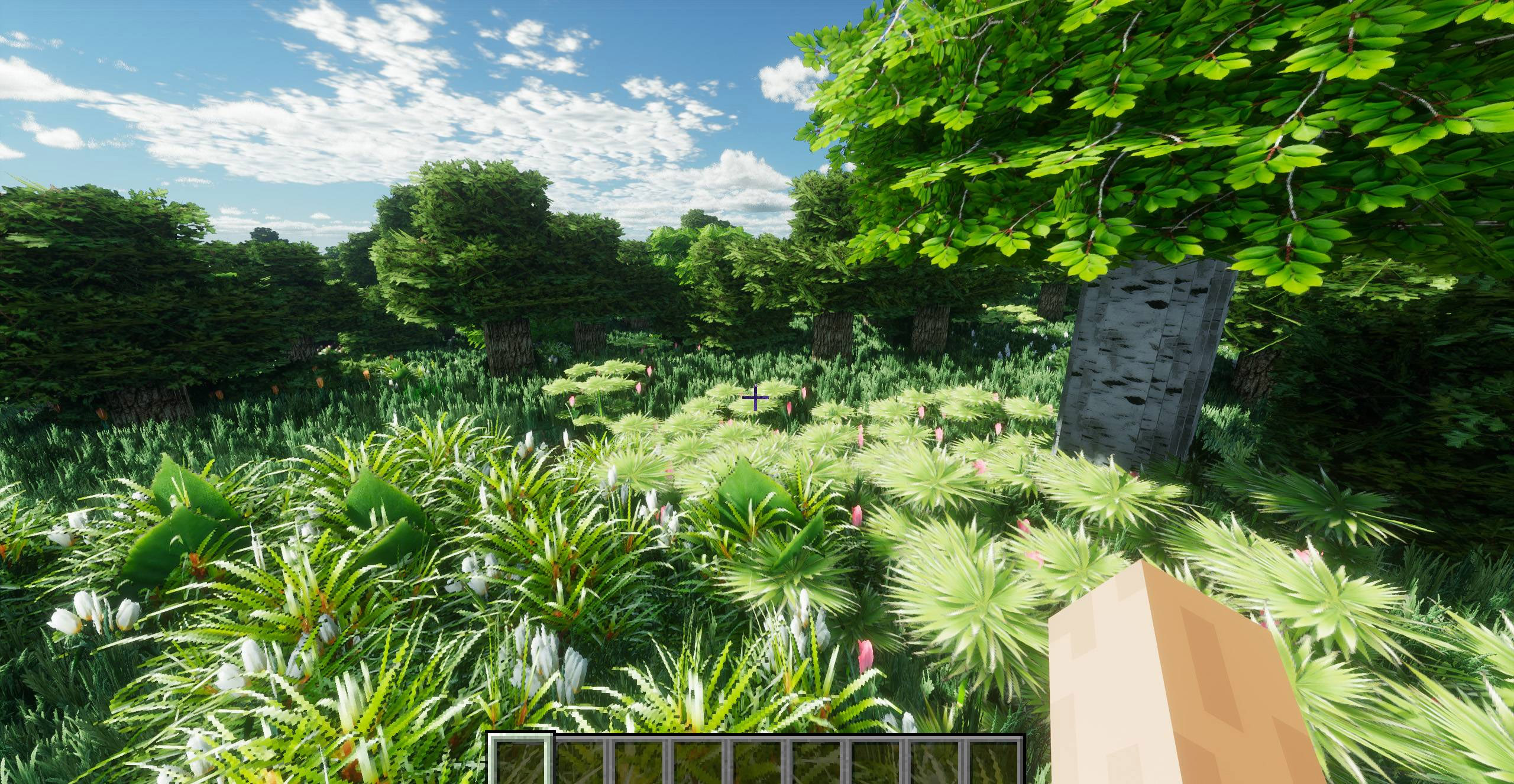
Transform Minecraft into a grounded, immersive sandbox with hand-crafted realism across mobs, foliage, and equipment, plus tasteful animations that bring the world to life.
Built with creator-grade 3D workflows and animation know‑how, this pack balances visual fidelity with playability, so survival and PvP stay smooth and responsive.
Features
New mob looks with subtle reworks to shapes, materials, and facial detail for a natural, lifelike style.
Animated and randomized mobs for extra variety in crowds, herds, and hostile encounters.
Leaves and grass retextured for natural color, density, and ground cover cohesion across biomes.
3D weapons and tools modeled for depth and silhouette clarity without overcomplicating combat readability.
Consistent item and block pass for cohesive materials and improved inventory legibility.
Optional animation-friendly setup compatible with community animation approaches when desired.


### **https://www.patreon.com/c/zerolaggaming0/membership**
Compatibility
Designed to work on vanilla, with enhancements available when using common client-side tools and animation frameworks.
Created and tested with a Blockbench-centric workflow and OptiFine-focused setup for models and entity visuals.
Installation
Download the pack and place the zip into the resourcepacks folder.
In-game, open Resource Packs and activate the pack; position above others if mixing.
Restart the world or reload resources to ensure models and animations initialize cleanly.
Recommended settings
Enable entity animations and smooth lighting for best ambience with animated mobs.
Keep foliage settings moderate-to-high to showcase grass and leaf detail while preserving performance.
If using client enhancers, prefer options that don’t override entity textures to retain pack intent.
Performance
Textures and models are tuned to minimize overdraw and maintain clarity in motion, suitable for survival and PvP.
If mixing with heavy visuals, layer this pack above purely cosmetic packs and keep animation
Ready Crops [Tweaks]: Animated Fully Grown Highlighter
Tired of harvesting too early? This visual tweak provides a clear, animated indicator when your crops are 100% ready. Maximize your farming efficiency with this essential utility!
## 🛠️ Supported Crops:
This pack currently highlights the following crops in their final stage:
– 🌾 **Wheat** (Stage 7)
– 🥕 **Carrots** (Stage 3)
– 🥔 **Potatoes** (Stage 3)
– 🍷 **Beetroots** (Stage 3)
– 🍄 **Nether Wart** (Stage 2)
– 🍓 **Sweet Berries** (Stage 3)
## 🚀 Features:
– ✨ **Visual Tweak:** Subtle but clear indicators for fully grown crops.
– 🌀 **Animated:** High-quality animations for easy spotting.
– ✅ **Wide Compatibility:** 1.11 to 1.26.x+.
– 📱 **Universal Support:** Bedrock (MCPE) & Java Edition.
## ESPAÑOL
¿Cansado de cosechar antes de tiempo? Este ajuste (tweak) visual proporciona un indicador animado y claro cuando tus cultivos están 100% listos.
### 🛠️ Cultivos Soportados:
Este pack resalta los siguientes cultivos en su etapa final:
– 🌾 **Trigo** (Etapa 7)
– 🥕 **Zanahorias** (Etapa 3)
– 🥔 **Papas** (Etapa 3)
– 🍷 **Remolachas** (Etapa 3)
– 🍄 **Verruga del Nether** (Etapa 2)
– 🍓 **Bayas Dulces** (Etapa 3)
—
## ⚖️ Credits & Context
This project is a Java Edition Port/Fork inspired by the original Bedrock Tweaks Ready Crop.
✦ Inspired by: bedrocktweaks Ready Crop.
💡 Why this exists? While Vanilla Tweaks has a similar concept for Java, this version brings the specific indicators and animations from Bedrock Tweaks that were missing in the Java ecosystem. I’ve adapted and refined these textures to work perfectly with Java’s rendering engine.