Smoother Green Widgets
Removes the ugly and noisy pixels from widget buttons and makes highlited widgets green like Bedrock or Barebones.
⚠️ This pack only affects widget buttons and slider buttons
✏️ Created with Live Texture Editor by Zee
💯 Dark Mode coming at 100 downloads
Der’s Smooth Shaded Font (Faithful 32x)


This resourcepack simply modifies [Faithful 32x](https://modrinth.com/resourcepack/faithful-32x)’s font by adding targeted colored shading to the lower parts of its characters, giving the game a more refreshing/visually appealing look! Supports **11,000+** characters, various languages, many symbols and is available for a wide range of game versions!
_**Note:** This pack has various (former) shading styles, check them out in the gallery! Only the latest release style is showcased here._

**All of Faithful 32x’s font is currently supported and shaded, consisting of:**
– **ascii.png**: Most-used characters and some other symbols
– **ascii_sga.png**: Standard Galactic Alphabet used for enchanting
– **asciillager.png**: Secret characters only illagers may understand (pre v16)
– **accented.png**: Versions of letters with accents, diacritics, ligatures and circled numbers/letters
– **nonlatin_european.png**: Accented characters, miscellaneous symbols, some non-european characters, latin script characters
**Beyond that, the latest releases also added:**
– **8,500+** shaded glyphs across 37 unicode pages
– **Extensive** language & symbol support
– **Vanilla fixes** for incorrect glyph widths like for “▚”
– Support for popular servers like **Hypixel** (symbols) and **Wynncraft** (tooltips)

**Q1**: May I use this for my modpack?
**A1**: Feel free to include it in your modpacks on Curseforge and Modrinth! If you are using it as a content creator, giving credit by linking to this project’s page in your content’s description is highly appreciated!
***
**Q2**: What are editions?
**A2**: Editions were used to group game versions, indicated by a letter at the end of the pack’s name, ex.: (C) for Copper Edition, supporting MC 1.18+, including the files shown in the table of editions (gallery). **v10+ no longer uses editions** as there is only one file for MC 1.16+ now.
***
**Q3**: What are shading styles?
**A3**: Shading styles used to provide variety in the font’s appearance. v9.2 needs the [Respackopts](https://legacy.curseforge.com/linkout?remoteUrl=https%253a%252f%252fmodrinth.com%252fmod%252frespackopts) mod to access all styles (pair with [Sinytra Connector](https://modrinth.com/mod/connector) if on forge). Standalone versions for each style, ex.: “Rose” (pink tint) are also available, not needing any mods. **v10+ no longer has multiple shading styles** nor needs any mods.
***
**Q4:** How do I tell **Der’s Shaded Font** apart from other shaded fonts?
**A4:** Last time I checked, this one was the only vanilla shaded font that supported anything other than just ascii.png characters (see features section for details). Symbols, accented characters and otherwise special characters with shading are most likely from here as well as any of the exclusive colored shading styles.
***
**Q5**: Why do a few special characters/symbols look double-struck when bold?
**A5**: Those (usually thin) characters appear as double-struck/outline due to Minecraft applying the same bolding method (duplicating and shifting by two pixels) across the board. Resourcepacks are limited in this regard as they cannot adjust said method. It is best to avoid using such characters in “**bold**” for now. Only a handful are affected.
***
[Click here](https://modrinth.com/resourcepack/shaded-font-plus) for a 16x version! / [Submit feedback](https://docs.google.com/forms/d/e/1FAIpQLSfpLF-RLC95utvtUaEm9pXmwhpzo3kRg8XpJ-BFcLcI7ZnXAQ/viewform?usp=dialog)
smooth biome moss
add biome blending to moss block, donesnt work with moss carpet unfortunatly.
/! NEEDS either continuity OR optifine to work as it use theyre CTM feature /!
smoothing also need continuity or optiphine as it was not intentional at firs, i will have to remake the texture in the plain for everyone one day but for now, everything in this pack need continuity or optifine
Smiley Totem
This Resource Pack changes the totem to an Animated Smiley. No OptiFine.

Smaller Crosshair
Did you ever think: “_Why is the Crosshair so big_” ?. If yes, this Texturepack is the right choice!
It makes the Crosshair 1 pixel smaller and is good if you want to change the size of the crosshair, without changing the GUI Scale.
(works with the Crosshair Indicator Mod)

Smaller Crit Particle
This Texturepack makes the Crit Particle smaller. It is perfect for PvP, or if you just want a better vision. If you also don’t like the size of the Crosshair, check out my other Packs!

Small Shield & Totem
# Small Shield & Totem
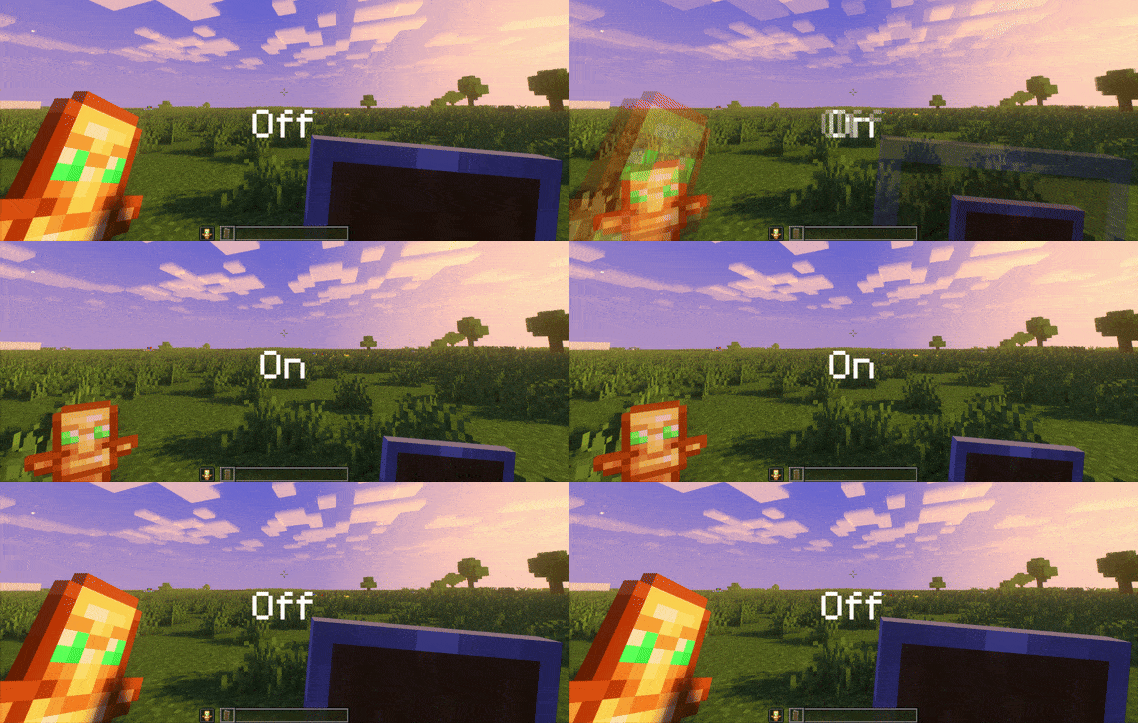
### Features
– Small shield
– Small totem
– Small totem pop
– Small totem pop particles
– No mods needed
### Compatibility
The pack works on all version from **1.9** to the **Newest**
⚠️ Versions 1.19.4 and below will tell you “the pack is for a newer version”, but it will work just fine
### Notice
Totem of undying will be extra small when placed in an item frame. This is unfortunately a side effect of the small totem pop effect
⠀
### Want a Minecraft server? Consider using Sparkedhost!
Use code ‘blob’ for 25% off
[](https://billing.sparkedhost.com/aff.php?aff=3085)
Truly Small Items
### Features
– Smallified equipment and miscellaneous items.
– Fixes multiple texture issues, such as the end crystal offset.
– Blends in well with vanilla textures.
– Fully compatible with other smallifying resource packs!
– Fully functional in any version from 1.5!
### Questions?
Be sure to make suggestions and report bugs or inconsistencies to the [Jotform](https://form.jotform.com/260524716060046)!
### What Version?
If you are using the Modrinth loader, it should automatically select the resource pack for your version!
In case you are not using the Modrinth loader, the letter determines which pack to install:
* P: 1.5 – 18w43a
* T: 18w43a – Latest
Small Crosshair
Modified crosshair for PvP gameplay across all Minecraft versions (1.8.9 – 1.21.x), but feel free to use it for casual play if you like it! 🙂
This crosshair is part of my Crosshair Collection; you can find the others listed below:
– [Point Crosshair](https://modrinth.com/resourcepack/point-crosshair-quel13s-pack)
– [Square Crosshair](https://modrinth.com/resourcepack/square-crosshair-quel13s-pack)
– [Targeter Crosshair](https://modrinth.com/resourcepack/targeter-crosshair-quel13s-pack)
– [Scope Crosshair](https://modrinth.com/resourcepack/scope-crosshair-quel13s-pack)
**Developed by quel13.**
**If you are looking for a texture pack to make the Minecraft interface invisible, you can find it here:**
[](https://modrinth.com/resourcepack/invisible-gui)
Slightly Shorter Swords
# Makes Swords Slightly Shorter
## Why would you use this?
If you ever thought that swords are a bit too long (like me), especially when looking in the inventory or hotbar. Well i fixed it!
## List of Changes in the pack
– Shorter Wooden Sword
– Shorter Stone Sword
– Shorter Iron Sword
– Shorter Gold Sword
– Shorter Diamond Sword
– Shorter Netherite Sword