Vanilla+ TPS
**Vanilla+ TPS** — это простой и удобный мод, разработанный для просмотра данных сервера в реальном времени. С его помощью игроки могут легко отслеживать производительность сервера, используя удобные команды и интерфейс.
### Основные функции:
– **Команды для просмотра данных:**
– **/vtps bossbar** — отображает информацию о TPS (количество тиков в секунду) в виде босс-бара, что делает мониторинг производительности ещё более наглядным.
– **/tps** — предоставляет краткую информацию о TPS и задержке (ping) в чате.
– **/vtps actionbar** — выводит данные о TPS и задержке в строке действий (action bar) для удобного мониторинга в реальном времени.
### Особенности:
– **Простота использования:** Мод не требует сложной настройки — достаточно установить и начать использовать команды.
– **Информативность:** Получайте важные данные о производительности сервера в удобном формате, включая наглядный босс-бар для TPS.
– **Гибкость:** Выбирайте, как именно отображать информацию — в чате, босс-баре или строке действий.
– **Лёгкий в установке:** Мод не требует дополнительных зависимостей и легко интегрируется в ваш игровой процесс.
– **Быстрое обновление:** Мы активно поддерживаем мод и быстро выпускаем обновления для новых версий Minecraft, чтобы вы всегда могли использовать последние функции.
### Статус мода:
– **Текущий статус:** Мод находится в **бета-версии**, что означает, что он стабилен и готов к использованию, но пока что не поддерживает настройку прав доступа для команд.
– **Будущие обновления:** В ближайших обновлениях планируется добавить систему прав доступа, что позволит ограничить использование команд **/vtps bossbar**, **/tps** и **/vtps actionbar** только для администраторов или других указанных групп игроков. После этого мод будет считаться **полноценным релизом**.
**Vanilla+ TPS** идеально подходит как для администраторов серверов, так и для обычных игроков, которые хотят лучше понять, как работает их сервер. Установите мод и наслаждайтесь прозрачностью и контролем над игровой средой!
**Vanilla+ TPS** is a simple and convenient mod designed to view server data in real time. With its help, players can easily monitor server performance using convenient commands and an interface.
### Key features:
– **Commands for viewing data:**
– **/vtps bossbar** – displays TPS (ticks per second) information in the form of a boss bar, which makes performance monitoring even more visual.
– **/tps** – provides brief information about TPS and latency (ping) in the chat.
– **/vtps actionbar** – displays TPS and latency data in the action bar for convenient monitoring in real time.
### Features:
– **Ease of use:** The mod does not require complex configuration – just install and start using commands.
– **Informative:** Get important server performance data in a convenient format, including a visual boss bar for TPS.
– **Flexibility:** Choose how you want to display information – in the chat, boss bar, or action bar.
– **Easy to install:** the mod does not require additional dependencies and easily integrates into your gameplay.
– **Fast update:** we actively support the mod and quickly release updates for new versions of Minecraft, so you always have the latest features.
### Mod status:
– **Current status:** the mod is in **beta**, which means that it is stable and ready for use, but does not yet support setting access rights for commands.
– **Future updates:** in future updates, we plan to add a permissions system that will limit the use of the **/vtps bossbar**, **/tps** and **/vtps actionbar** commands to admins or other specified groups of players. After that, the mod will be considered a **full release**.
**Vanilla+ TPS** is great for both server admins and casual players who want to better understand how their server works. Install the mod and enjoy transparency and control over your gaming environment!
VoxelMap-Updated
# VoxelMap
## Description
The VoxelMap is a MiniMap and WorldMap that allows you to view the entire explored world and your current environment.
The VoxelMap offers useful features like creating waypoints per dimension and teleporting to them, a mob radar, a clear Nether map and a biome overlay.
## Legal
The upload of this mod has been approved by Modrinth. If mamiyaotaru does not want the mod to be available on Modrinth, he can let us know on Discord or contact Modrinth Support.
All rights remain with mamiyaotaru, we only update the VoxelMap so that this great mod does not die out. We only offer updates and support for the versions we create.
## Donation
If you would like to donate, we ask that all donations go to mamiyaotaru. You can find his Patreon here.
VCT – Voiid Countdown Timer

# Voiid Countdown Timer
As simple as the name implies. A customizable timer datapack & plugin.
[](https://ko-fi.com/maxxvoiid/donate)
[](https://modrinth.com/datapack/voiid-countdown-timer)
[](https://curseforge.com/minecraft/bukkit-plugins/voiid-countdown-timer-for-bukkit)
[](https://vctdocs.mintlify.app/)
[](https://github.com/Voiid-Studios/voiidstudios/blob/main/LICENSE.md)
[](https://github.com/Voiid-Studios/voiidcountdown)
[](https://crowdin.com/project/voiidcountdowntimer)


## ❓ What is VCT?
Voiid Countdown Timer (VCT) is a fully customizable timer for Minecraft.
It works in two different versions:
– 📦 **Datapack** → The Lite version of VCT, ideal for single-player worlds or realms.
– 🔌 **Plugin** → The full version of VCT, perfect for multiplayer servers with Spigot/Paper.
With both versions, you can:
– 🎨 Create visual timers with a progress bar.
– 🖌️ Customize color styles.
– 🛠️ Run custom events when the timer starts or ends.
## ✨ Features
Voiid Countdown Timer includes:
– 🎨 Custom Colors Styles
– ⚙️ Quick and easy setup
– ⏳ Progressive Time Bar
– 🎈 Custom Events
– 👥 SinglePlayer and Multiplayer Compatible
– 💻 Open Source and constantly updated
## 📋 Requirements
### 📦 Datapack
– Version: `1.15+`
### 🔌 Plugin
– Version: `1.13+`
– Server: Spigot, Paper, or Purpur (not CraftBukkit)
## 🚀 Installation
### 📦 Datapack
1. Download the [latest version here](https://modrinth.com/datapack/voiid-countdown-timer/versions?c=release&l=datapack)
2. Place the downloaded `.zip` file in the `datapacks` folder of your world.
3. Enter the world and you will receive a message confirming the installation! 🎉
### 🔌 Plugin
1. Download the [latest version here](https://modrinth.com/datapack/voiid-countdown-timer/versions?c=release&l=spigot)
2. Place the downloaded `.jar` file in the `plugins` folder of your server.
3. Restart the server and the plugin will be ready. ⚡
## 📖 How to use it
### 📦 Datapack
– Execute the command `/function vct:book` to receive the configuration book.
– From the book you will be able to:
– ⏰ Set time
– 🎛️ Timer controls
– 🌈 Customize style of colors
– 🗣️ Change language
– ❌ Uninstall
### 🔌 Plugin
– Configuration using commands and configuration files (`config.yml`)
– To see all available commands, use `/vct help`.
– In `config.yml`, you can customize various timer options; all of them are detailed in the [official documentation.](https://vctdocs.mintlify.app/)
## [📚 Plugin Documentation](https://vctdocs.mintlify.app/)
## 🔥 bStats
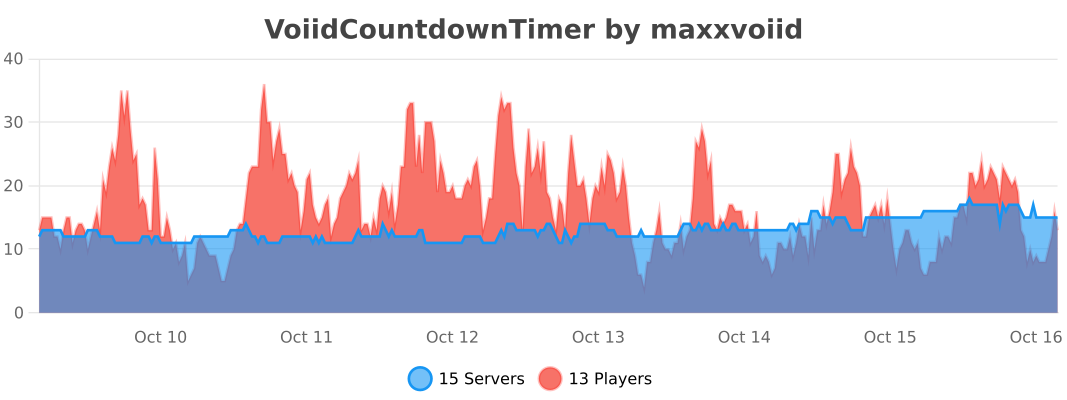


VoiceChatX-Red
# VoiceChatX-Red
### 📖 About
– VoiceChatX-Red brings life to your Simple Voice Chat icons by adding smooth colors.
– It enhances visuals without changing the core look, making the icons feel more alife and engaging.
### ✨ Features
– Adds smooth color to the Simple Voice Chat mod
– Fully matches the theme aesthetic
– Keeps original item designs clean and simple
– Enhances visual feedback and immersion
– Lightweight and performance-friendly
### 🎯 Why Use This?
– Makes the icons have more color
– Improves overall visual experience
– Keeps a clean and consistent style
– Great for both survival and showcase worlds
– Adds detail without adding clutter
### ⚙️ Compatibility
– Designed for the Simple Voice Chat mod
– Works well alongside most other packs
– May conflict with packs that modify the same icons
– Safe to add or remove anytime
### 🤖 Info
🔗 Check out [All my resourcepacks](https://modrinth.com/user/Apenkont3000)
🐞 Report bugs in my [discord server](https://discord.gg/nf29GuwzRd)
VoiceChatX-Green
# VoiceChatX-Green
### 📖 About
– VoiceChatX-Green brings life to your Simple Voice Chat icons by adding smooth colors.
– It enhances visuals without changing the core look, making the icons feel more alife and engaging.
### ✨ Features
– Adds smooth color to the Simple Voice Chat mod
– Fully matches the theme aesthetic
– Keeps original item designs clean and simple
– Enhances visual feedback and immersion
– Lightweight and performance-friendly
### 🎯 Why Use This?
– Makes the icons have more color
– Improves overall visual experience
– Keeps a clean and consistent style
– Great for both survival and showcase worlds
– Adds detail without adding clutter
### ⚙️ Compatibility
– Designed for the Simple Voice Chat mod
– Works well alongside most other packs
– May conflict with packs that modify the same icons
– Safe to add or remove anytime
### 🤖 Info
🔗 Check out [All my resourcepacks](https://modrinth.com/user/Apenkont3000)
🐞 Report bugs in my [discord server](https://discord.gg/nf29GuwzRd)
VoiceChatX-Blue
# VoiceChatX-Blue
### 📖 About
– VoiceChatX-Blue brings life to your Simple Voice Chat icons by adding smooth colors.
– It enhances visuals without changing the core look, making the icons feel more alife and engaging.
### ✨ Features
– Adds smooth color to the Simple Voice Chat mod
– Fully matches the theme aesthetic
– Keeps original item designs clean and simple
– Enhances visual feedback and immersion
– Lightweight and performance-friendly
### 🎯 Why Use This?
– Makes the icons have more color
– Improves overall visual experience
– Keeps a clean and consistent style
– Great for both survival and showcase worlds
– Adds detail without adding clutter
### ⚙️ Compatibility
– Designed for the Simple Voice Chat mod
– Works well alongside most other packs
– May conflict with packs that modify the same icons
– Safe to add or remove anytime
### 🤖 Info
🔗 Check out [All my resourcepacks](https://modrinth.com/user/Apenkont3000)
🐞 Report bugs in my [discord server](https://discord.gg/nf29GuwzRd)
Vixmoyy’s No Particles
A simple resource pack that removes all particles from the game using core shaders, _even modded ones!_
—
### • How?
> Instead of overwriting particle textures, this pack simply tells the game not to render them at all. This results in better performance and a true no particle experience.
### • Sodium?
> You can use this resource pack with Sodium if you have the [Sodium Core Shader Support](https://modrinth.com/project/G8yJPRdl) mod installed; it may display a warning stating that it may be incompatible, although it should work just fine.
### • >1.17?
> No, it is not possible to port this to pre 1.17 versions because core shaders could not be modified through resource packs before that.
—
particle.fsh & particle.vsh
### particle.fsh
“`
#version 330
void main()
{
discard;
}
“`
### particle.vsh
“`
#version 330
void main()
{
gl_Position = vec4(0.0, 0.0, 0.0, 0.0);
}
“`
##### You may not redistribute this resource pack anywhere without proper permission, the only official download page for this resource pack is on modrinth.
VulkanMod Just for Chinese
# Hello! This translation pack for VulkanMod just for Chinese!
It is for people just need Chinese translation,it can’t support you any other problem.
It are not VulkanMod,if you need,Please go to [there](https://modrinth.com/mod/vulkanmod) for VulkanMod!
# 欢迎使用VulkanMod专属中文翻译包!✨
## 有何不同🤔
只支持中文翻译,简便实用!⚡
## 安装🔨
这是一个 资源包 文件,请放置在resourcepacks文件夹中。这通常会在游戏目录下方(开启版本隔离),也可以在游戏中的“资源包…”界面选择右下角“打开包文件夹”打开。
## 可以将其内置于整合包中吗🤨
当然,您可以将其内置于资源包中。
顺带一提,您也可以修改包文件,只是请不要将作者私自标注为您!
## 翻译不准/遇到问题🛠️
请反馈至评论区或QQ 3564937130。
Vivian Totem
# ABOUT
**This texture pack replaces the standard Totem of Immortality with the character Vivian from Zenless Zone Zero in high quality and replaces the sound of using the totem with the phrase “Careful!” straight from the game when the character charges an attack. Enjoy using and playing!**
# IMPORTANT
– ### **Is there a port on the Bedrock Edition?**
This texture pack is designed exclusively for Java Edition. We do not plan to release a version for Bedrock Edition.
– ### **Want to use it on Bedrock Edition?**
You can port the texture pack yourself, as long as you comply with all license terms.
– ### **Pack version warning ?**
There is a high chance that resource packs will work with different versions of Minecraft without the need to change the version of the pack, unless there is a major update that breaks resource packs.
Visual honey levels
**Visual Honey Levels** is a simple texture pack that adds clear visual indicators of honey levels in hives.
Now you can instantly tell when a hive is ready for harvesting without having to check it manually. This makes honey farms more convenient and beginner-friendly. :3