MineGIT
### Cloud sync for Minecraft worlds!
Sync and back up your worlds between multiple devices! Fully integrated into the Minecraft client for a seamless experience when loading, saving, and downloading worlds from the cloud.
## How does it work?
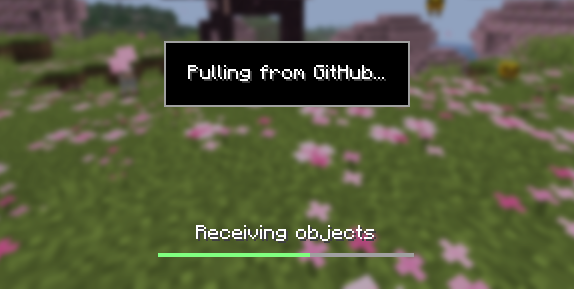
Worlds that you select are uploaded to your GitHub account as repositories. Every time you quit to the title screen, a commit of the current state of your world is created and pushed to the repository on GitHub. Whenever the world is loaded, the mod will check if any new versions of the world are available in the cloud, and if so, they will be downloaded to your device.
Since this mod uses Git internally, it also means that only the files in your world save folder that you modify will be uploaded and downloaded each time, saving storage space and internet bandwidth.
## How do I set it up?
There are several steps to setting up this mod, which include creating a personal access token for GitHub, as well as choosing the worlds you would like to enable MineGIT for.
### Video guide:
### Creating a GitHub personal access token
In order to do the first-time setup, you will need to generate a GitHub personal access token through the following steps:
1. Create an account on GitHub if you do not have one already (https://github.com)
2. Navigate to the page to create a personal access token
3. Click `Generate new token`
4. Enter any name (such as MineGIT) under `Token name`
5. Scroll to `Expiration` and set it to `No expiration` (so that you do not have to repeat this process when the token expires)
6. Under `Repository access` choose `All repositories`
7. Under `Permissions`, click `Add permissions` and select `Administration` and `Contents`
8. Set `Access` on the `Administration` and `Contents` lines to `Read and write`
9. Press `Generate token` and copy the generated token to be pasted into Minecraft later (the generated token should start with `github_pat_` and be followed by a long string of letters and numbers)
### Setting up in-game
Once the mod is installed and you are in-game, do the following steps to link your GitHub account with the mod:
1. Click on the cloud button on the bottom left corner of the world creation or world selection screen (If the button does not appear, you have already previously linked your account; see the section below entitled ‘Reconfiguring account linking’)
2. Enter your GitHub username and personal access token (PAT) that you created in the previous step on the new page that appears
3. Press the button labeled `Test credentials` to make sure you’ve entered the information properly
4. You may now exit the screen and proceed to either enable sync for a world or clone an existing one
#### Reconfiguring account linking
If you have already previously set up account linking and would like to change settings afterwards, you have a couple of options to get back to the configuration screen:
– **Configure through ModMenu:** If you have ModMenu installed, simply find the mod in the mods list and open the configuration from there
– **From the world clone screen:** There is a button in the top right corner of the world cloning screen that will open the configuration screen
– **From the world selection screen:** By holding alt and clicking on the world sync button on the bottom left of the world selection screen, you will be brought back into the configuration screen
### Enabling sync for a world
World syncing needs to be enabled individually for each world you would like to sync to your GitHub account. To enable sync for a world, do the following:
1. Select a world on the world selection screen
2. Press the cloud button in the bottom left of the screen labeled `Enable world sync`
3. Confirm your decision on the next screen
This process will create a new repository named `minegit_[world folder name]` on your GitHub account, initialize a Git repository in your world save folder, and push its current state to GitHub. From this point forward, loading the world will pull the world’s latest changes from GitHub, and exiting the world will push changes to GitHub.
You can now download this world on another device to effectively sync changes between them through the next step: cloning.
### Downloading a world on a different device (Cloning)
Cloning a world will download the exact state of the world as it was last saved to GitHub. Use the following steps to clone a world:
1. Navigate to github.com in a web browser
2. Click on your profile picture in the top right corner and then `Repositories`
3. Find the repository corresponding to the world you would like to clone and copy its name
4. Back in Minecraft, click on the button with an arrow pointing downwards labelled in the bottom left corner of either the world selection screen or world creation screen
5. Paste the name of the repository you copied earlier and press `Clone`
6. You are now able to load the world like normal and have changes be synced across your devices!
### Tips & Tricks
– If you want to exit a world without pushing it to GitHub (for example, if you wanted to restart Minecraft and load the same world without having to wait for changes to be pushed), you can hold `Alt` while clicking `Save and Quit to Title`. This will skip the ‘pushing to GitHub’ step.
– Git keeps a list of all of the worlds changes every time you exit the world. This is useful, since if you have a little knowledge of how to use the Git command line interface you can rollback your world to a previous version!
– If you want to save some storage space taken up by the size of the Git repository on your computer, or make the world quicker to clone on other devices, use the `Prune World Commits` button in the edit world menu. This will delete all of the old versions of your world, leaving only the most recent one.
## Report an issue
If you run into bugs, crashes, or simply have a suggestion on how to improve the mod, please feel free to open an issue on the mod’s issue tracker!
Please include the current Minecraft version, Fabric version, mod version, and any relevant game logs when submitting an issue.
Ultimately Optimized – Vanilla but Better!
### Updates are paused due to internet blockage of Iran
## ⚡ Read Before Downloading: ##
### Most versions of this modpack comes with 2 versions for releases: Classic and Fairplay ###
### Classic:
Offers the complete and modpack’s default experience but includes some mods that some people might consider cheating or make you banned/kicked from public servers. – **Usually includes these key mods**:
> – Better Third Person
> – GammaUtils
> – Axiom
> – Freecam
> – Bridging Mod
> – Accurate Block Placement Reborn
> – Xaero’s Minimap
> – Xaero’s World Map
> – Bactromod _(Only on older versions of the modpack – Replaces some mods above.)_
>
> And many more… – The differences between Classic and Fairplay versions vary for each version of this modpack.
**Classic versions don’t have a suffix at the end of their version names.** – Example of a classic version to download: _1.21.11+0.2.3_
### Fairplay:
Offers a safe option to play on public servers. Still having most of QoL features and all of the optimization mods.
**Fairplay version names end with “-fair”.** – Example of a Fairplay version to download: _1.21.11+0.2.3-fair_
—
### Please report any bugs you might find or any suggestions you might have to our Discord server. ###
#
## ❗ Disclaimar: ##
> This modpack **is intended not to modify the server-side part of the game** (like no new blocks etc). But **some optimization patches might have parity differences with Vanilla in singleplayer worlds**.
>
> Examples:
>
> **Noisium mod** generates features a little bit different compared to Vanilla. It’s noticeable when comparing the tree locations.
>
> **Ksyxis mod** removes spawn chunks to speed up game loading and improve perfomance. – Won’t exist in 1.21.9+ because Minecraft did this!
>
> **Server Core mod** on some versions of this modpack, might modify entity spawning within chunk borders and few other tiny, non-noticable changes.
>
> (1.16.1 version is perfectly on par with Vanilla as it’s a speedrun-special version.)
>
> ### You can remove the mods above to achieve perfect parity with Vanilla. ###
# ❗ About
> ### ❓ Why Ultimately Optimized? ###
> ###
> The main reason to choose this modpack is the **QoL (Quality of Life) mods/resourcepacks**. Remember this isn’t a vanilla+ modpack, because **it doesn’t change any of Vanilla Minecraft’s mechanics**. So you can enjoy an optimized version of Minecraft with all your wished features in a server with your friends or singleplayer world. Also, public servers that have too many players in them will not lag your PC.
> ###
> This modpack **is available for 3 recent April Fools snapshots and some older vanilla Minecraft versions** , too. (Check Version Support part for more info.) These versions tend to get less updates from me.
> 💯 Note that although this modpack includes many QoL features, **1.16.1 version of this modpack only includes speedrun-only mods and thus, it’s safe for submission to speedrun.com**.
> 🧑💻 This modpack **is just in Modrinth and won’t be ported to Curseforge**.
# 📃 Features #
> ### Check out the Gallery tab to see features. ###
>
> Note: The Gallery tab is showing features “mostly referring to 1.21.4 and 1.21.5” versions of this modpack. Some of those features might not be available in other versions.
# 💡 Check Out My Other Project(s) #
> **Create Ultimate Pack – The Industrial Age** : The **ultimate experiance of Create mod and its addons**.
>
>
> **Check It Out Right Now**
>
>
> **Low on Water! The Ultimate Realism** : A **realistic** modpack which **relies on physics and realism**. Probably not more dragons, because it isn’t RLCraft! **Currently in Alpha stage.**
>
>
> **Check It Out Right Now**
>
# ➕ Version Support
> 🧑💻 The development of this modpack **is more focused on the latest version** but sometimes older versions also get updates.
Note that this list can be subject to change.
>✅: Is currently supported. (Supported means that this modpack has a version for it)
>
>❌: Isn’t currently supported but it will be later. (The support for these versions might not be released until all other versions reach a stable Release.)
>
>➖: Isn’t supported and I don’t have any plans for supporting it in the future.
> Also, every version not listed here won’t be supported. (Probably!)
###
**Normal Versions**
– 26.1 (Upcoming update)
– 1.21.11 ✅️
– 1.21.10 ✅️
– 1.21.9 ✅️
– 1.21.8 ✅️
– 1.21.7 ✅️
– 1.21.6 ✅️
– 1.21.5 ✅️
– 1.21.4 ✅
– 1.21.3 ✅
– 1.21.2 ➖
– 1.21.1 ✅
– 1.21 ✅
– 1.20.6 ✅
– 1.20.5 ➖
– 1.20.4 ❌
– 1.20.3 ➖
– 1.20.2 ❌
– 1.20.1 ❌
– 1.20 ➖
– 1.19.4 ✅
– 1.19.3 ➖
– 1.19.2 ❌
– 1.19.1 ➖
– 1.19 ➖
– 1.18.2 ✅
– 1.18.1 ➖
– 1.18 ➖
– 1.17.1 ➖
– 1.17 ➖
– 1.16.5 ✅
– 1.16.4 ➖
– 1.16.3 ➖
– 1.16.2 ➖
– 1.16.1 ✅ (Available as a special speedrunning-compatible version.)
– 1.16 ➖
###
**April Fools Snapshots**
– 25w14craftmine ✅️
– 24w14potato ✅
– 23w13a_or_b ✅
– 22w13oneblockatatime ❌️
– 20w14infinite ❌️
# 🎫 Licencing #
> This modpack is licensed under **Creative Commons Attribution Non Commercial No Derivatives 4.0 International**. A summary of it means that you, as a user of this project, can **redistributable my project as long as it isn’t modified, it isn’t for commercial use, and you credit me and my project**.
#
### … Small Notes & Credits ###
– The modpack icon is generated by AI (Bing Image Creator) — as I suck with image editing 🫣.
– None of the mods/resourcepacks/shaderpacks in my modpack are mine and must be credited to their respective owners. That means I haven’t made any mods/resourcepacks/shaderpacks for this modpack. I’ve made the pre-loading screen of 1.21.5+ versions myself though.
Minecraft Movie Iron Golem
This is a simple resourcepack that changes the look of the Iron Golem with the Iron Golem from the Minecraft Movie Event from Bedrock(Includes cracked golem visuals).
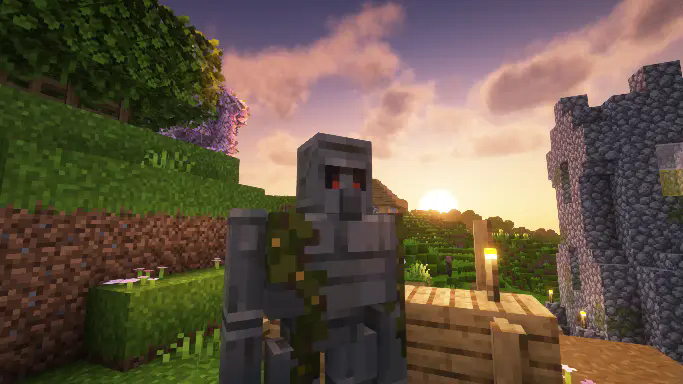
This resourcepack doesn’t change anything else in the game, and it does not change sounds for the Iron golem, just visual changes.
if you use Fresh Animations, i have also made compatible version of this same resourcepack here.
Mindful SMP Resources
# Mindful SMP Resource Pack
This resource pack is to be used with Mindful Optimized
MI-PBR
A minimal PBR resource pack for the Modern Industrialization mod. Requires a shader supporting “Lab” or “Old/seus” PBR.
This project is still an early work-in-progress so not all blocks are complete.
Mellstroy (Я уже красный) Totem of Undying
**EN**: This resource pack replaces the original **Totem of Undying** with the Meme from Mellstroy **I’m already red, it won’t work out culturally** with sound. This meme has become very popular on TikTok over the past couple of years.
**RU**: Этот ресурспак заменяет оригинальный **Тотем бессмертия** на Мем от Меллстроя **Я уже красный, культурно не получится** со звуком, данный мем за последние пару лет стал очень популярным в Тик Ток
– Омайгадность Тотем
– Тотем Меллстрой
– ПОЛНАЯ КОЛЛЕКЦИЯ РЕСУРСПАКОВ – МЕМЫ + СТРИМЕРЫ

Medium Biomes
# Medium biomes
Medium Biomes is a Minecraft datapack that adjusts world generation by introducing a biome scale between default and large biomes.
This creates a more balanced terrain layout, where biomes are neither too small and fragmented nor excessively large and repetitive.
The result is a smoother exploration experience with improved biome transitions and more coherent world generation.
## Features
– Adds a biome scale between default and large biome generation
– Creates more cohesive and naturally distributed biomes
– Improves exploration by reducing excessive biome fragmentation
– Only affects newly generated chunks
## Installation
– Download the datapack
– Move the datapack inside “.minecraft/saves//datapacks“ (How to find .minecraft?)
– Reload the world or run “/reload“
## Support the Project
If you enjoy this datapack and find it useful, please consider giving the repository a star and following me on GitHub.
This helps the project gain visibility and motivates further development and maintenance.
## Contributing
Contributions are welcome! Please read CONTRIBUTING.md for commit conventions and guidelines.
MCSM enchantment glint
**Enchantment glint in Minecraft story mode looks different than the one in minecraft**, so i decided to **make a texture pack** that **looks similar** to the one seen in Minecraft story mode, it **isnt the same** but its good enough. this texture pack **will be updated in the future** because it **isnt perfect**
Minecraft Earth Mud
**This pack still works** _at least_ up to Minecraft 1.21.8 (likely higher).
You can ignore the warning that the pack was made for an older version. I will update the metadata soon to reflect that it still works.
—
Who wants grey Mud in Minecraft when you can have the brown Mud from Minecraft Earth?
RIP Minecraft Earth 🙁
This pack implements the Mud textures from Minecraft Earth, including having different textures for the top/bottom versus the sides. The textures are also animated just as they were in Minecraft Earth. The mud inside of Muddy Mangrove Roots is also affected.
No need to unzip the file or do anything really, just drop it right in the `resourcepacks` folder, and you’re good to go.
Have fun,
-kk iris
Also available for Bedrock Edition!
The provided textures are edited versions of textures from Minecraft & Minecraft Earth. The rights to the original textures belong to the games’ developers.
Max Totem of Undying
– ENG: Max is a Russian cross-platform instant messaging service based on the digital system of the same name. It was founded in 2025 by the VK technology company. Resourcepack replaces the immortality totem with the logo
– RU: Max — российский кроссплатформенный сервис мгновенного обмена сообщениями на базе одноимённой цифровой системы. Основан в 2025 году технологической компанией VK. Ресурспак заменяет тотем бессмертия на логотип
Check collection with all memes + streamers Totems
– Тотем Я уже Красный-totem-of-undying)
– Тотем Меллстрой
– Colored Bricks
– MACAN Totem of Undying